
RT-SD 3 6 Li - Screw machine TAURUS - Free user manual and instructions
Find the device manual for free RT-SD 3 6 Li TAURUS in PDF.


| Product Type | Cordless Screwdriver |
| Brand | Taurus |
| Model | RT-SD 3 6 Li |
| Motor Power Supply | 3.6 V DC |
| Idling Speed | 200 min⁻¹ |
| Direction of Rotation | Clockwise / Counter-clockwise |
| Battery Type | Li-Ion |
| Battery Charger Supply Voltage | 240 V ~ 50 Hz |
| Charge Voltage | 6 V DC |
| Charge Current | 300 mA |
| Charging Time (max) | 5 hours |
| Weight | 0.4 kg |
| Sound Pressure Level (LₚA) | 62 dB(A) |
| Sound Power Level (LWA) | 73 dB(A) |
| Vibration Emission Value (screwing) | ≤ 2.5 m/s² |
| Uncertainty (K) | 1.5 m/s² |
| Bit Chuck Type | Quick-change hex |
| LED Lamp | Yes, switchable |
| Magnetic Screw Holder | Yes |
| Battery Capacity Indicator | 3-color LED |
| Included Accessories | 4 bits, bag, charger, charging cable |
| Protection Class | III (low voltage) |
Frequently Asked Questions - RT-SD 3 6 Li TAURUS
User questions about RT-SD 3 6 Li TAURUS
0 question about this device. Answer the ones you know or ask your own.
Ask a new question about this device
Download the instructions for your Screw machine in PDF format for free! Find your manual RT-SD 3 6 Li - TAURUS and take your electronic device back in hand. On this page are published all the documents necessary for the use of your device. RT-SD 3 6 Li by TAURUS.
USER MANUAL RT-SD 3 6 Li TAURUS
Operating Instructions Cordless Screwdriver RT-SD 3.6 Li

natural_image
Black and white photo of a Taurus electric drill with visible branding (no text or symbols on the device itself)After Sales Support
TEL: 1300 130 579
WEB: www.rossmac.com

N16188
Cordless Screwdriver
What your 1 year warranty means
Great care has gone into the manufacture of this product and it should therefore provide you with years of good service when used properly. In the event of product failure within its intended use over the course of the first 1 year after the date of purchase, we will remedy the problem as quickly as possible once it has been brought to our attention. In the unlikely event of such an occurrence, or if you require any information about the product please contact us via our after sales support services, details of which can be found in this manual and on the product itself.
1

2
3

After Sales Support
TEL: 1300 130 579
WEB: www.rossmac.com


"Caution - Read the operating instructions to reduce the risk of inquiry"

Wear ear-muffs.
The impact of noise can cause damage to hearing.

Wear safety goggles.
Sparks generated during working or splinters, chips and dust emitted by the device can cause loss of sight.
⚠️ Important!
When using equipment, a few safety precautions must be observed to avoid injuries and damage. Please read the complete operating manual with due care. Keep this manual in a safe place, so that the information is available at all times. If you give the equipment to any other person, give them these operating instructions as well. We accept no liability for damage or accidents which arise due to non-observance of these instructions and the safety information.
1. Safety information
General safety instructions for electric tools
⚠ CAUTION: Read all safety regulations and instructions. Any failures made in following the safety regulations and instructions may result in an electric shock, fire and/or serious injury.
Keep all safety regulations and instructions in a safe place for future use.
The term “electric tool” used in the safety instructions refers to electric tools operated from the mains power supply (with a power cable) and to battery operated electric tools (without a power cable).
1.1. Workplace safety
- Keep your work area clean and well illuminated. Untidy or unlit work areas can result in accidents.
- Do not operate the electric tool in an environment where there is a risk of explosions and where there are inflammable liquids, gases or dust. Electric tools produce sparks which could set the dust or vapours alight.
- Keep the electric tool out of the reach of children and other persons. If there is a distraction, you may lose control of the appliance.
1.2. Electrical safety
●The connector plug from this electric tool must fit into the socket. The plug should never be altered in any way. Never use adapter plugs together with earthed electric tools. Unaltered plugs and correct sockets reduce the risk of an electric shock.
●Avoid bodily contact with earthed surfaces such as pipes, heating, ovens and fridges. The risk of electric shock is increased if your body is earthed.
- Keep the tool out of the rain and away from moisture. The ingress of water into an electric tool increases the risk of an electric shock.
●Do not use the cable to carry the electric tool, to hang it up or to pull it out of the socket. Keep the cable away from heat, oil, sharp edges and moving parts of the appliance. Damaged or entangled cables increase the risk of an electric shock.
- If you are working outdoors with an electric tool, only use extension cables which are designed specifically for this purpose. Using specially designed outdoor extension cables, the risk of electric shock is reduced.
- If operation of the electric tool in a damp environment can not be avoided, use a earth-leakage circuit-breaker. The earth-leakage circuit-breaker reduces the risk of an electric shock.
1.3. Safety of persons
●Be careful, watch what you are doing and use an electric tool sensibly. Do not use the tool if you are tired or under the influence of drugs, alcohol or medication. A moment of inattention when using the electric tool can result in serious injuries.
●Wear personal protection equipment and always wear safety goggles. Wearing personal protection (such as dust masks, non-slip safety shoes, safety helmet or ear protection, depending upon the type and use of the electric tool) reduces the risk
of injury.
●Make sure that the appliance cannot start up accidentally. Ensure that the electric tool is switched off before you connect it to the power supply and/or insert the battery, or pick up or carry the tool. If your finger is on the switch whilst carrying the electric tool or if you connect the appliance to the mains when it is switched on, this can lead to accidents.
- Remove keys and wrenches before switching on the electric tool. A tool or key which comes into contact with rotating parts of the appliance can lead to injuries.
●Avoid abnormal working postures. Make sure you stand squarely and keep your balance at all times. In this way, you can control the electric tool better in unexpected circumstances.
●Wear suitable work clothes. Do not wear loose clothing or jewellery. Keep hair, clothes and gloves away from moving parts. Loose clothing, jewellery or long hair can get trapped in moving parts.
- If vacuuming devices and draining devices can be fitted, make sure that these are correctly attached and correctly used. The use of a dust extraction system can reduce the danger posed by dust.
1.4. Usage and treatment of the electric tool
- Do not overload the appliance. Use the correct tool for your work. You will be able to work better and more safely within the given performance boundaries.
●Do not use an electric tool with a defective switch. An electric tool that cannot be switched on or off is dangerous and must be repaired.
●Pull the plug out of the socket and/or remove the battery before making any adjustments to the appliance, changing accessories or put the appliance down. This safety measure prevents starting the electric tool unintentionally. - Keep unused electric tools out of the reach of children. Do not allow people who are not familiar with the appliance
or who have not read these instructions to use the appliance. Electric tools are dangerous if they are used by inexperienced people.
●Clean your electric tool carefully. Check whether moving parts are functioning properly and not jamming, whether parts are broken or damaged enough that the functioning of this electric tool is affected. Have damaged parts repaired before using the appliance. Many accidents are caused by badly maintained electric tools.
- Keep your cutting tools sharp and clean. Carefully maintained cutting tools with sharp cutting edges will jam less and are easier to control.
●Make sure to use electric tools, accessories, attachments, etc. in accordance with these instructions. Take the conditions in your work area and the job in hand into account. Using electric tools for any purpose other than the one for which they are intended can lead to dangerous situations.
1.5. Service
●Have your electric tool repaired only by trained personnel using only genuine spare parts. This will ensure that your electric tool remains safe to use.
1.6. Careful handling and use of cordless equipment
●Ensure that the equipment is switched off before you insert the battery.
Inserting a battery into an electric tool that is switched on can cause accidents.
●Only charge the batteries in chargers that are recommended by the manufacturer. A charger that is designed for a certain type of batteries may pose a fire risk if it is used with other types of batteries.
●Use only the correct batteries in the electric tools. The use of other batteries may result in injuries and a fire risk.
- Keep unused batteries away from paper
clips, coins, keys, nails, screws and other metallic objects that could cause a short circuit between the contacts. A short circuit between the battery contacts may cause burns or a fire.
●In case of incorrect use, fluid may escape from the battery. Avoid contact with it. If you touch it by mistake, rinse the affected area with water. If you get the fluid in your eyes, also seek medical advice. Leaking battery fluid can cause skin irritation or burns.
Additional safety instructions
●The battery pack supplied with your cordless tool is not charged. The battery pack has to be charged before you use the tool for the first time.
●The battery pack does not reach its maximum capacitance until it has been charged and discharged approximately five times.
●Battery packs lose their charge even when they are not being used. Regular charging is therefore recommended.
- Please check the data marked on the rating plate of the battery charger. Be sure to connect the battery charger to a power supply with the voltage marked on the rating plate. Never connect it to a different mains voltage.
- Keep the battery charger and the cordless tool out of children's reach.
●Wear suitable work clothes. Wear safety goggles.
- Never open the battery pack. Avoid contact with a leaking battery pack. In case of accidental contact, wash the affected area of skin with soap and water. If battery acids gets in your eye, rinse out the eye with clear water for at least 10 minutes and seek a doctor's advice immediately. Neutralize other affected areas with a mild acid such as lemon juice or vinegar.
●Protect the battery charger and its cable from damage and sharp edges. Have damaged cables repaired without delay by a qualified electrician.
●Make sure that the contacts of the battery
pack do not come into contact with other metallic objects such as nails or screws. There is a risk of short-circuiting!
●Use only battery chargers that are intended for the battery pack in question.
●Do not use damaged battery chargers.
●Leave repairs strictly to the appointed service center or authorized dealers.
●Do not use the supplied battery charger to charge other cordless tools.
●Never allow the battery pack to become fully discharged. This will cause it to develop a defect.
●Timely recharging of the battery pack will help it serve you well for a long time. You must recharge the battery pack when you notice that the power of the cordless tool drops.
●In heavy use the battery pack will become warm. Allow the battery pack to cool to room temperature before commencing with the charging.
●Protect your cordless tool and the battery charger from moisture and rain.
- Do not use the cordless tool or the battery charger near vapors and inflammable liquids.
●Do not throw battery packs into an open fire. There is a risk of explosion!
- Use the battery charger only in dry conditions and an ambient temperature of 10-40°C.
- Do not keep the battery charger in places where the temperature is liable to reach 50^ . In particular, do not leave the battery charger in a car that is parked in the sunshine.
●Do not ignite the battery pack or expose it to fire.
Do not lose these safety instructions.
Rechargeable batteries and cordless electric machines and tools contain materials that are potentially harmful to the environment. Never place any cordless electric machines or tools in your household refuse. When cordless electric machines or tools become defective or worn, remove the rechargeable batteries and return them to Einhell Australia, PO Box 261,
After Sales Support TEL: 1300 130 579 WEB: www.rossmac.com
Essendon North, Victoria, 3041. If the rechargeable batteries cannot be removed, return the complete cordless machine or tool. You can then be sure that the equipment will be correctly disposed of by the manufacturer.
2. Layout (Fig. 1)
- Bit chuck
- Lamp
- Magnetic screw holder
- ON/OFF switch for lamp
- Battery capacity indicator
- Switch for battery capacity indicator
- Charging control lamp
- Charging connection
- On/Off switch
- Clockwise/Counter-clockwise selector switch
- Battery charger
- Charging cable
- Bag
- 4 Bits
3. Proper use
The cordless screwdriver is designed for tightening and undoing screws.
The machine is to be used only for its prescribed purpose. Any other use is deemed to be a case of misuse. The user / operator and not the manufacturer will be liable for any damage or injuries of any kind caused as a result of this.
Please note that our equipment has not been designed for use in commercial, trade or industrial applications. Our warranty will be voided if the machine is used in commercial, trade or industrial businesses or for equivalent purposes.
4. Technical data
Motor power supply: 3.6 V DC
Idling speed: 200 min -1
Clockwise/Counter-clockwise: Yes
Charge voltage for rechargeable battery:
6 V DC
Charge current for rechargeable battery:
300 mA
Battery charger supply voltage: 240 V \~ 50 Hz
Charging time: max. 5 hours
Battery type: Li-Ion
Weight: 0.4
Sound and vibration
Sound and vibration values were measured in accordance with EN 60745.
L_pA sound pressure level 62 dB(A)
K_pA uncertainty 3
L_WA sound power level 73 dB(A)
K_WA uncertainty 3
Wear ear-muffs.
The impact of noise can cause damage to hearing.
Total vibration values (vector sum of three directions) determined in accordance with EN 60745.
Screwing without hammer action
Vibration emission value a_h ≤ 2.5 m/s^2
K uncertainty = 1,5 m/s²
⚠️ Important!
The vibration value changes according to the area of application of the electric tool and may exceed the specified value in exceptional circumstances.
5. Before starting the equipment
Be sure to read the following information before you use your cordless screwdriver for the first time:
- Charge the battery pack with the charger supplied.
- Only ever use screwdriver bits which are suitable for the purpose and in faultless condition.
- Always check for concealed electric cables and gas and water pipes when drilling and screwing in walls.
6. Operation
6.1 Charging the battery (Fig. 1)
The battery is protected from exhaustive discharge. An integrated protective circuit automatically switches off the equipment when the battery is flat. In this case the bit chuck will cease to turn.
Warning! Do not press the ON/OFF switch any more if the protective circuit has actuated. This may damage the battery.
- Check that your mains voltage is the same as that marked on the rating plate of the battery charger. Plug the battery charger in the plug socket and connect the charging cable to the charging connection. The charging process starts as soon as the charging cable is connected to the charging adapter.
- The red LED (7) will come on to indicate that the battery pack is being charged.
- The charging control lamp (7) goes out when charging is completed.
Important! The handle may become a little warm during the charging process. This is normal.
If the battery pack fails to charge, please check
●whether there is voltage at the socket-outlet
●and check for proper contact with the charging contacts in the battery charger.
If the battery still fails to charge, send
●the battery charger
●and the screwdriver
to our customer services department.
Timely recharging of the battery pack will help it serve you well for a long time. You must recharge the battery pack when you notice that the power of the screwdriver drops.
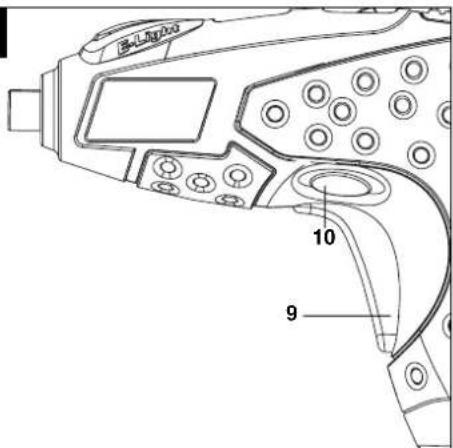
6.2 Changeover switch (Fig. 2/Item 10)
The slide switch above the ON/OFF switch is for setting the direction of rotation of the cordless screwdriver and for preventing the cordless screwdriver from being switched on inadvertently. You can select between clockwise and counter-clockwise rotation. Change the direction of rotation only when the equipment is at a standstill. If you fail to observe this point, the gearing may become damaged. When the slide switch is in the middle position, the ON/OFF switch is blocked.
6.3 ON/OFF switch (Fig. 2 / Item 9)
Press the On/Off switch to switch the cordless screwdriver on. Release the ON/OFF switch to switch off the tool.
6.4 LED lamp (Fig. 3/Item 2)
The LED lamp (2) can be used in poor lighting conditions to illuminate the area where you want to screw.
To switch on, push the switch (4) forwards; to switch off, pull the switch back again.
6.5 Magnetic screw holder (Fig. 3/Item 3)
Screws can be placed on the magnetic screw holder for easy reach during operation.
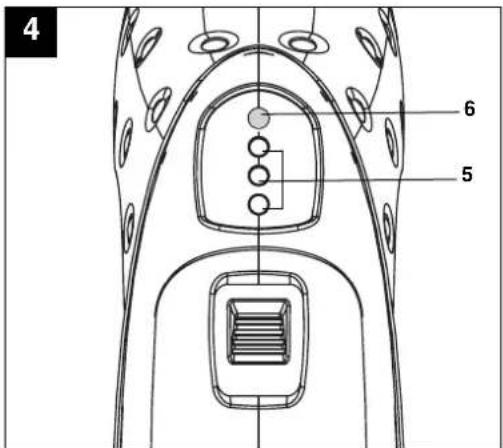
6.6 Battery capacity indicator (Fig. 4/Item 5)
Press the button for the battery capacity indicator (6). The battery capacity indicator (5) indicates the charge state of the battery on 3 colored LEDs.
All LEDs illuminate:
The battery is fully charged.
The yellow and red LED illuminate:
The battery has an adequate remaining charge.
Red LED:
The battery is empty, recharge the battery.
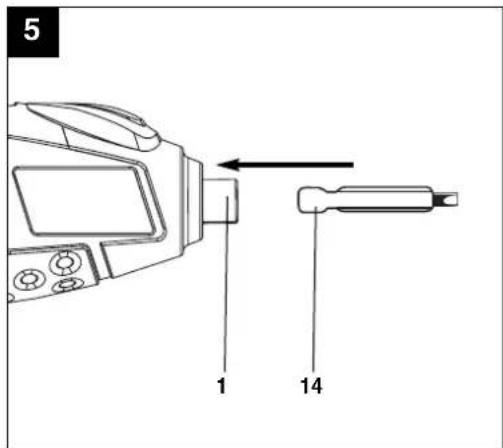
6.7 Changing the tool (Fig. 5)
Important! Set the changeover switch to its centre position whenever you carry out any work (for example changing the tool, maintenance work, etc.) on the cordless screwdriver. Insert the bit (14) into the bit chuck (1). To remove the bit (14), pull it back out of the bit chuck (1).
6.8 Screwdriving
We recommend using self-centering screws (e.g. Torx screws, recessed head screws) designed for reliable working. Be sure to use a bit that matches the screw in shape and size. Set the torque, as described elsewhere in these operating instructions, to suit the size of screw.
7. Cleaning, maintenance and ordering of spare parts
Always pull out the mains power plug before starting any cleaning work.
7.1 Cleaning
- Keep all safety devices, air vents and the motor housing free of dirt and dust as far as possible. Wipe the equipment with a clean cloth or blow it with compressed air at low pressure.
●We recommend that you clean the device immediately each time you have finished using it.
●Clean the equipment regularly with a moist cloth and some soft soap. Do not use cleaning agents or solvents; these could attack the plastic parts of the equipment. Ensure that no water can seep into the device.
7.2 Maintenance
There are no parts inside the equipment which require additional maintenance.
7.3 Ordering replacement parts
Please quote the following data when ordering replacement parts:
●Type of machine
●Article number of the machine
●Identification number of the machine
●Replacement part number of the part required
For our latest prices and information please go to www.isc-gmbh.info
8. Disposal and recycling
The unit is supplied in packaging to prevent its being damaged in transit. This packaging is raw material and can therefore be reused or can be returned to the raw material system. The unit and its accessories are made of various types of material, such as metal and plastic. Defective components must be disposed of as special waste. Ask your dealer or your local council.
natural_image
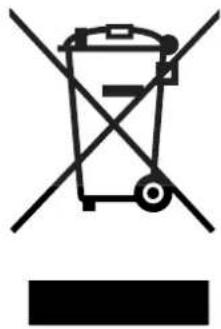
Symbol of a trash bin crossed with a diagonal line, no text or numbers presentNever place any electric tools in your household refuse.
Seek advice on correct disposal from local waste authorities.
Technical changes subject to change
After Sales Support
TEL: 1300 130 579
WEB: www.rossmac.com
The reprinting or reproduction by any other means, in whole or in part, of documentation and papers accompanying products is permitted only with the express consent of ISC GmbH.
After Sales Support TEL: 1300 130 579 WEB: www.rossmac.com

EH 07/2009 (01)
- Operating Instructions Cordless Screwdriver RT-SD 3.6 Li
- Cordless Screwdriver
- ⚠️ Important!
- Safety information
- General safety instructions for electric tools
- Workplace safety
- Electrical safety
- Safety of persons
- Additional safety instructions
- Do not lose these safety instructions.
- Layout (Fig. 1)
- Proper use
- Technical data
- Sound and vibration
- Wear ear-muffs.
- Screwing without hammer action
- Before starting the equipment
- Operation
- Charging the battery (Fig. 1)
- Changeover switch (Fig. 2/Item 10)
- ON/OFF switch (Fig. 2 / Item 9)
- LED lamp (Fig. 3/Item 2)
- Magnetic screw holder (Fig. 3/Item 3)
- Battery capacity indicator (Fig. 4/Item 5)
- All LEDs illuminate:
- The yellow and red LED illuminate:
- Red LED:
- Changing the tool (Fig. 5)
- Screwdriving
- Cleaning, maintenance and ordering of spare parts
- Cleaning
- Maintenance
- Ordering replacement parts
- Disposal and recycling
Brand : TAURUS
Model : RT-SD 3 6 Li
Category : Screw machine