
G3 EP1/2M - Unknown Foster - Free user manual and instructions
Find the device manual for free G3 EP1/2M Foster in PDF.


| Product Type | Commercial Refrigerator |
| Brand | Foster |
| Model | G3 EP1/2M |
| Climate Class | 4 (30°C, 55% RH) or 5 (40°C, 40% RH) as per serial plate |
| Number of Sections | 2 (based on model designation) |
| Weight (empty) | Approx. 150 kg for 2-section model |
| Shelves | 4 adjustable shelves per section; each shelf max load 40 kg evenly distributed |
| Defrost | Automatic periodic defrost; manual override available |
| Control Type | Electronic digital display with touch buttons |
| Lighting | Internal light (button 5) on glass door models |
| Door Lock | Key lock, 90° turn |
| Keypad Lock | Yes, to prevent unauthorized adjustments |
| Noise Level | < 70 dB(A) |
| Electrical Connection | 230 V / 50 Hz (typical); RCD recommended |
| Cooling Method | Forced air circulation with evaporator fans |
| Condenser | Air-cooled; clean grille and coils periodically |
| Operating Temperature | Set point adjustable; typical range +1°C to +8°C (refrigerator) or -18°C (freezer) – check model variant |
| Safety Features | Alarms for high/low temperature, probe failure, power failure; keypad lock; RCD recommended |
| Standby Function | Yes, press and hold button 3 for 3 seconds |
| Warranty | 6-12 month service recommended; authorized service agent |
Frequently Asked Questions - G3 EP1/2M Foster
User questions about G3 EP1/2M Foster
0 question about this device. Answer the ones you know or ask your own.
Ask a new question about this device
Download the instructions for your Unknown in PDF format for free! Find your manual G3 EP1/2M - Foster and take your electronic device back in hand. On this page are published all the documents necessary for the use of your device. G3 EP1/2M by Foster.
USER MANUAL G3 EP1/2M Foster
natural_image
Front view of a modern stainless steel foster appliance with wheels and control panel (no visible text or symbols)Four Steps
to extend the life of your appliance
flowchart
graph TD
    A["1"] --> B["2"]
    B --> C["3"]
    C --> D["4"]
    style A fill:#fff,stroke:#000
    style B fill:#fff,stroke:#000
    style C fill:#fff,stroke:#000
    style D fill:#fff,stroke:#000
1
Getting to know your new
Foster appliance


These instructions should be retained and made readily accessible by personnel using the appliance. The instructions should be read thoroughly prior to appliance installation. Failing to follow the advice contained in this manual may result in damage to the appliance and personal injury to the operator.
All installations must conform to local and municipal regulations and directives. In case of doubt contact your Foster authorised distributor or the Foster Technical Department. The information contained in this manual is current at the time of publication and is subject to change without notice.

natural_image
Warning symbol with exclamation mark inside a triangle (no text or numbers)CAREFUL – DANGER
Ignoring this sign and remarks may result in personal danger.

natural_image
Simple black outline of an equilateral triangle on white background (no text or symbols)CAREFUL – DANGER
Ignoring this sign and remarks may result in damage to your appliance.

INFORMATION
Useful hints to make the best use of your appliance.
Climate Class
Climate class indicated on the serial plate shows the ambient temperature & humidity at which this appliance has been tested, for the purposes of establishing values in line with European standards.
| Climate Class Temperature Relative humidity | |
| 4 30°C 55% | |
| 5 40°C 40% | |
General Safety

- Do not store explosive substances such as aerosol cans with a flammable propellant in this appliance.
- Keep all ventilation openings in the appliance or in the structure of a built in unit clear of any obstructions.
- Do not use electrical appliances inside the storage compartment.
- Do not use steam cleaners, pressure washers or other jets/sprays of water on or around the appliance.
- The appliance is air tight when the door or drawers are closed therefore under no circumstances should any living body be stored or 'locked in' the appliance.
- This appliance is heavy. When moving the appliance care should be taken and correct safe practices followed. The appliance should not be moved over uneven surfaces.
- The emitted sound level of this appliance is not greater than 70dB(A).
- To ensure stability the appliance should be located on a flat, level surface, correctly loaded.
- Do not use mechanical devices to accelerate the defrost process.
- The worktop should not be sat or stood on.
- Where the appliance is fitted with drawers these should not be used as a step to assist or gain height.
- Where the appliance is fitted with drawers, do not sit or stand in the drawers.
- Care should be taken not to damage the refrigeration circuit and/or system.
- If the supply cord is damaged, it must be replaced by the manufacturer, it's service agent or similarly qualified persons in order to avoid hazards.
- Care should be taken to avoid prolonged contact with cold surfaces with unprotected body parts, correct PPE to be used at all time.
Electrical Safety

Foster Refrigerator recommends that the equipment is electrically connected via a Residual Current Device (RCD); such as a Residual Current Circuit Breaker (RCCB) type socket, or through a Residual Current Circuit Breaker with Overload Protection (RCBO) supplied circuit.
Should it be necessary to replace the fuse, the replacement fuse must be of the value stated on the serial label for the appliance.
Disposal Requirements
This appliance contains components and materials which can be harmful to the environment if not disposed of correctly. Disposal of this appliance should be carried out by a suitably licensed waste contractor in accordance with national laws and regulations which may be in force the at time.

Removal of packaging
Prior to carrying out this operation please ensure that these instructions have been read, understood and that the necessary personnel and tools are available to ensure that these instructions are complied with. It is also recommended that a full assessment of the installation conditions and requirements be conducted prior to commencing this operation.
Tools required: A sharp retractable knife or scissors
Pliers or cutters suitable to cut hard plastic

tion appliances weigh up to 150kg when empty and requires at least 2 people to carry out instructions.

4 section appliances weigh up to 230kg when empty and requires at least 4 people to carry out instructions.

or lift more weight than you are comfortable with. Any lifting should be carried out using correct techniques.

or stand directly in line or under the appliance when it is leaning at an angle while carrying out instructions.

appliances are top heavy and care should be taken when manoeuvring uneven or sloping ties. Do not manoeuvre the appliance without assistance.

recommended that gloves are worn when carrying out these instructions.
1 Remove outer plastic and cardboard. Take care not to damage the appliance with any sharp objects used to remove the packaging.
Note - The image is of a 2 section appliance. The same instructions apply to 3 and 4 section appliances in conjunction with the guidelines above with regards to the recommended number of people.

natural_image
Line drawing of a two-door industrial refrigerator with wheels and ventilation slots (no text or symbols)2 Position the pallet against a flat surface of a similar height to the pallet.
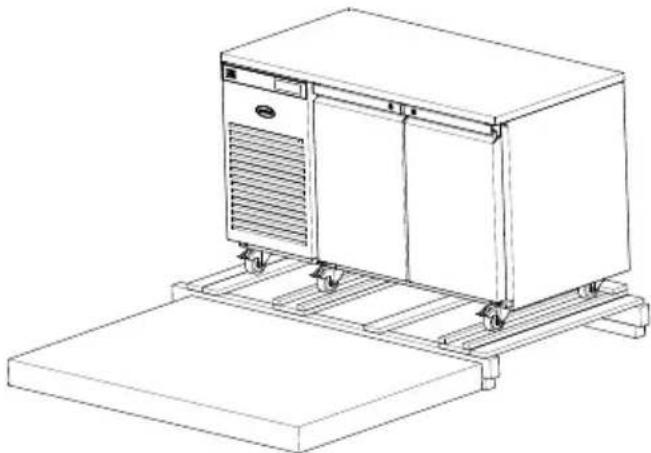
natural_image
Line drawing of a kitchen appliance with a flat base and side-mounted platform (no text or symbols)3 Ensure that the castors and appliance door are locked.
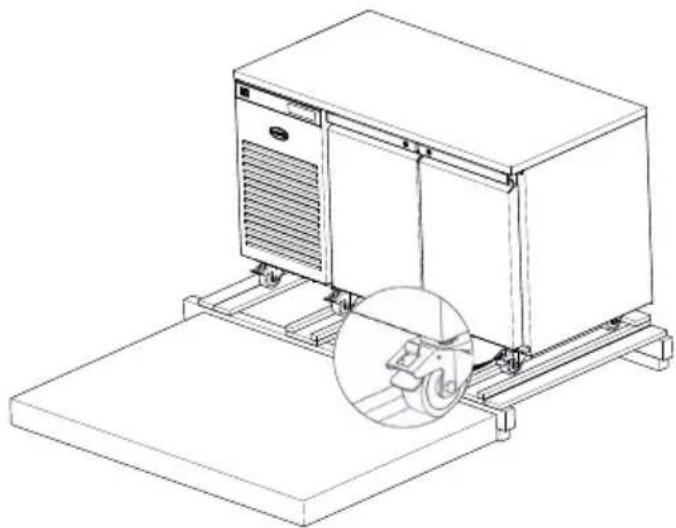
natural_image
Line drawing of a server rack with a circular inset showing a mechanical component (no text or symbols)4 Support the appliance at the front and rear. Cut the support straps on both sides and unlock the castors.
5 Carefully slide the appliance off the pallet onto the adjacent level surface.

natural_image
Line drawing of a laboratory equipment unit with wheels and a red arrow indicating direction (no text or symbols)6 If the appliance is not being moved straight to it's final location lock all the castors once more.
7 Ensure that all packaging is disposed of in an appropriate way in accordance with any local regulations for waste disposal.
Start-Up and Test Sequence
After unpacking, clean (cleaning directions supplied within this manual) and allow the appliance to stand for 60 minutes before turning on.
Ensure the appliance is situated on a firm, level surface, away from both hot and cold air sources, as this will affect its performance.
Place the appliance in a location so as not to exceed the maximum rated ambient temperature.
The appliance produces warm air when operating normally and requires adequate ventilation. The dimensions indicated are a minimum.
Connect the appliance to a suitable power supply. Do not connect or disconnect the appliance with wet hands. The appliance will turn on automatically displaying the actual internal temperature of the appliance. If this does not happen and button 3 is 'pulsing' press and hold button 3 for 3 seconds to turn on the appliance.
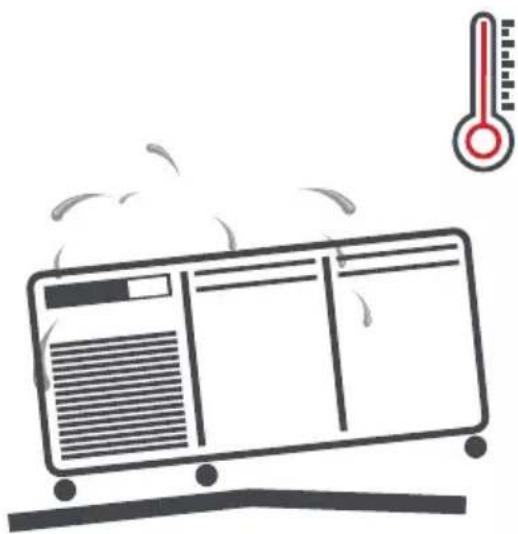
natural_image
Illustration of a steam rising from a refrigerated air conditioner unit with a thermometer above (no text or symbols)
natural_image
Line drawing of a rectangular electronic device with two side dimensions labeled 50mm (no text or symbols on the device itself)As the operating temperature has been pre-set no adjustments are required. Allow the appliance to reach its normal operating temperature before loading with product.
Display Icons and Buttons

| Icon Button | |||
| 1 | Compressor running 1 Information | menu | |
| 2 | Keypad locked 2 Increase value | ||
| 3 | Evaporator fans running | 3 Standby/Exit/Confirm | |
| 4 | Defrost in progress | 4 Decrease value | |
| 5 | Alarm 5 Light (If fitted) | ||
| 6/7 | Display units Centigrade or Fahrenheit | ||
| 8 | Auxillary output operation | ||
Note - Buttons 1, 2, 4 and 5 are only visible after pressing button 3
Standby
Pressing button 3 for 3 seconds will turn the unit on or into standby. When in standby, only button 3 will be displayed. The remainder of the display will be blank. When operating normally, the display will show the internal temperature and button 3.
Set Point
To display the appliance Set Point, with the display showing the temperature, press button 3. Then press button 1 and with the display showing 'SP' press button 3.
To amend the Set Point press button 3. Then press button 1 and with the display showing 'SP' press button 3. Adjust using button 2 and button 4. Press button 3 to save the new value. If button 3 is not pressed the new value will not be stored.
If the Set Point cannot be adjusted to the value required please contact your authorised Foster dealer for advice.
The display will reset after 30 seconds or by pressing button 1.
Defrost
The appliance has an automatic defrost function and will defrost periodically each day without any user intervention. This process is normal and does not affect product stored in the appliance. During defrost the appliance can be used as normal.
To start a defrost manually press and hold button 3 for 5 seconds. This will turn off the appliance. When this happens do not release the button and after 2 more seconds the display will indicate a defrost has commenced (icon 4 illuminated) and the button can be released.

natural_image
Stylized snowflake icon with three raindrops falling below (no text or symbols)Shelves, Supports, Loading and Air Flow
The appliance is supplied with adjustable, removable trayslides and shelves.
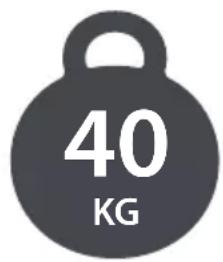
Each shelf is capable of holding up to 40kg of product evenly distributed.
Do not block air vents with product. A minimum of 25mm should be maintained between the top of the product and the shelf above.
Do not place product on the base of the appliance. If it is required to store product on the base of the appliance please contact the Foster parts team to purchase the necessary shelf and spacers.
Always ensure air can circulate around/through the stored product. It is important that for optimum energy and temperature performance that adequate airflow is maintained around the perimeter of the shelves, and around all stored products.

natural_image
Simple circular arrow diagram with four directional arrows forming a loop (no text or symbols)Where the appliance is fitted with drawers these should not be used as a step to assist or gain height.
Where the appliance is fitted with drawers, do not sit or stand in the drawers.
Internal Light (Applicable to models with glass doors.)
The light is operated using button 5. Press once to turn on the light and press again to turn off the light.
Door Lock
To lock the door insert the key and turn 90°, turn in the opposite direction to unlock.
Keypad Security Settings
We advise that this function is used to prevent unauthorised adjustment of the appliance and it's operating temperature.
Press and release button 3. Then press button 1 followed by button 4 to display 'Loc'. Press button 3 and use buttons 2 and 4 to change the value to 'Yes' to lock the keypad or 'no' to unlock it. Press button 3 to save the new value. If button 3 is not pressed the new value will not be stored.
The display will reset after 30 seconds or by pressing button 1.
Cleaning and Maintenance
IMPORTANT: This appliance is heavy. When moving the appliance care should be taken and correct safe practices followed. Prior to cleaning ensure that the correct PPE is available and utilised and that the appliance is switched off and disconnected from the power supply. Do not disconnect or connect the appliance from the power supply with wet hands. Following cleaning, only when the appliance is dry should the appliance be reconnected to the power supply and switched on.

Cleaning should be carried out periodically as required depending on application.
Switch off the appliance, disconnect from the power supply and remove all products, racking and shelves. Care should be taken with the racking and shelves being inspected for any signs of damage resulting in sharp edges and ensure that body parts do not come into contact with cold surfaces.
When cleaning a freezer it is recommended that the internal temperature is allowed to increase to above freezing prior to cleaning.
Wash all internal and external surfaces with a mild liquid detergent diluted as per the manufacturer's instructions. Rinse surfaces with clean water and dry thoroughly.
Never use wire wool, other abrasive substances, cleaning agents with a high acid or alkaline content (e.g. bleach acid or chlorine) or similar products as they can damage the appliance.
When the appliance has been cleaned and dried, refit the racking and shelves.
Re-connect the appliance to the power supply adhering to the previous guidelines above. Switch the appliance on and allow it to reach its normal operating temperature before re-loading product.

natural_image
Abstract graphic of three dark blue starburst shapes on white background (no text or symbols)Cleaning
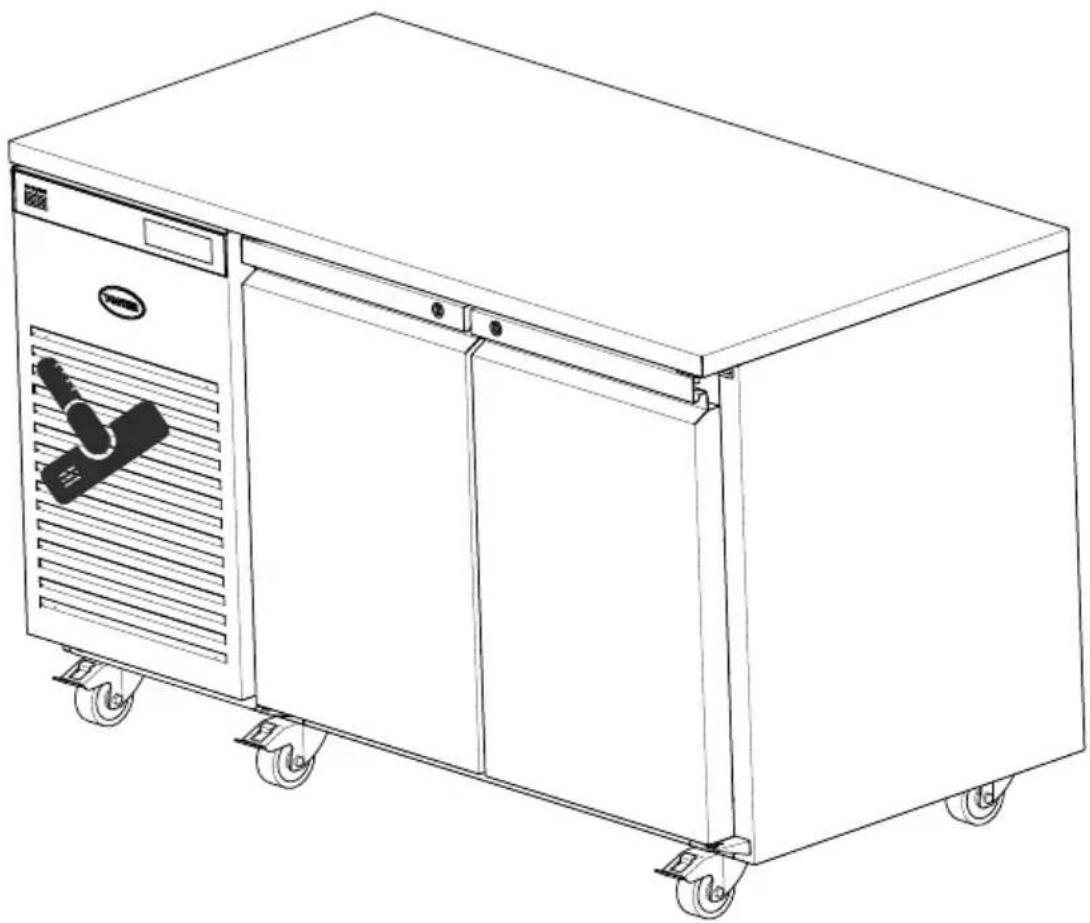
Condenser Air Grill
Use a soft brush or vacuum to remove loose dust and dirt from the Condenser Air Grill.
natural_image
Line drawing of a three-tiered stainless steel kitchen cabinet with wheels and ventilation slots (no text or symbols)Condenser
Regular cleaning of the condenser (located behind the Condenser Air Grill) increases energy efficiency and prolongs the life of your appliance.
Never use a wire brush, abrasive or corrosive materials to clean the condenser. This should be carried out periodically, by a competent engineer as outlined in the Regular Maintenance section of this manual.
Gasket
All door gaskets should be inspected on a regular basis and replaced as necessary if damaged. To clean, wipe with a warm damp soapy cloth followed by a clean damp cloth. Finally dry thoroughly.
Shelves
The shelves in the appliance can be removed for cleaning. The shelves are dishwasher safe however the vertical supports should be cleaned with warm soapy water then rinsed and dried.
Regular Maintenance
Where the regular cleaning regime previously described does not remove dirt or grease deposits from the condenser, it should be cleaned by a competent engineer. We recommend that an engineer services the appliance every 6 to 12 months to maintain your warranty and ensure optimal performance of your appliance. We recommend that service is carried out by an authorised Foster agent or by contacting the Foster Service team using the contact details in this manual.

natural_image
Silhouette of a hand holding two wrenches (no text or symbols)6-12 MONTHS
Troubleshooting
Alarms/Warnings:
During operation the current temperature inside the appliance will be displayed. At certain times this will change to indicate a particular appliance operation or fault. The indicators you may see are as follows:

natural_image
Simple line drawing of two interlocking gears (no text or symbols)hi - The internal temperature of the appliance is higher than it should be. Ensure that the door is closed and that the air flow inside is not obstructed by excessive or poor loading of product. The alarm will reset if the temperature falls to a normal level. If this does not happen please contact your authorised dealer or Foster Service.
Lo - The internal temperature of the appliance is lower than it should be. Check to ensure that the appliance has not been loaded with product at a lower temperature than the normal appliance operating temperature. If this is not the case please call your authorised dealer or Foster Service.
tA - This indicates that the internal temperature probe has failed. Call your authorised dealer or Foster Service to arrange for this to be replaced. During this time the appliance cannot maintain an accurate temperature and all product should be removed and the appliance switched off.
tE - This indicates that the evaporator probe has failed. Call your authorised dealer of Foster Service to arrange for this to be replaced.
PF - The mains power has been removed from the appliance for a period of time and has now been restored. This may have resulted in a rise in appliance temperature. Caution should be taken when using products stored within to ascertain whether these products are suitable for use. Upon restoration of the power supply the appliance will resume normal operation and the PF can be cancelled by pressing button 3 once.
HC - The condenser temperature is higher than it should be. If the appliance is being subjected to particularly high ambient temperatures steps should be taken to reduce this. If the ambient temperature is not high or reducing the temperature does not rectify the fault please contact your authorised dealer or Foster Service.
Cnd - The condenser clean period has expired. Please contact your authorised dealer or Foster Service.
While in an alarm condition icon 5 will also be illuminated.
(Some indications are only visible periodically during specific appliance operations such as defrost or when activated through use of the appliance).
Before calling your supplier please make sure that:
CheckProblem Solution
| The appliance is not functioning Is the appliance plugged in and the socket switched on? | If the appliance is plugged in check that the socket is ‘live’ by plugging another appliance in to see if that works. |
| Has the fuse blown? Check the fuse and if necessary change it for a new one | |
| The appliance is not cooling or it is not reaching the required temperature | Is the appliance switched on? Check that the temperature is displayed. If the display shows ‘oFF’ switch on the appliance as it is in standby |
| Is the condenser blocked or dirty? Inspect and clean the condenser if necessary as described in this manual | |
| Is the appliance positioned close to a heat source? Is the heat source affecting the performance of the appliance. If possible move the appliance away from the heat source. | |
| Is the appliance loaded correctly? Check the loading of the product contained in the appliance is in accordance with the guidelines in this manual | |
| There is something other than the temperature displayed on the controller | Is the display showing one of the alarms/warnings above? The display may show indications shown in the ‘Alarms and Warnings’ section of these instructions. For anything else contact your authorised dealer or Foster Service. |
If the reason for the malfunction cannot be identified, disconnect the electrical supply from the appliance and contact your authorised dealer or Foster Service. When requesting a service call, please quote the model and serial number which can be found on the inside of the appliance on the right hand wall and begins with 'E'.

natural_image
Illustration of a crown with multiple lion statues and a shield, no visible text or symbolsBy Appointment to Her Majesty Queen Elizabeth II Suppliers of Commercial Refrigeration Foster Refrigerator, King's Lynn

The Refrigeration Experts
For more information:
+44 (0) 1553 698485
regional@foster-gamko.com
fosterrefrigerator.com
Document ID code: 00-570479 v3
Original Instructions
For service and spares:
For service +44 (0) 1553 780333
service@foster-gamko.com
For parts +44 (0) 1553 780300
parts@foster-gamko.com
- Four Steps
- 1
- Getting to know your new
- Foster appliance
- CAREFUL – DANGER
- INFORMATION
- Climate Class
- General Safety
- Electrical Safety
- Disposal Requirements
- Removal of packaging
- Start-Up and Test Sequence
- Standby
- Set Point
- Defrost
- Shelves, Supports, Loading and Air Flow
- Internal Light (Applicable to models with glass doors.)
- Door Lock
- Keypad Security Settings
- Cleaning and Maintenance
- Cleaning
- Condenser Air Grill
- Condenser
- Gasket
- Shelves
- Regular Maintenance
- Troubleshooting
- Alarms/Warnings:
- Before calling your supplier please make sure that:
Brand : Foster
Model : G3 EP1/2M
Category : Unknown