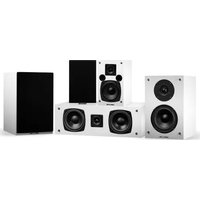
SX50WHC - Home Theater Fluance - Free user manual and instructions
Find the device manual for free SX50WHC Fluance in PDF.


| Product Type | Home Theater Passive Speaker |
| Supported Configurations | 5.1 and 7.1 Surround Sound |
| Speaker Binding Posts | 5-way binding posts, gold-plated, with removable bridges for bi-amping/bi-wiring |
| Recommended Speaker Wire | 18 AWG or thicker (lower gauge) |
| Break-In Period | Minimum 10-12 hours of normal playing time |
| Bi-Amp / Bi-Wire Capable | Yes, requires removal of bridges |
| Wall Mounting | Supported; stud anchor recommended |
| Floor Spike Compatibility | Yes, sound isolation floor spikes supported (sold separately) |
| Sound Isolation Pads | Compatible to reduce vibrations |
| Cleaning Method | Dry microfiber cloth only; no liquid cleaners |
| Ventilation Clearance | Minimum 2-3 feet from obstructions; do not block ports |
| Power Source | Requires external amplifier/receiver (not self-powered) |
| Warranty (Passive Speakers) | Lifetime limited warranty to original purchaser |
| Recommended Amplifier Brands | Denon, Marantz, Onkyo, Yamaha (commonly used) |
| Safety Warning | Avoid touching tweeter dome; ensure proper polarity; do not let positive/negative wires touch |
Frequently Asked Questions - SX50WHC Fluance
User questions about SX50WHC Fluance
0 question about this device. Answer the ones you know or ask your own.
Ask a new question about this device
Download the instructions for your Home Theater in PDF format for free! Find your manual SX50WHC - Fluance and take your electronic device back in hand. On this page are published all the documents necessary for the use of your device. SX50WHC by Fluance.
USER MANUAL SX50WHC Fluance
Serious Performance.
Elite, Reference, and Signature Series
Speaker Manual v1.0fluence.com
Introduction
Thank you for your purchase of your Fluance product. We hope you enjoy your experience. If you have any questions please visit us at:
www.fluance.com/support
Fluance believes everyone should experience audio in its truest form, recreating the performance the way the artist intended. Utilizing only superior components and expert audio engineering, their products are a testament to the performance that can be achieved when a passion for music takes center stage. The perfect complement to any audiophile's lifestyle, you'll be enjoying live performances in your home for years to come.
Online Resources
For videos on the full setup and configuration of your speakers visit us at: www.fluance.com/resources
Table of Contents
Speaker Basics .... 3
5.1 & 7.1 Surround Sound Speaker Setup....4
Wiring Guide.... 5
Bi-Amp Connection 6
Bi-Wire Connection....7
Turntable Passive Speaker Setup....8
Wall Mounting Recommendations 9
Care & Maintenance....10
Troubleshooting....11
FAQs....12
Videos....13
Knowledge ....13
Fluance Warranty....15
Speaker Basics
Front Speakers
In home theater, the front left and right speakers provide a wide soundstage that blends with the video or music to create a more realistic and exciting experience.

Center Speaker
A center speaker is usually placed centered, above or below the visual device. It must also be timbre matched with the other speaker products in the system.
Surround Speakers
The surround speakers in a home theatre system are used to create atmosphere and a sense of space. Surround speakers can be placed to the side and rear of the listener.
5.1 & 7.1 Surround Sound Speaker Setup
Speaker placement is the most important part of any Home Theater setup. The proper placement will optimize surround sound and performance of your Fluance speaker system.

flowchart
graph TD
    FL["FL"] -->|1.5'1.5'| SCREEN["SCREEN"]
    FL -->|3'3'| C["C"]
    FR["FR"] -->|3'3'| SCREEN
    FR -->|3'3'| C
    SBR["SBR"] -->|3'3'| C
    SBL["SBL"] -->|3'3'| C
    SLSR["SLSR"] -->|3'3'| C
    FL <--> FR
    FL <--> SBR
    FL <--> SBL
    FL <--> SBR
    FL <--> C
    FL <--> SUB
    FR <--> C
    FR <--> SUB
    FR <--> SBR
5.1 Surround System
Five audio channels: Front Left, Front Right, Center, Left Surround, Right Surround and the Subwoofer.
7.1 Surround System
Seven audio channels: Front Left, Front Right, Center, Left Surround, Right Surround, Back Left & Right Speakers, and the Subwoofer.
FL FR
Front Left & Right Speakers:
Place your front speakers 3 feet away from the TV on each side rotated at 22°-30° towards the main seating position, for optimal listening.
Center Channel Speaker:
Place your center channel speaker center with your TV. Above or below the TV but more importantly at ear level.
Surround Left & Right Speakers:
Place the surround left & surround right speakers between 90° to 110° directly to the sides of your seating position two feet or higher from the ground.
Surround Back Left & Right Speakers:
Mount the back left and right surround sound speakers behind the seating position at ear level in line with the front speakers 135^ to 150^ towards the main seating position.
Subwoofer:
The location and angle of the subwoofer is not important as it will radiate sound evenly throughout the room. Do not place in a corner or it will create muddy undesirable bass.
C
SL SR
SBL SBR
The location and angle of the subwoofer is not important as it will radiate sound evenly throughout the room. Do not place in a corner or it will create muddy undesirable bass.
SUB
Wiring Guide
Setting up a home theater system requires proper wiring and wire management. Depending on the system you set up, the size of the wires and the proper type of wiring you need may vary. Fluance recommends 18 gauge or better wire for optimal sound quality.
Standard Method:
- Cut insulation of lead wire to reveal 0.39 - 0.78 inches (1-2cm) of exposed wire on both ends.
- Rotate the positive and negative terminal on the back of the speaker counter clockwise to unlock.
- Insert positive/negative end of exposed wire into unlocked positive/negative terminal of speaker.
- Rotate positive and negative terminals clockwise to lock exposed wire into terminal.
- Insert positive/negative exposed wire of other end into positive/negative terminal of receiver amplifier.

flowchart
graph LR
    A["Input Signal"] --> B["Component 1"]
    B --> C["Component 2"]
    C --> D["Component 3"]
    D --> E["Component 4"]
    E --> F["AMPLIFIER"]
    style A fill:#f9f,stroke:#333
    style F fill:#bbf,stroke:#333
Banana Plug Method:
- Cut insulation of lead wire to reveal 0.39 - 0.78 inches (1-2cm) of exposed wire on both ends.
- Rotate the positive and negative ends on the back of banana plug counter clockwise to unlock.
- Insert positive/negative end of exposed wire into now unlocked middle bracket of banana plug and rotate clockwise to lock.
- Insert positive/negative front ends of banana plug into positive/negative speaker terminals.
- Insert positive/negative exposed wire of other end into positive/negative terminal of receiver amplifier.

flowchart
graph LR
    A["Wire Connection"] --> B["Switching"]
    B --> C["Capacitor"]
    C --> D["Capacitor with Pin 1"]
    D --> E["Capacitor with Pin 2"]
    E --> F["Amplifier"]
    F --> G["Output L, N"]
Note: Do not let the positive and negative ends of the exposed speaker wire touch
Bi-Amp Connection
Bi-amping
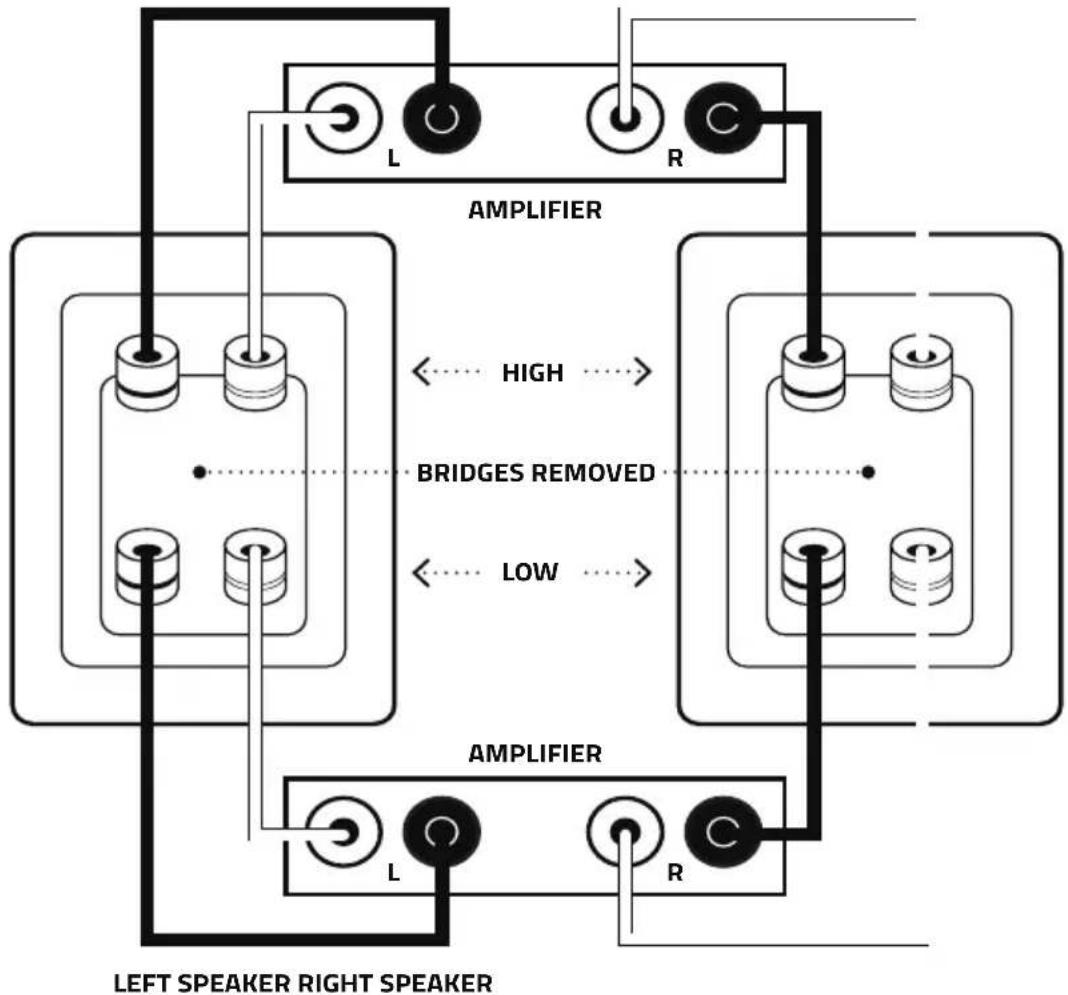
Bi-amping involves the use of two separate amplifier channels per speaker, one to connect to each pair of binding posts. It is only possible when speakers have two or more sets of binding posts. Benefits include: transients are less likely to cause amplifier overload (clipping) and/or speaker damage, reduced distortion, and better matching of the power amplifier to speaker drivers.
Here are the steps to connect speakers in the bi-amplification mode:
- Ensure that your system is powered OFF.
- Remove the bi-wire bridges from each speaker (this separates the low pass filter & high pass filter crossovers).
- Connect each amplifier channel to its respective speaker section as shown.
- Set the level controls on the amplifiers such that the signal will arrive at all speaker terminals at the same power-volume level. If your amplifiers are identical, it is usually sufficient to set all the amplifier level controls the same. The speaker's built-in crossovers are designed to match the efficiency of all the individual drivers (tweeters, midranges, and woofers). When using the bi-amplifier connection you must directly deal with some of these issues by adjusting levels according to your listening preference.
flowchart
graph TD
    A["Left Speaker Right Speaker"] --> B["Amplifier"]
    B --> C["AMPLIFIER"]
    C --> D["Bridges Removed"]
    D --> E["Low"]
    E --> F["Left Speaker Right Speaker"]
    style A fill:#f9f,stroke:#333
    style B fill:#ccf,stroke:#333
    style C fill:#cfc,stroke:#333
    style D fill:#fcc,stroke:#333
    style E fill:#cff,stroke:#333
    style F fill:#ffc,stroke:#333
Bi-Wire Connection
Bi-wiring
In bi-wiring, each loudspeaker has two pairs of connectors and two cables are run from the same amplifier output to the speaker cabinet - one for the high frequency or tweeter driver and one for the low frequency driver (through two separated crossover filters). The purported advantage of this split is that it reduces magnetic interaction in the cable, resulting in a better soundstage.
How to connect speakers in the bi-wire mode:
- Ensure that your system is powered OFF.
- Remove the bi-wire bridges from each speaker (this separates the low pass filter & high pass filter crossovers).
- Connect each amplifier channel to its respective speaker section as shown.

flowchart
graph TD
    subgraph_LeftSpeaker["LEFT SPEAKER"]
        A1[" "] --> B1[" "]
        A2[" "] --> B2[" "]
        A3[" "] --> B3[" "]
        B1 --> C1[" "]
        B2 --> C2[" "]
        B3 --> C3[" "]
    end
    subgraph_RightSpeaker["RIGHT SPEAKER"]
        D1[" "] --> E1[" "]
        D2[" "] --> E2[" "]
        D3[" "] --> E3[" "]
        E1 --> F1[" "]
        E2 --> F2[" "]
        E3 --> F3[" "]
    end
    GND["BRIDGES REMOVED"] -.-> E1
    HND["AMPLIFIER"] --> I1["L"]
    HND --> I2["R"]
Take care to maintain the correct polarity when connecting (+ or RED) to (+ or RED) and (- or BLACK) to (- or BLACK). Before attempting the connection make sure that your amplifier's speaker wire connectors will accept a second set of cables and that the equipment is turned OFF while you make the connections.
Turntable and Passive Speaker Setup
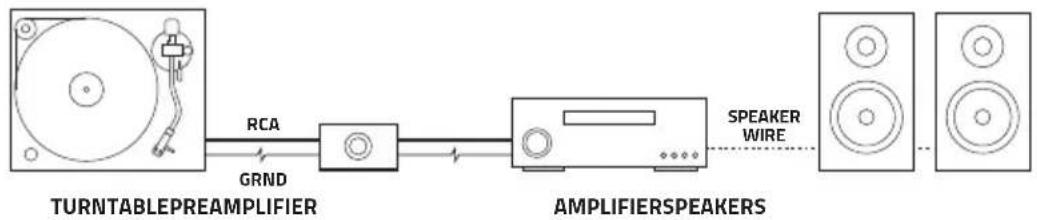
To connect passive speakers to a turntable additional electronics are needed. The standard configuration includes the turntable, a phono preamplifier, an amplifier, and a pair of passive speakers.
Turntable + Preamp + A/V Receiver + Passive Speakers
flowchart
graph LR
    A["Turntable Preamplifier"] -->|RCA| B["Amplifiers"]
    B -->|GRND| A
    B -->|SPEAKER WIRE| C["Speaker"]
Amplifier
An amplifier is the most important electronic when using passive speakers. The amplifier provides the power to drive the speakers. Some integrated amplifiers have a Phono input that uses a built-in preamplifier. An AV Receiver, with a built-in amplifier, can also be used.
Phono Preamplifier
A preamplifier boosts a small electrical signal to a normal line level, preparing the signal for further amplification. A phono preamplifier is specifically designed to amplify the signal from a turntable.
Turntable
The connected turntable may feature an internal preamplifier. The built-in preamplifier should be disabled or bypassed if using an external preamplifier or a receiver with a built-in preamplifier.
IMPORTANT! Only one preamplifier should be used in a turntable setup. If your turntable/amp features an internal preamplifier you must not use a second preamplifier. Using more than one preamplifier can damage any connected devices.
Grounding
All components in a turntable setup should be properly grounded. Connect a ground wire from your turntable to your preamplifier and then to your amplifier. This will prevent unwanted interference or humming during playback.
Placement
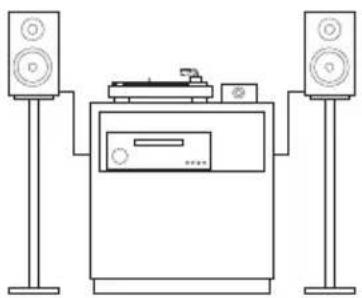
Incorrect speaker placement can cause unwanted feedback on turntable setups. To avoid feedback follow the below recommendations:
• Bookshelf speakers should not be on the same surface as the turntable.
• The speakers can also be placed on speaker stands or speaker isolation pads.
- The turntable should be on a solid and sturdy surface.
natural_image
Line drawing of a two-tiered electronic device setup with speakers and a front-mounted unit (no text or symbols)Wall Mounting Recommendations
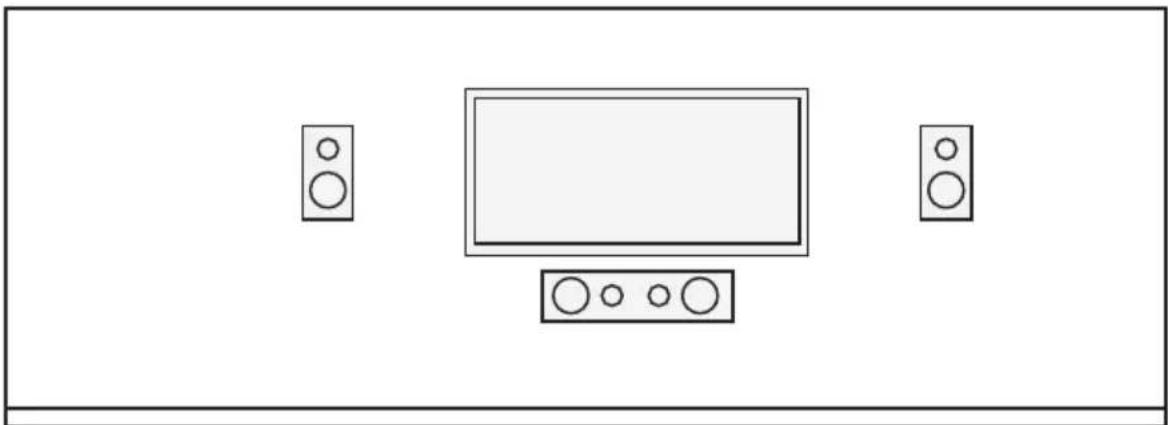
Whether you are mounting a TV, speaker, or on-wall shelving, it's always best to anchor into a stud. Drywall anchors can work well, but you never really know the quality of drywall. There may be cracks hidden under paint and texture. There may have been water damage, or it may simply pull off the wall if poorly installed. Because of these potential problems, it's safest to hit a stud.
Stud Finding Tips
- Most homes are built with 16" on-center studs, which means there should be a stud every 16". If you have trouble finding studs on a wall, verify how far apart they are in the home by locating and measuring them on another wall.
- When using a stud finder, use painters' tape to mark out at least three studs in a row, then measure the distances between the studs. If the studs are equidistant apart, you can be sure the stud finder actually marked studs, as opposed to some other object in the wall.

Before wall mounting installation
natural_image
Simple line drawing of a room with a TV and two speakers (no text or symbols)After wall mounting installation
Care & Maintenance
- Refrain from touching the tweeter dome; if the tweeter is pushed in the sound quality will be affected tremendously. The dispersion and response of the tweeter is dependent on its shape.
- Ensure positive/negative speaker wire does not touch; this can lead to blowing a fuse or shorting out your amplifier/home theater receiver.
- Refrain from dragging floor-standing speakers across the floor when floor spikes are attached as it is possible that surfaces can be scratched and/or damaged.
- Clean your speakers regularly with a dry microfiber cloth and do not use any liquid cleaners or they might cause damage to the amplifiers.
- Do not keep speakers on metals conducive to magnetism; you can use wooden materials to stand them on, or any non-magnetic one. Do not keep it near any magnetic source or the built-in electromagnet may be damaged.
- Static electricity is one of the hazards that can affect your electrical systems. Please take necessary steps to avoid your speakers coming into contact with static electricity.
- Keep speakers away from direct sun rays.
- If there is a port/vent on the speaker, avoid blocking the ventilation. It is recommended to keep the speakers 2-3 feet away from any obstructions.
- It is recommended that the amplifier is connected to a functional clean power outlet or surge protector.
- Avoid running speaker wire parallel to electrical lines to avoid interference.
Troubleshooting
Audio Distorted
- Too much or too little power from amplifier/receiver.
- Lower the volume and adjust equalizer settings to avoid excessive bass.
Buzzing/Crackling
- Check cable connections at the receiver and speaker binding posts.
- Plug the receiver directly into a wall. Where possible use a different outlet.
- Try different audio sources (TV, Smartphone, Gaming Console, Blu-ray/DVD player).
Muddy/Muffled Bass
- Speakers are not broken in. Allow a minimum 10 hours of regular use for proper break-in.
- Speakers/Subwoofer too close to walls. Allow 2-3 feet behind speakers for proper airflow.
- Adjust equalizer settings on the receiver.
No or Limited Bass
- Check cable connections at the receiver and speaker binding posts.
- Tower speakers with two sets of binding posts use bridge pins or plates to connect the top and bottom posts when you are not bi-amping. If these are missing, only one set of drivers will work.
- Change channel settings on the receiver. If a subwoofer is enabled on the receiver without one connected, the bass frequencies will not come through the front speakers.
General Speaker Troubleshooting
- Confirm the speaker wires are connected to the matching binding posts (Black to Black, Red to Red).
- Check that the speaker wire is in good condition.
- Speaker wire should be 18 AWG (American Wire Gauge) or better.
- Ensure the binding posts are fully tightened.
- If using speakers with multiple binding posts on back, confirm the metal bridge pins/plates are in place.
- Compare the amplifier power output to the speaker power handling to ensure they match.
- Eliminate any audio equalizers or filters that may affect audio output.
If you continue to experience any issues or questions additional resources are available at www.fluance.com/resources.
FAQs
What is the break-in period for Fluance speakers?
The break-in period for our speakers is a minimum 10-12 hours of playing time at normal listening volumes. After this period the drivers will have had enough movement to perform at their peak level.
Do I need Banana Plugs for my Fluance speakers?
No, banana plugs are not required. However they can provide the following benefits: They provide a stronger connection and it is more convenient to plug and unplug a banana plug than to screw or clamp bare wire into the binding posts. Check out our Home Audio Accessories section for the banana plugs you may want in addition to your new speaker system.
Why is 18-Gauge Speaker Wire recommended?
At Fluance, we recommend that you use 18-gauge speaker wire when setting up your Home Theater System. We recommend 18-gauge because the larger amount of copper provides less resistance for electricity. A larger gauge (a thinner wire with less copper) can result in power loss, which in turn means lower sound quality and lesser performance from your Home Theater System.
What Receiver should I use with Fluance speakers?
In order to get truly Serious Performance™ from your Fluance Speakers, they must be paired up with a Home Theater Receiver capable of equally Serious Performance. With that in mind, the brand names most often used by Fluance customers are: Denon, Marantz, Onkyo, Yamaha.
What are Sound Isolation Floor Spikes?
Sound isolation floor spikes eliminate vibration absorption to aid in eradicating distortion. Floor spikes will isolate sound that is transmitted through the floor by reducing the speaker surface area in direct contact with the floor. In return the speakers will produce a clearer more defined sound.
What are Sound Isolation Pads?
Sound isolation pads ensure your speakers are isolated from their supported surface, decreasing unwanted vibrations and delivering a tighter bass response and increased clarity. Some isolation pads can also be used to angle the speakers to the ideal listening position.
Do I have to bi-amp or bi-wire my connections with your speakers?
Some of our models have speaker wire connections to allow for bi-amping or bi-wiring. This is for your benefit and can be used to enhance the performance of your system. Connection of a basic audio system, where there is only one connection from the amplifier, is very simple and bi-amp or bi-wire is not necessary. You can connect your speakers using the regular left and right speaker wire connections and ignore the second set of terminals. There are gold-plated bridges connecting the two sets of terminals that allow the speaker to be connected as a traditional loudspeaker. Only remove these bridges if you plan to bi-wire or bi-amp your speakers. See the Bi-Amp Connection and Bi-Wire Connection sections of this manual for more information.
How do I register my speakers?
Your warranty registration is automatic and is processed by us when you place your order directly with us (no additional paperwork required beyond a copy of your invoice). All returns require a return authorization and you will receive complete instructions with the authorization.
For more frequently asked questions, please visit:
www.fluance.com/faq.html
Videos
Fluance creates videos on many subjects related to our products. If you wish to learn more about choosing a home audio receiver or setting up your home theatre speakers, you can watch these videos and more at:
www.fluance.com/videos
Knowledge
Fluance's Support Center is designed with you in mind. These tips and articles have been written by Fluance industry experts to help you optimize your home theater system.
Visit us online to learn more:
blog.fluance.com/knowledge
The Ultimate Guide to Home Theater Setup
Achieving great sound in a home entertainment system is inherently more complex than with stereo systems, because there are six to twelve (or more) speakers to set up, rather than just two. No matter what speaker configuration you choose, our guide to home theater surround sound setup will help you place and configure your speakers for the best possible sound.
Guide: blog.fluance.com/home-theater-setup-guide
How to Set the Phase and Crossover Frequency on Your Subwoofer
Setting your bass management on processors, receivers, and the subwoofer is critical if you hope to get the best performance out of your audio system. Check out our guide on configuring your subwoofer for the best performance.
Guide: blog.fluance.com/set-phase-crossover-frequency-on-subwoofer
Matching Speaker and Receiver Power
It is best to have an amplifier that slightly exceeds the power of the speakers that are connected to it. For example, a 30 watt RMS rated amplifier at high volume will cause clipping and distortion when connected to a speaker with 100 watt RMS. This will produce harmful electronic signals that will potentially damage your speakers. It is also important that your amplifier not be too much higher than the power of the speakers. Use the guide below to learn more about power ratings, impedance, and sensitivity.
Guide: blog.fluance.com/matching-speaker-and-receiver-power
Medium-density fibreboard (MDF) vs Natural Wood
Have you ever heard of the expression “no two snowflakes are alike”? Well the same can be said for natural wood speakers. Natural wood often has organic characteristics like knots, rings and lines which can affect the way a speaker system looks and sounds. There are 3 main benefits of MDF wood:
-
Producing great sound in solid construction
-
Speakers designed with beautiful finishes
-
A lower cost in construction that saves you money
Guide: blog.fluance.com/mdf-wood-speaker-cabinets
Warranty Information
Fluance gives the following warranty to the original customer of each new Fluance product purchased from a dealer authorized by Fluance. Fluance warrants that each new product, under normal use, is free from defects, subject to the terms and conditions set forth. If a defect should occur within the warranty period, repairs will be made free of charge for parts and labor when such defects are determined by us to be attributable to faulty materials or workmanship at time of manufacture.
Warranty Period
The Fluance products listed below are warranted for parts and labor for the stated period from the date of original purchase and are subject to the terms and conditions of the warranty.
Home Audio Passive Speakers: Lifetime Warranty Active/Powered Speakers: 2 Year Warranty HiFi Turntables: 2 Year Warranty
Warranty Exclusions
- Products purchased from a dealer not authorized by Fluance.
- Products with the serial number defaced, altered or missing.
- Defects resulting from disaster, accident, abuse, misuse, lightning, power surges, neglect, unauthorized modification or water damage.
- Defects or damage as a result of repairs performed by a person or party not authorized by Fluance.
- Defects or damage occurring during shipping (claims should be made with the shipping company).
- Defect or damage as a result of connecting a product to an outlet with the incorrect voltage. Voltage converters must be used where applicable.
To Obtain Warranty Service
Should your Fluance product require warranty service, please contact your Fluance Authorized Dealer and send your product fully insured and freight prepaid to the nearest Fluance authorized service center. Before sending to Fluance, you will be required to get a Return Authorization Number from your dealer.
Products shipped without a valid Return Authorization Number will be refused. To avoid possible shipping damage, make sure the product is properly packaged and well protected. Include a copy of your original bill of sale as proof of warranty along with your name, home and/or work telephone number(s), a complete return address and a detailed description of the faults.
Products repaired within warranty will be returned freight prepaid. This warranty in itself is not considered a valid proof of purchase. When applying for warranty repairs, you must present the original copy of your bill of sale as proof of warranty.
FLUANCE®
fluance.com

- Introduction
- Online Resources
- Table of Contents
- Speaker Basics
- Front Speakers
- Center Speaker
- Surround Speakers
- & 7.1 Surround Sound Speaker Setup
- Surround System
- Surround System
- Wiring Guide
- Standard Method:
- Banana Plug Method:
- Bi-Amp Connection
- Bi-amping
- Here are the steps to connect speakers in the bi-amplification mode:
- Bi-Wire Connection
- Bi-wiring
- How to connect speakers in the bi-wire mode:
- Turntable and Passive Speaker Setup
- Amplifier
- Phono Preamplifier
- Turntable
- Grounding
- Placement
- Wall Mounting Recommendations
- Stud Finding Tips
- Care & Maintenance
- Troubleshooting
- Audio Distorted
- Buzzing/Crackling
- Muddy/Muffled Bass
- No or Limited Bass
- General Speaker Troubleshooting
- FAQs
- What is the break-in period for Fluance speakers?
- Do I need Banana Plugs for my Fluance speakers?
- Why is 18-Gauge Speaker Wire recommended?
- What Receiver should I use with Fluance speakers?
- What are Sound Isolation Floor Spikes?
- What are Sound Isolation Pads?
- Do I have to bi-amp or bi-wire my connections with your speakers?
- How do I register my speakers?
- Videos
- Knowledge
- The Ultimate Guide to Home Theater Setup
- How to Set the Phase and Crossover Frequency on Your Subwoofer
- Matching Speaker and Receiver Power
- Medium-density fibreboard (MDF) vs Natural Wood
- Warranty Information
- Warranty Period
- Warranty Exclusions
- To Obtain Warranty Service
- FLUANCE®
Brand : Fluance
Model : SX50WHC
Category : Home Theater