
8173 - Audio module Heritage Audio - Free user manual and instructions
Find the device manual for free 8173 Heritage Audio in PDF.


| Product Type | Audio Module (80 Series Compatible) |
| Brand | Heritage Audio |
| Model | 8173 |
| Dimensions (W x H x D) | 45 mm x 224 mm x 304 mm |
| Power Consumption | <110 mA @ 24V DC |
| Power Supply | +24V DC from compatible enclosure (RACK 2, FRAME 8, etc.) |
| Mic Preamp Gain | 80 dB (Class A) |
| Line Amplifier Gain | 10 dB (with -20 dB pad) |
| EQ Type | 4-band (High Shelf, Hi Mid, Low Mid, Low Shelf) |
| High Shelf Frequencies | 10 kHz, 12 kHz, 16 kHz |
| Hi Mid Frequencies | 10 selectable (including OFF) |
| Low Mid Frequencies | 10 selectable (including OFF) |
| Low Shelf Frequencies | 220 Hz, 110 Hz, 60 Hz, 35 Hz |
| EQ Boost/Cut Range | ±15 dB per band |
| High Pass Filter Frequencies | 50 Hz, 80 Hz, 300 Hz (both buttons pressed) |
| Input Impedance | 1200 Ω or 300 Ω (switchable) |
| Maximum Output | > +26 dBu into 600 Ω |
| THD | <0.025% @ 1 kHz, <0.05% @ 100 Hz |
| Frequency Response | 20 Hz (+0.3 dB) to 20 kHz (-0.2 dB) |
| Noise | < -100 dBu |
| Phantom Power | +48V (from chassis) |
| Phase Reverse | Yes (switch) |
| EQ Bypass | Yes (EQ In/Out switch) |
| Construction | Handmade, hand-wired in Madrid, Spain |
| Transformers | Carnhill (hand-wound, Oxford) |
Frequently Asked Questions - 8173 Heritage Audio
User questions about 8173 Heritage Audio
0 question about this device. Answer the ones you know or ask your own.
Ask a new question about this device
Download the instructions for your Audio module in PDF format for free! Find your manual 8173 - Heritage Audio and take your electronic device back in hand. On this page are published all the documents necessary for the use of your device. 8173 by Heritage Audio.
USER MANUAL 8173 Heritage Audio
Thank you for choosing the 8173 Module. Heritage Audio is dedicated to bringing you 'the sound of yesterday for tomorrow'. We specialize in capturing that unique, enticing sound that everybody has fallen in love with. For years engineers, producers and musicians have been yearning for that classic vibe. Usually the only option is to search for old, used original equipment that is almost always in a questionable state of operation. This brings with it a whole lot of other issues, making the experience less than desirable. Not to mention the very high prices asked for this equipment, which makes them virtually unobtainable for the great majority. Now it's possible to obtain that same sound with a brand new piece that will give you all the problem-free, heavy-duty use you'll need for years of music making history.
Peter Rodriguez
CEO
Heritage Audio - Madrid, Spain

© 2023 Heritage Audio S.L. is the sole owner of the copyright of all information and drawings contained in this manual which are not to be copied or reproduced by any means or disclosed in part or whole to any third party without written permission.
Heritage Audio reserves the right to alter specifications without notice. The information in this manual has been carefully checked and is believed to be accurate at the time of publication. However, no responsibility is taken by us for inaccuracies, errors or omissions nor any liability assumed for any loss or damage resulting either directly or indirectly from use of the information contained within it.
TABLE OF CONTENTS
| INTRODUCTION | 2 |
| CONTENTS | 2 |
| DESCRIPTION | 3 |
| GETTING STARTED | 4 |
| APPLICATIONS | 5 |
| SPECIFICATIONS | 6 |
| SIGNAL FLOW | 6 |
| TROUBLE SHOOTING | 7 |
| WARRANTY STATEMENT | 8 |
| REGISTRATION | 8 |
| RECALL SHEETS | 9 |

The best 80 Series sculpting tool
Leverage your 80 Series's investment with the Heritage Audio 8173.
The 8173 module is a Heritage Audio unique design, which has been engineered to fill input module slots in the restoration process of vintage 80 Series sound mixing consoles. It is also compatible with the Heritage Audio FRAME 8 and RACK 2 powered enclosures, and with any other rack, console or enclosure that follows the same mechanical and electrical protocol.
Don't settle with the same old song, the 8173 offers what the vintage modules do plus more
The 8173 has a Class A Mic preamp with 80 dB of gain to make sure you're never lacking for more. This gives you more than enough even for demanding ribbon mics and older dynamic mics, which are often low output. With the 8173 your mic collection has never sounded better.
There is also a Class A line-level amplifier with 10 dB of additional gain as well as -20 dB for when you need to reduce a very high signal coming into the unit before EQing it. Both the Mic preamp and the Line amplifier have their own separate exclusive Carnhill transformers to guarantee solid, professional results.
The 8173 is a 73-sized module, adding the 81 mid bands to the 73 classic design, creating an equalizer that is really hard to beat. It features a Baxandall type high shelf band, but with the addition of a high frequency selector switch offering 3 different frequencies instead of the fixed one at 12 kHz. There are also two Mid peak bands (Hi & Low) with 10 selectable frequencies to choose from each in addition to the OFF position that removes the filter from the signal path. Then you have a Low Shelf band, also of the Baxandall type, with 4 selectable frequencies available for some incredible low end shaping. The result is a 4-band tone monster that combines the best features of the vintage modules in a smart and tasteful way, at a price lower than most current offerings. And not to be overlooked, the 8173 has a Class A High Pass Filter with 3 frequencies to choose from to make you can clean up the very low end allowing more room to achieve the sound you want.
Vintage connoisseurs and plug-in users already know how cool the 81 mid bands are for sculpting sounds in a musical way. This level of flexibility has never been present in a 73 style module and will certainly make finding that elusive sound much easier.
To get the desired results it's necessary to use the right components
Special care has been taken in sourcing the correct components that not only ensure that performance will be as close to a 1970's unit as possible, but also gives your top-class studio the look and feel it deserves to help enhance the overall experience.
Custom polystyrene and film capacitors have been developed to closely match the Siemens styroflex and Mullard Mustard types of the late 60s and early 70s. This attention to detail is reflected in the unit's performance and is appreciated by the end user.
Carnhill input transformers are hand wound at its Oxford factory exclusively for Heritage Audio, enclosed in vintage correct green metal cases for the ultimate in detail nailing. The vintage character is indeed guaranteed and you won't find them in any other brand's products.
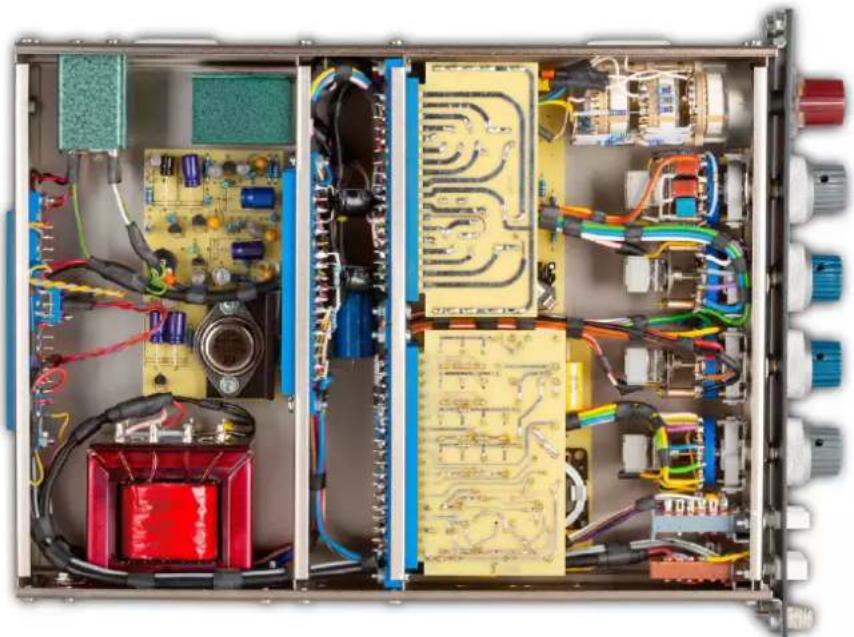
The Heritage Audio 8173 is entirely handmade and hand wired by only our most experienced technicians in our facilities in Madrid, Spain, employing the same wiring and soldering techniques of the 70s. All its circuitry is conveniently held on 5 plug-in cards.
FRONT
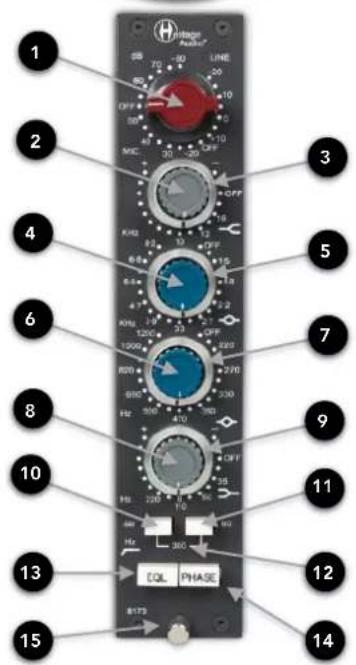
| 1 | 2 | 3 | 4 | 5 |
| INPUT GAIN SWITCH5 dB Steps From 20 to 80 dB in MIC mode and -20 dB to 10 dB in LINE mode | HIGH SHELF BOOST/CUT+/- 15 dB at Selected Frequency | HIGH SHELF FREQUENCY10, 12 and 16 kHz Options | HIGH MID BOOST/CUT+/- 15 dB at Selected Frequency | HiGH MID PEAK FREQUENCYMid Band Frequency Selection |
| 6 | 7 | 8 | 9 | 10 |
| LOW MID BOOST/CUT+/- 15 dB at Selected Frequency | LOW MID PEAK FREQUENCYLow Band Frequency Selection | BASS SHELF BOOST/CUT+/- 15 dB at Selected Frequency | BASS SHELF FREQUENCY220, 110, 60 and 35 Hz | HIGH PASS FILTER50 Hz |
| 11 | 12 | 13 | 14 | 15 |
| HIGH PASS FILTER80 Hz | HIGH PASS FILTERPressing both buttons gives a 300 Hz cut | EQLTurns Equalizer On | PHASEFlips phase 180° | FASTENING SCREWTo secure 80 Series module in enclosure |

flowchart
graph TD
    A["REAR"] --> B["1 MIC INPUT IMPEDANCE 1200 Ω (HI) or 300 Ω (LO)"]
    A --> C["80 SERIES EDGE CONNECTOR PIN OUT"]
    C --> D["1 to 18"]
    D --> E["To Pin V"]
    D --> F["Hi"]
    D --> G["Lo"]
    D --> H["0V"]
    D --> I["Line I/P"]
    D --> J["0 dBu"]
    D --> K["LINK"]
    D --> L["Unbalanced O/P"]
    D --> M["BAL O/P"]
    D --> N["To Pin V"]
    D --> O["+24V at 106 mA"]
    C --> P["-20 dBu"]
    C --> Q["-3 dBu"]
    C --> R["0 dBu"]
    C --> S["Technical Earth Link"]
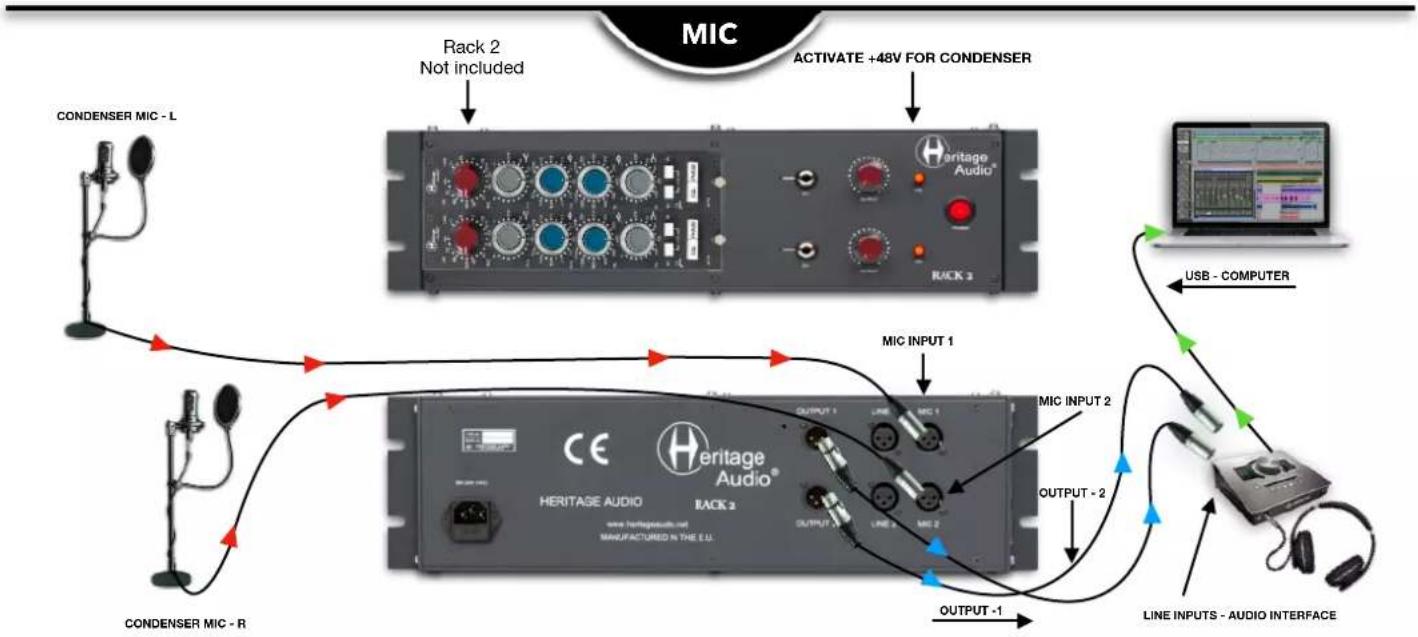
flowchart
graph TD
    A["CONDENSER MIC - L"] -->|Rack 2 Not included| B["RACK 3"]
    B --> C["ACTIVATE +48V FOR CONDENSER"]
    C --> D["MIC INPUT 1"]
    D --> E["MIC INPUT 2"]
    E --> F["LINE INPUTS - AUDIO INTERFACE"]
    F --> G["USB - COMPUTER"]
    H["CONDENSER MIC - R"] --> I["HERITAGE AUDIO RACK 2"]
    I --> J["OUTPUT -1"]
    J --> K["OUTPUT -2"]
    K --> L["Line INPUTS - Audio Interface"]
flowchart
graph TD
    A["Guitar FX PEDAL"] -->|D.I. INPUT 2| B["RACK 2"]
    B -->|D.I. INPUT 1| C["Heritage Audio"]
    C -->|Output - 1| D["Line Inputs - AUDIO INTERFACE"]
    D -->|Output - 2| E["Heritage Audio RACK 2"]
    E -->|Output 1| F["USB - COMPUTER"]
    F -->|Output - 2| G["Line Inputs - AUDIO INTERFACE"]
    G -->|Output - 1| H["Line Inputs - AUDIO INTERFACE"]
    H --> I["Line Inputs - AUDIO INTERFACE"]
    I --> J["Line Inputs - AUDIO INTERFACE"]
    J --> K["Line Inputs - AUDIO INTERFACE"]
    K --> L["Line Inputs - AUDIO INTERFACE"]
    L --> M["Line Inputs - AUDIO INTERFACE"]
    M --> N["Line Inputs - AUDIO INTERFACE"]
    N --> O["Line Inputs - AUDIO INTERFACE"]
    O --> P["Line Inputs - AUDIO INTERFACE"]
    P --> Q["Line Inputs - AUDIO INTERFACE"]
    Q --> R["Line Inputs - AUDIO INTERFACE"]
    R --> S["Line Inputs - AUDIO INTERFACE"]
    S --> T["Line Inputs - Audio Interface"]
    T --> U["Line Inputs - Audio Interface"]
    U --> V["Line Inputs - Audio Interface"]
    V --> W["Line Inputs - Audio Interface"]
    W --> X["Line Inputs - Audio Interface"]
    X --> Y["Line Inputs - Audio Interface"]
    Y --> Z["Line Inputs - Audio Interface"]
    Z --> AA["Line Inputs - Audio Interface"]
    AA --> AB["Line Inputs - Audio Interface"]
    AB --> AC["Line Inputs - Audio Interface"]
    AC --> AD["Line Inputs - Audio Interface"]
    AD --> AE["Line Inputs - Audio Interface"]
    AE --> AF["Line Inputs - Audio Interface"]
    AF --> AG["Line Inputs - Audio Interface"]
    AG --> AH["Line Inputs - Audio Interface"]
    AH --> AI["Line Inputs - Audio Interface"]
    AI --> AJ["Line Inputs - Audio Interface"]
    AJ --> AK["Line Inputs - Audio Interface"]
    AK --> AL["Line Inputs - Audio Interface"]
    AL --> AM["Line Inputs - Audio Interface"]
    AM --> AN["Line Inputs - Audio Interface"]
    AN --> AO["Line Inputs - Audio Interface"]
    AO --> AP["Line Inputs - Audio Interface"]
    AP --> AQ["Line Inputs - Audio Interface"]
    AQ --> AR["Line Inputs - Audio Interface"]
    AR --> AS["Line Inputs - Audio Interface"]
    AS --> AT["Line Inputs - Audio Interface"]
    AT --> AU["Line Inputs - Audio Interface"]
    AU --> AV["Line Inputs - Audio Interface"]
    AV --> AW["Line Inputs - Audio Interface"]
    AW --> AX["Line Inputs - Audio Interface"]
    AX --> AY["Line Inputs - Audio Interface"]
    AY --> AZ["Line Inputs - Audio Interface"]
    AZ --> BA["Line Inputs - Audio Interface"]
    BA --> BB["Line Inputs - Audio Interface"]
    BB --> BC["Line Inputs - Audio Interface"]
    BC --> BD["Line Inputs - Audio Interface"]
    BD --> BE["Line Inputs - Audio Interface"]
    BE --> BF["Line Inputs - Audio Interface"]
    BF --> BG["Line Inputs - Audio Interface"]
    BG --> BH["Line Inputs - Audio Interface"]
    BH --> BI["Line Inputs - Audio Interface"]

flowchart
graph TD
    A["You need to be in the LINE GAIN section to use the LINE Inputs"] --> B["Line INPUT -1"]
    B --> C["Line OUTPUTS - KEYBOARD"]
    C --> D["LINE INPUT -2"]
    D --> E["Line OUTPUTS - KEYBOARD"]
    E --> F["RACK 2"]
    F --> G["Line INPUT -1"]
    G --> H["Line INPUT -2"]
    H --> I["Line INPUT -1"]
    I --> J["Line INPUT -2"]
    J --> K["Line INPUT -1"]
    K --> L["Line INPUT -2"]
    L --> M["Line INPUT -1"]
    M --> N["Line INPUT -2"]
    N --> O["Line INPUT -1"]
    O --> P["Line INPUT -2"]
    P --> Q["Line INPUT -1"]
    Q --> R["Line INPUT -2"]
    R --> S["Line INPUT -1"]
    S --> T["Line INPUT -2"]
    T --> U["Line INPUT -1"]
    U --> V["Line INPUT -2"]
    V --> W["Line INPUT -1"]
    W --> X["Line INPUT -2"]
    X --> Y["Line INPUT -1"]
    Y --> Z["Line INPUT -2"]
    Z --> AA["Line INPUT -1"]
    AA --> AB["Line INPUT -2"]
    AB --> AC["Line INPUT -1"]
    AC --> AD["Line INPUT -2"]
    AD --> AE["Line INPUT -1"]
    AE --> AF["Line INPUT -2"]
    AF --> AG["Line INPUT -1"]
    AG --> AH["Line INPUT -2"]
    AH --> AI["Line INPUT -1"]
    AI --> AJ["Line INPUT -2"]
    AJ --> AK["Line INPUT -1"]
    AK --> AL["Line INPUT -2"]
    AL --> AM["Line INPUT -1"]
    AM --> AN["Line INPUT -2"]
    AN --> AO["Line INPUT -1"]
    AO --> AP["Line INPUT -2"]
    AP --> AQ["Line INPUT -1"]
    AQ --> AR["Line INPUT -2"]
    AR --> AS["Line INPUT -1"]
    AS --> AT["Line INPUT -2"]
    AT --> AU["Line INPUT -1"]
    AU --> AV["Line INPUT -2"]
    AV --> AW["Line INPUT -1"]
    AW --> AX["Line INPUT -2"]
    AX --> AY["Line INPUT -1"]
    AY --> AZ["Line INPUT -2"]
    AZ --> BA["Line INPUT -1"]
    BA --> BB["Line INPUT -2"]
    BB --> BC["Line INPUT -1"]
    BC --> BD["Line INPUT -2"]
    BD --> BE["Line INPUT -1"]
    BE --> BF["Line INPUT -2"]
    BF --> BG["Line INPUT -1"]
    BG --> BH["Line INPUT -2"]
    BH --> BI["Line INPUT -1"]
    BI --> BJ["Line INPUT -2"]
    BJ --> BK["Line INPUT -1"]
    BK --> BL["Line INPUT -2"]
    BL --> BM["Line INPUT -1"]
    BM --> BN["Line INPUT -2"]

• Class A mic preamp with 80 dB of gain, plus a sweet-sounding 4-band EQ.
• Class A line-level amplifier with 10 dB of gain.
- Equalizer's mid-bands cover nearly the entire audible frequency range.
- Low and high shelving EQs with Baxandall curves for smooth, natural-sounding response.
• High-pass filter, switchable between 50 Hz, 80 Hz, and 300 Hz.
- +48 V phantom power is supplied by your 80 Series chassis.
• Maximum output: Greater than +26 dBu into 600 Ω.
• THD: Less than 0.025 % at 1 kHz, Less than 0.05 % at 100 Hz.
• Frequency response: 20 Hz (+0.3 dB) to 20 kHz (-0.2 dB).
• Maximum Gain: Slightly greater than 80 dB.
- Noise: Less than -100 dBu.
• Power consumption: Less than 110 mA @ 24V DC.
- Dimensions (W x H x L): 45 mm x 224 mm x 304 mm. (Standard Series 80 Module)
SIGNAL FLOW
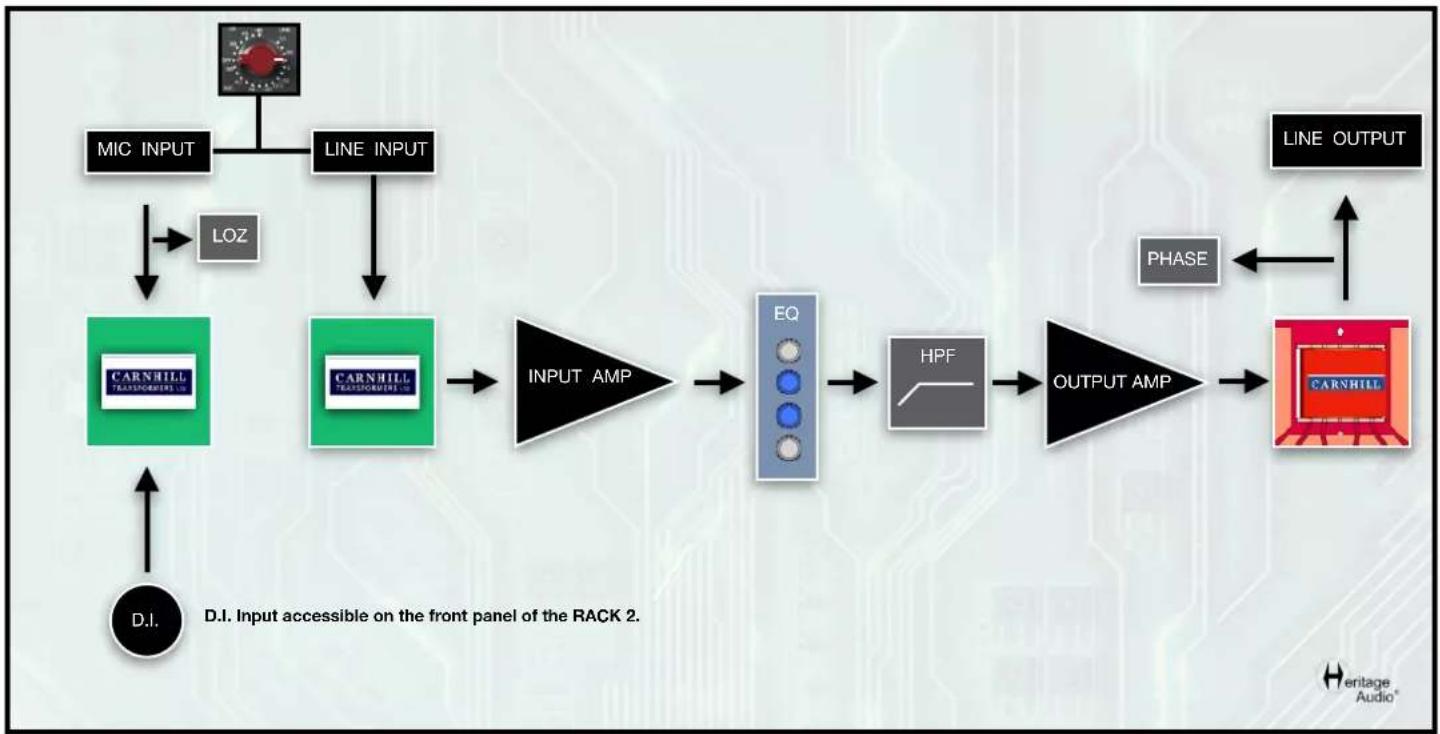
flowchart
graph TD
    A["MIC INPUT"] --> B["LOZ"]
    C["LINE INPUT"] --> D["CARNHILL TRANSPORTER LDC"]
    D --> E["INPUT AMP"]
    E --> F["EQ"]
    F --> G["HPF"]
    G --> H["OUTPUT AMP"]
    H --> I["CARNHILL"]
    J["LINE OUTPUT"] --> K["PHASE"]
    K --> I
    L["D.I. Input accessible on the front panel of the RACK 2."] --> M["D.I."]

natural_image
Abstract black-and-white graphic of a question mark with a human head silhouette and a small symbol (no text or symbols present)
natural_image
Illustration of a glowing light bulb with a stylized 'H' symbol on its side (no text or labels)| PROBLEMS | SOLUTIONS |
| I can’t seem to get any signal out of the 8173. | Check to make sure you have not left the GAIN knob in an ‘OFF’ position. |
| I still can’t seem to get any signal out of the 8173. | Check to make sure you have not left the OUTPUT knob turned all the way down on your rack enclosure. |
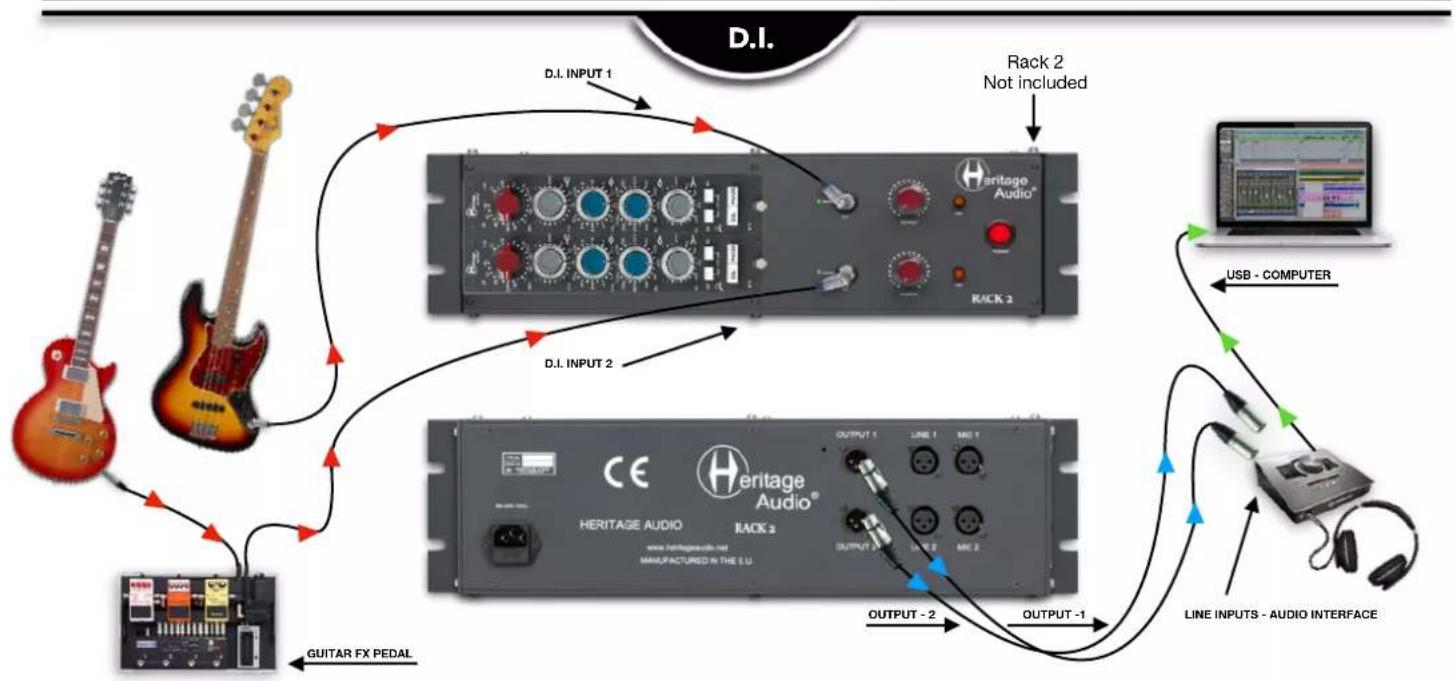
| Is it possible to use a bass or electric guitar with the 8173. | It certainly is. There are two convenient DI inputs on the RACK 2 enclosure and with the FRAME 8 or any other setups you could simply use a DI box ahead of the 8173. |
| How do I activate the 300 Hz low cut filter? | You must push both of the buttons, the 50 Hz and 80 Hz buttons to access the 300 Hz cut. |
| I can’t figure out how to change the impedance. | There is a switch on the backside of the module. It does require pulling the module out of the RACK 2 or SESSION 8 to access the switch. It switches between 1200 ohm and 300 Ω. |
| Can I simply use the Hi Shelf on the EQ without using the other bands? | Yes, of course. You simply leave the other bands in the ‘OFF’ position and they will not be in the signal path. |
* For any further doubts or questions please get in contact with us at: support@heritageaudio.com
natural_image
Interior view of an electronic control box with exposed circuit boards, capacitors, and wiring (no visible text or labels)LIMITED 2 YEAR WARRANTY
Heritage Audio 8173 Module is warranted by Heritage Audio SL to be free from defects in materials and workmanship for the period of 2 years to the original purchaser. In the event of such defects, the product will be repaired without charge or, at our option, replaced with a new one if delivered to Heritage Audio prepaid, together with a copy of the sales slip or other proof of purchase date. The warranty excludes problems due to normal wear, abuse, shipping damage or failure to use the product in accordance with the specifications.
Heritage Audio shall not be liable for damages based upon inconvenience, loss of use of the product, loss of time, interrupted operation or commercial loss or any other damages, whether incidental, consequential or otherwise.
This warranty is not transferable.
Heritage Audio and the Heritage Audio "H" logos are registered Trademarks owned and/or licensed by Heritage Audio.

REGISTRATION
Please visit our website: https://heritageaudio.com/registration/

Session / Title: ____ Track: ____ Connected Equipment: ____
Switch ON
Date: ____ Instrument: ____ Notes: ____ □ Switch OFF □

Session / Title: ____ Track: ____ Connected Equipment: ____
Switch ON
Date: ____ Instrument: ____ Notes: ____ □ Switch OFF □

natural_image
Abstract black and white diagonal line design (no text or symbols)
www.heritageaudio.com
HERITAGE AUDIO. C/ Alfonso Gómez, 38, 3C. 28037 Madrid – Spain. Tel: +34 917 266 189
info@heritageaudio.com
Brand : Heritage Audio
Model : 8173
Category : Audio module