
P.I.P.-FTE - Audio module CROWN - Free user manual and instructions
Find the device manual for free P.I.P.-FTE CROWN in PDF.


| Product Type | Audio Module (P.I.P. - Programmable Input Processor) |
| Brand | Crown |
| Model | P.I.P.-FTE |
| Dimensions | 6 3/8 × 1 7/8 × 3 7/8 in (16.2 × 4.8 × 9.8 cm) |
| Weight | 11 oz (312 g) |
| Power Supply | Powered by amplifier via P.I.P. connector (no external supply) |
| Inputs | Balanced with 1:1 isolation transformers; quick-connect barrier blocks |
| Outputs | Daisy-chain output via barrier blocks |
| Frequency Response | ±1 dB from 20 Hz to 20 kHz (with filters flat, horn EQ off) |
| Signal-to-Noise Ratio | Better than -85 dB (EIN) 20 Hz to 20 kHz |
| Common Mode Rejection | Better than 60 dB at 1 kHz |
| Crosstalk | Better than -88 dB at 1 kHz |
| Input Impedance | 20 kΩ nominal |
| Maximum Input Level | +20 dB at 1 kHz |
| Gain | Unity (0 dB) |
| Filters | RFI low-pass (33 kHz, 2nd order Bessel); Switchable subsonic/bass high-pass (18 dB/octave Butterworth) at 50, 100, 300 Hz or Flat |
| Equalization | Constant-directivity horn EQ (6 dB/octave shelving, 3 dB rise at 3.2 kHz, peak 12.5 dB at 24 kHz), switchable per channel |
| Compatibility | Com-Tech and Macro-Tech series amplifiers (standard P.I.P. and PIP2) |
| Installation | Slides into P.I.P. card rails; secured with two screws and lock washers |
| Safety Precautions | Turn off amplifier and disconnect AC before installation; do not touch circuitry |
| Maintenance | No user-serviceable parts; keep clean and avoid moisture |
| Spare Parts / Repairability | No specific spare parts listed; contact Crown Technical Support |
Frequently Asked Questions - P.I.P.-FTE CROWN
User questions about P.I.P.-FTE CROWN
0 question about this device. Answer the ones you know or ask your own.
Ask a new question about this device
Download the instructions for your Audio module in PDF format for free! Find your manual P.I.P.-FTE - CROWN and take your electronic device back in hand. On this page are published all the documents necessary for the use of your device. P.I.P.-FTE by CROWN.
USER MANUAL P.I.P.-FTE CROWN
© 1997 by Crown International, Inc., P.O. Box 1000, Elkhart, IN 46515-1000 U.S.A. Telephone: 219-294-8000. Fax: 219-294-8329. P.I.P. modules are produced by the Professional Audio Division of Crown International, Inc. Trademark Notice: Crown®, Macro-Tech®, Com-Tech®, IOC® and P.I.P® are registered trademarks of Crown International, Inc. Other trademarks are the property of their respective owners.

Fig. 1.1 P.I.P.-FTE
1 Welcome
Thank you for purchasing the Crown P.I.P.-FTE accessory. P.I.P.® modules are designed to quickly install in the rear panel of many Crown amplifiers. P.I.P. stands for "Programmable Input Processor." Their versatile features expand the capabilities of your amplifier and enable you to customize it for your particular needs.
The P.I.P-FTE employs balanced transformers to isolate the inputs of Com-Tech ® or Macro-Tech ® series amplifiers. This adds valuable isolation from shorted input cables, faulty wiring and common mode noise.
In addition to transformer isolation, this P.I.P. provides two important filters to attenuate unwanted ultrasonic and subsonic frequencies.
A horn equalization circuit is also available to compensate for the high-frequency roll-off of constant-directivity horns.
You should find these items when you unpack:
• P.I.P.-FTE module
- Two 8-32 Phillips Machine Screws
- Two Lock Washers
- Two Quick-Connect Barrier Blocks
• This Owner's Manual
Features
☐ Balanced inputs with 1:1 isolation transformers to help keep the input noise-free.
☐ RFI filter which attenuates unwanted ultrasonic frequencies that would otherwise waste amplifier power. The RFI filter is a 12 dB/octave (2nd order), Bessel-tuned low-pass filter with a 3 dB roll-off point at 33 kHz.
☐ Switchable subsonic/bass filter with 50-, 100- or 300-Hz roll-off frequencies.
☐ Constant-directivity horn equalization network which can be switched on or off.
☐ Quick-connect barrier block connectors provide greater wiring flexibility and make installation easier.
2 Facilities2 Facilities
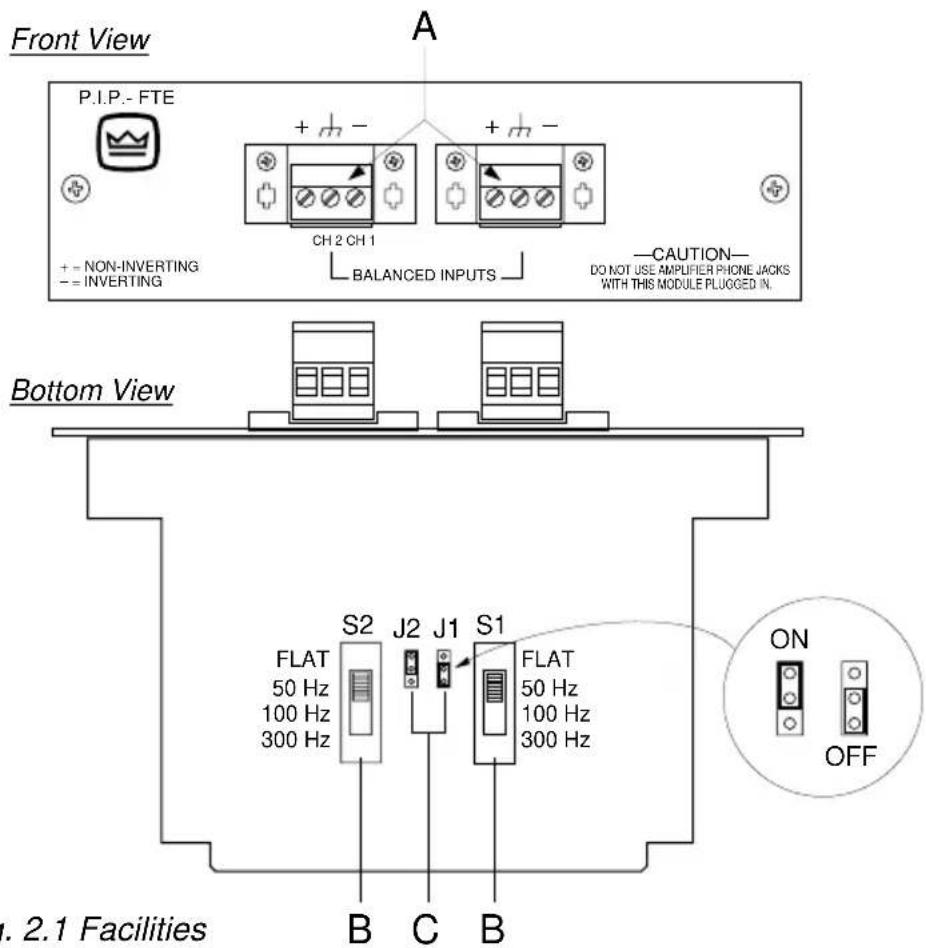
A. Balanced Input
With these special quick-connect barrier-block connectors (Figure 2.1), it's quick and easy to attach each input cable with just three screws. Once the cable is attached, the connector can be quickly unplugged and, if desired, moved to a different amplifier.
B. Subsonic/Bass Switch
A 4-position sliding switch is provided for each channel to control the subsonic/bass filter. This filter is an 18-dB/octave (3rd order) Butterworth high-pass filter which
can be selected to attenuate low frequencies below 50 Hz, 100 Hz or 300 Hz. It can also be switched off (Flat). A label on the side of each switch identifies the switch settings.
C. Constant-Directivity Horn Equalization Jumper
A jumper is provided for each channel to enable/disable the constant-directivity horn equalization. The jumper for channel 1 (J1) is shown in the "OFF" position while the jumper for channel 2 (J2) is shown in the "ON" position. The constant directivity horn equalization is a 6-dB/octave shelving network with a 3 dB rise at 3.2 kHz and a peak boost of 12.5 dB at 24 kHz.
3 Installation
Before installing this P.I.P. module, you'll want to configure it to best serve your needs.
Note: The RFI filter is always on and cannot be switched off.
-
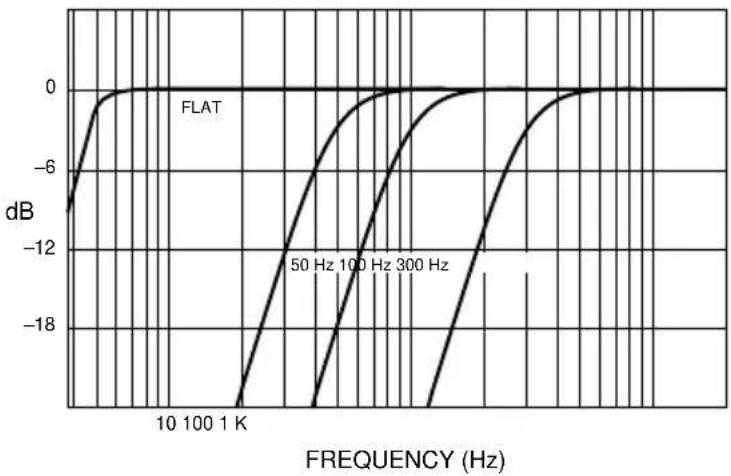
Adjust the constant-directivity equalization jumper of each channel to be either "ON" or "OFF" (see Figure 2.1). Figure 4.1 shows the frequency response through the P.I.P.-FTE when this filter is on.
-
Select the desired position for the Subsonic/Bass filter switch for each channel. Pushing the switch all the way forward toward the front of the module switches the filter off ("Flat"). A label is affixed to the inside of the switch to show what the positions do. Figure 4.2 shows the frequency response through the P.I.P.-FTE when this filter is set in each of its four modes (Flat, 50 Hz, 100 Hz and 300 Hz).
Now you are ready to install the P.I.P. in the amplifier.
Fig. 3.1 Constant-Directivity Horn Equalization (with RFI filter)

Fig. 3.2 Subsonic/Bass Filter Settings
3.1 Installation Procedures
You may need a phillips screw-driver to remove the existing P.I.P. module or panel from your amplifier.
CAUTION: Before connecting this or any P.I.P. to your amplifier, it is important to turn its level controls down, turn it off and remove the AC power. Don't touch the circuitry. Even though the amplifier is off, there could still be enough energy remaining to cause electric shock.
-
Turn down the level controls (full counterclockwise), turn off the amplifier and unplug it from the AC power source.
-
Remove the existing P.I.P. module or panel (two screws). For PIP2 amplifiers, this may involve disconnecting the P.I.P. from a PIP2 input adapter (see Figures 3.4 and 3.5). If a PIP2
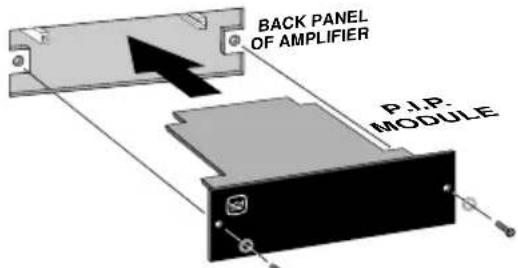
Fig. 3.3 Installation into a Standard P.I.P. Amplifier

Fig.3.4 PIP2 Input Adapter Connection
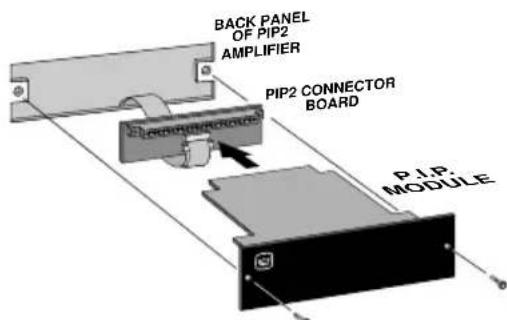
Fig. 3.5 Installation into a PIP2 Amplifier
input adapter is already present, do not remove the ribbon cables from the adapter. Otherwise you will have to reconnect them in the next step.
- Standard P.I.P. Amplifiers: Align the edges of the P.I.P.-FTE in the P.I.P. card rails and firmly push the unit in until it is seated against the mounting bracket (see Figure 3.3).
PIP2 Amplifiers: (Requires a PIP2 input adaptor. Crown part number Q43528-1.) Connect the PIP2 input adapter to the two input cables of the amplifier (see Figure 3.4). Notice that the PIP2 input adapter should be positioned with the P.I.P. edge connector on top and facing away from the amplifier. The 20 pin cable (A) is connected first then the 18 pin cable (B) is connected. Both ribbon cables should extend below the PIP2 input adapter.
Next, insert the edge connector of the P.I.P.-FTE into the PIP2 input adapter (see Figure 3.5) and insert the assembly into the P.I.P. opening in the back of the amplifier.
-
Secure the P.I.P.-FTE with the two screws and lock washers provided. (The lock washers are important because they bond the P.I.P. to the chassis ground of the amplifier.)
-
Connect input and output wiring.
- Plug in the amplifier and turn it on. Adjust its level controls to a desired setting.
Do not tamper with the circuitry. Circuit changes made by unauthorized personnel, or unauthorized circuit modifications are not allowed.
Remember: Crown is not liable for any damage resulting from overdriving other components in your sound system.
Figure 3.6 shows how to wire a balanced and unbalanced source or daisy-chain output to the barrier block connectors.
Important: If the amplifier is used in either Bridged-Mono or Parallel-Mono mode, you must turn the Ch. 2 amplifier level control off (fully counterclockwise). The input and level control of Ch. 2 are not defeated in mono mode so any signal applied to Ch. 2 will beat against the signal in Ch. 1.
Refer to the amplifier Reference Manual for more information about Bridged-Mono or Parallel-Mono modes of operation.
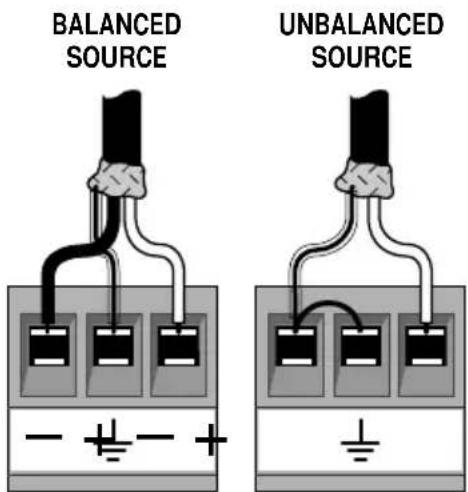
Fig. 3.6 Audio Wiring
4 Specifications
Signal to Noise: Better than -85 dB (equivalent input noise) 20 Hz to 20 kHz.
Common Mode Rejection: Better than 60 dB at 1 kHz.
Crosstalk:Cr88stBllat 1 kHz.
Input Impedance: Nominally 20 kohm.
Recommended Source Impedance: 10 kohm or less.
Maximum Input Level: +20 dB at 1 kHz.
Nominal Gain: Unity.
Frequency Response: ±1 dB from 20 Hz to 20 kHz with filters
set flat and horn equalization off. High-pass (subsonic/bass) filter has selectable -3 dB roll-off points of 50, 100 or 300 Hz (see Figure 4.2). Constant-directivity horn equalization network has 3 dB rise at 3.2 kHz with 12.5 dB peak at 24 kHz (see Figure 4.1). Both these filters can be switched off if desired.
A permanent RFI filter with a -3 dB roll-off at 33 kHz also affects the response.
Dimensions: 63/8 × 17/8 × 37/8 in. (16.2 x 4.8 x 9.8 cm).
Weight: 11 ounces (312 grams).
Note: All specifications referenced to a 0.775 V input signal.
Notes
5 Schematic
Electronic image for this figure were not included due to quality considerations. Please refer to the printed documentation.
Electronic image for this figure were not included due to quality considerations. Please refer to the printed documentation.
For Technical Support contact:
Crown Audio Division Technical Support Group
Plant 2 SW, 1718 W. Mishawaka Rd., Elkhart, Indiana 46517 U.S.A.
Phone: 800-342-6939 (North America, Puerto Rico and Virgin Islands) or 219-294-8200
Fax: 219-294-8301 Fax Back (North America only): 800-294-4094 or 219-293-9200
Fax Back (International): 219-294-8100
Internet: http://www.crownaudio.com
Brand : CROWN
Model : P.I.P.-FTE
Category : Audio module