
UV232A-S - AV Transceiver Hall Research - Free user manual and instructions
Find the device manual for free UV232A-S Hall Research in PDF.


| Product Type | VGA-Audio-RS232 Extender (Transmitter and Receiver) |
| Model | UV232A-S (Sender unit) |
| Video Support | Analog VGA (RGBHV), YPbPr, RGB with sync-on-green |
| Max Resolution | WUXGA (1920x1200 @ 60Hz) and 1080p |
| Video Bandwidth | 20 Hz to 450 MHz |
| Audio Support | Line-level stereo (L+R mixed) via mini-stereo jack (UV232A only) |
| RS-232 | Unidirectional (from Sender to Receiver) up to 115 kbps |
| Transmission Media | Single Cat5/5e/6 UTP or STP cable |
| Max Distance | Up to 500 ft (152 m) depending on resolution and cable quality |
| Power Source | 6V DC, center-positive; Sender: 200 mA, Receiver: 160 mA |
| Power Supply | Included AC adapters (two); Sender can also be powered from VGA source (pin 9, +5V) |
| EDID Emulation | DDC compliant on Sender |
| Enclosure | Aluminum, compact metal |
| Dimensions (each unit) | 1.25 in H x 2.75 in W x 3.08 in D (plus mounting ears: +0.40 in each side) |
| Weight | Approximately 0.5 lb (estimated) |
| Operating Temperature | 32 to 122 °F (0 to 50 °C) |
| Storage Temperature | -40 to 185 °F (-40 to 85 °C) |
| MTBF | 100,000 hours (calculated estimate) |
| Included Accessories | VGA cable, RS-232 DB9 cable, power adapters (2), mounting hardware |
| Compliance | FCC Class A, CE (implied) |
| Country of Origin | Made in USA |
| Cleaning | Wipe with dry cloth; do not use liquids |
| Repairability | No user-serviceable parts; contact Hall Research for RMA |
Frequently Asked Questions - UV232A-S Hall Research
User questions about UV232A-S Hall Research
0 question about this device. Answer the ones you know or ask your own.
Ask a new question about this device
Download the instructions for your AV Transceiver in PDF format for free! Find your manual UV232A-S - Hall Research and take your electronic device back in hand. On this page are published all the documents necessary for the use of your device. UV232A-S by Hall Research.
USER MANUAL UV232A-S Hall Research

UV-232A

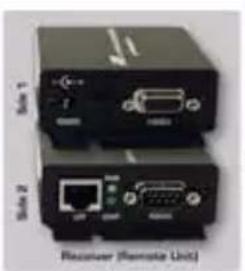
UV-232B
UMA1159 Rev. E
TRADEMARKS USED IN THIS MANUAL
Hall Research, HR, and its HR logo are trademarks of Hall Research. Any other trademarks mentioned in this manual are acknowledged to be the property of the trademark owners.
FEDERAL COMMUNICATIONS COMMISSION
RADIO FREQUENCY INTERFERENCE STATEMENT
This equipment generates, uses, and can radiate radio frequency energy and if not installed and used properly, that is, in strict accordance with the manufacturer's instructions, may cause interference to radio communication. It has been designed to comply with the limits for a Class A computing device in accordance with the specifications in Subpart B of Part 15 of FCC rules, which are designed to provide reasonable protection against such interference when the equipment is operated in a commercial environment. Operation of this equipment in a residential area is likely to cause interference, in which case the user at there own expense will be required to take whatever measures may be necessary to correct the interference. Changes or modifications not expressly approved by the party responsible for compliance could void the user's authority to operate the equipment. This digital apparatus does not exceed the Class A limits for radio noise emission from digital apparatus set out in the Radio Interference Regulation of the Canadian Department of Communications.

VGA – AUDIO – RS232 EXTENDERS
Contents
- Introduction...... 2
1.1 General....2
1.2 Features.... 3
- Installation .... 3
2.1 Connecting the UV232A / B...... 3
- Configuration and Operation 5
3.1 Adjusting the video quality for long cable runs..... 5
3.2 UTP Cable Recommendations...... 6
- Troubleshooting 7
4.1 Contacting Hall Research 7
4.2 Shipping and Packaging 7
- Specifications....8
1. Introduction
1.1 General
Hall Research's Model UV232A and UV232B kits are members of HR's powerful video product line. The model UV232A kit extends VGA/HD video, audio (L+R Mixed), and unidirectional RS-232 over a single Cat5 cable, while the model UV232B kit extends VGA/HD video and bi-directional RS-232.
![graph TD A["PC VGA Source or HD analog YPbPr"] -->|Video In| B["Image with icons"] B --> C["Serial RS-232"] C -->|Up to 500 ft of single UTP| D["Image with icons"] D -->|Video Out| E["Image with icons"] E --> F["Serial RS-232"] F -->|Serial RS-232| G["Monitor with projection"]](/content/2026/06/1222918/images/33eb68eab7d936495150c10244878506e1406dca20fcbb02e8091f212d14dcd7.jpg)
Figure 1 – UV232B Block Diagram
1.2 Features
☐ Sends PC or HD video, audio (L+R mixed), and unidirectional RS-232 over single Catx (Model UV232A)
☐ Sends PC or HD video and bi-directional RS-232 over single Catx (Model UV232B)
☐ Wide bandwidth to transmit WUXGA signals (1920x1200 / 60hz) or HD Analog Component (1080p)
☐ Compensation for UTP cable to 500 ft.
☐ No power supply required for local unit – powered from VGA source
☐ DDC compliant EDID emulation on the Sender
□ Supports all baud rates to 115Kbps
☐ Perfect for touch-screen (UV232B), Kiosk, or Projector Control applications.
☐ RS-232 and high quality VGA input cables provided
☐ Compact metal enclosure with mounting provisions
☐ Compact, Rugged, Reliable, and Economical
Made in USA
2. Installation
2.1 Connecting the UV232A / B

VGA – AUDIO – RS232 EXTENDERS
- Connect video source to Sender unit using supplied VGA cable. Connect the RS-232 serial using supplied straight-through DB9 male/female cable. Connect line-level audio to mini-stereo jack (UV232A only).
Note: The Sender unit receives power from the VGA source per VESA standard (+5v on pin 9). If the source is not VESA compliant in that regard, or if the video is YPbPr (using a 3 RCA to HD15 input cable), then a power supply would be needed at both ends. Two power supplies are included for this purpose.
-
Connect the Sender's RJ45 port to the Receiver unit using straight-through UTP or STP cable directly to the receiver. IMPORTANT: You cannot connect the Cat5 cable to any other manufacturer's device or network equipment.
-
Connect the Receiver to the display device, and use a straight-through RS-232 cable to connect the receiver to the remote serial device (e.g. touch-screen (UV232B), projector, etc). Connect audio output to powered speakers (UV232A only).
CAUTION
Maximum Recommended Cable Lengths Table 3.1
Before applying power to the remote unit, verify that the AC line is properly wired and that a protective ground (green) wire is established with NO potential difference between both the sender and receiver locations. The extender can tolerate up to 5v peak-to-peak ground potential between the two locations. Failure to ensure good grounding can result in erratic operation and possible shock hazards or damage to your equipment.
- Power receiver using included power supply; check green Power LED on sender to verify it is receiving power from VGA source. Using a small screwdriver; turn the compensation potentiometer CW for more compensation or CCW for less, until the image is perfectly clear.
3. Configuration and Operation
3.1 Adjusting the video quality for long cable runs
The video quality at the remote station depends on: (1) the length of the CAT5 cable, (2) video resolution setting, (3) refresh rate setting and the model of the receiver.
In general, at low and mid resolutions, excellent image reproduction is provided at up to 500 feet. At high resolution and refresh rates perfect image reproduction can be achieved at shorter distances (see table below). Using longer cables or higher resolution rates will still produce an image, but the reproduction quality will be reduced.
Maximum Recommended Cable Lengths
Table 3.1
| Refresh Rate | ||||
| 60 Hz | 75 Hz | 85 Hz | ||
| Resolution | 800x600 500 ft 500 ft 500 ft | |||
| 1024x768 500 ft 450 ft 400 ft | ||||
| 1280x1024 400 ft 350 ft 300 ft | ||||
| 1600x1200 300 ft 300 ft 300 ft | ||||
3.2 UTP Cable Recommendations

![graph TD A["RED"] --> B["GREEN"] B --> C["BLUE"]](/content/2026/06/1222918/images/6f821f39e20d8ac163d66c5e7a127900fbd283f7c578d88542cf60da39b22304.jpg)
Figure 3.2
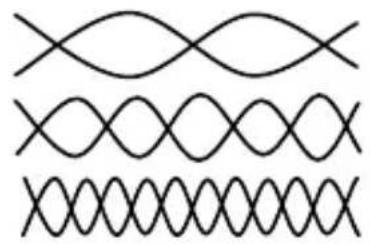
UTP cables have 4 twisted pairs inside. The video transmission over UTP uses 3 individual pairs for each color (Red, Green, & Blue). As shown in figure 3.2 above, a characteristic of Category-5/5e/6 cable is that the pairs of wires are twisted at different rates. Therefore, for a given length of Cat-5 cable the total length of a particular pair could be longer than others. Since the signals travel in the cable at a fixed speed, the arrival times of signals can be skewed in a long cable (those that have to travel farther arrive later and the corresponding color shifts to the right).
This is seen on the monitor as separation, or lack of convergence in colors. For example a vertical white line on the screen may look to have a red tinge on the left edge and blue tinge on the right edge.
This effect gets worse at high resolutions, high refresh rates, long cables (in excess of 200 feet), and depends on the cable construction itself. Hall Research highly recommends the use of UTP cables specifically constructed for video transmission. In these cables the all the twisted pairs are the same length. They are available from several sources including Hall Research (part numbers shown below).
Zero-Skew CAT5 Cable for use with Hall Research CAT5 Products
| PART NUMBER |
| CUTP-Z-1000-BLK 1000 ft.Zero-Skew CAT5 cable. Bulk spool of 1000 ft |
| CUTP-ZP-1000-BLK 1000 ft.Zero-Skew CAT5 cable. Bulk spool of 1000 ft Plenum Rated |
If you are going to use commercial grade UTP cable, then we recommend using Cat5 or Cat5e rather than Cat6, since the twist ratio match is better in Cat5 cable.
4. Troubleshooting
Most common problems are caused by the following:
- Confusing the Sender and the Receiver
- Using a Cat5 cable that is too long, not straight through, or not terminated properly
- Not connecting the power supply, or it is not powered
- Display device does not support the resolution that is being sent (in which case you should check operation without the extender first)
4.1 Contacting Hall Research
If you determine that your extender is malfunctioning, do not attempt to repair the unit. There are no user serviceable parts inside the unit. Opening the unit will void the warranty. Contact HR's Tech. Support at 714-641-6607 to obtain an RMA (Return Authorization) number.
Before you do, make a record of the history of the problem. We will be able to provide more efficient and accurate assistance if you have a complete description.
4.2 Shipping and Packaging
If you need to transport or ship your device:
- Package it carefully. We recommend that you use the original container if possible.
- Before you ship the units back to Hall Research for repair or return, contact us to get a Return Authorization (RMA) number.
VGA – AUDIO – RS232 EXTENDERS
5. Specifications
Standards Analog VGA Video (RGBHV), YPbPr, or RGB signals with sync-on-green.
Resolutions All up to WUXGA (1920x1200 / 60Hz), 1080p
Video Level 0.7 v p-p on RGB, 5v p-p H/V sync
Bandwidth 20 Hz to 450 MHz
Common Mode
Noise Rejection 100 dB @ 60 Hz, 70 dB @ 1 MHz, 50 db @ 10 MHz
Max Distance Up to 500 ft. (152 meters) - See table 3.1 for details
Temperature Operating: 32 to 122 Deg F (0 to 50 Deg C); Storage: -40 to +185 Deg F (-40 to +85 Deg C)
Enclosure Aluminum
MTBF 100,000 hours (calculated estimate)
Power Via the included power adapters. Voltage: 6v DC
Center-Positive. Average Power Consumption: 200mA (Sender) 160mA (Receiver)
Size (H x W x D) 1.25" H x 2.75" W x 3.08" D* Each Device
*Units have 2 mounting ears that protrude 0.40" beyond the main box on each side.
RS232 Connections

DB9F - RECEIVER

SENDER - DB9M
HR HALL RESEARCH
© Copyright 2009. Hall Research All rights reserved.
1163 Warner Ave., Tustin, CA 92780 Ph: (714)641-6607, Fax: (714)641-6698
- TRADEMARKS USED IN THIS MANUAL
- FEDERAL COMMUNICATIONS COMMISSION
- RADIO FREQUENCY INTERFERENCE STATEMENT
- VGA – AUDIO – RS232 EXTENDERS
- CONTENTS
- INTRODUCTION
- 1.1 GENERAL
- 1.2 FEATURES
- INSTALLATION
- 2.1 CONNECTING THE UV232A / B
- CAUTION
- MAXIMUM RECOMMENDED CABLE LENGTHS TABLE 3.1
- CONFIGURATION AND OPERATION
- 3.1 ADJUSTING THE VIDEO QUALITY FOR LONG CABLE RUNS
- 3.2 UTP CABLE RECOMMENDATIONS
- TROUBLESHOOTING
- 4.1 CONTACTING HALL RESEARCH
- 4.2 SHIPPING AND PACKAGING
- SPECIFICATIONS
- COMMON MODE
- HR HALL RESEARCH
Brand : Hall Research
Model : UV232A-S
Category : AV Transceiver