
UVA-WP - AV Transmitter Hall Research - Free user manual and instructions
Find the device manual for free UVA-WP Hall Research in PDF.


| Product Type | VGA and Audio over UTP Transmitter Wallplate |
| Supported Video Types | VGA through UXGA, RGBS, RGB; also Composite Video (CV), S-Video (Y/C), Component Video (Y, Pb, Pr) with adapter |
| Maximum Resolution | 1920 x 1440 (PC VGA) or 1080p (HD YPbPr) |
| Refresh Rates | Up to 85 Hz |
| Bandwidth | Video: DC to 250 MHz; Audio: 20 Hz to 10 kHz |
| Video Level | 0.7 volts peak-to-peak |
| Audio Transmission | Line-level mono with simulated stereo output |
| Maximum Distance | Up to 1000 ft (305 m) over Cat5/6 |
| Cable Type | Cat5/5e/6 UTP (EIA/TIA 568B straight-through wiring) |
| Connectors | HD15 (VGA) input, 3.5mm audio input, RJ45 output, 2-position screw terminal for power |
| Power Supply | Self-powered from VESA-compliant VGA source (pin 9) or external 6-9V DC adapter (included) |
| Power Consumption | Approximately 0.1 A |
| Compliance | CE; FCC Part 15 Subpart B Class A, IC Class |
| Operating Temperature | 32 to 122°F (0 to 50°C) |
| Storage Temperature | -40 to +185°F (-40 to +85°C) |
| Humidity | Up to 95% non-condensing |
| Dimensions (W x L x D) | 2.75 x 4.5 x 1 inches (single-gang wallplate) |
| Weight | 0.5 lb (225 g) |
| MTBF | 100,000 hours (calculated estimate) |
| Installation | Single-gang wall box (retrofit box included for -E/-U models) |
| Spare Parts / Repairability | No user-serviceable parts; contact Hall Research for RMA |
| Maintenance | Keep dry and clean; avoid exposure to extreme temperatures |
| Package Contents | Wallplate with attached circuit board, VGA and audio cables (6 ft), power supply, 2.5mm jack, (and retrofit switchbox for -E/-U) |
| Compatible Receiver | Model URA or other compatible receiver (sold separately) |
Frequently Asked Questions - UVA-WP Hall Research
User questions about UVA-WP Hall Research
0 question about this device. Answer the ones you know or ask your own.
Ask a new question about this device
Download the instructions for your AV Transmitter in PDF format for free! Find your manual UVA-WP - Hall Research and take your electronic device back in hand. On this page are published all the documents necessary for the use of your device. UVA-WP by Hall Research.
USER MANUAL UVA-WP Hall Research
VGA and Audio over UTP (Cat5/5e/6) Transmitter Wallplate
natural_image
Electronic device with circuit board and audio in front, no visible text or symbols on the main components.TRADEMARKS USED IN THIS MANUAL
Hall Research, HR, and its logo are trademarks of Hall Research, Inc. Any other trademarks mentioned in this manual are acknowledged to be the property of the trademark owners.
FCC & CANADIAN DEPARTMENT OF COMMUNICATIONS
RADIO FREQUENCY INTERFERENCE STATEMENTS
This equipment generates, uses, and can radiate radio frequency energy and if not installed and used properly, that is, in strict accordance with the manufacturer's instructions, may cause interference to radio communication. It has been designed and found to comply with the limits for a Class A computing device in accordance with the specifications in Subpart B of Part 15 of FCC rules, which are intended to provide reasonable protection against such interference when the equipment is operated in a commercial environment. Operation of this equipment in a residential area is likely to cause interference, in which case the user; at their own expense will be required to take whatever measures may be necessary to correct the interference.
This digital apparatus does not exceed the Class A limits for radio noise emission from digital apparatus set out in the Radio Interference Regulation of the Canadian Department of Communications.
EUROPEAN UNION DECLARATION OF CONFORMITY
This product has been tested and shown to comply with the requirements of the European EMC directive 89/336/EEC

Contents
1. Introduction...... 3
1.1 General....3
1.2 Features 4
2. Installation 4
2.1 Package Contents 4
2.2 Installation into a Wall, Desk or Podium 5
2.3 Connecting the Power Supply 6
2.4 Connecting the Transmitter to the Receiver....8
2.5 Adjusting Cable Length Compensation 9
3. Operation 11
3.1 UTP Cable Recommendations 11
4. Troubleshooting 13
4.1 Problem Solving FAQ.... 13
4.2 Calling Hall Research.... 14
4.3 Shipping and Packaging.... 14
5. Specifications.... 15
1. Introduction
1.1 General
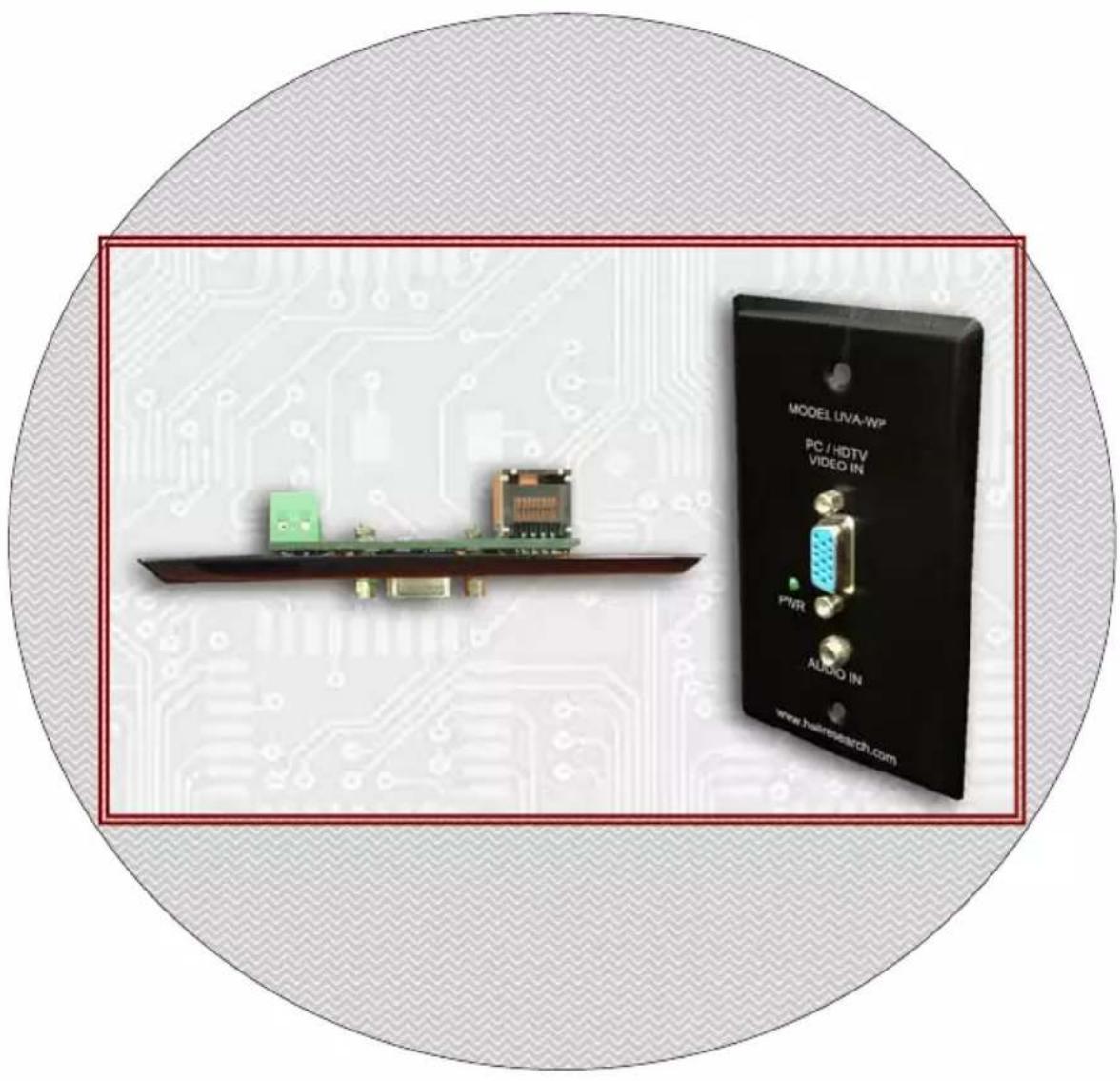
The Model UVA-WP is a single-gang wall plate that can transmit PC VGA video or HD analog component video (YPbPr) with audio up to 1,000 feet over a single Cat5/6/6e twisted pair cable.
In most installations for PC video extension, the unit does not require connection of a power supply (it will draw power from PC video source through HD15 connector with a VESA compliant VGA cable). This, together with its shallow depth, makes installations a snap. For convenience the rear of the unit features a standard RJ45 connector.
In instances where the input video is YPbPr (requires a 3 RCA to HD15 adapter cable), or if your PC does not provide power on its pin 9 of HD15 connector (as required by VESA standard), then a power supply will need to be connected to the UVA-WP.
Next to the RJ45 connector on rear of the unit is a 2-position screw terminal for connection of a power supply if your installation requires it. The package includes a 6v DC power supply that you can use to attach to the unit if needed.
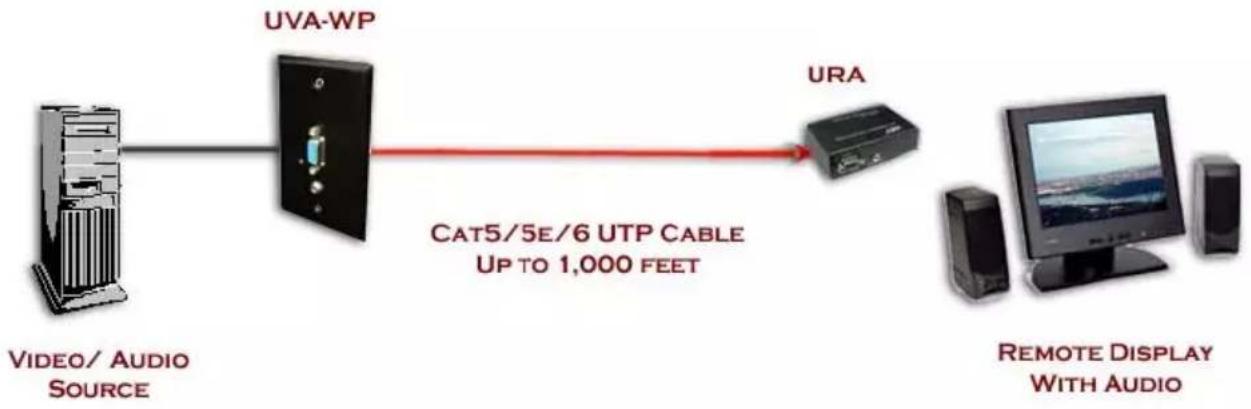
At the other end of the Cat5 cable, to convert the signal back to VGA and Audio, you need a compatible receiver such as a Model URA receiver. The remote receiver is not included and must be purchased separately.
1.2 Features
- Handles resolutions up to 1080p (HD YPbPr) or 1920x1440 (PC VGA) at any refresh rate
- Rugged, Reliable, Compact size fits in tight spaces
- No power supply needed for most installations
- Drive standard CAT5 cables to 1000 feet
- Transmit audio and video signals on one cable
- Standard EDID video resolutions pre-programmed
2. Installation
2.1 Package Contents
The Model UVA-WP comes with the following items
• Wallplate with attached circuit board
- male-male VGA and 3.5mm Audio input cables (approx. 6 ft long)
- A power supply
- For North America: a 110 VAC input, 6v, 300 ma output adapter
- For Europe or Australia (parts with -E or -U): a Universal input, with 6v output power supply
- A 2.5mm loose jack (can be used to attach the power supply to the unit
- For Europe or Australia (parts with -E or -U): A retrofit, single gang High Impact PVC electrical box with clamps (Hall Research Part Number 920-WB-B114R-UPC)
2.2 Installation into a Wall, Desk or Podium
- If you will be using a PC or notebook, test the transmitter and receiver with a short Cat5 cable to ensure there is enough power from your Video source to power up the transmitter. In that case you may decide to not hook-up a power supply. However, Hall Research Technologies recommends that you hook up a power supply to the transmitter, so that if a source with no power is encountered, you will still be able to transmit the signal.
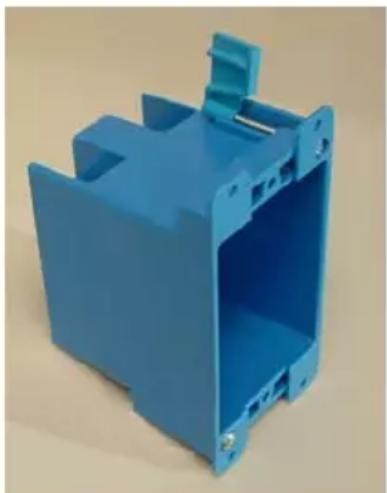
- For new construction, you need a single gang switchbox of any depth (since the unit is shallow).
For retrofit, or in countries where the size of single gang box is not the same as the unit, you need to install a switchbox in to the wall or podium. -E or -U units are shipped with such a box, or you can order one from Hall Research (920-WB-B114R-UPC) or get one from your local hardware store. Check your local electrical codes to ensure compliance.
natural_image
Blue plastic enclosure with internal structure and mounting bracket (no text or symbols visible)Single-gang Retrofit Switchbox
2.3 Connecting the Power Supply
- There is a 2-position screw terminal on the back of the unit. You need to connect a 6 volt (could be 6 to 9v DC) power supply into these terminals.
- In your package there is either of the following 2 power supplies.

There is also a 2.5 mm Jack included in the package so that you don't have to cut the connector at the end of the supply.
- If you decide to cut the connector at the end of the supply, then you have to connect it to the screw terminals. The power supply cable has 2 conductors, the + terminal usually has a white line or white writing on it. That goes into the + terminal as noted on the printed circuit board of the UVA-WP. Verify this with a voltmeter before powering the circuit.
- If you do not want to cut off the connector on the end of the power supply, then use the enclosed jack and solder a pair of wires to it to extend it and connect those wires to the UVA-WP.
- Using the supplied 2.5mm jack also gives you the ability to place the power supply outside of the wall. You can use a

separate single gang plate and install the supplied jack on it and wire it to the terminals on the back of the UVA-WP.
Electrical Safety Note
Since the DC supply to the unit is only 6 volts with minimal current requirements, the product qualifies as a Class 2 low-voltage device, and you are not required to run the DC cables in a conduit. However if you will be installing the power supply in the wall or ceiling, since it has to plug in to AC, you need an electrical junction box for it, and the AC line that brings high-voltage to the junction-box should follow the electrical code for your specific installation. Always check your local electrical codes to ensure compliance.
2.4 Connecting the Transmitter to the Receiver
The UTP RJ45 wiring follows the standard EIA/TIA568B (shown below)
NOTICE
Do not connect this unit to any LAN device such as network cards or hubs as this may damage the UVA/URA and/or the LAN device. Use EIA/TIA 568B standard straight-through patch wiring as shown below. Do not use crossover cables.
| EIA/TIA 568B WIRING STANDARD | |
| PIN Wire Color | |
| 1 White w/ Orange Stripe2 Orange3 White w/Green Stripe4 Blue5 White w/Blue Stripe6 Green7 White w/Brown Stripe8 Brown |  |
We recommend that you use zero-skew Cat5 cable to minimize color skew particularly if the length of the cable is over 200 feet. See section 3.1 UTP Cable Recommendations for more information
Wallplate VGA and Audio on UTP Transmitter
flowchart
graph LR
    A["VIDEO/ AUDIO SOURCE"] --> B["UVA-WP"]
    B --> C["UMA"]
    C --> D["REMOTE DISPLAY WITH AUDIO"]
    style A fill:#f9f,stroke:#333
    style B fill:#ccf,stroke:#333
    style C fill:#cfc,stroke:#333
    style D fill:#fcc,stroke:#333
Connect the remote monitor and speakers to the URA or another compatible receiver unit (as shown above) and attach the power supply to the receiver.
CAUTION
Before plugging in the remote monitor, verify that the AC line is properly wired and that a protective ground (green) wire is established with NO potential difference between both the sender and receiver locations. The splitter can tolerate up to 5 vPeak-Peak ground potential between the two locations. Failure to ensure good grounding can result in erratic operation and possible shock hazards or damage to your equipment.
2.5 Adjusting Cable Length Compensation

There is a potentiometer (pot) or pushbuttons on the Model URA receiver depending on the products revision. Turning the pot CW increases the compensation. Use a small screwdriver and starting from fully CCW; slowly turn the pot CW until the image is perfectly clear. Fully CCW corresponds to no compensation (recommended for lengths of 100 ft or less), and fully CW corresponds to 1000 feet. Newer models use pushbuttons to adjust the compensation, follow the directions supplied with that model. Be careful not to over-compensate the video image.
The video quality at the remote station depends on:
(1) The length of the CAT5 cable
(2) The video resolution setting
(3) The video refresh rate setting
In general, at low and mid resolutions, excellent image reproduction is provided at up to 1000 feet. At high resolution and refresh rates perfect image reproduction can be achieved at shorter distances (see table 2.1 below). Using longer cables or higher resolution rates will still produce an image, but the reproduction quality will be reduced.
| Refresh Rate | ||||
| 60 Hz 75 Hz 85 Hz | ||||
| Resolution | 800x600 1000 ft | 1000 ft 1000 ft | ||
| 1024x768 1000 ft | 800 ft 750 ft | |||
| 1280x1024 750 ft | 650 ft 600 ft | |||
| 1600x1200 750 ft | 600 ft 500 ft | |||
| 0x1440 750 ft 750 ft | 500 ft | |||
Table 2.1 Maximum Recommended Cable Lengths
3. Operation
3.1 UTP Cable Recommendations

flowchart
graph LR
    A["Local Video Screen"] --> B["UTP Cable"]
    B --> C["Remote Video Screen"]
    subgraph Local Video Screen
        D["RED"]
        E["GREEN"]
        F["BLUE"]
    end
    subgraph Remote Video Screen
        G["RED"]
        H["GREEN"]
        I["BLUE"]
    end
UTP cables have 4 twisted pairs inside. The UVA/URA video transmission on UTP uses 3 individual pairs for each color (Red, Green, & Blue). As shown above, a characteristic of Category-5/5e/6 cable is that the pairs of wires are twisted at different rates. Therefore, for a given length of Cat-5 cable the total length of a particular pair could be longer than others. Since the signals travel in the cable at a fixed speed, the arrival times of signals can be skewed in a long cable (those that have to travel farther arrive later and the corresponding color shifts to the right).
This is seen on the monitor as separation, or lack of convergence in colors. For example a vertical white line on the screen may look to have a red tinge on the left edge and blue tinge on the right edge.
This effect gets worse at high resolutions, high refresh rates, long cables (in excess of 200 feet), and depends on the cable construction itself. Hall Research highly recommends the use of UTP cables specifically constructed for video transmission. In these cables all of the twisted pairs are the same length and are available from several sources including Hall Research (part numbers shown below).
Zero-Skew CAT5 Cable for use with Hall Research CAT5 Products
| PART NUMBER |
| CUTP-Z-1000-BLK 1000 ft.Zero-Skew CAT5 cable. Bulk spool of 1000 ft |
| CUTP-ZP-1000-BLK 1000 ft.Zero-Skew CAT5 cable. Bulk spool of 1000 ft Plenum Rated |
If for some reason you are unable to use zero-skew Cat5 cable and have a long cable run, and will be displaying high-resolution PC image (such as a spread-sheet with small fonts), then you may need to purchase an Model SKU-RGB skew corrector or a Model URA-SKU which will re-align the RGB components of the video signal at the remote (or local) end.

natural_image
Black electronic device with ports and indicator lights (no visible text or symbols)Model SKU-RGB

natural_image
Two black electronic devices with visible ports and connectors, no readable text or symbols on the devices themselves.Model URA-SKU
4. Troubleshooting
4.1 Problem Solving FAQ
1. Fuzzy, blurry, or ghosting image at remote location
If you have a stable image but it looks somewhat blurry (edges are not sharp), make sure that you have adjusted the receiver unit's compensation pot correctly. Also check table 2.1 to see that you have not exceeded the maximum recommended cable length. If you still have a fuzzy image, try reducing the refresh rate and/or resolution of the PC.
You can point your browser to
http://www.hallresearch.com/files/articles/skew_adjust.gif for an image that allows you to adjust the compensation and also evaluate the amount of color skew in your setup.
2. Image exhibits steady or rolling horizontal color "hum" bars
This is usually an indication of improper grounding either at the sending end, the receiving end, or both. Verify that the AC line is properly wired and that a protective ground (green) wire is established with NO potential difference between both the sender and receiver locations. The UTP splitter can handle up to 5 v peak-to-peak of ground noise between the two locations, but no more.
3. Shaking image or periodically blanking monitor
Inherently, balanced signal transmission over twisted pair offers good immunity to EMI coupled noise from other external sources. However, a strong electromagnetic noise field can cause instability in the signal.
Usual sources are high power AC lines or data and/or control cables that run adjacent to and parallel with a substantial length of the CAT5 cable. To eliminate this, either place a distance between the CAT5 cables from the splitter and the interfering source, or use shielded twisted pair (STP) CAT5 cables.
4. Poor audio quality at the receiving end
Only use powered speakers with the receiver. It is also good practice to set the audio level (volume) output of the PC about 1/2 to 2/3 from the maximum and use the volume knob of the speakers to adjust the volume to the desired level. A low volume signal output from the PC reduces the signal-to-noise (S/N) ratio, whereas too high output amplitude can cause saturation and clipping to occur.
4.2 Calling Hall Research
If you determine that your sender is malfunctioning, do not attempt to repair the unit. The unit contains no user serviceable parts. Opening the unit without written authorization from Hall Research will void the warranty.
Contact the Hall Research technical support department at 714-641-6607. Before you do, make a record of the history of the problem. We will be able to provide more efficient and accurate assistance if you have a complete description, including:
• Nature and duration of the problem.
- Components involved in the problem – that is, what type of cable, makes and models of computers and monitors, etc.
- Results of any testing you've already done.
4.3 Shipping and Packaging
If you need to transport or ship your wallplate, package it carefully (we recommend that you use the original container), and before you ship the unit back to Hall Research for repair or return, contact us to get a Return Material Authorization (RMA) number.
5. Specifications
Supported
Video Types VGA through UXGA, RGBS, or RGB
Can also transmit Composite Video (CV), S-Video (Y/C), and
Component Video (Y, Pb, Pr) on pins 1, 2, and 3 of the HD15 VGA
connector (adaptor cable will be needed)
Resolutions &
Refresh Rates Up to 1920 x 1440 non-interlaced at up to 85 Hz. Or YPbPr up to 1080p
Bandwidth Video: DC to 250 MHz, Audio: 20 Hz to 10 KHz
Video Level 0.7 volts peak-to-peak
Audio
Transmission Line-level mono-with simulated stereo output
Maximum
Distance Up to 1000 ft. (305 meters) – See table 2.1 for details
Compliance CE; FCC Part 15 Subpart B Class A, IC Class
Maximum
Altitude 10,000 ft. (3048 m)
Temperature
Tolerance Operating: 32 to 122°F (0 to 50°C);
Storage: -40 to +185°F (-40 to +85°C)
Humidity Up to 95% non-condensing
MTBF 100,000 hours (calculated estimate)
Power Self powered form Standard VGA VESA compliant output, or from utility-power (mains) outlet, through included external power adapters. Output Voltage: 6 DC Current requirement is approximately 0.1 A
Size & Weight 2.75" W X 4.5" L X 1" D - 0.5 Lb
HR HALL RESEARCH

Designed and Made in the USA


- VGA and Audio over UTP (Cat5/5e/6) Transmitter Wallplate
- TRADEMARKS USED IN THIS MANUAL
- FCC & CANADIAN DEPARTMENT OF COMMUNICATIONS
- RADIO FREQUENCY INTERFERENCE STATEMENTS
- EUROPEAN UNION DECLARATION OF CONFORMITY
- Contents
- Introduction...... 3
- Installation 4
- Operation 11
- Troubleshooting 13
- Specifications.... 15
- Introduction
- General
- Features
- Installation
- Package Contents
- Installation into a Wall, Desk or Podium
- Connecting the Power Supply
- Electrical Safety Note
- Connecting the Transmitter to the Receiver
- NOTICE
- Wallplate VGA and Audio on UTP Transmitter
- CAUTION
- Adjusting Cable Length Compensation
- The video quality at the remote station depends on:
- Operation
- UTP Cable Recommendations
- Troubleshooting
- Problem Solving FAQ
- Fuzzy, blurry, or ghosting image at remote location
- Image exhibits steady or rolling horizontal color "hum" bars
- Shaking image or periodically blanking monitor
- Poor audio quality at the receiving end
- Calling Hall Research
- Shipping and Packaging
- Specifications
- Supported
- Resolutions &
- Audio
- Maximum
- Temperature
- HR HALL RESEARCH
Brand : Hall Research
Model : UVA-WP
Category : AV Transmitter