
PDIGPRDP22 - Musical instrument Pyle - Free user manual and instructions
Find the device manual for free PDIGPRDP22 Pyle in PDF.


| Product Type | Digital Practice Drum Pad |
| Brand | Pyle |
| Model | PDIGPRDP22 |
| Drum Pad Size | 8 inches |
| Overall Drum Dimensions | 9.45 x 10.63 x 1.06 inches |
| Black Bag Dimensions | 22.83 x 11.42 x 2.95 inches |
| Tripod Stand Folded Dimensions | 20.47 x 4.13 x 3.15 inches |
| Construction Materials | ABS and Rubber |
| Power Supply | 5V AC Adapter via USB Type-C |
| Battery Type | Rechargeable Lithium (charge between -10°C to 60°C) |
| Display | LCD Display |
| Connectivity | Bluetooth for streaming, 3.5mm Headphone Jack |
| Built-in Speaker | Yes |
| Modes | Metronome, Counting, Speed Detection, Total Practice Time |
| Tempo Range | 40 to 208 BPM |
| Included Accessories | Tripod Stand, Pair of Drum Sticks, Travel Bag, USB Cable |
| Recommended Use | Beginner to Professional |
| Cleaning | Wipe with clean, dry cloth; do not use liquid cleaners |
| Safety Warning | Contains Nickel carbonate (California Prop 65) |
| FCC Compliance | Class B digital device |
Frequently Asked Questions - PDIGPRDP22 Pyle
User questions about PDIGPRDP22 Pyle
0 question about this device. Answer the ones you know or ask your own.
Ask a new question about this device
Download the instructions for your Musical instrument in PDF format for free! Find your manual PDIGPRDP22 - Pyle and take your electronic device back in hand. On this page are published all the documents necessary for the use of your device. PDIGPRDP22 by Pyle.
USER MANUAL PDIGPRDP22 Pyle
Digital Practice Drum Pad
8 Inch Rechargeable Drum Pad with LCD Display, Adjustable Folding Tripod Stand, and 1 Pair of Drum Sticks
USER GUIDE
Before you use this Digital Practice Drum Pad, we recommend that you carefully read through this manual.
Please keep the instruction manual for future reference.
FEATURES:
• 8-inch Digital Practice Drum Pad
• Height Adjustable Tripod Stand
• 3.5mm Headphone Jack, TYPE-C Power
- Controls: Beat Button, Up & Down Keys, On/Off, Volume Wheel
- Rechargeable
- Beat and Speed Detection
- LCD Display
- Adjustable Volume at Will
• Lightweight and Adjustable Folding Tripod Stand
- Pairs of Drum Sticks for Drum Practice
- Built-in Speaker
• Collapsible Metal Tripod Stand
• Perfect Learning and Practice Sets
- Popular Oak Drum Sticks
• Environmentally Friendly Rubber
- Portable Digital Drum Practice Pad
- Travel Bag fits All Kit Pieces for Easy Transport
• Used for a Beginner or Professional
WIRELESS BT STREAMING:
- Drum Pad
- Tripod Stand
• One Pair of Drum Sticks
TECHNICAL SPECS:
- Construction Materials: ABS and Rubber
- Tempo Range: 40 to 208bpm
• Power Supply: 5V AC Adapter - Drum Size: 9.45" x 10.63" x 1.06" -inches
- Drum Pad Dimensions: 8" -inches
- Black Bag Dimensions: 22.83" x 11.42" x 2.95"-inches
- Tripod Stand Folded Dimensions: 20.47" x 4.13" x 3.15"-inches
CAUTIONS
Location
Using the device in the following locations can result malfunction.
- Locations of extreme temperature or humidity
- Excessively dusty or dirty locations
- Locations of excessive vibration
- Close to magnetic fields
Power supply
Be sure to turn the power OFF when the unit is not in use. Use only the supplied AC adaptor and the correct voltage. To prolong battery life please cycle charge every three months if not in regular use.
In order to make full use of the performance of the lithium battery, make sure the temperature is between -10 and 60°C when the battery is being charged.
Interference with other electrical devices
Radios and televisions placed near by may experience reception interference. Operate this unit at a suitable distance from radios and televisions.
Handling
To avoid breakage, do not apply excessive force to the switches or display.
Care
If the exterior becomes dirty, wipe it with a clean, dry cloth.
Do no t use liquid cleaners such as benzene or thinner, or cleaning compounds of flammable polishes.
Keeping foreign matter out of your equipment
Never set any container with liquid near this equipment.
If liquid gets into the equipment, it could cause a breakdown, fire, or electrical shock. Be careful not to let metal objects get into the equipment.
PANEL AND FUNCTIONS
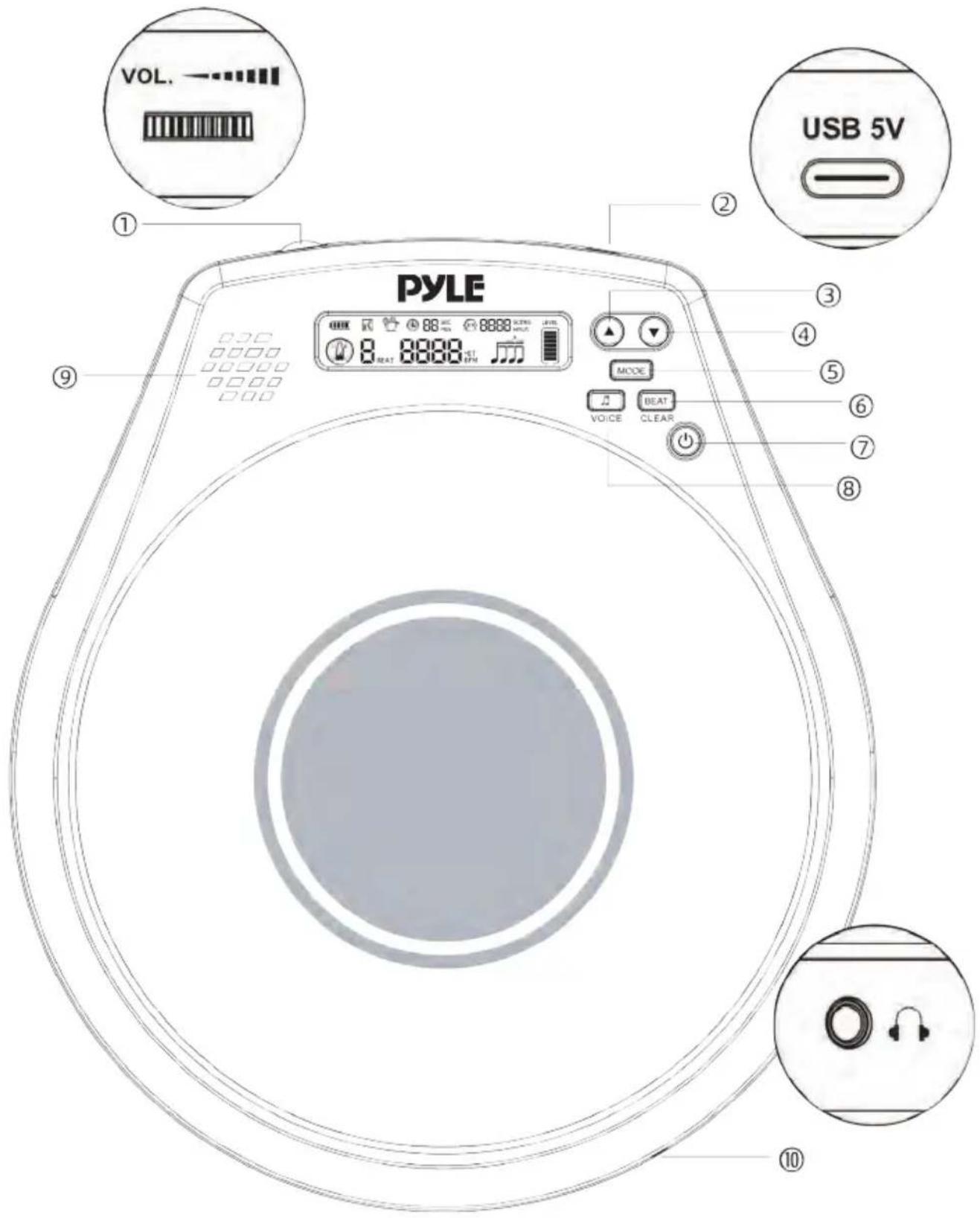
① Volume
⑤ Mode
⑧ Rhythm
② USB Type-C Port
⑥ Beat
⑨ Speaker
③④ Up/Down
⑦ ON/OFF
⑩ Earphone output
HOW TO USE
Press and hold the "⏻" button to turn on/off.
1. Metronome Mode
Open/Pause Metronome
Short press the " 🔊" button
Set Tempo
Short press "▲" "▼" button to change tempo: 40 BPM --208 BPM
Choose Beats
Short press the "BEAT" button to select beats: 0, 1, 2, 3, 4, 5, 6, 7, 8, 9
Choose Rhythm
Short press the "♩" button to select the rhythm: J, J, J, J, J, J, J, J, J
Set Time
Short press "MODE" button to set (10, 20, 30, 40, 50, 60 Mins or unlimited)
Voice
Press and hold the "VOICE" button to start, and press and hold again to switch "Chinese - English - Close the voice".
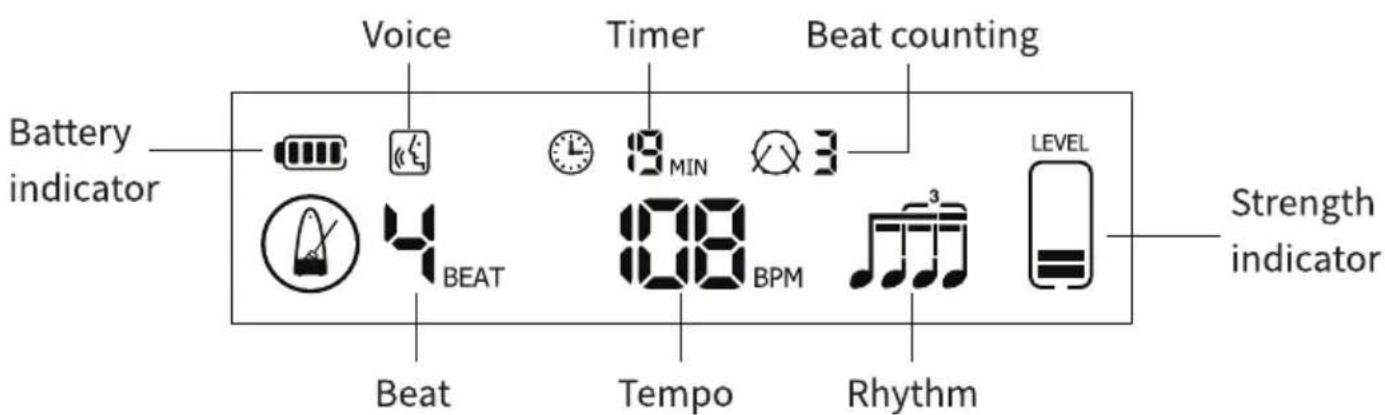
Diagram 1
2. Counting mode
Counting the hits within set time and highest record will be saved.
Press and hold "MODE" button to select counting mode (diagram 2), then short press MODE to choose the counting time (15, 30, 45, 60, 75, 90 seconds or unlimited). Press the "⏻" button to reset.
Restore Defaults: Press and hold the "BEAT" (CLEAR) button until the word "CLr" appears and wait for restore completed.

Diagram 2
Default Chart
| Time | Highest record | Time | Highest record |
| 15 | 100 | 75 | 500 |
| 30 | 200 | 90 | 600 |
| 45 | 300 | Unlimited | —— |
| 60 | 400 | —— | —— |
3. Speed detection mode
The average tempo and total usage time will be displayed under this mode. Press and hold "MODE" button to select Speed detection (diagram 3), then short press "MODE" to choose the counting time (1, 5, 10, 15, 20, 25, 30 Mins or unlimited). Counting begins at your first hit, press the "⏻" button to reset.

Diagram 3
Reminder:
-
If no operation for one minute, the system will enter pause mode automatically, and power off in 5 mins. Mode and settings will be memorized before power off.
-
" Clock □" Indicates no set time.
4. Total practice time
It has a limit capacity of recording time for maximum 10,000 hours, and reset when up to 10,000 hours every time.
The total usage time includes the time that you use metronome mode, counting mode and speed detection mode.
The total practice time is not allowed to delete or modified manually.
5. Strength level indicator of pad hits
According to the different position and strength that you hit, it will display the current strength value, which is useful for training strength.
RECHARGE
Connect USB Type-C charging cable and use 5V=--2A charging plug for charging, will blink when charging, stop blinking when full charged.
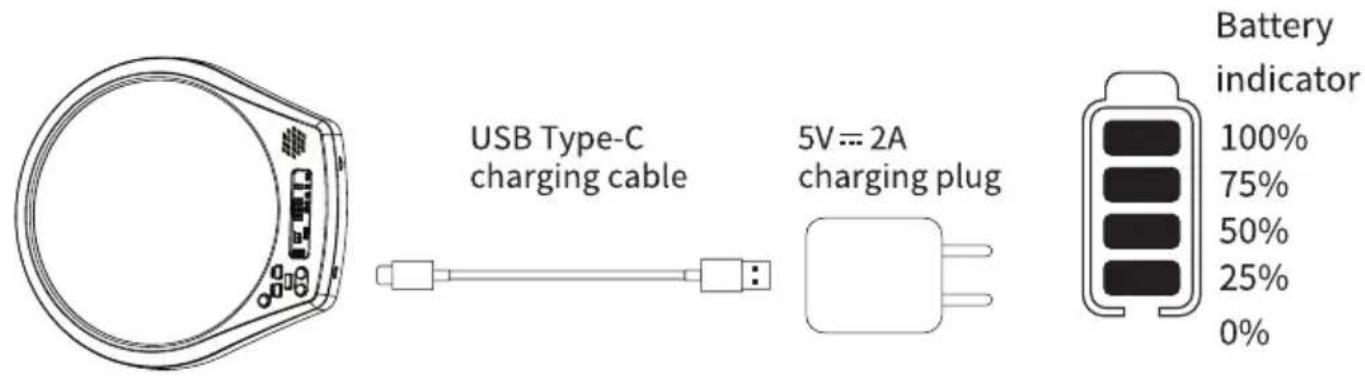
EXTERNAL DEVICES
Headphone or amp can be connected to the 3.5mm output jack. The speaker is no sound when the headphone be connected.
STAND (OPTIONAL PURCHASE)
This pad can be used with APS-01 tripod (optional purchase)

Diagram 4
FCC Warning:
This equipment has been tested and found to comply with the limits for a Class B digital device, pursuant to part 15 of the FCC Rules.
These limits are designed to provide reasonable protection against harmful interference in a residential installation. This equipment generates, uses and can radiate radio frequency energy and, if not installed and used in accordance with the instructions, may cause harmful interference to radio communications.
However, there is no guarantee that interference will not occur in a particular installation. If this equipment does cause harmful interference to radio or television reception, which can be determined by turning the equipment off and on, the user is encouraged to try to correct the interference by one or more of the following measures:
- Reorient or relocate the receiving antenna.
- Increase the separation between the equipment and receiver.
- Connect the equipment into an outlet on a circuit different from that to which the receiver is connected.
- Consult the dealer or an experienced radio/TV technician for help.
Caution: Any changes or modifications to this device not explicitly approved by manufacturer could void your authority to operate this equipment. This device complies with part 15 of the FCC Rules. Operation is subject to the following two conditions: (1) This device may not cause harmful interference, and (2) this device must accept any interference received, including interference that may cause undesired operation.
This equipment complies with FCC radiation exposure limits set forth for an uncontrolled environment. This equipment should be installed and operated with minimum distance 20cm between the radiator & your body.

natural_image
Top-down view of a black PYLE CD or DVD disc with control panel and display (no readable text or symbols)California Prop 65 Warning

WARNING:
This product contains Nickel carbonate which is known to the state of California to cause cancer birth defects and other reproductive harm. Do not ingest.
For more info go to: www.P65warnings.ca.gov





PYLE
PyleUSA.com

natural_image
Illustration of a laptop with a red checkmark on screen, no text or symbols presentVISIT US ONLINE:
Have a question?
Need service or repair?
Want to leave a comment?
PyleUSA.com/ContactUs

Questions? Comments?
We are here to help!
Phone: (1) 718-535-1800
Email: support@pyleusa.com
- Digital Practice Drum Pad
- Before you use this Digital Practice Drum Pad, we recommend that you carefully read through this manual.
- Please keep the instruction manual for future reference.
- FEATURES:
- WIRELESS BT STREAMING:
- TECHNICAL SPECS:
- CAUTIONS
- Location
- Power supply
- Interference with other electrical devices
- Handling
- Care
- Keeping foreign matter out of your equipment
- HOW TO USE
- Metronome Mode
- Open/Pause Metronome
- Set Tempo
- Choose Beats
- Choose Rhythm
- Set Time
- Voice
- Counting mode
- Speed detection mode
- Reminder:
- Total practice time
- Strength level indicator of pad hits
- RECHARGE
- EXTERNAL DEVICES
- STAND (OPTIONAL PURCHASE)
- FCC Warning:
- California Prop 65 Warning
- WARNING:
- PYLE
- PyleUSA.com
Brand : Pyle
Model : PDIGPRDP22
Category : Musical instrument