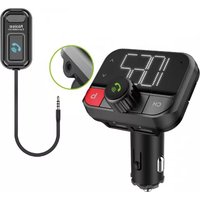
PBT97 - Hi-Fi System Pyle - Free user manual and instructions
Find the device manual for free PBT97 Pyle in PDF.


| Product Type | Wireless Bluetooth Car FM Transmitter |
| Brand | Pyle |
| Model | PBT97 |
| Dimensions (FM Transmitter) | 1.69" x 1.5" x 2.99" inches (4.3 x 3.8 x 7.6 cm) |
| Dimensions (Microphone) | 1.5" x 0.79" x 0.35" inches (3.8 x 2.0 x 0.9 cm) |
| Cable Length | 23.62" inches (60 cm) |
| Weight (estimated) | Approximately 100 g |
| Power Source | Vehicle cigarette lighter / 12V DC power port |
| FM Frequency Range | 87.5 – 108.0 MHz (206 channels) |
| Bluetooth Version | 4.2 |
| Bluetooth Range | Up to 30+ ft (9+ m) |
| Supported Audio Formats | MP3, WMA, WAV, FLAC |
| Max USB/SD Card Support | 64 GB |
| USB Charger Output (Left Port) | 5V / 2.4A |
| USB Charger Output (Right Port) | 5V / 1A (also reads USB disk) |
| Key Functions | Wireless music streaming, hands-free calling, FM transmission, Siri/Google Assistant activation, dual USB charging, micro SD/USB playback |
| What's in the Box | FM transmitter, user manual, hook and loop fastener, separated microphone |
| Safety Warning | Contains Cadmium (Cd) – known to cause cancer and reproductive harm (California Prop 65) |
| Cleaning Instructions | Wipe with a dry, soft cloth; avoid moisture and harsh chemicals |
| Repair and Service | Contact Pyle support via phone (1-718-535-1800) or email support@pyleusa.com |
Frequently Asked Questions - PBT97 Pyle
User questions about PBT97 Pyle
0 question about this device. Answer the ones you know or ask your own.
Ask a new question about this device
Download the instructions for your Hi-Fi System in PDF format for free! Find your manual PBT97 - Pyle and take your electronic device back in hand. On this page are published all the documents necessary for the use of your device. PBT97 by Pyle.
USER MANUAL PBT97 Pyle
PBT91
Wireless BT Car FM Transmitter
Stereo Wireless Car Music Streaming Transmitter
USER MANUAL
BRIEF INTRODUCTION
This device streams music and calls directly from your Wireless BT device to your car FM stereo system. The separated microphone provides you with an amazing hands free function and it is also with a Micro SD card/USB Diskslot that lets you enjoy favorite MP3 and WMA tunes by your car's stereo system. Please read the user manual carefully before using.Hope this device makes your driving more interesting and safer.
COMPATIBILITY
This device can be paired as a hands free kit with any compatible Wireless BT enabled devices.
PRECAUTIONS
Please read all safety instruction and warnings carefully before using this product. Improper use of this product may result in damage. To ensure it works well, please never use this in the following conditions
- Moist or underwater conditions.
- Conditions near heater or high-temperature service.
- Conditions with direct and strong sunshine,
- Conditions with apt falling
- Never dismantle the product without due permission, otherwise it may nullify the warranty clause.
PRODUCT OVERVIEW
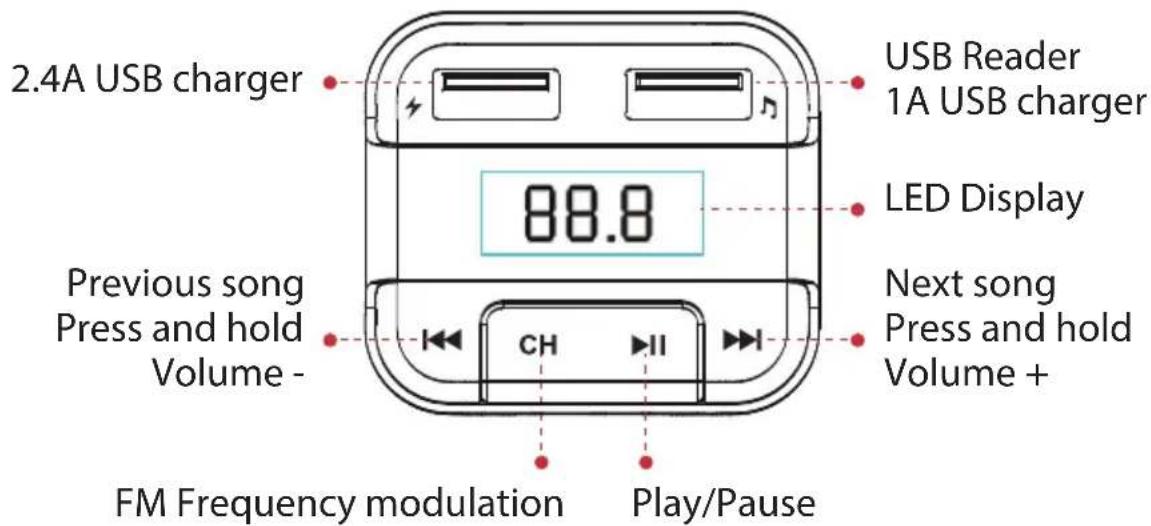
PRODUCT OVERVIEW

USING FM TRANSMITTER FUNCTION
- Plug the FM transmitter into your vehicle's cigarette lighter or power port. The LED displays the voltage of car battery for 2 seconds. Then the device enters into Wireless BT pairing mode, LED also displays "bt".
- Tune your radio to an unused FM frequency, then match the same frequency of this unit.
- Insert a micro SD card/USB disk containing MP3 files into micro SD card/USB disk slot of this unit and it will play and transmit the MP3 files automatically.
USING WIRELESS BT STREAMING FUNCTION
- Paste 3M Adhesive Tape on the place you need.
- Using Wireless BT for the first time, you need to pair your mobile phone with this unit. Activate your mobile phone's Wireless BT function, then search new device. When the mobile phone detects this unit (named as "PyleUSA PBT91"), please pair or connect by using the original password "0000".
- In the music playing mode, when there is an incoming call, this unit will automatically switch to telephone mode.
- On music playing mode, press the "Play/Pause" and hold for 2 seconds to switch modes between Wireless BT and Micro SD card/USB disk reading.
WIRELESS BT CALLING
- Please press 📞 to answer the incoming call or hang off a call.
- Please press 📋 and hold for 2 seconds during call to reject the incoming call in Wireless BT calling mode.
- Please press twice to dial the last number automatically.
- When the call connected, long press 📋 to switch a private call.
USING USB CHARGER FUNCTION
Connect the USB Charger port (two ports both ok) to your mobile phone, with a USB cable (not included) when this product powered from car lighter socket, The product will serve as mobile phone charger.
Please note:
• The maximum output of right USB port is 1mAh;
• The maximum output of left USB port is 2.4mAh;
- Read MP3/WMA/ WAV/ FLAC files in USB disk by right USB port.
SIRI/GOOGLE ASSISTANT ACTIVATION
When Bluetooth is connected successfully, press and hold 2 seconds to quick activate Siri/Google assistant of your mobile phone.
QUICK GUIDE
| QUICK GUIDE On FM Transmitter | |
| 1. Answer/hang up the call | Press " √" button: answer the callPress " √" button: hang up the call |
| 2. Ignore call | Press " √" and hold for 3 seconds to reject incoming calls |
| 3. Call last Number | Press " √" twice to dial the last number automatically |
| 4. Private calling | When answering a call, press " 🔍 " and hold for 3 seconds to switch to private call mode. |
| 5. Play and Pause the music | Press "▶II" Button: Play the musicPress "▶II" Button again: Pause playing |
| 6. Adjust the Volume | Press "▶◀" and hold for 2 seconds to increase the volumePress "◀◀" and hold for 2 seconds to decrease volume |
| 7. Set frequency | Press "CH" firstThen press "▶◀" : increase the frequencyOr press "◀◀" : decrease the frequency |
| 8. Choose music | Press "▶◀" button: play the next songPress "◀◀" button: play the previous song |
| 9. Music sources switch | Press "▶II" button and hold for 2 seconds to switch modes between Wireless BT and Micro SD card/USB disk reading |
| 10. Activate Siri/ Google assistant | Long press 🔍 to quick activate Siri/Google assistant under Wireless BT connected |
PBT91
Wireless BT Car FM Transmitter
Stereo Wireless Car Music Streaming Transmitter
Features:
- Wireless Phone Call & Audio Streaming Transmitter
• Automatic Hands-Free Mode
• Built-in FM Transmitter
• 4-Way Stereo Music Streaming
• LCD Backlight Display Screen
• Incorporated Voice Microphone Cable - Detect and Display the Voltage of the Car Battery When Powered On
• Full 206 Channels Optional From 87.5-108 MHz
• Support Micro SD Card & Read USB Disk - Quick Siri/Google Assistant Activation
- User-friendly Switch to Private Call
- Hook and Loop Fastener
• Hassle-free Design & Simple Plug-in Operation
• Dual USB Device Charge Ports
Wireless BT Streaming:
• Built-in BT for Wireless Music Streaming
• Built-in Microphone for Hands-Free Calling
- Compatible with All of Your Favorite Wireless BT Devices (iPhone, Androids, Smartphones, iPad, Tablets, etc.)
- Wireless BT Version: 4.2
- Wireless Range: Up to 30'+ ft.
What's In The Box:
- Wireless BT device
- User manual
- Hook and loop fastener
- Separated microphone
Technical Specs:
• Frequency Range: 87.5-108.0MHz
• Digital Media File Compatibility: MP3 WMA WAV FLAC
• Maximum USB/SD Memory Card Support Size: 64GB
• Total Output: 5V/3.4A, 2.4A, and 1A&USB reading
- FM Transmitter Size: 1.69" x 1.5" x 2.99" - inches
- Microphone Size: 1.5'' × 0.79'' × 0.35'' – inches
• Length of Cable: 23.62" - inches
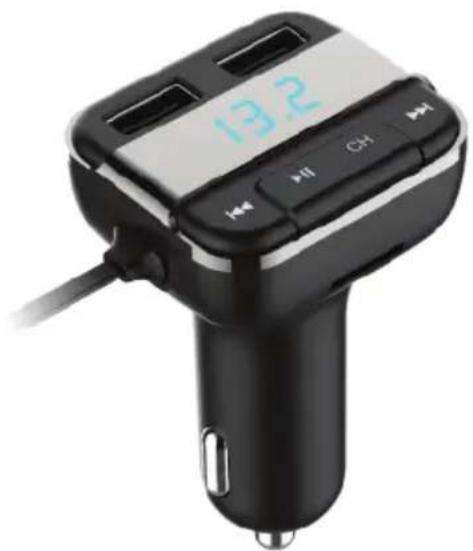
natural_image
Black and white photo of a car charger with a digital display showing 13.2, no visible text or symbols on the device itself.Questions? Issues?
We are here to help!
Phone: (1) 718-535-1800
Email: support@pyleusa.com

WARNING:
This product can expose you to a chemical or group of chemicals, which may include "Cadmium (Cd)" which is known in the state of California to cause cancer, birth defects, or other reproductive harm. For more info, go to https://www.p65warnings.ca.gov/.
PYLE
PyleUSA.com

natural_image
Illustration of a laptop with a red checkmark icon on screen (no text or symbols)VISIT US ONLINE:
Have a question?
Need service or repair?
Want to leave a comment?
PyleUSA.com/ContactUs

- PBT91
- Wireless BT Car FM Transmitter
- BRIEF INTRODUCTION
- COMPATIBILITY
- PRECAUTIONS
- PRODUCT OVERVIEW
- USING FM TRANSMITTER FUNCTION
- USING WIRELESS BT STREAMING FUNCTION
- WIRELESS BT CALLING
- USING USB CHARGER FUNCTION
- Please note:
- SIRI/GOOGLE ASSISTANT ACTIVATION
- Stereo Wireless Car Music Streaming Transmitter
- Features:
- Wireless BT Streaming:
- What's In The Box:
- Technical Specs:
- PYLE
- PyleUSA.com
Brand : Pyle
Model : PBT97
Category : Hi-Fi System