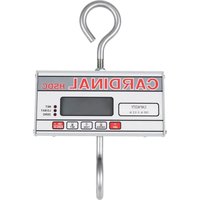
HSDC-500 - Kitchen scale Cardinal Detecto - Free user manual and instructions
Find the device manual for free HSDC-500 Cardinal Detecto in PDF.


| Product Type | Digital Hanging Scale |
| Model | HSDC-500 |
| Brand | Cardinal Detecto |
| Capacity | 500 lb (226.8 kg) |
| Graduation | 0.2 lb (0.1 kg) |
| Display | 4-digit LCD, 1 inch high |
| Weight | 5 lb (2.27 kg) |
| Power Supply | 6 x C size alkaline batteries |
| Operating Temperature | -10°C to +40°C (14°F to 104°F) |
| Storage Temperature | -10°C to +60°C (14°F to 140°F) |
| Tare Range | Up to 99.8 lb (auto push-button) |
| Zero Limit | 4% or 100% of capacity (selectable) |
| Auto Shutoff | Programmable 1-9 minutes of inactivity |
| Sleep Mode | Programmable 1-9 minutes at zero |
| Weighing Units | Pounds or Kilograms (selectable) |
| Calibration | Test weight required; user-adjustable parameters |
| Overload Protection | Ultimate safe overload 200% of capacity |
| Construction | Hanging scale with hook and load receiver |
| User Interface | Membrane keypad (ON/ZERO, TARE, GROSS, OFF) |
| Cleaning | Damp cloth with mild detergent; do not submerge |
| Battery Warning | Low battery indicator (LO BAT) |
| Compliance | FCC Class B |
Frequently Asked Questions - HSDC-500 Cardinal Detecto
User questions about HSDC-500 Cardinal Detecto
0 question about this device. Answer the ones you know or ask your own.
Ask a new question about this device
Download the instructions for your Kitchen scale in PDF format for free! Find your manual HSDC-500 - Cardinal Detecto and take your electronic device back in hand. On this page are published all the documents necessary for the use of your device. HSDC-500 by Cardinal Detecto.
USER MANUAL HSDC-500 Cardinal Detecto
natural_image
Abstract black ink brushstroke design on white background (no text or symbols)Cardinal®
Cardinal Scale Manufacturing Co.
DIGITAL HANGING SCALE BATTERY OPERATED HSDC SERIES
Operation Manual
8551-M256-O1 Rev J
06/05
PO BOX 151, WEBB CITY, MO 64870
PH 417-673-4631 • FAX 417-673-5001
Web site-http://www.cardinalscale.com
Printed in USA
TABLE OF CONTENTS
Introduction 1
Specifications 1
Battery Installation 2
Scale Operation 3
Tare Weight Entry 4
Display Codes 5
Calibration 6
Setup Review 10
Sealing 10
Do's And Don'ts.... 10
In Case Of Difficulty 11
Serial Number
Date Of Purchase
Purchased From_
Office, Washington, DC 20402; Stock No. 004-000-00345-4.
INTRODUCTION
Congratulations on selecting a Cardinal Series HSDC digital hanging scale. This precision weighing instrument is designed to provide years of trouble-free operation while maintaining a high degree of weighing accuracy. This manual contains information on the proper care and use of this instrument.

Before using the instrument, read this manual and pay special attention to all "Warning" Symbols.
Retain This Information For Future Use
WARNING! This equipment generates and uses radio frequency energy and if not installed and used properly, that is, in strict accordance with the manufacturer's instructions, may cause interference to radio and television reception. It has been type tested and found to comply with the limits for a Class B computing device in accordance with the specifications in Subpart J of Part 15 of FCC Rules, which are designed to provide reasonable protection against such interference in a residential installation. However, there is no guarantee that interference will not occur in a particular installation. If this equipment does cause interference to radio or television reception, the user is encouraged to try to correct the interference by one or more of the following measures:
- Reorient the receiving antenna.
- Relocate the instrument with respect to the receiver.
- Move the instrument away from the receiver.
- Plug the instrument into a different outlet so that the instrument and receiver are on different branch circuits.
If necessary, the user should consult the dealer or an experienced radio/television technician for additional suggestions. The user may find the following booklet prepared by the Federal Communications Commission helpful: "How to Identify and Resolve Radio-TV Interference Problems." This booklet is available from the U.S. Government Printing.
NOTICE
All rights reserved. Reproduction or use of editorial or pictorial content, in any manner, without written, expressed permission is prohibited. No patent liability is assumed with respect to the use of the information contained herein. While every precaution has been taken in the preparation of this book, the Seller assumes no responsibility for errors or omissions. Neither is any liability assumed for damages resulting from the use of the information contained herein. All instructions and diagrams have been checked for accuracy and ease of application; however, success and safety in working with tools depends to a great extent upon individual accuracy, skill and caution. For this reason, the Seller is not able to guarantee the result of any procedure contained herein. Nor can they assume responsibility for any damage to property or injury to persons occasioned from the procedures. Persons engaging the procedures do so entirely at their own risk.
SPECIFICATIONS
Capacity ...... see table
Graduation size ...... see table
Tare/Rezero capacity ..... 4% or 100% of scale capacity
Operating temperature ... -10° to +40°C,
14° to 104°F
Storage temperature ..... -10° to +60°C,
14^ to 140^
Display type ...... 4 digit, 1" high LCD
Battery requirements ..... 6 each "C" size alkaline
Weight 5 lb
Ultimate safe overload.... 200%
SPECIFICATIONS, Cont.
| Model Capacity Graduation | |
| HSDC-200 200 lb 200 x 0.1 lb | |
| HSDC-100 100 lb 99.95 x 0.05 lb | |
| HSDC-40 40 lb 40 x 0.02 lb | |
| HSDC-20 20 lb 20 x 0.01 lb | |
| HSDC-500 500 lb 500 x 0.2 lb | |
| HSDC-100KG 100 kg 99.95 x 0.05 kg | |
| HSDC-40KG 40 kg 40 x 0.02 kg | |
| HSDC-20KG 20 kg 20 x 0.01 kg | |
BATTERY INSTALLATION
Before weighing operations can begin it will be necessary to install the batteries in the HSDC hanging scale. This same procedure should also be followed when battery replacement becomes necessary. Make certain that only "C" size alkaline batteries are used as replacements.

NOTE! Exposure of batteries to high temperatures (above 140^ F) will decrease their capacity resulting in shorter operation time.
Step 1
Using a screwdriver, remove the two retaining screws from the back of the instrument. Remove the battery compartment cover.

Step 2
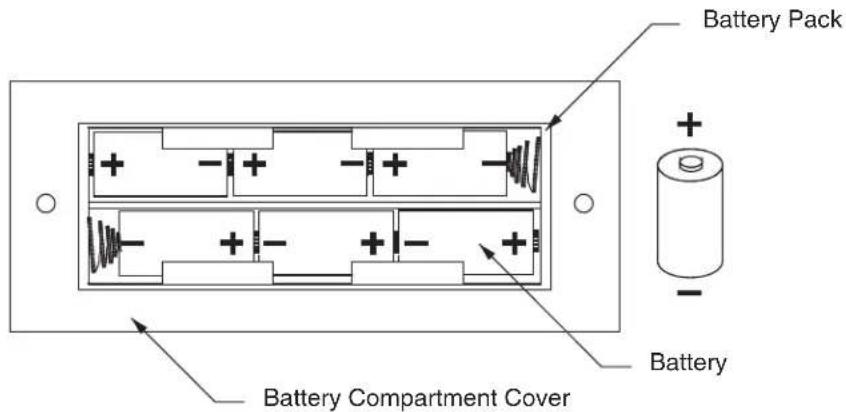
Remove the old batteries, if present. Insert six new "C" cells making certain that each cell is correctly positioned. Refer to the next diagram for proper battery placement.
BATTERY INSTALLATION, Cont.
Step 3
Replace the battery compartment cover and retaining screws.

NOTE! If the HSDC scale fails to operate after battery replacement check to make certain that each of the six cells has been installed correctly. One cell installed backward will prevent the scale from operating.
SCALE OPERATION
Before weighing operations can begin it will be necessary to install batteries in the scale. Refer to the battery installation section of this manual for additional information.
Hang the scale from a support that is strong enough to support the weight of the scale PLUS the weight of the material that is to be weighed.
Hang the load receiving element on the hook on the bottom of the scale and press the ON/ZERO key. Look at the weight display. If the display does not indicate zero weight, press the ON/ZERO key again to reset the display to zero.
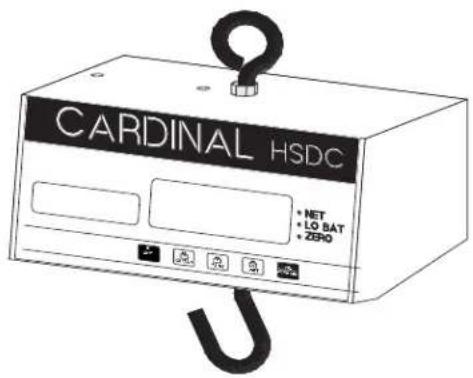
Place the material to be weighed in the receiving element and read the weight in the scale display. Refer to the figure below for the identification of scale components:

SCALE OPERATION, Cont Scale Component Identification

Press to turn the scale off. The auto-shutoff feature will turn the scale off automatically after a preselected time of inactivity (no motion).

Press to place the scale in the gross weight display mode (net indicator off).

Press to enter a new tare weight value equal to the current scale weight. The scale will automatically enter the net weight display mode (net indicator on).

Press to enter the net weight display mode without entering a new tare weight value (net annunciator on).

Press to turn the scale on. If on, press to zero the weight display up to the preset zero limit (4% or 100% of the scale capacity).

The membrane keyboard is not to be operated with pointed objects (pencils, pens, fingernails, etc). Damage to keyboard resulting from this practice will NOT be covered under warranty.
Annunciators
- NET Illuminated to indicate the scale is in the net weight mode. If it is off, it indicates that the scale is in the gross weight mode.
● LO BAT Illuminated to signal that the batteries should be replaced. - ZERO Illuminated to show that the scale weight is within 1/4 graduation of the center of zero.
TARE WEIGHT ENTRY
The HSDC has an automatic tare feature that allows you to enter tare weight up to the three least significant digits of the scale capacity. This tare weight feature is often used to subtract the empty container weight or other unwanted fixed weight values from the weight reading. See the PUSH BUTTON TARE setup mode section to activate this feature.
The following table lists the maximum tare weight allowed for each model of the HSDC scale.
| MODEL | CAPACITY | MAXIMUM TARE WT |
| HSDC-500 500 lb X 0.2 lb 99.8 lb | ||
| HSDC-200 200 lb x 0.1 lb 99.9 lb | ||
| HSDC-100 99.95 lb x 0.05 lb 9.95 lb | ||
| HSDC-40 40 lb x 0.02 lb 9.98 lb | ||
| HSDC-20 20 lb x 0.01 lb 9.99 lb | ||
| HSDC-100KG | 99.95 kg x 0.05 kg | 9.95 kg |
| HSDC-40KG | 40 kg x 0.02 kg | 9.98 kg |
| HSDC-20KG | 20 kg x 0.01 kg | 9.99 kg |
TABLE 1
TARE WEIGHT ENTRY, Cont.
Pressing the TARE key will cause the currently displayed gross weight to be stored as the new tare weight and cause the scale to enter the net weight display mode. The net weight display mode is indicated by turning on the net annunciator. For example, on a HSDC-20, if the displayed gross weight is 2.00 lb and you press the TARE key, the 2.00 lb would be entered as the new tare weight. The scale would then enter the net weight mode and subtract the 2.00 lb tare value from the gross weight displaying a net weight of 0.00 lb. If you added another 2.00 lb to the platform, the display would indicate 2.00 lb of net weight. Pressing the GROSS key would return the scale to the gross weight display 4.00 lb. NOTE: Remember the scale will only weigh to its maximum capacity. Any combination of NET plus TARE weights over the scale capacity will result in a overload condition and display t . For example, using the HSDC-20 from above, with tare weight of 2.00 lb, adding 19.00 lb to the platform will cause an overload condition. This is because 2.00 lb tare weight plus 19.00 lb load weight equals 21.00 lb gross weight, which exceeds the capacity of the scale.
DISPLAY CODES
During operation of the HSDC hanging scale you may encounter a special display message. The following lists display codes and their meaning.
| DISPLAY | MEANING |
| -oC- | Scale overloaded, remove excess load to resume operation. |
| UnSt | Motion is present when attempting to power-up, zero the weight display or enter a tare value. |
| UnLd | The weight on the scale exceeds the zero range on power-on. Remove the load. |
| LoRd= | The scale load is less than the zero range on power-on. |
| -oF- | Attempting to display a negative number less than -999. |
| CALb | Indicates that the scale has not been calibrated or has been interrupted during the calibration process. |
| Err | Disallowed keyboard entry: attempted to zero with the weight outside the zero range. |
CALIBRATION
Your HSDC hanging scale has been calibrated prior to shipment and should not require re-calibration before it is placed in service. A regular check of the instrument's calibration should be made to ensure that its weighing accuracy is maintained.
To check the calibration of your HSDC hanging scale, you must have a calibrated test weight or weights equal to the scale's capacity. Begin by making certain that the scale is unloaded and that the display is indicating zero weight. Load the scale with the test weight(s) and observe the weight display. If the displayed weight is different from the total test weight value, calibration may be necessary. Note that a qualified scale technician should be consulted before any attempt at calibration is made.

NOTE! This scale is provided with a means of attaching a seal to prevent access to the calibration switch.
Calibration Procedure
Step 1. Remove the seals (if present) from the calibration cover plate, then remove the two retaining screws and cover plate.
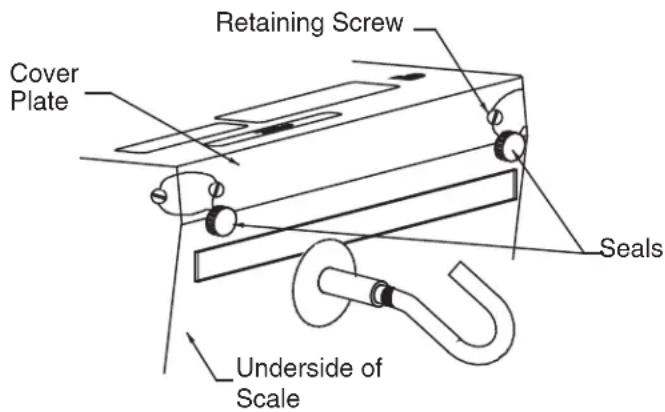
Step 2. Hang the scale from a suitable support and attach the load receiving device. Press the OFF key. Using a straightened paper clip, press and hold the calibration switch while pressing the ON/ZERO key. Release the calibration switch when the display shows int = .
Step 3. Refer to the following steps and enter the required setup parameters.
INTERVAL
$$ , n t = $$
Press the NET key to show the current setting. Then press the ON/ZERO key to select the desired value: 1-2-5. Press the NET key to save.
CALIBRATION, Cont.
DECIMAL POINT
| dPP= | Press the NET key to show the current setting. Then press the ON/ZERO key to select the desired value:0=XXXX 1=XXX.X2=XX.XX 3=X.XX xPress the NET key to save. |
CAPACITY
| CAP= | Press the NET key to show the current capacity setting. Then press the ON/ZERO key to advance the flashing digit from 0 through 9 (200. 0). Select the value then press the TARE key to advance to the next digit location (200. 0). Repeat the process until the capacity has been entered. Press the NET key to save. |
WEIGHING UNITS
| Unit: | Press the NET key to show the current setting. Then press the ON/ZERO key to select the desired value: 1-2 where 1=Pounds Only and 2=Kilograms Only. Press the NET key to save it.(Please note, although selection 3 will display and can be selected, it is INVALID for the HSDC scale.) |
CALIBRATION WEIGHT
| Lod= | Press the NET key to show the current calibration weight. Then press the ON/ZERO key to advance the flashing digit of calibration weight from 0 through 9 (150. 0). Select the value then press the TARE key to advance to the next digit location (150. 0). Repeat the process until the calibration weight has been entered. Place this amount of calibration test weights on the scale, then press the NET key. The display will show ---- then: |
| UnLod | Remove the test weights and press the NET key. The display will show ---- then proceed to the next prompt. |
ZERO TRACKING RANGE
| t_r : | Press the NET key to show the current division setting. Values of through 9 and . 5 are valid for the zero tracking range. Press the ON/ZERO key to step through and select . 5 as the division value, then press the NET key to save. If a zero tracking range division of through 9 is desired, first press the ON/ZERO key to select , then press the TARE key to advance to the next digit location and press the ON/ZERO key to select through 9 divisions. Press the NET key to save. |
4% ZERO TRACKING LIMIT
| t_rL= | Press the NET key to show the current setting. Then press the ON/ZERO key to toggle between yes and no. yE5=4% limit, no = 100% limit. Press the NET key to save. (NOTE: 4% limit is for Canadian use) |
POWER UP ZERO
| PUO= | Press the NET key to show the current setting. Then press the ON/ZERO key to toggle between yes and no. YES = enable, no = disable. Press the NET key to save. |
FILTERING
| F_LE = | Press the NET key to show the current level of filtering. Then press the ON/ZEROkey to select the desired value:0=no filtering 1=minimal filtering2=moderate filtering 3=custom filteringPress the NET key to save setting.If you select level 3 then: |
| F_= | Press NET to show current filter weight setting. Press ON/ZERO to select filterweight level (1 through 99,-99 being the greatest filtering and 1 the least). Pressthe NET key to save setting. |
CALIBRATION, Cont
BREAKPOINT
$$ b = $$
Press NET to show the current break point setting. Press ON/ZERO to select break point setting (1 through 99). Press the NET key to save setting.
MOTION RANGE
$$ U \cap S = $$
Press the NET key to show the current motion range in divisions. Then press the ON/ZERO key to select the number of digits to change before motion: through . Press the NET key to save.
SAMPLE RATE
$$ 5 r = $$
Press the NET key to show the current sample rate setting. Values of 1 through 12 are valid for the sample rate. Press the ON/ZERO key to select 1 through 9 samples per second, then press the NET key to save. If a sample rate of 10 through 12 is desired, first press the ON/ZERO key to select 0 through 2, then press the TARE key to advance to the next digit location and press the ON/ZERO key to select 10 through 12 samples per second. Press the NET key to save.
AUTOMATIC SHUTOFF
$$ A 5 h = $$
Press the NET key to show the current setting. Then press the ON/ZERO key to disable the feature or to select the number of minutes of inactivity before turning off the scale. 0 = disable, 1 to 9 = minutes of inactivity before shutoff. Press the NET key to save it.
SLEEP MODE
$$ S L P = $$
Press the NET key to show the current setting. Then press the ON/ZERO key to disable the feature or to select the number of minutes at zero before going to sleep. ☐ = disable, 1 to 9 = minutes of inactivity before sleeping. Press the NET key to save it.
PUSH BUTTON TARE
$$ P b t = $$
Press the NET key to show the current setting. Then press the ON/ZERO key to toggle between yes and no. YES = enable, no = disable. Press the NET key to save.
The display will display the software revision number and then the gross weight. The setup and calibration process has been completed and the scale is ready to weigh. Place the test weight back on the scale to verify calibration.
CALIBRATION, Cont

Table 1 -- Setup Settings for HSDC Models
| Model HSDC | 500 | 200 | 100 | 40 | 20 | 100kg | 40kg | 20kg |
| int= | 2 | 15 | 22 | 1 | 5 | 1 | ||
| dPP= | 1 | 12 | 2222 | |||||
| CAP= | 5000 | 2000 | 9995 | 4000 | 2000 | 9995 | 4000 | 2000 |
| unt= | 1 | 11 | 11 | 111 | ||||
| trA= | 0.5 | 0.5 | 0.5 | 0.5 | 0.5 | 0.5 | ||
| trL= | no | no | no | no | no | no | ||
| noPUO= | no | no | no | no | no | |||
| FLt= | 1 | 11 | 11 | 111 | ||||
| UnS= | 11 | 11 | 111 | |||||
| Sr= | ||||||||
| RSh=2 | 2 | 22 | 222 | |||||
| SLP= | 11 | 11 | 111 | |||||
| Pbt= | y | y | y | y | y | y | y | y |
End of Calibration Section. Go to Setup Review/Fine Span.
SETUP REVIEW
The HSDC allows several operational parameters to be reviewed and changed as necessary without having to break the calibration seal and enter the setup and calibration mode. The setup review allows changes to be made to the power up zero setting, the automatic shutoff and sleep mode delay times, push button tare.
To enter the setup review mode, simply turn the HSDC off, then press and hold any key other than ON/ZERO or the OFF keys and press the ON/ZERO key. The display will prompt for the power up zero selection. Refer to the instructions listed in the Calibration Procedure section of this manual for information on how to change these parameters.
The parameters in the setup review will be processed in the following sequence:
POWER UP ZERO
AUTOMATIC SHUTOFF TIME
SLEEP MODE TIME
PUSH BUTTON TARE
Fine Span
The span can be fine-adjusted while the indicator is on by pressing and holding the calibration switch and pressing the ON/ZERO or NET key:
Calibration Switch + ON/ZERO = increase
Calibration Switch + NET = decrease
Go to Sealing Instructions
SEALING INSTRUCTIONS
To attach the seals, first make certain the two cover plate retaining screws are snug then thread the seal wires through the hole in the screw heads as shown in the calibration section of this manual.
DO'S and DON'TS
- DO hang the scale from a support that is strong enough to support the weight of the scale plus the weight of the material to be weighed. The more rigid the support the better.
- DON'T shock load your HSDC hanging scale with weights greater than 10 percent of the scale's capacity by throwing the weight on the scale.
- DO replace batteries as soon as the weight display shows the low battery signal.
- DON'T hose down or submerse the scale in any liquid.
- DO use only a damp cloth and mild detergent to clean the outside of the scale.
- DON'T disassemble the scale. There are no user-serviceable components within the scale.
DO'S AND DON'TS, Cont.
-
DO use only high quality Alkaline "C" size replacement batteries.
-
DON'T use sharp objects to press the keys. Use only your finger tip.
-
DO check scale calibration regularly to ensure that the high degree of weighing accuracy is maintained.
10.DON'T modify or replace the loading hook or hanging eye with lower capacity parts.
- DO remove loads which produce the over capacity (-oC-) display as soon as possible.
IN CASE OF DIFFICULTY
Your HSDC hanging scale has been designed to provide years of trouble free service. Should you encounter a problem with your scale refer to the chart below before contacting your scale technician.
Problem Possible Cause/Solution
- Scale seems dead A. Batteries improperly installed, make certain each of the six batteries is correctly installed.
No display B. Batteries are discharged completely, replace with fresh batteries.
- Incorrect weight A. Scale not at zero prior to applying weight, remove load and reset display to zero by pressing ON/ZERO key.
B. Scale is not calibrated. Refer to Calibration Section of this manual.
C. Scale in net mode. Press the GROSS key.
If you are unable to resolve the difficulty, contact the Cardinal Scale representative from whom you purchased the scale. He will be able to provide you with information concerning the return and repair of your scale. Make certain that you obtain a return authorization number prior to returning the scale. This number should appear on the shipping carton and all correspondence referencing the repair. Failure to obtain a return authorization number will result in unnecessary delay.


- Cardinal®
- DIGITAL HANGING SCALE BATTERY OPERATED HSDC SERIES
- TABLE OF CONTENTS
- INTRODUCTION
- Retain This Information For Future Use
- NOTICE
- SPECIFICATIONS
- SPECIFICATIONS, Cont.
- BATTERY INSTALLATION
- Step 1
- Step 2
- Step 3
- SCALE OPERATION
- SCALE OPERATION, Cont Scale Component Identification
- Annunciators
- TARE WEIGHT ENTRY
- TARE WEIGHT ENTRY, Cont.
- DISPLAY CODES
- CALIBRATION
- Calibration Procedure
- INTERVAL
- CALIBRATION, Cont.
- CALIBRATION, Cont
- BREAKPOINT
- MOTION RANGE
- SAMPLE RATE
- AUTOMATIC SHUTOFF
- SLEEP MODE
- PUSH BUTTON TARE
- SETUP REVIEW
- Fine Span
- SEALING INSTRUCTIONS
- DO'S and DON'TS
- DO'S AND DON'TS, Cont.
- IN CASE OF DIFFICULTY
- Problem Possible Cause/Solution
Brand : Cardinal Detecto
Model : HSDC-500
Category : Kitchen scale