
Orbitals ECO17-PRO - Polisher Mytee - Free user manual and instructions
Find the device manual for free Orbitals ECO17-PRO Mytee in PDF.


| Brand | Mytee |
| Model | Orbitals ECO17-PRO |
| Product Type | Orbital Polisher |
| Pad Size | 17 inches (43 cm) |
| Overall Dimensions | 20 x 20 x 12 inches (51 x 51 x 30 cm) |
| Weight | 14 lbs (6.4 kg) |
| Power Source | 120V AC, 60Hz |
| Power Rating | 1200 Watts |
| Variable Speed | Yes, 1,000 – 4,000 RPM |
| Orbit Diameter | 3/16 inch (4.8 mm) |
| Ergonomic Handle | Yes, double grip |
| Cooling System | Internal fan cooling |
| Noise Level | Low noise design (<70 dB) |
| Overload Protection | Thermal overload switch |
| Pad Attachment | Hook & loop (velcro) backing |
| Motor Type | Brushless motor |
| Housing Material | High-impact plastic with rubber grip |
| Power Cord Length | 12 ft (3.6 m) |
| Warranty | 1 year limited |
| Certifications | ETL, CE |
| Included Accessories | Bonnett pad, foam pad, user manual |
| Recommended Use | Professional floor care, automotive detailing |
Frequently Asked Questions - Orbitals ECO17-PRO Mytee
User questions about Orbitals ECO17-PRO Mytee
0 question about this device. Answer the ones you know or ask your own.
Ask a new question about this device
Download the instructions for your Polisher in PDF format for free! Find your manual Orbitals ECO17-PRO - Mytee and take your electronic device back in hand. On this page are published all the documents necessary for the use of your device. Orbitals ECO17-PRO by Mytee.
USER MANUAL Orbitals ECO17-PRO Mytee
13655 Stowe Dr. Poway, CA 92064
P: (858) 679-1191
F: (858) 726-6005
www.mytee.com
Dear Customer:
Congratulations on the purchase of your new Orbital All-Surface Floor Machine. As technology continues to develop you can work confidently knowing that both Mytee and its employees are equally dedicated to developing with the industry and its advances.
Like any other piece of machinery or technology, the ECO PRO also requires proper maintenance and care to keep the product working over extended use. Neglecting your machine, abusing it or not operating it properly can void its warranty and prevent the machine from performing to the quality and standard you'd expect out of the Mytee line.
If you have any warranty concerns or questions, please review this manual thoroughly or do not hesitate to contact your distributor. If there are questions regarding maintenance, replacement, or ordering parts please contact an authorized Mytee Service Center. To see an updated list please visit our website at http://www.mytee.com/support/service-centers.
Before using your Mytee product, please read this manual thoroughly.
Sincerely,
Mytee Customer Care Dept.
Important Safety Information ....4
1 At a Glance 6.
1.1 - Technical Specifications 6....
1.2 - Included with the ECO PRO 6....
1.3 - ECO PRO Front View 7....
1.4 - ECO PRO Rear View 8....
1.5 - Spray Selector Valve 9....
2 Machine Operation 10....
2.1 - Powering the ECO PRO .10....
2.2 - Connecting the Optional Spray Gun 10....
2.3 - Pad Drivers, Pads, and Brushes 10....
2.4 - Filling the Shampoo Tank 10....
2.5 - Emptying the Shampoo Tank 11....
2.6 - How to Pre-Spray ...... 11
2.7 - How to Operate the ECO PRO 11
3 Machine Maintenance....12
3.1 - Flywheel and Bearing Replacement ..... 12
4 Troubleshooting....14
Grounding Instructions
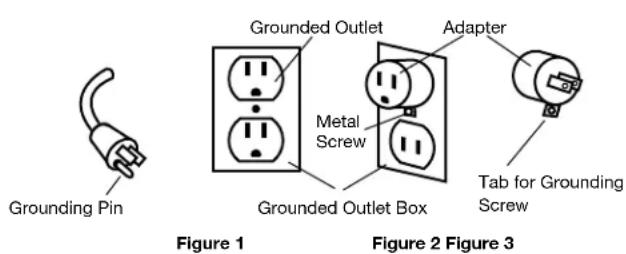
This machine must be grounded. If it should malfunction or breakdown, grounding provides a path of least resistance for electrical shock. This machine is equipped with a cord having an equipment-grounding conductor and grounding plug. The plug must be plugged into an appropriate outlet that is properly installed in accordance with all local code and ordinances. Do not remove ground pin; if missing, replace plug before use.

Improper installation of the equipment-grounding conductor can result in a risk of electric shock. Be sure to check with a qualified electrician or service person if you are in doubt as to whether the outlet is properly grounded. If the plug will not fit in the outlet do not modify either the plug nor the machine's cord, instead have a proper outlet installed by a qualified technician.
This machine is for use on a nominal 120-volt circuit and with a grounding plug similar to the one in Figure 1 below. If a proper outlet is not available, follow the illustrations of Figure 2 & 3 to install a temporary-grounding plug. This temporary work-around should be used only until a proper outlet (Figure 1) can be installed by a qualified electrician. When and if this type of adapter is employed, screw the adapter's extended tab into place with a metal screw. However, grounding adapters are not approved for use in Canada.
Again, be sure to check the grounding pin for damages and replace if necessary.
The Green, or Green-Yellow, wire in the cord is the grounding wire. When replacing a plug, this wire must be attached to only the grounding pin.
DO NOT use extension cords.
Please Note for America use only.
Parts and Service
Please contact a Mytee service personnel or Mytee authorized Service Center using Mytee original replacement parts and accessories for repairs are needing to be performed. When and if calling Mytee for support, please have your Model and Serial Number available for faster assistance.
Name Plate
The Model and Serial Number are located on the lower half of the back of the machine near the power plugs and will be required for ordering replacement parts. You can use the space provided on the front of this manual to note down both for future referencing.
Unpacking the Machine
When your new machine is delivered, please carefully inspect both the shipping carton and the machine for damages. If damage is evident, save both the shipping carton and machine so that the delivering carrier can inspect it. Contact the carrier immediately to file a freight claim if there has been any damage.
Caution and Warnings
Symbols
Mytee uses the symbols below to signal potentially dangerous conditions. Always read this information carefully and take the necessary steps to protect personnel and property.

Is used to warn of immediate hazards that will cause severe personal injury or death.

Is used to call attention to a situation that could cause severe personal injury.

Is used to call attention to a situation that could cause minor personal injury or damage to the machine or other property. When using an electrical appliance, basic precautions should always be followed, including the following: Read all instructions before using this machine. This product is intended for commercial use only.
Important Safety Information
To reduce the risk of fire, electrical shock, or injury:
-
Read all instructions before using equipment.
-
Use only as described in this manual. Use only manufacturer's recommended attachments.
-
Always unplug power cord from electrical outlet before attempting any adjustments or repairs.
-
Do not unplug by pulling on cord. To unplug, grasp the plug, not the cord.
-
Do not pull or carry by cord. Do not close a door on cord or pull cord around sharp edges or corners.
-
Do not run appliance over cord. Keep cord away from heated surfaces.
-
Do not use with damaged cord or plug. If cord is damaged, repair immediately.
-
Do not use outdoors or on wet surfaces and or standing water.
-
Always unplug or disconnect the appliance from power supply when not in use.
-
Do not allow to be used as a toy. Close attention is necessary when used by or near children.
-
Do not use in areas where flammable or combustible material may be present.
-
Do not leave the unit exposed to harsh weather elements. Temperatures below freezing may damage components and void warranty.
-
Use only the appropriate handles to move and lift unit. Do not use any other parts of this machine for this purpose.
-
Keep hair, loose clothing, fingers, and all parts of the body away from all openings and moving parts.
-
Use extra care when using on stairs.
-
To reduce the risk of fire or electric shock, do not use this machine with a solid-state speed control device.
-
The voltage and frequency indicated on the name plate must correspond to the wall receptacle supply voltage.
-
When cleaning and servicing the machine, local or national regulations may apply to the safe disposal of liquids which may contain: chemicals, grease, oil, acid, alkalines, or other dangerous liquids.
-
Do not leave operating unattended.
1.1 - Technical Specifications
ECO14-PRO ECO17-PRO
| Cleaning Path | 14” |
| Solution Tank | 4 Gallons |
| Motor | 1.5 Horsepower |
| Pump PSI | 60 |
| Pump GPM | 1.0 |
| Power Consumption | 20 amps @ 115V 60Hz |
| Machine Weight | 110 lbs . |
| Machine Dimensions | 28” x 17.5” x 48.5” |
| Power Cord | Single 50’ 12/3, twist-lock |
| Cleaning Path | 17” |
| Solution Tank | 4 Gallons |
| Motor | 1.5 Horsepower |
| Pump PSI | 60 |
| Pump GPM | 1.0 |
| Power Consumption | 20 amps @ 115V 60Hz |
| Machine Weight | 120 lbs. |
| Machine Dimensions | 28” x 17.5” x 48.5” |
| Power Cord | Single 50’ 12/3, twist-lock |
1.2 - Included with the ECO PRO

Pad Driver Two Cleaning Pads

1.3 - ECO PRO Front View
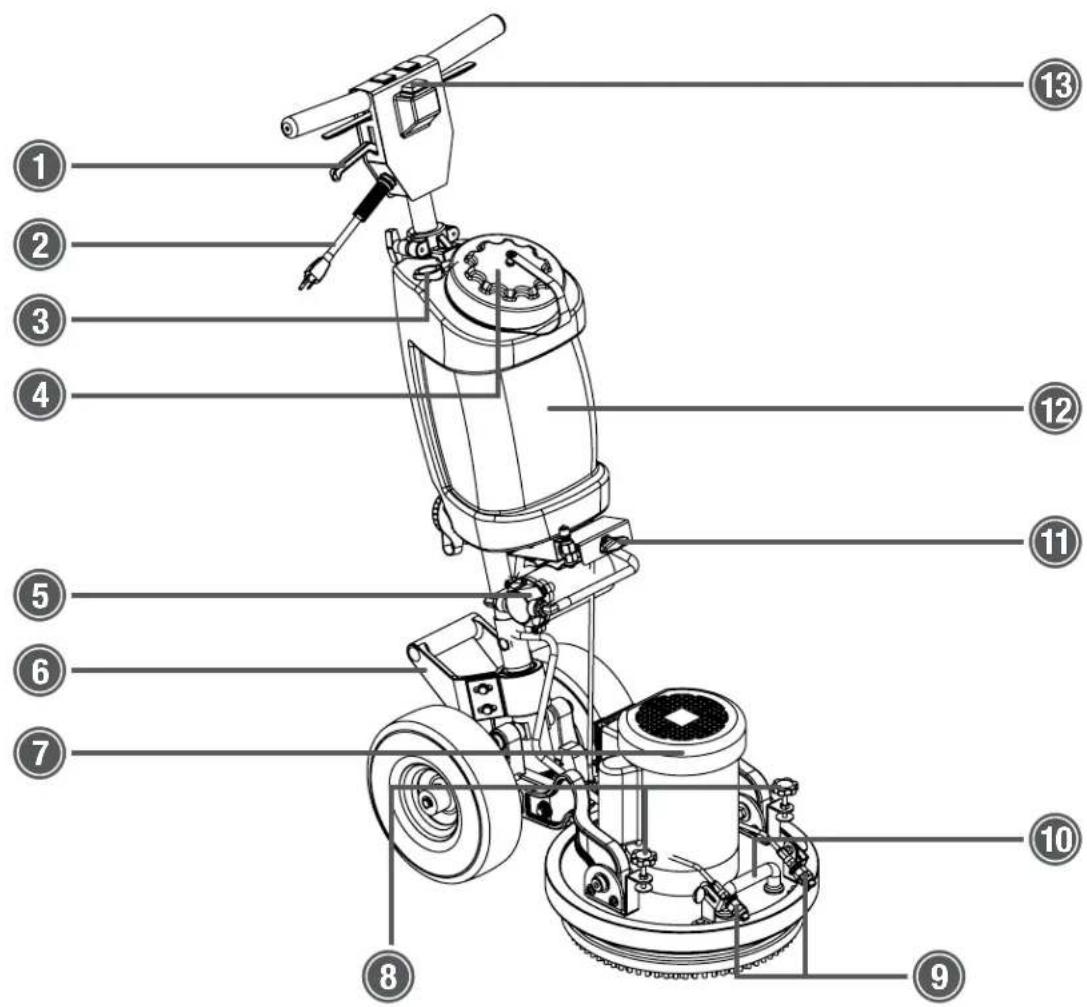
- Handle Height Adjustment Lever
- Power Cord Pigtail
- Faucet Fill Hose
- Solution Tank Lid
- 60 PSI Solution Pump
- Rear Lifting Handle
-
1.5 Horsepower Motor
-
Holding Brackets for Optional Weight Set (on ECO17-PRO only)
- Forward-Facing Spray Jets
- Front Lifting Handle
- Spray Selector Valve
- 4 Gallon Solution Tank
- Power Switch
1 - At a Glance
1.4 - ECO-PRO Rear View
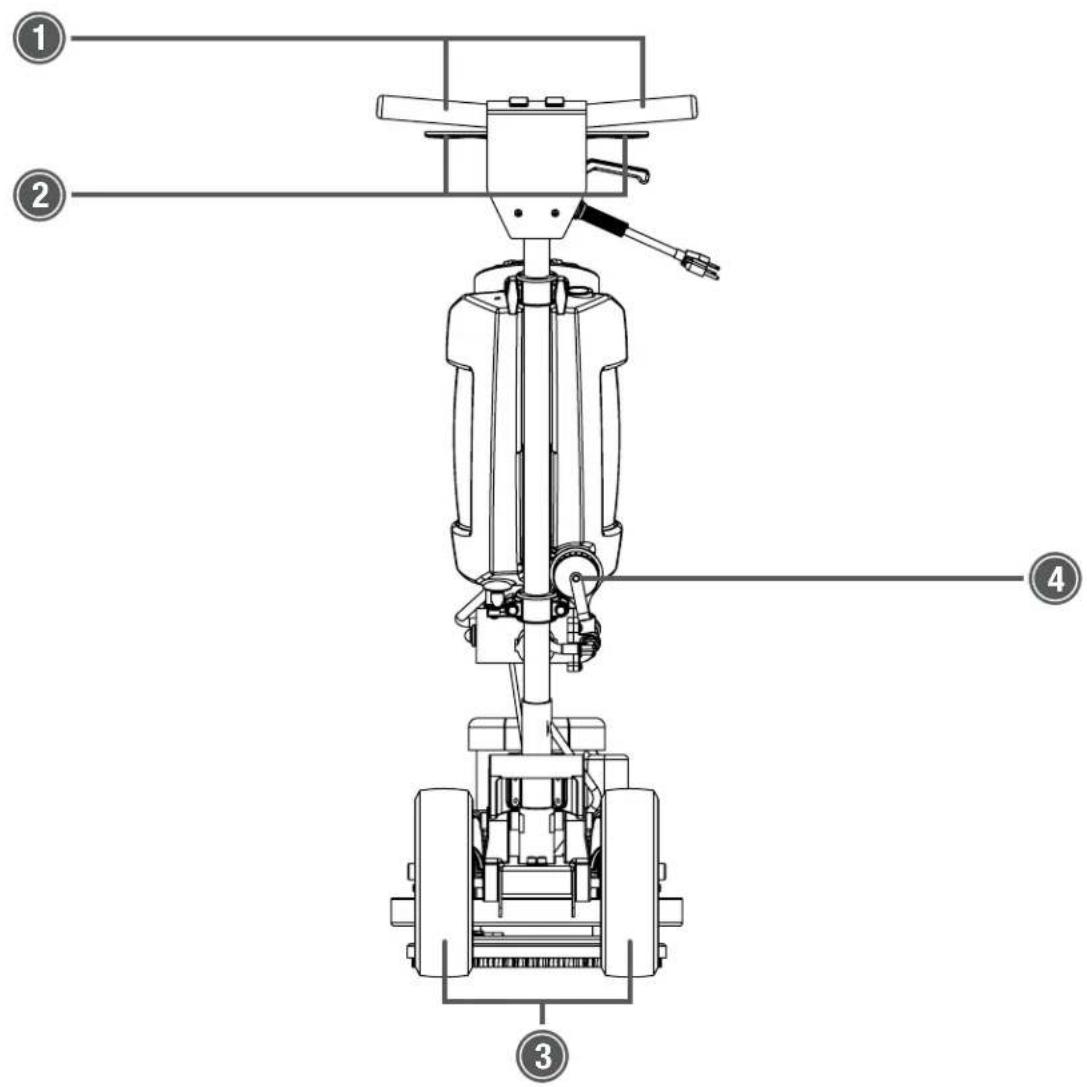
-
Push Handlebars
-
Solution Spray Levers
-
10" Foam-Filled Wheels
-
Solution Tank Drain Cap
1.5 - Spray Selector Valve
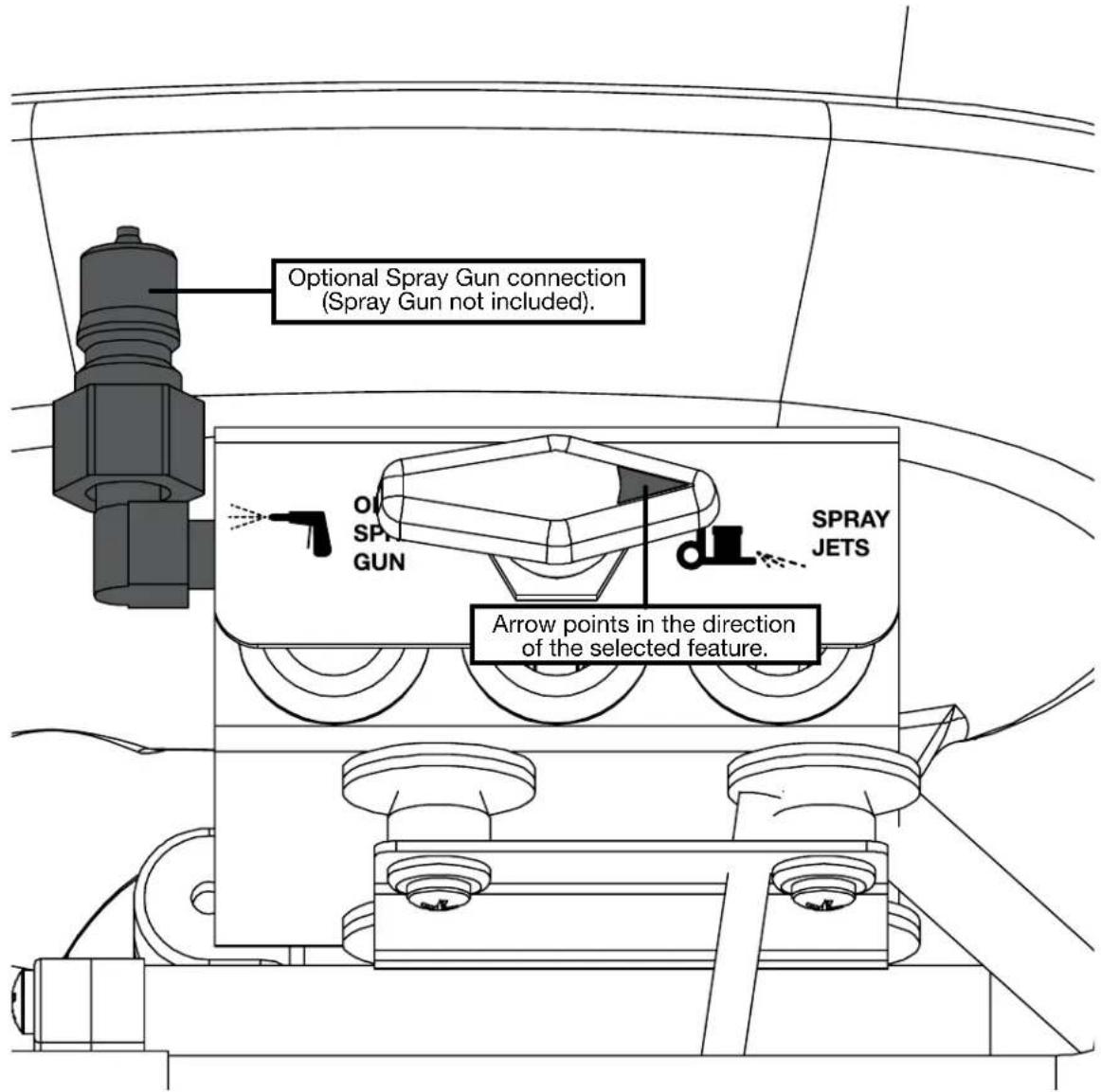
Optional Spray Gun
Select this feature if you want to use the optional Spray Gun (part no. ECO-GUN) for pre-spray.
Spray Jets
Select this feature to use the spray jets mounted on the front of the machine to spray solution while cleaning.
2 - Machine Operation
2.1 - Powering the ECO PRO

The Orbital Floor Machine requires a 20 amp, 115V power outlet to operate.
Plug the female end of the 50' twist-lock extension cord into the Orbital Floor Machine's pigtail power cord and twist clockwise to lock. Plug the male end of the extension cord into a wall outlet.
2.2 - Connecting the Optional Spray Gun
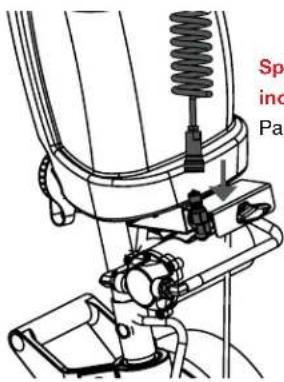
The coiled hose attached to the spray gun features a female quick disconnect fitting which connects to the male quick disconnect fitting to the left of the pump.
2.3 - Pad Drivers, Pads, and Brushes Pad Driver
The pad driver comes pre-installed on Mytee's Orbital Floor Machines. To remove the pad driver, undo the four screws on the bottom of the pad driver.

Applying Cleaning Pad
To apply a cleaning pad, just lower the machine with pad driver onto a pad. Make sure the pad is as centered as possible on the pad driver with no driver bristles exposed to carpet.
Tile & Grout Brush
To apply the optional Tile & Grout Brush, remove the pre-installed pad driver via the four screws holding it in place. Screw the Tile & Grout Brush directly into the bearing just like the pad driver was.
2.4 - Filling the Shampoo Tank
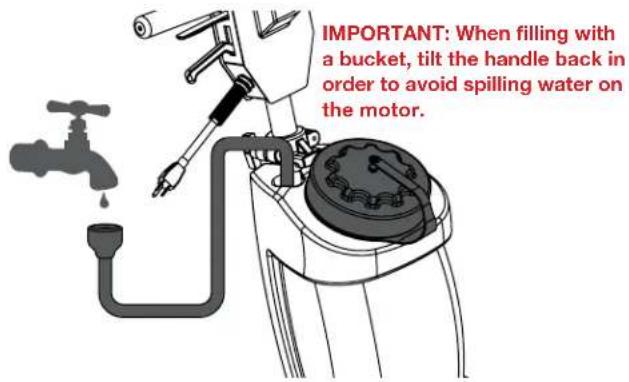
Faucet Fill
The shampoo tank can be filled from a standard faucet. Simply lift the Faucet Fill hose out of the tank and press it against the faucet. Turn on the faucet to allow water to flow
down into the tank.
Bucket Fill
To fill using a bucket, twist off the shampoo tank cap counter-clockwise and pour in water. IMPORTANT: Tilt back the handle before filling with a bucket in order to avoid spilling water on the motor causing damage.
2.5 - How to Pre-Spray

- Connect a spray gun.
- Turn the Spray Selector Valve to the OPTIONAL SPRAY GUN setting.
- Flip the switch on the handle to the SPRAY ONLY setting. This will turn on the solution pump.
- Squeeze the trigger on the spray gun to begin spraying solution.
2.6 - How to Operate the ECO PRO

- Apply a cleaning pad to the pad driver.
- Pull the handle adjustment lever and lower the handle to a comfortable height.
- Flip the switch on the handle to the ON setting. This will
turn on the motor.
- Use a back-and-forth motion to work encapsulation chemical into carpet or to scrub hard surfaces.
2.7 - Emptying the Shampoo Tank

The shampoo tank can be easily emptied into a bucket by unscrewing the drain cap on the bottom of the tank.
3 - Machine Maintenance
In order to keep the Orbital Floor Machine running smoothly and reduce the risk of damage to the machine and subsequent downtime, Mytee recommends following the maintenance schedule below:
| Maintenance Item Daily Weekly | ||
| Clean and inspect motor. | X | |
| Check power supply cable. | X | |
| Clean machine with all purpose cleaner and cloth. | X | |
| Inspect machine for water leaks and loose hardware. | X |
3.1 - Flywheel and Bearing Replacement
Tools Needed:
• 1/8" Allen wrench
- 3/8" wrench
• 7/16" wrench or socket
- Blue threadlocker
• 3/16" Allen wrench

- Remove the pad driver from the unit by unbolting the four bolts with a 7/16" socket or wrench.
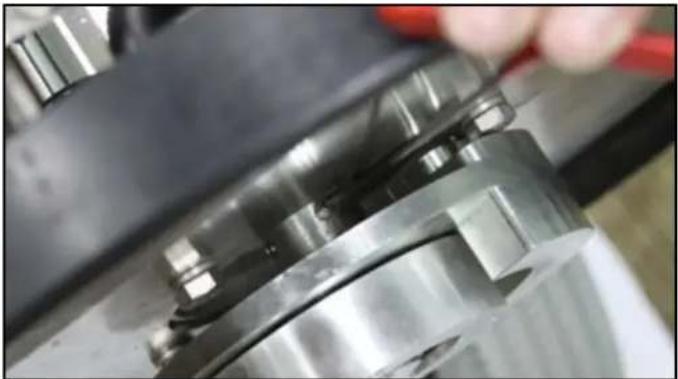
- Loosen the four set screws holding the flywheel onto the shaft using a 1/8" Allen wrench and slide the flywheel assembly off the shaft.
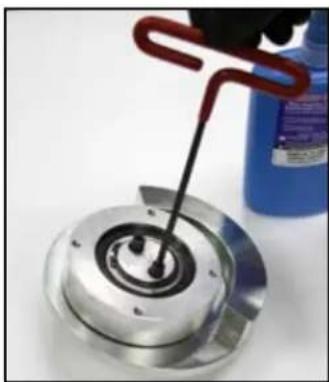
- Line up the holes on the center of the new bearing with the holes on the center of the new flywheel (1). Add a dot of blue threadlocker to the two black bearing screws and, using a 3/16" Allen wrench, tighten the bearing onto the flywheel. Make sure the bearing spins freely.

- Apply blue threadlocker to the two small set screws (3) and thread them into the holes where the key slot is. They do not need to be threaded in very far. Make sure they don't stick out into the key slot.
3 - Machine Maintenance
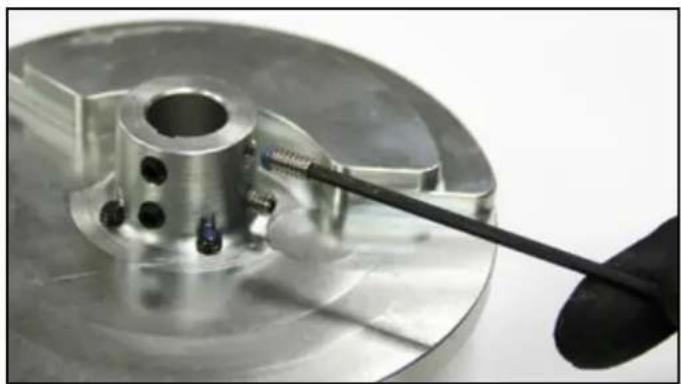
- Apply blue threadlocker to the two longer set screws (4). These get threaded into the holes 90° to the right of the key slot. They do not need to be threaded in very far. Make sure they don't stick out into the shaft slot.
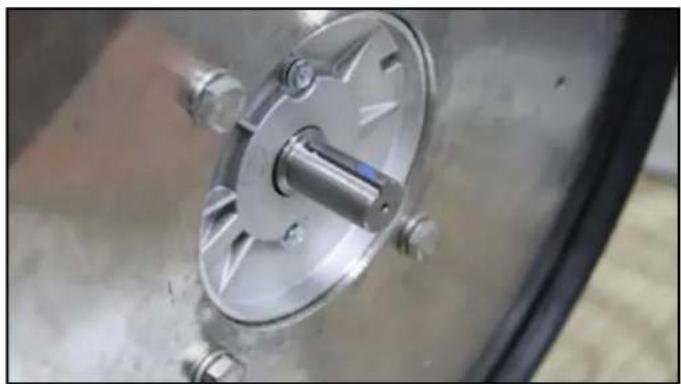
- Apply a dot of blue threadlocker to one side of the key (2) and place it in the key slot on the motor shaft so that the threadlocker is facing outward.
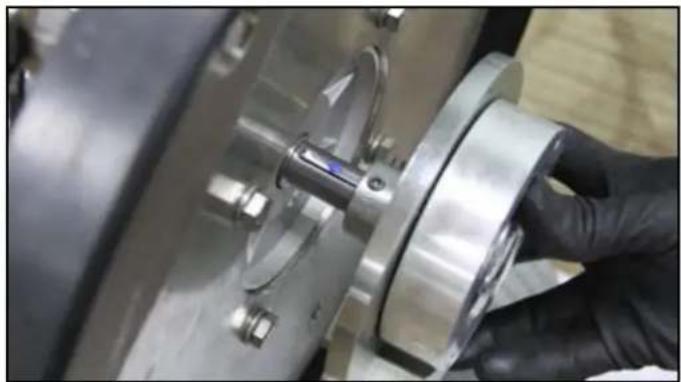
- Line the key slot on the flywheel up with the key on the shaft and slide the flywheel and bearing assembly into place.
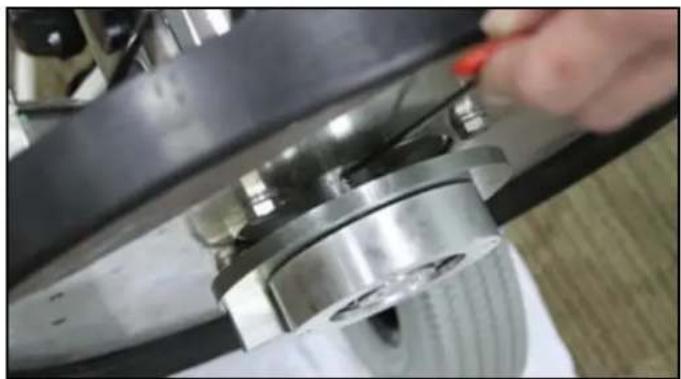
- Tighten all four set screws with a 1/8" Allen wrench.
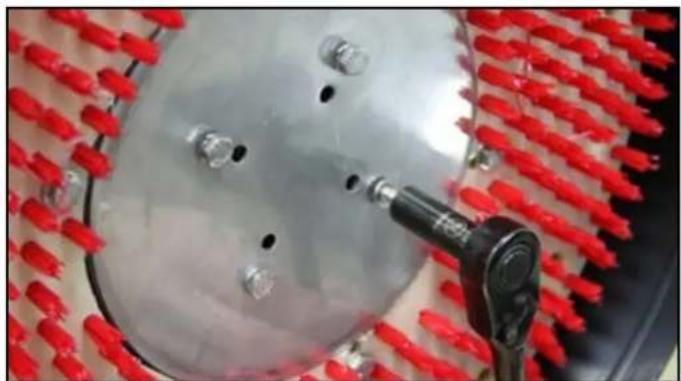
- Bolt the pad driver back into place with the 7/16" socket or wrench.
4.1 - Machine Troubleshooting
| Plug on the power cord doesn’t light up when plugged in. | |
| Possible Causes Solutions | |
| Problem with the power cord. | Replace power cord.13” Pigtail: Part # E417 |
| Burnt out light. No action needed or replace power cord.13” Pigtail: Part # E417 | |
| Plug lights up when plugged in but machine does not turn on. | |
| Possible Causes Solutions | |
| Wires connecting to the switch may be loose or disconnected. | Open up the faceplate on the handle and check the switch for loose or disconnected wires. Re-connect any loose wires. |
| Bad power switch. Replace switch. Part # E516 | |
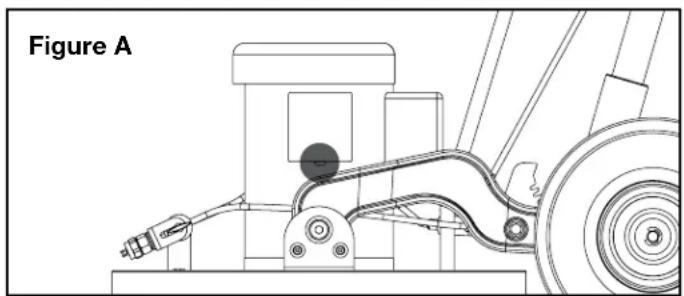
| (120 volt units only) Motor circuit breaker may have tripped. | Make sure motor is first cooled down, then reset breaker by pressing button located on bottom of motor conduit box (see Figure A). Make sure that only the proper Mytee power cord extension is being used, and that it is good condition. If the problem persists or reoccurs, contact a Mytee Service Center. |
| Motor is drawing too many amps and blowing breakers. | |
| Possible Causes Solutions | |
| Power cord is defective or damaged. | Replace power cord. 13” Pigtail: Part # E417 |
| Power switch has shorts or loose connections. | Replace power switch. Part # E516 |
| Power cord from the switch is defective or damaged. | Replace power cord. 38” Pigtail: Part # E575 |
| Machine is making a loud grinding noise. | |
| Possible Causes Solutions | |
| Bearing failure. Replace bearing (See Bearing Replacement instructions on page 12). | |
4.2 - Pump Troubleshooting
| No water flow. | |
| Possible Causes Solutions | |
| Tank is empty. Fill tank. | |
| Filter is clogged. Clean the filter. | |
| Pump valves are clogged or damaged. | Examine the valves and clean or replace. |
| Low pressure. | |
| Possible Causes Solutions | |
| Work nozzle. Replace nozzle | with a new one of the same size. |
| Leak in high pressure hose or connections. | Check the hose and connections. |
| Filter is clogged. Clean the filter. | |
| Pump valves are clogged or damaged. | Examine the valves and clean or replace. |
| Pump pulsates when spraying. | |
| Possible Causes Solutions | |
| Filter is clogged. Clean the filter. | |
| Pump valves are clogged or damaged. | Examine the valves and clean or replace. |
| Leaks seen under pump. | |
| Possible Causes Solutions | |
| Worn pump seals. Replace with new plunger and seals. | |
| Abrasives in solution have damaged pump seals. | Mix chemical thoroughly and make sure filter is not damaged. |
NOTES

Mytee®
Mytee, LLC
13655 Stowe Dr.
Poway, CA 92064
www.mytee.com
© 2022 Mytee, LLC
Printed in the USA
- DEAR CUSTOMER
- IMPORTANT SAFETY INFORMATION ....4
- 1 AT A GLANCE 6
- 2 MACHINE OPERATION 10
- 3 MACHINE MAINTENANCE....12
- 4 TROUBLESHOOTING....14
- GROUNDING INSTRUCTIONS
- PARTS AND SERVICE
- NAME PLATE
- UNPACKING THE MACHINE
- CAUTION AND WARNINGS
- SYMBOLS
- IMPORTANT SAFETY INFORMATION
- TO REDUCE THE RISK OF FIRE, ELECTRICAL SHOCK, OR INJURY
- 1.1 - TECHNICAL SPECIFICATIONS
- 1.2 - INCLUDED WITH THE ECO PRO
- 1.3 - ECO PRO FRONT VIEW
- AT A GLANCE
- OPTIONAL SPRAY GUN
- SPRAY JETS
- MACHINE OPERATION
- 2.1 - POWERING THE ECO PRO
- 2.2 - CONNECTING THE OPTIONAL SPRAY GUN
- 2.3 - PAD DRIVERS, PADS, AND BRUSHES PAD DRIVER
- APPLYING CLEANING PAD
- TILE & GROUT BRUSH
- 2.4 - FILLING THE SHAMPOO TANK
- FAUCET FILL
- BUCKET FILL
- 2.5 - HOW TO PRE-SPRAY
- 2.6 - HOW TO OPERATE THE ECO PRO
- 2.7 - EMPTYING THE SHAMPOO TANK
- MACHINE MAINTENANCE
- 3.1 - FLYWHEEL AND BEARING REPLACEMENT
- TOOLS NEEDED
- MYTEE®
Brand : Mytee
Model : Orbitals ECO17-PRO
Category : Polisher