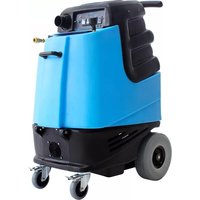
Speedster 1000DX-200-230 - Steam cleaner Mytee - Free user manual and instructions
Find the device manual for free Speedster 1000DX-200-230 Mytee in PDF.


| Product Type | Carpet Extractor / Steam Cleaner |
| Brand | Mytee |
| Model | Speedster 1000DX-200-230 |
| Recovery Tank Capacity | 9 gallons (34 liters) |
| Solution Tank Capacity | 10 gallons (38 liters) |
| Vacuum Motors | Dual 3-stage, 200 CFM, 130" water lift |
| Solution Pump | 220 PSI, 1.35 GPM |
| Heater | Not included |
| Wheels | 10" foam-filled |
| Casters | 4" locking |
| Power Cord | Single 50' 12/3 with grounded plug |
| Amp Draw | 20 amps @ 115V 60Hz |
| Machine Weight | 87 lbs (39.5 kg) |
| Machine Dimensions (LxWxH) | 28" x 18.5" x 39" (71 x 47 x 99 cm) |
| Accessories Included | 2" Cuff-Lynx hose connectors (H141V, H110V), hose hanger (H375), drain spout (H226) |
| Vacuum Connection | 2" Cuff-Lynx |
| Solution Connection | Quick connect with prime valve |
| Materials | Commercial-grade polyethylene tanks |
| Maintenance Frequency | Daily: clean tanks, hoses, filters; Weekly: flush system with Mytee System Maintainer |
| Safety Features | Grounded cord, circuit breaker protection, automatic shut-off if overheating (not specified but typical) |
Frequently Asked Questions - Speedster 1000DX-200-230 Mytee
User questions about Speedster 1000DX-200-230 Mytee
0 question about this device. Answer the ones you know or ask your own.
Ask a new question about this device
Download the instructions for your Steam cleaner in PDF format for free! Find your manual Speedster 1000DX-200-230 - Mytee and take your electronic device back in hand. On this page are published all the documents necessary for the use of your device. Speedster 1000DX-200-230 by Mytee.
USER MANUAL Speedster 1000DX-200-230 Mytee
Dear Customer:
Congratulations on the purchase of your new Speedster® Carpet Extractor. As technology continues to develop you can work confidently knowing that both Mytee Products and its employees are equally dedicated to developing with the industry and its advances.
Like any other piece of machinery or technology, the Speedster® also requires proper maintenance and care to keep the product working over extended use. Neglecting your machine, abusing it or not operating it properly can void its warranty and prevent the machine from performing to the quality and standard you'd expect out of the Mytee Products line.
If you have any warranty concerns or questions, please review this manual thoroughly or do not hesitate to contact your distributor. If there are questions regarding maintenance, replacement, or ordering parts please contact an authorized Mytee Products Service Center. To see an updated list please visit our website at http://www.mytee.com/support/service-centers. Before using your Mytee product, please read this manual thoroughly.
Sincerely,
Mytee Customer Care Dept.
TABLE OF CONTENTS
IMPORTANT SAFETY INFORMATION....4
1 AT A GLANCE 6.
1.1 - Technical Specifications 6....
1.2 - Included with the Speedsters® 7......
1.3 - Speedster® Features 8.
1.5 - Switch Plate 9....
3.1 - Opening the Unit for Maintenance 12
3.2 - Filter Maintenance ....12
3.3 - Ball Float Maintenance ....12
3.4 - System Maintainer ....12
4 AVAILABLE ACCESSORIES 13
5 TROUBLESHOOTING....14
IMPORTANT SAFETY INFORMATION
Grounding Instructions
This machine must be grounded. If it should malfunction or break down, grounding provides a path of least resistance for electrical shock. This machine is equipped with a cord having an equipment-grounding conductor and grounding plug. The plug must be plugged into an appropriate outlet that is properly installed in accordance with all local code and ordinances. Do not remove ground pin; if missing, replace plug before use.

Improper installation of the equipment-grounding conductor can result in a risk of electric shock. Be sure to check with a qualified electrician or service person if you are in doubt as to whether the outlet is properly grounded. If the plug will not fit in the outlet do not modify the plug on the machine's cord, instead have a proper outlet installed by a qualified technician.
This machine is for use on a nominal 120-volt circuit and with a grounding plug similar to the one in Figure 1 below. If a proper outlet is not available, follow the illustrations of Figure 2 & 3 to install a temporary-grounding plug. This temporary work-around should be used only until a proper outlet (Figure 1) can be installed by a qualified electrician. When and if this type of adapter is employed, screw the adapter's extended tab into place with a metal screw. However, grounding adapters are not approved for use in Canada.
Again, be sure to check the grounding pin for damages and replace if necessary.
The Green, or Green-Yellow, wire in the cord is the grounding wire. When replacing a plug, this wire must be attached to only the grounding pin.
DO NOT use extension cords.
Please Note for America use only.

Figure 1
Figure 2 Figure 3
Parts and Service
Please contact Mytee service personnel or a Mytee authorized Service Center using Mytee original replacement parts and accessories if repairs need to be performed. When and if calling Mytee for support, please have your Model and Serial Number available for faster assistance.
Name Plate
The Model and Serial Number are located on the lower half of the back of the machine near the power plug and will be required for ordering replacement parts. You can use the space provided in this manual to note down both for future referencing.
Unpacking the Machine
When your new machine is delivered, please carefully inspect both the shipping carton and the machine for damages. If damage is evident, save both the shipping carton and machine so that the delivering carrier can inspect it. Contact the carrier immediately to file a freight claim if there has been any damage.
Caution and Warnings
Symbols
Mytee uses the symbols below to signal potentially dangerous conditions. Always read this information carefully and take the necessary steps to protect personnel and property.

Is used to warn of immediate hazards that will cause severe personal injury or death.

Is used to call attention to a situation that could cause severe personal injury.

Is used to call attention to a situation that could cause minor personal injury or damage to the machine or other property. When using an electrical appliance, basic precautions should always be followed, including the following: Read all instructions before using this machine. This product is intended for commercial use only.
IMPORTANT SAFETY INFORMATION
To reduce the risk of fire, electrical shock, or injury:
-
Read all instructions before using equipment.
-
Use only as described in this manual. Use only manufacturer's recommended attachments.
-
Always unplug power cord from electrical outlet before attempting any adjustments or repairs.
-
Do not unplug by pulling on cord. To unplug, grasp the plug, not the cord.
-
Do not pull or carry by cord. Do not close a door on cord or pull cord around sharp edges or corners.
-
Do not run appliance over cord. Keep cord away from heated surfaces.
-
Do not use with damaged cord or plug. If cord is damaged, repair immediately.
-
Do not use outdoors or on wet surfaces and/or standing water.
-
Always unplug or disconnect the appliance from power supply when not in use.
-
Do not allow to be used as a toy. Close attention is necessary when used by or near children.
-
Do not use in areas where flammable or combustible material may be present.
-
Do not leave the unit exposed to harsh weather elements. Temperatures below freezing may damage components and void warranty.
-
Use only the appropriate handles to move and lift unit. Do not use any other parts of this machine for this purpose.
-
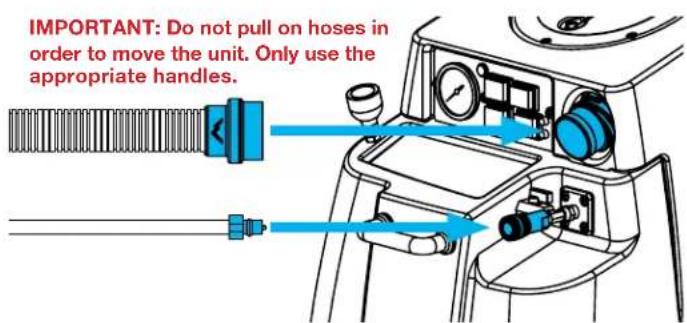
Do not pull on hoses in order to move the unit. Only use the appropriate handles.
-
Keep hair, loose clothing, fingers, and all parts of the body away from all openings and moving parts.
-
Use extra care when using on stairs.
-
To reduce the risk of fire or electric shock, do not use this machine with a solid-state speed control device.
-
The voltage and frequency indicated on the name plate must correspond to the wall receptacle supply voltage.
-
When cleaning and servicing the machine, local or national regulations may apply to the safe disposal of liquids which may contain: chemicals, grease, oil, acid, alkalines, or other dangerous liquids.
-
Do not leave operating unattended.
1 - AT A GLANCE
1.1 - Technical Specifications
1000DX-200
| Recovery Tank | 9 gallon capacity |
| Solution Tank | 10 gallon capacity |
| Vacuum Motors | Dual 3-stage, 200 CFM, 130” water lift |
| Solution Pump | 220 PSI, 1.35 GPM |
| Wheels | 10” foam-filled |
| Casters | 4” locking |
| Power Cord | Single 50’ 12/3 |
| Amp Draw | 20 amps @ 115V 60Hz |
| Machine Weight | 87 lbs. |
| Machine Dimensions | 28” x 18.5” x 39” |
1001DX-200
| Recovery Tank | 9 gallon capacity |
| Solution Tank | 10 gallon capacity |
| Vacuum Motors | Dual 3-stage, 200 CFM, 130” water lift |
| Solution Pump | 220 PSI, 1.35 GPM |
| Heater | 2,000 watt - 210° max. |
| Wheels | 10” foam-filled |
| Casters | 4” locking |
| Power Cord | Dual 50’ 12/3 |
| Amp Draw | Cord 1: 20 amps @ 115V 60HzCord 2: 18 amps @ 115V 60Hz |
| Machine Weight | 120 lbs. |
| Machine Dimensions | 28” x 18.5” x 39” |
1003DX
| Recovery Tank | 9 gallon capacity |
| Solution Tank | 10 gallon capacity |
| Vacuum Motors | Dual 3-stage, 200 CFM, 130” water lift |
| Solution Pump | 500 PSI max., 1.5 GPM |
| Heater | 1,600 watt. 210° max. |
| Wheels | 10” foam-filled |
| Casters | 4” locking |
| Power Cord | Dual 50’ 12/3 |
| Amp Draw | Cord 1: 20 amps @ 115V 60HzCord 2: 20 amps @ 115V 60Hz |
| Machine Weight | 127 lbs. |
| Machine Dimensions | 28” x 18.5” x 39” |
1005LX
| Recovery Tank | 9 gallon capacity |
| Solution Tank | 10 gallon capacity |
| Vacuum Motors | Dual Mytee® Hybrid Ametek motors, 225-250 CFM, 182” water lift |
| Solution Pump | 500 PSI max., 1.5 GPM |
| Wheels | 10” foam-filled |
| Casters | 4” locking |
| Power Cord | Dual 50’ 12/3 |
| Amp Draw | Cord 1: 20 amps @ 115V 60Hz Cord 2: 16 amps @ 115V 60Hz |
| Machine Weight | 115 lbs. |
| Machine Dimensions | 28” x 18.5” x 39” |
1.2 - Included with the Speedsters®
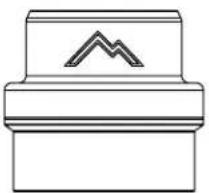
H141V Cuff-Lynx™ (2" Female Cuff-Lynx™ x 1.5" Female Hose)
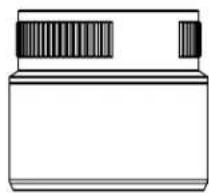
H110V Cuff-Lynx™ (2" Female Cuff-Lynx™ x 2" Female Hose)

H375 Hose Hanger H226 Drain Spout

1 - AT A GLANCE
1.4 - Speedster® Features

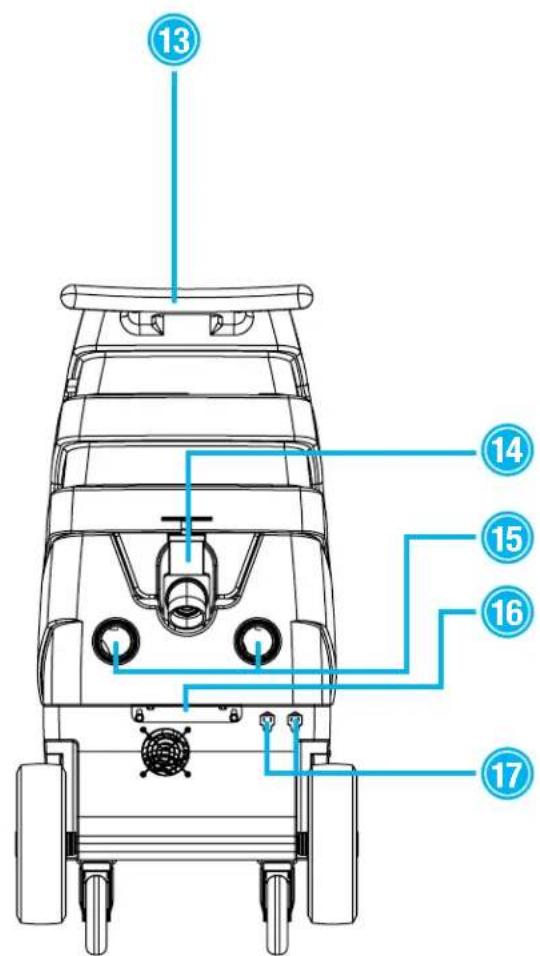
1003DX shown as example
- Clear recovery tank lid
- Switch plate
- Faucet fill hose
- Solution tank lid
- Front lift handle
- 10 gallon solution tank
- 4" locking casters
-
Regulator (1003DX, 1005DX, & 1005LX only. Regulator placement varies.)
-
10" foam-filled wheels
- Solution hose quick connect with prime valve
- 9 gallon recovery tank
- 2" Cuff-Lynx™ vacuum hose connection
- Push handle
- Recovery tank drain
- Exhaust ports
- Rear bracket for opening machine
- Power cord pigtail(s)
1.5 - Switch Plate
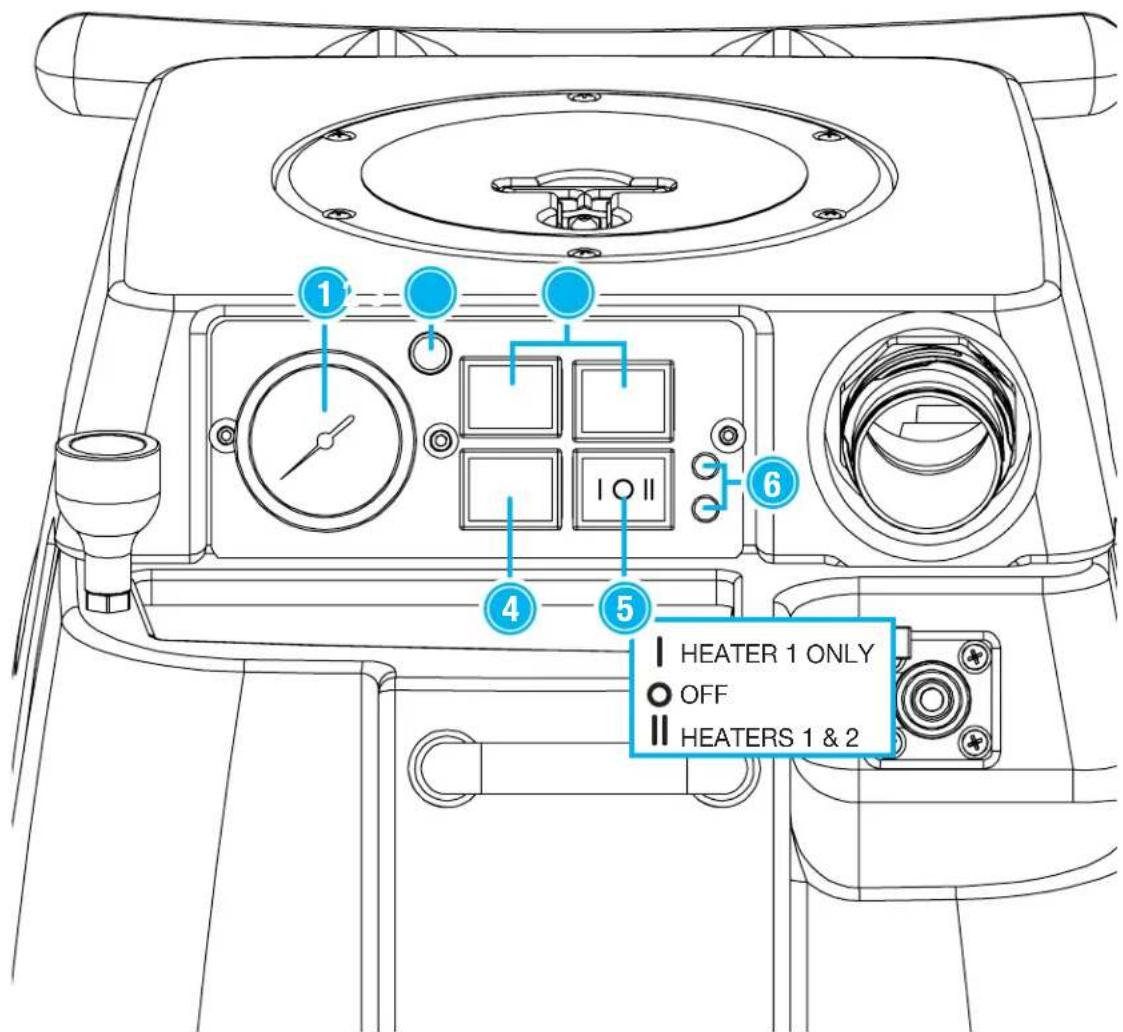
1003DX shown as example
- Pressure gauge (not installed on 1000DX-200 & 1001DX-200).
- Dual circuit indicator light (not installed on 1000DX-200).
-
Vacuum switches.
-
Pump switch.
- Heater three-position switch (not installed on 1000DX-200, 1005DX, & 1005LX).
- Heater indicator lights. Each light illuminates when the corresponding heater is on.
Each power cord on the Speedster® requires a grounded 20 amp outlet. For dual cord machines, plug each cord into its own 20 amp circuit. The dual circuit indicator light and tone will activate when this is achieved.

| Machine | Components on each cord. Primary Cord always marked with yellow tag. | |
| 1000DX-200 | Primary Cord: | Vacuums 1 & 2 Pump |
| 1001DX-200 | Primary Cord: | Vacuum 1 1,000 Watt Heater Pump |
| Secondary Cord: | Vacuum 2 1,000 Watt Heater | |
| 1003DX Primary Cord: | Vacuum 1 600 Watt Heater Pump | |
| 1005LX Primary Cord: | Vacuum 1 Pump | |
2.2 - Connecting Vacuum & Solution Hoses
Use the included Cuff-Lynx™ hose connectors to connect 1.5" or 2" vacuum hose to the Speedster®. Connect the solution hose via the quick connect fitting on the front of the Speedster®.
2.3 - Filling the Solution Tank
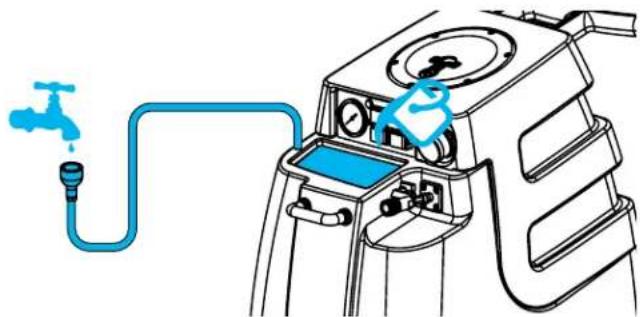
The Speedster® solution tank can be filled up via the faucet fill hose or from a bucket via the opening under the solution tank lid.
IMPORTANT: Do not use acid (acid rinse) or high alkaline chemicals like sodium hydroxide in the 1003DX or 1005LX machines. This will cause damage to the pump and void the warranty.
2.4 - Switching on the Speedster® Units Without Heater (1000DX-200, 1005LX)
After a cleaning tool is connected and the solution tank is filled, switch on the vacuums and the pump in any order.
Units With Heater (1001DX-200, 1003DX)

In order to avoid vapor locking the unit, the components should be switched on by following the procedure below after a cleaning tool is connected:
-
Turn pump switch on. Pull the lever on the cleaning tool to release air in the line. Hold lever until a steady flow of water comes out of the wand.
-
Once pump is primed and there is pressure in the solution line, turn on heater switch and wait a few minutes for water to heat up.
-
Once water is heated, turn on vacuum and begin cleaning.
2.5 - The Prime Valve
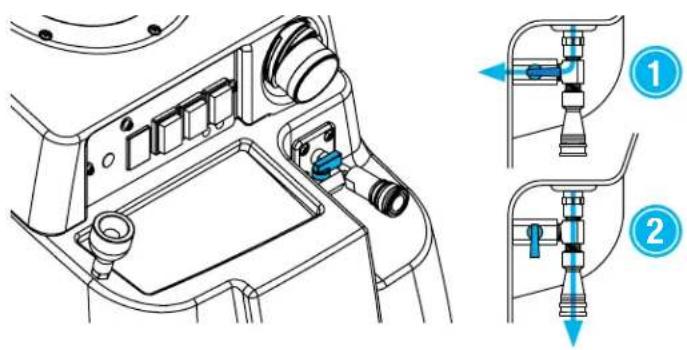
The Speedster® units come with a prime valve attached to the solution hose quick connect fitting. Turning the valve lever to position 1 directs flow towards the wash hose inside the solution tank. Turning the lever to position 2 directs flow towards the cleaning tool.
2.6 - Emptying the Recovery Tank

Empty the recovery tank by attaching the H226 45° drain elbow to the drain spout in back. Lift up the dump valve and empty the tank into a bucket or drain.
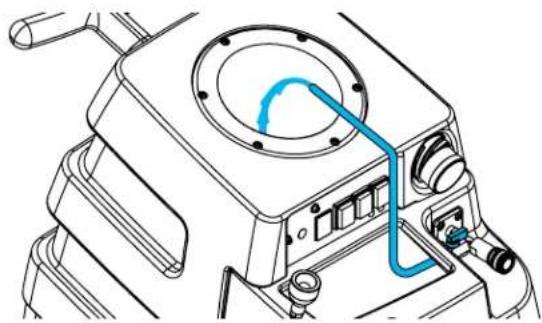
Rinse out the recovery tank using the wash hose inside the solution tank. Take the lid off the recovery tank and place the end of the wash hose inside. With solution or clean water in the solution tank, switch on the pump and turn the prime valve to position 1 (shown in section 2.5 on previous page). Rinse off the inside of the recovery tank and then drain the tank.
2.7 - Emptying the Solution Tank

Connect a vacuum hose to the Cuff-Lynx™ connection. Switch on the vacuum(s) and insert the vacuum hose into the solution tank to suck out all the unused solution. When finished, lift the recovery tank dump valve to drain.
In order to keep the Speedster® running smoothly and reduce the risk of damage to the machine and subsequent downtime, Mytee recommends following the maintenance schedule below:
| Maintenance Item Daily Weekly | ||
| Clean and inspect tanks. X | ||
| Clean and inspect hoses. X | ||
| Check and clean internal filters. X | ||
| Check power supply cable. X | ||
| Clean machine with all-purpose cleaner and cloth. | X | |
| Check spray nozzles. X | ||
| Flush solution system with Mytee System Maintainer. | X | |
| Inspect vacuum hoses for holes and loose cuffs. | X | |
| Inspect spray pattern for clogging. If clogged, remove spray tips and soak them in a recommended liquid neutralizer for up to six hours. To remove spray tip, twist spray tip body counter-clockwise. | X | |
| Lubricate wheels with water resistant oil. | X | |
| Inspect machine for water leaks and loose hardware. | X |
3.1 - Opening the Unit for Maintenance

To open your Speedster® for maintenance, use a drill with a 3/8" bit to remove the bolts holding the Speedster's® body together. Lift up on the push handle to open the machine.
3.2 - Filter Maintenance
The Speedster® has a small mesh screen intake filter in the solution tank. This filter should be checked and cleaned after each use.
3.3 - Ball Float Maintenance
The ball floats in the recovery tank prevent recovered dirty water from rising too high and damaging the vacuum motors. Clean the mesh screen on the floats regularly.
3.4 - System Maintainer
Weekly flushing of the solution system with Mytee® System Maintainer helps keep lines clean and prevents chemical build-up, improving pump life, performance and pressure.
How to use System Maintainer:
- Mix 1-quart 3601 System Maintainer with 1-quart of warm water.
- After thoroughly mixing, pour this solution into the solution tank.
- Turn the pump on FIRST, and run solution through your cleaning tool. NOTE: The jet should be removed from the cleaning tool in order to prevent clogging due to loosening of deposits in line.
- Next, turn on the heater (if equipped). If the heater is turned on first, it will result in a vapor lock, which will affect the machine's operation.
- Next, with both the pump and heater on, begin running the solution through the machine. This allows the solution to break down any build up in the lines.
- After running all of the solution through the machine, fill the tank with clean, warm water. Run the water through the machine to clear the solution completely out of the tank & lines.
4 - AVAILABLE ACCESSORIES
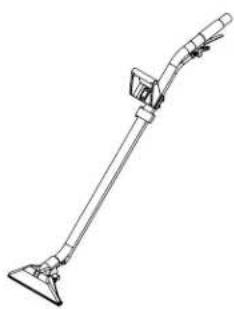
8300-EZ - 12" Dual Jet Wand
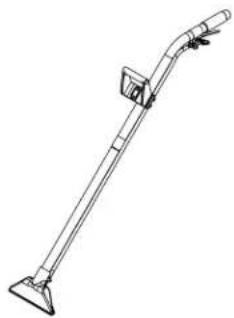
8390-EZ - 10" Single Jet Wand
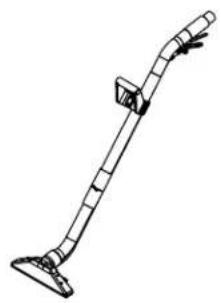
8314T - Bentley™ 14" Carpet Wand

8314P - Bentley™ Plus 14" Carpet Wand

8314DW - Bentley™
14" Drag Wand
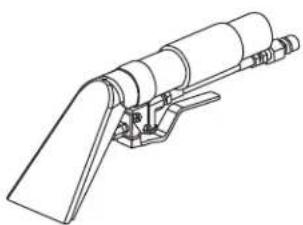
8400 - 4" Stainless Steel Upholstery Tool
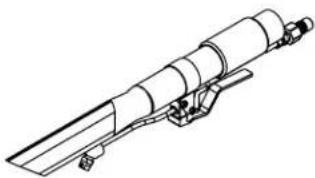
8700 - Stainless Steel
Crevice Tool

8400P - Air Lite™ Upholstery Tool

8400DX - Mytee Dry™ Upholstery Tool

8100 - 1.5" x 25' Vacuum & Solution Hose Combo
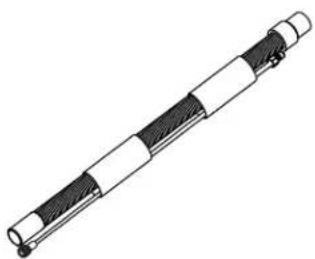
8101 - 2" x 25' Vacuum & Solution Hose Combo

8500 - 1.5" x 15' Vacuum & Solution Hose Combo
5 - TROUBLESHOOTING
5.1 - Vacuum Troubleshooting
| Vacuum is not turning on. | |
| Possible Cause Solution | |
| Vacuum may not be getting power. | Check the electrical connections and the switch.Look for loose or damaged wires.To check the switch:Unbolt the switch plate.Take a picture of the layout of the wires or tagging the wires for future reference.Switch the wires from the vacuum switch with the wires from either the pump or heater switch.Turn on the pump or heater switch (whichever one you exchanged wires with). If the vacuum turns on, then you know the vacuum switch is bad. |
| Vacuum is not producing suction. | |
| Possible Causes Solutions | the recovery tank. |
| Recovery tank is full. Empty | Open the machine and find the hose running from the recovery tank to the vacuum motor. Check if it is disconnected. If so, reconnect it. If it has a leak, replace the hose (Part # PH627 if 1.5", PH628 if 2"). |
| If the vacuum exhausts but there is no suction, then the hose from the recovery tank to the vacuum motor is disconnected. | |
| Vacuum hose blockage (if there is no suction or exhaust). | Check for blockage in the hose, starting from the cleaning tool to the machine. |
| Clogged filter in vacuum tank. | Clean out filter regularly. |
| Drain valve/cap is loose and is causing air leakage. | Tighten the drain valve/cap. |
| Hose cuffs are loose and causing air leakage. | Tighten all hose cuffs regularly as may loosen over time. Use a glue to prevent cuffs from coming loose (optional). |
| Lid on tank is loose and is causing air leakage. | Make sure the lid is tight. |
| Vacuum blows water out the exhaust. | |
| Possible Causes Solutions | |
| Foam building up in the recovery tank. | Use a defoaming solution in the recovery tank. |
| There is a loud grinding noise coming from the vacuum. | |
| Possible Cause Solution | |
| Debris has been sucked into the vacuum motor chamber. Usually results from dry vacuuming. | Replace the vacuum motor. To avoid repeat problem, DO NOT dry vacuum with your extractor. |
Click here for more detailed information.
5.2 - Pump Troubleshooting
| Pump doesn’t turn on. | |
| Possible Causes Solutions | |
| Bad switch at control panel. | Unbolt the switch plate. We recommend taking a picture of the layout of the wires or tagging the wires for future reference. Switch the wires from the pump switch with the wires from either the vacuum or heater switch. Turn on the vacuum or heater switch (whichever one you exchanged wires with). If the pump turns on, the pump switch is bad. |
| Loose or disconnected wire. | Disconnect the power cord from the electrical outlet. Open up the machine and look for any loose or disconnected wires. Re-attach or replace wires. |
| Pump runs but there is no spray. | |
| Possible Causes Solutions | |
| Blockage or kink somewhere in the line. | See chart on page 4 of the Diaphragm Pump Troubleshooting Guide to diagnose the location of the blockage. |
| Air is in the pump. Prime the | pump. |
| Remove QD off the machine and solution hose.Make sure that the three-prong clip on the inside of the threaded end is evenly aligned below the thread of the QD. | |
| Pump runs but there is no spray. | |
| Possible Causes Solutions | |
| On a new unit, the check valve between the pump and heater may hang up, causing the flow of water to be impeded or stop entirely. | Remove the check valve temporarily and check to see if the pump will flow water out of the pump outlet hose when the pump is turned on for a brief instant in order to verify cause. The remedy is to install a new check valve. Observe the proper orientation (flow direction) of the check valve.Tip: the check valve may be able to be temporarily returned to service by un-sticking the check valve poppet with manipulation of the poppet ball with a thin tool, like a straightened paperclip. Replace the check valve in unit assembly.NEVER OPERATE A UNIT WITHOUT A CHECK VALVE IN PLACE. |
| Pump runs for a second then shuts down. | |
| Possible Causes Solutions | |
| QD is pressure locked. Relieve pressure from behind the QD by pressing in the button inside the QD. |
| Low PSI. | |
| Possible Causes Solutions | |
| The jet nozzle could be too large. | Replace the jet with one that has a smaller opening. |
| Pump doesn’t stop running. | |
| Possible Causes Solutions | |
| Leak somewhere in the line. | Disconnect the solution hose from the machine. If this causes the pump to stop running then the problem is outside the machine, either in the solution hose or tool. If it continues running on, open the machine and check for leaks. Repair the leak. If there are no leaks, run Mytee’s System MaintainerTM (Part # 3601) through the machine to clear blockages. |
| Cracks or vacuum leaks on inlet side of pump. | Make sure hoses are secured tightly. If the inlet side of the pump is cracked or damaged, replace the pump. |
| Seals have been degraded by chemical. | Install seal repair kit. |
| Debris blocking inlet filter or pump head. | Clean filter and/or pump head. |
| Pump trips circuit breaker when turned on. | |
| Possible Causes Solutions | |
| Short in power switch. Test by swapping vacuum and pump switch. If problem resolves, but vacuum begins tripping breaker, replace switch (Part #E515). |
5 - TROUBLESHOOTING
| Short in electrical harness. | Risk of electric shock. Do this at your own risk.Remove pump from circuit by attaching power leads together. If breaker still pops when switch is toggled, then there is a short to the ground in the circuit. Replace wires as needed. |
| Short in pump motor. If switch | and harness check is OK, the short may be in the pump motor. Replace pump. |
Click here for more detailed information.
5.3 - Heater Troubleshooting
| Heater is not heating water. | |
| Possible Causes Solutions | |
| Loose electrical connection. | Check all electrical connections, including power cord and harness. |
| Automatic sensor has failed, causing manual sensor to trip. | Reset the manual sensor button by pressing the small white and yellow button in the center of the sensor. If this works, but heater continues to trip the manual sensor, replace the automatic sensor (Part #E573) on the heater. |
| Heater element has failed. Check for continuity through the element by reading the amperage. If amps are low, only part of the element may be heating up – in this case, the element is damaged and needs to be replaced. | |
| Bad power switch. If the element, sensors, and wiring all check out okay, there may be a bad switch on the switch-plate. | |
| Running out of hot water too fast. | |
| Possible Causes Solutions | |
| Too much water flowing through the heater. | Remember, when using your machine, it is recommended you do one wet pass followed by two dry passes. This way you are not spraying as much and the hot water will last longer. |
| Jets being used are too large. | If your machine has a 1,000W or 1,200W heating system, make sure your cleaning tool has 0.02 jets. |
| Water in tank is very cold. If possible, fill your solution tank with warm water in order to shorten the amount of time it takes for the water to heat up. The pumps are usually rated for 140°F water. | |
| Heater has hard water buildup inside, leading to lost efficiency. | Run Mytee System MaintainerTM (Part # 3601) through the machine regularly in order to clear hard water or chemical residue that can block water flow and reduce heating ability. See product label for instructions. |
| Unit has vapor locked and there is no water pumping out of the unit. | |
| Possible Cause Solution | |
| Turning on the heater before turning on the pump and priming the unit. | Turn off the heater and allow the unit to cool completely. When machine has cooled, turn on the pump first. Prime the unit by spraying solution out of the cleaning tool. Then, turn on the heater. |
Click here for more detailed information.
NOTES

Mytee Products, Inc.
13655 Stowe Dr.
Poway, CA 92064
www.mytee.com
© 2019 Mytee Products, Inc.
Printed in the USA
- DEAR CUSTOMER
- TABLE OF CONTENTS
- IMPORTANT SAFETY INFORMATION....4
- 1 AT A GLANCE 6
- 4 AVAILABLE ACCESSORIES 13
- 5 TROUBLESHOOTING....14
- IMPORTANT SAFETY INFORMATION
- GROUNDING INSTRUCTIONS
- PARTS AND SERVICE
- NAME PLATE
- UNPACKING THE MACHINE
- CAUTION AND WARNINGS
- SYMBOLS
- TO REDUCE THE RISK OF FIRE, ELECTRICAL SHOCK, OR INJURY
- AT A GLANCE
- 1.2 - INCLUDED WITH THE SPEEDSTERS®
- 1.5 - SWITCH PLATE
- 2.2 - CONNECTING VACUUM & SOLUTION HOSES
- 2.3 - FILLING THE SOLUTION TANK
- 2.4 - SWITCHING ON THE SPEEDSTER® UNITS WITHOUT HEATER (1000DX-200, 1005LX)
- UNITS WITH HEATER (1001DX-200, 1003DX)
- 3.1 - OPENING THE UNIT FOR MAINTENANCE
- 3.2 - FILTER MAINTENANCE
- 3.3 - BALL FLOAT MAINTENANCE
- 3.4 - SYSTEM MAINTAINER
- HOW TO USE SYSTEM MAINTAINER
- AVAILABLE ACCESSORIES
- TROUBLESHOOTING
- NOTES
Brand : Mytee
Model : Speedster 1000DX-200-230
Category : Steam cleaner