
H2AB2 - Video camera Speco Technologies - Free user manual and instructions
Find the device manual for free H2AB2 Speco Technologies in PDF.


| Product Type | Video Surveillance Camera |
| Brand | Speco Technologies |
| Model | H2AB2 |
| Image Sensor | 1/2.8\" CMOS |
| Resolution | 2MP (1920x1080) |
| Lens | 2.8mm fixed |
| Video Output | AHD/TVI/CVI/CVBS (default HD-TVI) |
| Audio | 1CH built-in microphone |
| Power Supply | DC12V (±15%) |
| Power Consumption | LED Off: <1W, LED On: <4W |
| Ingress Protection | IP67 |
| Operating Temperature | -22°F to 122°F |
| Dimensions (H2AB2) | 6.52 x 2.71 x 2.71 inches |
| White Light Range | 65~98 feet |
| Min. Illumination | 0 lux (LED On) |
| Functions | OSD (UTC), Smart LED, Digital WDR, DNR, AGC, AWB, HLC, BLC, Contrast, Sharpness, Defect Correction |
| Frame Rate | 30fps (60Hz) / 25fps (50Hz) |
| S/N Ratio | ≥52dB (AGC OFF) |
| Mounting | Wall or ceiling mount |
| Maintenance | Clean lens with soft, dry cloth; avoid harsh chemicals. Keep dry. |
| Safety | Do not install near heat sources or electromagnetic radiation. Use weatherproofing hardware. |
| Compliance | FCC Part 15 |
Frequently Asked Questions - H2AB2 Speco Technologies
User questions about H2AB2 Speco Technologies
0 question about this device. Answer the ones you know or ask your own.
Ask a new question about this device
Download the instructions for your Video camera in PDF format for free! Find your manual H2AB2 - Speco Technologies and take your electronic device back in hand. On this page are published all the documents necessary for the use of your device. H2AB2 by Speco Technologies.
USER MANUAL H2AB2 Speco Technologies
natural_image
Two white surveillance cameras mounted on cylindrical bases, no visible text or symbolsH2AB2/H2AT2
User Manual
Thank you for purchasing our product. Speco Technologies is constantly developing and improving products. We reserve the right to modify product design and specifications without notice and without incurring any obligation.
Warnings
If the product does not work properly, please contact the dealer or where the product was purchased. Speco Technologies is not responsible for any problems caused by improper operation or repair.
- Do not expose the unit to heavy stress, violent vibration or long-term exposure to water and humidity during transportation, storage, and/or installation.
■ Do not install near sources of heat.
■ Only install the product in environments inside the specification operating temperature and humidity range.
- Do not install the camera near power lines, radar equipment or other electromagnetic radiation.
■ Do not block any ventilation openings if any.
■ Use all the weatherproofing hardware requirement to minimize weather intrusion.
Introduction
This camera series is the latest technology and advanced circuit design, which features high definition and sensitivity, low noise and distortion and supports HD video transmission with the common coaxial cable, ensuring the requirement of the HD monitoring in the traditional surveillance system.
● High Resolution
Adopt high performance sensor, providing high definition and clear image.
● High Transmission Performance
Real-time transmission with high speed and long distance.
● DNR
Reduce noise from brightness and color signal.
OSD
Access the camera settings which can be clearly displayed through the main menu.
● White Balance
Adjust the color temperature according to the environment automatically.
● AGC
Adjust the gain of amplifier, enabling the camera to output the standard video signal in different lighting condition.
● Backlight Compensation (BLC)
When the back of the captured object is too much bright, you can set BLC for the captured object to make it clearer.
● Coaxial audio transmission
Cables
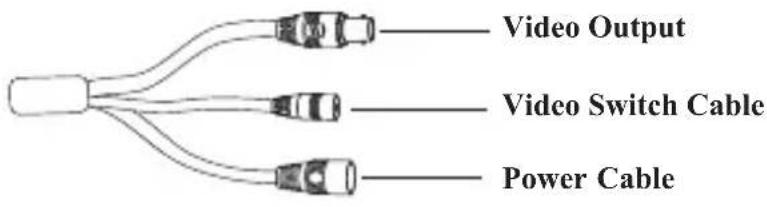
Video Switch: Four video output modes can be optional--AHD, TVI, CVI and CVBS (a) remove the cover of the video switch cable; (b) hold and press the button in the video switch cable for 5 seconds to switch the current video output.
Installation
Before you start, please make sure that the wall or ceiling is strong enough to withstand three times the weight of the camera. Please install and use the camera in the dry environment.
You'd better install back the lens cover or lower dome less than 4 hours after removing it.
The mounting types of cameras are only for reference.
▶Mounting for H2AB2
- Drill the screw holes and the cable hole on the wall according to the drill template.

-
Route and connect the cables.
-
Secure the mounting base with camera to the wall with screws as shown below.
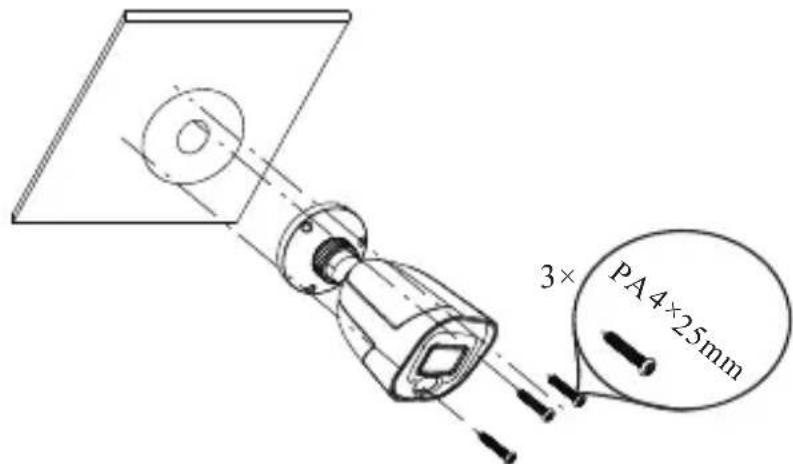
- Bracket adjustment. Before adjustment, preview the image of the camera on a monitor and then loosen the fixed ring to adjust the view angle of the camera. Tighten the fixed ring after the adjustment.

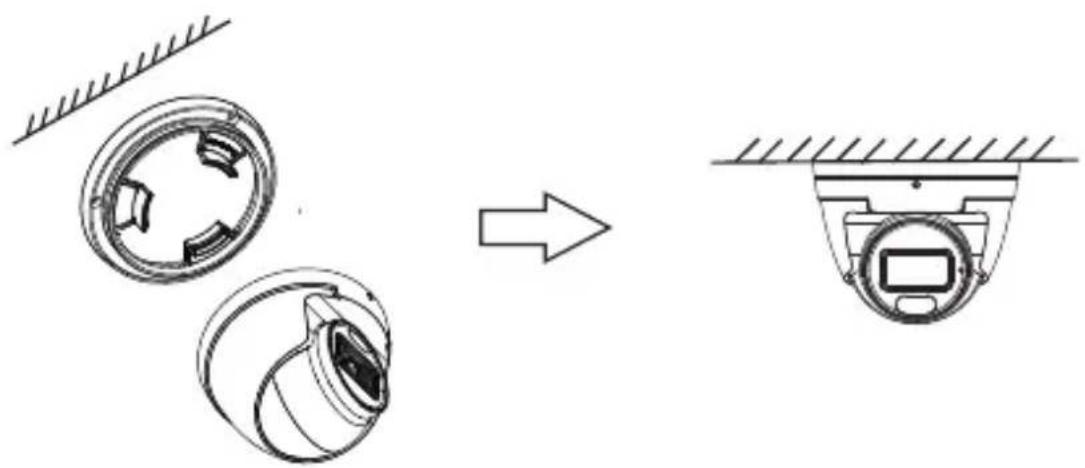
▶Mounting for H2AT2
- Drill the screw holes on the wall according to the drill template.
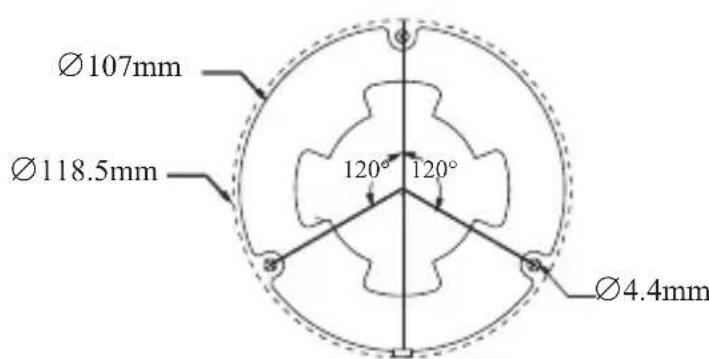
② Loosen the fixed screw to disassemble the camera.
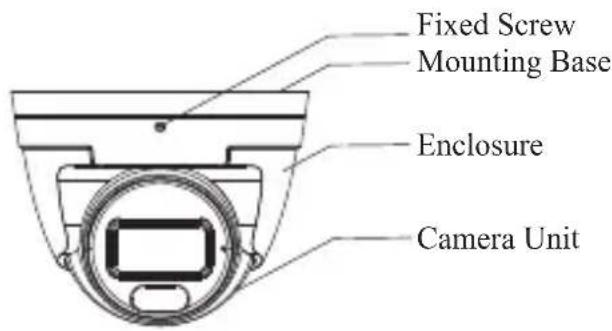
③ Rontsecandecthenmouthingblase To the ceiling or wall with the screws provided.
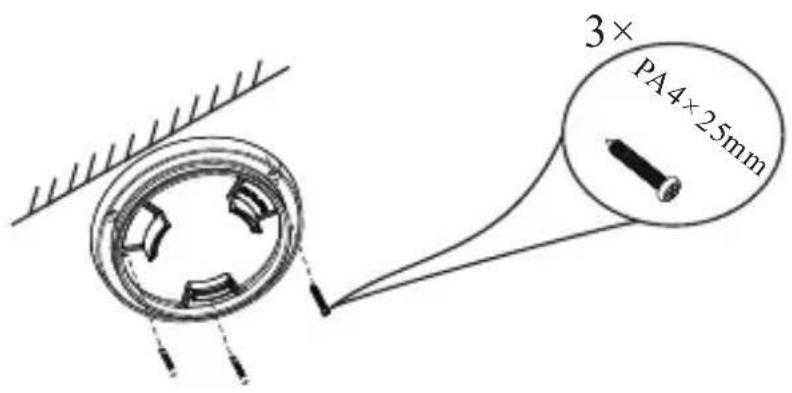
④ Install the camera unit and enclosure to the mounting base and then adjust if necessary to obtain an optimum view angle. Finally, fasten the camera with the fixed screw.
Specifications
| Models Specifications | H2AB2 | H2AT2 |
| Camera | ||
| Image Sensor | 1/2.8" CM Ⓧ | |
| Resolution | 2MP | |
| Image size | 1920×1080 | |
| Video Output | AHD/TVI/CVI/CVBS (*camera comes defaulted to HD-TVI) | |
| Audio | 1CH built-in microphone | |
| Image System | PAL/NTSC | |
| Electronic Shutter | Auto | |
| White Light Range (feet) | 65~98 | |
| Frame Rate | 30fps(60Hz); 25fps(50Hz) | |
| Min. Illumination | 0 lux (LED ON) | |
| Lens | 2.8 mm | |
| Lens Mount | M12 | |
| S/N Ratio | ≥ 52dB(AGC OFF) | |
| Ingress Protection | IP67 | |
| Functions | ||
| Function Control | OSD (UTC control) | |
| Smart LED | Manual or auto mode | |
| WDR | Digital WDR | |
| Digital NR | Yes | |
| AGC | Yes | |
| Auto White Balance | Yes | |
| HLC | Yes | |
| BLC | Yes | |
| Front Light Compensation | Yes | |
| Defog | No | |
| Contrast | Yes | |
| Sharpness | Yes | |
| Image Setting | Yes | |
| Defect Correction | Auto | |
| Others | ||
| Power Supply | DC12V (± 15%) | |
| Power Consumption | LED OFF: < 1W;LED ON : < 4W | |
| Working Environment | -22 °F ~ 122 °F, 10 % ~ 90 %(relative humidity) | |
| Dimensions (inch) | 6.52 2.71× × 2.71 | Φ3.72 3.25× |
Model: H2AT2/H2AB2
Federal Communications Commission (FCC) Statements
This device complies with Part 15 of the FCC Rules. Operation is subject to the following two conditions: (1) This device may not cause harmful interference, and (2) This device must accept any interference received, including interference that may cause undesired operation.
FCC Responsible Party:
Speco Technologies
200 New Highway
Amityville, NY 11701
www.specotech.com
Brand : Speco Technologies
Model : H2AB2
Category : Video camera