
FSPCVR - Cleaner Panduit - Free user manual and instructions
Find the device manual for free FSPCVR Panduit in PDF.


| Product Type | Optical Fiber Cleaver |
| Brand | Panduit |
| Model | FSPCVR |
| Dimensions (W x D x H) | 58 mm x 98 mm x 49 mm |
| Weight | Approx. 260 g |
| Power Supply | Coin type Lithium battery CR1220 |
| Applicable Fiber | Silica glass, cladding diameter 125 µm, single fiber |
| Cleave Length | 7.0-7.5 mm |
| Blade Life | 60,000 fibers (2,500 fibers x 24 positions) |
| Cleave Counts per Battery | Approx. 60,000 |
| Operating Temperature | -10°C to 50°C |
| Storage Temperature | -40°C to 80°C |
| Humidity | Below 95% RH (non-condensing) |
| Blade Rotation | Automatic (24 positions) or Fixed |
| Lid Opening Angle | Switchable (approx. 30° or 70°) |
| Counter Display | LCD, cleave count up to 99,999; total up to 999,999 |
| Included Accessories | Single fiber adapters (AP-FC7, AP-FC7(P)), carrying case, cleaning brush, hexagonal wrench, strap |
| Optional Accessories | Replacement blade (FCP-20BL(7R)), fiber bin (TR-FC8R), additional adapters, battery |
| Safety Notice | Do not use in condensation or wet environments; keep away from infants; blade is extremely sharp. |
| Maintenance | Daily cleaning of clamp, anvil, blade with cotton swab and pure alcohol; empty fiber bin after use. |
Frequently Asked Questions - FSPCVR Panduit
User questions about FSPCVR Panduit
0 question about this device. Answer the ones you know or ask your own.
Ask a new question about this device
Download the instructions for your Cleaner in PDF format for free! Find your manual FSPCVR - Panduit and take your electronic device back in hand. On this page are published all the documents necessary for the use of your device. FSPCVR by Panduit.
USER MANUAL FSPCVR Panduit
Optical fiber cleaver
FSPCVR
Operation manual
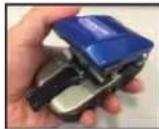
IMPORTANT SAFETY PRECAUTIONS
This product has been designed and manufactured to assure personal safety. Improper use can result in bodily injury and serious damage to the fiber cleaver. Please read and observe all warnings instructions given in this operation manual.

Denotes Important safety considerations that could result in serious injury if ignored.
Denotes important safety considerations that could result in injury or damage to the cleaver.

Warning
- Do not use the cleaver in condensation or wet environments. Doing so can cause fire, malfunction or electric shock.
- Please observe these important considerations when dealing with lithium batteries for the cleave counter:
- Do not charge, short circuit, disassemble, heat up and throw the battery in fire. Do not mix the batteries with other metallic objects and different types of batteries.
- When disposing of or storing the battery, wrap it with tape for insulation.
- If you are not going to use the cleaver for a long time, remove the battery from the cleaver and wrap it around with a tape for insulation.
- Keep away from infants. If infant happens to swallow the battery, consult with a doctor.
- Make sure the polarities are correctly connected.

Caution
- Do not touch the blade with bare hands as it is extremely sharp. Doing so can cause bodily injury. A chipped blade will degrade cleaving performance. Take care not to hit the blade against anything.
- Optical fiber and glass fiber offcuts are tiny and extremely sharp. Handle with great care. Take care not to prick your finger. Wear safety glasses at all times during cleaving operation for protection from glass fibers.
- Do not use the cleaver which has a crack or damage. Doing so can cause bodily injury.
- The cleaver is a precision tool. Do not impact the cleaver by hitting or dropping. Doing so can cause bodily injury and loss of cleaving performance.
- After use please empty the fiber bin and then store the deaver in the case. There is a possibility that fiber offcuts could spill out of the bin during transportation if they remain in the bin.
- Do not push the slider while the stopper lever is lowered.
- If working in an elevated position, such as on a ladder, take safety measures like using a strap to prevent dropping the cleaver.
- Dispose of glass fiber offcuts and batteries in proper disposal bins. Do not mix them with other waste.
- Do not disassemble or lubricate any parts of the cleaver. Doing so can cause damage to the cleaver.
- When pushing the slider, make sure that the lid is opened. Pushing the slider with the lid closed can cause damage to the cleaver. When the lid is closed during storage, do not apply excessive force to the slider.
*With regards the names of the cleaver parts, please refer to "2. Structure".
- Do not use and store the cleaver in high temperature and high humidity. Doing so can cause damage to the cleaver.
- Be sure to lock the lid before storage and transportation.
- Store the cleaver in the carrying case after use.
1. General
Specification
| Item | FSPCVR | |
| Applicable fiber | Material | Silica glass |
| Cladding diameter | 125 m | |
| Fiber count | Single | |
| Coating diameter *1 | 0.25mm, 0.9mm | |
| Cord diameter *2 | 1.6mm, 3.0mm | |
| 0.9mm coating length | 1.6mm Cord : 14mm 3.0mm Cord : 14mm | |
| Cleave length *3 | 7.0~7.5mm | |
| Automatic blade rotation*4 | Available (Switchable to Fixed) | |
| Cleaver operation counter | Built-in | |
| DC power supply | Coin type Lithium battery CR1220 | |
| Cleave counts per battery *5 | Approx. 60,000 counts | |
| Lid opening angle | Switchable (Wide/Narrow) | |
| Size *6 | 58(W) x 98(D) x 49(H)mm | |
| Weight | Approx. 260 g | |
| Blade life*7 | 60,000 fibers (2,500 fibers x 24 positions) | |
| Operating condition *8 | Temp. -10°C~50°C/Humidity RH below 95% (non-condensing) | |
| Storage condition *8 | Temp. -40°C~80°C/Humidity RH below 95% (non-condensing) | |
*1 With AP-FC7 attached.
*2 With AP-FC7(P) attached.
*3 Design value.
*4 24 positions per rotation.
*5 Based on in-house standards, this number may be achievable at room temperature with Panasonic CR 1220 battery. It varies depending on the operational environments and batteries. Even if the battery is replaced, the cleave count is not reset and up to 99,999 counts can be displayed. It can be reset anytime. If the cleave count is reset, the total cleave count is logged.
*6 A projection region is excluded.
*7 Blade life is not guaranteed. It may vary depending on the operational environment.
*8 The FSPCVR works on a battery. Please use the cleaver in a cool place. Using and storing the cleaver in low temperature or high temperature and high humidity may cause the battery capacity to decrease and the cleave count will be less.
Standard package
| Part name | Part No. | Unit | Qty |
| Optical fiber cleaver | FSPCVR | pc | 1 |
| Single fiber adapter for cord *1 | AP-FC7(P) | pc | 1 |
| Single fiber adapter for 0.25mm/ 0.9mm *2 | AP-FC7 | pc | 1 |
| Carrying case | CC-8RSH | pc | 1 |
| Operation manual *3 | OME1326009-03 | pc | 1 |
| Cleaning brush | - | pc | 1 |
| Hexagonal wrench | - | pc | 1 |
| Strap | - | pc | 1 |
*1 Pre-attached to the cleaver included in the package (with M2x4 screw)
*2 Included (with M2x6 screw)
*3 The latest version is provided.
Optional accessories / Consumables
| Part name | Part No. | Unit | Qty |
| Replacement blade | FCP-20BL(7R) | pc | 1 |
| Single fiber adapter for cord *1 | AP-FC7(P) | pc | 1 |
| Single fiber adapter for Φ0.25mm/Φ0.9mm *2 | AP-FC7 | pc | 1 |
| Fiber bin *2 | TR-FC8R | set | 1 |
| Carrying case | CC-8RSH | pc | 1 |
| Coin type Lithium battery | CR1220 | pc | 1 |
*1 Included as a standard package item. (The adapter comes with M2x4 screw to secure to the cleaver.)
*2 Included as a standard package item. (The adapter comes with M2x6 screw to secure to the cleaver.)
- Structure
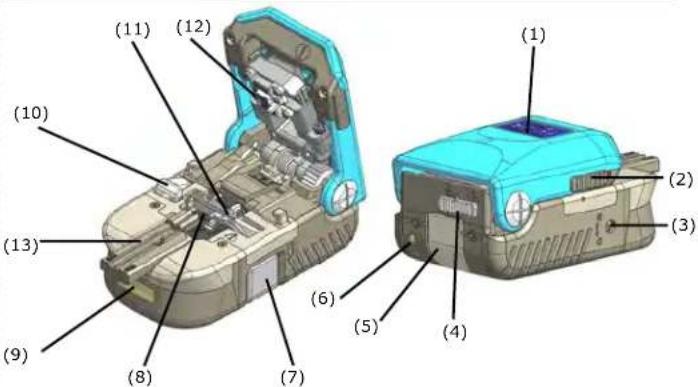
(1)Lid
Fiber is cleaved and fiber offcut is collected along with opening and closing of the lid.
(2)Locking lever Keeps the lid closed
(3) Blade rotation switching lever
Changes blade rotation to Automatic or Fixed.
(4)Lid opening angle switching lever Changes lid opening angle.
(5) Fiber bin Collects fiber offcuts.
(6) Strap hook
Secures the strap.
(7)Slider Moves the blade.
(8)Clamp
Is made of rubber and holds optical fiber.
(9)Counter
Displays cleave count.
(10)Stopper lever
Moves the slider.
(11)Blade
Scratches optical fiber.
(12)Anvll
Is made of rubber and cleaves a scratched fiber.
(13) Single fiber adapter for cord A guide for placement of single fiber.
3. Operating procedures
(1) Slide both locking levers to open the lid. While pushing down the lid lightly, hold both locking levers and slide them together to the front at the same time until the red indicator is not visible at all.


Locking lever (located on Left & Right)
Sliding one locking lever does not open the lid smoothly.
(2) Push the slider fully until it's locked.
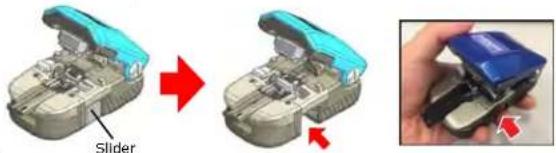

Do not touch the blade.
(3) Position the edge of the fiber coating at "7 CLEAVE" and hold the fiber coating with your finger.


- The fiber bin only collects a specified cleave length. If the cleave length is not optimum, the collector may not collect the offcut.

(4) Close the lid. The slider is automatically pushed back. The fiber is cleaved.
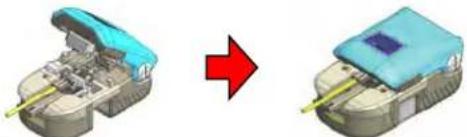
natural_image
3D model of a vehicle showing a blue roof component before and after assembly, with no visible text or symbols.
Do not place your finger where the slider is pushed back. The slider may hit the finger, resulting in an injury.
(5) Open the lid. The fiber offcut is automatically collected. The cleaving process is completed. Remove the fiber from holder.

(6) After using the cleaver, slide back the locking levers to lock the lid. While keeping the lid closed, hold both locking levers and slide them to the back until the locking levers do not move. Make sure the red indicator is completely visible.


If the lid is closed with one locking lever or the locking levers are not slid fully, the lid will accidentally open during storage or transport, potentially resulting in damage.
4. Functions
Lid opening angle change
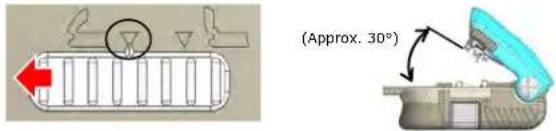
The opening angle of the lid can be changed depending on how you use the cleaver. When you use the cleaver in one hand or cleave single fiber, it's beneficial to "Open the lid in a small angle". When you use the cleaver on a work bench, cleave ribbon fiber or clean the cleaver, it's effective to "Open the lid in a large angle". The factory default is "a small angle". Before sliding the lid opening angle switching lever, make sure the lid is fully closed.

Lid opening angle switching lever
Open the lid in a small angle (Approx. 30°) (Factory default)
Slide the lid opening angle switching lever to the left until mark of the lever aligns with mark of the cleaver with a clicking sound.
Open the lid in a large angle (Approx. 70°)
Slide the lid opening angle switching lever to the right until mark of the lever aligns with mark of the cleaver with a clicking sound.
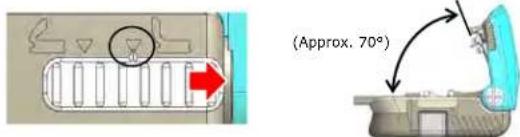

If you stop the lever halfway, the lid does not open properly, resulting in damage to the cleaver.
Automatic blade rotation
The blade rotation switching lever changes the blade rotation to "Automatic (R)" or "Fixed (0)". With "Automatic (R)", the blade automatically rotates by approx. 15° on each cleave.
With "Fixed (0)", the blade does not rotate. If the blade is partly chipped but you wish to use it, "Fixed (0)" is recommended. The factory default is "Automatic".

Automatic rotation (R)
Turn the blade rotation switching lever with a slotted screwdriver until the slit of the lever comes to "R". The lever can rotate in both directions. Ensure that the blade automatically rotates on each cleave.
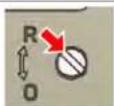
The slit should come to "R".
Fixed (0)
Turn the blade rotation switching lever with a slotted screwdriver until the slit of the lever comes to "0". Ensure that the blade does not rotate.

The slit should come to "0".
Caution Turn the lever until the slit comes to "R" or "0" completely with a clicking sound. If you stop the lever halfway, the blade rotation will not work properly, resulting in damage to the cleaver.
Fitting single fiber adapter to the cleaver
With use of the single fiber adapter, you can cleave single fiber to 7mm cleave length.
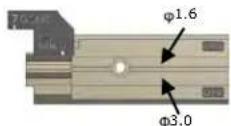
Make sure the single fiber adapter is secured with a correct size screw. Using an incorrect size screw can cause the adapter not to be secured properly or give damage to the counter. AP-FC7(P) : M2x4 screw / AP-FC7 : M2x6 screw
How to fit single fiber adapter
Place the single fiber adapter in the fiber holder receptacle. While pushing the adapter against the reference surface, secure it by tightening the provided screw. Make sure the adapter is perpendicular to the reference surface.
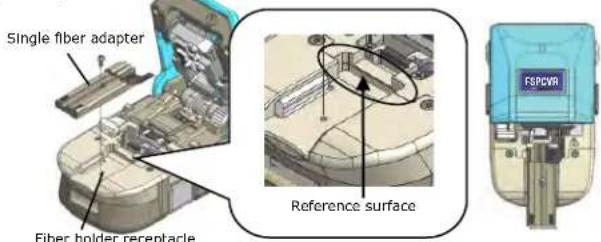

- Make sure the single fiber adapter is secured with a correct size screw. Using an incorrect size screw can cause the adapter not to be secured properly or give damage to the counter. (AP-FC7(P): M2x4 screw / AP-FC7: M2x6 screw)
Make sure the single fiber adapter is perpendicular to the reference surface. If the adapter is angled, fiber will not be cleaved properly or cleave angle will be poor.
Cleave operation counter
The FSPCVR Incorporates an LCD which displays the cleave count. The cleaver automatically counts the number of cleaves on each cleave. It can display the cleave count and total cleave count.
| Feature | Display of cleave count and total cleave countReset of cleave count |
| DC power supply | Coin type Lithium battery CR1220 (commercial item) |
| Cleave counts Per battery | Approx. 60,000 counts |
| Displayable cleave count | Cleave count: up to 99,999 countsTotal cleave count: 999,999 counts |

Counter

- The cleave count and total cleave count are not reset after a battery is replaced. - The total cleave count cannot be reset.
A battery which is installed in the cleaver upon shipment is intended for checking of counter operation. Please replace it with a new one after operation checking.
The cleaver can count the number of cleaves only when a fiber holder or single fiber adapter is fitted to the cleaver.
- Based on our in house standards the above number may be achievable at a room temperature with Panasonic CR1220 battery. It varies depending on the operational environments and batteries. If nothing or "Lo bat" is displayed, or the displayed number is disappearing, the battery should be replaced.
- If the number of cleaves exceeds the displayable cleave count, the cleave count and total cleave count will return to "0".
Do not apply excessive impact to the counter. Doing so can cause the counter to malfunction or become faulty.
Do not use the cleaver in the rain, in wet condition caused by dew condensation, and in too much humid, dusty and oily places. Doing so can cause fire, malfunction and electric shock.
Counter display
The counter automatically counts the number of cleaves on each cleave. With regards how to use the cleaver, please refer to "3. Operating procedures". The counter does not count without a fiber holder or single fiber adapter fitted.
(1) Details of display
The cleaver displays "Cleave count" and "Total cleave count". "Cleave count" is displayed as a standard and "Total cleave count" can be displayed as necessary.
Even if "Cleave count" is reset, "Total cleave count" is not reset. If the battery capacity is getting low, "Lo bat" appears.

Cleave count ("C" is displayed.)
(2) Timing of counting
A cleave is counted when the slider is moved back following closing of the lid. The cleave count is displayed for approx. 4 seconds. If a fiber holder or single fiber adapter is not fitted to the cleaver, the current cleave count is displayed and the count does not increase.
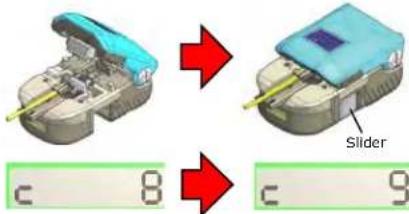
Checking cleave counts and total cleave counts
The button SW is located on the bottom of the cleaver. With a hexagonal wrench (Allen key) etc, push the button SW straight down lightly until it clicks. Every time the SW is pushed, the display switches to "Cleave count" and "Total cleave count" alternately and shows for approx. 8 seconds.
Button SW


Caution
- Do not push the button SW too hard. Doing so can cause damage to the SW. - The standard display is "Cleave count". If you push it again, the display will switch to "Total cleave count".
Resetting cleave count
"Cleave count" can be reset by following these steps:
(1) With a hexagonal wrench (Allen key) etc, push the button SW down to display "Cleave count".
Button SW

(2) While keeping "Cleave count" displayed, press and hold down the button SW for more than 5 seconds. "Cleave count" will be reset. (return to 0).
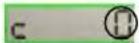

Caution
- Do not push the button SW too hard. Doing so can cause damage to the SW. - If you press the button SW while nothing or "Total cleave count" is displayed, "Cleave count" will not be reset. - "Total cleave count" cannot be reset.
Replacing the battery
If nothing or "Lo bat" is displayed on the LCD, or the displayed number is disappearing, the battery needs replacing. A commercial item can be used as a new replacement battery. (Part No.: CR1220)
(1) Loosen the 2 screws with the provided hexagonal wrench (Allen key). Remove the fiber holder receptacle. (Remove the single fiber adapter prior to this step.)

(2) Hold the battery cover. Pull it to the front to remove.

(3) Remove the battery using your fingers or nails.

(4) With the positive (+) of a new battery faced up, install it in the cleaver. Push the battery until it's locked. Push the button SW once and make sure "Cleave count" is displayed.
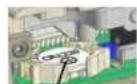
The positive (+) should be faced up.
(5) Push the battery cover all the way to the back.
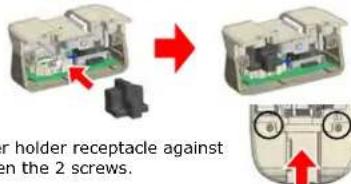

Caution
- Do not apply excessive force to the counter when replacing the battery. - "Cleave count" and "Total cleave count" are not reset after a battery is replaced. - Dispose of old batteries in accordance with local regulations.
Take care not to lose the battery cover. Always fit it to the cleaver. If the battery cover is not fitted, a battery will be removed by strong impact, resulting in malfunction of the slider.
5. Maintenance

Caution
The blade is extremely sharp. Do not touch it with bare hands.
- Do not disassemble or lubricate any parts of the cleaver. Doing so can cause damage to the cleaver. The quality of disassembled or lubricated cleavers cannot be guaranteed.
The edge of the blade is precisely manufactured. Take great care not to give any damage to the blade.
Daily cleaning
To maintain excellent cleaver's performance, daily cleaning is recommended before and after use. It is easier to clean the cleaver if the lid is opened at a larger angle. Anvil
(1) Clean the clamp, anvil and blade
Clean the 4 clamps, 1 anvil and 1 blade lightly with a cotton swab moistened with pure alcohol.

Cotton swab

Cotton swab

Fiber holder receptacle
(2) Clean the Single fiber adapter
Using the provided cleaning brush or a cotton swab, clean the fiber groove.
Cleaning brush


Caution
·Fiber offcuts adhering to the cleaver parts may cause loss of cleaving performance and quality.
Emptying fiber bin
After use and before transportation, dispose of fiber offcuts and empty the fiber bin referring to the procedures below.
(1) Close and lock the lid.
(2) Remove the fiber bin from the back of the cleaver.
(3) Dispose of fiber offcuts and empty the fiber bin completely.
(4) Put back the fiber bin in the cleaver.


Caution
- Fiber offcuts may scatter. Wearing protective glasses is recommended. - Using a cotton swab makes it easier to take out fiber offcuts from the fiber bin. Never use bare hands. Doing so can cause bodily injury. - Empty the fiber bin and then store the cleaver in the case. - Dispose of fiber offcuts in accordance with local regulations.
Blade replacement

Caution
To maintain the original performance, please always use Sumitomo genuine blade.
The edge of the blade is extremely sharp. Do not touch it with bare hands. Doing so can result in bodily injury.
(1) When a cleaver reaches up to 60,000 fibers or cannot cleave fibers, it needs to be replaced.
| Fiber | Single fiber |
| Cleave counts | 60,000 |
| Blade life | 60,000 fibers |
(2) Using the provided hexagonal wrench (Allen key), loosen the 2 screws to remove the fiber holder receptacle. (Remove the single fiber adapter prior to this step.)

(3) Using a slotted screwdriver, loosen the blade securing screw. Remove the blade securing screw and spring.


(4) Using tweezers, remove the gearwheel and blade.
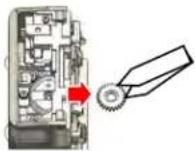
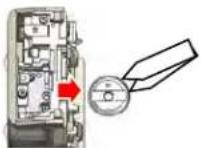
(5) Install a new blade in the cleaver. Insert the gearwheel so it fits the slit of the blade.


The slit of the blade should be in line with the direction of the installation.
The blade should not move when the gearwheel is inserted.
Key point
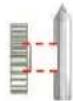


The hole of the blade should align with the hole of the gearwheel.

Caulion
- Take care not to hit the edge of the blade against the cleaver. - The edge of the blade is extremely sharp. Do not touch it with bare hands. Doing so can result in bodily injury.
(6) Re-fit the spring and blade securing screw to the cleaver. Torque: 100N·cm (10kgf·cm)

Spring


(7) Re-tighten the 2 screws to secure the fiber holder receptacle to the cleaver.

natural_image
3D mechanical assembly diagram showing internal components and a red arrow indicating direction (no text or symbols)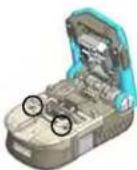

Caution
-After the blade replacement, make sure the blade rotates properly.
(8) For the FSPCVR, reset the cleave count referring to "Cleave operation counter" described in page 3.
- FSPCVR
- IMPORTANT SAFETY PRECAUTIONS
- General
- Operating procedures
- Functions
- Lid opening angle change
- Open the lid in a small angle (Approx. 30°) (Factory default)
- Open the lid in a large angle (Approx. 70°)
- Automatic blade rotation
- Automatic rotation (R)
- Fixed (0)
- Fitting single fiber adapter to the cleaver
- How to fit single fiber adapter
- Cleave operation counter
- Counter display
- Details of display
- Timing of counting
- Checking cleave counts and total cleave counts
- Resetting cleave count
- Replacing the battery
- Maintenance
- Daily cleaning
- Emptying fiber bin
- Blade replacement
Brand : Panduit
Model : FSPCVR
Category : Cleaner