
J1842A-SND - Wardrobe Tennsco - Free user manual and instructions
Find the device manual for free J1842A-SND Tennsco in PDF.


| Product Type | Wardrobe / Storage Cabinet |
| Brand | Tennsco |
| Model | J1842A-SND |
| Width | 48 inches |
| Depth | 18 inches |
| Height | Approximately 36 inches (counter-height) |
| Weight Capacity | 400 lbs (181 kg) |
| Material | Heavy-duty steel with gray powder coat finish |
| Assembly Required | Yes, two people recommended |
| Assembly Time | 20-30 minutes |
| Number of Shelves | 2 adjustable shelves |
| Doors | 2 hinged doors with locking handle |
| Locking System | Key-lock handle with locking bars and cam |
| Warranty | 1 year limited warranty |
| Included Tools | 11/32" nut driver |
| Special Features | Counter-height design, adjustable shelves, lockable, easy assembly |
| Recommended Use | Office, garage, warehouse storage |
| Color | Gray (typical industrial finish) |
| Replacement Parts Available | Yes, listed in manual (e.g., doors, shelves, locking handle) |
| Additional Hardware Included | Bolts, nuts, lock washers, hinge pins |
Frequently Asked Questions - J1842A-SND Tennsco
User questions about J1842A-SND Tennsco
0 question about this device. Answer the ones you know or ask your own.
Ask a new question about this device
Download the instructions for your Wardrobe in PDF format for free! Find your manual J1842A-SND - Tennsco and take your electronic device back in hand. On this page are published all the documents necessary for the use of your device. J1842A-SND by Tennsco.
USER MANUAL J1842A-SND Tennsco
ASSEMBLY INSTRUCTIONS & PARTS MANUAL
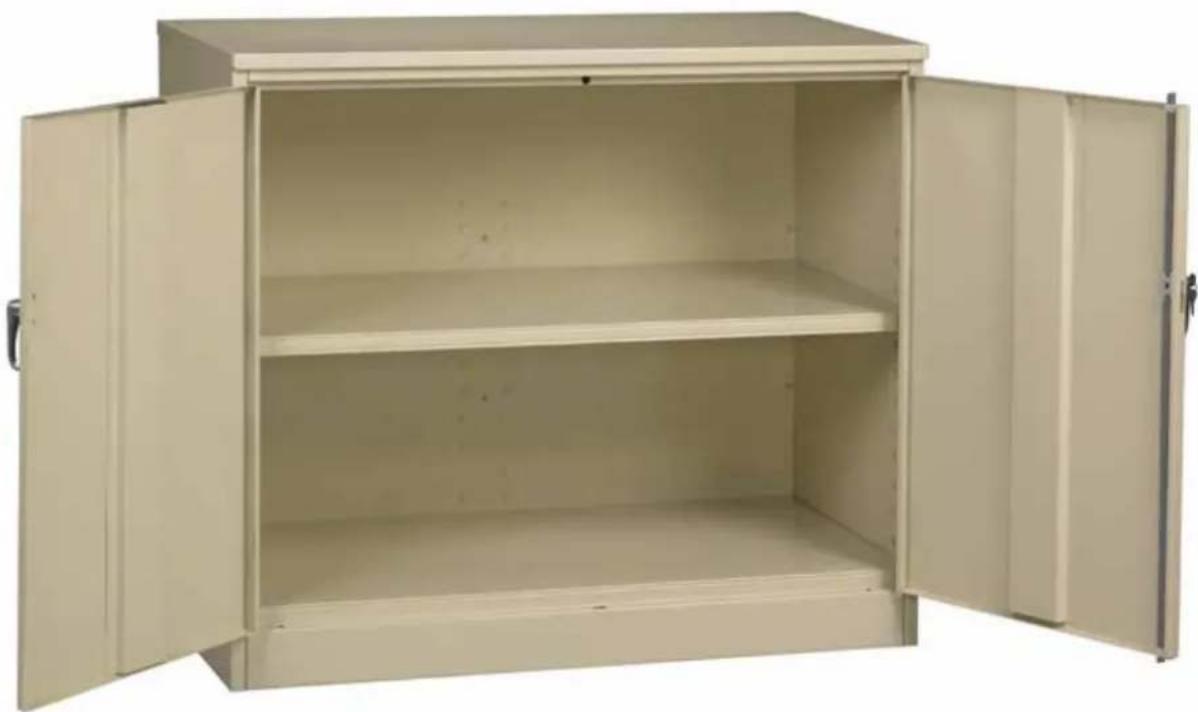
Jumbo Counter-Height Storage Cabinet Unassembled Models J1842A-N & J2442A-N
tennsco®
Storage Made Easy
RETAIN INSTRUCTIONS FOR FUTURE REFERENCE
natural_image
Empty metal cabinet with two doors open, showing interior shelves and door handles (no text or symbols visible)| UNIT SIZE | WEIGHT CAPACITY |
| 48w x 18d | 400 lbs. |
| 48w x 24d | 400 lbs. |
GENERAL SAFETY INFORMATION
Some parts may have sharp edges. CARE must be taken when handling various pieces to avoid injury. For safety, wear a pair of work gloves when assembling or performing any maintenance on products.
LIMITED WARRANTY
Tennisco warrants goods purchased hereunder to be free of defects in materials and workmanship for a period of one (1) year from the date of shipment, hereunder. This warranty shall not apply in the event goods are damaged as a result of misuse, abuse, neglect, accident, improper application, modification or repair by persons not authorized by Seller, where goods are damaged during shipment, or where the date stamps on the goods have been defaced, modified or removed. UNLESS CONSIDERED UNENFORCEABLE OR UNLAWFUL UNDER APPLICABLE LAW:
a. ALL IMPLIED WARRANTIES, INCLUDING BUT NOT LIMITED TO WARRANTIES OR MERCHANTABILITY AND FITNESS FOR A PARTICULAR PURPOSE ARE HEREBY EXCLUDED:
b. BUYERS REMEDY, IF ANY, FOR ANY DEFECTIVE GOODS SHALL BE LIMITED TO A REFUND BY SELLER OR REPLACEMENT OF THE GOODS AT SELLER'S OPTION, AND SHALL IN NO EVENT INCLUDE DAMAGES OF ANY KIND, WHETHER INCIDENTAL, CONSEQUENTIAL OR OTHERWISE.
NO GOODS ACCEPTED FOR RETURN WITHOUT PRIOR APPROVAL. Seller shall have the right to inspect any goods claimed to be defective at Buyers place of business or require Buyer to return the goods to Seller for inspection on Seller's premises. Transportation charges covering returned goods will be borne by Seller only if such goods are proven to be defective, are covered by this warranty and are returned within the warranty period stated above.
ASSEMBLY OF J1842A-N OR J2442A-N CABINET
Tools Needed: A free 11/32" nut driver is included with each Tennisco cabinet.
Two people are recommended for assembly. Approximate assembly time: 20-30 minutes.
- The reference numbers used throughout this sheet refer to the illustration on the back cover. This is to help you to identify the various parts as they are mentioned.
- Place the back panels (Ref. No. 1) on a smooth surface, making sure that the flanges of both panels are facing up. Overlap the right panel over the left anel. After aligning the holes, bolt the two panels tightly together with four bolts and nuts (Ref. Nos. 17 & 18).

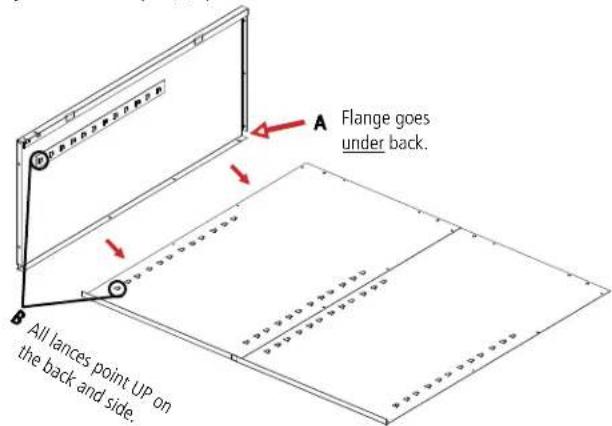
- Attach the left side (Ref. No. 2) to the back by placing flange (A) around the back and bolting tightly together with four bolts and nuts. Be sure that the lances on all the shelf adjustment strips (B) point in the same direction.
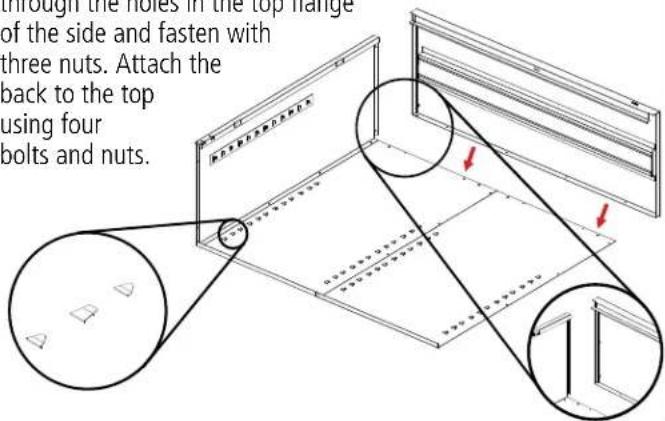
- Attach the top (Ref. No. 8) to the unit by sliding the outer flange over the back of the unit and the side flange to the side panel on the unit. The threaded studs should go through the holes in the top flange
of the side and fasten with three nuts. Attach the back to the top using four bolts and nuts.
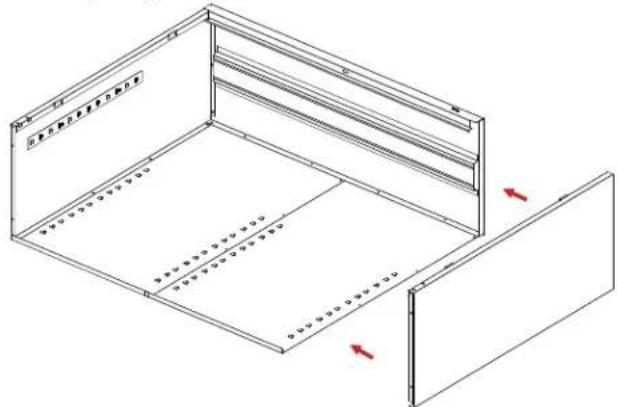
- Attach the right side (Ref. No. 3) to the back in the same manner as you did in step 3, again making sure that the flange is around the back and that the lances on the shelf adjustment strips are pointed in the same direction as those on the back and left side. Push the side panel up so the studs in the top go through the holes in the top flange of the side and fasten with three nuts.
natural_image
Isometric line drawing of a two-panel storage unit with red arrows indicating internal components (no text or symbols)- Attach the sill (Ref. No. 4) to the sides. Place a nut (Ref. No. 19) loosely on each of the studs and slide the ends of the sill into the slots on both sides of the unit. Then, securely tighten the nuts.

- Place the rear flange of the bottom shelf (Ref. No. 5) into the bottom lances of the back. The flange with two holes should face the front, hanging over the sill.

- Set the unit upright. Insert the second shelf at the desired level. Be sure that the flange with the two holes should face the front.

natural_image
Technical line drawing of a multi-level cabinet with two red arrows indicating directional flow or movement (no text or symbols present)NOTE: In order to place the shelf, you must first tilt the shelf slightly to the left or right before inserting into the unit.
- Attach the left door (Ref. No. 6) to the unit by placing the door on the hinges, aligning the hinge holes, placing the hinge pins (Ref. No. 15) into the slots and tapping them in until secure. Attach the right door (Ref. No. 7) to the unit in the same manner as the left door.
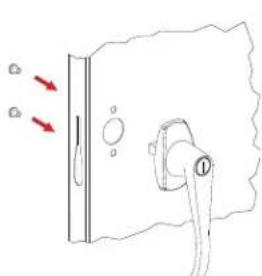
Handle/Locking System Installation
natural_image
Simple line drawing of a door handle with arrows indicating direction (no text or symbols)-
Place the locking handle (Ref. No. 10) on the right hand door and fasten with two #8-32 X 1/4 hex-head bolts and lock washers, provided with the handle.
-
Turn the handle to the open position and place the locking cam (Ref. No. 11) over the square shank of the door handle. The latch must be facing downward as shown. Then place the locking cotter pin (Ref. No. 13) through the hole of the square shank.
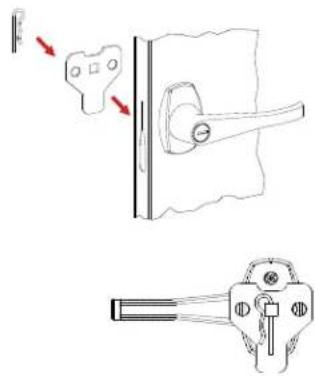
- With the handle still in the open position, hook the locking bars (Ref. No. 9) to the locking cam (see "A" at left). Once in position, slowly rotate the door handle to the closed position so the lock bars prot rude from the holes at the top and bottom of the door (shown at right, below).
natural_image
Line drawing of a door handle with lever and handle (no text or symbols)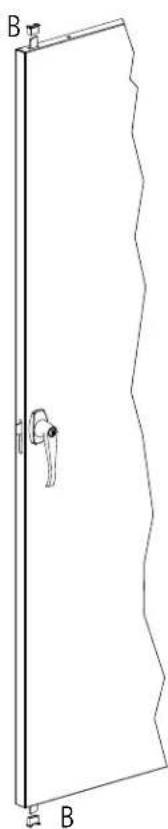
natural_image
Line drawing of a door with a handle and labeled corner points B (no text or symbols beyond labels)-
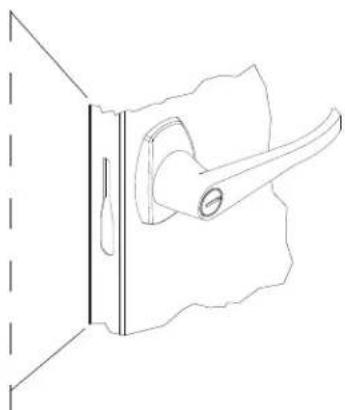
Slide the nylon lock bar guide inserts (Ref. No. 12) over the lock bar ends and through the door slots (see "B" at right). Push down firmly until the guides snap into place.
-
Attach the "dummy" handle (Ref. No. 14) using two #8-32 X 1/4 hex-head bolts and lock washers.
REPLACEMENT PARTS
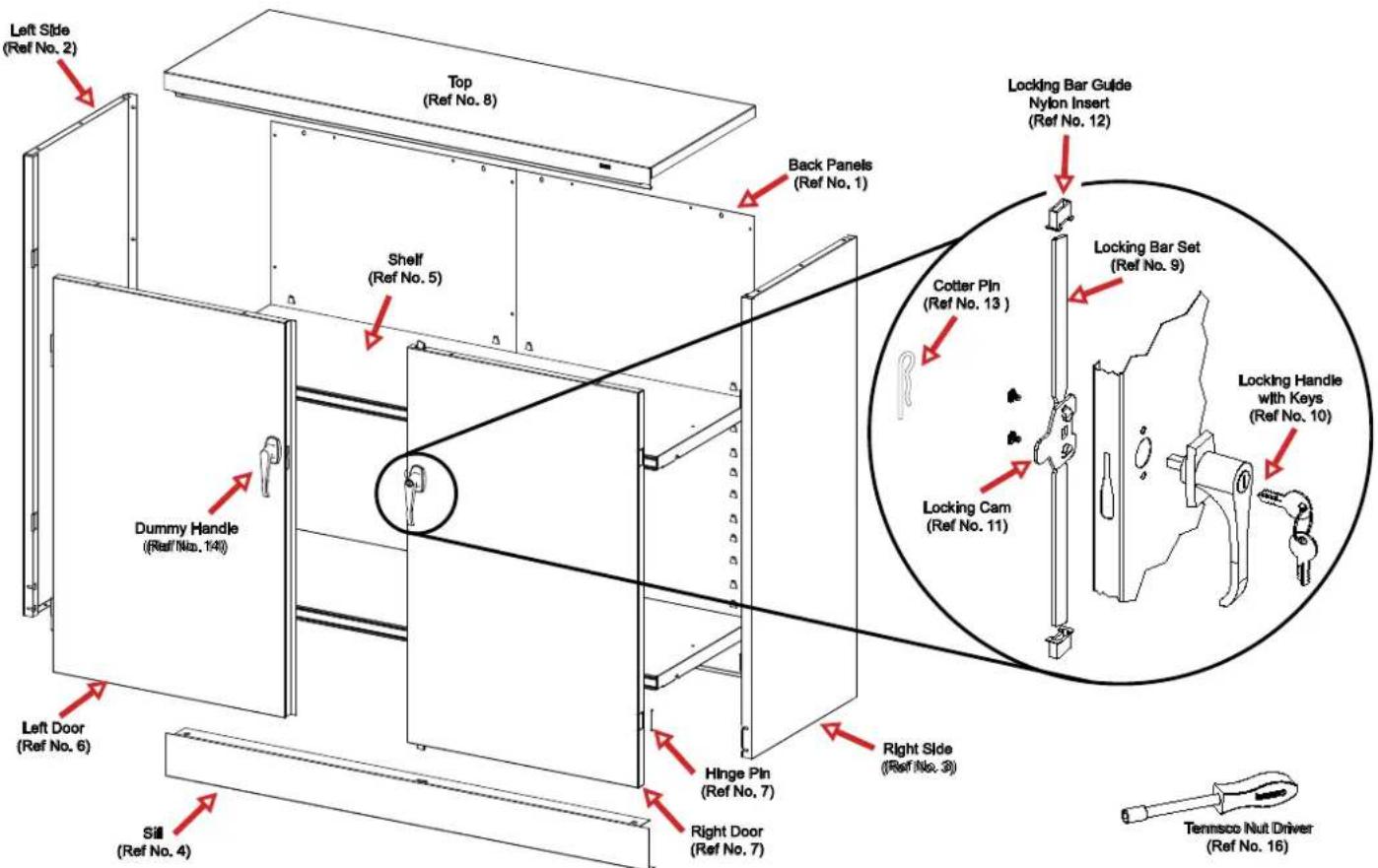
| J1842A-N (18"d Cabinet) | J2442A-N (24"d Cabinet) | ||||
| REF. NO. | DESCRIPTION | QTY. | PART NO. | QTY. | PART NO. |
| 1 | Back Panels | 2 | 042BA | 2 | 042BA |
| 2 | Left Side | 1 | 042LSN | 1 | 044LSN |
| 3 | Right Side | 1 | 042RSN | 1 | 044RSN |
| 4 | Sill | 1 | 055SIN | 1 | 055SIN |
| 5 | Shelf | 2 | 306 | 2 | 307 |
| 6 | Left Door | 1 | 042LD | 1 | 042LD |
| 7 | Right Door | 1 | 042RD | 1 | 042RD |
| 8 | Top | 1 | 042TS | 1 | 044TS |
| 9 | Locking Bar Set | 1 | 978LB | 1 | 978LB |
| 10 | Locking Handle w/keys & hardware | 1 | 043LH | 1 | 043LH |
| 11 | Locking Cam* | 1 | 944LC | 1 | 944LC |
| 12 | Locking Bar Guide Insert (Nylon)* | 2 | 944GI | 2 | 944GI |
| 13 | Cotter Pin* | 1 | CTRPN | 1 | CTRPN |
| 14 | Dummy Handle* | 1 | 043DH | 1 | 043DH |
| 15 | Hinge Pin* | 4 | 944HP | 4 | 944HP |
| 16 | Tennsco Nut Driver | 1 | TOOL-2 | 1 | TOOL-2 |
| 17 | #8-32 x 3/8" bolts (not shown above) | 15 | ** | 15 | ** |
| 18 | #8-32 nuts (not shown above) | 31 | ** | 31 | ** |
| 19 | Bolt w/lockwasher #8-32 x 3/8" bolts (not shown above) | 4 | ** | 4 | ** |
*Included in Ref. No. 10, locking handle with keys and hardware (Part No. 043LH).
**Available Locally
NOTE: Additional hardware may be included for replacement purposes.
- ASSEMBLY INSTRUCTIONS & PARTS MANUAL
- Jumbo Counter-Height Storage Cabinet Unassembled Models J1842A-N & J2442A-N
- tennsco®
- Storage Made Easy
- RETAIN INSTRUCTIONS FOR FUTURE REFERENCE
- GENERAL SAFETY INFORMATION
- LIMITED WARRANTY
- ASSEMBLY OF J1842A-N OR J2442A-N CABINET
- Handle/Locking System Installation
Brand : Tennsco
Model : J1842A-SND
Category : Wardrobe