
NJSR453GWAA - Coffee maker HOTPOINT - Free user manual and instructions
Find the device manual for free NJSR453GWAA HOTPOINT in PDF.


| Product Type | Tumble Dryer |
| Brand | Hotpoint |
| Model | NJSR453GWAA |
| Energy Source | Electric or Gas (model dependent) |
| Drying Cycles | Automatic (Cottons, Perm. Press), Timed Dry, Damp Dry, Dewrinkle |
| Fabric Care Selections | Cottons (Regular Heat), Perm. Press (Medium Heat), Knits/Delicates (Low Heat), Fluff (No Heat) |
| Press Guard Feature | 15-minute no-heat tumbling after drying to reduce wrinkles (on some models) |
| Cycle Signal | Audible alert at end of cycle; sound level adjustable (on some models) |
| Drum Capacity | Approximately 7.0 cu. ft. (typical for this size) |
| Drum Lamp | Yes (on some models) |
| Drying Rack | Available for items like stuffed toys and sweaters (on some models) |
| Lint Filter | Clean before each load |
| Exhaust Duct | 4-inch rigid metal or flexible metal duct recommended |
| Venting Requirement | Must be vented to outside (gas models); electric models strongly recommended |
| Door Reversible | Yes, can be reversed with a screwdriver |
| Power Supply (Electric) | 240V, 30A, 60Hz (typical) |
| Gas Connection | Natural or LP gas |
| Dimensions (Approximate) | 27" W x 26" D x 36" H |
| Weight (Approximate) | 120 lbs (electric), 130 lbs (gas) |
| Warranty | 1 year full, 5 years limited on drum |
| Safety Certifications | UL listed per typical standards |
Frequently Asked Questions - NJSR453GWAA HOTPOINT
User questions about NJSR453GWAA HOTPOINT
0 question about this device. Answer the ones you know or ask your own.
Ask a new question about this device
Download the instructions for your Coffee maker in PDF format for free! Find your manual NJSR453GWAA - HOTPOINT and take your electronic device back in hand. On this page are published all the documents necessary for the use of your device. NJSR453GWAA by HOTPOINT.
USER MANUAL NJSR453GWAA HOTPOINT
natural_image
Illustration of a white washing machine with open door and side-mounted control knobs (no text or symbols visible)Model Types
453
473
Dryers
Safety Information ...3-5
Operating Instructions
Controls 6,7
Features 8
Reversing The Door....9
Loading and Using The Dryer ...10
Venting The Dryer .....11
Troubleshooting Tips
Before You Call For Service ..12, 13
Customer Service
Warranty 15
Service Telephone
Numbers ....Back Cover
Congratulations!
You Are Now Part of the Hotpoint Family.
Welcome to the Hotpoint family. We're proud of our quality products and we are committed to providing dependable service. You'll see it in this easy-to-use Owner's Manual and you'll hear it in the friendly voices of our customer service department.
Best of all, you'll experience these values each time you use your dryer. That's important, because your new dryer will be part of your family for many years. And we hope you will be part of ours for a long time to come.
We thank you for buying Hotpoint. We appreciate your purchase, and hope you will continue to rely on us whenever you need quality appliances for your home.
Hotpoint & You, A Service Partnership.

IMPORTANT!
Staple sales slip or cancelled check here.
Proof of the original purchase date is needed to obtain service under the warranty.
FOR YOUR RECORDS
Write the model and serial numbers here:
#
#
They are on the label on the front of the dryer behind the door.
READ THIS MANUAL
Inside you will find many helpful hints on how to use and maintain your dryer properly. Just a little preventive care on your part can save you a great deal of time and money over the life of your dryer.
PROPER VENTING
For the best drying performance the dryer needs to be properly vented. The dryer will use more energy and run longer if it is not vented to the specifications outlined in the Venting the Dryer section in this manual and the Exhausting section in the Installation Instructions.
IF YOU NEED SERVICE
You'll find many answers to common problems in the Before You Call For Service section. If you review our chart of Troubleshooting Tips first, you may not need to call for service at all.
If you do need service, you can relax knowing help is only a phone call away. A list of toll-free customer service numbers is included in the back section. Or, in the U.S., you can always call the GE Answer Center ® at 800.626.2000, 24 hours a day, 7 days a week. In Canada, call 1-800-361-3400.
WARNING!
For your safety, the information in this manual must be followed to minimize the risk of fire or explosion, electric shock, or to prevent property damage, personal injury, or death.
■ Do not store or use gasoline or other flammable vapors and liquids in the vicinity of this or any other appliance.
■ Installation and service must be performed by a qualified installer, service agency or the gas supplier.
WHAT TO DO IF YOU SMELL GAS:
Do not try to light a match, or cigarette, or turn on any gas or electrical appliance.
2 Do not touch any electrical switch; do not use any phone in your building.
3 Clear the room, building or area of all occupants.
4 Immediately call your gas supplier from a neighbor's phone. Follow the gas supplier's instructions carefully.
5 If you cannot reach your gas supplier, call the fire department.
California Safe Drinking Water and Toxic Enforcement Act
This act requires the governor of California to publish a list of substances known to the state to cause cancer, birth defects or other reproductive harm and requires businesses to warn customers of potential exposure to such substances.
Gas appliances can cause minor exposure to four of these substances, namely benzene, carbon monoxide, formaldehyde and soot, caused primarily by the incomplete combustion of natural gas or LP fuels.
Properly adjusted dryers will minimize incomplete combustion. Exposure to these substances can be minimized further by properly venting the dryer to the outdoors.
PROPER INSTALLATION
This dryer must be properly installed and located in accordance with the Installation Instructions before it is used. If you did not receive an Installation Instructions sheet, you can receive one by calling, toll-free, in the United States the GE Answer Center®, 800.626.2000. In Canada, call, 1-800-361-3400.
■ Properly ground dryer to conform with all governing codes and ordinances. Follow details in Installation Instructions.
■ Install or store where it will not be exposed to temperatures below freezing or exposed to the weather.
■ Connect to a properly rated, protected and sized power supply circuit to avoid electrical overload.
■ Remove all sharp packing items and dispose of all shipping materials properly.
Exhaust/Ducting:
Gas dryers MUST be exhausted to the outside.
2 Exhausting electric dryers to the outside is strongly recommended to prevent large amounts of moisture and lint from being blown into the room.
3 Use only rigid metal or flexible metal 4" diameter ductwork inside the dryer cabinet or for exhausting to the outside. USE OF PLASTIC OR OTHER COMBUSTIBLE DUCTWORK CAN CAUSE A FIRE. PUNCTURED DUCTWORK CAN CAUSE A FIRE IF IT COLLAPSES OR BECOMES OTHERWISE RESTRICTED IN USE OR DURING INSTALLATION.
For complete details, follow the Installation Instructions.
IMPORTANT SAFETY INFORMATION. READ ALL INSTRUCTIONS BEFORE USING.
⚠ WARNING!
YOUR LAUNDRY AREA
- Keep the area underneath and around your appliances free of combustible materials, (lint, paper, rags, etc.), gasoline, chemicals and other flammable vapors and liquids.
-
Keep the floor around your appliances clean and dry to reduce the possibility of slipping.
■ Close supervision is necessary if this appliance is used by or near children. Do not allow children to play on, with, or inside this or any other appliance. -
Keep all laundry aids (such as detergents, bleaches, etc.) out of the reach of children, preferably in a locked cabinet. Observe all warnings on container labels to avoid injury.
■ Never climb on or stand on the dryer top.

WHEN USING YOUR DRYER
■ Never reach into the dryer while the drum is moving. Before loading, unloading or adding clothes, wait until the drum has completely stopped.
■ Clean the lint filter before each load to prevent lint accumulation inside the dryer or in the room. DO NOT OPERATE THE DRYER WITHOUT THE LINT FILTER IN PLACE.
■ Do not wash or dry articles that have been cleaned in, washed in, soaked in, or spotted with combustible or explosive substances (such as wax, oil, paint, gasoline, degreasers, dry-cleaning solvents, kerosene, etc.) which may ignite or explode. Do not add these substances to the wash water. Do not use or place these substances around your washer or dryer during operation.
■ Do not place items exposed to cooking oils in your dryer. Items contaminated with cooking oils may contribute to a chemical reaction that could cause a clothes load to catch fire.
■ Any article on which you have used a cleaning solvent or that contains flammable materials (such as cleaning cloths, mops, towels used in beauty salons, restaurants, or barber shops, etc.) must not be placed in or near the dryer until solvents or flammable materials have been removed. There are many highly flammable items used in homes such as acetone, denatured alcohol, gasoline, kerosene, some household cleaners, some spot removers, turpentines, waxes, wax removers and products containing petroleum distillates.
■ The laundry process can reduce the flame retardancy of fabrics. To avoid such a result, carefully follow the garment manufacturer's care instructions.
■ Do not dry articles containing rubber, plastic, or similar materials such as padded bras, tennis shoes, galoshes, bath mats, rugs, bibs, baby pants, plastic bags, pillows, etc. that may melt or burn. Some rubber materials, when heated, can under certain circumstances produce fire by spontaneous combustion.
■ Do not store plastic, paper or clothing that may burn or melt on top of the dryer during operation.
■ Garments labeled Dry Away from Heat or Do Not Tumble Dry (such as life jackets containing Kapok) must not be put in your dryer.
■ Do not dry fiberglass articles in your dryer. Skin irritation could result from the remaining particles that may be picked up by clothing during subsequent dryer uses.
■ To minimize the possibility of electric shock, unplug this appliance from the power supply or disconnect the dryer at the household distribution panel by removing the fuse or switching off the circuit breaker before attempting any maintenance or cleaning (except the removal and cleaning of the lint filter). NOTE: Turning the Cycle Selector knob to an OFF position does NOT disconnect the appliance from the power supply.
■ Never attempt to operate this appliance if it is damaged, malfunctioning, partially disassembled, or has missing or broken parts, including a damaged cord or plug.
■ The interior of the machine and the exhaust duct connection inside the dryer should be cleaned at least once a year by a qualified technician. See the Loading and Using the Dryer section.
■ If yours is a gas dryer, it is equipped with an automatic electric ignition and does not have a pilot light. DO NOT ATTEMPT TO LIGHT WITH A MATCH. Burns may result from having your hand in the vicinity of the burner when the automatic ignition turns on.
- You may wish to soften your laundered fabrics or reduce the static electricity in them, by using a dryer-applied fabric softener or an anti-static conditioner. We recommend you use either a fabric softener in the wash cycle, according to the manufacturer's instructions for those products, or try a dryer-added product for which the manufacturer gives written assurance on the package that their product can be safely used in your dryer. Service or performance problems caused by use of these products are the responsibility of the manufacturers of those products and are not covered under the warranty to this appliance.
WHEN NOT USING YOUR DRYER
■ Grasp the plug firmly when disconnecting this appliance to avoid damage to the cord while pulling. Place the cord away from traffic areas so it will not be stepped on, tripped over or subjected to damage.
- Do not attempt to repair or replace any part of this appliance or attempt any servicing unless specifically recommended in this Owner's Manual or in published user-repair instructions that you understand and have the skills to carry out.
■ Before discarding a dryer, or removing it from service, remove the dryer door to prevent children from hiding inside.
■ Do not tamper with controls.

Read and follow this Safety Information carefully.
SAVE THESE INSTRUCTIONS
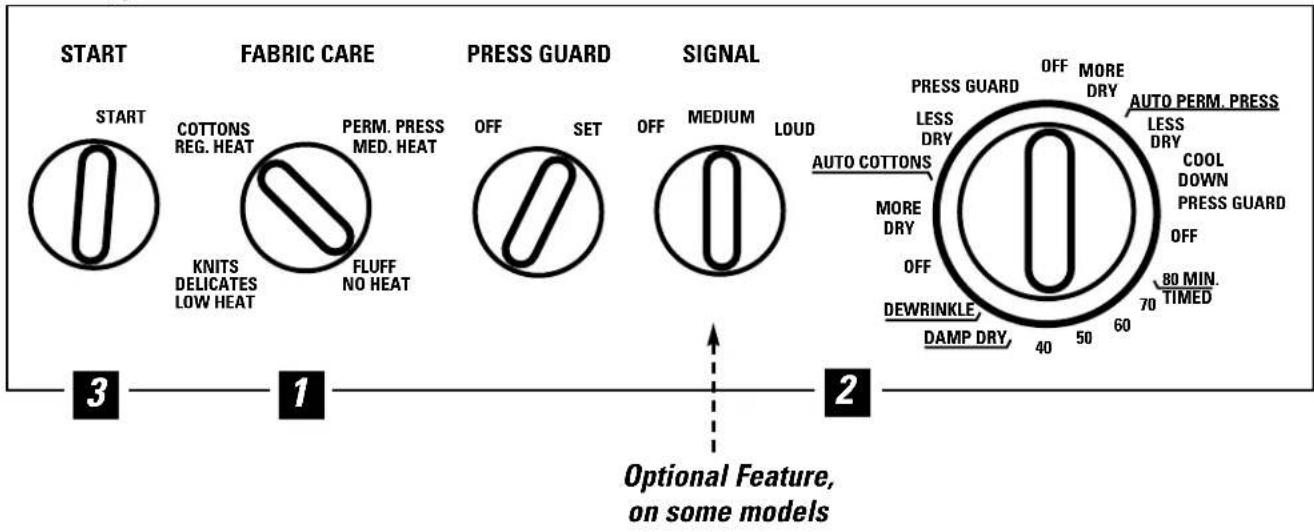
About the dryer control panel.
You can locate your model number on the label on the front of the dryer behind the door. Throughout this manual, features and appearance may vary from your model.
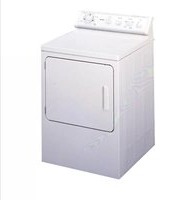
Model Types 453

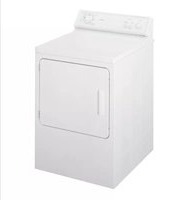
Model Types 473
flowchart
graph LR
    A["START"] --> B["FABRIC CARE"]
    B --> C["PRESS GUARD"]
    C --> D["SIGNAL"]
    D --> E["OPTIONAL FEATURE ON SOME MODELS"]

    subgraph START
        A1["START"]
        B1["COTTONS REG. HEAT"]
        B2["KNITS DELICATES LOW HEAT"]
        B3["FLUFF NO HEAT"]
    end

    subgraph FABRIC CARE
        B4["PERM. PRESS MED. HEAT"]
        C0["OFF"]
        C1["SET"]
        D0["OFF"]
        D1["MEDIUM"]
        D2["LOUD"]
    end

    subgraph PRESS GUARD
        E1["PRESS GUARD"]
        E2["LESS DRY"]
        E3["AUTO COTTONS"]
        E4["MORE DRY"]
        E5["OFF"]
        E6["DEWRINKLE DAMP DRY"]
        E7["OFF"]
        E8["MORE DRY"]
        E9["AUTO PERM. PRESS"]
        E10["LESS DRY"]
        E11["COOL DOWN PRESS GUARD"]
        E12["OFF"]
        E13["80 MIN TIMED"]
    end

    subgraph SIGNAL
        D1["O"]
        D2["O"]
        D3["O"]
        D4["O"]
        D5["O"]
        D6["O"]
        D7["O"]
        D8["O"]
        D9["O"]
        D10["O"]
        D11["O"]
        D12["O"]
        D13["O"]
        D14["O"]
        D15["O"]
        D16["O"]
        D17["O"]
        D18["O"]
        D19["O"]
        D20["O"]
        D21["O"]
        D22["O"]
        D23["O"]
        D24["O"]
        D25["O"]
    end
NOTE:
Drying times will vary according to the type of heat used (Electric, Natural or LP gas), size of load, types of fabrics, wetness of clothes and condition of exhaust ducts.
Control Settings
IMPORTANT: Clean the lint filter each time you use the dryer.
1 Fabric Care
COTTONS For regular to heavy cottons. REG. HEAT
PERM. PRESS For synthetics, blends, delicates and items labeled permanent press. MED. HEAT
FLUFF For fluffing items without heat. Use the TIMED DRYcycle. HEAT
KNITS For delicates, synthetics and items labeled tumble dry low. DELICATES LOW HEAT
2 Drying Cycles—Automatic cycles automatically determine fabric dryness. Select MORE DRY for heavier fabrics, LESS DRY for lighter fabrics. Timed cycles run for a selected time.
AUTO For cottons and most linens. For most loads set at AUTO COTTONS. COTTONS
AUTO. For synthetic blends and delicates. PERM. PRESS
TIMED DRY Set the Cycle Selector at the desired drying time.
DAMP DRY For leaving items partially dry.
DEWRINKLE For removing wrinkles from items that are clean and dry or that are very lightly damp.
3 Start—Close the dryer door. Select START. Opening the door during operation will stop the dryer. To restart the dryer, close the door and select START to complete the cycle.
About your dryer features.
PRESS GUARD
OFF SET

Press Guard—On some models
Use this option to minimize the wrinkles in clothes. It provides approximately 15 minutes of no-heat tumbling after the clothes are dry.
This option can only be used with the Automatic cycles.
If the Cycle Signal knob is selected, the Signal will sound at the end of the drying time and will sound several times during the PRESS GUARD cycle. This will remind you that it is time to remove the clothes.
SIGNAL
OFF
MEDIUM
LOUD

Cycle Signal—On some models
This signal will sound just before the end of the cycle to remind you to remove the clothes. On some models the signal sound level cannot be adjusted.
If you selected the PRESS GUARD option the signal will sound at the end of the drying time and will sound several times during the PRESS GUARD cycle. This will remind you that it is time to remove the clothes.
NOTE:
■ Remove garments promptly at the sound of the signal. Place clothes on hangers so wrinkles won't set in.
■ Use the Cycle Signal especially when drying fabrics like polyester knits and permanent press. These fabrics should be removed so wrinkles won't set in.

natural_image
Illustration of a hand inserting a plastic into a washing machine (no text or symbols)Drum Lamp—On some models
Before replacing the light bulb, be sure to unplug the dryer power cord or disconnect the dryer at the household distribution panel by removing the fuse or switching off the circuit breaker. Reach above dryer opening from inside the drum. Remove the bulb and replace with the same size bulb.
natural_image
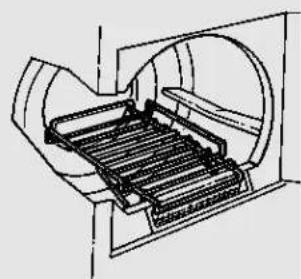
Technical line drawing of a mechanical component with internal channels and housing (no text or symbols)Drying Rack—On some models
A handy drying rack may be used for drying articles such as stuffed toys, pillows or washable sweaters.
Hook the rack over the lint filter so the rack extends into the dryer drum.
NOTE:
■ The drying rack must be used with the TIMED CYCLE.
■ Do not use this drying rack when there are other clothes in the dryer.
About reversing the door.

Reversing the Door
Tools needed:
Standard #2
■ Tape-tipped
- Needle-nosed
Phillips screwdriver putty knife pliers
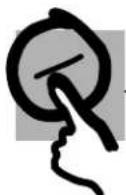
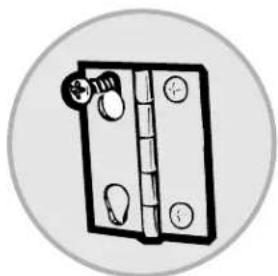
7 Open the door and remove the filler plugs opposite the hinges. With the door completely open, remove the bottom screw from each hinge on the dryer face. Insert these screws about half way into the TOP holes, for each hinge, on the opposite side (where you removed the filler plugs). Apply firm pressure to get the screw started in untapped holes.
natural_image
Simple line drawing of a door handle with a knob and circular frame (no text or symbols)2 Loosen top screw from each hinge on the dryer face half way. With one hand holding the top of the door and the other hand holding the bottom, remove the door from the dryer by lifting it UP and OUT.

natural_image
Diagram of a door handle assembly with a valve and mounting bracket (no text or symbols)3 Rotate the door 180°. Insert it on the opposite side of the opening by moving the door IN and DOWN until the top hinge and the bottom hinge are resting on the top screws inserted in step 1.
natural_image
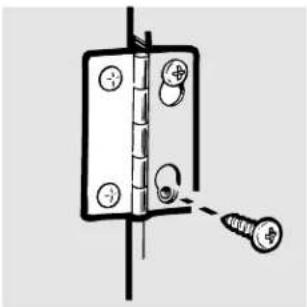
Diagram of a door hinge with a screw inserted, showing mounting holes and a connecting rod (no text or symbols)4 Remove the remaining screws from the side of the opening from which the door was removed. With these screws secure each hinge at the bottom. Tighten the two top screws of each hinge. Reinsert the plastic plugs on the side from which the door was removed.
Loading and using the dryer. Always follow the fabric manufacturer's care label when laundering.
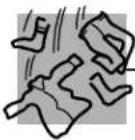
Sorting and Loading Hints
As a general rule, if clothes are sorted properly for the washer, they are sorted properly for the dryer.
Do not add fabric softener sheets once the load has become warm. They may cause fabric softener stains. Bounce® Fabric Conditioner Dryer Sheets have been approved for use in all GE Dryers when used in accordance with the manufacturer's instructions.
Do not overload. This wastes energy and causes wrinkling.
Do not dry the following items: fiberglass items, woolens, rubber-coated items, plastics, items with plastic trim and foam-filled items.
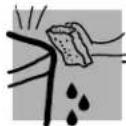
Care and Cleaning of the Dryer
The Exterior: Wipe or dust any spills or washing compounds with a damp cloth. Dryer control panel and finishes may be damaged by some laundry pretreatment soil and stain remover products. Apply these products away from the dryer. The fabric may then be washed and dried normally. Damage to your dryer caused by these products is not covered by your warranty.
The Lint Filter: Clean the lint filter before each use. Moisten your fingers and reach into the filter opening. Run your fingers across the filter. Have a qualified technician vacuum the lint from the dryer once a year.

natural_image
Simple line drawing of a hand pressing down on a door panel (no text or symbols)The Exhaust Duct: Inspect and clean the exhaust ducting at least once a year to prevent clogging. A partially clogged exhaust can lengthen the drying time.
Follow these steps:
Turn off electrical supply by disconnecting the plug from the wall socket.
2 Disconnect the duct from the dryer.
3 Vacuum the duct with the hose attachment and reconnect the duct.
The Exhaust Hood: Check with a mirror that the inside flaps of the hood move freely when operating. Make sure that there is not wildlife (birds, insects, etc.) nesting inside the duct or hood.
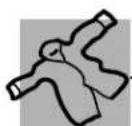
Fabric Care Labels
Below are fabric care label "symbols" that affect the clothing you will be laundering.
WASH LABELS
Machine wash cycle

Normal

Permanent Press/wrinkle resistant

Gentle/ delicato

Upp/week

Do not wash

Do not wring
Water temperature

Hot (50°C/120°F)

Warm (40°C/105°F)

Cold/cool (30°C,85°F)
BLEACH LABELS
Bleach symbols

Any bleach (when needed)

Only non-chlorine bleach (when needed)

Do not bleach
DRY LABELS
Tumble dry

Dry

Normal

Permanent Press/wrinkle resistant

Gentle/ delicate

Do not tumble dry

Do not dry (used with do not wash)
Heat setting

High

Medium

Low

No heat/air
Special instructions

Line dry/ hang to dry

Drip dry

Dry flat

In the shade

Venting the Dryer
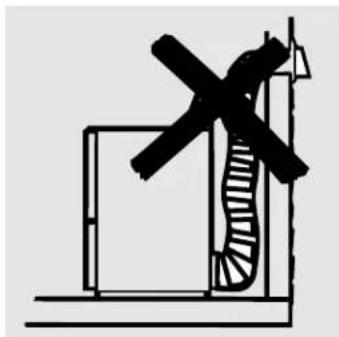
For the best drying performance the dryer needs to be properly vented. The dryer will use more energy and run longer if it is not vented to the below specifications. Carefully follow the details on Exhausting in the Installation Instructions.
■ Use only rigid metal or flexible metal 4" diameter ductwork inside the dryer cabinet or for exhausting to the outside.
■ Do not use plastic or other combustible ductwork.
■ Use the shortest length possible.
■ Do not crush or collapse.
■ Avoid resting the duct on sharp objects.
■ Venting must conform to local building codes.
Correct Venting

natural_image
Pure technical line drawing of a mechanical assembly without any text, numbers, or symbols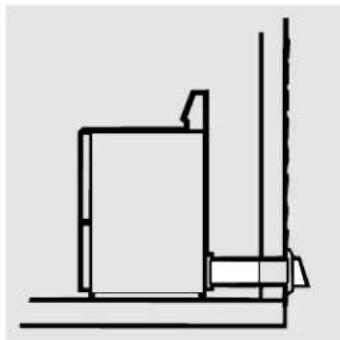
natural_image
Pure architectural line drawing of a building corner with stairs and windows (no text or symbols)Incorrect Venting
natural_image
Simple line drawing of a windmill with a handle and blade, no text or symbols present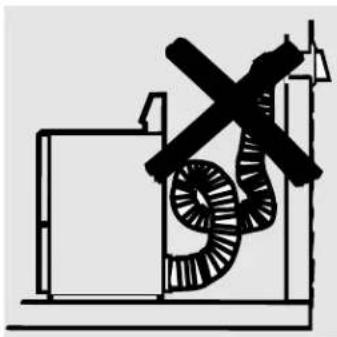
natural_image
Pure electrical circuit lines without any symbolsBefore you call for service...

Troubleshooting Tips Save time and money! Review the charts on the following pages first and you may not need to call for service.
Problem Possible Causes What To Do
| Dryer doesn't start | Dryer is unplugged | Make sure the dryer plug is pushed completely into the outlet. |
| Fuse is blown/circuit breaker is tripped replace fuse or reset breaker. | Check the house fuse/circuit breaker box andNOTE: Most electric dryers use two fuses/breakers. | |
| Dryer doesn't heat | Fuse is blown/circuit breaker is tripped, the dryer may tumble replace fuse or reset breaker.but not heat | Check the house fuse/circuit breaker box and |
| Gas service is off | Make sure gas shutoff at dryer and main shutoff are fully open. | |
| Dryer shakes or makes noise | Some shaking/noise is normal.Dryer may be sitting unevenly leveling legs as necessary until even. | Move dryer to an even floor space, or adjust |
| Greasy spots on clothes | Improper use of fabric softener | Follow directions on fabric softener package. |
| Drying dirty items with clean ones | Use your dryer to dry only clean items. Dirty items can stain clean items and the dryer. | |
| Clothes were not completely clean | Sometimes stains which cannot be seen when the clothes are wetappearafter drying. Use proper washing procedures before drying. | |
| Lint on clothes | Lint filter is full | Clean lint screen before each load. |
| Improper sorting | Sort lint producers (like chenille) from lint collectors (like corduroy). | |
| Static electricity can attract lint | See suggestions in this section underSTATIC. | |
| Overloading | Separate large loads into smaller ones. | |
| Paper, tissue, etc. left in pockets | Empty all pockets before laundering clothes. | |
| Static occurs | No fabric softener was used | Try a fabric softener.Bounce® Fabric Conditioner Dryer Sheets have been approved for use in all GE Dryers when used in accordance with the manufacturer's instructions. |
| Overdrying | Try a fabric softener.Adjust controls for less drying. | |
| Synthetics, permanent press and blends can cause static | Try a fabric softener. | |
| Inconsistent drying times | Type of heat | Automatic drying times will vary according to the type of heat used (electric, natural or LP gas), size of load, types of fabrics, wetness of clothes and condition of exhaust ducts. |
| Problem Possible Causes What To Do | ||
| Clothes take too long to dry | Improper sorting | Separate heavy items from lightweight items (generally, a well-sorted washer load is a well-sorted dryer load). |
| Large loads of heavy fabrics (like beach towels) longer to dry. Separate large, heavy fabrics into smaller loads to speed drying time. | Large, heavy fabrics contain more moisture and take large, heavy fabrics into smaller loads to speed drying time. | |
| Controls improperly set | Match control settings to the load you are drying. | |
| Lint filter is fullClean lint filter before every load. | ||
| Improper or obstructed ducting | Check installation instructions for proper ducting/venting.Make sure ducting is clean, free of kinks and unobstructed.Check to see if outside wall damper operates easily.Check the Installation Instructions to make sure the dryer venting is correct. | |
| Blown fuses or tripped circuit breaker dryers use 2 fuses/breakers | Replace fuses or reset circuit breakers. Since most operating. | |
| Overloading/combining loads | Do not put more than one washer load in the dryer at a time. | |
| Underloading | If you are drying only one or two items, add a few items to ensure proper tumbling. | |
| Clothes are wrinkled | Overdrying | Select a shorter drying time.Remove items while they still hold a slight amount of moisture. |
| Letting items sit in dryer after cycle ends | Remove items when cycle ends and fold or hang immediately. | |
| Clothes shrink | Some fabrics will naturally shrink when washed. Others can be safely washed, but will shrink in the dryer. | To avoid shrinkage, follow garment care labels exactly.Some items may be pressed back into shape after drying.If you are concerned about shrinkage in a particular item, do not machine wash or tumble dry it. |
Notes
Hotpoint Dryer Warranty (For customers in the U.S.)
All warranty service provided by our Factory Service Centers, or an authorized Customer Care ® technician. For service, call 800-GE-CARES.
For The Period Of: We Will Replace:
| One Year Any partFrom the date of the original purchase | of the dryer which fails due to a defect in materials or workmanship. During this full one-year warranty, we will also provide, free of charge, all labor and in-home service to replace the defective part. |
| Five YearsFrom the date of the original purchase | Any extra large or super capacity dryer drum which fails due to a defect in materials or workmanship. During this five-year limited warranty, you will be responsible for any labor or in-home service costs. |
What We Will Not Cover:
■ Service trips to your home to teach you how to use the product.
■ Improper installation.
■ Failure of the product if it is abused, misused, or used for other than the intended purpose or used commercially.
■ Replacement of house fuses or resetting of circuit breakers.
■ Damage to the product caused by accident, fire, floods or acts of God.
■ Incidental or consequential damage to personal property caused by possible defects with this appliance.
This warranty is extended to the original purchaser and any succeeding owner for products purchased for home use within the USA. In Alaska, the warranty excludes the cost of shipping or service calls to your home.
Some states do not allow the exclusion or limitation of incidental or consequential damages. This warranty gives you specific legal rights, and you may also have other rights which vary from state to state. To know what your legal rights are, consult your local or state consumer affairs office or your state's Attorney General.
Warrantor: General Electric Company. Louisville, KY 40225
Service Telephone Numbers.

GE Answer Center® In the U.S.: 800.626.2000
The GE Answer Center ® is open 24 hours a day, 7 days a week.
In Canada, contact: Manager, Consumer Relations, Camco Inc., 1 Factory Lane, Suite 310, Moncton, N.B., E1C 9M3.

In-Home Repair Service In the U.S.: 800-432-2737
Expert GE repair service is only a phone call away.
In Canada, call 1-800-361-3400.

Special Needs Service In the U.S.: 800.626.2000
GE offers, free of charge, a brochure to assist in planning a barrier-free kitchen for persons with limited mobility. In the U.S., call 800-TDD-GEAC (800-833-4322).
In Canada, contact: Manager, Consumer Relations, Camco Inc., 1 Factory Lane, Suite 310, Moncton, N.B., E1C 9M3.

Service Contracts In the U.S.: 800-626-2224
Purchase a GE service contract while your warranty is still in effect and you'll receive a substantial discount. GE Consumer Service will still be there after your warranty expires.
In Canada, call 1-800-461-3636.
Parts and Accessories In the U.S.: 800-626-2002
Individuals qualified to service their own appliances can have parts or accessories sent directly to their homes (VISA, MasterCard and Discover cards are accepted).
Instructions contained in this manual cover procedures to be performed by any user. Other servicing generally should be referred to qualified service personnel. Caution must be exercised, since improper servicing may cause unsafe operation.
Please consult your yellow pages for your local Camco number.

Service Satisfaction
If you are not satisfied with the service you receive from GE:
First, contact the people who serviced your appliance.
Next, if you are still not pleased, in the U.S., write all the details—including your phone number—to: Manager, Consumer Relations, GE Appliances, Appliance Park, Louisville, KY 40225; or, in Canada, to Director, Consumer Relations, Camco Inc., 1 Factory Lane, Suite 310, Moncton, N.B., E1C 9M3.



- Dryers
- Operating Instructions
- Troubleshooting Tips
- Customer Service
- Congratulations!
- You Are Now Part of the Hotpoint Family.
- Hotpoint & You, A Service Partnership.
- IMPORTANT!
- Staple sales slip or cancelled check here.
- FOR YOUR RECORDS
- Write the model and serial numbers here:
- READ THIS MANUAL
- PROPER VENTING
- IF YOU NEED SERVICE
- WARNING!
- WHAT TO DO IF YOU SMELL GAS:
- California Safe Drinking Water and Toxic Enforcement Act
- PROPER INSTALLATION
- Exhaust/Ducting:
- IMPORTANT SAFETY INFORMATION. READ ALL INSTRUCTIONS BEFORE USING.
- ⚠ WARNING!
- YOUR LAUNDRY AREA
- WHEN USING YOUR DRYER
- WHEN NOT USING YOUR DRYER
- About the dryer control panel.
- NOTE:
- Control Settings
- Fabric Care
- Drying Cycles—Automatic cycles automatically determine fabric dryness. Select MORE DRY for heavier fabrics, LESS DRY for lighter fabrics. Timed cycles run for a selected time.
- Start—Close the dryer door. Select START. Opening the door during operation will stop the dryer. To restart the dryer, close the door and select START to complete the cycle.
- About your dryer features.
- PRESS GUARD
- Press Guard—On some models
- SIGNAL
- Cycle Signal—On some models
- Drum Lamp—On some models
- Drying Rack—On some models
- About reversing the door.
- Reversing the Door
- Loading and using the dryer. Always follow the fabric manufacturer's care label when laundering.
- Sorting and Loading Hints
- Care and Cleaning of the Dryer
- Follow these steps:
- Fabric Care Labels
- WASH LABELS
- BLEACH LABELS
- DRY LABELS
- Venting the Dryer
- Before you call for service...
- Notes
- Hotpoint Dryer Warranty (For customers in the U.S.)
- What We Will Not Cover:
- Service Telephone Numbers.
- GE Answer Center® In the U.S.: 800.626.2000
- In-Home Repair Service In the U.S.: 800-432-2737
- Special Needs Service In the U.S.: 800.626.2000
- Service Contracts In the U.S.: 800-626-2224
- Parts and Accessories In the U.S.: 800-626-2002
- Service Satisfaction
Brand : HOTPOINT
Model : NJSR453GWAA
Category : Coffee maker