
VTCRH2 - Wireless camera Boyo - Free user manual and instructions
Find the device manual for free VTCRH2 Boyo in PDF.


| Product Type | Wireless Backup Camera System |
| Model | VTCRH2 |
| Brand | Boyo |
| Monitor LCD Size | 5 inches IPS panel |
| Monitor Resolution | 1024×800 (16:9) |
| Monitor Power | DC 12-24V, 3W |
| Monitor Dimensions | 5.6 × 4.1 × 2.5 inches (excluding bracket) |
| Camera Resolution | 1280×720 (720P) CMOS |
| Camera Horizontal Viewing Angle | 130 degrees |
| Camera Night Vision | HD infrared night vision |
| Camera Battery Capacity | 6400 mAh (built-in) |
| Camera Operating Time (fully charged) | 18 hours |
| Camera Charging Time | 10 hours at DC 5-24V |
| Camera Waterproof Rating | IP68 |
| Camera Mounting | Magnetic base with adjustable angle (0-100 degrees) |
| Wireless Transmission Distance (open area) | 700 feet |
| Wireless Frequency | 2.4 GHz (2400-2483.5 MHz) |
| Number of Cameras Included | 2 cameras |
| Pairing Method | Long press pairing button on monitor, then cycle camera power |
| Operating Temperature Range | -4°F to 158°F |
| Accessories Included | 2 cameras, monitor, power adapters, car charger, antennas, mounting brackets, warranty card |
Frequently Asked Questions - VTCRH2 Boyo
User questions about VTCRH2 Boyo
0 question about this device. Answer the ones you know or ask your own.
Ask a new question about this device
Download the instructions for your Wireless camera in PDF format for free! Find your manual VTCRH2 - Boyo and take your electronic device back in hand. On this page are published all the documents necessary for the use of your device. VTCRH2 by Boyo.
USER MANUAL VTCRH2 Boyo
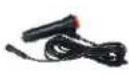
| DC5 5 power cable*2PCS(3PCS for VTCRH2 and5PCS for VTCRH4) | Fan-shaped bracket *1PC | Car charger powercable * 1PC | 2.4G SDB antenna *2PCS(3PCS for VTCRH2, 5PCSfor VTCRH4) |
 |  |  |  |
| 2.4G antenna extensioncord*1PC | 2.4G wireless cameras*1PC (2PCS for VTCRH2,4PCS for VTCRH4) | Power adapter*1PC | Suction bracket*1PC |
 |  |  |  |
| Warranty card *1PC | Product registrationcard*1PC | ||
 |  | ||
For technical support contact 888-941-3060 or email info@visiontechamerica.com WWW.VISIONTECHAMERICA.COM
BOYO®
User Manual

Before operating the Monitor, please read this manual thoroughly and retain it for future reference.
Attention
For your safety, Do not watch video or set monitors while driving. Non-professional please do not disassemble the product at will, please consult the after-sales service organization when the product malfunctions, or send it to the local maintenance department for inspection and repair.
Warning
When installing this product, please install it in the position permitted by laws and regulations, and we shall not be responsible for the liability caused by the illegal installation of the product.
Tips
In cold weather, the product may appear dark screen phenomenon when startup. Which will heat up slowly and return to normal with the increase of temperature.
Notice to the VTCRH hitch camera users
The cameras are battery-operated and have a built-in rechargeable battery. Once fully charged, it will operate continuously for 20 hours. The battery can be charged using

If you are planning to operate the hitch cameras for multiple days, please consider the following to conserve battery.
- turn off the power to the camera when not using.
- install a DC power cable near the camera to ACC power and connect it to the camera. It will charge the battery while the vehicle key is on.
Power Button
1. Product Function & Parameter
Wireless Monitor
. LCD: 5 inch IPS panel, 16:9 high definition
. Resolution: 1024*RGB*800
. Full viewing angle: Left(85°) Right(85°) Below(85°) Above(85°)
. Panel key function: 5PCS key control
. Wireless video input: 1, 2, or 4 channel wireless video input
. Using digital wireless encryption technology to code connection, with strong anti-interference ability
. 2.4G wireless transmission distance: 700ft. in open area
. Power supply: DC12-24V
. Power consumption: 3W
. Working temperature: -4°F \~ 158°F
. Storage temperature: -22°F \~ 185°F
. Size: 5.6" x 4.1" x 2.5" (excluding bracket)
Wireless Camera
. Effective resolution: 1280*720px, 720P,
. Image Sensor: 1/2.7" CMOS
. Horizontal viewing angle: 130 degree
. Wireless transmission distance: 700ft. in open area
. System: PAL/NTSC automatically
. SPSP: FHSS(adaptive frequency hopping)
. Transmission bandwidth: 8MHz BER<1E-3
. Built-in battery capacity: 6400mA
. Battery indicator: 4 LED lights
. Battery charging time: DC5.5, 5\~24V, 10 hours
. Working time: 18 hours(when fully charged)
. Camera adjustable angle: 0-100 degree
. Operation frequency: 2400-2483.5MHZ
. ON/OFF mode: press and hold to turn on and turn off, short press to display battery capacity
. Installation mode: magnet base adsorption installation
. Night vision: HD infrared night vision
. SNR: 46.5dB
. Waterproof level: IP68
. Transmitting sensitivity: -89 dBm
. Material: black aluminum alloy
. Shockproof: 4G
. Power supply: DC 5-24V
. Working temperature: -4°F \~ 158°F
. Storage temperature: -22°F \~ 185°F
. Size: 2.9" x 1.8" x 2.2" (excluding bracket)
2. Product Features
. Heavy Duty Wireless Waterproof Camera with IR night vision, builtbattery and magnetic mounting.
. Camera with 3MP pixels image with 720P HD video streaming.
. 2.4G wireless transmission with no delay or deadlock.
. Transmission distance up to 700ft. in open area.
. A monitor with original IPS display with full viewing angle.
. 1024*800 resolution with 16:9 wide screen.
. Automatically shut off screen when there is no video signal and starts up within a second when signal is detected.
- Camera operates for 18 hours with full charge.
3. Product Introduction
Monitor Introduction
- 2.4G transmission antenna
- LCD screen
- "M": enter/exit the menu
- Flip: horizontally/vertically image flip
- Power: turn on/off the monitor
- Parking guide lines: on/off
- Paring: long press to pair VTCRH2 and VTCRH4 only: - press shortly to switch display
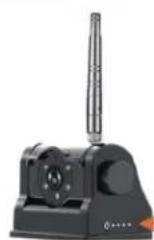
Wireless Camera Introduction
- 2.4G antenna
- Night vision infrared light
- Angle adjusting knob
- Light sensor(night vision)
- Power indicator
- Power on/off
- Built-in battery
- Charging port

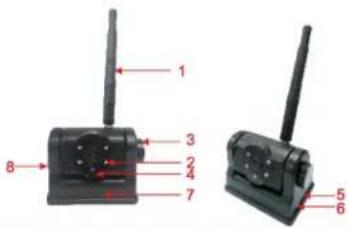
4. Menu Setup Introduction
M Button
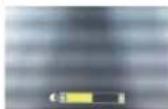
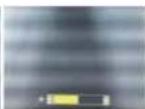
Press the "M" key to open the option for contrast, saturation and brightness, and then press "▲" or "≠" key on the front panel to set the contrast, saturation and brightness. Just as shown in the images below. And which will be saved and disappeared automatically after 5 seconds.

Flip Button
Under single image display, press "▲"key on the front panel to turn up/down/left/right the display image. Under multiple image display, turn up/down/left/right the screen and menu (only for VTCRH2 and VTCRH4).
Parking Guideline Button
Press "✗" key on the front panel to open and close the parking guide line. Just as shown in the image below.
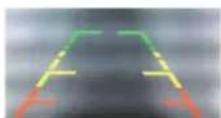
Image display mode switch
Press "oo" to switch image display mode.(only for VTCRH2 and VTCRH4)
Camera pairing
Under single image display mode, press and hold "CD"key on the front panel to pair the cameras. Just as shown in the image below. Then remove the power for the wireless camera and then powered it on again. If pair successfully, it will show the camera image, if no, then the screen will display "Pair fail), and you will need to repair it again. The whole pair process will need about 10S. For multiple wireless cameras, you will need to enter into the related channel display, and then pair the cameras one by one(only for VTCRH2 and VTCRH4).

5. Connections
Wireless camera

Charged by cigarette car charger

Powered by DC power cable
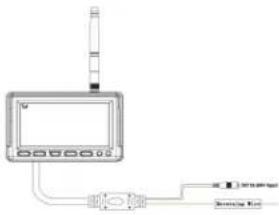
Wireless monitor

natural_image
Pure electrical circuit lines without any symbols
- DC12-24V(By cigarette car charger or DC cable)
- Brown line: trigger full screen to CAM 1
- Green line: trigger full screen to CAM 2(to CAM 1 for VTCRH1)
- Blue line: trigger full screen to CAM3
- Grey line: trigger full screen to CAM4
- BOYO®
- User Manual
- Attention
- Warning
- Tips
- Notice to the VTCRH hitch camera users
- Product Function & Parameter
- Wireless Monitor
- Wireless Camera
- Product Features
- Product Introduction
- Monitor Introduction
- Wireless Camera Introduction
- Menu Setup Introduction
- M Button
- Flip Button
- Parking Guideline Button
- Image display mode switch
- Camera pairing
- Connections
Brand : Boyo
Model : VTCRH2
Category : Wireless camera