
PBM120AT - Video recorder Speco Technologies - Free user manual and instructions
Find the device manual for free PBM120AT Speco Technologies in PDF.


| Product Type | Public Address Amplifier with AM/FM Tuner |
| Model | PBM120AT |
| Brand | Speco Technologies |
| Power Output | 120W RMS / 240W Max |
| Power Supply | AC 115V, 60Hz |
| Microphone Inputs | 3 XLR with selectable phantom power (Mic 1 has priority) |
| Telephone Paging Input | Yes, 600 ohms |
| Music on Hold Output | Yes (600 ohms/1V and 8 ohms/1W) |
| Speaker Outputs | 5 zoned outputs (70V or 25V) and non-zoned 4/8/16 ohm output |
| Line Outputs | RCA and XLR |
| Tone Controls | Front Bass and Treble |
| Volume Controls | Individual per input and master digital volume |
| Front Panel Lock | Digital lock |
| Remote Control | IR remote included |
| Integration | RS232 input for control systems |
| Tuner Module | Factory-installed AM/FM tuner (PBM120AT) |
| Antennas | AM and FM antennas included |
| Fuse | T10AL, 250V (external) |
| Dimensions (approx) | Standard rack-mount size (exact dimensions not specified) |
| Weight (approx) | Not specified; typical for 120W amplifier ~10-15 lbs |
| Safety Features | Overload protection, polarization, ventilation requirements |
| Accessories Included | Product manual, IR remote with battery, rack mounting hardware, AC power cord |
Frequently Asked Questions - PBM120AT Speco Technologies
User questions about PBM120AT Speco Technologies
0 question about this device. Answer the ones you know or ask your own.
Ask a new question about this device
Download the instructions for your Video recorder in PDF format for free! Find your manual PBM120AT - Speco Technologies and take your electronic device back in hand. On this page are published all the documents necessary for the use of your device. PBM120AT by Speco Technologies.
USER MANUAL PBM120AT Speco Technologies
PBM120A - 120 WATT RMS PUBLIC ADDRESS AMPLIFIER
PBM120AT 120 WATT RMS PUBLIC ADDRESS AMPLIFIER WITH TUNER
PBM120AU 120 WATT RMS PUBLIC ADDRESS AMPLIFIER WITH TUNER/CD/USB
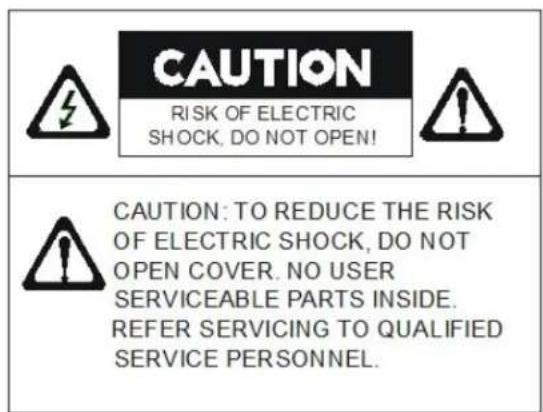
PRECAUTIONS
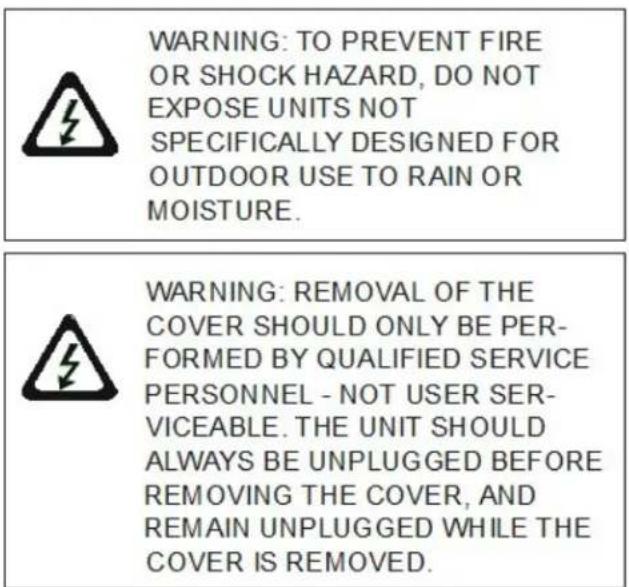
1. Unpacking
After removing the amplifier from the carton, inspect for any exterior damage to the unit. If damage is noted, notify the carrier at once so that a claim can be justified. Save all packing material. This is important when the claim is processed.
2. Ventilation
To offset heat generated by the unit, it is necessary to provide ample ventilation around the unit. Avoid blocking or impeding the ventilation holes on the unit. To prevent unnecessary problems, install the unit in a place free from any vibrations, direct sunlight, humidity or dust circulation.
3. Prevent liquids or other materials to enter cabinet
If the unit gets wet or any foreign material enters the amplifier cabinet, immediately disconnect the AC power cord and consult your dealer or qualified technician.
IMPORTANT SAFETY INSTRUCTIONS
- Read these instructions completely.
- Keep these instructions for future reference.
- Heed all warnings.
- Follow all instructions.
- Do not use this apparatus near water.
-
Clean only with a dry cloth.
-
Do not block ventilation openings. Install in accordance with instructions.
-
Do not install on or near any heat sources such as radiators, heat registers, stoves or other apparatus (including amplifiers) that produce heat.
-
Do not defeat purpose of the polarized or grounding-type plug. A polarized plug has two blades with one wider that the other. A grounding type plug has two blades and a third grounding prong. The wide blade and the third prong are provided for your safety. If the provided plug does not fit into your outlet, consult an electrician for replacement of the obsolete outlet.
-
Protect the power cord from being walked on or pinched, particularly at plugs, convenience receptacles and where connected to the apparatus.
-
Only use the attachments/accessories specified by the manufacturer.
-
Use only with the cart, stand, tripod, bracket or table specified by the manufacturer, or sold with the apparatus. When a cart is used, use caution when moving the cart/apparatus combination to avoid injury from tip-over.
-
Unplug this apparatus during lightning storms or when unused for long periods of time.
-
Refer all servicing to qualified service personnel. Servicing is required when the apparatus has been damaged in any way such as power supply cord or plug is damaged, liquid has been spilled or objects have fallen into the apparatus, the apparatus has been exposed to rain or moisture, does not operate normally, or has been dropped.
-
Apparatus shall not be exposed to dripping or splashing and no objects filled with liquids, such as vases, shall be placed on the apparatus.
-
WARNING – To reduce the risk of fire or electric shock, do not expose this apparatus to rain or moisture.
-
CAUTION – Use of any controls or adjustments or performance of procedures other than those specified herein may result in hazardous radiation exposure.

natural_image
Silhouette of a person climbing a ladder inside a circular frame with a diagonal line (no text or symbols)Thank You!
We at Speco Technologies thank you for your purchase of our PBM120A, PBM120AT or PBM120AU amplifier. The PBM120A is the first in Speco Technologies next generation of commercial public address amplifiers.
We have taken our customers' input and created the perfect amplifier for almost any application. In addition to the great features you've come to expect in a Speco Technologies amplifier, the new PBM-A series has ample inputs, an included IR-remote control, an RS232 input for integration with control systems, front panel locking capability, and includes all rack-mounting hardware.
With a stylish appearance and all these additional features at a price similar to previous generation amplifiers, the new PBM-A series is sure to become your go-to amplifier.
Please review this checklist of components to make sure you received all items with your amplifier:
Inside the box (PBM120A)
- One amplifier
• One product manual
• One IR remote control (Battery included)
• One set of rack mounting hardware including two (2) brackets - AC Power Cord
If you have purchased a PBM120AU or PBM120AT, the module will already be factory installed, and this box should also include:
- AM Antenna
- FM Antenna
Please make sure you have all accessories and your box and unit did not suffer any noticeable damage during transit prior to connecting your amplifier.
TABLE OF CONTENTS
| Page 3 | Safety Instructions |
| Page 5 | Features and Specifications |
| Page 5 | Front Panel |
| Page 7 | Rear Panel |
| Page 10 | Reference Information |
| Page 11 | PBM120AU Instructions |
| Page 14 | PBM120AT Instructions |
| Page 15 | IR Remote |
SECTION 1: FEATURES AND SPECIFICATIONS
• 120W RMS/240W Max Power
- AC 115V, 60Hz
• 3 XLR Microphone inputs with selectable phantom power (Mic 1 has selectable priority)
- Telephone paging input
• Music on hold output
- 5 zoned speaker outputs (70 or 25V)
• Non-zoned 4/8/16 Ohm output
• RCA or XLR line output
- Front Bass and Treble controls
- Individual volume control for each input
• Master digital volume control
• Digital front panel lock
• RS232 input for integration with popular control systems
SECTION 2: Controls and Connections
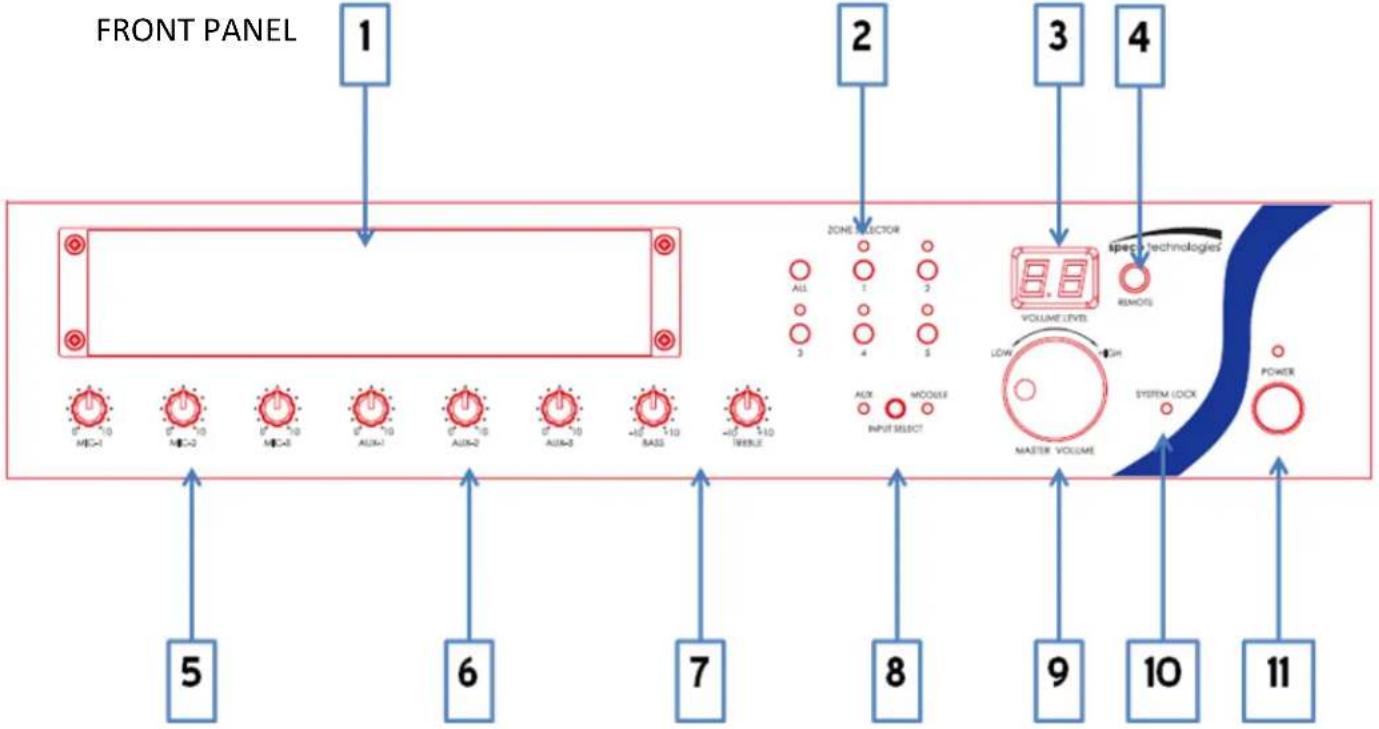
1) Module Bay:
a. This will be empty for the PBM120A.
b. This will contain a factory-installed Tuner/CD/USB/SD player for the PBM120AU (Page 9).
c. This will contain a factory-installed AM/FM Tuner for the PBM120AT (Page 11).
2) Zone Selector:
a. Turn specific speaker runs on or off.
b. If a zone is turned on, the LED above the zone button will illuminate.
3) Volume Level Indicator:
a. This display will indicate the level of volume of the amplifier.
b. Volume can be changed either using the Master Volume Knob (#9) or by using the IR remote control
4) IR receiver:
a. Aim your IR remote control at this window to control the amplifier.
b. Range of the IR remote can be extended by using an optional IR repeater, such as the Speco Technologies Part Number IRRPTKIT.
5) Microphone Volume Control Knobs:
a. Turn the knob left to decrease the microphone volume relative to other inputs.
b. Turn the knob right to increase the microphone volume relative to other inputs.
6) Auxiliary Input Volume Control Knobs:
a. Turn the knob left to decrease the AUX input volume relative to other inputs.
b. Turn the knob right to increase the AUX input volume relative to other inputs.
7) Tone Controls:
a. Turning the Bass knob left or right will increase or decrease the bass of all inputs.
b. Turning the Treble knob left or right will increase or decrease the treble of all inputs.
8) Source Select Button:
a. Pushing this button will alternate between the auxiliary inputs and then module input as the main source.
b. If a module is not installed (PBM120A), no audio will play if module is selected.
9) Master Volume Knob:
a. Turn the knob to the left to decrease the volume of all inputs and sources.
b. Turn the knob to the right to increase the volume of all inputs and sources.
10) System Lock Indicator:
a. This amplifier comes complete with a feature that will lock the functions of the front panel so that only the IR remote can control the amplifier.
b. This is useful for when the amplifier is installed in a public area and unauthorized personnel or customers might have access to the volume, source, etc.
11) Standby Power Button:
a. This button will enable the amplifier to enter and exit standby mode.
b. When in standby mode, the LED light above the button will illuminate.
Section 2: Controls and Connections
REAR PANEL

12) Main Power Switch:
a. This switch will completely turn the amplifier power on and off.
13) Commercial Speaker Zone Outputs:
a. This amplifier comes complete with both constant voltage and constant impedance outputs. Only one type of output may be used at a time. Attempting to use both simultaneously could damage the amplifier and/or speakers and would void the warranty.
b. 5 outputs are provided to make speaker wiring easier and to allow for distribution of speakers into groups.
c. In conjunction with the buttons on the front panel (#2), audio can be turned on and off to these zones.
VERY IMPORTANT: Make sure commercial audio principles are followed and the proper speaker types are wired to the proper outputs. Putting the incorrect speakers on the incorrect output can damage your speakers and/or amplifier and is not covered under warranty. If unsure, please contact a professional.
a. This connection allows the amplifier to be controlled by a remote source, such as a third party automation system.
b. Programming instructions are available upon request. Please contact the Speco Technologies Technical Support department.
PLEASE NOTE: For Music-on-hold and Telephone Paging, please refer to the instructions of your PBX or telephone paging system for proper function. These are simply passive inputs that allow for either music to be fed into the phone system for audio while callers
are on hold, or for using the features of the phone system to send a page via a specific output on the phone system. Installation instructions vary widely by manufacturer. If unsure, please contact a professional.
15) Music-on-hold (MOH) Volume Knob:
a. This knob will allow you to adjust the volume of the MOH output.
16) Music-on-hold (MOH) Output:
a. These terminals allow output of the amplifier's audio to another source, such as a telephone paging system.
i. 600 Ohms/1V
ii. 8 Ohms/1W
17) Telephone Paging Inputs:
a. These inputs will allow you to utilize your amplifier with a telephone paging system for purposes of paging.
18) Telephone Paging Volume Knob:
a. If connected to a phone system, this will allow adjustment of the incoming audio.
a. This terminal will allow you to connect an AM antenna for your module.
b. The antenna will only be included with a PBM120AT and PBM120AU.
20) AC Power Inlet:
a. Connect your included power cord here, carefully following all safety instructions.
21) External Fuse:
a. T10AL, 250V fuse can be replaced here.
22) Zone Output Switch:
a. Change the format of the zoned commercial outputs between 25V and 70V.
VERY IMPORTANT: NEVER switch output while amplifier is active. NEVER switch output and power amplifier if incorrect speakers are connected to the output. Damage can occur to the amplifier and/or speakers and the warranty will be void. If unsure, please consult a professional.
23) Single-Zone Constant Impedance Outputs
a. This amplifier comes complete with both constant voltage and constant impedance outputs. Only one type of output may be used at a time. Attempting to use both simultaneously could damage the amplifier and/or speakers and would void the warranty.
b. This amplifier offers single-channel 4 Ohm, 8 Ohm and 16 Ohm outputs
24) XLR Line Output:
a. Utilize this XLR output to connect the amplifier to a booster amplifier with a matching input
25) RCA Line Output:
a. Utilize this RCA output to connect the amplifier to another amplifier with RCA inputs
to daisy chain amplifiers.
26) Auxiliary Inputs:
a. These inputs accept right and left channel RCA inputs.
a. This amplifier provides phantom power to the appropriate microphones.
b. This switch will turn the phantom power feature on and off for each microphone input.
28) Microphone Inputs:
a. This amplifier has three XLR microphone inputs.
b. To expand the number of microphone inputs on this amp, we suggest using an external microphone mixer such as Speco Technologies' Part numbers MMB3XLR (3 input) or MMB8XLRLL (8 input) and connecting that mixer to one of the three XLR microphone inputs.
29) Priority Paging Switch
a. Activation of this switch will allow any microphone connected to MIC1 to take priority.
b. This means that when a page is made from a microphone connected to this input, all other audio sources will be temporarily muted.
a. This terminal will allow you to connect an FM antenna for your module.
b. The antenna will only be included with a PBM120AT and PBM120AU.
SECTION 3: REFERENCE INFORMATION
The following information is provided for reference only. Please consult a professional if unsure about any aspects of commercial or residential installations.
SPEAKER CONNECTION
The rear panel of the amplifier contains 5, zoned speaker connections.
BE SURE TO CONNECT SPEAKERS PROPERLY, see line voltage instructions below.
The speaker lines are to be connected directly between the appropriate COM terminal on the terminal strip and the terminal corresponding to the impedance of the speaker(s).
Connect the cables to the terminals on the screw terminal strip provided. Use the screw terminals which correspond to the proper polarity of the speaker(s). One lead must always be connected to the COM.
IMPORTANT NOTICE: When 70V or 25V constant line voltages are used, a line matching transformer must be used with each speaker. All transformers must be connected in parallel.
ALWAYS CONNECT LINE TRANSFORMERS IN PARALLEL, NEVER CONNECT IN SERIES
SPEAKER IMPEDANCES
Speaker terminal taps for 70V constant line voltage are provided on the rear panel of the unit. To connect the power output directly to a speaker or PA horn or a combination of speakers and/or PA horns, connect to the COM and (+) terminal on the strip. Be sure the speaker(s) or PA horn(s) can handle a reasonable power output from the amplifier or permanent damage to the speaker(s) or PA horn(s) may result. Also, be careful not to overload the amplifier with too many speakers or PA horns. If it is desired to use a number and variety of speakers, the speakers must be arranged in various series or parallel arrays to provide proper impedance matching. 70V constant line voltage must be used (parallel connection only). If you are not familiar with impedance matching, consult a professional installer or technician for advice. If 70V constant line voltages are used, a line matching transformer must be used with each speaker. Again do not overload or use incompatible speakers. Line transformers are the preferred method for multi-speaker installation.
CABLE REQUIREMENTS
Output cabling need not be shielded in most cases and should be of sufficient gauge to minimize losses due to the resistance of the wire over long runs (insertion loss). Cable thinner than 18 gauge AWG is not recommended. Long runs require 16 gauge AWG or heavier.
In some cases where the output cable is run in close proximity to unshielded intercom cables, electrical cables, radio transmission antennas or other sources of interference, or when the amplifier is being used for paging from a telephone system, the amplifier may require shielded output cabling to prevent audio feedback or interference.
PRIORITY PAGE
The amplifier features a voice activated priority page circuit and automatically mutes all program material (Auxiliary, Module, Microphone, etc.) from the amplifier's output, and permits MIC 1 and the TEL input to override for paging announcements.
TELEPHONE LINE
A telephone line input of 600 Ohms is provided. For phone systems with this feature, a Music on Hold output is also available.
WHNEVER IN DOUBT ABOUT INSTALLATION, CONSULT WITH A PROFESSIONAL INSTALLER OR TECHNICIAN. OTHERWISE, PERSONAL INJURY, DAMAGE TO THIS AMPLIFIER AND/OR SPEAKERS MAY RESULT AND YOUR WARRANTY MAY BE VOID.
SECTION 4: OPTIONAL MODULES
PBM120AU
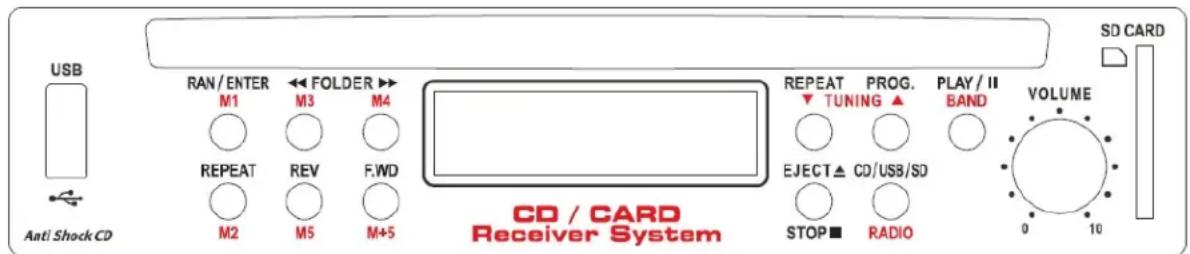
This amplifier comes complete with a Anti-Shock CD/USB/SD/Tuner module installed. The function is identical to the PBM120A, except for that the input select button on the front must be changed to "Module" for the installed module to properly function.
HARDWARE:
This unit accepts SD/SDHC Card readers, USB Thumb Drives and standard disks, such as CD, CD-R, CD-RW, and MP3 disk. Do not insert a mini-disk. In addition to standard analog CD tracks, this unit can play MP3 and WMA formats.
CD Operation:
When inserting or removing a disk in the CD player, you must let the automatic system complete its insertion or ejection process. It is prohibited to push or take out the disk by hand before the disk is completely in/out from the device, otherwise it will damage the unit.
USB Operation:
- Insert a USB thumb drive in the faceplate.
- Press CD / USB / SD / Radio button on the remote controller or faceplate to select USB mode. USB function will activate when “USB” appears on the LCD display.
SD / SDHC Card Operation:
- Insert SD / SDHC Card into SD hole in the front panel. Push the card in so that it catches properly in the device.
- Press CD / USB / SD / Radio button on the remote controller or faceplate to select SD mode. SD function will activate when "SD" appears on the LCD display.
SYSTEM CONTROLS:
• VOLUME: For mixing volume relative to other inputs on the amplifier.
CD / USB / SD READER OPERATION:
- PLAY / II: Press to start and pause play of the source
- STOP/ EJECT: Will stop playing while source is active, or will eject CD if pressed when CD is inserted and no source is playing
- Press to stop and the LCD display will show the total number of tracks.
- Press again to eject the disk; LCD display will show: "EJECT"
○ If pressed again while CD has not been removed, the disk will be automatically reinserted.
- CD / USB / SD / RADIO: Press the button to select the function of CD, USB, SD Card, or RADIO mode.
• RAN / ENTER:
- Press to play all songs in a random order. The LCD display shows "RANDOM"
Press again, LCD display shows "Enter" to confirm the "PROG" function. (Please see "PROG" section for operating program function.)
- REPEAT : Repeat play
- If a CD is the active source playing analog tracks:
- Press once to constantly repeat current track. The LCD display shows "REPEAT 1".
- Press again to constantly repeat whole CD. The LCD display shows "REPEAT ALL"
- Press again to cancel repeat function
- If a CD, USB, or SD Card is the active source playing MP3 tracks:
- Press to constantly repeat current track. LCD display shows "REPEAT"
- Press again to constantly repeat current folder. LCD display shows "REPEAT FOLDER"
- Then press again to repeat whole songs in the file. LCD display shows "REPEAT ALL"
- Press once again to cancel the REPEAT function.
- FOLDER ▶▶: Forward to next folder
- FOLDER ◀◀ : Return to last folder
- REV :
- Press once to rewind to previous track
- Press for 5 seconds to rewind through current track
- FWD:
- Press once to forward to next track
- Press for 5 seconds to fast forward the current track
- MUTE: Press to temporarily mute the module source.
• PROG: Press to set presets.
- To create a program of standard analog tracks from a CD:
- Press "PROG" and the LCD display will show "PROGRAM"
- Select desired song by using SKIP button, then press RAN/ENTER button once to confirm. LCD display shows "00 01" for the first song
- SKIP to the next song, and press RAN/ENTER twice to program as the 2nd song; LCD display shows "00 02"
- Repeat process for more songs (Maximum of 10)
- Press PLAY/II to start playing programmed songs
- To program digital MP3 tracks from a CD, USB, or SD Card :
-
Press "PROG", LCD display shows "PROGRAM"
-
Select desired songs by using FOLDER and SKIP button, then press RAN / ENTER button once to confirm. LCD display shows "00 01" for the first song
- SKIP to the next song, and press RAN/ENTER twice to program as the 2nd song; LCD display shows "00 02"
- Repeat process for more songs (Maximum of 10)
- Press PLAY / II to start playing programmed songs
- Press PROG again to cancel the program function
RADIO OPERATION:
- Press "CD / USB / SD / RADIO" button and select Radio mode
• BAND : For switching between AM and FM bands - TUN ▲ / TUN ▼: Press “▲” or ”▼” to search station. Hold down for 3 seconds to automatically scan stations. Scanning will stop when the unit reaches a station with good reception
- M1-M5 & M+5 buttons: These buttons are used to store stations in memory as presets. Up to 20 stations can be stored: 10 AM and 10 FM
- Press TUN ▲ / TUN ▼ button reach the desired station. Hold your choice of the M1 through M5 buttons for 3 seconds to store that station at that preset. To store in presets 6 through 10, press the M+5 button; LCD will show “M+5”, and then press your choice of the M1 through M5 buttons for 3 seconds. Once the module has accepted the preset, the LCD will flash CH#, with # being the number of the preset you selected.
- To play a stored station, press the M1 through M5 button, or M+5 and then M1 through M5.
Note: Your status from each mode will be saved if you leave and return. For example, if you switch from radio mode to the CD and then return to the radio later, the module will resume from the last station. If you switch to another mode, the module will resume from the last song.
SECTION 5: OPTIONAL MODULES
PBM120AT
AM/FM RECEIVER
BAND

MEM. UP

natural_image
Empty rectangular frame with light green border (no text or symbols)M1

M2


SYSTEM CONTROLS
• VOLUME: Turn to adjust the volume up or down relative to other inputs
RADIO OPERATION
- Press "BAND" to select AM / FM.
- TUNING ▲: Press to search radio stations. Press once to increase frequency by steps. Holding for over 2 seconds will begin a scan and automatically stop at the next channel.
- TUNING ▼: Press to search radio stations. Press once to decrease frequency by steps. Holding for over 2 seconds will begin a scan and automatically stop at the previous channel.
MEMORY FUNCTION
-
Up to 20 stations can be stored in memory (10 FM and 10 AM)
• Memory instructions: -
Tune your radio to the station you wish to store and press the "MEMORY" button.
Press either "MEM. UP" to scroll through the memory channels, or press and hold the M1 to M5 channel you wish to store the station in. - If you wish to store the station in M6 through M10, press +5 and then M1 through M5 to access that slot.
Once you've reached the desired slot, press Memory again to confirm your selection.
- If a station is stored in memory, press M1 through M5, or +5 and then M1 through M5 to access that station.
SECTION 6: IR REMOTE CONTROL
There is an IR Remote control included with every PBM-A series amplifier.

- Power– Turn amplifier on and off
- System Lock – Lock front panel so that only remote can change volume, source, etc.
- Mute – Silence audio on amp
- Eject - Eject CD
- VOL. UP/DOWN Track Play/Fwd/Rev
- SOURCE – Switch between Auxiliary and Module audio
- CD Functions – Select tracks, repeat, random, navigate folders
- Tuner Controls – Select band, memory, station
speco technologies®
Speco Technologies is constantly developing and improving products.
We reserve the right to modify product design and specifications without notice and without incurring any obligation.
Rev. 5/21/21
- PRECAUTIONS
- Unpacking
- Ventilation
- Prevent liquids or other materials to enter cabinet
- IMPORTANT SAFETY INSTRUCTIONS
- Thank You!
- SECTION 1: FEATURES AND SPECIFICATIONS
- Section 2: Controls and Connections
- SECTION 3: REFERENCE INFORMATION
- SPEAKER CONNECTION
- ALWAYS CONNECT LINE TRANSFORMERS IN PARALLEL, NEVER CONNECT IN SERIES
- SPEAKER IMPEDANCES
- CABLE REQUIREMENTS
- PRIORITY PAGE
- TELEPHONE LINE
- SECTION 4: OPTIONAL MODULES
- HARDWARE:
- CD Operation:
- USB Operation:
- SD / SDHC Card Operation:
- SYSTEM CONTROLS:
- CD / USB / SD READER OPERATION:
- RADIO OPERATION:
- SECTION 5: OPTIONAL MODULES
- PBM120AT
- SYSTEM CONTROLS
- RADIO OPERATION
- MEMORY FUNCTION
- SECTION 6: IR REMOTE CONTROL
- speco technologies®
Brand : Speco Technologies
Model : PBM120AT
Category : Video recorder