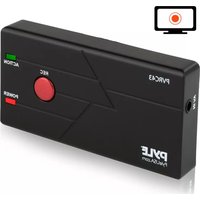
PVRC43 - Television Pyle - Free user manual and instructions
Find the device manual for free PVRC43 Pyle in PDF.


| Product Type | Standalone Video Recorder |
| Model | PVRC43 |
| Brand | Pyle |
| Input Sources | DVD, DV, VHS players via composite AV (CVBS + stereo audio) |
| Recording Media | SD/SDHC card (Class 10 or above) |
| Included SD Card | 4 GB SD card |
| Connections | 3.5mm AV input (video + audio L/R), USB for PC/charging, SD card slot |
| Power | 5V DC via included AC adapter or USB power from computer |
| Dimensions (approx) | 100 x 60 x 20 mm (3.9 x 2.4 x 0.8 in) |
| Weight (approx) | 100 g (3.5 oz) |
| Recording Control | One-touch REC button to start/stop recording |
| PC Connectivity | USB mass storage for file transfer (disconnected during recording) |
| Indicator Lights | Red REC LED, green ACTION LED |
| Cleaning | Use a dry, soft cloth only |
| Safety Precautions | Do not expose to water, rain, or moisture. Avoid heat sources. Use only manufacturer-supplied accessories. |
| Operating Temperature | 0°C to 40°C (32°F to 104°F) |
Frequently Asked Questions - PVRC43 Pyle
User questions about PVRC43 Pyle
0 question about this device. Answer the ones you know or ask your own.
Ask a new question about this device
Download the instructions for your Television in PDF format for free! Find your manual PVRC43 - Pyle and take your electronic device back in hand. On this page are published all the documents necessary for the use of your device. PVRC43 by Pyle.
USER MANUAL PVRC43 Pyle
natural_image
Black rectangular electronic device with red button labeled REC, green 'ACTION' indicator, and 'POWER' button (no readable text beyond labels)INSTRUCTION MANUAL
Standalone Video Recorder
USER MANUAL
Table of contents
Important safety information
Check the product box contents
Overview
Buttons and connectors
Functions
Getting started
Step 1-connect to an A/V source
Step 2 -Record
Step 3-connection with your PC
Step 4 -Input/Output SD card
Troubleshooting
Important safety information
-
Read these instructions. Keep these instructions.
-
Use the product in accordance with the manufacturer's instructions.
-
Insert appropriate country specific plug before using the AC power adapter.
-
Clean only with dry cloth.
5.Do not use near any heat sources.
-
Place it on a flat surface.
-
Only use accessories provided/specified by the manufacturer.
-
Unplug this product during lightning storms or when unused.
-
To reduce the risk of fire or sock hazard, do not expose the unit to water, rain or moisture.
-
In case of any damage to the product, refer all servicing to qualified personnel.
| CAUTION |
| DO NOT CONNECT HIGH POWER AMPLIFIER OUTPUT TO AUDIO IN OF THE PRODUCT |
Congratulations and thank you for purchasing our Personal Media Recorder.
Check the product Box contents

- Product Device
- 3.5mm to AV Cable
- USB Cable
- 5V Power Adapter
- User Manual
- 4G SD card inside
Overview

flowchart
graph LR
    TV["TV"] -->|CVBS| A["AC"]
    TV -->|AUDIO(R)| A
    TV -->|AUDIO(L)| A
    A --> TF["TF"]
    TF --> USB["USB"]
    USB --> PC["PC"]
    USB --> Power["Power"]
The product is a Standalone Video Recorder which can capture high quality video from DVD, DV and VHS.
Buttons and Connectors
Functions:
*REC: ----start /stop recording
*3.5mm video jack: ----AV to 3.5mm video input
*USB Power/PC: ----USB power from PC/data transfer to PC
*“SD-Card”:----SD card slot
Getting started
Step 1-connect to an A/V source: Connect the product to the output jacks of your video sources, such as DV, DVD player, VHS player.
Step 2 -Record: Press the "REC" key to start recording. Press it again to save the recorded video and continue to record the next video.
Step 3-connection with your PC
Start your PC; connect the product with the PC by the provided USB cable for charge or data transfer. When the PC shows USB code, you can copy or delete the video on the product.
Notes: When recording video, the product cannot be connected to the computer. Otherwise, the computer will be converted to USB mode and it will not provide power to the product. When recording, please only use the power adapter to provide the power to the product.
Step 4- Insert or remove SD card
Insert: Insert the card, the card will fit snugly inside SD card slot; do not allow to pop up.
Remove: Lightly push the SD card, the SD will be protrude a little, then you can safely remove the SD card.
Troubleshooting
- Before pressing the REC button of the product, please make sure the input sources(DV, DVD player, VHS) is turned on and can provide audio or video signal to the product.
- Make sure that the A/V cables are securely connected to both the input sources and the product.
- If the product is crashed, Please unplug the power and restart.
- Please use SD cards with transfer speeds rated Class 10 or above.
Brand : Pyle
Model : PVRC43
Category : Television