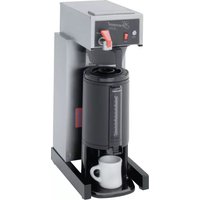
Gourmet 8780 - Coffee maker Bloomfield - Free user manual and instructions
Find the device manual for free Gourmet 8780 Bloomfield in PDF.


| Product Type | Commercial Thermal Server Coffee Brewer |
| Model | Gourmet 8780 (Bloomfield) |
| Voltage | 120 VAC (also 230V variants) |
| Power | 1800 W (1500 W for Canadian models) |
| Current | 15 A (120V models) |
| Power Supply Cord | NEMA 5-15P (120V) |
| Brewing Method | Pour-over and automatic (solenoid valve) |
| Water Supply | Cold water line, 20-90 PSI |
| Tank Capacity | Not specified (approx. 1 gallon) |
| Hot Water Faucet | Includes hot water faucet (separate from brew) |
| Controls | Brew button (automatic), pour-over lid, ready-to-brew light |
| Construction | Stainless steel and plastic components |
| Cleaning | Daily: clean spray disk, brew chamber, exterior; descale as needed |
| Safety Features | Hi-limit thermostat, grounded power cord, burn hazard warnings |
| Certifications | UL listed (file E9253), NSF Standard 4 (when installed per instructions) |
| Intended Use | Commercial (restaurants, cafeterias) |
| Warranty | 2 years parts and labor (pour-over/automatic brewers) |
| Optional Accessory | 7750 Thermal Server |
| Weight | Not specified (estimated ~25-35 lbs) |
| Dimensions (Width x Depth x Height) | Not specified (estimated 9-12" x 15-18" x 20-24") |
Frequently Asked Questions - Gourmet 8780 Bloomfield
User questions about Gourmet 8780 Bloomfield
0 question about this device. Answer the ones you know or ask your own.
Ask a new question about this device
Download the instructions for your Coffee maker in PDF format for free! Find your manual Gourmet 8780 - Bloomfield and take your electronic device back in hand. On this page are published all the documents necessary for the use of your device. Gourmet 8780 by Bloomfield.
USER MANUAL Gourmet 8780 Bloomfield
www.bloomfieldworldwide.com

Model 8780 Brewer
with optional
7750 Thermal Server
OWNERS MANUAL for
Gourmet 1000™
By Bloomfield®
AIRPOT & THERMAL SERVER COFFEE BREWERS
MODELS
| 8778 | 8780 | 8782 |
| 8783 | 8785 | 8786 |
| 8788 |
Includes:
Installation
Use & Care
Servicing Instructions
WARRANTY STATEMENT
All equipment manufactured by Bloomfield is warranted against defects in materials and workmanship for the time periods listed in the chart starting from the date the equipment is placed into service and is for the benefit of the original purchaser:
THE FOREGOING OBLIGATION IS EXPRESSLY GIVEN IN LIEU OF ANY OTHER WARRANTIES, EXPRESSED OR IMPLIED, INCLUDING ANY IMPLIED WARRANTY OF MERCHANTABILITY OR FITNESS FOR A PARTICULAR PURPOSE, WHICH ARE HEREBY EXCLUDED.
BLOOMFIELD, LLC SHALL NOT BE LIABLE FOR INDIRECT, INCIDENTAL OR CONSEQUENTIAL DAMAGES OR LOSSES FROM ANY CAUSE WHATSOEVER.
This warranty is void if it is determined that upon inspection by an authorized service agency that the equipment has been modified,
misused, misapplied, improperly installed, or damaged in transit or by fire, flood or act of God.
| Equipment Parts Labor | ||
| pour over, automatic coffee brewers 2 yrs. 2 yrs. | ||
| EBC, EMAX coffee brewers 2 yrs.* 2 yrs. | ||
| * EBC, EMAX coffee brewer control 3 yrs. | no labor | |
| POD coffee brewers | 1 yr. | 1 yr. |
| ECO coffee brewers | 1 yr. | 1 yr. |
| coffee warmers | 1 yr. | 1 yr. |
| tea brewers | 2 yrs. 2 yrs. | |
| tea dispensers | 1 yr. | 1 yr. |
| tea dispenser BBTea | 1 yr. no labor | |
| hot water machines | 2 yrs. 2 yrs | |
| thermal servers | 90 days | no labor |
| airpots | 30 days | no labor |
| decanters | no warranty | no warranty |
It also does not apply if the serial nameplate has been removed or unauthorized service personnel perform service. The prices charged by Bloomfield for its products are based upon the limitations in this warranty. Seller's obligation under this warranty is limited to the repair of defects without charge by a Bloomfield Authorized Service Agency or one of its sub-agencies. This service will be provided on customer's premises for non-portable models. Portable models (a device with a cord and plug or a dispenser) must be taken or shipped to the closest authorized service agency, transportation charges prepaid, for services.
Agencies are located in principal cities, please visit our website to locate one.
This warranty is valid in the United States and Canada and void elsewhere. Please consult your classified telephone directory or your food service equipment dealer; or, for information and other details concerning warranty, write to:
Service Parts Department; Bloomfield
10 Sunnen Drive, St. Louis, MO 63143
Phone: (314) 678-6336 : Fax: (314) 781-2714
Technical@bloomfieldworldwide.com / www.bloomfieldworldwide.com
BLOOMFIELD SERVICE POLICY AND PROCEDURE GUIDE ADDITIONAL WARRANTY EXCLUSIONS
- Resetting of safety thermostats, circuit breakers, overload protectors, or fuse replacements.
- All problems due to operation at voltages other than specified on equipment nameplates - conversion to correct voltage must be the customer's responsibility.
- All problems due to electrical connections not made in accordance with electrical code requirements and wiring diagrams supplied with the equipment.
- Replacement of items subject to normal wear, to include such items as knobs and light bulbs. Normal maintenance functions including adjustment of thermostats, microswitches, and replacement of fuses and indicating lights are not covered under warranty.
- All problems due to inadequate water supply, such as fluctuating, or high or low water pressure.
- All problems due to mineral/calcium deposits, or contamination from chlorides/chlorines. De-liming is considered a preventative maintenance function and is not covered by warranty.
- Full use, care and manuals may or may not be sent with each unit, only a condensed version. Please visit our web site to download the full version.
- Travel mileage is limited to fifty (50) miles from an authorized service agency or one of its sub-service agencies.
- All labor shall be performed during normal working hours. Overtime premium shall be charged to the customer.
- All genuine Bloomfield replacement parts are warranted for ninety (90) days from date of purchase on non-warranted equipment. Any use of non-genuine Bloomfield parts completely voids any warranty.
- Installation, labor and job checkouts are not considered warranty.
- Charges incurred by delays, waiting time or operating restrictions that hinder the service technicians ability to perform services are not covered by warranty. This includes institutional and correctional facilities.
SHIPPING DAMAGE CLAIMS PROCEDURE
NOTE: For your protection, please note that equipment in this shipment was carefully inspected and packaged by skilled personnel before leaving the factory. Upon acceptance of this shipment, the transportation company assumes full responsibility for its safe delivery.
IF SHIPMENT ARRIVES DAMAGED:
- VISIBLE LOSS OR DAMAGE: Be certain that any visible loss or damage is noted on the freight bill or express receipt, and that the note of loss or damage is signed by the delivery person.
- FILE CLAIM FOR DAMAGE IMMEDIATELY: Regardless of the extent of the damage.
- CONCEALED LOSS OR DAMAGE: if damage is unnoticed until the merchandise is unpacked, notify the transportation company or carrier immediately, and file "CONCEALED DAMAGE" claim with them. This must be done within fifteen (15) days from the date the delivery was made to you. Be sure to retain the container for inspection.
Bloomfield cannot assume liability for damage or loss incurred in transit. We will, however, at your request, supply you with the necessary documents to support your claim.
TABLE OF CONTENTS
| WARRANTY STATEMENT xiSPECIFICATIONS | |
| FEATURES & OPERATING CONTROLS 2 | |
| PRECAUTIONS & GENERAL INFORMATION 3 | |
| AGENCY LISTING INFORMATION 3 | |
| INSTALLATION INSTRUCTIONS 4 | |
| OPERATION | |
| BREWING COFFEE 8 | |
| CLEANING INSTRUCTIONS 9 | |
| TROUBLESHOOTING SUGGESTIONS 10 | |
| SERVICING INSTRUCTIONS 1 | |
| Deliming Instructions 16 | |
| EXPLODED VIEWS & PARTS LISTS 18 | |
| WIRING DIAGRAMS |
Thank You for purchasing this Bloomfield appliance.
Proper installation, professional operation and consistent maintenance of this appliance will ensure that it gives you the very best performance and a long, economical service life.
This manual contains the information needed to properly install this appliance, and to use, care for and maintain or repair the appliance in a manner which will ensure its 23 optimum performance.
SPECIFICATIONS
| MODEL | STYLE | VOLTS | WATTS | AMPS 1ø | POWER SUPPLY CORD |
| 8778 | THERMAL | 120V | 1800 | 15 | NEMA 5-15P |
| 8778CAk | 120C | 1500 | 12.5 | NEMA 5-15P | |
| 8778 UK | 230UK | 1800 | 7.8 | CW 3100 | |
| 8778 EURO | 230V | 1800 | CEE 7/VII | ||
| 8780 | THERMAL | 120 | 1800 | 15 | NEMA 5-15P |
| 8780CAk | 120 | 1500 | 12.5 | NEMA 5-15P | |
| 8780 UK | 230UK | 1800 | 7.8 | CW 3100 | |
| 8780 EURO | 230V | 1800 | CEE 7/VII | ||
| 8782 | AIRPOT | 120 | 1800 | 15 | NEMA 5-15P |
| 8782CAk | 120 | 1500 | 12.5 | NEMA 5-15P | |
| 8782XL | 120 | 1800 | 15 | NEMA 5-15P | |
| 8782XLCAk | 120 | 1500 | 12.5 | NEMA 5-15P | |
| 8782 UK | 230UK | 1800 | 7.8 | CW 3100 | |
| 8782 EURO | 230V | 1800 | CEE 7/VII | ||
| 8783 | AIRPOT | 120 | 1800 | 15 | NEMA 5-15P |
| 8783CAk | 120 | 1500 | 12.5 | NEMA 5-15P | |
| 8785 | AIRPOT | 120 | 1800 | 15 | NEMA 5-15P |
| 8785CAk | 120 | 1500 | 12.5 | NEMA 5-15P | |
| 8785XL | 120 | 1800 | 15 | NEMA 5-15P | |
| 8785XLPI | 240 | 1800 | 7.5 | NEMA 1-15P (non-polarized) | |
| 8785 UK | 230UK | 1800 | 7.8 | CW 3100 | |
| 8785 EURO | 230V | 1800 | CEE 7/VII | ||
| 8786 | THERMAL | 115/230 4 WIRE | 3500 | 15 | NONE |
| 230V | |||||
| 8788 | AIRPOT | 115/230 4 WIRE | 3500 | 5 | NONE |
k Meets Canadian standards.
FEATURES AND OPERATING CONTROLS
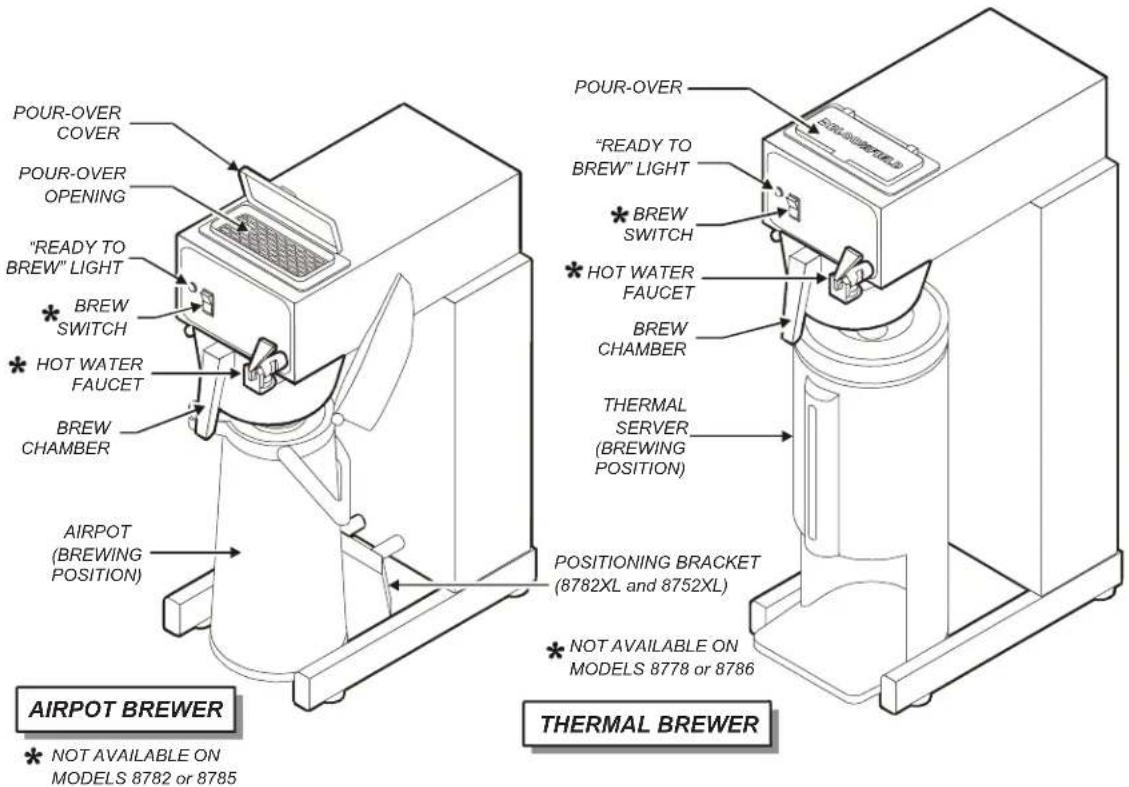
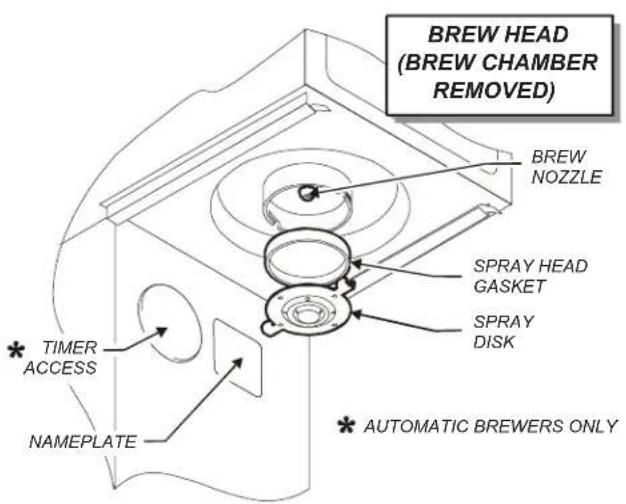
Fig. 1 Features & Operating Controls
PRECAUTIONS AND GENERAL INFORMATION

WARNING: ELECTRIC SHOCK HAZARD
All servicing requiring access to non-insulated components must be performed by qualified service personnel. Do not open any access panels which require the use of tools. Failure to heed this warning can result in electrical shock.

WARNING: INJURY HAZARD
All installation procedures must be performed by qualified personnel with full knowledge of all applicable electrical and plumbing codes. Failure could result in property damage and personal injury.

WARNING: ELECTRIC SHOCK HAZARD
Brewer must be properly grounded to prevent possible shock hazard. DO NOT assume a plumbing line will provide such a ground. Electrical shock will cause death or serious Injury.

WARNING: BURN HAZARD
This appliance dispenses very hot liquid. Serious bodily injury from scalding can occur from contact with dispensed liquids.
This appliance is intended for commercial use only.
This appliance is intended for use to brew beverage products for human consumption. No other use is recommended or authorized by the manufacturer or its agents.
This appliance is intended for use in commercial establishments, where all operators are familiar with the appliance use, limitations and associated hazards. Operating instructions and warnings must be read and understood by all operators and users.
Except as noted, this piece of equipment is made in the USA and has American sizes on hardware. All metric conversions are approximate and can vary in size.
The following trouble shooting, component views and parts lists are included for general reference, and are intended for use by qualified service personnel.
This manual should be considered a permanent part of this appliance. The manual must remain with the appliance if it is sold or moved to another location.

CAUTION: EQUIPMENT DAMAGE
DO NOT plug in or energize this appliance until all Installation Instructions are read and followed. Damage to the Brewer will occur if these instructions are not followed.

CAUTION: BURN HAZARD
Exposed surfaces of the appliance, brew chamber and Airpot or Server may be HOT to the touch, and can cause serious burns.
AGENCY LISTING INFORMATION
This brewer is


listed under UL file E9253.
NOTE: Model 8785XLPI is not UL approved
This brewer meets NSF Standard 4 only when installed, operated and maintained in accordance with the enclosed instructions.

INSTALLATION INSTRUCTIONS
READ THIS CAREFULLY BEFORE STARTING THE INSTALLATION
IMPORTANT:
To enable the installer to make a quality installation and to minimize installation time, the following suggestions and tests should be done before the actual unit installation is started:

CAUTION: EQUIPMENT DAMAGE
DO NOT plug in or energize this appliance until all Installation Instructions are read and followed. Damage to the Brewer will occur if these instructions are not followed.

CAUTION: UNSTABLE EQUIPMENT HAZARD
It is very important for safety and for proper operation that the brewer is level and stable when standing in its final operating position. Provided adjustable, non-skid legs must be installed at each corner of the unit. Failure to do so will result in movement of the brewer which can cause personal Injury and/or damage to brewer.
NOTE: Water supply inlet line must meet certain minimum criteria to insure successful operation of the brewer. Bloomfield recommends 1/4" copper tubing for installation of less than 25 feet and 3/8" for more than 25 feet from a 1/2" water supply line.
REFER TO EXPLODED VIEWS PAGES 18 thru 21 FOR COMPONENT NAMES/NUMBERS
Unpack the unit. Inspect all components for completeness and condition. Ensure that all packing materials have been removed from the unit.
Verify that the Spray Head Gasket (#33) and Spray Disk (#34) are properly installed.
LEVELING THE UNIT
Verify that an adjustable leg is installed at each corner of the brewer, and that a rubber foot is installed on each leg.
Set Brewer in its operating location. Level the Brewer. A spirit level should be placed on the top of the unit, at the edge, as a guide when making level adjustments.
Level the unit from left to right and front to back by turning the adjustable feet. Be sure all four feet touch the counter to prevent tipping.
PLUMBER'S INSTALLATION INSTRUCTIONS (AUTOMATIC BREWERS ONLY)
Brewer should be connected to a POTABLE WATER, COLD WATER line. Flush water line before connecting to Brewer.
DO NOT use a saddle valve with a self-piercing tap for the water line connection. Such a tap can become restricted by waterline debris. For systems that must use a saddle tap, shut off the main water supply and drill a 3/16" (minimum) tap for the saddle connection, in order to insure an ample water supply. Remember to flush the line prior to installing the saddle.
The brewer must be installed on a water line with average pressure between 10 PSI and 90 PSI. If your water pressure exceeds 90 PSI at anytime, a pressure regulator must be installed in the water supply line to limit the pressure to not more than 90 PSI in order to avoid damage to lines and solenoid.
A water shut-off valve should be installed on the incoming water line in a convenient location (Use a low restriction type valve, such as a 1/4-turn ball valve, to avoid loss of water flow thru the valve.
NSF requires that the brewer be able to be moved for cleaning underneath. A flex line or loops of copper tubing will satisfy this requirement. See Fig. 2 at right.
INSTALLATION INSTRUCTIONS (continued)

Fig. 2 Water Supply Installation
In some areas, local codes require a backflow preventer (check valve) to be installed on the inlet water line. If a backflow preventer is used, you must install a water hammer arrester in the incoming line, between the backflow preventer and the brewer inlet, as far away from the brewer as space will allow. This will relieve the excessive back pressures that can cause faucet leaks and solenoid malfunctions.
ELECTRICIAN'S INSTALLATION INSTRUCTIONS
REFER TO ELECTRICAL SPECIFICATIONS - Page 1 Check the nameplate to determine correct electrical service required for the Brewer to be installed.
IMPORTANT: Before connecting to electricity, make sure automatic brewers are connected to the water supply.
Models 8778, 8780, 8782, 8783 & 8785 (120V units) are equipped with a cord and plug. They require a 115 - 125 volt 15 amp circuit (50/60 Hz, 2 wire plus ground, with NEMA 5-15R receptacle).
IMPORTANT: The ground prong of the plug is part of a system designed to protect you from electrical shock in the event of internal damage. Never cut off the ground prong nor twist a blade to fit an existing receptacle. Contact a licensed electrician to install the proper circuit and receptacle.
Models 8786 & 8788 must be wired by an electrician, and require a 115/230V 20A circuit (50/60 Hz, 2 hot legs / 1 neutral leg, plus ground). Remove front panel to gain access to terminal block. Green terminal must be connected to a suitable building ground. Circuit must be capable of 3500 Watts. See figure 3 at right.
IMPORTANT: Wiring must be installed in approved solid or flexible conduit, and must be secured to the brewer with a strain relief (to be provided by the installer).
NOTE: This equipment must be installed in compliance with all applicable federal, state and local plumbing codes and ordinances.

WARNING: SHOCK HAZARD
Brewer must be properly grounded to prevent possible shock hazard. DO NOT assume a plumbing line will provide such a ground. Electrical shock will cause death or serious injury.
IMPORTANT: Do not connect brewer to electrical power until the tank is filled with water. Pour water into the pour-over opening until water flows from the brew head.
IMPORTANT:
Supply power must match nameplate for voltage and phase. Connecting to the wrong voltage will damage the brewer or result in decreased performance. Such damage is not covered by warranty.

Fig. 3 115/240 Volt Terminal Block
OPERATION
![graph TD A["INLET FITTING"] --> B["SOLENOID"] B --> C["FAUCET SHUT-OFF VALVE"] C --> D["TANK VENT TUBE"] D --> E["BREW"] E --> F["FAUCET"] F --> G["BASIN"] G --> H["HOT WATER FAUCET"] H --> I["BREW HEAD"] I --> J["BREW CHAMBER"] J --> K["COLD WATER"] J --> L["HOT WATER IL1706"]](/content/2026/06/1217285/images/0e9dcf5e917087ac3fec972b4305b2474c140d3e3ccdb2a39dc2ef78efed0e11.jpg)
Fig. 4 Brewer Operation Diagram
IMPORTANT:
Tank must be full of water before connecting brewer to electrical power. Heating elements will be damaged if allowed to operate without being fully submerged in water. Damage caused by operating the brewer without water in the tank is NOT COVERED BY WARRANTY.
A. START-UP
For initial start-up, or if the brewer has not been used for an extended period of time:
Be sure spray disk and brew gasket are properly installed in the brew head.
For automatic brewers, be sure the water supply is properly connected and the water supply valve is turned ON.
BEFORE plugging the brewer into a receptacle, or otherwise connecting brewer to electrical power THE WATER TANK MUST BE FILLED. Place an empty container under the brew head. Lift the pour-over cover then pour warm tap water into the pour-over opening until water flows from the brew head. When water stops dripping from the brew head, empty the container.
Once the tank is full of water, connect the brewer to electrical power. The heating elements will begin heating the water in the tank. When the water has reached the proper temperature, the "READY TO BREW" light will glow.
OPERATION (continued)
WATER HEATER
Water temperature is sensed by a thermobulb inserted into the water tank. This temperature signal is fed to the thermostat, which controls line power to the heating element.
The setpoint temperature is adjustable at the thermostat.
The element is protected from over-temperature by a hi-limit thermostat.
WATER FLOW
POUR-OVER FEATURE
Pouring any amount of cold water into the pour-over opening and into the basin pan forces an identical amount of hot water out of the tank and through the spray head into the brew chamber.
AUTOMATIC OPERATION
Pressing BREW button energizes the solenoid valve, allowing water from an external water supply to flow into the basin pan and then into the hot water tank. This forces an identical amount of hot water out of the tank and through the spray head into the brew chamber
The solenoid uses a flow control device so that flow is consistent between 20 p.s.i. and 90 p.s.i.
Length of time the solenoid is open is controlled by the timer.
HOT WATER FAUCET
The faucet water coil is submerged in the hot water tank and draws heat from the brew water. Water going to the water coil is not controlled by the solenoid valve.
Hot water is provided at the faucet, at supply water pressure, any time the faucet shut-off valve is OPEN.

Fig. 5 Heat Control Diagram
![graph TD A["BASIN PAN"] --> B["TANK"] B --> C["BREW"] C --> D["MANUAL POUR-OVER"]](/content/2026/06/1217285/images/7783d0f82b96b16968c596332e1dc8965abfa6ceac45f13f2b167ff36ff03c7e.jpg)
![graph TD A["FAUCET BYPASS"] --> B["SOLENOID"] B --> C["BASIN PAN"] C --> D["TANK"] D --> E["BREW"] E --> F["MANUAL POUR-OVER"] F --> G["E"]](/content/2026/06/1217285/images/21552d22e4facce717a91b19b8a45ea237d799e84ebcc7bdbe56f71d68cf6a25.jpg)
![graph TD A["SOLENOID"] --> B["FAUCET BYPASS"] B --> C["FAUCET SHUT-OFF VALVE"] C --> D["WATER COIL TANK"] D --> E["HOT WATER IL1654"] E --> F["FAUCET"]](/content/2026/06/1217285/images/49b2838cc906c3f968e8552e28d754d405358e37b3577179a41ef9a3dafd6a40.jpg)
Fig. 6 Water Flow Diagram
BREWING COFFEE

CAUTION: BURN HAZARD
Exposed surfaces of the brewer, brew chamber and airport or server may be HOT to the touch, and can cause serious burns.

CAUTION: BURN HAZARD
To avoid splashing or overflowing hot liquids, ALWAYS place an empty airport or server under the brew chamber before starting the brew cycle. Failure to comply can cause serious burns.

CAUTION: BURN HAZARD
After a brew cycle, brew chamber contents are HOT. Remove the brew chamber and dispose of used grounds with care. Failure to comply can cause serious burns.
NOTE:
Water for the hot water faucet is heated in a coil inside of the water tank. Use of the faucet will not affect the volume of water delivered for a brew. However, overuse of the faucet during a brew may lower the temperature of the brew water. Draw no more than one (1) cup of water at a time.
A. PREPARATION
Place one (1) genuine Bloomfield paper filter in the brew chamber. Add a pre-measured amount of fresh coffee grounds.
Gently shake the brew chamber to level the bed of grounds. Slide the brew chamber into place under the brew head.
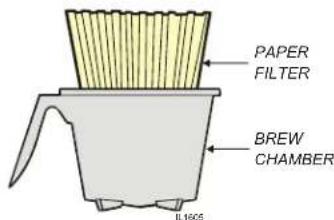
Fig. 7 Brew Chamber
BE sure "READY TO BREW" light is lit.
Place the appropriate EMPTY airport or thermal server in place under the brew chamber.
Fill an airport or server, identical to the one being used, with tap water. Lift the pour-over cover and pour the entire contents of the container into the pour-over opening, which will fill the basin.
Water from the basin will displace a like amount of heated water from the tank. The hot water will be forced into the brew head where it will spray over the bed of grounds. Freshly brewed coffee will begin to fill the container under the brew chamber. When the flow and all dripping stops, the coffee is ready to serve.
Discard the contents of the brew chamber. Rinse the brew chamber in a sink. When the "READY TO BREW" light glows, the brewer is ready for another brew cycle.
BE sure "READY TO BREW" light is lit.
Place the appropriate EMPTY airport or thermal server in place under the brew chamber.
Press the "BREW" switch. The solenoid will open for an amount of time determined by the timer setting, admitting a measured quantity of water into the basin.
Water from the basin will displace a like amount of heated water from the tank. The hot water will be forced into the brew head where it will spray over the bed of grounds. Freshly brewed coffee will begin to fill the container under the brew chamber. When the flow and all dripping stops, the coffee is ready to serve.
Discard the contents of the brew chamber and rinse it in a sink. When the "READY TO BREW" light glows, the brewer is ready for another brew cycle.
CLEANING INSTRUCTIONS
PROCEDURE: Clean Coffee Brewer
PRECAUTIONS: Disconnect brewer from electric power. Allow brewer to cool.
FREQUENCY: Daily
TOOLS: Mild Detergent, Clean Soft Cloth or Sponge Bristle Brush, Bottle Brush
- Disconnect brewer from electric power. Allow brewer to cool before cleaning.
- Remove airport or thermal server.
- Remove and empty brew chamber.
- Remove the spray disk from the brew head (See figure 8): Press up on the spray disk ears, then turn the disk to the left to unlatch. Remove the gasket from inside the brew head.
- Wipe inside of brew head and area around the brew head with a soft clean cloth or sponge moistened with clean water.
- Wash the spray disk in a sink using warm water and a mild detergent. A bristle brush may be used to clear clogged spray holes. Rinse the spray disk with clean water and allow to air dry.
- Wash the brew chamber in a sink using warm water and a mild detergent. A bristle brush may be used to clean the inside. Rinse with clean water and allow to air dry.
- Wipe the exterior of the brewer with a soft clean cloth or sponge moistened with clean water.
- Reinstall the gasket INSIDE the brew head, and then reinstall the spray disk.
- Reinstall the brew chamber.
- DO NOT submerge airpots or thermal servers in water. Clean airpots and thermal servers by filling with warm soapy water. Scrub the inside with a bottle brush. Empty and rinse with clean water. Wipe the exterior with a soft clean cloth or sponge moistened with clean water. Invert and allow to air dry.
Procedure is complete

CAUTION: BURN HAZARD
Brewing and serving temperatures of coffee are extremely hot. Hot coffee will cause serious skin burns.

CAUTION: SHOCK HAZARD
Do not submerge or immerse brewer in water.
IMPORTANT:
DO NOT use steel wool, sharp objects, or caustic, abrasive or chlorinated cleansers to clean the brewer, airpots or thermal servers.

Fig. 8 Cleaning
TROUBLESHOOTING SUGGESTIONS
| SYMPTOM POSSIBLE CAUSE SUGGESTED REMEDY | ||
| Water won't heat | Brewer unplugged or circuit breaker tripped | Check power supply cord |
| Check / reset circuit breaker | ||
| Thermostat set too low Set for desired temperature | ||
| Hi-Limit thermostat tripped | Allow to cool,Reset hi-limit (8786, 8788) | |
| Damaged internal component or wiring | Examine wiring & connectors,thermostat and heating element,Repair/replace as needed | |
| Pourover - no water or too little water added at startup | Be sure to add sufficient water | |
| Coffee level low (pour-over) | Not enough water poured in Increase water amount | |
| Too much coffee grounds Adjust amount of grounds | ||
| Coffee level too high or low (automatic) | Timer out of adjustment Adjust timer | |
| Brew chamber overflows | Too many filter papers or wrong filter paper | Use one (1) genuine Bloomfield filter per brew |
| Brew chamber dispense hole plugged Thoroughly clean brew chamber | ||
| Too much coffee or too fine a grind Adjust coffee amount and grind | ||
| Sprays water from brew head | Spray gasket improperly installed | Check/reinstall gasket on INSIDE of brew head |
| Spray disk plugged Clean spray disk | ||
| No brew (automatic) | Water supply OFF Turn water supply ON | |
| Solenoid strainer plugged Clean strainer | ||
| Water filter (if used) plugged Replace filter element | ||
| Bad BREW switch Replace switch | ||
| Damaged internal component or wiring | Examine wiring & connectors,brew switch and solenoid, Repair/replace as needed | |
| No flow from hot water faucet | Faucet valve turned OFF Turn faucet valve ON | |
| Faucet plugged | Disassemble faucet, clean | |
| Poor coffee quality | Water not hot enough | Adjust water temp 195-205°F |
| Keep brewer, airpots and servers clean. Install a taste and odor filter in water supply, and replace cartridges regularly. Use a quality coffee with a consistent roast. Use proper grind and amount of coffee per brew. | ||
SERVICING INSTRUCTIONS
ACCESS PANELS
TOP PANEL:
Remove top panel to access hot water tank, thermostat, heating elements, brew circuit tubing, faucet valve and piping.
Top panel is held by two screws at the rear and a retaining lip at the front.
FRONT PANEL:
Remove front panel to access timer, terminal block and solenoid.
Front panel is held by two screws at the bottom and a retaining lip at the top.
SOLENOID DOOR:
Remove solenoid door to access solenoid and plumbing connections.
Solenoid door is held by two screws and a retaining lip.

CAUTION: SHOCK HAZARD
Opening access panels or removing warmer plates on this brew may expose uninsulated electrical components. Disconnect brewer from electrical power before removing any panel or warmer plate.

Fig. 9 Access Panels
SERVICING INSTRUCTIONS (continued)
CAUTION: SHOCK HAZARD
These procedures involve exposed electrical circuits. These procedures are to be performed by qualified technical personnel only.
NOTE:
Optimum brewing temperature range is 195°F to 205°F (90°C to 96°C).
IMPORTANT:
A mechanical thermostat will maintain temperature within ±5° F. To prevent boiling water in the brewer, thermostat should be adjusted to a maximum temperature equal to the local boiling temperature minus 5° F.
NOTE: 1/8 turn = approximately 10° F (5.6°C).
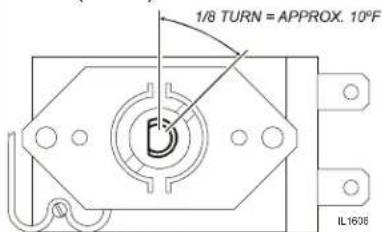
Fig. 11 Adjust Thermostat
TEMPERATURE ADJUSTMENT
Unplug power cord or turn circuit breaker OFF. Remove top panel.
Pull vent tube out of tank lid and insert a thermometer of known accuracy in vent hole. Reconnect brewer to electrical power.

Fig. 10 Checking and Adjusting Brew Temperature
Place an empty decanter under brew chamber. Energize brewer and pour one decanter (64 oz.) of cold water into pour-over opening. When READY TO BREW light comes on, read temperature displayed on thermometer.
Adjust thermostat by turning shaft; clockwise increases temperature. 1/8 turn = approximately 10° F.
Refer to Table 1 below for proper brewing temperature based on altitude.
Upon completion, remove thermometer and reinstall vent tube.

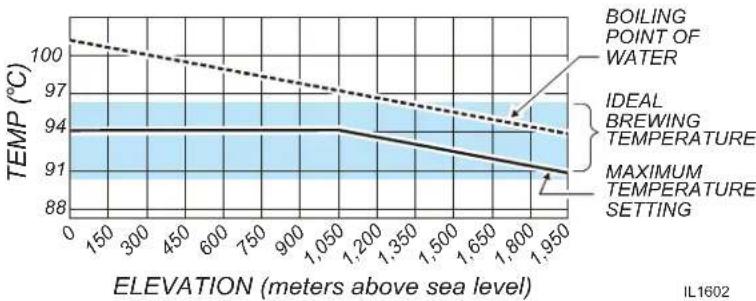
Table 1 Boiling Temperature by Altitude
SERVICING INSTRUCTIONS (continued)
TIMER ADJUSTMENT
The amount of water dispensed automatically during a brew cycle is controlled by the timer.
Place empty decanter under brew chamber. Press BREW button. Brewer should dispense one decanter of water. To adjust amount:
Remove brew chamber and button plug. Adjust knob on timer; clockwise increases time. Run several cycles to check amount of water delivered. Replace button plug.
REMOVE TANK LID ASSEMBLY
Unplug brewer or turn circuit breaker OFF. Turn OFF water supply. Remove top panel. Pull vent tube and inlet elbow out of basin pan.
Pull water inlet tube out of basin pan. Remove basin pan.
On models with faucet, disconnect inlet pipe at faucet shut-off valve and outlet pipe at faucet.
Disconnect all wiring from thermostat, hi-limit, and heating element.
Loosen center screw on tank hold-down bracket. Remove hold-down bracket by sliding short slotted end off of locking stud and lifting it off. Remove cover assembly by lifting it straight up.
Reassemble in reverse order.
REPLACE THERMOSTAT
Unplug brewer or turn circuit breaker OFF. Turn OFF water supply. Remove top panel.
Disconnect all wiring from thermostat only. Loosen and free jam nut from pass-thru fitting securing temperature sensing bulb. Remove two screws holding thermostat to bracket.
Lift out thermostat, sensing bulb and thermostat gasket.
Push sensing bulb into tank lid thermowell until fitting seats. Tighten capillary lock nut only enough to ensure no water leakage. Excessive tightening is not necessary.
Reassemble in reverse order.
IMPORTANT: Water pressure must be between 20 p.s.i and 90 p.s.i. flowing pressure. If water pressure exceeds this value, or if water pressure varies greatly, a pressure regulator must be installed in the water supply line.
IMPORTANT: Before setting assembly into tank, make sure tank lid gasket is properly seated on flange of lid. DO NOT OVER-TIGHTEN.
IMPORTANT:
If mounting thermostat p/n WS-8512-51, be sure to place a new seal washer below the fitting on the capillary line.
If replacing gray-bodied thermo with p/n WS-8512-51, be sure to remove tube from thermowell.
SERVICING INSTRUCTIONS (continued)
IMPORTANT: When replacing heating element, also replace seal gaskets.


SLIDE WRENCH BETWEEN VALVE AND HOSE FITTING PRESS CLINCH RING TOWARD METAL FITTING TO RELEASE
Fig. 11 Remove Faucet Supply from Solenoid

Fig. 12 Clean Strainer Screen
REPLACE HEATING ELEMENT
Remove tank lid assembly as described on page 13.
Remove two hex nuts holding element to cover. Pull element from mounting holes.
Reassemble in reverse order.
REPLACE SOLENOID
Symptom: Automatic brewer will not flow water; or, automatic brewer drips continuously from brew head.
NOTE: Wrench p/n 86660 is designed to allow easy removal of the hoses from the plastic solenoid valve.
IMPORTANT: Shut-off water and electric supply to brewer before removing hoses or wiring.
Remove water supply flare fitting:
a. Slide the 5/8" end of the wrench over the flats on the inlet fitting of the valve.
b. Hold the wrench to prevent the inlet fitting from turning while installing or removing the inlet water supply flare nut.
Remove braided hose:
a. Slide the 7/16" end of the wrench between the valve body and the white ring on the extreme end of the metal hose fitting.
b. Pressure on the white ring toward the metal ferrule releases the clinch ring, allowing the hose to be easily slid off of the solenoid bypass outlet.
c. Install hose on new valve by pressing end of hose onto bypass outlet until it is fully seated.
Disconnect wiring.
Remove two screws holding solenoid to access door.
Reassemble in reverse order.
CLEAN SOLENOID SCREEN
Symptom: Automatic brewer will not flow water.
Unplug power cord or turn circuit breaker OFF. Turn OFF and disconnect water supply from brewer inlet fitting.
Unscrew water inlet fitting from solenoid.
Using needle-nose pliers, withdraw strainer screen from solenoid. Clean screen under faucet. A stiff bristle brush may be used if necessary.
Reinsert screen in solenoid. Be careful to maintain correct orientation. (The OPEN END of the screen goes in FIRST.)
Reassemble in reverse order.
SERVICING INSTRUCTIONS (continued)
REPLACE TIMER ASSEMBLY
Unplug power cord or turn circuit breaker OFF.
Remove front panel. Remove knob and three screws holding timer to bracket. Disconnect wiring to timer.
Reassemble in reverse order.
Adjust timer as described on page 13
REPLACE HOT WATER FAUCET COIL
Symptom: Brewer drips continuously from brew head, except when faucet valve is turned OFF.
Remove tank lid assembly per above.
Remove two hex nuts hot water coil to cover.
Pull coil from mounting holes.
Reassemble in reverse order.
REPAIR HOT WATER FAUCET
Remove top panel and turn faucet valve OFF.
Unscrew aerator cap from faucet and remove handle retaining clip. Do not let faucet body turn.
Pull bonnet assembly from faucet body.
Examine the interior of the faucet body and the surface of the seat cup. Clean out any debris in the faucet body, using a stiff bristle brush if necessary.
Examine the aerator. Clean any debris from the screen or flow straightener, using a stiff bristle brush if necessary.
Reassemble in reverse order.
REPLACE BREW READY LIGHT or BREW BUTTON
Unplug power cord or turn circuit breaker OFF. Disconnect electric leads.
Using Switch Removal Tool (p/n WS-83209) or a thin screwdriver, compress mounting tabs then pry light or switch from mounting hole.
Reassemble in reverse order.
IMPORTANT: When replacing water faucet coil, also replace seal gaskets.
NOTE: Any abrasion or roughness on the flat end of the seat cup will require replacing the seat cup:
Work the seat cup out of the bonnet and off of the end of the stem.
Install a new seat cup, making sure the knob on the stem is fully inserted into the pocket of the seat cup, and the skirt of the seat cup is fully inserted into the bonnet.
SERVICING INSTRUCTIONS (continued)

CAUTION: CHEMICAL BURN HAZARD
Deliming chemicals may be caustic. Wear appropriate protective gloves and goggles during this procedure. Never siphon deliming chemicals or solutions by mouth.
This operation should only be performed by qualified and experienced service personnel.
IMPORTANT: DO NOT spill, splash or pour water or deliming solution into or over any internal component other than the inside of the water tank.
IMPORTANT: DO NOT allow any internal components to come into contact with the deliming solution. Take care to keep all internal components dry.
NOTE: Repeat steps 4 thru 5 as required to remove all scale and lime build-up.
NOTE: Normally, silicone hoses do not need to be delimited. Should deliming hoses become necessary, Bloomfield recommends replacing the hoses.
PROCEDURE: Delime the Water Tank
PRECAUTIONS: Disconnect brewer from electric power. Allow brewer to cool.
FREQUENCY: As required (Brewer slow to heat)
TOOLS: Deliming Solution Protective Gloves, Goggles & Apron Mild Detergent, Clean Soft Cloth or Sponge Bristle Brush, Bottle Brush Large Sink (or other appropriate work area)
-
Disconnect brewer from the electrical supply. For automatic brewers, turn off the water shut-off valve and disconnect the water supply line from the brewer inlet fitting.
-
Remove the tank lid assembly as described on page 13.
-
Remove the water tank from the brewer body by lifting straight up. Empty all water from the tank. Set the tank back into the brewer.
-
Mix 2 quarts of deliming solution according to the manufacturer's directions. Carefully pour the deliming solution into the water tank. Lower the lid assembly back onto the tank. Allow to sit for 30 minutes, or as directed by the manufacturer.
-
At end of soaking period, remove lid assembly from tank. Thoroughly rinse internal components of lid assembly with clear water. Using a stiff bristle brush, scrub the heating element (and faucet water coil on automatic brewers) to remove lime and calcium build-up. Rinse with clean water. Store lid assembly in a safe location.
-
Remove the tank from the brewer and empty. Using a stiff bristle brush, scrub the interior of the water tank to remove lime and calcium build-up. Rinse with clean water.
-
Set the tank back into the brewer. Reassemble the tank lid to the water tank. Make sure the gasket is properly in place, and then reinstall the hold-down strap.
-
Reinstall wiring to heating element and thermostat. Reinstall the hi-limit thermostat (if removed). For automatic brewers, reassemble piping for the faucet. Verify that all internal components are dry, and then reinstall the top panel.
-
Reconnect brewer to electrical supply and, for automatic brewers, reconnect water supply.
-
Install the brew chamber without filter paper or grounds. Run at least three full brew cycles and discard all water generated.
-
Brewer is ready to use.
EXPLODED VIEW: Main Assembly

Model: 8780
Gourmet® Airport & Thermal Brewer
Main Assembly

BLOOMFIELD
SK2904 Rev. - 5/15/15
PARTS LIST: Main Assembly
| Fig No. | Part No Qty Description | Application | |
| 1 2C | 70092 AR SCREW 8BX3/8 PH PAN HD SM | ||
| 2 2C | 70132 2 NUT TNR ZI #8 | ||
| 3 2F | 76666 1 FILL PORT ASSY BREWERS PL | ||
| 4 A6 | 76696 1 BASIN COVER/PLASTIC FILL | ||
| 5 2C | 73457 1 NUT 8-32 HEX HEAD KEPS MS | ||
| 6 2C | 70134 1 STRAP HOLD DOWN ASSY | ||
| 7 | 2D-70095 | 1 | PAN BASIN A/F |
| 2D-70226 | PAN BASIN P/O | ||
| 2D-70399 | PAN BASIN | ||
| 8 2K | 70096 1 ELBOW POLY PROPELYNE | ||
| 9 A6 | 73538 1 TUBE SIL .312 ID X 10 LG | ||
| 10 | 2K-70436 1 BUSHING SNAP HEYCO 5/8 | ||
| 11 2K | 70229 1 BUSHING SHORTY HEYCO 2850 | ||
| 12 | 2K-70130 1 ELBOW SPRAYER | ||
| 13 | 2I-70139 | 1 GASKET SPRAY HEAD | |
| 14 | A6-72727 1 SPRAY HEAD DISC EMBOSSED | ||
| 15 | 2D-70234 1 CHAMBER BREW BLK PLASTIC | ||
| 16 | 2C-72680 1 NUT 7/16-20 FINISH HEX JA | ||
| 17 | 2C-70107 1 WASHER LOCK 7/16 EXT SEMS | ||
| 18 | 2C-72681 1 WASHER FLT 15/32X1 1/8 X0 8780, 8782, 8786, 8788 | ||
| 19 | 2M-74806 | 1 | DECAL GOURMET BASIN W/HOL |
| 2M-74853 | LABEL GOURMET FRONT 6X5 1 | ||
| 2M-74970 | DECAL 8785 BASIN | ||
| 2M-75314 | DECAL 8780-SERIES BASIN "ARAMARK" | ||
| 2M-77509 | DECAL 8785 BASIN ARAMARK | ||
| 20 | 2U-72556 1 FAUCET ASSY PRESSURE | ||
| 21 | 2E-70733 | 1 | SWITCH ROCKER BREW START |
| 2E-77566 | SWITCH ROCKER ON-OFF 125/ | ||
| 22 | 2J-70644 | 1 | LIGHT PILOT GREEN 250V |
| 2J-72671 | LIGHT PILOT GREEN 125V | ||
| 23 | 2T-70716 | 1 | THERMO HI LIMIT RESET 240V |
| 24 | A6-72317 | 1 | BRKT HI LIMIT (SHORT) |
| A6-74971 | BRKT HI LIMIT (TALL) | ||
| 25 | A6-72291 1 BASE BODY 8780 SERIES | ||
| 26 | 2A-72160 | 2 | LEG ALUM BLK ANOD RT 1 X |
| 2A-74791 | LEG ALUMINUM 1X1 | ||
| 27 | 2P-72159 | 4 | CAP END LEG CAN BREWERS 1 |
| 2P-74792 | CAP END 1X1 |
PARTS LIST: Main Assembly (continued)
MODEL: 8780TF, 8782AF, 8782TFL, 8786AF, 8778-T, 8785A, Main Assembly
| Fig No. | Part No Qty Description | Application | ||
| 28 2A | -71732 4 LEG ASSY LEVELING | |||
| 29 2C | -70135 1 SCREW 10-32 X1 PH PAN HD | |||
| 30 2C | -40680 4 NUT 10-32 HEX KEPS MS SS | |||
| 31 2C | -49395 1 RIVET POP 1/8 DIA SST | |||
| 32 | 2A-74690 | 1 | STANDOFF RUBBER BUMPER | |
| A6-77192 BRA | 1 | POSITIONING 8782TFL, 8785-AL | ||
| 33 | A6-72292 | 1 | PANEL FRONT 8780 8780, 8778-T | |
| A6-74793 PANEL FRONT 1 | 1 | NT 8782XL 8782TFL, 8785-AL, 8785-ALP | ||
| A6-74811 | PANEL FRONT 8782, 8788 | 8782, 8788, 8785-A | ||
| DD-74900 | PANEL FRONT 1082L | 8782AFL | ||
| 34 2F | -70053 1 PLUG BUTTON 2IN | |||
| 35 | 2P-70128 | 1 | TIMER W/KNOB 2-MIN 120V | 8782AFL-120V |
| 2P-Z16730 | TIMER, 3 MIN. 120V | 120V, 120C | ||
| 2P-Z16731 | TIMER, 3 MIN. 240V | 230UK, 230V | ||
| 36 | 2K-70648 | 1 | STRAIN RELIEF SMAL | 230UK, 230V |
| 2K-76118 | STRAIN RELIEF STR HEYCO 1 | 120V, 120C | ||
| 37 2F | -70272 4 PLUG BUTTON 1/2 DIA | |||
| 38 | 2Q-75089 | 1 | DOOR ACCESS PLASTIC | |
| A6-70088 DOOR ACCESS METAL, 8778-T | ||||
| 39 | 2E-75753 | 1 | SOLENOID BYPASS 120V .50 | 8782AFL-120V |
| 2E-Z16608 | SOLENOID BYPASS 120V .30 | 120V, 120C | ||
| 2E-Z16609 | SOLENOID BYPASS 240V .30 | 230V, 230UK | ||
| 40 2J | -75681 | 1 HOSE | BRAID 6MMX299MM(11.7) | |
| 41 2C | -70866 2 SCREW 6-32X7/8 PH PAN HD | |||
| 42 | 2E-70709 | 1 | TERM BLOCK 4-POLE | 8786TF-230/240V, 8788AF-230V |
| 2E-75309 TERM BLOCK 3-POLE 120V, 120C | ||||
| 43 2C | -73730 2 NUT 6-30X.5 | 1 | HEX MS ALUMN | |
| NI | 2E-41050 | 1 | CORD SET 120V 14/3 5-15P | 8780TF-120C, 120V, 240C, 8782AF-120C, 120V, 240C, 8785-A, 8785-A-120V 8785-AL-120V |
| 2E-70017 CORD SET 6FT 5-15P 8778-T-120C/120V, 8785-A-120C, 8785-AL-120C | ||||
| 2E-70666 CORD & CAP EURO 3COND 230V | ||||
| 2E-72921 CORD & CAP ASSY UK (CE) 230UK | ||||
SOLENOID REPAIR KITS
| WS-85218 | INLET FITTING KIT INCLUDES: CAP (39a), FITTING (39b), GASKET (39c) & STRAINER (39d) |
| WS-85219 | INLET STRAINER ( 39d ONLY) |

EXPLODED VIEW: Detail A
CABINET COMPONENTS

622 2M-75854 Owners Manual Gourmet 1000 Airport/Thermal
| Detail A: Tank Assembly | ||||
| Fig No | Part No Qty Description | Application | ||
| 1 2J-75681 1 HOSE | BRAID 6 | MMX299MM(11.7) | ||
| 2 2V-70352 1 VALVE | NEEDLE | SEAT | ||
| 3 2E-70451 1 CONNECTOR | BRASS | |||
| 4 2V-70111 1 TUBE | FORMED | INLET ASSY | ||
| 5 2V-70104 1 TUBE | OUTLET | ASSY 10 7/16 | ||
| 6 2C-70151 2 NUT 7 | 16-20 H | EX HEAD BRAS | ||
| 7 2T-47499 1 THERMO | HI LIMIT 120/240V | |||
| 8 2K-Z18254 1 ELBOW, INLET | ||||
| 9 2K-70103 1 ELBOW | OUTLET | |||
| 10 | 2V-70131 1 TUBE | OUTLET WATER 4 3/4 L | ||
| 11 | 2C-70175 2 NUT 1/2-20 | HEX HD BRASS | ||
| 12 | A6-70142 1 COVER | TANK S/A A/F | ||
| 12 | A6-70221 | 1 | COVER TANK SUB ASSY A-P/O | 8778-T, 8785-A, 8785-AL, 8785-ALP |
| 13 | 2V-70102 | 1 | TUBE VENT | |
| 2V-70398 | TUBE VENT LONG | 8778-T | ||
| 14 | 2C-70405 2 SCREW | 6 | -32X1/4 PH RD HD M | |
| 15 | WS-8512-51 | 1 | THERMO CTRL W-WSHR/SCREW | |
| 16 | 2I-70152 | 4 | GASKET ELEM HTG | |
| 2 | 8778-T, 8785-A, 8785-AL, 8785-ALP | |||
| 17 | 2C-70145 1 SCREW | 4 | -40X1-1/2 SL PAN M | |
| 18 | 2C-70146 1 NUT 4-40 | HEX HD MS SS | ||
| 19 | 2V-70144 1 TUBE | INLET WATER | ||
| 20 | 2N-70143UL | 1 ELEM HEATING 120V 1500W | 8780TF-120C, 8780TF-240C, 8782AF-120C, 8782AF-240C, 8782TFL-120C, 8782TFL-240C, 8778-T-120C, 8785-A, 8785-A-120C, 8785-AL-120C | |
| 2N-70173UL | 1 ELEM 240V 1800W TANK | 8780TF-230UK, 8780TF-230V, 8782AF-230UK, 8782AF-230V, 8782TFL-230V, 230UK, 8778-T-230UK/230V, 8785-A-230UK/230V, 8785-ALP-240, 8785AL-230UK/230V | ||
| 2N-70715UL | 1 | ELMT-230V-3500W, TANK HTG | 8786TF-230/240V, 8788AF-230/240V | |
| 2N-72299UL | 1 | ELEM 120V 1800W TANK HTG | 8780TF-120V, 8782AF-120V, 8778-T-120V | |
| 21 | 2N-70149 1 COIL ASSY HOT WATER | |||
| 22 | 2I-70147 | 1 GASKET TANK COVER | ||
| 23 | 2D-70110 1 TANK BODY | |||
WIRING DIAGRAM
Gourmet 1000 TM
120VAC, POUR-OVER
1800 WATT MODELS"
8778
8783
8785
1500 WATT (Canadian) MODELS:
8778CA
8783CA
8785CA
![graph TD A["Ground"] --> B["GREEN 14 GA"] B --> C["WHITE 14 GA"] C --> D["TERMINAL BLOCK"] D --> E["1"] E --> F["2"] F --> G["3"] G --> H["4"] H --> I["5"] I --> J["6"] J --> K["BLACK 14 GA"] K --> L["HEATING ELEMENT"] L --> M["5"] M --> N["CONTROL THERMOSTAT"] N --> O["p/n 74852"] P["READY TO BREW…](/content/2026/06/1217285/images/e64fad13ab57bccdd8914c4fb2d761807b4bbdb7f3ad1949f66e2d1e275ad939.jpg)
Gourmet 1000™
120VAC, AUTOMATIC
1800 WATT MODELS"
8780
8782
8782XL
1500 WATT (Canadian) MODELS:
8780CA
8782CA
8782XLCA
![graph TD A["SOLENOID VALVE"] -->|7| B["BROWN"] A -->|8| C["WHITE"] A -->|1| D["TIMER"] D -->|7| E["WHITE 14 GA"] D -->|1| F["GREEN 14 GA"] F --> G["GROUND"] G --> H["WHITE 14 GA (BLUE 230V)"] H --> I["TERMINAL BLOCK"] I --> J["HEATING ELEMENT"] J --> K["HI-LIMIT THERMOSTAT"] K --> L["BLACK 14 GA"] L…](/content/2026/06/1217285/images/b370283270e9f710998526591d82c9ab90aa7e456036dc3c4ffe540ed614e1e3.jpg)
WIRING DIAGRAM (continued)
Gourmet 1000™
115/230VAC, 3500 WATTS AUTOMATIC MODELS:
8786 8788
![graph TD A["SOLENOID VALVE"] -->|11| B["BROWN"] A -->|8| C["WHITE"] A -->|11| D["TIMER"] D -->|5| E["BLACK"] D -->|11| F["WHITE"] D -->|11| G["GREEN 12 GA"] G --> H["TERMINAL BLOCK"] H --> I["GROUND"] J["READY TO BREW LIGHT"] --> K["6"] J --> L["7"] M["BREW SWITCH"] --> N["5"] M --> O["11"] P["BROWN…](/content/2026/06/1217285/images/dd4ae9693c0592cc75aadabcbc4678f15a1bf4d1b1688dac8b09ff12dbe52464.jpg)
NOTES
NOTES
622 2M-75854 Owners Manual Gourmet 1000 Airport/Thermal

Wells Bloomfield proudly supports CFESA Commercial Food Equipment Service Association
SERVICE TRAINING - QUALITY SERVICE

CUSTOMER SATISFACTION
BLOOMFIELD®
10 Sunnen Drive, St. Louis, MO 63143 telephone: 314-678-6336 fax: 314-781-2714 www.bloomfieldworldwide.com
- OWNERS MANUAL FOR
- AIRPOT & THERMAL SERVER COFFEE BREWERS
- INCLUDES
- WARRANTY STATEMENT
- BLOOMFIELD SERVICE POLICY AND PROCEDURE GUIDE ADDITIONAL WARRANTY EXCLUSIONS
- SHIPPING DAMAGE CLAIMS PROCEDURE
- IF SHIPMENT ARRIVES DAMAGED
- FEATURES AND OPERATING CONTROLS
- PRECAUTIONS AND GENERAL INFORMATION
- WARNING: ELECTRIC SHOCK HAZARD
- WARNING: INJURY HAZARD
- WARNING: BURN HAZARD
- CAUTION: EQUIPMENT DAMAGE
- CAUTION: BURN HAZARD
- AGENCY LISTING INFORMATION
- INSTALLATION INSTRUCTIONS
- READ THIS CAREFULLY BEFORE STARTING THE INSTALLATION
- IMPORTANT
- CAUTION: UNSTABLE EQUIPMENT HAZARD
- LEVELING THE UNIT
- PLUMBER'S INSTALLATION INSTRUCTIONS (AUTOMATIC BREWERS ONLY)
- INSTALLATION INSTRUCTIONS (CONTINUED)
- ELECTRICIAN'S INSTALLATION INSTRUCTIONS
- WARNING: SHOCK HAZARD
- OPERATION
- START-UP
- OPERATION (CONTINUED)
- WATER HEATER
- WATER FLOW
- POUR-OVER FEATURE
- AUTOMATIC OPERATION
- HOT WATER FAUCET
- BREWING COFFEE
- NOTE
- PREPARATION
- CLEANING INSTRUCTIONS
- PROCEDURE: CLEAN COFFEE BREWER
- CAUTION: SHOCK HAZARD
- SERVICING INSTRUCTIONS
- ACCESS PANELS
- TOP PANEL
- FRONT PANEL
- SOLENOID DOOR
- SERVICING INSTRUCTIONS (CONTINUED)
- TEMPERATURE ADJUSTMENT
- TIMER ADJUSTMENT
- REMOVE TANK LID ASSEMBLY
- REPLACE THERMOSTAT
- REPLACE HEATING ELEMENT
- REPLACE SOLENOID
- CLEAN SOLENOID SCREEN
- REPLACE TIMER ASSEMBLY
- REPLACE HOT WATER FAUCET COIL
- REPAIR HOT WATER FAUCET
- REPLACE BREW READY LIGHT OR BREW BUTTON
- CAUTION: CHEMICAL BURN HAZARD
- PROCEDURE: DELIME THE WATER TANK
- PARTS LIST: MAIN ASSEMBLY (CONTINUED)
- EXPLODED VIEW: DETAIL A
- WIRING DIAGRAM
- GOURMET 1000 TM
- GOURMET 1000™
- WIRING DIAGRAM (CONTINUED)
- NOTES
Brand : Bloomfield
Model : Gourmet 8780
Category : Coffee maker