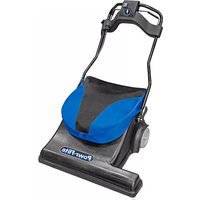
PF28SV - Vacuum Cleaner Powr-Flite - Free user manual and instructions
Find the device manual for free PF28SV Powr-Flite in PDF.


| Product Type | Commercial Wide Area Sweeper Vacuum |
| Model | PF28SV |
| Brand | Powr-Flite |
| Voltage | 115 V |
| Grounding | Three-wire grounding plug required |
| Pickup Type | Dry Pickup Only |
| Brush Height Adjustment | 5 levels, adjustable via foot pedals |
| Handle Adjustment | Height and length adjustable with lock levers and wing nuts |
| Bag Type | Cloth zipper bag with elastic opening seal |
| Circuit Breaker | On-board circuit breaker for motor protection |
| Brush Drive | Belt-driven brush roll |
| Brush Roll Replacement | Access via belt cover removal (4 screws) and bumper removal |
| Belt Replacement | Requires removing belt cover and brush roll |
| Power Cord | Wrap around handle for storage; do not use extension cords |
| Recommended Filters | Use genuine OEM filters and bags for optimal performance |
| Intended Use | Commercial carpet cleaning |
| Safety Features | Grounding circuit, circuit breaker, instructions against wet hands or wet surfaces |
| Maintenance | Regular bag/filter changes, periodic inspection by authorized service |
| Warranty | See www.Powr-Flite.com for details |
Frequently Asked Questions - PF28SV Powr-Flite
User questions about PF28SV Powr-Flite
0 question about this device. Answer the ones you know or ask your own.
Ask a new question about this device
Download the instructions for your Vacuum Cleaner in PDF format for free! Find your manual PF28SV - Powr-Flite and take your electronic device back in hand. On this page are published all the documents necessary for the use of your device. PF28SV by Powr-Flite.
USER MANUAL PF28SV Powr-Flite
natural_image
Close-up of a black safety harness with yellow clasp and blue fabric, no visible text or symbolsCongratulations on your purchase of a Wide Area Sweeper Vacuum. You are now equipped to handle any and all commercial carpet cleaning jobs. Your new unit is a high quality, precision-made product. All parts used in the manufacturing of this unit have passed rigid quality control standards prior to assembly. Please safeguard the original receipt / invoice. If you experience any problems with your unit during the warranty period, the original receipt / invoice will act as proof of purchase.
Shipping and Damage
This equipment is thoroughly inspected, tested, and packaged to provide equipment in good operating condition. It is beyond our control after the equipment is turned over to a freight carrier. The freight carrier received and signed for the equipment in good condition. Consequently, it is most important to protect your interest by carefully complying with the following instructions: Please inspect your cartons for any damage (including concealed damage) that might have occurred during shipment. Any damage is the responsibility of the freight carrier and should be reported to the freight carrier immediately. It is your responsibility to issue a claim and to receive compensation from the freight carrier for any damage done in transit. Damage of this sort is not warranted.
Customer Record
Model Number:
Serial Number:
Date Purchased:
IMPORTANT SAFETY INSTRUCTIONS
This vacuum is not a household appliance, intended for commercial use only. READ AND UNDERSTAND ALL INSTRUCTIONS BEFORE USING THIS UNIT
Read and understand this owner's manual and all labels on the unit before operating. Safety is a combination of common sense, staying alert, and knowing how your unit works. Use this unit only as described in this manual. Use only manufacturer's recommended attachments. To reduce the risk of personal injury or damage to your unit use only recommended accessories.
SAFETY WARNINGS AND PRECAUTIONS
- Use only as instructed in this manual.
- Do not leave appliance when plugged in. Unplug from outlet when not in use and before servicing.
- Do not use outdoors or on wet surfaces.
- Do not use to pick up liquids. This vacuum is for Dry Pickup only.
- Do not use with damaged cord or plug. If appliance is not working as it should, has been dropped, damaged, left outdoors, or dropped into water, return it to a service center.
- Do not vacuum up hard or sharp objects, as they may damage the vacuum bag or the vacuum motor.
- Do not use without paper vacuum bag, cloth bag and filters in place.
- Do not use with damaged cord or plug.
- Do not kink or twist the power cord.
- Do not pull or carry by the cord, use the cord as a handle, close a door on cord, or pull cord around sharp edges or corner. Do not run vacuum cleaner over cord. Keep cord away from heated surfaces.
- Do not pull on the cord to unplug. Grasp and pull the plug, not the cord. Turn off the vacuum before unplugging.
- Do not handle the cord, plug, switch or vacuum with wet hands.
- Do not use outlets with inadequate current capacity.
- Do not use an extension cord with this vacuum.
- Do not put any objects into openings. Do not use with any opening blocked. Keep free of dust, lint, hair and anything that might reduce airflow.
- Keep hair. loose clothing. fingers. and all parts of body away from openings and moving parts.
This appliance must be grounded. If it should malfunction or breakdown, grounding provides a path of least resistance for electric current to reduce the risk electric shock. This machine is equipped with a cord having an equipment -grounding conductor and grounding plug. The plug must be inserted into an appropriate outlet that is properly installed and grounded in accordance with all local codes and ordinances.
WARNING: Improper connection of the equipment-grounding conductor can result in a risk of electric shock. Check with a qualified electrician or service person if you are in doubt as to whether the outlet is properly grounded. Do not modify the plug provided with the appliance - if it will not fit the outlet, have a proper outlet installed by a qualified electrician.
This appliance is for use on a nominal 115-volt circuit, and has a grounding plug that looks like the plug illustrated in sketch A.

HANDLE ADJUSTMENT
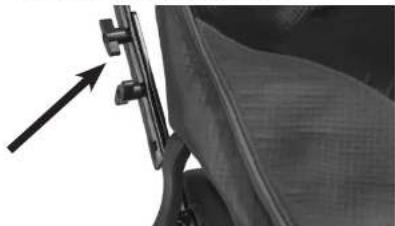
- Using the wing nuts (Fig. 1), adjust the handle length to a comfortable working position. Tighten all wing nuts.
- Loosen the handle lock levers (Fig. 2) on both sides of the unit and adjust the handle to a comfortable operation height.
- Tighten the handle lock lever on both sides to lock the handle in place.
natural_image
Close-up of a mechanical clamp or bracket with an arrow pointing to it, no visible text or symbolsFig. 1

natural_image
Close-up of a mechanical lever handle with an arrow indicating direction (no text or symbols visible)Fig. 2
BAG INSTALLATION
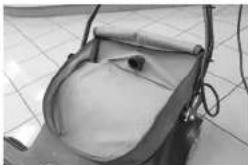
- Attach the cloth zipper bag by placing the elastic opening seal securely around the

natural_image
Close-up of hands adjusting a dark-colored seatbelt (no visible text or symbols)Fig. 3

Fig. 4
natural_image
Close-up of a small outdoor scooter with a cushioned seat and handle, placed on tiled floor (no visible text or symbols)Fig. 5
BRUSH HEIGHT ADJUSTMENT
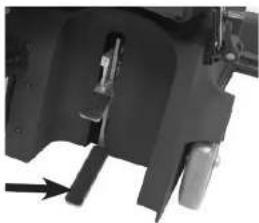
- This machine has 5 brush adjustment levels.
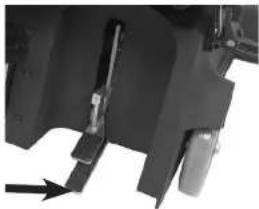
- To lower brush height level: depress the lower pedal, Fig 8., down and release one notch of ratchet at a time to desired carpet height.
natural_image
Close-up of a mechanical component with a black arrow pointing to a specific part (no visible text or symbols)Fig. 8
- To raise brush height level: depress the top pedal, Fig. 9, down to desired carpet height.
natural_image
Close-up of a mechanical component with a black arrow pointing to a specific part (no visible text or symbols)Fig. 9

Fig. 10
- To operate brush and vacuum motor squeeze the brush start triggers, Fig. 11.
- Adjust brush height for proper pick-up.

Fig. 11
CIRCUIT BREAKER

natural_image
Close-up of a car's seatbelt with a circular dial indicator showing the number 15 (no text or symbols beyond the dial)Fig. 12
Your new wide area sweeper vacuum comes
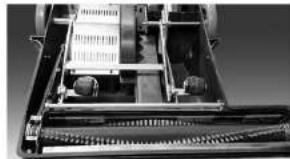
- Detach belt cover by removing the 4 belt cover screws as shown in Fig. 13. This will expose the belt connected to the brush roll Fig. 14.

natural_image
Close-up of a mechanical device with internal components and a tool, no visible text or symbolsFig. 13
natural_image
Interior view of a mechanical device with internal components and no visible text or symbolsFig. 14
- Pull down bumper on long end of sweeper to expose screws, Fig. 15.

natural_image
Close-up of a metallic object with a pointed tip, possibly a tool or component (no visible text or symbols)Fig. 15

natural_image
Close-up of a mechanical assembly with metal components and a cylindrical component (no visible text or symbols)Fig. 17
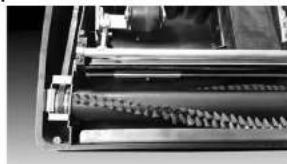
- Inert the new brush roll. Ensure the belt loops around the grooved end of brush roll and that there is tension in the belt Fig 18. The brush should be able to spin without any interference.
natural_image
Close-up of a mechanical device with cylindrical components and mounting brackets (no visible text or symbols)Fig. 18
- Using the 10 mm wrench and Allen wrench, screw in the brush roll with screws and nuts previously used Fig. 19.

natural_image
Close-up of a mechanical gear assembly with teeth and shaft (no visible text or symbols)Fig 10
FOR BEST PERFORMANCE
- Keep machine and all accessories clean and in good operating condition.
- Change vacuum bags and filters as recommended to maintain optimum cleaning efficiency.
- Always use genuine bags, filters and parts, as use of other products may result in poor cleaning or filtration performance. OEM filtration products are designed for maximum performance.
- Have machine checked periodically by an authorized service representative.
- Store machine carefully in dry area.
- For optimum cleaning performance and safety, follow your owner's manual.
- After each use, carefully wrap power cord around handle and check cord for wear or damage. If cord is damaged, have power cord replaced by an authorized service representative immediately.
| TROUBLESHOOTING | |
| THE MACHINE DOES NOT TURN ON | |
| CAUSE: SOLUTION: | |
| 1) The circuit breaker has tripped. 1) Reset circuit breaker. | |
| 2) Plug is broken or has loose contact. 2) Replace cord. | |
| 3) Branch circuit breaker has tripped. 3) Find circuit breaker box and reset. | |
For warranty information go to www.Powr-Flite.com
Brand : Powr-Flite
Model : PF28SV
Category : Vacuum Cleaner