
IAEB26 - Earphones iLive - Free user manual and instructions
Find the device manual for free IAEB26 iLive in PDF.


| Product Type | Wireless Stereo Earbuds |
| Brand | iLive |
| Model | IAEB26 |
| Color | Black |
| Wireless Technology | Bluetooth |
| Bluetooth Range | 60 feet (18.3 meters) |
| Supported Profiles | A2DP (Advanced Audio Distribution Profile) |
| Battery Type | Built-in rechargeable lithium-ion battery |
| Battery Life | Approx. 4 hours at 100% volume, 6 hours at 50% volume |
| Charging Time | Approx. 2 hours for initial charge |
| Charging Port | Micro-USB |
| Included Accessories | 3 pairs of ear tips (small, medium, large), Micro-USB charging cable |
| On-Ear Controls | Power/Pair/Play/Pause/Speakerphone button, Volume Up/Down |
| Built-in Microphone | Yes |
| Speakerphone Function | Answer/end calls, redial last number |
| Weight | Approx. 0.5 oz (14 g) per earbud |
| Dimensions (Earbud) | Approx. 1.5 x 1.0 x 1.0 inches (38 x 25 x 25 mm) |
| Safety Warnings | Do not expose to rain or moisture; avoid hearing damage by starting volume low |
| Battery Disposal | Recycle lithium battery according to local guidelines; do not incinerate |
| Regulatory Compliance | FCC Part 15 compliant; California Prop 65 warning |
| Repairability | Non-user serviceable; contact manufacturer for support |
| Warranty | See www.iLiveElectronics.com for latest warranty information |
Frequently Asked Questions - IAEB26 iLive
User questions about IAEB26 iLive
0 question about this device. Answer the ones you know or ask your own.
Ask a new question about this device
Download the instructions for your Earphones in PDF format for free! Find your manual IAEB26 - iLive and take your electronic device back in hand. On this page are published all the documents necessary for the use of your device. IAEB26 by iLive.
USER MANUAL IAEB26 iLive
- Warning: Changes or modifications to this unit not expressly approved by the party responsible for compliance could void the user's authority to operate the equipment.
NOTE: This equipment has been tested and found to comply
with the limits for a tax test in digital devices, pursuant to Part 15 of the IUC Rules. These limits are designed to provide reasonable protection against harmful interference in a residential installation. This equipment generates, uses, and can radiate radio frequency energy and, if not installed and used in accordance with the instructions, may cause harmful interference to radio communications. However, there is no guarantee that interference will not occur in a particular installation. If this equipment does cause harmful interference to radio or television reception, which can be determined by entering the equipment off and on, the user is encouraged to try to correct the interference by one or more of the following measures. - Reorient or relocate the receiving antenna.
- Increase the separation between the equipment and receiver.
- Connect the equipment into an outlet on a circuit different from that to which the receiver is connected.
- Consult the dealer or an experienced radio/TV technician for help.
ADDITIONAL WARNINGS
- WARNING: To prevent fire or shock hazards, do not expose this unit to rain or moisture.
- WARNING: Where the mains ping or appliance compiler is used as the dissement device, such dissement device shall remain readily operable.
- Lithium batteries, like all rechargeable batteries, are recyclable and should be recycled or disposed of according to state and local guidelines. They should never be disposed of in normal household waste, and they should never be incinerated, as they might explode. Contact your local government for disposal or recycling practices in your area.
- WARNING: This product may contain chemicals known to the State of California to cause birth defects, or other reproductive harm (California Prop 65). Waste hands after handling
• This product meets and complies with all Federal regulations.
• To avoid hearing damage, make sure that the volume on your music players is turned down before connecting your headphones. After placing headphones in on your ears, gradually turn up the volume until you reach a comfortable listening level.
International Support
To download this User's Guide In English, Spanish, or French, or to get answers to frequently asked questions, visit the support section at: www.iliveElectronics.com
For Warranty Information and the most
up-to-date version of this User's Guide, go to: www.iLiveElectronics.com.

Specifications are subject to change without notice.
Copyright © 2016 Digital Products International (DPI, Inc.)
All other trademarks appearing herein are the property of their respective entity.
of their respective owners.

natural_image
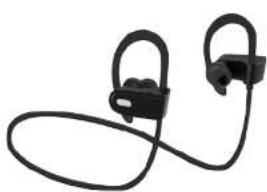
Black athletic earbuds with black plastic bands, no text or symbols visibleWireless Stereo Earbuds User's Guide for Model IAE826-1575-01
Features
• Supports Bluetooth
- Wireless range: 60 feet
• Supports profile A2DP (Advanced Audio
Distribution Profile)
- On ear controls
• Built-in microphone
- Micro-USB port for battery recharge
• DC battery power: built-in rechargeable lithium
ion battery
• Battery life: approx. 4 hrs at 100% volume
6 hrs at 50%
Includes
• 3 pairs of cartips: 1 small, 1 medium, 1 large
- Micro-USB to USB charging cable
Overview & Controls

Power / Pair / Play /
Pause/Speakerphone
Press and hold to power
on or off
Press to play or pause audio.
Press to answer incoming
phone call.
Indicator LED

DC Power Input
Use with USB charging cable
(nduded).
Volume Up/Down
Microphone
Battery Power
Initial charge time is approximately 2 hours. Charge fully before use.
Using a Micro-USB to USB cable (included), connect to the USB port of a powered on computer or USB power adaptor (not included) to charge the unit.

Indicator LED
| Status Indicators | |
| Power On Flashing blue light | |
| Low Battery Flashing red light | |
| Charging red light | |
| Finished Charging Blue light | |
| Paining Wireless Flashing red and blue lights |
Pairing a Bluetooth Device
If your device should become unpaired, or you find it
Is unable to connect normally, repeat the steps below.
- Power on the unit by pressing and holding the
Play/Pause/Speakerphone/Pair button for
4 seconds. When pairing, remain within 3 feet of
the unit.
- Using the controls on your Bluetooth device,
select IAEB26 in your Bluetooth settings to pair.
if your device requests a password, enter the default
password 0000
- Refer to the user's manual for your specific device
for instructions on pairing and connecting
Bluetooth devices. After initial pairing, the unit
will stay paired unless unpaired manually by the
user, or erased due to a reset of the device.
Playing Audio Wirelessly
-
Use the controls on the connected Bluetooth device to select and begin playing an audio track. Audio from the connected Bluetooth device should pay be heard through the appods.
-
To play or pause audio, press the Play/Pause button, or use the controls on the connected Bluetooth device.
Using the Speakerphone
- To accept a call, press the Speakerphone button, or use the controls on the connected phone.
- To end a call, press the Speakerphone button, or use the controls on the connected phone.
- To re-dial the last dialed number, press the Speakerphone button twice.
Brand : iLive
Model : IAEB26
Category : Earphones