
Qualite QL-3560-LED - USB Drive Impact - Free user manual and instructions
Find the device manual for free Qualite QL-3560-LED Impact in PDF.


| Product Type | LED Floodlight |
| Brand | Impact |
| Model | Qualite QL-3560-LED |
| Dimensions (L × W × H) | 8.4 × 7.5 × 5.8 in. (21.3 × 19 × 14.2 cm) |
| Weight (without barndoors) | 1.9 lb. (0.86 kg) |
| Weight (with barndoors) | 2.5 lb. (1.13 kg) |
| Power Consumption | 34 W |
| AC Input Power | 100 to 240 V, 50/60 Hz |
| DC Input Power | 15 V, 4 A |
| Light Source | 36 LEDs, TIR LED panel |
| Beam Angle | 45° |
| Color Temperature | 5600 K |
| Color Rendering Index (CRI) | 97 |
| Dimming | Yes, 0% to 100% stepless |
| Cooling System | Passive |
| Mounting | 5/8 in. receiver for light stand |
| Accessories Included | Barndoors, diffuser, orange filter, power adapter, power cord |
| Optional Accessories | Watson Pro CA-DTAP-25M cable (V-mount battery), Angler 7464-SFS speed ring |
| Warranty | One-year limited warranty |
| Expected Lamp Life | 50,000 hours |
| Cleaning Instructions | Use only a soft, dry cloth |
Frequently Asked Questions - Qualite QL-3560-LED Impact
User questions about Qualite QL-3560-LED Impact
0 question about this device. Answer the ones you know or ask your own.
Ask a new question about this device
Download the instructions for your USB Drive in PDF format for free! Find your manual Qualite QL-3560-LED - Impact and take your electronic device back in hand. On this page are published all the documents necessary for the use of your device. Qualite QL-3560-LED by Impact.
USER MANUAL Qualite QL-3560-LED Impact
natural_image
Black photo of a studio lighting fixture with multiple blades against a yellow background (no text or symbols visible)QL-3560-LED
Qualite LED Floodlight
INSTRUCTIONS
Introduction
Thank you for choosing Impact.
The QL-3560-LED is the digital LED version of Impact's popular Qualite. This high-output fixture draws only 34 watts and operates on both AC and DC power. It features a TIR LED panel that furnishes a focused and bright beam with a long reach. The color temperature of 5600K and a CRI of 97 deliver a natural-looking daylight beam with high color rendering and accuracy.
The OL-3560-LED has stepless dimming from 0% to 100% and includes four-way barboders for shaping the light and preventing light spill. Diffuser and orange filter discs are included to soften the beam end to match tungsten light you might be using on your set. The fixture is designed with an accessory bracket that accepts Impact's speed ring, so you can add a softbox to your setup for light that's perfect for portraits and headshots.
Precautions
- Please read and follow these instructions, and keep this manual in a safe place.
- Keep this unit away from water and any flammable gases or liquids.
- Make sure the unit is powered off when plugging it into a power source.
- Use only the correct, recommended voltage.
- Do not attempt to disassemble or repair the equipment—doing so will void the warranty, and impact will not be responsible for any damage.
- Handle the unit with care.
- Do not stare directly at the lights when they are powered on.
- Clean the unit with only a soft, dry cloth.
- Keep this unit away from children.
- Use only parts provided by the manufacturer.
- Make sure the item is intact and that there are no missing parts.
• All images are for illustrative purposes only.
Specifications
| Light Feature | |
| Beam Angle 45° | |
| Color Temperature 5600 K | |
| Color Accuracy Standard CRt: 97 | |
| Cooling System Passive | |
| Dimming Yes, 0% to 100% | |
| Display LCD | |
| Housing Material Metal | |
| Light Intensity @ 3 ft. 9150 lx | |
| Number of LEDs 36 | |
| Expected Lamp Life 50,000 hr | |
| Dimensions (L × W × H) 8.4 × 7.5 × 5.8 in. (21.3 × 19 × 14.2 cm) | |
| Weight | 1.9 lb. (0.86 kg) without bardoors2.5 lb. (1.13 kg) with bardoors |
Connectors
Power Input Connector 2.5 mm barrel
| Mounting | |
| Future Mount | 5/8 in. receiver |
| Power | |
| AC Input Power 100 to 240 V, 50/60 Hz | |
| DC Input Power 15 V, 4 A | |
| Power Source AC output | |
| Max Power Consumption 34 W | |
| Power Pass-Through No | |
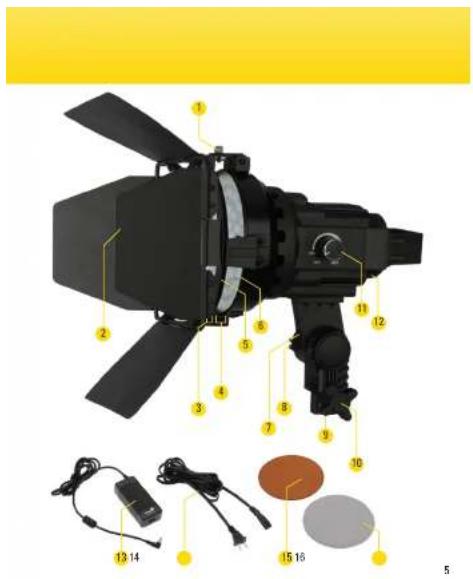
Overview
Qualite LED Daylight
1 Locking screw
2 Barndoors
3 Barndoor Slot
4 Accessory Slot
5 Barndoor mounting collar
5 LED panel
7 Umbrella mount
8 Tilt adjustment knob
9 5/8 in. receiver
10 Locking knob
11 Power/dimmer
12 Power socket
13 Power adapter
4 Power cord
15 Orange filter
16 Diffuser
Mounting the Qualite LED
The Qualite LED mounts on any standard light stand with a 5/8 in. stud.

- Loosen the locking screw, and seat the receiver onto the 5/8 in. stud.

- Tighten the locking screw until secure. Do not overtighten.
Attaching the Barndoors
The barndoors shape the beam and prevent light spill.
To attach the bamdoors:
- Loosen the locking screw, and open the hinged accessory bracket
- Slide the barndoor mounting collar into the accessory slot of the accessory bracket.
- Close the accessory bracket, and tighten the locking screw until secure.
When properly installed, the barndoors should rotate 360°.

natural_image
Two-step diagram showing a hand holding a mechanical component and a helicopter-like device with a blade (no text or symbols)Using the Diffuser and Filter
The diffuser and orange filter can be used with or without the barndoors.
Use the diffuser to soften the light and cut down on harsh shadows. Use the orange filter to emulate the warm light of a tungsten bulb with a color temperature of approximately 3200 K.
Insert the filter or diffuser into the accessory slot. When using the diffuser or filter with the barndoors, insert the disk in the accessory slot between the light and barndoors.

natural_image
Person using a tool to lift a red-orange object, no visible text or symbolsAdjusting the Light Angle
Important! Always support the light with one hand while loosening the tilt knob to reposition the light.
-
Loosen the tilt adjustment knob, and position the light as desired.
-
Retighten the knob. Do not overtighten.

natural_image
Person using a black optical device with a yellow clip, no visible text or symbolsPowering On and Adjusting the Brightness
Before connecting the Qualite LED to a power source, make sure the light is turned off.
AC Power
- Plug the power adapter cord into the power socket.
- Attach the power cord to the power adapter, and plug it into an available outlet.
- Turn the power/dimmer knob clockwise to power on and adjust the brightness level.
DC Power
The Qualite LED can be powered by a V-mount battery using the Watson Pro CA-DTAP-25M cable (sold separately).
Connect the cable to the V-mount battery's D-tap output and to the Qualite LED's power socket.
Refer to the V-mount battery's user manual to determine the battery's remaining capacity and when to recharge your battery.
Attaching a Speed Ring
The Angler 7464-SFS speed ring (sold separately) allows you to attach most major brands of softboxes to the Qualite LED. To attach a speed ring, remove the barndoors, and follow these steps:
- Loosen the locking screw, and open the hinged accessory bracket.
- Slide the speed ring into the barndoor slot of the accessory bracket.
- Close the accessory bracket, and tighten the locking screw until secure.
When properly installed, the speed ring should rotate 360°.

natural_image
Two interlocking mechanical rings enclosed in a yellow circular border (no text or symbols)One-Year Limited Warranty
This Impact product is warranted to the original purchaser to be free from defects in materials and workmanship under normal consumer use for a period of one (1) year from the original purchase date or thirty (30) days after replacement, whichever occurs later. The warranty provider's responsibility with respect to this limited warranty shall be limited solely to repair or replacement, at the provider's discretion, of any product that fails during normal use of this product in its intended manner and in its intended environment. Inoperability of the product or part(s) shall be determined by the warranty provider. If the product has been discontinued, the warranty provider reserves the right to replace it with a model of equivalent quality and function.
This warranty does not cover damage or defect caused by misuse, neglect, accident, alteration, abuse, improper installation or maintenance. EXCEPT AS PROVIDED HEREIN, THE WARRANTY PROVIDER MAKES NEITHER ANY EXPRESS WARRANTIES NOR ANY IMPLIED WARRANTIES, INCLUDING BUT NOT LIMITED TO ANY IMPLIED WARRANTY OF MERCHANTABILITY OR FITNESS FOR A PARTICULAR PURPOSE. This warranty provides you with specific legal rights, and you may also have additional rights that vary from state to state.
To obtain warranty coverage, contact the Impact Customer Service Department to obtain a return merchandise authorization ("RMA") number, and return the defective product to Impact along with the RMA number and proof of purchase. Shipment of the defective product is at the purchaser's own risk and expense.
For more information or to arrange service,
visit www.impactstudiolighting.com or
call Customer Service at 212-594-2353.

IMPACT*
A derivative group Brand
Product warranty provided by the Gradus Group.
www.gradusgroup.com
Impact is a registered trademark of the
Gradus Group. ©2019 Gradus Group LLC. All Rights Reserved.
GG2


Brand : Impact
Model : Qualite QL-3560-LED
Category : USB Drive