
DWR-2U - Wall / Under Desk Mount Auray - Free user manual and instructions
Find the device manual for free DWR-2U Auray in PDF.


| Product Type | Under Desk / Wallmount Rack |
| Brand | Auray |
| Model | DWR-2U |
| Rack Spaces | 2U |
| Dimensions (H × W × D) | 4 × 19.4 × 4.1 in (10.2 × 49.3 × 10.4 cm) |
| Weight | 1.4 lb (0.64 kg) |
| Material | Steel |
| Mounting Options | Under-desk, wall (vertical/horizontal) |
| Included Hardware | Sleeve anchors (×4), wood screws (×4), cage nuts (×4), cage screws (×4), bubble level |
| Installation Surfaces | Wood, masonry, concrete (drywall requires additional anchors) |
| Screw Type | Self-tapping wood screws (M5×25) |
| Hole Spacing for Horizontal Drywall Mount | 16 in (406.4 mm) apart for standard studs |
| Keyhole Slots | Yes, for easy mounting and removal |
| Round Holes | Yes, for direct screw installation |
| Assembly Required | No |
| Warranty | 1 Year Limited Warranty |
| Compatible Equipment | Standard 19-inch rack-mountable equipment |
| Cleaning Instructions | Clean with a soft, dry cloth |
| Safety Note | Ensure mounting surface can support combined weight of rack and equipment |
Frequently Asked Questions - DWR-2U Auray
User questions about DWR-2U Auray
0 question about this device. Answer the ones you know or ask your own.
Ask a new question about this device
Download the instructions for your Wall / Under Desk Mount in PDF format for free! Find your manual DWR-2U - Auray and take your electronic device back in hand. On this page are published all the documents necessary for the use of your device. DWR-2U by Auray.
USER MANUAL DWR-2U Auray
DWR-2U / DWR-4U / DWR-6U
Under Desk/Wallmount Rack
2U/4U/6U
Owner's Manual
natural_image
Black metal frame with mounting holes and a triangular support (no text or symbols)Thank you for choosing Auray.
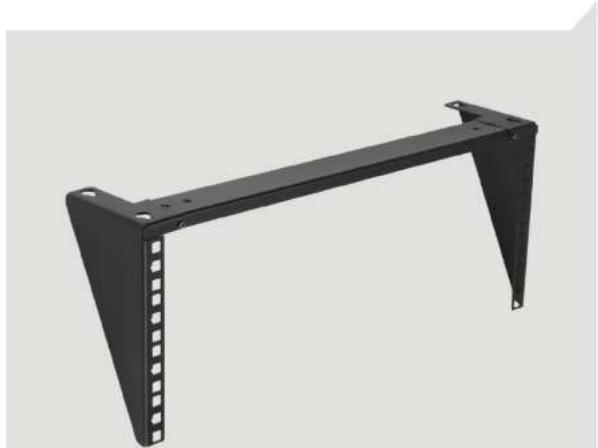
The Auray Under Desk / Wallmount rack is a space-saver equipment rack that mounts directly to a wall or underneath a desk. It holds equipment like rack-mountable servers, as well as audio and video gear. No assembly is required, and mounting hardware for masonry, concrete, or wood-surface wall or under-desk installation is included. The rack offers permanent and nonpermanent installation options, so you can break down temporary studio setups as easily as you install them.
Precautions
- Please read and follow these instructions, and keep this manual in a safe place.
• Make sure the mounting surface can support the combined weight of the rack and installed equipment.
This product has been designed specifically for mounting directly on wooden desks or tables, masonry, or concrete walls, depending on the wall type and material, accessories such as drywall anchors and longer screws may be required.
• This product may contain small parts which can possibly pose a choking hazard; keep out of reach of children and pets.
• Clean the unit with only a soft, dry cloth.
• Make sure everything is secure before proceeding.
• Make sure that this product is intact and that there are no missing parts.
Contents Include
2U / 4U / 6U rack
Sleeve anchors (×4) 2
Wood screws (×4) 3
Cage nuts (×4)
Cage screws (×4) 5
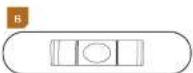
Bubble level 6



natural_image
Empty rectangular frame with corner markers and a small orange square at top (no text or symbols)Before You Start
The DWR-2U/4U/6U features two different sets of mounting holes.
The keyhole slots allow you to mount and remove the rack from its mounting screws.
The round holes are designed to be used with the included wood screws. Use these for vertical and under-desk installation.
Under-Desk Installation
Important! The included wood screws are M5×25 (3/16 × 1 in.). Make sure the desk or tabletop is at least 1 inch thick. For tops that are less than 1 inch thick, use shorter screws that are appropriate for your installation.
- Use the rack as a template to mark the position of at least two round holes.
- Mark the location of the narrow side of the keyholes as pictured.

natural_image
Pure mechanical bracket diagram without any text, numbers, or symbols- Hold the rack in place and drill the screws directly into the surface through the mounting holes.
Note: The screws are self-tapping. Drilling pilot
Masonry and Concrete Wall Installation (Vertical and Horizontal)
- Position the rack against the wall. Use the included bubble level to ensure the rack is level.
- Mark the narrow end of the keyholes with a pencil.

natural_image
Pure mechanical bracket diagram without any text, numbers, or symbols- Drill M10 (10 mm or 3/8 in.) holes into the masonry or concrete 1.5 to 2 inches (38 to 51 mm) deep. Clean the dust and debris from the hole with
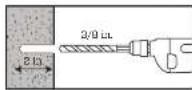
Important: When drilling into masonry, avoid drilling into mortar joints.
-
Place the rack over the holes, and use a hammer to tap the sleeve anchors through the keyholes and into the wall.
-
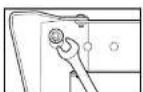
Use a 10 mm wrench to tighten the sleeve anchor nuts until secure.

Drywall Installation
Important! You will need to use longer screws than the included M5×25 screws to mount the rack to drywall.
Be sure to locate the wall studs. If wall studs are not available, use suitable wall anchors.
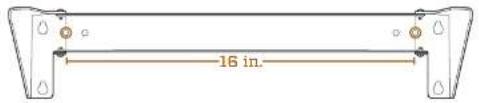
The rack has two round holes that are spaced 16 inches apart for horizontal mounting into 16-on-center drywall studs.
Installing Rack-Mount Equipment
Locate the appropriate mounting holes in the rack.
Note: 1U = 3 rack holes.
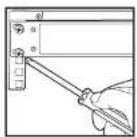
Install the cage nuts from the back of the rack, so the cage nut lips are pointing out.
- Slide one lip into the hole and press against it until you can fit the other lip into the hole.

Alternate: Slide one lip into the hole and press the other lip with a slotted screwdriver until it fits into the hole.
- Use the included cage nut screws to install your equipment into the rack.

Specifications
Rack Material: Steel
Rack Spaces: 2U, 4U, 6U
Dimensions (H × W): 2U: 4 × 19.4 × 4.1 in. (10.2 × 49.3 × 10.4 cm) 4U: 4 × 19.4 × 7.6 in. (10.2 × 49.3 × 19.3 cm) 6U: 4 × 19.4 × 11.1 in. (10.2 × 49.3 × 28.2 cm)
Weight: 2U: 1.4 lb. (0.64 kg) 4U: 1.8 lb. (0.8 kg) 6U: 2.2 lb. (1 kg)
One-Year Limited Warranty
This Auray product is warranted to the original purchaser to be free from defects in materials and workmanship under normal consumer use for a period of one (1) year from the original purchase date or thirty (30) days after replacement, whichever occurs later. The warranty provider's responsibility with respect to this limited warranty shall be limited solely to repair or replacement, at the provider's discretion, of any product that fails during normal use of this product in its intended manner and in its intended environment. Inoperability of the product or part(s) shall be determined by the warranty provider. If the product has been discontinued, the warranty provider reserves the right to replace it with a model of equivalent quality and function.
This warranty does not cover damage or defect caused by misuse, neglect, accident, alteration, abuse, improper installation or maintenance. EXCEPT AS PROVIDED HEREIN, THE WARRANTY PROVIDER MAKES NEITHER ANY EXPRESS WARRANTIES NOR ANY IMPLIED WARRANTIES, INCLUDING BUT NOT LIMITED TO ANY IMPLIED WARRANTY OF MERCHANTABILITY OR FITNESS FOR A PARTICULAR PURPOSE. This warranty provides you with specific legal rights, and you may also have additional rights that vary from state to state.
To obtain warranty coverage, contact the Aursy Customer Service Department to obtain a return merchandise authorization ("RMA") number, and return the defective product to Aursy along with the RMA number and proof of purchase. Shipment of the defective product is at the purchaser's own risk and expense.
For more information or to arrange service, visit www.aurayaudio.com or call Customer Service at 212-594-2353.
Product warranty provided by the Gradus Group. www.gradusgroup.com
Auray is a registered trademark of the Gradus Group. © 2021 Gradus Group LLC. All Rights Reserved.

Brand : Auray
Model : DWR-2U
Category : Wall / Under Desk Mount