
BG-PSC6X2-4K - Power Strip BZBGear - Free user manual and instructions
Find the device manual for free BG-PSC6X2-4K BZBGear in PDF.


| Product Type | 4K Presentation Scaler Switcher |
| Model | BG-PSC6X2-4K |
| Brand | BZBGear |
| Video Inputs | 3x HDMI, 1x DisplayPort, 1x USB-C, 1x VGA (with audio) |
| Video Outputs | 2x HDMI (mirrored) |
| Max Video Resolution | 3840x2160 @ 60Hz (4:4:4), HDR10, HLG, full 3D |
| Built-in Scaler | Yes, supports resolutions from 1024x768 to 4K |
| Audio Features | Embedding/de-embedding, MIC In, Line Out, Coaxial out, L/R analog out |
| Control Methods | Front panel buttons, IR remote, RS-232, Telnet, WebGUI |
| IR Control | IR receiver and emitter (included) |
| RS-232 | DB9 female connector for PC or control system |
| Network Control | RJ45 TCP/IP port for Telnet and WebGUI |
| EDID Management | Built-in EDID presets and copy from output |
| Firmware Upgrade | Via micro USB service port (cable not included) |
| Power Supply | External power adapter (included) |
| Dimensions | Approximately 17 x 4 x 1.5 inches (432 x 102 x 38 mm) |
| Weight | Approximately 3.5 lbs (1.6 kg) |
| Surge Protection | Recommended but not built-in; use external surge protector |
| Maintenance | Clean with soft dry cloth; do not use alcohol, thinner, or benzene |
| Warranty | 1 year limited (2nd year free upon registration) |
Frequently Asked Questions - BG-PSC6X2-4K BZBGear
User questions about BG-PSC6X2-4K BZBGear
0 question about this device. Answer the ones you know or ask your own.
Ask a new question about this device
Download the instructions for your Power Strip in PDF format for free! Find your manual BG-PSC6X2-4K - BZBGear and take your electronic device back in hand. On this page are published all the documents necessary for the use of your device. BG-PSC6X2-4K by BZBGear.
USER MANUAL BG-PSC6X2-4K BZBGear
natural_image
Front view of a black electronic device with ventilation grilles and ports (no visible text or labels)Thank you for purchasing this product. For optimum performance and safety, please read these instructions carefully before connecting, operating or adjusting this product. Please keep this manual for future reference.
SURGE PROTECTION DEVICE RECOMMENDED
This product contains sensitive electrical components that may be damaged by electrical
Table of Content
Introduction 4
Features 4
Panel Descriptions ....5
Front Panel 5
Rear Panel 6
Remote Control Description ....7
Application Diagram 8
Specifications 8
IR TX/RX Guidelines....9
RS-232 Pin Assignment 9
RS232 and Telnet Commands....10
Package Contents....12
Maintenance....13
Warranty Policy....13
Limitations of Warranty....13
Exclusive Remedies....14
RMA Policy 14
Introduction
The BG-PSC6X2-4K is a 4K/18Gbps presentation scaler switcher supports 6 inputs including 3 HDMI inputs, 1 DisplayPort, 1 USB-C and 1 VGA, and 2 HDMI mirrored outputs. With built-in scaler chip, the video can be scaled to various aspect ratios and resolutions from 1024x 768 up to 3840x 2160 @ 60Hz.
The presentation switcher also features advanced audio embedding and de-embedding, it can offer flexible application of audio which includes analog and digital audio, MIC In and Line out. Each source and display could be controlled and configured via front-panel button, IR remote, RS232, Telnet, WebGUI. This product is a suitable solution for presentation purpose at classroom and conference room.
Features
• 4K@60Hz 4:4:4, HDR10, HLG and full 3D
- Switch & Scale 6 sources to 2 displays
- 3x HDMI input, 1x VGA w/Audio input, 1x USB-C input, 1x Display port input
Panel Descriptions
Front Panel
flowchart
graph TD
    A["1"] --> B["2"]
    B --> C["3"]
    C --> D["4"]
    D --> E["5"]
    E --> F["6"]
    F --> G["7"]
    G --> H["8"]
    H --> I["9"]
    I --> J["10"]
    J --> K["11"]
    K --> L["12"]
    L --> M["13"]
    M --> N["14"]
    N --> O["15"]
    O --> P["16"]
    P --> Q["17"]
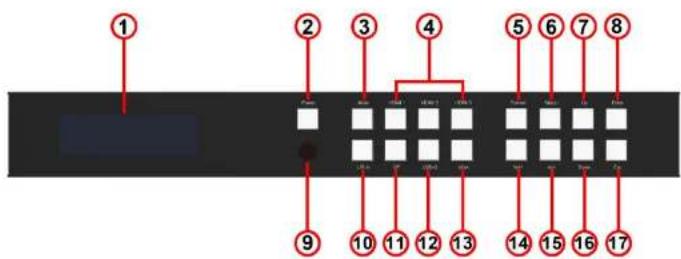
- LCD display – Show the status of input-to-output selection, EDID info and so on.
- Power button – Press to power on the unit
- Mute button – Press to mute the HDMI outputs and L/R & Coaxial audio outputs.(Mute function only works for PCM format audio, other format audio will bypass)
- HDMI Input selection button – Press to select Output1& 2 from HDMI Input 1 to 3.
- Format set button – Press to set the resolution for the output
-
Menu button – Press to enter EDID setting, volume setting or F/M information. Three EDID segments will display on the LCD panel formatted as: INPUT VIDEO AUDIO,
-
Down selection button – Press to change segment's value
- ESC – Press to quit EDID set mode.
Rear Panel
-
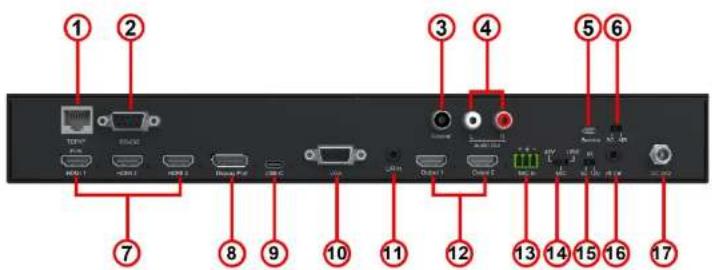
TCP/IP port - RJ45 connector, for TCP/IP control.
-
RS232 port - DB9 female connector, to control the unit from a PC or control processor.
-
Coaxial audio output – Output coaxial audio which always follow HDMI outputs
-
L/R audio output - Output analog audio which follow HDMI outputs.
-
Service port – Micro USB port, for firmware upgrade.(Upgrade cable should be purchased separately).
-
Upgrade slip switch - Used with service port to upgrade SC/Scaler Chip or MB/Main Board
-
HDMI Input 1 to 3 – Connect to HDMI sources.
-
DP Input - Connect to DisplayPort source.
-
HCD C1-4 M2-HCD 4-4-4-4-HCD C
Remote Control Description

Input: Source selection for HDMI output 1 & output 2.
SRC AUD/Source Audio:
➢ Bypass: Audio on HDMI outputs is from HDMI input selected.
➢ Embed: Audio on HDMI outputs is from L/R Analogue audio input (3.5mm Jack)
Format: Video output resolution selection.
The BG-PSC6X2-4K includes built-in video scaler. Press the required resolution button on remote control to change the HDMI output video resolution
MIC control:
Mix On: Open Mix Audio mode
Mix Off: Close Mix Audio mode
Mic Only: Only microphone has audio output
➢ Vol+: Increase the volume of microphone
➢ Vol: Decrease the volume of microphone
Output Vol: Press to Increase/Decrease/Mute the volume of Audio from HDMI outputs and De-embedded
Application Diagram

flowchart
graph TD
    A["Control System"] --> B["4VR"]
    B --> C["4K"]
    C --> D["Laptop"]
    D --> E["Microphone"]
    A --> F["Busky driver"]
    F --> G["PC"]
    G --> H["Audio"]
    H --> I["HDMI"]
    I --> J["Network"]
    J --> K["Microphone"]
    style A fill:#f9f,stroke:#333
    style B fill:#ccf,stroke:#333
    style C fill:#cfc,stroke:#333
    style D fill:#fcc,stroke:#333
    style E fill:#ffc,stroke:#333
    style F fill:#cff,stroke:#333
    style G fill:#ffc,stroke:#333
    style H fill:#cfc,stroke:#333
    style I fill:#cfc,stroke:#333
    style J fill:#fff,stroke:#333
    style K fill:#fff,stroke:#333
    style_L["USB"] --> M["4K"]
    N["VGA"] --> O["4K"]
    P["Microphone"] --> Q["4K"]
Specifications
IR TX/RX Guidelines

IR Emitter: Plug in the IR emitter to emit all IR command signals received from the IR receiver from the other end to control the devices corresponding to the IR signals.
IR Receiver: Plug in the IR receiver to receiver all IR command signals from the IR remote controls of the corresponding devices.

RS-232 Din Assignment
RS232 and Telnet Commands
| No. | Command | Action |
| 1 | ? | Print Help Information |
| 2 | HELP | Print Help Information |
| 3 | STATUS | Print System Status And Port Status |
| 4 | PON | Power On, System Run On Normal State |
| 5 | POFF | Power Off, System Run On Power Save State |
| 6 | IR ON/OFF | Set System IR Control On Or Off |
| 7 | KEY ON/OFF | Set System KEY Control On Or Off |
| 8 | LCD ON/OFF | Set LCD Always On or Auto Turn Off In Power On State |
| 9 | RSB x | Set RS232 Baud Rate to x bpsX= [0:115200, 1:57600, 2:38400, 3:19200, 4:9600] |
| 10 | RESET | Reset System To Default Setting(Should Type "Yes" To Confirm, "No" To Discard) |
| 11 | RESET ALL | Reset System And Network To Default Setting(Should Type "Yes" To Confirm, "No" To Discard) |
| 12 | OUT xx ON/OFF | Set Output: xx On Or Off |
| 13 | OUT xx FR yy | Set OUTPUT:xx From INPUT:yyxx=00: Select All OUTPUT Portxx=[01...02]: Select One OUTPUT Portyy=Select One Input Port[04, 05]IPM, 06:RR, 07:UPD, 08:00/01]rr=12: 4K2K@50Hzrr=13: 4K2K@60Hzrr=14: Auto |
| 16 | EDID xx CP yy | Set Input:xx EDID Copy From Output:yy yy=[00]: |
| 17 | EDID xx DF zz | Set Input:xx EDID To Default EDID:zzxx=00: Select All INPUT Portxx=[01...05]: Select One INPUT Portyy=[01...02]: Select One OUTPUT Portzz=00: HDMI 1080p@60Hz, Audio 2CH PCMzz=01: HDMI 1080p@60Hz, Audio 5.1CH DTS/DOLBYzz=02: HDMI 1080p@60Hz, Audio 7.1CH DTS/DOLBY/HDzz=03: HDMI 1080i@60Hz, Audio 2CH PCMzz=04: HDMI 1080i@60Hz, Audio 5.1CH DTS/DOLBYzz=05: HDMI 1080i@60Hz, Audio 7.1CH DTS/DOLBY/HDzz=06: HDMI 1080p@60Hz/3D, Audio 2CH PCMzz=07: HDMI 1080p@60Hz/3D, Audio 5.1CH DTS/DOLBYzz=08: HDMI 1080p@60Hz/3D, Audio 7.1CH DTS/DOLBY/HDzz=09: HDMI 4K@30Hz 4:4:4, Audio 2CH PCMzz=10: HDMI 4K@30Hz 4:4:4, Audio 5.1CH DTS/DOLBYzz=11: HDMI 4K@30Hz 4:4:4, Audio 7.1CH DTS/DOLBY/HDzz=12: DVI 1280x1024@60Hz, Audio Nonezz=13: DVI 1920x1080@60Hz, Audio Nonezz=14: DVI 1920x1200@60Hz, Audio Nonezz=15: User EDID 1zz=16: User EDID 2zz=17: GUI Download EDIDxx=+: Volume Increasexx=-: Volume Decrease |
| 24 | MUTE ON/OFF | Set Scaler Output Audio Mute ON Or OFF |
| 25 | MIC MIX mm | Set MIC And Background Audio Mix Modemm=ON: Mix MIC And Background Audiomm=BGO: Background Audio Onlymm=MICO: MIC Audio Only |
| 26 | MIC VOL xx | Set MIC Input Audio Volumexx=[00...01]:MIC Volume Value |
| 27 | MIC MUTE ON/OFF | Set MIC Mute On Or Off |
| 28 | MIC AUTOBG ON/OFF | Set Auto Decrease Background Audio When Detect MIC Voice |
| 29 | MIC BGVOL pp | Set Auto Decrease Background Audio To pp Percent of "VOL xx"pp=[00...100]:Percent of "VOL xx" Settling |
| 30 | MIC BGR dd | After Speaking, The MIC Takes dd Second To Raise The Volumeedd=[01...20]: Delay Seconds |
| 31 | NET DHCP ON/OFF | Set Auto IP(DHCP) ON Or OFF |
| 32 | NET IP xxx.xxx.xxx.xxx | Set IP Address |
| 33 | NET GW xxx.xxx.xxx.xxx | Set Gateway Address |
| 34 | NET SM xxx.xxx.xxx.xxx | Set Subnet Mask Address |
| 35 | NET TN XXXX | Set Telnet Port |
| 36 | NET RB | Set Network Reboot and Apply New Config!!! |
Package Contents
Maintenance
Clean this unit with a soft, dry cloth. Never use alcohol, paint thinner or benzene to clean this unit.
Warranty Policy
BZBGEAR products are warranted against defects in material and workmanship for one year from the date of shipment. During the warranty period, BZBGEAR will, at its option, repair or replace products that prove to be defective. Repairs are warranted for the remainder of the original warranty.
For equipment under warranty, the owner is responsible for freight to BZBGEAR and all related customs, taxes, tariffs, insurance, etc. BZBGEAR is responsible for the freight charges only for return of the equipment from the factory to the owner. BZBGEAR will return the equipment by the same method (i.e., Air, Express, Surface) as the equipment was sent to BZBGEAR.
All equipment returned for warranty repair must have a valid RMA number issued prior to return and be marked clearly on the return packaging. BZBGEAR strongly recommends all equipment be returned in its original packaging.
BZBGEAR's obligations under this warranty are limited to repair or replacement of failed parts,
The warranty does not cover replacement or repair necessitated by loss or damage from any cause beyond the control of BZBGEAR, such as lightning or other natural and weather-related events or wartime environments.
The warranty does not cover any labor involved in the removal and or reinstallation of warranted equipment or parts on site, or any labor required to diagnose the necessity for repair or replacement.
The warranty excludes any responsibility by BZBGEAR for incidental or consequential damages arising from the use of the equipment or products, or for any inability to use them either separate from or in combination with any other equipment or products.
A fixed charge established for each product will be imposed for all equipment returned for warranty repair where BZBGEAR cannot identify the cause of the reported failure.
Exclusive Remedies
BZBGEAR's warranty, as stated is in lieu of all other warranties, expressed, implied, or statutory, including those of merchantability and fitness for a particular purpose. The buyer shall pass on to any purchaser, lessee, or other user of BZBGEAR's products, the aforementioned warranty, and shall indemnify and hold harmless BZBGEAR from any claims or liability of such purchaser, lessee, or user based upon allegations that the buyer, its agents, or employees have made additional warranties or representations as to product preference or use.
An RMA number must first be issued by sales. This RMA number will need to be referenced on the outside of the return shipment.
Upon receipt of the defective product, BZBGEAR will, at its discretion, either repair or replace the product and ship it out in the most expeditious manner possible. Subject to availability, the replacement product will be shipped on the business day following receipt of the defective product.
In the event the product returned to BZBGEAR has been discontinued (i.e. the product is no longer being manufactured by BZBGEAR but is still under warranty), BZBGEAR will, at its discretion, either repair or replace with recertified product.
Once you have obtained an RMA number
After obtaining an RMA number from BZBGEAR, you must send the product - freight prepaid to BZBGEAR Technology Co., Ltd. The BZBGEAR RMA number must be prominently displayed on the outside of your package. If you send your product to BZBGEAR without the RMA number prominently displayed on the outside of the package, it will be returned to you unopened.
Please use a shipping company that can demonstrate proof of delivery. BZBGEAR does not accept responsibility for any lost shipments unless proof of delivery to BZBGEAR is provided.
Please note:
Product shipped to BZBGEAR must be properly packaged to prevent loss or damage in
Warranty Information (Second Year Assurance)
BZBGEAR wants to assure you peace of mind. We're so confident in the quality of our products that along with the manufacturer's one-year limited warranty, we are offering free second-year warranty coverage upon registration*!
Taking advantage of this program is simple, just follow the steps below:
-
Register your product within 90 days of purchase by visiting BZBGEAR.com/warranty.
-
Complete the registration form. Provide all necessary proof of purchase details, including serial number and a copy of your sales receipt.
For questions, please call 1.888.660.2962 or email support@bzbgear.com.
For complete warranty information, please visit BZBGEAR.com/warranty or scan the QR code below.

Mission Statement
BZBGEAR manifests from the competitive nature of the audiovisual industry to innovate while keeping the customer in mind. AV solutions can cost a pretty penny, and new technology only adds to it. We believe everyone deserves to see, hear, and feel the advancements made in today's AV world without having to break the bank. BZBGEAR is the solution for small to medium-sized applications requiring the latest professional products in AV.
We live in a DIY era where resources are abundant on the internet. With that in mind, our team offers system design consultation and expert tech support seven days a week for the products in our BZBGEAR catalog. You'll notice comparably lower prices with BZBGEAR solutions, but the quality of the products is on par with the top brands in the industry. The unparalleled support from our team is our way of showing we care for every one of our customers. Whether you're an integrator, home theater enthusiast, or a do-it-yourselfer, BZBGEAR offers the solutions to allow you to focus on your project and not your budget.
- SURGE PROTECTION DEVICE RECOMMENDED
- Table of Content
- Introduction
- Features
- Panel Descriptions
- Remote Control Description
- SRC AUD/Source Audio:
- MIC control:
- IR TX/RX Guidelines
- RS-232 Din Assignment
- Maintenance
- Warranty Policy
- Exclusive Remedies
- Once you have obtained an RMA number
- Please note:
- Warranty Information (Second Year Assurance)
- Mission Statement
Brand : BZBGear
Model : BG-PSC6X2-4K
Category : Power Strip