
PSC8X2 - Audio/Video Accessories BZBGear - Free user manual and instructions
Find the device manual for free PSC8X2 BZBGear in PDF.


| Product Type | HDMI Receiver (HDBaseT) |
| Model Number | BG-PSC8X2-REC (PSC8X2) |
| Brand | BZBGear |
| Dimensions (W x D x H) | 100 x 100 x 25 mm |
| Weight | 320 g |
| Power Supply | DC 24V 1A (adapter included), PoE (Power over Ethernet) support |
| Power Consumption | Max 10W |
| Video Input | 1 x HDBaseT input (RJ45 for Cat5e/Cat6) |
| Video Output | 1 x HDMI Female |
| Maximum Resolution | 4K x 2K @ 60Hz (4K@30Hz 24bit); 1080p @60Hz 48bit |
| Transmission Distance | Up to 100 meters (328 ft) over Cat6 at 1080p; 70m at 4K@30Hz |
| Cable Type | Cat5e or Cat6 UTP (IEEE-568A/568B termination) |
| IR Control | Bidirectional IR (IR Tx and Rx included) |
| RS232 Control | Bidirectional RS232 via Phoenix connector |
| ESD Protection | Human Body Model: ±8kV (air-gap), ±4kV (contact) |
| Operating Temperature | 0°C to 40°C (32°F to 104°F) |
| Storage Temperature | -20°C to 60°C (-4°F to 140°F) |
| Relative Humidity | 20% to 90% RH (non-condensing) |
| Package Contents | HDMI Receiver, 2x IR Tx, 2x IR Rx, 24V1A power supply, manual, 2x Phoenix connectors, 4x mounting ears |
| Maintenance | Clean with a dry cloth; do not use liquids or solvents. |
| Safety | Surge protection device recommended due to sensitive components. |
Frequently Asked Questions - PSC8X2 BZBGear
User questions about PSC8X2 BZBGear
0 question about this device. Answer the ones you know or ask your own.
Ask a new question about this device
Download the instructions for your Audio/Video Accessories in PDF format for free! Find your manual PSC8X2 - BZBGear and take your electronic device back in hand. On this page are published all the documents necessary for the use of your device. PSC8X2 by BZBGear.
USER MANUAL PSC8X2 BZBGear
BG-PSC8X2-REC HDMI Receiver over Cat5e/Cat6 (HD BaseT)
User Manual
VER 1.4
Thank you for purchasing this product
For optimum performance and safety, please read these instructions carefully before connecting, operating or adjusting this product. Please keep this manual for future reference.
Surge protection device recommended
This product contains sensitive electrical components that may be damaged by electrical spikes, surges, electric shock, lighting strikes, etc. Use of surge protection systems is highly recommended in order to protect and extend the life of your equipment.
Table of Contents
- Introduction....2
II. Features....2
III. Package Contents.... 3 IV. Specifications
IV. Specifications.... 3
V. Operation Controls and Functions.... 4
VI. Application Example....8
Advanced:
The receiver using UTP cable termination follows the standard of IEEE-568A and IEEE-568B.

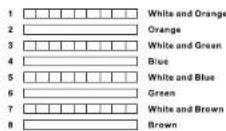
Direct interconnection method
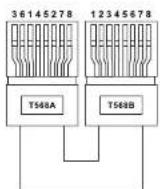
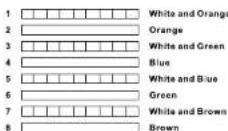
Cross interconnection method
I. Introduction
The BG-PSC8X2-REC HDMI Receiver is a tool which can extend your HDMI signal over 328ft/100meters to a compatible display. It is designed to accept a HDBaseT signal which can be transmitted by category cable. It also supports bi-directional IR and RS232.
II. Features
- POE(Power Over Ethernet)function support, either TX or RX powered 24V@1A,another don't need power form the DC jack. POE Power Consumption less than 10W. ✗ See the description 1
- Use single UTP LAN cable (CAT-5E/6) to substitute HDMI cable to achieve long distances transmission.
- UTP cable termination follows the standard of IEEE-568A or IEEE-568B
- Transmission distance: ×Over CAT6 cable 100 meters: 1080P @60Hz36bit; 3D1080P@30Hz36bit; 70 meters: 1080P @60Hz@48bit; 1080P@120Hz@24bit; 3D1080P@60Hz@36bit; 4K x 2K@30Hz@24bit.
- Support display resolutions up to 4K x 2K@60Hz
- Full HD support: 1080p@60Hz@48 bit/pixels, 1080p@120Hz@24 bit/pixels, 3D 1080P60Hz and 4K x 2K@30Hz@24bit
- Transfer Bidirectional Infrared control signal together with the HDMI signal. ※ See the description 2.
- Transfer Bidirectional RS232 control signal together with the HDMI signal. ✉ See the description 3.
III. Package
- HDMI Extender Receiver 1PCS
- Wideband IR Tx 2PCS
- Wideband IR Rx 2PCS
- 24V1A DC Power Supply 1PCS
- Operation Manual 1PCS
- Phoenix Contact----2PCS
- Mounting ears 4PCS
IV. Specifications
- Frequency Bandwidth---- 2.97Gbps
- Receiver Input/Output Ports-- 1xHDMI Female port/2xCAT6
- Power Supply 1x IR Tx/1x IR Rx/1xPhoenix
- ESD Protection DC 24V 1A
Human Body Model: ±8kV (air-gap discharge) - Dimensions (mm)---- ± 4kV (contact discharge)
- Weight 00(W) X 100 (D) X 25 (H)
- Operating Temperature---- 320g x 2
- Storage Temperature---- 0°C \~ 40°C / 32°F \~ 104°F
- Relative Humidity---- -20°C \~ 60°C / -4°F \~ 140°F
- Power Consumption (Max) 20\~90% RH (Non-condensing)
10W
V. Operation controls and Functions
Receiver

- OUTPUT LED: The output status indicating lamp. This red LED illuminates when the TV plugs in with HDMI cable.
2.HDMI OUT: HDMI output port. This slot is where you connect the HDTV or monitor with HDMI cable.
- ETHERNET: This slot provides Internet signal from transmitter or to transmitter.
4.RS232: Phoenix jack provides Serial port control signal from transmitter or to transmitter.
5.DC IN: Plug the 24V DC power supply into the unit.
-
IR RX: Chanel 2 IR Receiver. Connect with Wideband IR Rx.
-
IR TX: Chanel 1 IR Transmitter. Connect with Wideband IR Tx.
-
LINK LED: The connection status indicating lamp.
※Illuminate: The Transmitter and Receiver are in good connections
✗ Flashing: The Transmitter and Receiver are in poor connections
Dark: The Transmitter and Receiver are in no connections
9.HD BaseT IN: Standard HD BaseT signal input port. Connect HD BaseT
transmitter with a UTP cable following the standard of IEEE-568A or IEEE-568B.
10.DATA LED: The data status indicating lamp.
※Illuminate: The HDMI signal with HDCP.
※Flashing: The HDMI signal without HDCP.
Dark: No HDMI signal.
Brand : BZBGear
Model : PSC8X2
Category : Audio/Video Accessories