ST-D6003.6-W - Security Camera Security Tronix - Free user manual and instructions
Find the device manual for free ST-D6003.6-W Security Tronix in PDF.


| Product Type | Indoor Color Dome Camera |
| Brand | Security Tronix |
| Model | ST-D6003.6-W |
| Image Sensor | 1/3" CMOS Digital Image Sensor |
| Effective Pixels (HxV) | 768 x 494 |
| Scanning System | NTSC |
| Horizontal Resolution | 600 TV Lines |
| Synchronization | Internal, Negative Sync |
| Minimum Illumination | 0.01 Lux (estimated) |
| Power Supply Requirement | 12 VDC, 500 mA (e.g., ST-PS12VDC1A or ST-PS12VDC2A) |
| Mount Type | 2-axis mounting bracket |
| Video Output | Composite, 75Ω coaxial cable |
| Special Features | Auto white balance, super back light compensation |
| Dimensions (Diameter x Height) | Approx. 4.33" x 3.15" (110 mm x 80 mm) |
| Weight | Approx. 0.35 kg (12.3 oz) |
| Indoor Use Only | Yes |
| Installation | Connect power and video, adjust lens direction |
| Maintenance | Clean lens with soft, dry cloth; avoid solvents |
| Safety Warnings | Risk of electric shock; no user-serviceable parts; use specified power source |
| Spare Parts / Repairability | Contact manufacturer or distributor for parts and service |
| Package Contents | Camera, installation manual |
Frequently Asked Questions - ST-D6003.6-W Security Tronix
User questions about ST-D6003.6-W Security Tronix
0 question about this device. Answer the ones you know or ask your own.
Ask a new question about this device
Download the instructions for your Security Camera in PDF format for free! Find your manual ST-D6003.6-W - Security Tronix and take your electronic device back in hand. On this page are published all the documents necessary for the use of your device. ST-D6003.6-W by Security Tronix.
USER MANUAL ST-D6003.6-W Security Tronix
THE IMAGE OF QUALITY
INSTALLATION MANUAL
ST-D6003.6 -B or -W
Indoor Color Dome Camera
With CMOS Sensor
PACKAGE CONTENTS
This package contains:
One ST-D6003.6 indoor color dome camera with CMOS sensor One installation manual
Note: The ST-D6003.6 requires a minimum 12VDC 500mA power supply such as the ST-PS12VDC1A or ST-PS12VDC2A.
PRODUCT DESCRIPTION
The ST-D6003.6 is an indoor color dome camera designed around a 1/3" CMOS sensor with 600TVL of resolution auto white balance and super back light compensation. The camera's size, packaging and 2-axis mount allow it to be easily and discretely installed. Its rich color, high definition, stability and resistance to jamming make it attractive for CCTV security applications.
SPECIFICATIONS
ST-D6003.6
Specifications (Typical)
| 1. Image Sensor | 1/3" CMOS Digital Image Sensor |
| 2. Pixels (HxV) | 768x494 |
| 3. Scanning System | NTSC |
| 4. Horizontal Resolution | 600TV Lines |
| 5. Synchronization | Internal, Negative Sync |
| 6. Minimum illumination | R4100 GHz 8.0GHz R6W |
INSTALLATION AND OPERATION

This symbol is intended to alert the user to the presence of important operating and maintenance (servicing) instructions.

This symbol is intended to alert the user to the presence of uninsulated "dangerous voltage" within the product's enclosure that may be of sufficient magnitude to constitute a risk of electrical shock.
CAUTION: To reduce the risk of electrical shock do not remove the cover or back of this unit. No user serviceable parts are inside.
CAUTION: To prevent electric shocks and risk of fire hazards, do not use other than specified power source.
1. UNPACKING and HANDLING
Each unit is shipped assembled and factory tested.
Ensure that all accessories are removed from the container before discarding packing material
2. MECHANICAL INSPECTION
Inspect the front and rear of the equipment for shipping damage. Make sure the equipment is clean, and no connectors are broken, damaged, or loose. If equipment appears to be damaged or defective please contact your distributor or SecurityTronix at 1-610-429-1511 for assistance.
3. SPECIAL ATTENTION
a. The installer must comply with electrical safety standards. There must be sufficient space between the camera's power supply and video line and any high voltage
4. WIRING CONNECTIONS
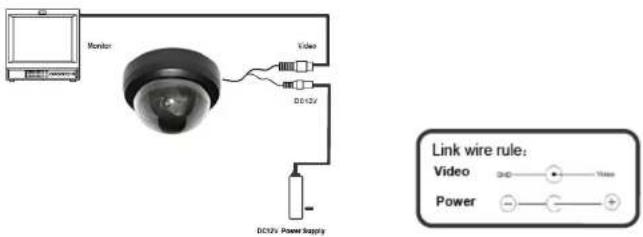
a. Connect the power supply's DC plug to the camera's power outlet.
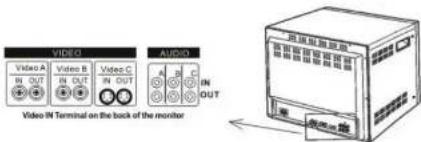
b. Connect the camera to the monitor with a 75Ω coaxial video cable.
c. Connect power supply's AC plug to a suitable AC power outlet.
d. Adjust the lens direction according to the required surveillance area and environment.
5. TROUBLESHOOTING
a. No picture after applying power - (i) check all plugs and cables are securely connected to the proper connectors; (ii) ensure your power supply is providing the correct voltage and current.
b. The picture has ripples – (i) check to see if the power supply is experiencing AC ripple, if so a filter may be required; (ii) determine if the monitor is faulty; (iii) determine if other peripheral equipment is causing ripple and if so make the necessary adjustments.
c. The picture background continuously changes color - a fluorescent lamp's magnetic field may cause color roll, therefore, reduce the number of fluorescent lamps or increase the distance between the camera and the lamps.
d. The picture appears smeared – (i) the power supply voltage level may be unstable, therefore, try another power supply; (ii) ensure the cables are correctly connected and/or the cables are of the correct impedance.
e. Other interference may require a SecurityTronix ground loop isolation filter.
f. Additional troubleshooting assistance can be found on-line at www.securitytronix.com in addition to support from SecurityTronix sales engineers at 1-610-429-1511.
Brand : Security Tronix
Model : ST-D6003.6-W
Category : Security Camera