
BI-45W-RL - Television Angler - Free user manual and instructions
Find the device manual for free BI-45W-RL Angler in PDF.


| Product Type | 14-inch Bi-color LED Ring Light |
| Brand | Angler |
| Model | BI-45W-RL |
| Color Temperature Range | 2700 K to 5600 K (adjustable in 100 K increments) |
| Brightness Range | 0% to 100% (adjustable in 1% increments) |
| CRI (Color Rendering Index) | 98 (at 3200 K and 5600 K) / 96 (at 4400 K) |
| TLCI (Television Lighting Consistency Index) | 98 (at all color temperatures) |
| LED Chip Type | SMD (Surface-Mount Device) bi-color LEDs |
| Cooling System | Passive (ventilation slots) |
| Housing Material | ABS Plastic |
| Light Intensity (at 3 ft, approximate) | 3200 K: 666 lux; 4400 K: 1120 lux; 5600 K: 782 lux |
| Expected Lamp Life | 22,000 hours |
| Fixture Diameter | 14 in (35.6 cm) outer |
| Fixture Dimensions (H x Depth) | 17.25 x 1.4 in (43.8 x 3.5 cm) |
| Fixture Weight | 1.1 lb (0.5 kg) |
| Light Stand Maximum Height | 60 in (152.4 cm) |
| Light Stand Minimum Height | 16 in (40.6 cm) |
| Light Stand Number of Sections | 4 |
| Top Mount (Stand) | 5/8 in stud with 1/4-20 male thread |
| Power Input Connector | Barrel connector (AC adapter) |
| Power Sources | AC adapter (100-240 V AC, 50/60 Hz) or NP-F rechargeable battery (7.4 V) |
| Maximum Power Consumption | 45 W |
| USB Output Power | 5 V, 2 A |
| Smartphone Bracket Maximum Width | 3.2 in (8.2 cm) |
| Remote Control Type | Infrared (IR) remote with line-of-sight operation |
| Remote Control Range | Approximately 50 ft (15.2 m) |
| Warranty | 1 year limited warranty |
| Cleaning Instructions | Use only a soft, dry cloth for cleaning; avoid liquids and solvents. |
| Safety Precautions | Keep away from water, flammable gases/liquids, and high temperatures. Do not disassemble. |
Frequently Asked Questions - BI-45W-RL Angler
User questions about BI-45W-RL Angler
0 question about this device. Answer the ones you know or ask your own.
Ask a new question about this device
Download the instructions for your Television in PDF format for free! Find your manual BI-45W-RL - Angler and take your electronic device back in hand. On this page are published all the documents necessary for the use of your device. BI-45W-RL by Angler.
USER MANUAL BI-45W-RL Angler
14 in. LED Bi-color Ring Light
and Light Stand
BI-45W-RL
INSTRUCTIONS
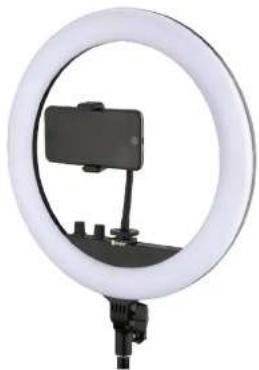
natural_image
Circular ring light fixture with a smartphone mounted on a stand, no visible text or symbols
angler®
Thank you for choosing Angler.
The Angler BI-45W-RL is a 14-inch ring light that's ideal for lighting vlogs and interviews, and self-lighting influencer videos and home broadcasts. Its bi-color SMD LEDs are housed in a diffuser that softens and spreads the beam for a flattering single-shadow light that's bright and color accurate.
This ring light runs on battery or AC power so it's as effective in the field as it is in the office or at home. Color temperature adjustment from 2700 to 5600 K lets you light subjects with the warmth of a tungsten bulb, bright daylight, and everything in between. Create realistic lighting or match the ambient light of your environment. For convenient setup wherever you want to record or chat, a four-section light stand is included with height adjustment from 16 to 58.5 inches.
The included flex arm with a spring-loaded smartphone clamp puts your phone at the center of the action. The light is designed with shoe and 1/4-20 accessory mounts.
Precautions
Please read and follow these instructions, and keep this manual in a safe place.
Keep this unit away from water and any flammable gases or liquids.
Do not leave the device in a closed vehicle under the sun or in other areas subject to very high temperatures.
Do not attempt to disassemble or repair the equipment. There are high-voltage components inside the unit. Failure to observe this precaution could result in electric shock or product malfunction. This will void the warranty, and Angler will not be responsible for any damage.
▶ Use only the correct, recommended voltage.
Make sure the unit is powered off when plugging it into a power source.
▶ Disconnect the power cord when not in use.
▶ Use only parts provided by the manufacturer.
▶ Handle this product with care.
▶ Clean this product with only a soft, dry cloth.
Keep this unit away from children.
Make sure the item is intact and that there are no missing parts.
All images are for illustrative purposes only.
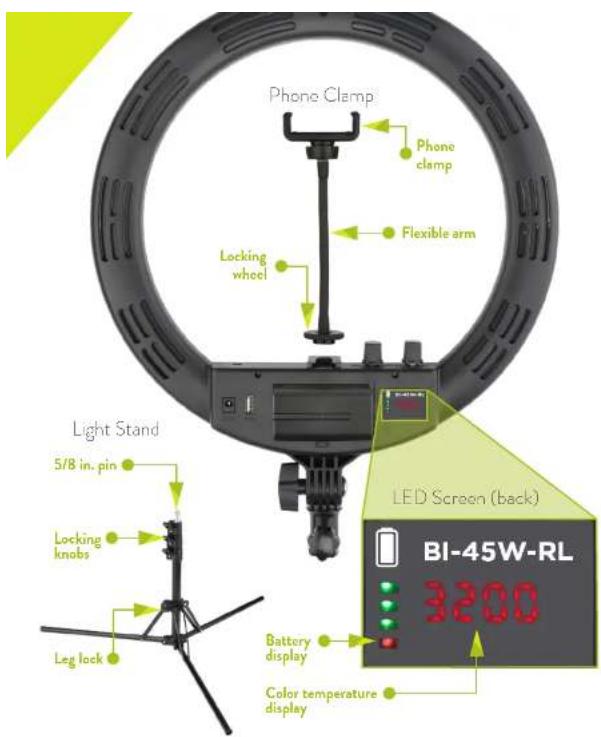
Overview


① Keyhole suspension slot
② Heat vents
1/4-20 accessory
socket
- Shoe mount
5 AC power socket
6 USB charging port
7 NP-F battery
Battery release
button
9 LED screen (b 10 Locking knob

Setting Up the Light Stand
- Loosen the leg lock, and unfold the legs to the desired angle. Tighten the leg lock until secure.
Important! Set the legs at a wide enough angle to ensure stability of the ring light and attached camera or accessories.
- Loosen the center column locking knobs and adjust the stand to the desired height. Tighten the locking knobs until secure.
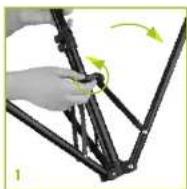
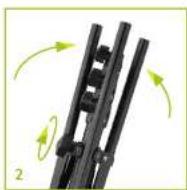
Packing Up the Light Stand
-
Loosen the locking knobs and collapse the sections to the minimum height.
-
Loosen the leg lock and fold the legs up so they're parallel to the shaft.
Mounting the BI-45W-RL
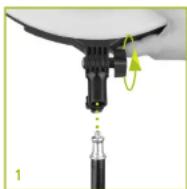
- Loosen the locking knob, and place the receiver onto the light stand's 5/8-inch pin.
- Make sure the receiver fits completely over the pin before you tighten the locking knob. If it doesn't, continue to loosen the locking knob until the fixture drops down around the pin.
- Tighten the locking knob until the ring light is secure.
Powering On the Light
AC Power
When operating the light on AC power, remove the batteries.
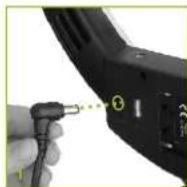
- Plug the power adapter into the light, and plug the power cord into an available outlet. OFF will appear on the control screen to indicate the light is receiving power.
- Press the Power/Brightness knob. Adjust the brightness and color temperature knobs to desired setting.
Battery Power
A 7.4 V NP-F type battery is recommended for the BI-45W-RL ring light.
When operating the light on battery power, unplug the power adapter from the light.
-
Place an NP-F battery into the battery plate, and slide it toward the contacts until locked in place. OFF will appear on the control screen to indicate the light is receiving power.
-
Press the Power/Brightness knob.
The battery display in the LED screen will show the remaining battery charge in 25% increments.
When the bottom red LED is the only illuminated light, the battery is low and should be recharged or replaced.
To remove the battery, press the battery release button, and slide the battery out of the battery compartment.


Adjusting the
Color Temperature
and Brightness
Color Temperature
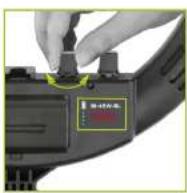
Turn the color temperature knob to adjust the color temperature from 2700 to 5600 K in 100 K increments.
Brightness
Turn the dimmer knob to adjust the output level from 0% to 100% in 1% increments.

Using the Memory Function
When you power on the light, it will resume operation with the color temperature and brightness that are set in the memory. To set the memory function, follow these steps.
Color Temperature
- Turn the color temperature knob to set the color temperature.
- Press and hold the color temperature knob until the color temperature display blinks. The color temperature is now set in the memory.
Brightness
- Turn the brightness knob to set the light's output.
- Press and hold the knob until the brightness display blinks. The brightness is now set in the memory.
- When you release the knob, the light will power down. Press the Power/Brightness knob again to resume operation.
Attaching a Smartphone
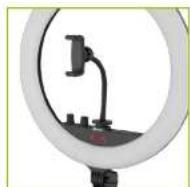
- Insert the phone into the spring-loaded clamp.
- Attach the flex arm smartphone holder to the shoe mount by sliding it into the shoe and tightening the locking wheel.
- Loosen the locking knob at the base of the phone clamp, and adjust the phone's orientation. Then tighten the locking knob until secure.
Adding Accessories
Use the 1/4-20 threaded socket and the shoe mount to add small photo and video accessories.
Remote Operation
The included remote uses an infrared beam to operate the ring light. For remote operation, line of sight is required, and the maximum range is approximately 50 feet.
Power Button
Press the power button to turn on the ring light. The light will power up with the most recent color temperature and brightness settings.
Press again to power off the light.
Daylight Button
Pressing the daylight button sets the light to 5600 K daylight-balance color temperature at 100% brightness.
Auto Buttons
Use the Auto Buttons to automatically set the light to a warm, neutral, or cool color temperature at either 100% or 50% brightness. Press again to power off the light.
Warm: 3200 K
Neutral: 4400 K

Cool: 5600 K
Brightness Up/Down
The brightness control lets you adjust the light's brightness from 0% to 100% in 1% increments.
Color Temperature Control
The color temperature control adjusts the color temperature from 2700 to 5600 K in 100 K increments.
Save Button
To save the current brightness and color temperature, press and hold the save button until the display blinks. The light will recall these settings the next time it's powered up. You can also press the save button at any time to recall the settings.
Note: Any subsequent setting adjustments made manually will override these stored settings.
Recycling Lithium-Ion Batteries
Lithium-ion batteries are recyclable. You can help preserve the environment by returning your used rechargeable batteries to a collection and recycling location near you.
For more information about recycling rechargeable batteries, call the Call2Recycle helpline at 1-877-723-1297, or visit www.call2recycle.org.
Specifications
| LIGHT FIXTURE | |
| LED CHIP TYPE IMG | |
| COLOR TEMPERATURE 2700 TO 5600 K | |
| COLOR ACCURACY STANDARD | CRI: 98 (3200 K) / 96 (4400 K) / 98 (5600 K)TLCI: 98 (3200 K) / 98 (4400 K) / 98 (5600 K) |
| COOLING SYSTEM ABOVE | |
| DIMMING TEL. 0% TO 100% | |
| DISPLAY LED | |
| HOUSING MATERIAL ABS | PLASTIC |
| LIGHT INTENSITY 93 FT. | 3200 K: 666 LX4400 K: 1120 LX5600 K: 782 LX |
| EXPECTED LAMP LIFE 22,000 HR. | |
| DIAMETER (L IN. Dx CM) | |
| DIMENSIONS (H = D) 17.25 × 1.4 IN (43.8 × 3.5 CM) | |
| WEIGHT (L IN. 0.5 KG) | |
| LIGHT STAND | |
| STAND TYPE OTHER AS PURPOSE STAND | |
| NUMBER OF SECTIONS | |
| MAXIMUM WORKING HEIGHT | 60 IN. (152.4 CM) |
| MINIMUM HEIGHT | (39.9 CM) |
| TOP MOUNT | 5/8 IN. STUD WITH 1/4-20 MALE THREAD |
| MOUNTING | |
| FIXTURE MOUNT | |
| TILT | |
| CONNECTORS | |
| BATTERY PLATE | |
| POWER INPUT CONNECTOR | BARREL |
| POWER OUTPUT CONNECTOR | USB STANDARD-A |
| REMOTE OPERATION | |
| REMOTE CONTROL TYPE | PROPRIETARY |
| FREQUENCY | |
| POWER | |
| AC INPUT POWER | 240 V AC, 50/60 HZ |
| DC INPUT POWER | 4 V DC |
| POWER SOURCE | PTER, NP-F BATTERY |
| MAX POWER CONSUMPTION | 45 W |
| USB OUTPUT POWER | 2 A |
| SMARTPHONE BRACKET | |
| MAXIMUM WIDTH | (8.2 CM) |
| LENGTH | |
One-Year Limited Warranty
This Angler product is warranted to the original purchaser to be free from defects in materials and workmanship under normal consumer use for a period of one (1) year from the original purchase date or thirty (30) days after replacement, whichever occurs later. The warranty provider's responsibility with respect to this limited warranty shall be limited solely to repair or replacement, at the provider's discretion, of any product that fails during normal use of this product in its intended manner and in its intended environment. Inoperability of the product or part(s) shall be determined by the warranty provider. If the product has been discontinued, the warranty provider reserves the right to replace it with a model of equivalent quality and function.
This warranty does not cover damage or defect caused by misuse, neglect, accident, alteration, abuse, improper installation or maintenance. EXCEPT AS PROVIDED HEREIN, THE WARRANTY PROVIDER MAKES NEITHER ANY EXPRESS WARRANTIES NOR ANY IMPLIED WARRANTIES, INCLUDING BUT NOT LIMITED TO ANY IMPLIED WARRANTY OF MERCHANTABILITY OR FITNESS FOR A PARTICULAR PURPOSE. This warranty provides you with specific legal rights; and you may also have additional rights that vary from state to state.
To obtain warranty coverage, contact the Angler Customer Service Department to obtain a return merchandise authorization ("RMA") number, and return the defective product to Angler along with the RMA number and proof of purchase. Shipment of the defective product is at the purchaser's own risk and expense.
For more information or to arrange service, visit www.anglerights.com or call Customer Service at 212-594-2353.
Product warranty provided by the Gradus Group. www.gradingroup.com
Angle is a registered trademark of the Gebras Group © 2017 Gebras Group LLC. All Rgsm Revenue

ANGLER® A Gradus Group Brand
G14
- Thank you for choosing Angler.
- Precautions
- Setting Up the Light Stand
- Packing Up the Light Stand
- Mounting the BI-45W-RL
- Powering On the Light
- AC Power
- Battery Power
- Color Temperature
- Brightness
- Using the Memory Function
- Attaching a Smartphone
- Adding Accessories
- Remote Operation
- Power Button
- Daylight Button
- Auto Buttons
- Brightness Up/Down
- Color Temperature Control
- Save Button
- Recycling Lithium-Ion Batteries
- One-Year Limited Warranty
Brand : Angler
Model : BI-45W-RL
Category : Television