
HDI - Audio Equipment Radial Engineering - Free user manual and instructions
Find the device manual for free HDI Radial Engineering in PDF.


| Product Type | High Definition Studio Direct Box |
| Brand | Radial Engineering |
| Model | HDI |
| Dimensions (L x W x H) | 8.25" x 8.25" x 3.5" (21 x 21 x 8.9 cm) |
| Weight | 5.05 lbs (2.29 kg) |
| Power Supply | 100-200 VAC, 0.45 A, 50/60 Hz via IEC connector |
| Frequency Response (Line Output) | 1 Hz – 100 kHz (+0.25/-3 dB) |
| Frequency Response (Mic Output) | 10 Hz – 80 kHz (+0.25/-3 dB) |
| Dynamic Range | 112 dB (20-20k, unweighted, referred to +25 dBu) |
| Signal-to-Noise Ratio | 91 dB (20-20k, unweighted, referred to +4 dBu) |
| THD+N | 0.3% @20 Hz, 0.22% @100 Hz, 0.01% @1 kHz (+4 dBu In) |
| Maximum Input (1/4" TS) | +5 dBu (3 VAC RMS, 8.4 V peak-to-peak) |
| Maximum Input (3.5mm) | +25 dBu (7 VAC RMS, 20 V peak-to-peak, Level at 12:00) |
| Maximum Output (Line-Level XLR) | +25 dBu (1% THD at 1 kHz) |
| Maximum Output (Mic-Level XLR) | +3.7 dBu (1% THD at 1 kHz) |
| Maximum Output (1/4" Processed) | +8 dBu (approx. unity gain with Level at 12:00) |
| Input Connectors | 1/4" TS (front and rear), 3.5mm stereo (synth) |
| Output Connectors | XLR Line-Level, XLR Mic-Level (both Jensen transformer isolated), 1/4" TS Processed, 1/4" TS Thru |
| Front Panel Controls | Level, Color, Presence, Hi-Z switch, Opto compressor (3-position), HPF (3-position), Ground Lift, -15 dB Pad, Output Meter |
| Construction | 14-gauge steel chassis, 1/4" aluminum front panel |
| Warranty | 3-year transferable limited warranty |
Frequently Asked Questions - HDI Radial Engineering
User questions about HDI Radial Engineering
0 question about this device. Answer the ones you know or ask your own.
Ask a new question about this device
Download the instructions for your Audio Equipment in PDF format for free! Find your manual HDI - Radial Engineering and take your electronic device back in hand. On this page are published all the documents necessary for the use of your device. HDI by Radial Engineering.
USER MANUAL HDI Radial Engineering
High Definition Studio Direct Box
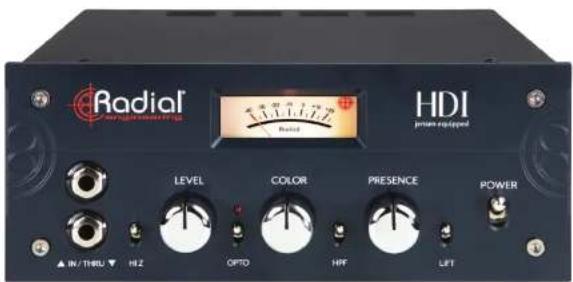
Radial HDI Owner's Manual
Table of Contents
| Overview | 2 |
| Features | 3-4 |
| Making Connections | 5 |
| Connecting a Mono Instrument | 5 |
| Connecting to the Synth Input | 6 |
| Connecting to the Outputs | 6 |
| Using the Front Panel Controls | 7-8 |
| Additional Applications | 9-11 |
| Specifications | 12 |
| Rack Mounting the HDI | 13-14 |
| Warranty | Back Cover |
INTRODUCTION
Thank you for purchasing the HDI, a unique and powerful direct box and studio tool that allows you to create amazing audio for recording or live performance.
We encourage you to read through this manual to familiarize yourself with the many features available.
OVERVIEW
A note from the HDI design engineer W.C. "Hutch" Hutchison
The HDI Direct Box has its roots in the experiences of a live sound and recording engineer. We know what an engineer typically needs to process the signal from a conventional DI to make it sit in a mix. We also know that sometimes that pure clean sound is exactly what is called for and sometimes we wish it sounded more like a great old tube amp. Sometimes, we struggle to make it sparkle the right way and sometimes we struggle to get a big lush rich sound that would be appropriate for this particular song.
In respect to the classic clean-ness of traditional DI's, it had to be clean, but could we make it even cleaner and lower noise than traditional approaches. Could we make it cleaner, and more transparent and truly clear while retaining the musicality? One of the goals of the HDI was to blur the line between musical instrument and recording hardware so that this DI could become an extension of the instrument itself.
Could we give it character and color? Sure. Many are the colors in the spectrum and many characteristics that are not so tasteful. So, the real question was, could we provide a range of colors that seem to be the most appealing and avoid a lot of characteristics that might be useless or just too subtle to make any significant difference to the mix. Even more to the point, will the resulting sound inspire the musician, make the engineer smile and make the listener wanting more of that.
We also wanted it to be simple to use, so that the player or engineer could dial up a perfectly good sound in 5 to 10 seconds and hit the record button. "Instant gratification" is intentional and perhaps the HDI's best "feature". An elegant set of controls is the key to that.
The result of this design process is a studio tool that combines the functionality of a direct box with the musicality of a guitar amplifier, opening up a unique sonic landscape which any instrumentalist can experiment with to create colorful studio recordings and memorable live performances alike.
FRONT PANEL FEATURES
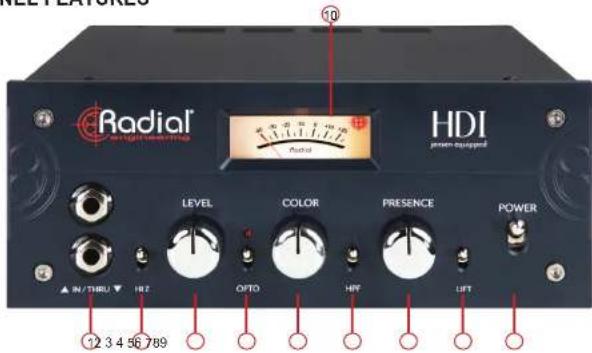
- IN/THRU: IN (top jack) - Standard 1/4" TS input for mono instruments. When in use this input overrides the rear-panel 1/4" input. THRU (bottom jack) - 1/4" TS unbuffered passthrough to feed the input of a stage amplifier.
- HI-Z: Adjusts the input impedance at the 1/4" inputs for different tonal options when using instruments with passive pickups or piezo transducers. Lower position is 200k Ohms, higher position is 2Meg Ohms.
- LEVEL: Input level control which also allows you to drive the distortion channel of the Color control for greater saturation and coloration. 12 o'clock nominal position
- OPTO: 3-position switch controls an internal opto compressor circuit, providing smooth and natural dynamic control when the Color knob is set to the clean channel (7 o'clock to 12 o'clock range). Note that the Opto LED will only illuminate to indicate when gain reduction is being applied.
- COLOR: Blends between an ultra-clean DI channel (when turned fully counter-clockwise) and a unique distortion channel that adds transformer saturation and amp-like distortion as this control is turned clockwise. The Color control is also dependent on the Level control, which in this case be viewed as a 'drive' control. There is an interesting and often useful range of colors depending
REAR PANEL FEATURES
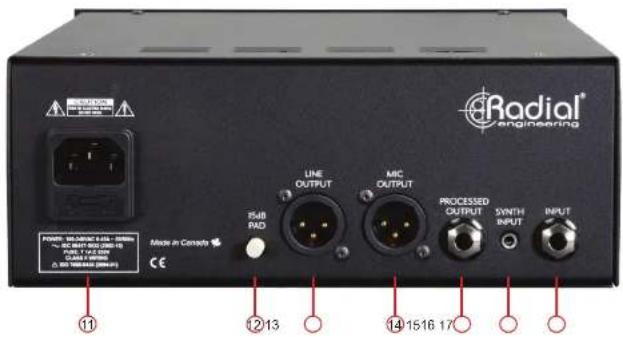
- POWER INPUT: Connection for IEC power supply cable (included). Ensure the front panel Power switch is in the off (down) position before connecting the HDI to power.
- 15dB PAD: Reduces the signal level at the Line-Level XLR output to avoid clipping the input stages of recording interfaces with lower maximum input settings.
- LINE-LEVEL OUTPUT: Independently isolated Jensen transformer-equipped XLR output designed to connect directly to the line-level inputs of a recording console or audio interface, bypassing the need for a separate preamplifier in the signal chain.
- MIC-LEVEL OUTPUT: Typical direct box balanced low-level XLR output, for connection to stage snakes or the mic inputs of a recording console or audio interface. This output follows the Line-Level XLR Output, and features an additional premium Jensen transformer for isolation and signal reduction to mic-level.
- PROCESSED OUTPUT: Unbalanced 1/4" TS output that follows the tone-shaping circuitry of the HDI, allowing you to easily feed an affected signal to a stage amplifier, amp modeling unit, or any device with instrument-level inputs.

True to the Music
MAKING CONNECTIONS
Before connecting to the HDI, it is always best to turn your audio system levels down in order to prevent plug-in transients that could damage more sensitive components such as high frequency drivers.
POWERING THE HDI
The HDI features a rear-panel IEC input for the included power supply. Once connected to power, flip the front-panel POWER switch up to the on position: the Output Meter LED will illuminate to indicate that the HDI is powered on and ready for use.
CONNECTING A MONO INSTRUMENT TO THE HDI
The HDI features both front and rear-panel 1/4" TS inputs for connecting any mono instrument, from bass to acoustic guitar, or any instrument in between. When the HDI is rack mounted, the rear panel input can be used for a hard-wired connection to a patch bay or an input switcher, leaving the front panel input open to allow for spontaneous connection to the HDI without having to repatch any cables. The front panel input takes priority - as soon as an instrument cable is plugged into it, the rear panel input will be automatically disabled.
If you are using an instrument amplifier in conjunction with the HDI in the studio or on stage, a Thru Output is provided to feed a clean split of the input signal to your amp. This output uses a standard 1/4" TS instrument cable.

flowchart
graph LR
    A["Guitar"] --> B["Radiofer"]
    B --> C["HD1"]
    C --> D["XLR"]
    D --> E["Instrument"]
    style A fill:#f9f,stroke:#333
    style B fill:#ccf,stroke:#333
    style C fill:#cfc,stroke:#333
    style D fill:#fcc,stroke:#333
    style E fill:#cff,stroke:#333
CONNECTING THE OUTPUTS OF THE HDI
Unlike most direct boxes which only feature a balanced mic-level output, the HDI provides dual XLR outputs: one which is a typical mic-level, and another which provides a line-level signal up to +25dBu. While the mic-level output allows you to connect to microphone snakes on stage or the mic inputs of a mixing board, the line-level XLR output provides the option to bypass an additional preamplifier stage and connect directly to the line inputs of a recording console or audio interface. Both of these connections require balanced XLR cables, which can be run distances up to 100m (300ft) without signal loss or degradation.
The XLR connections on the HDI are individually isolated with premium Jensen transformers, so both outputs can be used simultaneously if desired, allowing you to run the line-level output directly to your recording interface, while feeding the mic-level output through your favorite microphone preamp.
The HDI also features a Processed Output, which is an unbalanced 1/4" TS connection that provides the option for signal to be fed to a stage amplifier or an amp profiler unit while retaining the character and tone imparted by the front panel controls of the HDI. This can be used to add distortion and saturation before feeding a clean amplifier, or to impart some transformer warmth before connecting to a digital amp modeler. The Processed Output can be used at the same time as the balanced XLR outputs and the front panel Thru output.
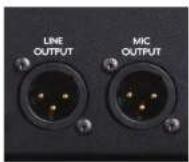
The HDI's balanced outputs

USING THE FRONT PANEL CONTROLS CONTINUED
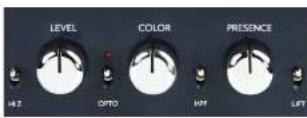
HI-Z
The HI-Z control adjusts the impedance of the front and rear panel 1/4" Inputs. This switch mirrors the functionality of older amplifiers which have Hi and Low inputs, giving you greater tonal flexibility when using instruments with passive pickups or piezo transducers. In the lower position the input impedance of these jacks is 200k Ohms, while the upper position increases this to 2Meg Ohms. Once you have adjusted the other settings on the HDI, you can try an A/B comparison test between the higher and lower input impedance, as you may find that this will affect the resonance of your pickups and result in a brighter sound that may complement the sound of your instrument.

LEVEL
The Level control provides an input gain stage for the HDI: turning up this knob will drive your signal harder into the Opto compressor and the distortion channel associated with the Color control. The remaining controls on the front panel will have minimal impact on the the amount of gain applied to the signal, so the Level control is also helpful for setting your output levels, which are displayed on the Output Meter.
OPTO
The Opto switch is a 3-position control for the internal opto compressor circuit. In the lowest position, this feature is bypassed. The middle and upper positions of this switch will both apply smooth compression to the clean channel of the Color control, providing a 'safety switch' for the engineer to control any large jumps in level during a performance. The difference between the middle and upper positions of the switch is that the upper position has the lowest threshold for gain reduction, meaning that the compressor will kick in sooner at this setting.
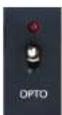
Note that the LED for the Onto compressor, does not illuminate when the switch is arranged. this LED actually
Under the hood: The Color control
In clean mode, with the Color knob turned more towards the counter-clockwise side of the dial, a substantial amount of negative feedback is applied after the Jensen transformer, helping to correct for any resulting coloration and providing an incredibly transparent, transformerless sound.
As the Color knob is turned clockwise towards the distortion channel, this transformer is instead driven into variable saturation, and a separate winding is biased as the knob is turned up, which increases even-order harmonics. This is particularly pronounced in the low frequencies.
This transformer saturation is only a part of the design of the distortion channel, as the main component implements a multi-stage circuit topology similar to that of a tube based guitar amplifier, including triode gain stages and a phase splitter. This tube amp topology employs asymmetrical clipping, where the last s distorts first, and as the input levels are increased, earlier stages of the circuitry begin to clip as well, reacting much the same way as a typical amplifier would, and resulting in a very natural and musical sounding level of grit and distortion.
tage
HPF
Following the Color control is a 3-position switch that adjusts the High-Pass Filter settings. This control is designed to help compensate for the additional low frequency content which can build up whe certain types of distortion and saturation are applied to the signal. For this reason, the HPF only affects signals processed through the distortion channel of the Color control: signals processed through the clean side of the HDI are unaffected by this switch.

When the Color control turned clockwise to add saturation and distortion, engaing the HPF can often provide an instant solution to help the resulting sound fit better within a mix. In the lowest position, this feature is bypassed: the middle position rolls off frequencies below 40Hz , and the top position rolls off from 100Hz . Both rolloffs have a slope of -6dB/octave.
PRESENCE
The final variable adjustment on the HDI is the Presence control, which emphasizes the high and high-mid

True to the Music
THE REAR PANEL PAD SWITCH
After spending some time adjusting the front panel controls to find your optimal tone through the HDI, you may find that the Line-Level XLR output is too hot for the inputs of the next device in your signal chain, whether it is a recording interface or another line-level signal processor. The HDI is capable of producing up to +25dBu at the Line-Level output, which can sometimes distort the inputs of other audio equipment.
While it is possible to lower the output of the HDI by turning down the Level control, this in turn will cause less saturation on the distortion channel of the Color control, and can alter the resulting tone that you've carefully constructed.
The 15dB pad on the rear panel of the HDI offers an alternative solution: engaging this switch will lower the Line-Level output only while preserving the relationship between all of the front panel controls, allowing you to avoid distorting your audio interface while keeping your tone intact.
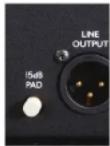
The 15dB Pad switch
ADDITIONAL APPLICATIONS
While this manual has discussed the general use cases for the HDI, this unique product can be used in a number of other creative ways. This section briefly describes some additional applications for the HDI.
Overdrive a mic preamp with the HDI - feed the line-level output of the HDI into your favorite microphone preamp (start with your levels turned down). Some preamps can sound wild when overdriven. Try following the preamp with a high-pass filter set at around 8kHz, or alternatively try using the impulse response of a guitar cabinet after the preamp.
ADDITIONAL APPLICATIONS CONTINUED
Using distortion pedals before or after the HDI - You can use standard distortion pedals in front of the HDI to generate some interesting tones, or try connecting the 1/4" Processed Output into a distortion pedal or chain of pedals that then feed a guitar amplifier.

flowchart
graph LR
    A["Red Guitar"] --> B["Radio/Diol"]
    B --> C["1/4" Processed Output"]
    C --> D["Amplifier"]
Connecting an instrument and an amplifier to the HDI
Using the 1/4" Processed Output in conjunction with the Thru Output - While the 1/4" Thru connection would typically feed your stage amplifier, try connecting an echo pedal to the 1/4" Processed Output and feeding this signal to a second amplifier, producing a wet/dry setup with the HDI.


True to the Music
ADDITIONAL APPLICATIONS CONTINUED
Use the EXTC-SA with the HDI - With the help of the EXTC-SA, you can simultaneously record to two channels on your recording interface, one that includes your favorite pedals, and another that includes only the tone from the HDI. The EXTC-SA has line-level inputs and outputs, while also allowing you to directly connect up to two effects loops with guitar pedals directly to the unit. This allows you to use the HDI line-level output to feed your effects pedals while the HDI mic output sends a clean signal to your recording interface. Try blending the two tracks together or shifting the phase for a unique sonic combination.

flowchart
graph LR
    A["Red Guitar"] --> B["Radiofoil"]
    B --> C["HD1"]
    C --> D["XLR Line Output"]
    D --> E["Reamp"]
    E --> F["Reincler"]
    F --> G["Roller"]
    G --> H["XLR Mic Output"]
    H --> I["Reincler"]
Using the HDI in conjunction with the Radial EXTC-SA
RACK MOUNTING THE HDI
HDI SPECIFICATIONS\*
SPECIFICATIONS
Frequency Response - Line Output: 1Hz \~ 100kHz +0.25/-3dB, 20Hz \~ 20kHz +/-0.1dB
Frequency Response - Mic Output: 10Hz \~ 80kHz +0.25dB/-3dB
Dynamic Range: 112dB (20-20k, unweighted, referred to +25dBu)
S/N Ratio: 91dB (20-20k, unweighted, referred to +4dBu)
THD+N: 0.3% @20Hz, 0.22% @100Hz, 0.01% @1kHz (+4dBu In)
Minimum Gain - Level CCW: ......-3dB
Maximum Gain - Level CW: +31dB
Max Input 1/4" TS: +5dBu, 3 VAC RMS, 8.4 V Peak to Peak
Max Input 3.5mm: +25dBu, 7 VAC RMS, 20V Peak to Peak (Level @ 12:00)
Max Output Line-Level XLR: ....+25dBu (1% THD at 1kHz)
Max Output Mic-Level XLR: +3.7dBu (1% THD at 1kHz)
Max Output 1/4" Processed Out: +8dBu (Approx. unity gain with Level @ 12:00)
FEATURES
Level, Color, Presence, Ground Lift, -15dB Pad, Output Meter
Input Connectors: 1/4" TS (front and rear), 3.5mm Synth
Output Connectors: ....XLR Line / Mic, 1/4" TS Processed, 1/4" TS Thru
Hi-Z: 200k Ω / 2Meg Ω @ 1/4" Inputs
Opto: 6:1 ratio, max 8dB gain reduction
High-Pass Filter: 40Hz / 100Hz rolloff @ -6dB/octave
GENERAL
Construction: 14 gauge steel chassis, 1/4" aluminum front panel
Size (L x W x H): 8.25" x 8.25" x 3.5"
Weight: 5.05lbs
Conditions: For use in dry locations only between 5°C and 40°C
Power 100-200VAC 0.45A \~ 50/60Hz
HOW TO ATTACH RACK EARS TO THE HDI
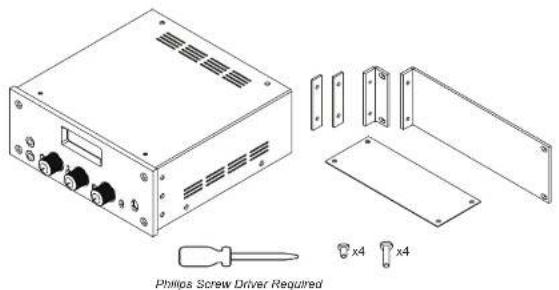
MOUNTING THE HDI IN A 19" RACK
①

- Remove 3 screws at both sides of the front panel. (6 screws in total).
- Remove all 4 rubber feet from the HDI.
PREPARING 2 HDI's FOR RACK MOUNTING
①

natural_image
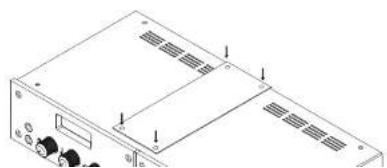
Isometric line drawing of a server rack with ports and ventilation slots (no text or labels)- Remove 3 screws from the outer side of each HDI (6 screws in total).
- Remove 2 screws from the top of each HDI and 2 screws from the bottom.
- Remove all 8 HDI Rubber feet.
②
natural_image
Technical line drawing of a computer drive chassis with mounting holes and ventilation slots (no text or symbols)- Use 8 small screws to secure the HDI's to each other with the large rectangular braces on the top and bottom of the units.
RADIAL ENGINEERING LTD.
3 YEAR TRANSFERABLE WARRANTY
RADIAL ENGINEERING LTD. ("Radial") warrants this product to be free from defects in material and workmanship and will remedy any such defects free of charge according to the terms of this warranty. Radial will repair or replace (at its option) any defective component(s) of this product (excluding finish and wear and tear on components under normal use) for a period of three (3) years from the original date of purchase. In the event that a particular product is no longer available, Radial reserves the right to replace the product with a similar product of equal or greater value. To make a request or claim under this limited warranty, the product must be returned prepaid in the original shipping container (or equivalent) to Radial or to an authorized Radial repair center and you must assume the risk of loss or damage. A copy of the original invoice showing date of purchase and the dealer name must accompany any request for work to be performed under this limited and transferable warranty. This limited warranty shall not apply if the product has been damaged due to abuse, misuse, misapplication, accident or as a result of service or modification by any other than an authorized Radial repair center.
THERE ARE NO EXPRESSED WARRANTIES OTHER THAN THOSE ON THE FACE HEREOF AND DESCRIBED ABOVE. NO WARRANTIES WHETHER EXPRESSED OR IMPLIED, INCLUDING BUT NOT LIMITED TO, ANY IMPLIED WARRANTIES OF MERCHANTABILITY OR FITNESS FOR A PARTICULAR PURPOSE SHALL EXTEND BEYOND THE RESPECTIVE WARRANTY PERIOD DESCRIBED ABOVE OF THREE YEARS. RADIAL SHALL NOT BE RESPONSIBLE OR LIABLE FOR ANY SPECIAL, INCIDENTAL OR CONSEQUENTIAL DAMAGES OR LOSS ARISING FROM THE USE OF THIS PRODUCT. THIS WARRANTY GIVES YOU SPECIFIC LEGAL RIGHTS, AND YOU MAY ALSO HAVE OTHER RIGHTS, WHICH MAY VARY DEPENDING ON WHERE YOU LIVE AND WHERE THE PRODUCT WAS PURCHASED.

- Radial HDI Owner's Manual
- INTRODUCTION
- OVERVIEW
- A note from the HDI design engineer W.C. "Hutch" Hutchison
- REAR PANEL FEATURES
- MAKING CONNECTIONS
- POWERING THE HDI
- CONNECTING A MONO INSTRUMENT TO THE HDI
- CONNECTING THE OUTPUTS OF THE HDI
- USING THE FRONT PANEL CONTROLS CONTINUED
- HI-Z
- LEVEL
- OPTO
- Under the hood: The Color control
- HPF
- PRESENCE
- THE REAR PANEL PAD SWITCH
- ADDITIONAL APPLICATIONS
- ADDITIONAL APPLICATIONS CONTINUED
- HDI SPECIFICATIONS\*
- SPECIFICATIONS
- FEATURES
- GENERAL
- PREPARING 2 HDI's FOR RACK MOUNTING
- RADIAL ENGINEERING LTD.
- YEAR TRANSFERABLE WARRANTY
Brand : Radial Engineering
Model : HDI
Category : Audio Equipment