71019 - Computers and Peripherals iPort - Free user manual and instructions
Find the device manual for free 71019 iPort in PDF.


| Product Type | USB Charging Module |
| Compatibility | iPort LuxePort BaseStation |
| Charging Ports | 1 USB-C (for iPad), 2 USB-A (5W each) or 1 USB-A (10W) |
| Power Supply | Included barrel connector power supply |
| Input Power | 120-240V AC, 50/60Hz (adapter) |
| Output Power | Up to 10W per USB-A port combined |
| Installation Method | Slide into BaseStation back slot |
| Under-Mount Installation | Optional with 5/8" (16mm) hole drilling |
| Mounting Hardware | Template and security foot included |
| Dimensions (Module) | Approx. 100 x 60 x 25 mm |
| Weight (Module) | Approx. 100 g |
| Material | Plastic and metal |
| Color | Black |
| Safety Features | Magnet warning; avoid credit cards and medical devices |
| Warranty | Refer to iPortproducts.com/warranty |
| Country of Origin | China (estimated) |
| Certifications | FCC, CE (estimated) |
| Operating Temperature | 0°C to 40°C |
| Storage Temperature | -20°C to 60°C |
| Included Accessories | Power adapter, template, security foot |
| Maintenance | Wipe with dry cloth; avoid liquids |
| Brand | iPort |
| Model | 71019 |
Frequently Asked Questions - 71019 iPort
User questions about 71019 iPort
0 question about this device. Answer the ones you know or ask your own.
Ask a new question about this device
Download the instructions for your Computers and Peripherals in PDF format for free! Find your manual 71019 - iPort and take your electronic device back in hand. On this page are published all the documents necessary for the use of your device. 71019 by iPort.
USER MANUAL 71019 iPort
The USB module was designed as an add on to your LuxePort BaseStation. The USB module utilizes a larger power supply to provide charging to your iPad while docked to the Luxeport BaseStation as well as 2 additional 5W USB devices such as 2 phones, or 1 additional 10W device such as a tablet.
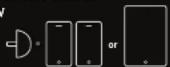
INSTALLING USB MODULE INTO BASESTATION
Step 1
Insert the barrel connector from the provided power supply into the bottom of the USB module.

Step 2
Remove the USB-C cable from the BaseStation if installed and slide the USB Module into the back of the BaseStation.

Once completed, additional devices can now be charged.
UNDER MOUNT USB MODULE WIRE (OPTIONAL)
Step 1
Remove security foot from the BaseStation and place in the desired location. For assistance in installation of the security foot, reference the BaseStation Manual.

Step 3
Mark the center hole and use a 5/8" (16mm) spade bit to drill through the table or desk.

Step 4
Run the power cable through the table and connect to the USB module.
natural_image
Pure electrical circuit lines without any symbolsStep 2
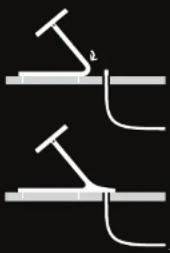
To properly align drill hole, insert the provided template into the security foot as shown.

Step 5
Secure the BaseStation to the foot* and Slide USB module into place covering the hole for the cables.
* Refer to BaseStation Manual

iPort
For more help and info
please visit:
lportproducts.com/luxeport
IPort
991 Calle Amanacer
San Clemente, CA 92673
United States of America
+1 949 226 5222


CAUTION: This product contains
magnets. Do not place in direct
proximity with magnetically sensitive
objects such as credit cards or
exposed hand drives. Persons with
palo markers are in your home environment.


CAUTION: Use products as directed.
Unspecified use could result in injury.
Warranty can be found at
Iportproducts.com/warranty
13-7092
Brand : iPort
Model : 71019
Category : Computers and Peripherals