
WCH-1500 - Water dispenser CUISINART - Free user manual and instructions
Find the device manual for free WCH-1500 CUISINART in PDF.


| Product Type | Countertop Water Dispenser with Filtration |
| Brand | Cuisinart |
| Model | WCH-1500 |
| Power Supply | 120V AC, 60Hz, 3.7A, 450W |
| Upper Tank Capacity | Approx. 0.5 gallon (unfiltered water) |
| Lower Tank Capacity | Approx. 1 gallon (filtered water) |
| Hot Tank Capacity | Approx. 0.5 gallon |
| Cold Tank Capacity | Approx. 0.5 gallon |
| Hot Water Temperature | Up to 194°F (90°C) |
| Cold Water Temperature | Down to 44°F (7°C) |
| Filtration System | Replaceable carbon block filter (Model GF-80) |
| Filter Life | 3 months or 48 gallons |
| Contaminants Reduced | Lead, Benzene, Cadmium, Copper, Mercury, Tetrachloroethylene, Toluene, Chlorine taste/odor |
| Filter Timer | 12-week electronic timer on lid |
| Child Safety | Hot water button with child lock |
| Energy Saver Mode | Switch to disable heater; reduces energy use by >50% |
| Indicator Lights | Red (hot), Blue (cold), Green (energy saver) |
| Material | Brushed stainless steel base, BPA-free plastic tanks |
| Cleaning | Tanks washable with mild soap; semi-annual vinegar cleaning |
| Drainage | Two removable plugs on bottom for draining internal tanks |
| Warranty | 3-year limited warranty |
| Certifications | WQA certified against NSF/ANSI 53 & 42; California Department of Public Health |
| Included Accessories | Water filter (GF-80), filter timer, user manual |
Frequently Asked Questions - WCH-1500 CUISINART
User questions about WCH-1500 CUISINART
0 question about this device. Answer the ones you know or ask your own.
Ask a new question about this device
Download the instructions for your Water dispenser in PDF format for free! Find your manual WCH-1500 - CUISINART and take your electronic device back in hand. On this page are published all the documents necessary for the use of your device. WCH-1500 by CUISINART.
USER MANUAL WCH-1500 CUISINART
natural_image
Exterior view of a modern stainless steel water dispenser with a glass of orange juice and orange slice beside it (no text or symbols visible on the device itself)IMPORTANT SAFEGUARDS
When using an electrical appliance, basic safety precautions should always be followed to reduce the risk of fire, electric shock, and personal injury, including the following:
- Use this appliance only as described in this manual. Other uses not recommended may cause fire, electric shock or personal injury.
- This product is intended for household use only.
- To protect against electric shock, do not immerse unit, plug or cord in water or spray with liquids.
- Close supervision is necessary when any appliance is used by or near children.
- Unplug from the outlet when not in use or when moving from one location to another, and before cleaning.
- To disconnect the appliance, grip the plug and pull it from the wall outlet. Never pull by the cord.
- Do not operate the appliance in the presence of explosive and/or flammable fumes.
- Do not place the appliance or any of its parts near an open flame, cooking or other heating appliance.
- Do not operate the appliance with a damaged cord or plug, if the product malfunctions, or if it is dropped or damaged in any manner.
- The use of attachments not recommended by the manufacturer may be hazardous.
- Place the unit on a dry level surface.
- Do not operate if the housing is removed or damaged.
- A loose fit between the AC outlet (receptacle) and plug may cause overheating and a distortion of the plug. Contact a qualified electrician to replace loose or worn outlet.
- This appliance is designed to be freestanding only, and should not be
quality without adequate disinfection before or after the system. Individuals requiring water of specific microbiological purity should consult their physician.
NOTE: The system and installation of this product need to comply with state and local laws and regulations.
WARNING: To reduce the risk of fire, electric shock or personal injury, unplug or disconnect the appliance from the power supply before servicing.
SAVE THESE INSTRUCTIONS FOR HOUSEHOLD USE ONLY
SPECIAL CORD SET INSTRUCTIONS
For your protection, this unit is equipped with a
3-conductor cord set that
has a molded 3-prong
grounding-type plug, and should be used in
and should be used in combination with a properly
combination with a property connected grounding-type
outlet as shown in figure A. If
a grounding-type outlet is
not available, an adapter,
shown in Figure B, may be
obtained so that a
2-slot wall outlet can be used
with a 3-prong plug. As
shown in Figure C, the
adapter must be grounded
by attaching its grounding
lug under the screw of the
outlet cover plate.
NOTE: Do not remove the
grounding prong.
CAUTION: Before using an adapter, it must be determined that the outlet cover plate screw is


CONTENTS
Important Safeguards. 2
Special Cord Set Instructions ..... 2
Introduction 3
Parts and Features. 3
Unpacking & Placement.... 4
Water Filter Setup 4
Water Dispenser Setup ....4-5
Operating Instructions .... 5 Replacing Water Filter .... 5
Replacing water filter .... 3 Tips and Hints 5-6
Cleaning and Care 6
Troubleshooting 7
Storing the Unit 8
Technical Specifications 8
Performance Data Sheet 9
California Certification 10
For Purchases Made in Iowa ..... 10
Warranty 11
INTRODUCTION
Pour yourself a glass of fresher, cleaner, filtered water for a refreshing drink without opening the refrigerator or a bottle.
Your CleanWater ^® Countertop Filtration System is Cuisinart at its most convenient. Drink healthy!
PARTS AND FEATURES
- 12-Week Filter Timer
Lets you know when to change your water filter.
- Cover
Flip-top lid for easy filling.
- Upper Water Tank
Holds approx. 12 gallon of unfiltered water.
-
Lower Water Tank Holds approx. 1 gallon of filtered water.
-
On/Off Power Button
Press to power On. This will activate the chilling and heating functions.
& Hot Water Button with Child Lock
- Indicator Lights
Red/blue LEDs light up when water has
reached hot/cold temperatures. Green LED
lights up when unit is in Energy Saver mode foot water is off.
-
Spigots
-
Brushed Stainless Steel Base
-
Internal Water Tanks (not shown)
Hot and cold tanks – approx. 12 gallon total
capacity
- Energy Saver Switch (not shown)
Turn off your heater when hot water is not
needed to reduce the system's energy
usage by more than 50%.
- Drainage Plugs (not shown)
Two removable plastic plugs are located on
Bottom of unit.
- Replacement Water Filter
(Model GF-80)
The Cuisinart ^® water filter has an optimum
filter life of 3 months

UNPACKING & PLACEMENT
- Remove your Cuisinart CleanWater ^25 Countertop Filtration System carefully from the box.
- Position the unit on a stable flat surface, close to a main power outlet. Avoid direct sunlight and keep out of the reach of children.
- Allow at least 3 inches of space around the sides and rear of the unit for proper air circulation.
- Remove filter from upper tank and carefully follow the SETUP instructions below. You will need a large bowl, a pitcher (or another type of container), and a glass.
NOTE: Do not plug in unit until ALL steps of SETUP are complete.
WATER FILTER SETUP
NOTE: For optimum filtering and flow rates, the water filter must be prepared and installed exactly as follows:
Preparing the Water Filter
- Remove the filter from its packaging.
NOTE: The filter may contain a small amount of loose carbon dust. It may also appear moist, have a faint smell of plastic or a slight yellowish tint – these are all normal. DO NOT wash filter with soap or water.
-
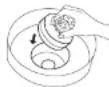
Place water filter in empty bowl sideways (see image). Pressing it firmly to the bottom of the bowl, and being careful not to pour water directly onto the filter, slowly add enough cold water to fully submerge and cover the filter by at least 1 inch. (You should see bubbles escaping the filter.)
-
Continue to hold filter under water for at least 30 seconds.


- Remove the filter timer from the lid by flipping the lid over and pressing on the plastic tab.
- Wash both tanks and plastic lid in mild, soapy water, and rinse. Replace the filter timer.
- Lift the filter from the bowl and allow water to drain.
NOTE: The filter's loose carbon dust may slightly darken water while soaking.
- With the Cuisinart logo facing up, insert the water filter into the upper water tank and push firmly into place.
- Place the upper tank on a pitcher (or another type of container) and fill with cold tap water. Allow to drain for 5 minutes to flush out any remaining carbon dust, then pour out remaining water.
WATER DISPENSER SETUP
NOTE: Use only cold tap water to fill the unit.
Filling the Upper and Lower Tanks
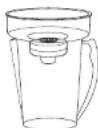
- Place the upper tank onto the lower tank and cover with the lid.

- Place assembled tanks on base. NOTE: The vertical groove on the upper tank must face the back of the unit.
- Carefully lift the flip top lid and add cold water to the FILL line. NOTE: This is a gravity
Filling the Internal Tanks
NOTE: Upper and lower tanks must be completely full before proceeding.
-
Place a glass under the right spigot and press and continue to hold the COLD button until water flow becomes steady (may take up to 3 minutes).
-
Repeat process with ROOM button, and then with the HOT button until all flow steadily.
NOTE: When filling hot and cold internal tanks, the water level in the lower tank will drop and you will hear the filling process taking place.
Setting the Filter Timer
The filter timer, located on the lid of the unit, lets you know when to change your water filter. Each filter will last for 3 months.
-
Once unit is set up and all water tanks are full, peel off the "Filtering" sticker from the filter timer screen.
-
Press and hold the Start button until FILTERING is displayed (approx. 5 seconds).
-
In 12 weeks, the word REPLACE will appear. For best results, we recommend inserting a new Cuisinart® Water Filter immediately.
-
You may turn off the timer and display by pressing the Start button for 5 seconds. Once you replace the filter, reset the timer by pressing the Start button for 3 seconds.
NOTE: You may reset the timer at any time by pressing and holding the Start button for 3 seconds.
OPERATING INSTRUCTIONS
Once setup is completed, tanks are filled and water is flowing steadily, your unit is ready to use!
-
Close the lid and plug unit into outlet.
-
Press the On/Off power switch on the control panel to turn on. The BLUE light around the

NOTE: Energy Saver switch must be in the Off position for water to heat.
- After about 1 hour and 20 minutes, the BLUE cold water indicator will light up, signaling water is chilled.
NOTE: On subsequent fill-ups, unit should take less than 10 minutes to heat and 30 minutes to chill.
- Press and hold each button to ensure all air has been purged from the unit so water flow is steady.
Initiating Energy Saver Mode
You can turn off the heater used to heat the water in the hot tank to reduce the system's energy usage by more than 50%. While in Energy Saver mode, you can still dispense water from your hot tank; however, it will not be heated.
NOTE: We recommend you power your unit off when only room temperature filtered water is needed.
- Put the Energy Saver switch in its On position.
- The green LED will light up, indicating your unit is in Energy Saver mode.
- Because your unit is in Energy Saver mode and your hot water heater is disabled, the red LED hot water indicator light will turn off when the temperature of the hot water decreases (this can take up to 2 hours).
- To resume your hot water, simply put the Energy Saver switch in its Off position. After about 15 minutes, the red LED hot water indicator will light up, signaling hot water is ready to dispense.
NOTE: If your unit has been in Energy Saver mode for longer than a week, we recommend you flush out your hot water tank by dispensing and disposing of a full glass of water from the left spigot before enjoying your first glass of hot water.
REPLACING WATER FILTER
- Regular use of cleaner, filtered water in your automatic coffeemaker means less frequent decalcification treatments.
- Use filtered water in your iron to reduce mineral build-up.
- Treat your pets to cleaner, filtered water.
- Cleaner, filtered water makes tea and instant soup or coffee taste better.
- Keeping the upper tank full helps increase the filtering process as well as the flow rate of water from spigots.
- Proper setup of the filter (as instructed on page 4) will maximize the reduction of contaminants and optimize taste of water.
- You may notice some condensation and water droplets on the lid and tanks of your unit. This is normal due to the heating and cooling system.
CLEANING AND CARE
CAUTION: To prevent personal injury or electric shock, always unplug your Cuisinart® CleanWater® Countertop Filtration System from outlet before draining and cleaning. NEVER immerse base in water or other liquid.
STANDARD CLEANING:
-
Turn the unit off and unplug it from outlet.
-
Remove the filter and place it in a bowl.
-
Lift upper water tank, let it drain into lower tank, and set it aside. Then lift lower tank off base and empty. Careful, a full tank can be very heavy!
-
Clean the water tanks and the cover with warm soapy water. NOTE: Remove filter timer before washing lid. Filter timer is not immersible.
-
The base is not immersible. Simply wipe it clean with a damp cloth.
-
Dry thoroughly when clean.
SEMI-ANNUAL CLEANING:
We recommend you clean your unit twice a
- Turn the unit off and unplug it from outlet.
- Remove and empty upper tank.
- Remove the filter and place it in a bowl. NOTE: To install a new filter or recondition the existing one, follow WATER FILTER SETUP instructions on page 4.
- Remove and empty lower tank.
- In the lower tank mix 12 gallon of distilled (white) vinegar and 12 gallon of tap water.
- Place lower tank back on base.
- Draw the following amount of water from each spigot: 2½ cups of hot, 1¼ cups of room temp, 3½ cups of cold. This allows the inner tanks to fill with cleaning solution.
- Plug in and turn power on for 20 minutes – do not dispense water during this time.
- Turn power off and draw the following amount of water from each spigot: 2½ cups of hot, 1¼ cups of room temp, 3½ cups of cold. This will help clear out scale and residue.
- Remove the lower tank and discard the remaining solution. Place lower tank back on base.
- Allow hot water to cool, then drain the internal reservoir over a sink by tilting unit slightly and removing the 2 plastic drainage plugs from bottom of unit. Plugs are tightly inserted and must be gently, but firmly, worked to remove.
- When water has completely drained, replace plugs and lower tank.
- Re-fill lower tank with water only and drain the internal reservoir again to flush thoroughly (see #11 above).
- When water has completely drained, replace plugs, tanks, filter and cover.
- Follow the WATER DISPENSER SETUP instructions on page 4, and the STANDARD CLEANING instructions on page 6.
TROUBLESHOOTING
| Symptom Possible Cause Solution | ||
| On/OFF Power button does not light up. | Unit might not be plugged into outlet. | Check the wall outlet for power. Make sure the outlet is not controlled by a wall switch. |
| It takes longer than 45 minutes for the water to pass through the filter. | Some air is still in the filter. | Place it filter in an empty bowl, then fill with water, making sure it is fully submerged. Resoak it for 10-15 minutes, or until no more bubbles are observed. |
| Unit does not dispense water when buttons are pushed. | Internal water tanks are not completely filled with water. | Review "Filling the Internal Tanks" on page 5 to be sure it was done correctly. Make sure the lower water tank is full. Continue to press and hold push buttons until water flow is steady. If unit still won't dispense water or flow does not become steady, contact Customer Service. |
| Water continues flowing from spot after push button is released. | Push button is stuck. | Remove water tanks from the base. Continue pressing button until it no longer sticks. |
| HOT water LED does not light up. | 1. Power is not on.2. There is no water in tanks. | 1. Make sure unit is plugged into outlet.2. Make sure air has been purged from internal tanks, as stated on page 5.3. If there is water in the tanks, it will take about 10 minutes for the water is heat. |
| COLD water LED does not light up. | 1. Power is not on.2. There is no water in tanks. | 1. Make sure unit is plugged into outlet.2. Make sure air has been purged from internal tanks, as stated on page 5.3. If there is water in the tanks, it will take about 80 minutes for the water to chill the first time. It takes only about 30 minutes for subsequent fill-ups. |
| COLD water LED light turns off even though cold water is not dispensed. | Large amount of room temperature water was dispersed. | Allow up to 30 minutes for water to chill and LED light will turn on. |
| Energy Saver mode LED does not light up. | 1. Power is not on.2. Energy Saver is in Off position | 1. Make sure unit is plugged into outlet.2. Make sure Energy Saver switch is in its On position. |
| Heater is still working and hot water is still available in Energy Saver mode. | Contact Customer Service. | |
| Filler timer does not show "Filtering" or "Replace." | Battery is dead. Contact Customer Service for replacement filter timer. | |
| Leakage on the countertop. | 1. Water tanks are not properly seated on base.2. Drainage plugs are not fully engaged. | 1. Make sure water tanks are seated properly on the base.2. Ensure that drainage plugs are correctly installed on the bottom of the base. |
| Water leaks from the top cover. | Water tanks are overfilled. Drain excess water from tanks by pressing push buttons. | |
STORING THE UNIT
- Turn the unit off and unplug it from outlet.
- Remove empty water tanks, filter and cover.
- Allow hot water to cool, then bring base to sink.
- Drain internal reservoir by tilting unit slightly and removing the 2 plastic drainage plugs from bottom of unit. Plugs are tightly inserted and must be gently, but firmly, worked to remove.
- When water has completely drained, replace plugs, tanks, filter and cover.
- Your Oisinart "CleanWater" Countertop Filtration System is ready to store.
TECHNICAL SPECIFICATIONS
| Unit: WCH-1500 | * CleanWater ^ | Cuisinart | ||||
| Countertop Filtration System | ||||||
| 1 | *Water Filter | u | i | s | i | |
System Capacity up to 3 months/ 48 gallons/ 181 liters
Maximum Input Temperature 104°F (40°C)
Minimum Input Temperature 34°F (1°C)
Maximum Output Temperature 194°F (90°C)
Minimum Output Temperature 44°F (7°C)
Rated Service Flow 6 gallons / 22.7 liters per day
(may vary according to water conditions)
Electrical Requirements AC\~120V 60Hz 3.7A 450W

System Tested and Certified by WQA against NSF/ANSI Standard 53 for the reduction of Lead, Benzene, Cadmium, Copper, Mercury, Tetrachloroethylene, Toluene, and Standard 42 for the reduction of Chlorine Taste and Odor.
See Performance Data Sheet for specific test conditions and results.
Claims are calculated based on WQA accepted practice of average percent reduction. The contaminants or other substances removed or reduced by this water treatment device are not necessarily in all users' water. Do not use with water that is microbiologically unsafe or of unknown quality without adequate disinfection before or after the system. Individuals requiring water of specific microbiological purity should consult their physician.
The Cuisinart® CleanWater® Countertop Filtration System processes approximately 48 gallons/181 liters. When the Cuisinart® Water Filter (GF-80) exceeds filtering capacity, replacement is essential for the product to perform as represented. In the United States, replacement filters cost generally \$19.99 per filter. Replacement filters may be purchased at most retail outlets. The
PERFORMANCE DATA SHEET
PERFORMANCE DATA SHEET FOR MODELS WCH-1000 AND WCH-1500
CONTAMINANT REMOVAL DATA IMPORTANT NOTICE:
Read this Performance Data Sheet and compare the capabilities of this unit with your actual water treatment needs. It is recommended that, before purchasing a water treatment unit, you have your water supply tested to determine your actual water treatment needs.
Performance testing conducted by WQA. These systems have been tested according to NSF/ANSI Standard 53 and 42 for reduction of the substances listed below. The concentration of the indicated substances in water entering the system was reduced to a concentration less than or equal to the permissible limit for the water leaving the system, as specified in NSF/ANSI Standard 53 and Standard 42.
Testing was performed under standard laboratory conditions; actual performance may vary.
| Removal Removal Action | Level Hardness Temp Inlet | ||||||||
| Substance | Influent Water Asp. (mg/L) | Influent Challenge Concentration (mg/L) | Filter Effluent Max. (mg/L) | Percent Reduction (%) | Max. Permissible Product Water Concentration (mg/L) | Co/CO3 (mg/L) | Testing Compert. (°C) | PH | Reduction Requirement |
| NSF/ANSI Standard 42-Aesthetic Effects | |||||||||
| Chlorine Taste and Odor Reduction | 2.0-2.0+/-10% N/A 97.5% | N/A, N/A, 20-7.50 | ≥50 | ||||||
| NSF/ANSI Standard 53-Health Effects | |||||||||
| Copper pH 6.5 | 3.15 | 3.0/-10% | .87 | 85.0% | 1.3 | 16 | 20 | 8.42 | N/A |
| Copper pH 8.5 | 3.10 | 3.0/-10% | 1.0 | 85.4% | 1.3 | 120 | 19 | 8.42 | N/A |
| Mercury pH 6.5 | .006 | 0.006+/-10% | .0009 | 92.8% | 0.002 | 22 | 19 | 8.45 | N/A |
| Mercury pH 8.5 | .006 | 0.006+/-10% | .001 | 89.9% | 0.002 | 140 | 20 | 8.55 | N/A |
| Cadmium pH 6.5 | .029 | 0.05+/-10% | .032 | 96.5% | 0.006 | 18 | 20 | 8.59 | N/A |
| Cadmium pH 8.5 | .03 | 0.03+/-10% | .034 | 92.5% | 0.005 | 120 | 20 | 8.41 | N/A |
| Benzene | .015 | 0.015+/-10% | .003 | 84.1% | 0.006 | 130 | 20 | 7.58 | N/A |
| Teluene | 2.9 | 3.0+/-10% | .770 | 89.6% | 1 | 320 | 20 | 7.54 | N/A |
State of California
Department of Public Health
Water Treatment Device
Certificate Number
07-1887
Date: August 10, 2007
Trademark/Model Designation
Replacement Elements
WCH-1504
6.1
Manufacturer
Conair Corporation (Colaburt Division)
The water treatment device(s) listed on this certificate have met the testing requirements pursuant to Section
110830 of the Health and Safety Code for the following health related contaminants:
Microbiological Contaminants and Turbidity
Name
Inorganic Radiological Contaminants
(七) 2019年
(2) 本说明仅供参考。
M
(1)
Organic Contaminants
Всюджо
Tetraflorofthylen
Einkapir
(五) 每日元 5.429
(五) 19
- 认案二(2)
法定代表人:
1.2.1
表决
(五)
(五)
√为正
(五) 现金
一、召开方式
(二)
八号
(五)
(1)
(1) 2017年1月1日
ed Service Capac
(No text)
(1) 定价议案的审议程序
it see with wanger th
the system.
广力云智慧零售收银系统
广力云智慧零售收银系统
(二)
UACI
TAS
s form must be signed and dated by the buyer and seller prior to consummation of this sale.
a from should be ignored on file by the email for a minimum of two words.
This form should be retained on file of the seller for a minimum of two years.
BUYER:
SELLER:
Name
ème
Arliness
Address
PURCHASES MADE IN IOWA

For purchases made in Iowa:
This form must be signed and dated by the buyer and seller price to consummation of this sale.
This form should be retained on file by the seller for a minimum of two years.
BUYER:
SELLER:
Name
ème
Akriness
Address
WARRANTY
LIMITED THREE-YEAR WARRANTY
This warranty is available to consumers only. You are a consumer if you own a Cuisinart®
CleanWater® Countertop Filtration System that was purchased at retail for personal, family or household use. Except as otherwise required under applicable law, this warranty is not available to retailers or other commercial purchasers or owners.
We warrant that your Cuisinart® CleanWater®
Countertop Filtration System will be free of defects in materials and workmanship under normal home use for 3 years from the date of original purchase. We suggest you complete and return the enclosed product registration card promptly to facilitate verification of the date of original purchase.
Verification of the date of original purchase. However, return of the product registration card does not eliminate the need for the consumer to maintain the original proof of purchase in order to obtain the warranty benefits. In the event that you do not have proof of purchase date, the purchase date for purposes of this warranty will be the date of manufacture.
If your Cuisinart® CircuVertop Filtration
System should prove to be defective within the warranty period, we will repair it. or if we think necessary. replace it.
To obtain warranty service, simply call our toll-free number 1-800-726-0190 for additional information from our Customer Service Representatives, or send the defective product to Customer Service at:
Cuisinart
150 Milford Road
East Windsor, NJ 08520.
To facilitate the speed and accuracy of your return, please enclose \$10.00 for shipping and handling of the product.
Please pay by check or money order (California residents need only supply proof of purchase and should call 1-800-726-0190 for shipping instructions).
NOTE: For added protection and secure handling of any Cuisinart product that is being returned, we recommend you use a traceable, insured delivery service. Cuisinart cannot be held responsible for in-transit damage or for packages that are not delivered to us. Lost and/or damaged products are not covered under warranty. Please be sure to include your return address, daytime phone number, description of the product defect, product model number (located on bottom of product), original date
This warranty expressly excludes any defects or damages caused by accessories, replacement parts, or repair service other than those that have been authorized by Cuisinart.
This warranty does not cover any damage caused by accident, misuse, shipment or other ordinary household use.
This warranty excludes all incidental or consequential damages. Some states do not allow the exclusion or limitation of these damages, so these exclusions may not apply to us.
these exclusions may not apply to you. CALIFORNIA RESIDENTS ONLY
California law provides that for In-Warranty Service, California residents have the option of returning a nonconforming product (A) to the store where it was purchased or (B) to another retail store that sells Cuisinart products of the same type.
The retail store shall then, at its discretion, either repair the product, refer the consumer to an independent repair facility, replace the product, or refund the purchase price less the amount directly attributable to the consumer's prior usage of the product. If the above two options do not result in the appropriate relief to the consumer, the consumer may then take the product to an independent repair facility if service or repair can be economically accomplished. Cuisinart and not the consumer will be responsible for the reasonable cost of such service, repair, replacement, or refund for nonconforming products under warranty.
California residents may also, according to their preference, return nonconforming products directly to Cuisinart for repair, or if necessary, replacement, by calling our Consumer Service Center toll-free at 1-800-726-0190.
Cuisinart will be responsible for the cost of the repair, replacement, and shipping and handling for such products under warranty.
BEFORE RETURNING YOUR CUISINART PRODUCT
If you are experiencing problems with your
Cuisinart product, we suggest that you call our Cuisinart Service Center at 1-800-726-0190 before returning the product to be serviced. If servicing is needed, a Representative can confirm whether the product is under warranty and direct you to the nearest service location.
Important: If the nonconforming product is to be serviced by someone other than Cuisinart's Authorized Service Center, please remind the servicer to call our Consumer Service Center at 1-800-726-0190 to ensure that the problem is
Cuisinart®
Cuisinart offers an extensive assortment of top quality products to make life in the kitchen easier than ever. Try some of our other countertop appliances and cookware, and Savor the Good Life ^4 .
www.cuisinart.com
©2010 Conair Corporation
Cuisinart® is a registered
trademark of the
Conair Corporation
Cuisinart
Version no : IB-8896B
Fold Size: 216X140MM Saddle Stitched 12PP
Material: COVER: 157gsm matt artpaper
INSIDE: 80gsm woodfree artpaper
Coating: Gloss Varnishing in cover
Color: COVER: 4C(CMYK)+1C(BK)
INSIDE: 1C(BK)+1C(BK)
Date: Nov-24-2009 Co-ordinator : Scias Liu
Hugo Description
PDF version : WCH1500 IB-8896B (0,0) BOOK
Hugo Code : KWE0003IB-1B1
Color Series: NON Operator : HAI
Remark: Quality request(1)


- IMPORTANT SAFEGUARDS
- SAVE THESE INSTRUCTIONS FOR HOUSEHOLD USE ONLY
- SPECIAL CORD SET INSTRUCTIONS
- CONTENTS
- INTRODUCTION
- PARTS AND FEATURES
- UNPACKING & PLACEMENT
- WATER FILTER SETUP
- Preparing the Water Filter
- WATER DISPENSER SETUP
- Filling the Upper and Lower Tanks
- Filling the Internal Tanks
- Setting the Filter Timer
- OPERATING INSTRUCTIONS
- Initiating Energy Saver Mode
- REPLACING WATER FILTER
- CLEANING AND CARE
- STANDARD CLEANING:
- SEMI-ANNUAL CLEANING:
- STORING THE UNIT
- PERFORMANCE DATA SHEET
- PERFORMANCE DATA SHEET FOR MODELS WCH-1000 AND WCH-1500
- CONTAMINANT REMOVAL DATA IMPORTANT NOTICE:
- PURCHASES MADE IN IOWA
- WARRANTY
- LIMITED THREE-YEAR WARRANTY
- these exclusions may not apply to you. CALIFORNIA RESIDENTS ONLY
- BEFORE RETURNING YOUR CUISINART PRODUCT
- Cuisinart®
- Hugo Description
Brand : CUISINART
Model : WCH-1500
Category : Water dispenser