
HW306LGE0 - Air purifier LG - Free user manual and instructions
Find the device manual for free HW306LGE0 LG in PDF.


| Product Type | Air Purifier with Humidifier |
| Model | HW306LGE0 |
| Power Supply | 220-240 V ~ 50 Hz |
| Humidification Volume | 305 mL/h |
| Power Consumption | 13 W |
| Product Weight | 6.6 kg |
| External Dimensions (W x H x D) | 320 x 370 x 320 mm |
| Recommended Room Size | Up to 22 m² |
| Humidification Method | Rotating moisture disk |
| Filter Type | Large dust filter (washable) |
| Ionizer | Yes, for bioaerosol removal |
| Auto Mode | Yes, adjusts humidity based on temperature and humidity |
| Sleep Mode | Yes, timer (2/4/8 hours) with low noise |
| Child Lock | Yes, lock button function |
| Automatic Drying | Yes, fan runs 5 min after shutdown |
| Lighting | Yes, adjustable brightness (low/high/off) |
| Installation Distance | At least 1 m from walls, furniture, TV, etc. |
| Water Supply | Direct to water tank or via upper inlet |
| Cleaning Frequency | Weekly: dust filter, water tank, moisture disk; Monthly: disassemble and clean moisture disks |
| Safety Features | Auto shut-off when water tank empty, overheat protection (if any) |
Frequently Asked Questions - HW306LGE0 LG
User questions about HW306LGE0 LG
0 question about this device. Answer the ones you know or ask your own.
Ask a new question about this device
Download the instructions for your Air purifier in PDF format for free! Find your manual HW306LGE0 - LG and take your electronic device back in hand. On this page are published all the documents necessary for the use of your device. HW306LGE0 by LG.
USER MANUAL HW306LGE0 LG
Read before using product (safety instruction), use properly.
About ensuring users safety and property.
After careful read through the user manual, do keep it in a handy place.
The equipment complies with requirements of the Technical Regulation, in terms of restrictions for the use of certain dangerous substances in electrical and electronic equipment.
SAFETY PRECAUTIONS
Children or people who have difficulty using the equipment safely should get help from others.
※ Do not insert fingers or sticks into air inlet or outlet when operating as this may cause injury.
The safety precautions listed below ensure the safe and correct use of the product to prevent unexpected risks or damages.

WARNING
Failure to comply with these instructions may result in death or serious injury.

CAUTION
Failure to comply with these instructions may result in user injury or property damage.
This appliance is not intended for use by persons (including children) with reduced physical, sensory or mental capabilities, or lack of experience and knowledge, unless they have been given supervision or instruction concerning use of the appliance by a person responsible for their safety.
Children should be supervised to ensure that they do not play with the appliance.
When the power cord is to be replaced, replacement work shall ve performed by authorized personnel only using only genuine replacement parts.

This symbol is to remind users of conditions and operations that may lead to dangerous situations. To avoid these types of dangerous situations, carefully read and follow the instructions.

This symbol indicates how to use the product to avoid and prevent dangerous situations.

WARNING
- Do not change or extend the power cable without approval.
This may cause fire or shock.
• Never use a damaged or loose receptacle.
This may cause fire or shock. - Do not use in the place with high moist or oil such as a toilet, bathroom, or washing room.
This may cause fire or electrical shock.
• Install the product in place free from direct light ray, heating apparatus, and moisture.
This may cause fire or product failure.
- Do not disconnect the power plug from the product while operating.
This may cause fire, shock, injury or product failure.
- Do not use the power plug in the vicinity of a heating apparatus.
This may cause fire or shock.
- Securely insert the power plug into the receptacle to prevent loosening. This may cause fire.
- Do not remove the power plug by pulling the cable.
This may cause fire or shock.
- Do not touch the product or the filter with wet hands.
This may cause shock or product failure.
- Keep the product out of reach of children.
This may cause shock or injury.
- Do not touch the power plug with wet hands.
This may cause shock or injury.
- Do not cover the power plug with any object such as a cover.
This may cause fire or shock.
- Disconnect the power plug and wait until the fan stops spinning before cleaning or handling the product.
This may cause shock or injury.
- Do not sit or step on the product.
This may cause fire, injury or product failure.
- If the product is immersed in water, call your local service center.
This may cause shock or fire.
- Do not spray insecticide or combustible solution on the product.
This may cause fire or product failure.
- Do not put the product upside down or clean it with water.
This may cause fire, shock or product failure
- Do not install the product in a place with industrial oil fumes or metallic particles.
This may cause fire or product failure.
- Do not operate the product with power other than 220 rating voltage.
This may cause fire or shock.
- Do not put coffee cup, flower vase or other drinks on top of the product.
This may cause fire or shock.
- If you detect an abnormal noise, smell or smoke coming from the product, immediately disconnect the power plug and call your local service center.
- If you will not use the product for a prolonged period of time, disconnect the power plug from the receptacle and fully drain water from the water tank. This may cause fire, shock or smell.
- When operating, only supply water through the upper part of the product.
This may cause fire, shock, injury or leak. - Never insert metallic articles such as pins, needles or foreign substances into the outlet or the filter section.
This may cause fire or injury. - Do not move the product while the product is operating or immediately after turning on.
This may cause fire, shock or product failure. - Always disconnect the power cable from the receptacle when filling the water tank. This may cause shock or product failure.

CAUTION
- Do not use the product as a ventilation fan or oven range hood in the kitchen.
This may cause product failure. - Do not use the product near curtains or drapes.
This may cause product failure. - Do not use the product while using indoor fumigation insecticides.
This may cause injury. - Use clean tap water at a temperature of 40°C or lower.
This may cause deformation/discoloration. - Do not use the product for removing toxic gases such as carbon dioxide.
This may cause product failure. - Do not use the product in the vicinity of home appliances such as microwave ovens or television sets that emit large quantities of electrostatic fields.
This may cause product failure. - Do not put obstacles next to the outlet of the product.
This may cause product failure. - Use a lint-free soft cloth for cleaning the water tank.
This may cause product failure. - Use clean tap water at a temperature lower than 40°C for cleaning the moisture disk and water tank.
This may cause deformation/discoloration, noise or product failure. -
Do not use strong detergent such as a solvent for cleaning the product. Use a soft lint-free cloth for cleaning.
This may cause product failure or deformation/discoloration. -
Do not use the product in spaces for special applications such as the preservation of animals or plants, precision systems or works of art. This may cause property damages.
- Do not keep or use combustible gas or inflammable substances in the vicinity of the product.
This may cause fire or product failure.
- Securely fit every filter, and clean the filters on a weekly basis.
This may cause product failure.
- If the power plug is damaged, call your local service center to have the plug repaired by an authorized service engineer.
This may cause fire, shock or product failure.
- Clean the water tank and moisture disk weekly with clean water.
This may cause deformation/discoloration, smell or product failure.
- Use both hands when moving or filling the tank.
This may cause injury or leak.
- Do not put the product on unstable places such as table or fabric matting that is vulnerable to heat.
This may cause leak or property damages.
- When draining water from the water tank, disconnect the power plug, and remove the water tank from the body first.
This may cause fire, shock or product failure.
- After cleaning the product, reassemble the components in the correct position. This may cause noise or product failure.
- Do not use the product next to a wall, furniture or ceiling.
This may cause deformation/discoloration or smell.
- Do not use the product on slope.
This may cause leak or product failure.
- Move the body of the product with two hands while keeping the product horizontal. This may cause leak, property damages or product failure.
- Do not move the product with water in the water tank.
This may cause fire, shock, injury or product failure.
- Do not apply strong impact to the water tank.
This may cause damage or leak.
- Never drink water remaining in the product body (the water tank), or give the water to an animal or plant.
This may cause injury or property damages. - Do not use the product next to places affected by winds from air-coolers or heaters, or by windows.
- Do not move the product only using the handle on the top.
This may cause damage, leak or injury.
- Do not put magnetic or metal objects on the body of the product.
This may cause product failure.
- Do not install the product on transportation vehicles (e.g., automobiles, vessels and airplanes).
This may cause product failure.
• Use the product installed on flat floor.
This may cause product failure.
• Install the product at least 1.5 m away from all light fixtures and 1 m from wall.
This may cause deformation/discoloration or product failure.
- Do not use the product if the water tank or the moisture disk is removed.
This may cause product failure.
• Install the product at a place 1 m at least from TV set or audio system.
This may cause product damages.
- Do not use the product near your head.
This may cause injury.
TABLE OF CONTENTS
2 SAFETY PRECAUTIONS
8 NAMES AND FUNCTIONS OF EACH COMPONENT
8 Product composition
8 Explanation and correct use for each component
9 HOW TO INSTALL
9 Selecting a place to install
9 How to install the moisture disk
10 How to supply water directly
11 How to supply water through upper part of the humidifier
11 Connecting power cable
12 HOW TO USE
12Display
13Controlpart
15 HOW TO CLEAN
15 How to clean the large dust filter and fan
16 Cleaning water tank and moisture disk
18 HOW TO KEEP THE PRODUCT
19 CHECKLIST BEFORE REPORTING FAILURE
21 PRODUCT SPECIFICATION
NAMES AND FUNCTIONS OF EACH COMPONENT
Product composition
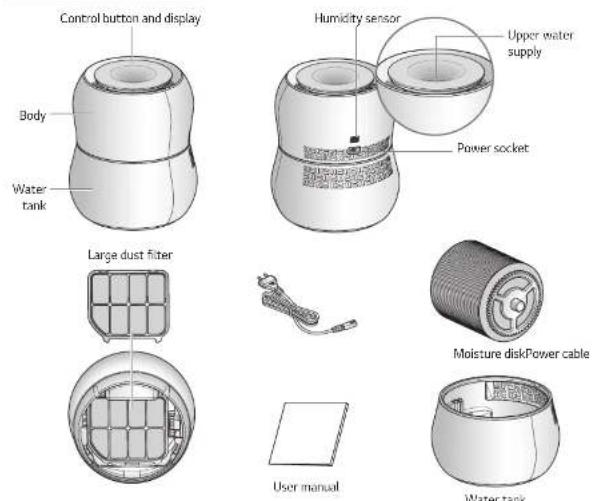
Explanation and correct use for each component
| Component name | Function Correct use | |
| Body Creates wind and contains major components. | Do not keep the body upside down. | |
| Water tank Stores water and | Empty water tank and fill with clean tap | |
HOW TO INSTALL
Selecting a place to install
Installing the product in the following places may help you use the product conveniently and safely:
• More than 1 m away from furniture, home appliances, walls and curtains.
- Position for easy connection to power source (next to receptacle).
- Place on flat floor
- Position with no combustible gas and inflammables.
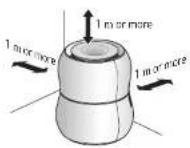
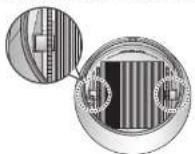
How to install the moisture disk
- Install by matching the water tank and moisture.
* Before installing moisture disk, clean moisture disk and water tank with tap water. Refer to page 16 for cleaning.
- Match the body with the water tank.
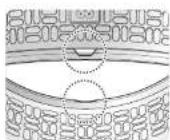
CAUTION
- Failure to properly mount the moisture disk may result in malfunction, noise, and product failure.
How to supply water directly
* Supply water directly to the water tank when pouring a large amount of water.
- Turn off the power by pressing start/stop ( ⏻ ) button.
- Unplug the power from receptacle.
- Unplug the power from the body.
- Disassemble the body and water tank and keep them as shown in the picture.
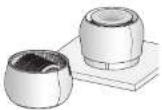

CAUTION
• Leaving the product upside down or cleaning it with water may cause fire, electrical shock, or product failure.
- Disassemble the moisture disk and water tank.
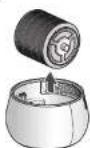

CAUTION
- Supply clean tap water up to the WATER LINE of the water tank.
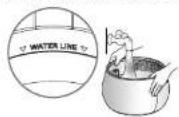

CAUTION
- Remove foreign substances without damaging metallic plate (if there is one).
- Empty the water tank before supplying water.
- It will cause odor.

Important
LG premium humidifier uses very small water particles. Bacillus and metallic molecules cannot enter small water particles. Water particles are used to humidify but bacillus and metallic molecules remain in the product and become enriched in the water tank. Such substances may cause smell and discoloration. You may preserve the cleanliness of the product by emptying the remaining water in the water tank when supplying water.
- Assemble the moisture disk in reverse order and use the product.

CAUTION
• Install the product by properly matching the moisture disk and the water tank.
How to supply water through upper part of the humidifier
• You may supply water conveniently through the upper part of the humidifier when supplying small amount of water.
1. Slowly supply water using tools such as cups with a pointed mouth through the upper part of the humidifier.


CAUTION
• Supply water from above to the top while the product is in operation.
- Pouring too much water at one time or supplying water with a shower from above may cause fire, electrical shock, or product failure.
- Do not let any water enter the body except through the water inlet on top.
- This may cause fire, electrical shock, or product failure.
- When "water full" is lighted in the display panel, do not supply water anymore.
- This may cause electrical shock or damage of property due to water leakage.
Connecting power cable
- Connect the power cable to the product.
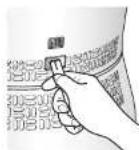
- Connect the power cable to the receptacle.
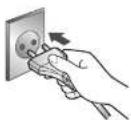

WARNING
- Connecting the power cable inserted in the receptacle to the product may cause fire, shock or product failure.
HOW TO USE
Display
* The state of operation of the product is displayed. The one that is being used will be displayed.
lonizer
Ionizer is displayed when pressing ionizer button
and the product removes vicinal Bioaerosol by ionizer.
Water Full display
Water Full is displayed with sound when the water tank is full. Water Full display automatically disappears when water in the water tank goes below WATER LINE. The product works normally even with water Full display.
* Alarm for Full Water only sounds the first time it is detected.
* When Water Full is detected without turning the power on, Water Full is only displayed for 1 minute.
Empty display
Empty is displayed with a melody when the water
tank is empty, and the product stops operating.
Empty display automatically disappears by supplying water and the product operates normally.
* The malony sounds twice 1 minute after detorting that
Sleep mode setting display
Sleep mode and set time is displayed when sleep mode setting button (☑) is pressed.
Display other than sleep mode disappears 3 seconds after sleep mode setting (A)
* Refer to page 13 for the sleep mode setting.
Current humidity state display
Current humidity around the product is displayed.
* High, Pleasant and Low of current humidity are set according to statistics by a Korean agency and there may be personal differences.
Control part
| Start/stop buttonUse it to supply power to the product or turn off the product. | |
| Humidifying volume buttonThe button is to control desired humidifying volume (airflow volume). If you press button, it will change the order of R (automatic) → 1(low) → 2(medium) → 3(high) → R (automatic)* Automatic humidification creates a pleasant environment by changing humidifying volume automatically based on the temperature and humidity around the premium humidifier. | |
| Ionizer buttonUse it to turn on/off ionizer for ionizer.* This function is initially off. Whether ionizer is working or not can be found in the display. | |
| Sleep mode setting buttonThe product will be turned off after set time by using sleep mode setting. The function will change in the order of 2 → 4 → 8 → cancel and 3 seconds after setting displays other than sleep mode, the setting will disappear;* The product operates at an adequate level of pleasant humidity and noise for sleep mode by automatically changing humidity based on temperature and humidity around the humidifier when using this function.* Under the sleep mode, the alarm for no water is not set off.* Under the sleep mode, if you don't want an automated operation, you can set up humidification amount by pressing the humidification amount button ( ).The set humidification amount is maintained until the sleep mode is cleared.* You can set up the lighting and the ionizer functions under the sleep mode also. | |
| Lighting buttonUse it for breastfeeding mode, mood lighting mode, etc. The intensity of light can be set to low → high → off by pressing lighting button. | |
| Lock/Unlock function (Child Lock)The product will present in Burson Locked Mode with 1 on the display by |
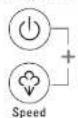
Automatic drying function
Automatic drying function can be set with On the display by pressing start/stop button (○) and speed button (○) simultaneously for 3 seconds. When the automatic drying function is set, the product will indicate if there are water drops on the moisture disk by running the fan for 5 minutes when the product stops operating.
The function is set until the function is disabled.
When pressing the start/stop button (○) and the speed button (○) in the air for 3 seconds simultaneously, ∑ is displayed and the function is disabled.
Open Source Software Notice Information
To obtain the source code under GPL, LGPL, MPL, and other open source licenses, that is contained in this product, please visit http://opensource.ige.com. In addition to the source code, all referred license terms, warranty disclaimers and copyright notices are available for download.
LG Electronics will also provide open source code to you on CD-ROM for a charge covering the cost of performing such distribution (such as the cost of media, shipping, and handling) upon email request to opensource@lge.com. This offer is valid for a period of three years after our last shipment of this product. This offer is valid to anyone in receipt of this information.
HOW TO CLEAN
How to clean the large dust filter and fan
- Turn off the product by pressing start/stop (💡) button.
- Unplug the power from the receptacle.
- Unplug the power from the body of the product.
- Disassemble the body and water tank.
- Disassemble the large dust filter by pulling on the 2 parts for detachment.
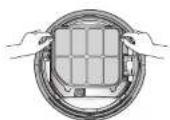

CAUTION
- Disassemble the large dust filter when fan stops completely.
- Keep the body of the product as shown in the picture
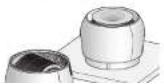
- Clean the large dust filter weekly by using a soft brush and cleaner.
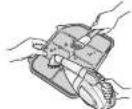

CAUTION
- Use clean tap water to clean and assemble after completely drying the filter.
-
Do not clean the large dust filter using a cleanser.
-
Clean the fan with soft and dry cloth.
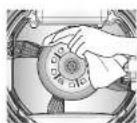

CAUTION
- Fire, shock or product failure may be caused by using water to clean fan.
- Assemble the product in reverse order and use the product.
Cleaning water tank and moisture disk
- Turn off the product by pressing start/stop button (⊕).
- Unplug the power from the receptacle.
- Unplug the power from the body.
- Disassemble the body and water tank.
- Keep the product as shown in the picture.
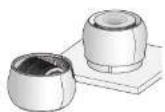

CAUTION
- Putting the body upside down or cleaning the body with water may cause fire, shock or product failure.
- Clean the water tank and moisture disk weekly and disassemble and clean the moisture disk monthly.
* How to clean the moisture disk (weekly)
→ Hold the handle with both hands and rinse the moisture disk through flowing tap water under 40°C to clean the surface by rotating it.
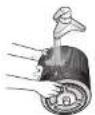
* How to disassemble and clean moisture disk (monthly)
→ Disassemble the disks one by one by turning the handle on moisture disk counter-clockwise as shown in the picture.
![graph TD A["Cylindrical object"] --> B["Hand holding part"] B --> C["Segmented circular component with internal segments"] C --> D["Shipped hand holding part"]](/content/2026/06/1215390/images/be642495ea7bead3021001926edbf6a096f3844976486caf336b347c5f6ed25e.jpg)
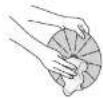
* Clean disk with a soft cloth
→ Use citric acid (can be purchased in pharmacies) to clean it if the disks need cleaning.
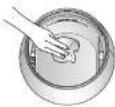
* How to clean the water tank (weekly)
→ Clean it with flowing tap water below 40° C and using a soft cloth.
CAUTION
- Do not damage or scratch the metallic panel as it may cause product failure.
- Assemble the product in reverse order and use the product.
HOW TO KEEP THE PRODUCT
- Turn off the product by pressing start/stop button (☐).
- Unplug the power from the receptacle.
- Unplug the power from the body.
- Disassemble the body and water tank.
- Clean the water tank and moisture disk with a dry cloth and dry them out of direct sunlight.
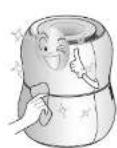
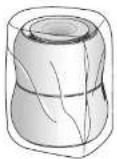
- Store the product out of direct sunlight to prevent dust and foreign substances from contaminating the product.
CHECKLIST BEFORE REPORTING FAILURE
Please check the list below before requesting the service center for product failures.
| Symptom Check Actions | ||
| The water in the water tank decreases slowly or does not decrease. | • Is the moisture disk properly installed?• Are there lots of foreign substances stuck in the moisture disk? | - Properly install the product by matching water tank and the moisture disk.- Clean the moisture disk. |
| Humidity does not increase. | • Is water tank full?• Is it raining or is the indoor temperature low?• Are you using the product in a large living room or a ventilated room?• Is humidity the sensor blocked by its surroundings?• Blow on the humidity sensor for 3 seconds. | - Fill the water tank with water.- If the humidification volume is low, water in the water tank will decrease slowly.- Use it in an area below 22 m2 and after ventilating.- Maintain more than 1 m of space between the humidity sensor and surrounding objects.- Call service center if humidity does not increase. |
| Current humidity displayed on the product is different on other hygrometers. | - Humidity may differ based on the location of the product even in the same space. | |
| [Empty] lamp is displayed even though there is water in the water tank. | • Are there foreign substances in the metallic part of the water tank?• Are the body and water tank properly installed? | - Clean fur or foreign substances in metallic part.- Install the product by matching the body and water tank correctly. |
| There is strange smell coming from the product. | • Is the water in the water tank contaminated? • Is the moisture disk contaminated? • Does the product smell as it did after purchasing? | - Clean the water tank and moisture disk and supply using clean tap water. - Clean the moisture disk. - All odors are harmless. (The smell is similar to the one found when purchasing a new car.) |
| The product makes noise when operating. | • Is the product being used in flat area? • Is there any object hindering operation near or on the product? • Is moisture disk mounted correctly? • Are there metallic or foreign substances in the outlet? | - Using the product on slope may cause noise. - Move the product or objects hindering air flow. - Assembling or disassembling the moisture disk in the wrong manner may cause noise. - Foreign substances stuck in the outlet may cause noise. |
ENGLISH
PRODUCT SPECIFICATION
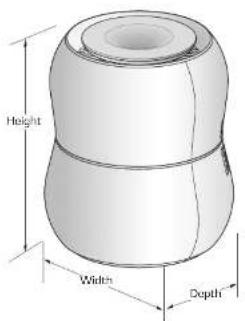
ENGLISH
Outlook and design as well as the product standard of the product may be changed to enhance the quality of the product
| Model Name Premium Humidifier, HW306 Series | |
| Power 220-240 V-, 50 Hz | |
| Humidification Volume 305 mL/h | |
| Product Weight 6.6 kg | |
| External Measurements (mm) | 320 (Width) x 370 (Height) x 320 (Depth) |
| Power Consumption 13 W | |
MEMO



- SAFETY PRECAUTIONS
- WARNING
- CAUTION
- TABLE OF CONTENTS
- 2 SAFETY PRECAUTIONS
- 8 NAMES AND FUNCTIONS OF EACH COMPONENT
- 9 HOW TO INSTALL
- 12 HOW TO USE
- NAMES AND FUNCTIONS OF EACH COMPONENT
- HOW TO INSTALL
- SELECTING A PLACE TO INSTALL
- HOW TO INSTALL THE MOISTURE DISK
- HOW TO SUPPLY WATER DIRECTLY
- IMPORTANT
- HOW TO SUPPLY WATER THROUGH UPPER PART OF THE HUMIDIFIER
- CONNECTING POWER CABLE
- HOW TO USE
- DISPLAY
- LONIZER
- WATER FULL DISPLAY
- EMPTY DISPLAY
- SLEEP MODE SETTING DISPLAY
- CURRENT HUMIDITY STATE DISPLAY
- AUTOMATIC DRYING FUNCTION
- OPEN SOURCE SOFTWARE NOTICE INFORMATION
- HOW TO CLEAN
- HOW TO CLEAN THE LARGE DUST FILTER AND FAN
- CLEANING WATER TANK AND MOISTURE DISK
- HOW TO KEEP THE PRODUCT
- PRODUCT SPECIFICATION
Brand : LG
Model : HW306LGE0
Category : Air purifier