
GP08NU6R - DVD Burner LG - Free user manual and instructions
Find the device manual for free GP08NU6R LG in PDF.


| Product Type | Portable Super Multi DVD Burner |
| Model | LG GP08NU6R |
| Interface | USB 2.0 (Y-type cable) |
| Supported Discs | DVD-ROM, DVD-R/RW, DVD+R/RW, DVD-R DL, DVD+R DL, DVD-RAM, CD-ROM, CD-R/RW, CD-DA, Video CD, Photo CD |
| Reading Speed (DVD-ROM) | 8x max (11.09 MB/s) |
| Reading Speed (CD-ROM) | 24x max (5,600 kB/s) |
| Average Access Time (DVD-ROM) | 220 ms (typical) |
| Average Access Time (CD-ROM) | 210 ms (typical) |
| Power Supply | USB bus-powered (no AC adapter needed) |
| Dimensions (approx.) | 142 x 142 x 21 mm (5.6 x 5.6 x 0.8 in) |
| Weight (approx.) | 300 g (0.66 lb) |
| Operating System Compatibility | Windows 7/8/10, Windows XP SP2 or higher, Mac OS X 10.3 or higher |
| Special Features | Buffer Under Run error protection, emergency eject hole, plug and play, region playback control Phase II |
| Package Contents | 1x Portable Super Multi Drive, 1x USB 2.0 Y-cable, 1x Software installation disc, 1x Quick Guide |
| Safety | Class 1 laser product; do not open cover; avoid exposure to rain/moisture |
| Environmental Compliance | EMC Directive 2004/108/EC, Low Voltage Directive 2006/95/EC |
Frequently Asked Questions - GP08NU6R LG
User questions about GP08NU6R LG
0 question about this device. Answer the ones you know or ask your own.
Ask a new question about this device
Download the instructions for your DVD Burner in PDF format for free! Find your manual GP08NU6R - LG and take your electronic device back in hand. On this page are published all the documents necessary for the use of your device. GP08NU6R by LG.
USER MANUAL GP08NU6R LG
Hardware Installation
NOTES
- Please pay attention to handling Electrostatic Sensitive Devices, you may use anti-static products such as wrist straps, heel straps, mats to protect your body from electrostatic.
- Make sure you have a personal computer with one or two open USB ports before connecting the drive to your computer.
- Power for all other devices should be turn off before attaching the cables.
Connecting to computer
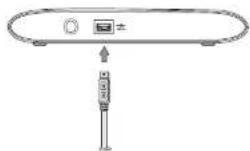
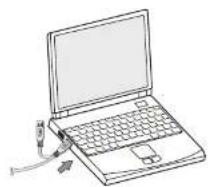
Connect the drive to the computer as shown in figure.
① Connect the USB 2.0 (Y type) cable to the drive.
② Connect the other end of the USB 2.0 cable to your computer.
③ The drive may get its power from the PC USB power. All systems may not meet USB power requirements and full performance may not be achieved. In this case, connect to the USB power cable.
When the computer is ready, confirm that the drive is detected. And then insert the supplied
①
②
③

Location and function of controls
This following is the general figure of the design of the drive.
The drive's appearance and specifications may change without prior notice.
Front
- Disc Tray
- Drive activity indicator
The LED is used to indicate the operation of drive. - Eject Button
- Emergency Eject Hole
Rear
- USB Connector (mini)
This connector is used to connect to the USB 2.0 cable.


natural_image
Simple line drawing of a device with a labeled component (no text or symbols)Removing the USB converter cable (For Windows)
The drive supports the plug and play(not swap) function of Windows, and can be removed and inserted by performing the following operation.
- Stop the application software being currently used.
- Click the icon " 🔒" of the taskbar located on your screen's bottom right side

LG
Quick Set-up Guide
Portable
Super Multi Drive
GP08
To install of your product, please read this guide manual carefully and completely.
Features
- Universal Serial Bus (USB) 2.0 interface for high-speed data transfer.
- Butler Under Run error protection technology
- Emergency elect support
- Combination of CD-R/RW, DVD-R/RW, DVD+R/RW, DVD-R DL, DVD-R DL and DVD-RAM drive functions into one data.
• Supports region playback control Phase II.
• PC USB powered, no AC adapter needed.
Package Items
| Item Quantity | |
| - Portable Super Multi Drive 1 | |
| - USB 2.0 cable (Y type) 1 | |
| - Software installation disc | 1 |
| - Quick Guide for Drive | 1 |
Cautions
System meeting the following requirements is needed in order to use USD 2.0 operation with this drive
• Computer that is equipped with a USB 2.0 - compliant USB portecta or PCI
adaptor card, and on which the USB 2.0 E-Cl Enhanced Host Controller
Intracchi diere seltam - ha non inralid
The U82 2.0 EHCI driver software is supplied with currently available PCI
adapter cents that conform to USB 2.0. Further, Microsoft has released the USB
2.0 EHCI driver software for Windows XP, therefore it is also possible to use this
driver software with Windows XP SP2
If you want to know in detail, please contact your USB 2.0 scapter dealer on
school your PG manufacturer, or consult the Microsoft Corporation website.
System Environment
Computer
This unit can be operated in the system environment explained here.
| System requirements | CPU | Per-Form 12.4 GB or High-World USB 2.9 GB to basic performance discommodated for optimal performance Per-Form 3.2 GB or High-World USB 2.9 GB |
| Memory | 256 KB or larger (Plasmonic) and 2 GB per MB | |
| Hand disk | 2 GB of more than more than one (The first space required for writing depends on the quantity of data) | |
| Video Memory | 64 KB (Plasmonic, 128 MB) | |
| Image | USB 2.0 dB | |
| CDI/CD4 mode | For better installation | |
| Bulbushu Precise OS | W/O/WD / Produces Virus/Windows XP EP2, Disc X 3.0 or Higher | |
| CD-R, CD-AS/CD-R/CD-R/CD-R/CD-R/CD-R/CD-R/CD-R/CD-R/CD-R/CD-R/CD-R/CD-R/CD-R/CD-R/CD-R/CD-R/CD-R/CD-R/CD-R/CD-R/CD-R/CD-R/CD-R/CD-R/CD-R/CD-R/CD-R/CD-R/CD-R/CD-R/CD-R/CD-R/CD-R/CD-R/DL class | CD-R: L5, Mbushuki Kaguchi Media, Vorbishin, That's, TDK; Hoge of 114 modes are recommended. CD-RK: L5, Mbushuki Kaguchi Media, Vorbishin are recommended. DVB-R: Mbushuki Kaguchi Media, That's, That's are recommended. DVB-RW: Mshili, Mbushuki Kaguchi Media, That's, Moshili are recommended. DVB-RM: Mshili, Mbushuki Kaguchi Media, That's, Moshili are recommended. DVB-RD: Mbushuki Kaguchi Media, Vorbishin are recommended. |
* For SW (006, 2) SW (007, 3)2, 1.05 (4.82M or large) is recommended to
- Compel bill by problem in arlerised function may occur with some media descending on line media
The following table is a simple formula:
To achieve maximum based & with speed your system may require data to be beyond 14. To the community's hard drive rather than correctly from another source disc or slice.
Specifications
Supported Discs
DVD-ROM(Single/Dual), DVD-RW, DVD-R, DVD+RW, DVD-R, DVD+R Double layer, DVD-R Dual layer, DVD-RAM, CD Digital Audio & CD-Extra, CD-Plus, CD-ROM, CD-ROM XA-Reedy, CD-RW, CD-TEXT, CD-Bridge, CD-R, CD-RW, Photo CD (Single & Multi-Session), Video CD
Data transfer rate
Sustained CD-ROM : 5,600 kBr/s (24x max)
DVD-ROM: 11.09 MB/s (8x max)
Average Access CD-ROM : 210 ms (Typical)
Time: 1. Street DVD-ROM: 220 ms (Typical)
DVD-RAM: 200 ms /Turicah
Safety Instructions
CAUTION: The laser used in the Portable Super Multi Drive can damage your eyes. Do not attempt to open the cover. To reduce the risk of electric shock, do not remove the cover (or back). There are no user-servicesable parts inside. Refer servicing to qualified service personnel. Use of controls or performance of procedures other than those specified herein may result in hazardous radiation exposure
WARNING: To reduce the risk of fire or electric shock, do not expose this appliance to rain or moisture.
This product is manufactured to comply with the radio interference requirements of EMC Directive 2004-108 EC and Low Voltage Directive 2006/95/EC.


Brand : LG
Model : GP08NU6R
Category : DVD Burner