
BD960 - Blender EVENTIDE - Free user manual and instructions
Find the device manual for free BD960 EVENTIDE in PDF.


| Product Type | Broadcast Delay (AutoFill) |
| Audio Input Connectors | 2 XLR female balanced line |
| Input Impedance | 10 kOhms bridging |
| Input Level Range | -6 dBm to +20 dBm, adjustable +/-10 dB |
| Audio Output Connectors | 2 XLR male balanced line |
| Output Impedance | < 50 ohms balanced |
| Output Drive Level | > +20 dBm |
| A/D/A Conversion | 24-Bit |
| Dynamic Range | > 100 dB |
| Sampling Rate | 48 kHz |
| Frequency Response | 10 Hz - 22 kHz ±1 dB |
| Crosstalk | < -95 dB |
| THD+N | < 0.008% |
| Recorded Filler Length | Up to 8 seconds stereo |
| Filler Sampling Rate | 24 kHz |
| Filler Frequency Response | 10 Hz - 11 kHz ±1 dB |
| Filler THD+N | < 0.005% |
| Controls | POWER, LEVEL +/-, BYPASS, DELETE, RECORD |
| Indicators | POWER, Dual 8-LED LEVEL bargraphs, BYPASSED, DELETE, RECORD, DELAY ACTIVE |
| Remote Control | RS232 serial, 1/4" tip-ring-sleeve jack for remote bypass/delete, relay jacks |
| Operating Modes | Normal and Command mode |
| Filler Options | Jingle or Silent filler |
| Mounting | Standard 19-inch rack |
| Warranty | 1 year limited |
Frequently Asked Questions - BD960 EVENTIDE
User questions about BD960 EVENTIDE
0 question about this device. Answer the ones you know or ask your own.
Ask a new question about this device
Download the instructions for your Blender in PDF format for free! Find your manual BD960 - EVENTIDE and take your electronic device back in hand. On this page are published all the documents necessary for the use of your device. BD960 by EVENTIDE.
USER MANUAL BD960 EVENTIDE
Eventide ® BD960
AutoFill™ Broadcast Delay Operating Manual
This page is intentionally left blank
TABLE OF CONTENTS
TABLE OF CONTENTS 3
OPERATION 4
Warnings and Cautions 4
Introduction and Overview 4
Quickstart Tutorial 6
The Front Panel 8 The Back Panel 10
The Back Panel 10 Putting the D12060 in News Facility 11
Putting the BD960 in Your Facility .... 11 Initial Setup, Command Mode .... 11
Initial Setup - Command Mode 11 Recording A Jingle' Setting the Delay Time 11
Adjusting Incent Levels 12
Adjusting Input Levels 12 Everyday Use - Normal Mode 13
Bypass 13
Deleting Offensive Utterances 13
Toggling Between Jingle Filler and Silent Filler....13
Remote Control Options 13
ELECTRICAL SPECIFICATIONS ....15
WARRANTY INFORMATION....16
INDEX 18
OPERATION
The BD960 is quite easy to use...
Warnings and Cautions
Failure to heed these warnings could result in an electrical shock hazard!
• Always use a properly grounded, three-prong AC outlet.
• Always use a three-wire line cord like the one supplied with the BD960.
- Don't expose the BD960 to rain or moisture of any kind.
- There are no user-serviceable parts inside the unit. Refer all service work to a qualified technician.
- Dangerous voltages are present inside the unit. Use extreme caution when operating the unit with its cover removed.
Heat is the enemy of reliability (among other things). Don't block the top or bottom ventilation slots. Leave some clearance above and below the BD960 in your rack. Failure to do so could result in reduced service life or damage to your equipment.
Introduction and Overview
There are many, many words you can say on the radio. I'or instance, you can say "crumpet." You can also say "underwit" and "boysenberry." Your license will not be revoked if a caller makes passing reference to "yarn." The list goes on.
Nevertheless, there are a few words you can't say on the radio. The Eventide BD960 exists to make sure any utterance of this small subset is checked - deleted as it were, never to reach the airwaves, never to get your station in trouble. The concept is simple. The BD960 delays the realtime audio so that the on-air signal lags several seconds behind. The signal "floats around" in the BD960 for several seconds before hitting the airwaves. If you hit the DELETE button, the BD960 replaces whatever is floating around inside it with silence or a prerecorded "jingle" of your choosing.
So, if someone yells "&!#%! in realtime, that "&!#%! floats around inside the BD960 for several seconds before hitting the airwaves. If an attendant technician or on air host hits DELETE while "&!#%! is still floating around inside the BD960, "&!#%! is replaced with silence or your jingle. After the silence or jinde runs its course, the actual delayed studio output again hits the airwaves.

flowchart
graph TD
    A["Whatever reaches here hits the airwaves"] --> B["Delay Buffer"]
    B --> C["Realtime"]
    D["Jingle Filler replaces delay buffer contents"] --> E["Disconnect Caller and hit DELETE - Host begins"]
    style A fill:#f9f,stroke:#333
    style C fill:#ccf,stroke:#333
Here's a quick overview of some important terminology:
The BD960 runs in two "modes." Use normal mode (GREEN BUTTON solidly file) for day-to-day operation. Use command mode (GREEN BUTTON blinking) to record your jingle, set the delay time, and adjust input levels. It's also important to realize that when you hit DELETE, the BD960 can replace its buffer with silence (silent filler) or a prerecorded jingle (jingle filler). The command mode is deliberately made hard to discover so that it will not be used by unauthorized persons.
| Normal Mode Command Mode | ||
| To toggle between | Hold GREEN BUTTON and press LEVELS+ | |
| Indicator | GREEN BUTTON lit solidly | GREEN BUTTON blinking |
| Use Everyday operation and selecting filler mode Recording jingle, setting delay time and adjusting input level | ||
| Jingle filler Silent filler | ||
| To toggle between | Hold GREEN BUTTON and press RECORD | |
| Indicator | RECORD I.F.D lit | RECORD I.F.D dark |
| Use Plays jingle during DELETE operation | Plays silence during DELETE operation | |
Quickstart Tutorial
What follows is a somewhat contrived story about Dan, the friendly station manager at WXYZ. Like you, Dan has just purchased an Eventide BD960. We're going to follow Dan through all the steps necessary to get it out of the box and up and running. Please join us.
In anticipation of their new BD960, WXYZ recorded a five-second jingle to replace offensive material: in true "radio station style," an a cappella group sings "Double-U ExWhyZee, we never swear at thee..." Dan connects a CD player to the BD960's XLR inputs, monitors the output, and cues the jingle CD. He puts the BD960 in command mode by holding down the GREEN BUTTON and pressing LEVELS+ (he knows he's in command mode because the GREEN BUTTON blink). He also makes sure the BYPASS LLD is not illuminated. Then he holds down RECORD and plays the CD. At the end of the jingle, he releases RECORD. He auditions the
Dan hears the phone ring. He answers it. WXYZ's infamous talk show host/instigator Sherry Dixon is caught in traffic! Dan will have to fill in until Sherry arrives! Oh dear!
Because he has always wanted to be a talk show host, Dan bravely decides to hold an "open phone" session, letting listeners call in and discuss (rant) about anything they like. 'The second caller begins a jag that culminates with "...I just want to say that anyone who believes the &4% news is true is a &4%." Yikes! Ever cool-of-head, Dan hits DELETE on the BD960, disconnecting the caller and losing the bad words. He immediately says, "Wow, Edgar from Waterloo feels pretty strongly about that! Moving on... moving on..." He tentatively takes the next caller, finger already edgiag toward DELETE.
From the listeners' perspective here's what happened:
Edgar (head full of steam): "...I just want to say that..."
Jingle (cutting in, whimsical): "Double-U LxWhyZee, we never swear at thee..."
Dan (exasperated): "Wow, Edgar from Waterloo feels pretty strongly about that! Moving on... moving on..."
And that ends the story of Dan and WXYZ's new Eventide BD960 (the part that we were about, anyway). He lived happily ever after.
The Front Panel

1) POWER
This switch turns the BD960 on and off. When off, internal relays hardwire each audio input to its corresponding output so audio flows through the BD960 as if it weren't there at all. The BD960 takes a few moments to power up, during which time BYPASS is active and the DELAY ACTIVE light flashes. After those few moments, the BD960 returns to whatever state it was in when it was shut down. Once DELAY ACTIVE lights steadily, the BD960 is ready for use.
2) GREEN BUTTON
The GREEN BUTTON modifies the function of other buttons to perform "special functions." We deliberately made accessing these "special functions" somewhat cryptic to thwart would-be meddlers. Depressing the GREEN BUTTON and the LEVELS+ buttons toggles between normal mode and command mode (you'll use command mode to record your jingle and to adjust input levels). In normal mode the GREEN BUTTON lights solidly. In command mode it blinks. More on these "special functions" later...
3) RECORD
In normal mode, pressing the GREEN BUTTON and RECORD toggles between jingle filler and silent filler. If you select jingle filler, the RECORD I.FD lights solidly. If you select silent filler, the RECORD I.FD does not light at all. In command mode, press and hold RECORD to record your jingle. Release it when you are finished recording.
4) DELETE
Press this key to delete offensive material! When you press DELETE, either jingle filler or silent filler replaces the offensive bit, DELAY ACTIVE darkens, and the DELETE LED lights. If you press DELETE before the jingle or silence ends, the jingle or silence starts anew (a good way to obliterate curse-laced tirades). In command mode, DELETE auditions the recording. This was also noted to remove the BD060 to feature defaults. The other means
8) LEVELS Hold down the GREEN BUTTON and press LEVELS+ to toggle between normal mode and command mode. On their own, the LEVELS buttons have no effect in normal mode. In command mode, they adjust the input gain in 1dB steps (see Adjusting Input Levels).
The Back Panel
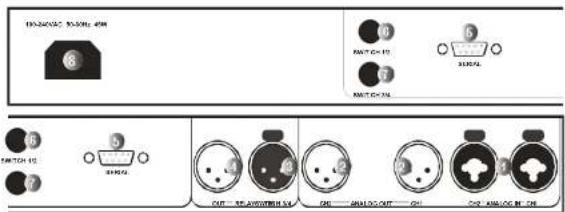
1) ANALOG IN
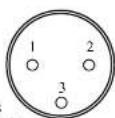
Connect the analog outputs of a mixer, a compressor, or some other such device to these XLR inputs. Pin 1 is ground, pin 2 is positive phase (hot), and pin 3 is negative phase (cold). To "unbalance" the XLR jack, use both pins 1 and 3 as ground and use pin 2 as "hot." If either pins 1 or 3 are unconnected, you will get more noise and how than signal! The holes in the middle look like 1 inputs, but they are not, so don't attempt to use them. Professionals prefer XLRs.
2) ANALOG OUT
These analog outputs accept balanced XLR connectors. The same pin layout and "ungrounding" procedure described above apply here as well.
3) RELAY IN
A two-pole relay is activated while the DELETE LED is illuminated. Use this function to control other devices, During DELETE, it connects pin 2 of this connector to pin 2 of "Relay Out." At the same time, it separately connects pin 3 of this connector to pin 3 of "Relay Out."
4) RELAY OUT
As described under "Relay In" above.

Putting the BD960 in Your Facility
Normally, you should rack-mount the BD960 in a standard 19-inch rack. Keep it well ventilated, dust-free, dry and, like Little Bear's porridge, neither too hot nor too cold.
When connecting the BD960, balanced XLR connectors are preferred to improve signal strength and to reduce hum and noise, but unbalanced XLR connectors can be used if you follow the guidelines described under "The Back Panel."
Of course, you'll need to locate the BD960 within easy reach of your "obscenity police officer" or run out a remote control to said individual.
Initial Setup - Command Mode
For day-to-day use, you'll use the BD960 in normal mode. You know it's in normal mode if the GREEN BUTTON is lit solidly. You know it's in command mode if the GREEN BUTTON blinks. To toggle between normal mode and command mode, hold the GREEN BUTTON in and press LEVELS+.
Command mode is used for three things:
- Recording a jingle
- Setting the delay time if you opt to use silent filler
• Optimizing the input level
Recording A Jingle/ Setting the Delay Time
To put things in perspective, recall that you can replace offensive material with a jingle of your choosing or silence (jingle filler or silent filler). This section describes how you record that jingle. 'The length of the silence (the delay time) is the length of the jingle. For example, if you record six seconds of chicken clucking, you will be able to replace offensive material with six seconds of chicken clucking or six seconds of silence. If you record two seconds of inarticulate stammering, you will be able to replace offensive material with two seconds of inarticulate stammering or two seconds of silence. Shorter jingles or delay times decrease your margin of safety.
To record a single or put the delay time, make even that the 120(6) is in command mode of: CFFY/UTTOU
Adjusting Input Levels
Usually, you adjust the input gain of a piece of equipment to give it a "hot" enough signal level that you get enough headroom without hearing any "noise." Because the BD960 has a large dynamic range, this is not usually necessary. The second reason to adjust input levels is to make sure the unit has the same levels when BYPASSed as it does during normal operation. These levels can be different because the BYPASS relay passes the signal at the BD960's input directly to the equipment connected to its output. This may cause a change in electrical loading on the system at the BD960's input, which in turn may cause a change in signal level. This is true of all equipment with relay bypass, not just the BD960.
To adjust the input gain, make sure the BD960 is in command mode (the GREEN BUTTON should be blinking). Use LEVELS+ to increase the input gain by 1dB; use LEVELS- to decrease the input gain by 1dB. The current levels setting will be briefly displayed on the level meters after hitting one of these buttons.
You may also want to adjust the input levels to change the source level when recording a jingle remember to restore them afterwards!
Everyday Use - Normal Mode
For day-to-day use, you'll operate the BD960 in normal mode. You know it's in normal mode if the GREEN BUTTON is lit solidly. You know it's in command mode if the GREEN BUTTON blinks. To toggle between normal mode and command mode, hold the GREEN BUTTON in and press LEVELS+.
Bypass
You can use BYPASS to... well, bypass the BD960's delay. In BYPASS you have no obscenity protection – the BD960 is essentially out of the system. This is also the power off state.
Deleting Offensive Utterances
OK, someone says something that shouldn't reach the air. Just hit DELETE some time within the BD960's delay time. Recall that the length of the jingle determines the delay time.
If you press DELETE while its L.F.D is still lit, the jingle (or silence) will start anew.
Whatever is said in realtime immediately after pressing DELETE will be the first audio to hit the airwaves after the jingle or silence. (Refer to the diagram under Introduction and Overview on page 4).
Toggling Between Jingle Filler and Silent Filler
When you press DELETE, do you want your listeners to hear your recorded jingle or silence? If the RECORD LED is lit, they will hear the jingle. If it isn't lit, they will hear silence. Toggle between the two in normal mode (GREEN BUTTON validity kit) by depressing the GREEN BUTTON and pressing RECORD.
Remote Control Options
There are two ways that you can control the BD960 remotely.
- The 1/4-inch tip-ring-sleeve Switch 1/2 jack on the back allows for remote control of BYPASS or
The single character remote control codes are:
B - enter BYPASS
C - leave BYPASS
A - toggle BYPASS
D DELETE
- The BD960 can also control other devices whenDELETE is triggered. By integrating the XLR Relay jacks into a suitable circuit, the BD960 acts as a switch that closes while the DELETE LED is illuminated. The relay connects pin 2 of the first jack to pin 2 of the second jack. It also connects pin 3 of the first jack to pin 3 of the second jack. This relay may be used to enable an external cart machine, or connected to your telephone system so as to disconnect the offending caller. Pins 2 and 3 are electrically isolated from the unit and each other are rated for 1A at 30V AC or DC.
ELECTRICAL SPECIFICATIONS
INPUT CHARACTERISTICS
Audio Input Connectors 2 XLR female balanced line
Input Impedance 10K ohms bridging.
Input Level -6 dBm to +20 dBm, adjustable +/- 10dB
OUTPUT CHARACTERISTICS
Audio Output Connectors 2 XLR male balanced line
Output Impedance Less than 50 ohms, balanced, for driving 600 ohm load
Output Drive Output amplifier clipping level > +20 dBm
A/D & DIGITAL SIGNAL PATH CHARACTERISTICS
A/D/A Conversion 24-Bit
Dynamic Range >100dB
Sampling Rate 48KHz
Frequency Response 10Hz - 22KHz +/- 1dB
Crosstalk < -95dB
1THD/N < 0.008%
RECORDED SIGNAL ("filler cart") SPECIFICATIONS
Length Up to 8 seconds stereo
Dynamic Range >100dB
Sampling Rate 24KHz
Frequency Response 10Hz-11KHz +/- 1dB
THD/N < 0.005%
OPERATING CONTROLS & INDICATORS
Controls POWER, LEVEL up/down, BYPASS, DELETE, RECORD, Indicators POWER, Dual 8-LED LEVEL bargraphs, BYPASSED, DELETE, RECORD, DELAY
REMOTE CONTROL CONNECTORS & SIGNALS
Delete Random 0 isolated N/O salary contracts that close during DELFE was at 1A
WARRANTY INFORMATION
BD960
LIMITED WARRANTY
The above-identified Eventide unit covered by this warranty is built to exacting quality standards and should give years of trouble-free service. If you are experiencing problems which are not cleared up or explained as normal in the manual, your recourse is this warranty.
What the warranty does and does not cover
Eventicle Inc. warrants the above-identified unit to be free from defects in workmanship and material under normal operation and service for a period of one year from the date of purchase, as detailed below. At our discretion within the warranty period, we may elect to repair or replace the defective unit. This means that if the unit falls under normal operation because of such defect, we will repair the defective unit at no charge for parts or labor. We also assume a limited responsibility for shipping charges, as detailed below.
The warranty does not extend beyond repair or replacement as stated herein and in no event will we be responsible for consequential or incidental damages caused by any defect, and such damages are specifically excluded from this warranty. Our sole obligation is to repair or replace the defective unit as described herein.
The warranty DOES NOT COVER any damage to the unit regardless of the cause of that damage. The unit is a complex piece of equipment that does not react well to being dropped, broken, crushed, soaked or exposed to excessively high temperatures, voltages, electrostatic or electromagnetic fields. If the unit is damaged for these or similar causes, and the unit is deemed to be economically repainable, we will repair it and charge our normal rates.
The warranty DOES NOT COVER shipping damage, either to or from Evcetide. If you receive a new unit from us in damaged condition, notify us and the carrier; we will arrange to file an insurance claim and either repair or exchange the unit.
If you receive a new unit from a dealer in damaged condition, notify the dealer and the carrier.
If we receive the unit from you with apparent shipping damage, we will notify you and the carrier. In this case, you must arrange to collect on any insurance held by you or your carrier. We will await your instructions as to how to proceed with the unit, but we will charge you for all repairs on damaged units.
Who is covered under the warranty
The warranty applies to the original purchaser of a new unit from Eventide or an Authorized Eventide Dealer. Demo units are also covered by this warranty under slightly different circumstances (see below). Units that are used, or have been used as part of a rental program, are not covered under any circumstances.
It is your responsibility to prove or to be able to prove that you have purchased the unit under circumstances which effect the warranty. A copy of your purchase invoice is normally necessary and sufficient for this.
If you have any questions about who is an Authorized Eventide Dealer, call us.
Units with the serial number plate defaced or removed will not be serviced or covered by this warranty.
When the warranty becomes effective
The one-year warranty period begins on the day the unit is purchased from an Authorized Eventicle Dealer or, if the unit is drop-shipped from Eventicle, on the day. Inicial, it is not a reasonable offer for acquisition before. This material shall be sold but not yet necessary to complete and take into form.
Who performs warranty work
The only company authorized to perform work under this warranty is Eventide Inc., Little Ferry, New Jersey. While you are free to give personal authorization to anyone else (or to work on it yourself), we will not honor claims for payment for parts or labor from you or from third parties.
However, we and our dealers do try to be helpful in various ways:
| 1. Our dealers will assist, usually without charge during the warranty period, in: | |||||||||
| a | ) | d | e | l | e | r | m | i | |
| n | |||||||||
| i | |||||||||
| b) alleviating user error or interconnection problems that may be preventing the unit from operating to its full capability. | |||||||||
| 2. | W | c | a | r | v | a | |||
| 3. | If a met is found to be definitive during the warranty period and you wish to remove it yourself, you will normally plan the most immediately at my | ||||||||
- If a part is found to be defective during the warranty period and you wish to replace it yourself, we will normally ship the part immediately at no charge, provided your warranty registration form is on file. We reserve the right to request that the defective part be returned to us.
Shipping within the 50 United States
You are responsible for getting the unit to our door at no cost to us. We cannot accept collect or COD shipments.
We will return the unit to you prepaid, at our expense, using an expeditious shipping method, normally United Parcel Service. In areas not served by UPS we will ship by US Mail.
If you are in a hurry and want us to use a premium shipping method (such as air express, next day air, etc.), be sure you tell us and agree to pay shipping charges collect. If you specify a method that does not permit collect or COD charges, remit sufficient funds to prepay shipping.
Shipping outside the 5D United States
If you purchased the unit from a dealer in your country, consult with the dealer before returning the unit.
If you wish to return the unit to us, please note the following:
-
The unit must be prepaid to our door. This means that you are responsible for all shipping charges, including customs brokerage and duties. When a unit is shipped to us it must be cleared through United States Customs by an authorized broker. You must make arrangements for this to be done. Normally, your freight forwarder has a branch in the United States which can handle this transaction. We can arrange to clear incoming shipments for you. If you want our assistance, you must notify us before shipping the unit for repair, giving full details of the shipment, and including a minimum of \$250.00 in US funds to cover the administrative and brokerage expenses. Any balance will be applied to the repair charges or refunded. If a balance is due to us, we will request a further prepayment.
-
All shipments will be returned to you collect. If this is impossible because of shipping regulations or money is due us, we will request prepayment from you for the appropriate amount.
-
All funds must be in \$US. Payment may be made by check drawn on any bank in the US, or by telegraphic funds transfer to our bank. If you send US currency, be sure that it is sent by a method you can trace, such as registered mail. If you wish to pay by Letter of Credit, be sure that it affords sufficient time for work to be performed and the LCP required, and that it is given from registration conditions and documentation requirements.
submittent time for work to be performed and the L-C negotiated, and that it is free from restrictive conditions and documentation requirements. 4. We reserve the right to substitute bright carriers. Although we will attempt to honor your request for a specific carrier, it is frequently necessary to select a substitute because of difficulties in communication or scheduling.
INDEX
| analog input, 10 | jingle, saving, 11 |
| analog output, 10 | |
| levcls buttons, 9 | |
| balanced connections, 11 | |
| bypass, 8, 13 | normal mode, 6, 13 |
| bypass, using instead of delete, 13 | normal mode, selecting, 8, 13 |
| command mode, 6, 11 | pedal 1, 10, 13 |
| command mode, selecting, 8, 11 | |
| delay active LED, 8 | power, 8, 10 |
| delay time, selecting, 11 | |
| delete, 13 | rack mounting, 11 |
| delete button, 8 | record button, 8 |
| rcording a jingle, 11 | |
| factory defaults, 8, 11 | relay jacks, 10, 14 |
| remote control, 10, 13 | |
| remote control, controlling other devices, 14 | |
| green button, 8 | rs232 port, 10, 13 |
| input level meters, 8 | |
| input level, adjusting, 12 | |
| silent filler, selecting, 13 | |
| jingle filler, selecting, 13 | |
| jingle, auditioning, 11 | unbalancing analog connectors, 10 |
| jingle, recording, 11 |
- TABLE OF CONTENTS
- OPERATION
- Warnings and Cautions
- Introduction and Overview
- Here's a quick overview of some important terminology:
- Quickstart Tutorial
- The Front Panel
- 1) ANALOG IN
- 2) ANALOG OUT
- 3) RELAY IN
- 4) RELAY OUT
- Putting the BD960 in Your Facility
- Initial Setup - Command Mode
- Recording A Jingle/ Setting the Delay Time
- Adjusting Input Levels
- Everyday Use - Normal Mode
- Bypass
- Deleting Offensive Utterances
- Toggling Between Jingle Filler and Silent Filler
- Remote Control Options
- ELECTRICAL SPECIFICATIONS
- WARRANTY INFORMATION
- BD960
- LIMITED WARRANTY
- What the warranty does and does not cover
- Who is covered under the warranty
- When the warranty becomes effective
- Who performs warranty work
- Shipping within the 50 United States
- Shipping outside the 5D United States
Brand : EVENTIDE
Model : BD960
Category : Blender