
HBT-C6PLT-SET - Video transceiver Avenview - Free user manual and instructions
Find the device manual for free HBT-C6PLT-SET Avenview in PDF.


| Product Type | HDBaseT HDMI Extender (Transmitter and Receiver set) |
| Model | HBT-C6PLT-SET |
| Dimensions (L x W x H) | 2.8" x 2.9" x 1" (71 mm x 73.5 mm x 23 mm) per unit |
| Weight | 0.3 lbs (126 g) per unit |
| Power Supply | 24V DC, 1.25A (included) |
| Power Consumption | 6 Watts (max) per unit |
| Video Bandwidth | Single-link 340 MHz / 9 Gbps |
| Supported Resolutions | 480i/p, 720p, 1080i/p60, 4K@30 (3840x2160@24/25/30Hz, 4096x2160@24Hz) |
| Maximum Transmission Distance | 4K: up to 35m (115ft) over CAT6e/6a; 1080p: up to 60m (200ft) over CAT6e/6a |
| Audio Support | LPCM 7.1CH, Dolby TrueHD, Dolby Digital Plus, DTS-HD Master Audio |
| HDMI Compliance | HDMI 1.4, HDCP 2.0 |
| Control Interfaces | Bi-directional IR (30-50 kHz), RS-232, CEC bypass |
| Power over Cable | PoE from Transmitter to Receiver over CATx cable |
| ESD Protection | Human body model ±8kV (air-gap) / ±4kV (contact) |
| Operating Temperature | 32°F to 104°F (0°C to 40°C) |
| Storage Temperature | -4°F to 140°F (-20°C to 60°C) |
| Relative Humidity | 20% to 90% RH (non-condensing) |
| Connectors (Transmitter) | 1x HDMI IN, 1x CAT5e/6/7 OUT, 1x IR Extender, 1x IR Blaster, 1x RS-232, 1x Power Jack |
| Connectors (Receiver) | 1x CAT5e/6/7 IN, 1x HDMI OUT, 1x IR Extender, 1x IR Blaster, 1x RS-232, 1x Power Jack |
| Warranty | 3 years limited warranty |
| Package Contents | Transmitter (HBT-C6PLT-S), Receiver (HBT-C6PLT-R), IR Extender cable, RS-232 cord, user manual |
Frequently Asked Questions - HBT-C6PLT-SET Avenview
User questions about HBT-C6PLT-SET Avenview
0 question about this device. Answer the ones you know or ask your own.
Ask a new question about this device
Download the instructions for your Video transceiver in PDF format for free! Find your manual HBT-C6PLT-SET - Avenview and take your electronic device back in hand. On this page are published all the documents necessary for the use of your device. HBT-C6PLT-SET by Avenview.
USER MANUAL HBT-C6PLT-SET Avenview
HDBaseT Lite HDMI CAT5/6/7 Extender with POE/RS-232/ Bi-directional IR



Model #: HBT-C6PLT-SET
Product Application & Market Sectors

Corporate House

/orship

Military Residenti


Education Industri


Medical Aviation

TABLE OF CONTENTS
I. GETTING STARTED .... I
I.1 IMPORTANT SAFEGUARDS....
1.2 SAFETY INSTRUCTIONS ...... I
1.3 REGULATORY NOTICES FEDERAL COMMUNICATIONS COMMISSION (FCC) 2
2. INTRODUCTION....3
2.1 PACKAGE CONTENTS 4
2.2 BEFORE INSTALLATION....5
2.3 CABLE SPECIFICATIONS ....5
3. APPLICATION DIAGRAM....6
4. PANEL DESCRIPTION....8
INPUT PANEL (Receiver, HBT-C6PLT-R) Front....8
OUTPUT PANEL (Receiver, HBT-C6PLT-R) Rear....8
INPUT PANEL (Sender, HBT-C6PLT-S) Front....9
OUTPUT PANEL (Sender HBT-C6PLT-S) Rear 9
- IR CABLE DEFINITION....10
- INSTALLATION (HBT-C6PLT-SET)....11
- GENERAL TROUBLESHOOTING....12
- SPECIFICATIONS....13
I.1 IMPORTANT SAFEGUARDS
Please read all of these instructions carefully before you use the device. Save this manual for future reference.
What the warranty does not cover
- Any product, on which the serial number has been defaced, modified or removed.
• Damage, deterioration or malfunction resulting from: - Accident, misuse, neglect, fire, water, lightning, or other acts of nature, unauthorized product modification, or failure to follow instructions supplied with the product.
• Repair or attempted repair by anyone not authorized by us.
• Any damage of the product due to shipment. - Removal or installation of the product.
- Causes external to the product, such as electric power fluctuation or failure.
• Use of supplies or parts not meeting our specifications.
• Normal wear and tear.
• Any other causes which does not relate to a product defect. - Removal, installation, and set-up service charges.
1.2 SAFETY INSTRUCTIONS
The HBT-C6PLT-SET HDBaseT Lite HDMI CAT5/6/7 Extender has been tested for conformance to safety regulations and requirements, and has been certified for international use. However, like all electronic equipments, the HBT-C6PLT-SET should be used with care. Read the following safety instructions to protect yourself from possible injury and to minimize the risk of damage to the unit.
Do not dismantle the housing or modify the module.
Dismantling the housing or modifying the module may result in electrical shock or burn.
⚠️ Refer all servicing to qualified service personnel.
Do not attempt to service this product yourself as opening or removing housing may expose you to dangerous voltage or other hazards
⚠️ Keep the module away from liquids.
Spillage into the housing may result in fire, electrical shock, or equipment damage. If an object or liquid falls or spills on to the housing, unplug the module immediately.
Have the module checked by a qualified service engineer before using it again.
Do not use liquid or aerosol cleaners to clean this unit. Always unplug the power to the device before cleaning.
I.3 REGULATORY NOTICES FEDERAL COMMUNICATIONS COMMISSION (FCC)
This equipment has been tested and found to comply with Part 15 of the FCC rules. These limits are designed to provide reasonable protection against harmful interference in a residential installation.
Any changes or modifications made to this equipment may void the user's authority to operate this equipment.
Warning symbols Description

ONLY USE THE PROVIDED POWER CABLE OR POWER ADAPTER SUPPLIED. DO NOT TAMPER WITH THE ELECTRICAL PARTS. THIS MAY RESULT IN ELECTRICAL SHOCK OR BURN.

DO NOT TAMPER WITH THE UNIT. DOING SO WILL VOID THE WARRANTY AND CONTINUED USE OF THE PRODUCT.


BEWARE
this unit
contains
static
sensitive devices
THE VIDEO BOARDS ARE VERY SENSITIVE TO STATIC. PLEASE ENSURE IF RACK MOUNTED OR INSTALLED ON A SURFACE, IT SHOULD BE IN A GROUNDED ENVIROMENT.

natural_image
Blue circular icon with a white silhouette of a person holding an open book (no text or symbols)WARNING
Read & understand user guide before using this device.
Failure to follow the proper installation instructions could result in damage to the product and preventing expected results.
2. INTRODUCTION
The Avenview HBT-C6PLT-SET HDBaseT Lite Extender with POE, Bi-Directional IR and Ethernet has been designed to extend High Definition video and multi-channel digital audio formats to any HD Monitor with zero latency.
Video Signals: 4K2K@30 (Ultra HD), 3D, Deep Color, and Full HD 1080p 36-bit color depth.
Audio signals: Lossless Multi-channel audio formats (DTS-HD Master Audio, Dolby TrueHD).
Data Signals: Bi-Directional IR signals 30 KHz to 50 KHz over CAT5/6.
The HBT-C6PLT-SET includes two (2) units. One Receiving unit (Rx) HBT-C6PLT-R with one (1) UTP which allows the user to extend video and audio up to 60m (200ft). The HBT-C6PLT-R also allows bi-directional IR control of the source connected to the unit from the users IR remote control at the monitor side.
One Sender unit (Tx) HBT-C6PLT-S with one (I) UTP which allows the user to extend video and audio up to 60m (200ft).
HBT-C6PLT-SET can support PoE (Power over the CATx cable to the RX).
- INPUT: HDMI with 3D & 4Kx2K, 1080p,HDCP and DVI compliant
- VIDEO BANDWIDTH: From 300MHz / 9 Gbps
- PC RESOLUTIONS: Up to VGA to WUXGA
- HD RESOLUTIONS: Up to 4Kx2K (3840x2160@30Hz and 4096x2160@24Hz)1080p (1920x1080@60Hz)
- AUDIO SUPPORTED: LPCM 7.1CH, Dolby TrueHD, Dolby Digital Plus and DTS-HD Master Audio
- AUDIO TRANSMISSION: (32-192kHz sample rate)
- SUPPORTS: CEC bypass
- DISTANCE: Up to 60 meters through CAT6e/6a/7 cables
- UNCOMPRESSED VIDEO: 1080p, 60 Hz, 36-bit
- 3D SUPPORT: Follow by Display / TV's EDID
NOTE:
- The PoE function is designed for powering compatible Receiver units only.
- The non-PoE Receivers has to be powered with a power supply.
- Receivers (Rx) from different manufactures would not be compatible.
- Displaying HDMI 4Kx2K resolution would require the standard 4Kx2K HDMI cable and display for accurate results.
2.1 PACKAGE CONTENTS
| I | HBT-C6PLT-SET X 2 | 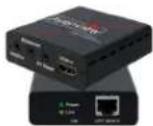  | |
| Sender | Receiver | ||
| IR EXTENDER XI | 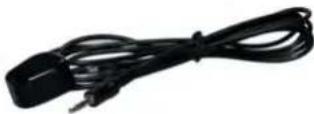 | ||
| RS 232 Cord XI | 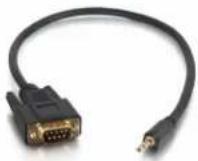 | ||
| USER'S MANUAL XI |  | ||
2.2 BEFORE INSTALLATION
- Put the product in an even and stable location. If the product falls down or drops, it may cause an injury or malfunction.
- Don't place the product in too high temperature (over 50°C), too low temperature (under 0°C) or high humidity.
- Use the DC power adapter with correct specifications and supplied with the unit. If improper power supply is used the unit may malfunction and cause a fire.
- Do not twist or pull by force ends of the UTP cable. It can cause malfunction.
2.3 CABLE SPECIFICATIONS
| Cable Type Range Pixel clock rate Video Data Rate Supported Video | ||||
| CAT5e/6 100m | <=225MHz <=5.3Gbps | (HD Video) | Up to 1080p, 60Hz, 36 bits, 3D (Data rates lower than 5.3 Gbps or below 225 Mhz TMDS clock). | |
| 70m >225MHz | >5.3Gbps(Ultra HD Video) | 4K2K, 30Hz video formats | ||
| CAT6A/7 100m | >225MHz | >5.3Gbps(Ultra HD Video) | 4K2K, 30Hz video formats | |
| Data Link TIA/EIA-568-B | ||
| PIN | Color | Function |
| 1 | TX0- | |
| 2 | TX0+ | |
| 3 | TX1- | |
| 4 | TX2- | |
| 5 | TX2+ | |
| 6 | TX1+ | |
| 7 | TXC- | |
| 8 | TXC+ | |

HBT-C6PLT-SET
4K2K (3840X2160) = 35m (115 fcct) CAT6E 260MHz 4K2K (3840X2160) = 35m (115 feet) CAT6A 500-625MHz 1080p(1920x1080) = 60m (200 feet) CAT6E 250MHz 1080p(1920x1080) = 60m (200 feet) CAT6A 500-625MHz
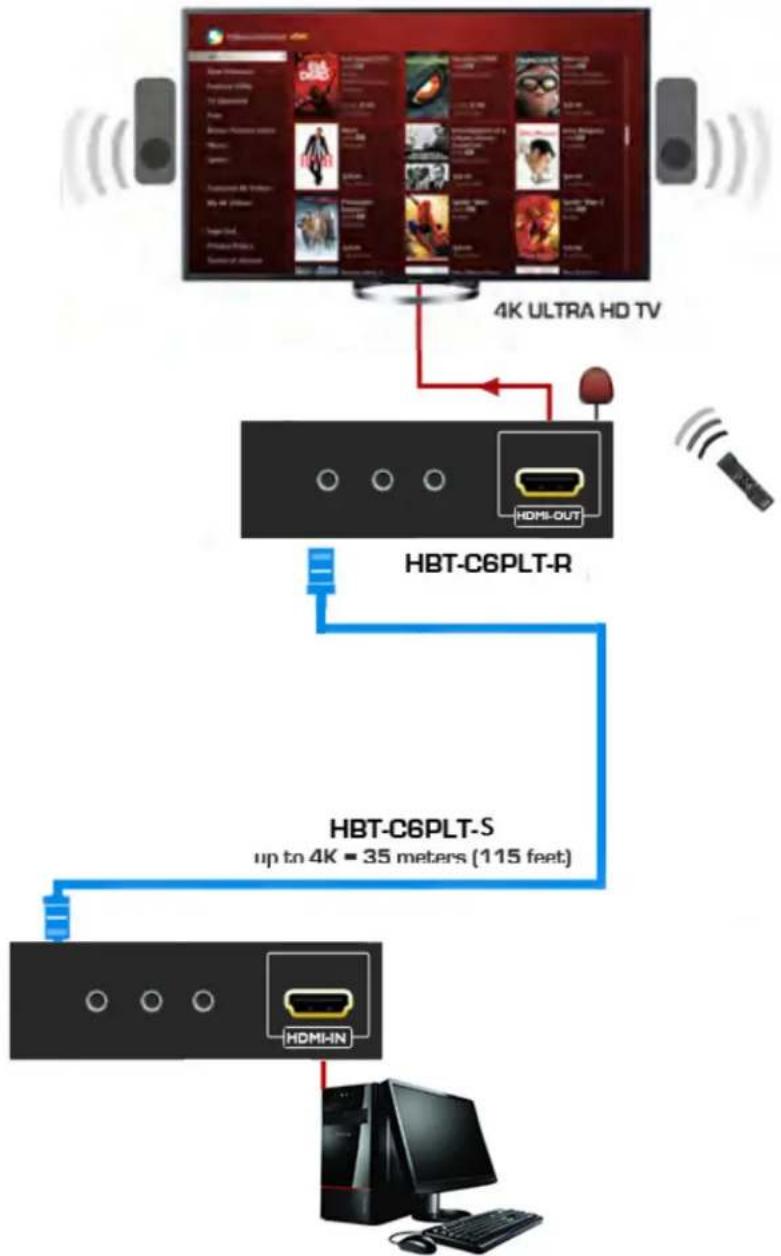
flowchart
graph TD
    A["4K ULTRA HD TV"] --> B["HBT-C6PLT-R"]
    B --> C["HBT-C6PLT-S"]
    C --> D["Computer"]
    style A fill:#f9f,stroke:#333
    style B fill:#ccf,stroke:#333
    style C fill:#cfc,stroke:#333
    style D fill:#fcc,stroke:#333
HBT-C6POE-SP4
4K2K (3840X2160) = 75m (165 feet) CAT6E 250MHz 4K2K (3840X2160) = 100m (330 feet) CAT6A 500-625MHz 1080p(1920x1080) = 100m (330 feet) CAT6E 250MHz 1080p(1920x1080) = 110m (360 feet) CAT6A 500-625MHz
LAYOUT 1
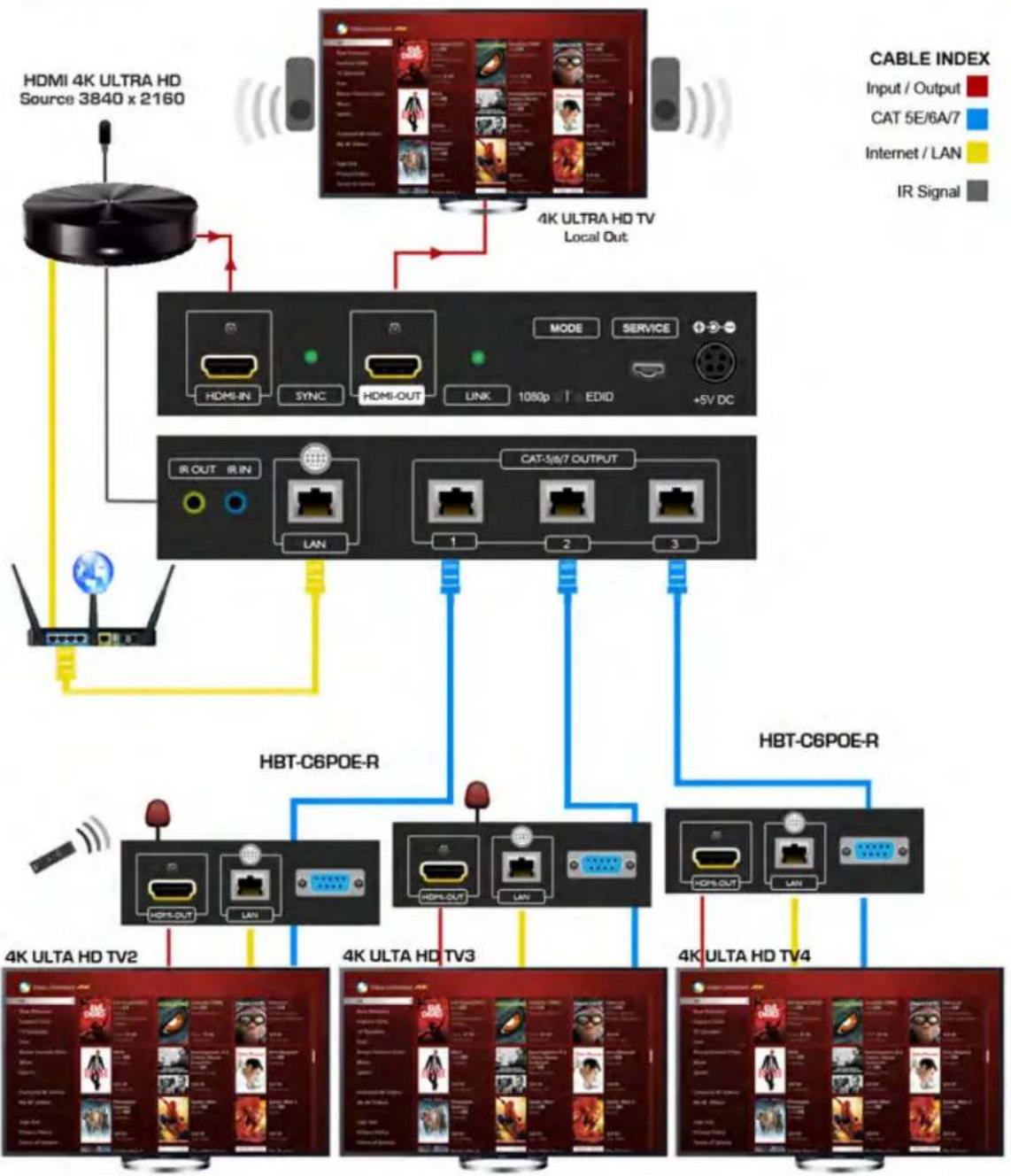
flowchart
graph TD
    A["HDMI 4K ULTRA HD Source 3840 x 2160"] -->|Red line| B["4K ULTRA HD TV Local Out"]
    B --> C["4K ULTRA HD TV 1080p"]
    C --> D["5V DC"]
    D --> E["4K ULTRA HD TV2"]
    E --> F["4K ULTRA HD TV3"]
    F --> G["4K ULTRA HD TV4"]
    G --> H["4K ULTRA HD TV2"]
    H --> I["4K ULTRA HD TV3"]
    I --> J["4K ULTRA HD TV4"]
    J --> K["4K ULTRA HD TV2"]
    K --> L["4K ULTRA HD TV3"]
    L --> M["4K ULTRA HD TV4"]
    M --> N["4K ULTRA HD TV2"]
    N --> O["4K ULTRA HD TV3"]
    O --> P["4K ULTRA HD TV4"]
    P --> Q["4K ULTRA HD TV2"]
    Q --> R["4K ULTRA HD TV3"]
    R --> S["4K ULTRA HD TV4"]
    S --> T["4K ULTRA HD TV2"]
    T --> U["4K ULTRA HD TV3"]
    U --> V["4K ULTRA HD TV4"]
    V --> W["4K ULTRA HD TV2"]
    W --> X["4K ULTRA HD TV3"]
    X --> Y["4K ULTRA HD TV4"]
    Y --> Z["4K ULTRA HD TV2"]
4. PANEL DESCRIPTION
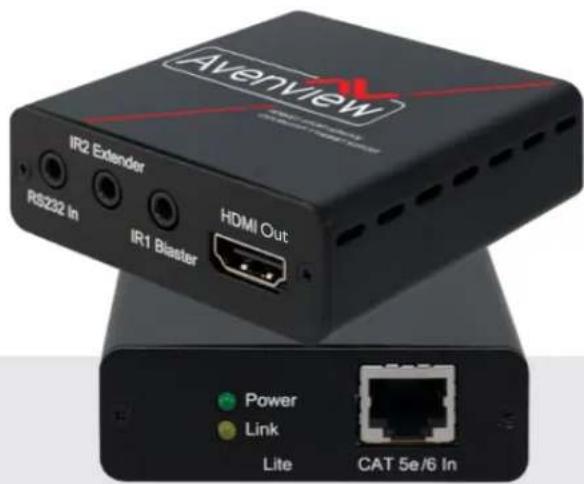
OUTPUT PANEL (Receiver, HBT-C6PLT-R) Front

| 1. RS-232: Connect to a device that has the ability to Receive control commands via RS232 only with compatible Transmitters. | 2. IR I Extender: Plug the IR Extender cable for IR signal being received. Place IR Extender within direct line of site with the IR Remote. |
| 3. IR 2 Blaster: Plug the IR Blaster cable for IR signal being transmitted. Place IR Blaster within direct site of the device being controlled. | 4. HDMI OUT: Connect to HDMI display Max 35ft via HDMI Cable or cascade with another Avenview type Transmitter |
INPUT PANEL (Receiver HBT-C6PLT-R) Rear

| 5. LED LINK: Illuminate when both the input and output signals are in sync. | 6. LED Power: Illuminates when connected to the Tx with Power (POE initialized) |
| 7. CAT5e/6/7 IN Connect CAT5e/6/7 cable to extend the signal up to 60m (200ft) | |
INPUT PANEL (Sender, HBT-C6PLT-S) Front
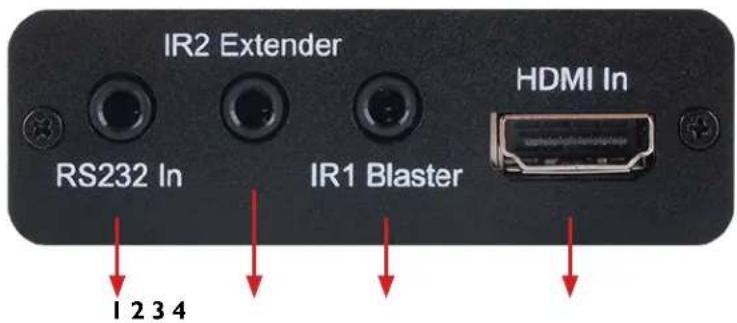
| 1. RS-232: Connect to a device that has the ability to Receive control commands via RS232 only with compatible Transmitters. | 2. IR I Extender: Plug the IR Extender cable for IR signal being received. Place IR Extender within direct line of site with the IR Remote. |
| 3. IR 2 Blaster: Plug the IR Blaster cable for IR signal being transmitted. Place IR Blaster within direct site of the device being controlled. | 4. HDMI IN: Connect to HDMI display Max 35ft via HDMI Cable or cascade with another Avenview type Transmitter |
OUTPUT PANEL (Sender, HBT-C6PLT-S) Rear

| 5. Power 24V: Illuminates when connected to the Tx with Power (POE initialized) | 6. LED LINK: Illuminate when both the input and output signals are in sync. |
| 7. LED Power: Illuminates when connected to the Tx with Power (POE initialized) | 8. CAT5e/6/7 IN Connect CAT5e/6/7 cable to extend the signal up to 60m (200ft) |
5. IR CABLE DEFINITIO
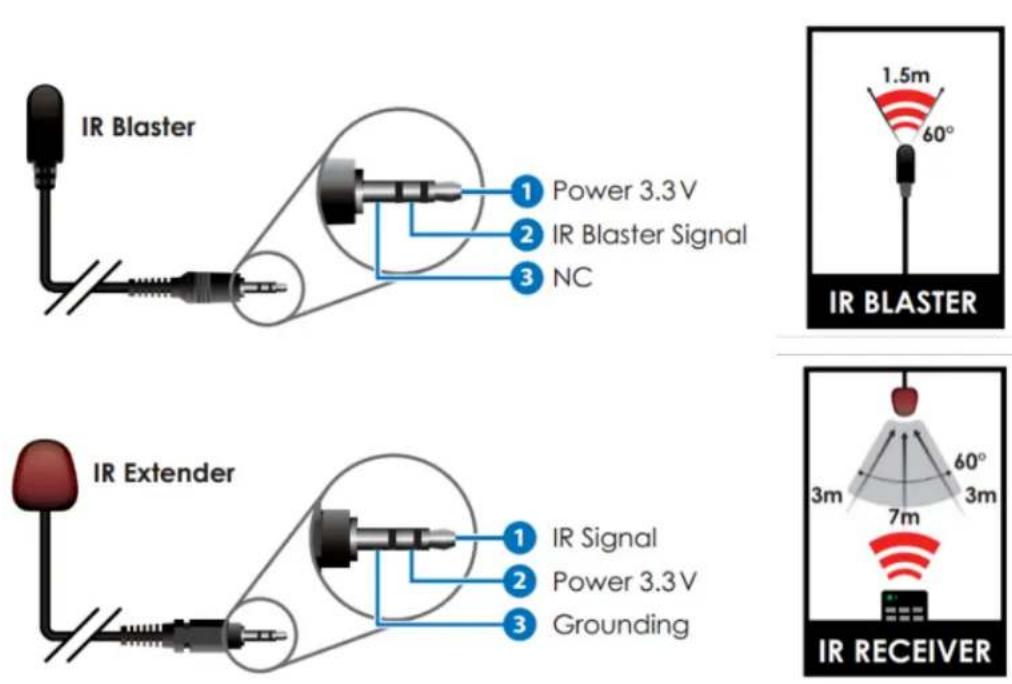
IR Sockets
- IR BLASTER: plug in the IR blaster to the HBT-C6PLT-R to emit all IR command signals received from the IR Extender plugged into the Rx (Monitor Side) to control the devices corresponding to the IR signals. Example: Set Top Box or DVD player (The Source).
- IR EXTENDER: plug in the IR Extender into the (RX) Receiver (Monitor Side) to receive all IR command signals from the IR remote controls of the corresponding source. Example: Set Top Box or DVD player (IR Remote Control).
WARNING

- NOTE: Incorrect placement of IR Blaster and IR Extender into the extender may result in the failure of the IR extenders.
- Please check carefully before plugging in the IR extender to the respective IR sockets.
- It is clearly marked and IR IN: IR EXTENDER /IR OUT: IR BLASTER
- WARRANTY WILL NOT COVER THE DAMAGE.

6. INSTALLATION (HBT-C6PLT-SET)
To setup Avenview HBT-C6PLT-SET please follow these steps for connecting to a device:
I. Turn off all devices including monitors / TV
2. Connect an HDMI source (such as a Blu-Ray Disc player) to the Transmitter HBT-C6PLT-S or HBT-C6POE-SP4/8 or Matrix 4x4/8x8
3. Connect HBT-C6PLT-R 60m with a CAT5/6/7 cable with shielded ends, then connect to display with HDMI cable.
4. Plug in Power for the Tx.
5. Plug in the IR BLASTER: into IR out and the blinker on the IR eye (Source)
6. Plug in the IR Extender to IR IN to receive IR Signals from Remote
7. Power on the HDMI display
8. Power on HDMI Sources.
Notice
NOTE: The QUALITY and TRANSMISSION of the video signals depends on the characteristics and quality of the UTP cables. Higher resolutions and longer transmission distances require low skew cables (<25ns/100m) for best performance. Unshielded CAT6 with metal RJ-45 connectors is recommended.

7. GENERAL TROUBLESHOOTING
| PROBLEM POSSIBLE SOLUTION | |
| NO IMAGE | Check if connection to the source and the display are correct.Ensure that display device supports 480p, 720p and 1080p 4K@30 resolutionTerminated to 568B standard with Shielded Ends RecommendedHigh Quality CAT5/6/7 Cable helps signal transmissionPlease use the supplied power supply-DC 24V 2.7ACheck LED Link light see (Section 3 Panel Description)Check LED Sync light see (Section 3 Panel Description |
| EDID ISSUE | EDID MODE-TV: The default factory setting is on TV. The unit will detect the 1st CAT5e/6/7 output's EDID. When obtained a (4K2K) Ultra HD 3840x2160 EDID the signal is transmitted.If the 1st CAT5e/6/7 output is without a Ultra HD 3840x2160 EDID the unit will detect all output's EDID and Transmit the signal that all outputs can accept.EDID MODE-STD: Switch to STD to use built-in EDID if the display has No Image. STD EDID's video at 1080p@60Hz and audio at LPCM 2CH. |
| SET-TOP BOXNO PICTURE | HDBaseT and HDMI 1.3 standards support CLOCK STRETCHING for i2 buss protocolExample set top boxes like Scientific Atlantic results no picture. This can be resolved by swapping out the box for a newer version that supports HDMI 1.3 not HDMI 1.2 |
| NO INFRAREDCOMMUNICATION | Ensure the UTP cable is run within the wall away from EMI and High Voltage power Lines.Please check manual of device to ensure proper placement of IR Blaster on IR EYE.Some LED /Plasma TV have EMI interference with the IR Extender, please place the IR Rx 3-6" away from Screen |
| Recommended TEST | |
| END-TO-END TESTING | HDBaseT system, a final end-to-end test of all the A/V components should take place. These tests include checking the HDMI stream at the far end (sink end), the clock rate, frame compare, video pattern, audio, EDID and HDCP with Quantum 780 (recommended) |
| PASSIVE MONITORING | Passive monitoring enables an integrator to view the HDCP transactions, EDID exchange, as well as the connection events between the actual devices in the network. |
8. SPECIFICATIONS
| Item Description | ||
| UNITS | HBT-C6PLT-S | HBT-C6PLT-R |
| UNIT DESCRIPTION | HDBaseT HDMI Extender | |
| HDMI COMPLIANCE | 1.4 | |
| HDCP | 2.0 | |
| VIDEO BANDWIDTH Single-link 340MHz [9 Gbps] | ||
| SUPPORTED RESOLUTIONS | 480i / 480p / 720p / 1080i / 1080p60 /4K@30 Up to Ultra HD (3840x2160@24/25/30Hz)4K2K-(4096x2160@24Hz) | |
| CEC SUPPORT | CEC BYPASS | |
| CAT5/6/7 CABLE | 4K2K: (3840X2160@30Hz) ~ 35meter (115feet) (CAT6e/6a)FULL HD: (1080p) ~ 60meter (200feet) (CAT6e/6a) | |
| AUDIO SUPPORT LPCM 7.1CH, Dolby TrueHD, Dolby Digital Plus and DTS-HD Master Audio | ||
| INPUT TMDS SIGNAL 1.2 Volts (peak-to-peak) | ||
| INPUT DDC SIGNAL 5 Volts (peak-to-peak, TTL) | ||
| ESD PROTECTION | Human body model — ±8kV (air-gap discharge)& ±4kV (contact discharge) | |
| INPUT | 1xIR Extender, 1xIR Blaster,1xRS 232, 1xHDMI | 1x CAT5e/6/71x Power Jack |
| OUTPUT | 1x CAT5e/6/71x Power Jack | 1x HDMIIx IR Extender, 1x IR Blaster1x RS 232 |
| HDMI CONNECTOR Type A (19 pin female) | ||
| LED | Power and Link LED | |
| IR FREQUENCY 30~50kHz | ||
| DIMENSIONS (L X W X H) | 2.8" x 2.9" x 1"71 mm (L)×73.5mm (W)×23 mm (H) | |
| WEIGHT 0.3lbs 126g | ||
| POWER SUPPLY | 24V / 1.25A DC(US/EU standards, CE/FCC/UL certified) | |
| POWER CONSUMPTION 6 Watt (max) | ||
Environmental
| OPERATING TEMPERATURE 32° ~ 104°F (0° to 40°C) | |
| STORAGE TEMPERATURE | -4° ~ 140°F (-20° ~ 60°C) |
| RELATIVE HUMIDITY | 20~90% RH (non-condensing) |
Notice
- All HDMI over CAT5 transmission distances are measured using Belden CAT6A (625MHz), 4-Pair, U/UTP-Unshielded, Riser-CMR, Premise Horizontal Cable, 23 AWG Solid Bare Copper Conductors, Polyolefin Insulation, Patented Double-H spline, Ripcord, PVC Jacket using Quantum 980 signal HDMI Video Generator Module Video Pattern Testing.
-
- The transmission length is largely affected by the type of category cables, also the type of HDMI sources, and the type of HDMI display. The testing result shows solid UTP cables (usually in the form of 300m or 1000ft bulk cable) can transmit a lot longer signals than stranded UTP cables (usually in the form of patch cords). Shielded STP connectors are better suit than unshielded UTP connectors. A solid UTP CAT5e cable shows longer transmission length than stranded STP CAT6 cable. For long extension users, solid cables are your only choice.
-
- EIA/TIA-568-B termination (T568B) for category cables is recommended for better performance.
-
- To reduce the interference among the unshielded twisted pairs of wires in category cable, you can use shielded STP cables with shielded connector to improve EMI problems, which occurs in long transmission.
-
- Because the quality of the category cables has the major effects in how long transmission distance will be made and how good is the received display, the actual transmission length is subject to your category cables. For resolution greater than 1080i or 1280x1024, a solid CAT6 cable is the only viable choice.
PERFORMANCE GUIDE FOR HDMI OVER CATEGORY CABLE TRANSMISSION
| PERFORMANCE RATING TYPE OF CATEGORY CABLE | ||||
| WIRING | LDING CAT5 CAT5E | CAT6 | ||
| SOLID | UNSHIELDED (UTP) | ***** | ***** | ***** |
| SHIELDED (STP) | ***** | ***** | ||
| STRANDED | UNSHIELDED (UTP) | ** | ** | |
| SHIELDED (STP) | ** | ** | ||
| TERMINATION PLEASE USE EIA/TIA-568-B TERMINATION (T568B) AT ANY TIME | ||||
Notes
Aview Warranty Certificate
AVENVIEW CORP. ("Avenview") warrants Avenview-branded product(s) contained in the original packaging against defects in materials and workmanship when used normally in accordance with Avenview's enclosed manual guidelines for a period of THREE (3) YEARS from the date of original retail purchase - Warranty Period. Avenview's published guidelines include but are not limited to information contained in technical specifications, user manuals and service communications.
LABOR: During the Warranty Period of THREE (3) YEARS, Avenview will repair or replace the product(s) at no cost using new or used parts equivalent to novel performance and reliability if the product(s) is determined to have abide by Avenview's published guidelines. Cost of Labor applicable to product(s) after Warranty Period. For labor costs, please contact support@avenview.com.
PARTS: During the Warranty Period of THREE (3) YEARS, Avenview will supply new or rebuilt replacements in exchange for defective parts of the product(s) at no cost if the product(s) is determined to have abide by Avenview's published guidelines. Cost of Parts applicable to product(s) after Warranty Period. For part(s) costs, please contact support@avenview.com.
To obtain Warranty: (a) proof of purchase in the form of a bill of sale or receipted invoice reflecting that the registered product(s) is within warranty period must be presented to obtain warranty service; (b) product(s) must be registered at time of purchase. Failure to do so will result in applicable parts and labor charges. Returning product(s) must be shipped in Avenview's original packaging or in packaging pertaining equal degree of protection to Avenview's. Both Avenview and purchaser are responsible for freight charges and brokerages when shipping the product(s) to the receiver.
NOT COVERED BY THIS WARRANTY
This warranty does not apply to any non-Avenview branded product(s); non-registered Avenview product(s). This warranty does not apply: (a) to cosmetic damage, including but not limited to scratches, dents and broken cords; (b) to damage caused by use with another product; (c) to damage caused by accident, abuse, misuse, liquid contact, fire, earthquake or other external cause; (d) to damage caused by operating the Avenview product(s) outside Avenview's manuals or guidelines; (e) to damage caused by service performed by anyone who is not a representative of Avenview or an Avenview authorized personnel; (f) to defects caused by normal wear and tear or otherwise due to the normal aging of the Avenview product(s), or (g) if any serial number has been removed or defaced from the Avenview product(s).
AVENVIEW IS NOT LIABLE FOR DIRECT, SPECIAL, INCIDENTAL OR CONSEQUENTIAL DAMAGES RESULTING FROM ANY BREACH OF WARRANTY OR CONDITION, OR UNDER ANY OTHER LEGAL THEORY, INCLUDING BUT NOT LIMITED TO LOSS OF USE; LOSS OF REVENUE; LOSS OF ACTUAL OR ANTICIPATED PROFITS (INCLUDING LOSS OF PROFITS ON CONTRACTS); LOSS OF THE USE OF MONEY; LOSS OF ANTICIPATED SAVINGS; LOSS OF BUSINESS; LOSS OF OPPORTUNITY; LOSS OF GOODWILL; LOSS OF REPUTATION; LOSS OF, DAMAGE TO, COMPROMISE OR CORRUPTION OF DATA; OR ANY INDIRECT OR CONSEQUENTIAL LOSS OR DAMAGE REPAIR OR REPLACEMENT AS PROVIDED UNDER THIS WARRANTY IS THE EXCLUSIVE REMEDY OF THE CONSUMER.
Some states do not allow the inclusion or limitation of incidental or consequential damages, or allow limitations on duration implements of the Warranty Period; therefore the above limitations or exclusions may not be applicable to you. This warranty gives you specific legal rights, and you may have other rights which vary from state to state.

275 Woodward Avenue, Kenmore, NY 14217 1.866.508.0269

Avenview
Control Your Video
TECHNICAL SUPPORT
CONTACT US

Phone: I (866) 5080269

Email: support@avenview.com

natural_image
Illustration of a globe with headphones and a headset, symbolizing global communication (no text or symbols present)USA Head Office Avenview Corp. 275 Woodward Avenue Kenmore, NY 14217
USA Head Office
Office Avenview
Corp. 275 Woodward Avenue
Kenmore, NY 14217
Phone: +1.716.218.4100 ext223
Fax: +1.866.387-8764
Email: info@avenview.com
Canada Sales
Avenview
151 Esna Park Drive, Unit 11 & 12
Markham, Ontario, L3R 3BI
Phone: 1.905.907.0525
Fax: 1.866.387.8764
Email: info@avenview.com
Avenview Europe
Avenview Europe
Demkaweg II
3555 HW Utrecht
Netherlands
Phone: +31 (0)85 2100-613
Unit 8, 6/F., Kwai Cheong Centre,
50 Kwai Cheong Road,
Kwai Chung, N.T.
Hong Kong
Phone: 852-3575 9585
Email: wenxi@avenview.com
Disclaimer
While every precaution has been taken in the preparation of this document, Avenview Inc. assumes no liability with respect to the operation or use of Avenview hardware, software or other products and documentation described herein, for any act or omission of Avenview concerning such products or this documentation, for any interruption of service, loss or interruption of business, loss of anticipatory profits, or for punitive, incidental or consequential damages in connection with the furnishing, performance, or use of the Avenview hardware, software, or other products and documentation provided herein.
Avenview Inc. reserves the right to make changes without further notice to a product or system described herein to improve reliability, function or design. With respect to Avenview products which this document relates, Avenview disclaims all express or implied warranties regarding such products, including but not limited to, the implied warranties of merchantability, fitness for a particular purpose, and non-infringement.


- HDBaseT Lite HDMI CAT5/6/7 Extender with POE/RS-232/ Bi-directional IR
- Product Application & Market Sectors
- TABLE OF CONTENTS
- I.1 IMPORTANT SAFEGUARDS
- What the warranty does not cover
- SAFETY INSTRUCTIONS
- I.3 REGULATORY NOTICES FEDERAL COMMUNICATIONS COMMISSION (FCC)
- Warning symbols Description
- WARNING
- INTRODUCTION
- NOTE:
- PACKAGE CONTENTS
- BEFORE INSTALLATION
- CABLE SPECIFICATIONS
- HBT-C6PLT-SET
- HBT-C6POE-SP4
- PANEL DESCRIPTION
- IR CABLE DEFINITIO
- IR Sockets
- INSTALLATION (HBT-C6PLT-SET)
- To setup Avenview HBT-C6PLT-SET please follow these steps for connecting to a device:
- Notice
- GENERAL TROUBLESHOOTING
- SPECIFICATIONS
- Aview Warranty Certificate
- NOT COVERED BY THIS WARRANTY
- Avenview
- TECHNICAL SUPPORT
- CONTACT US
- USA Head Office
- Canada Sales
- Avenview Europe
- Disclaimer
Brand : Avenview
Model : HBT-C6PLT-SET
Category : Video transceiver