
BZB-SW-41A - Router BZBGear - Free user manual and instructions
Find the device manual for free BZB-SW-41A BZBGear in PDF.


| Product Type | HDMI 4x1 Switcher with Audio Extractor |
| Brand | BZBGear |
| Model | BZB-SW-41A |
| Dimensions (W x D x H) | 120.97 mm x 79.17 mm x 16 mm |
| Weight | 195 g |
| Power Supply | DC 5V/1A (AC 100-240V 50/60Hz adapter included) |
| Video Bandwidth | 18 Gbps |
| Max Video Resolution | 4K2K@50/60Hz (YUV444) |
| HDMI Compliance | HDMI 2.0b, HDCP 2.2 |
| Color Depth | 10-bit, 12-bit |
| HDR Support | 10-bit HDR pass through |
| Audio Formats (pass-through) | LPCM 2/5.1/7.1, Dolby Digital, DTS 5.1, Dolby Digital+, Dolby TrueHD, DTS-HD Master Audio, Dolby Atmos, DTS:X |
| Audio Extraction | L/R analog stereo via 3.5mm jack (LPCM only) |
| Inputs | 4 x HDMI Type A (19-pin female) |
| Outputs | 1 x HDMI Type A, 1 x L/R Audio Out (3.5mm stereo mini-jack) |
| ESD Protection | Human body model: ±8kV (air-gap), ±4kV (contact) |
| Housing Material | Plastic enclosure, gray |
| Operating Temperature | 0 - 40°C (32 - 104°F) |
| Storage Temperature | -20 - 60°C (-4 - 140°F) |
| Relative Humidity | 20 - 90% RH (no condensation) |
| Power Consumption | 1W (Max) |
| Included Accessories | Power adaptor, remote control, user manual |
| Warranty | 1-year limited + free 2nd year upon registration |
| Maintenance & Cleaning | Wipe with a dry, soft cloth. Disconnect power before cleaning. |
| Safety & Surge Protection | Use a surge protector. Operate within specified temperature range. Do not expose to moisture. |
Frequently Asked Questions - BZB-SW-41A BZBGear
User questions about BZB-SW-41A BZBGear
0 question about this device. Answer the ones you know or ask your own.
Ask a new question about this device
Download the instructions for your Router in PDF format for free! Find your manual BZB-SW-41A - BZBGear and take your electronic device back in hand. On this page are published all the documents necessary for the use of your device. BZB-SW-41A by BZBGear.
USER MANUAL BZB-SW-41A BZBGear
HDMI 18Gbps 4x1 Switcher with Audio Extractor
Thank you for purchasing this product
For optimum performance and safety, please read these instructions carefully before connecting, operating or adjusting this product. Please keep this manual for future reference.
Surge protection device recommended
This product contains sensitive electrical components that may be damaged by electrical spikes, surges, electric shock, lightning strikes, etc. Use of surge protection systems is highly recommended in order to protect and extend the life of your equipment.
Table of Contents
- Introduction....3
- Features ....3
- Package Contents .... 3
- Specifications....4
- Operation Controls and Functions....5
- Connection Diagram......6
- Mission Statement....7
- Warranty Information......8
1. Introduction
The BZB-SW-41A HDMI 18Gbps 4x1 Switcher can switch any of 4 HDMI 2.0 sources to an HDMI 2.0 display. It supports 10bits HDR (High Dynamic Range) pass through and HDMI high resolution digital audio bypass as well as HDCP and CEC bypass. It can also extract HDMI audio to L/R analog output (LPCM only).
2. Features
✧ HDMI 2.0b (18Gbps), HDCP 2.2 and DVI compliant
✧ Video resolutions up to 4K2K@50/60Hz (YUV444)
✨ Supports 4 HDMI inputs and 1 HDMI output
Built-in retiming and cable driver
Extracts HDMI audio to L/R analog output (LPCM only)
✨ Supports HDMI High Bit Rate(HBR) audio pass through
✨ Audio sample rates up to 192kHz
✦ 10bits HDR (High Dynamic Range) pass through
✨ Supports HDCP, 3D and CEC bypass
3. Package Contents
✨ 1 x HDMI 4x1 Switcher unit
✨ 1 x 5V/1A Power Adaptor
✨ 1 x Remote Control unit
✨ 1 x User Manual
4. Specifications
| Technical | |
| HDMI Compliance | HDMI 2.0b |
| HDCP Compliance | HDCP 2.2 and HDCP 1.4 |
| Video Bandwidth | 18 Gbps |
| Video Resolutions | up to 4K2K@50/60Hz(YUV4:4:4),4K2K@30Hz,1080P@120Hz,and 1080P 3D@60Hz |
| Color Space | RGB, YCbCr 4:4:4, YCbCr 4:2:2 |
| Color Depth | 10-bit, 12-bit |
| HDMI Audio Formats(Pass-through) | LPCM 2/5.1/7.1CH, Dolby Digital, DTS 5.1, Dolby Digital+, Dolby TrueHD, DTS-HD Master Audio, Dolby Atmos, DTS:X |
| L/R Audio Formats | Analog Stereo 2CH |
| ESD Protection | Human body model — ±8kV (air-gap discharge) & ±4kV (contact discharge) |
| Connections | |
| Inputs | 4x HDMI Type A [19-pin female] |
| Outputs | 1x HDMI Type A [19-pin female]1x L/R Audio Out [3.5mm Stereo Mini-jack] |
| Mechanical | |
| Housing | Plastic Enclosure |
| Color | Gray |
| Dimensions | 120.97mm [W] x 79.17mm [D] x 16mm [H] |
| Weight | 195g |
| Power Supply | Input: AC100 - 240V 50/60HzOutput: DC 5V/1A (US/EU standards, CE/FCC/UL certified) |
| Power Consumption | 1W (Max) |
| OperationTemperature | 32 - 104°F / 0 - 40°C |
| Storage temperature | -4 - 140°F / -20 - 60°C |
| Relative Humidity | 20 - 90% RH (no condensation) |
5. Operation Controls and Functions
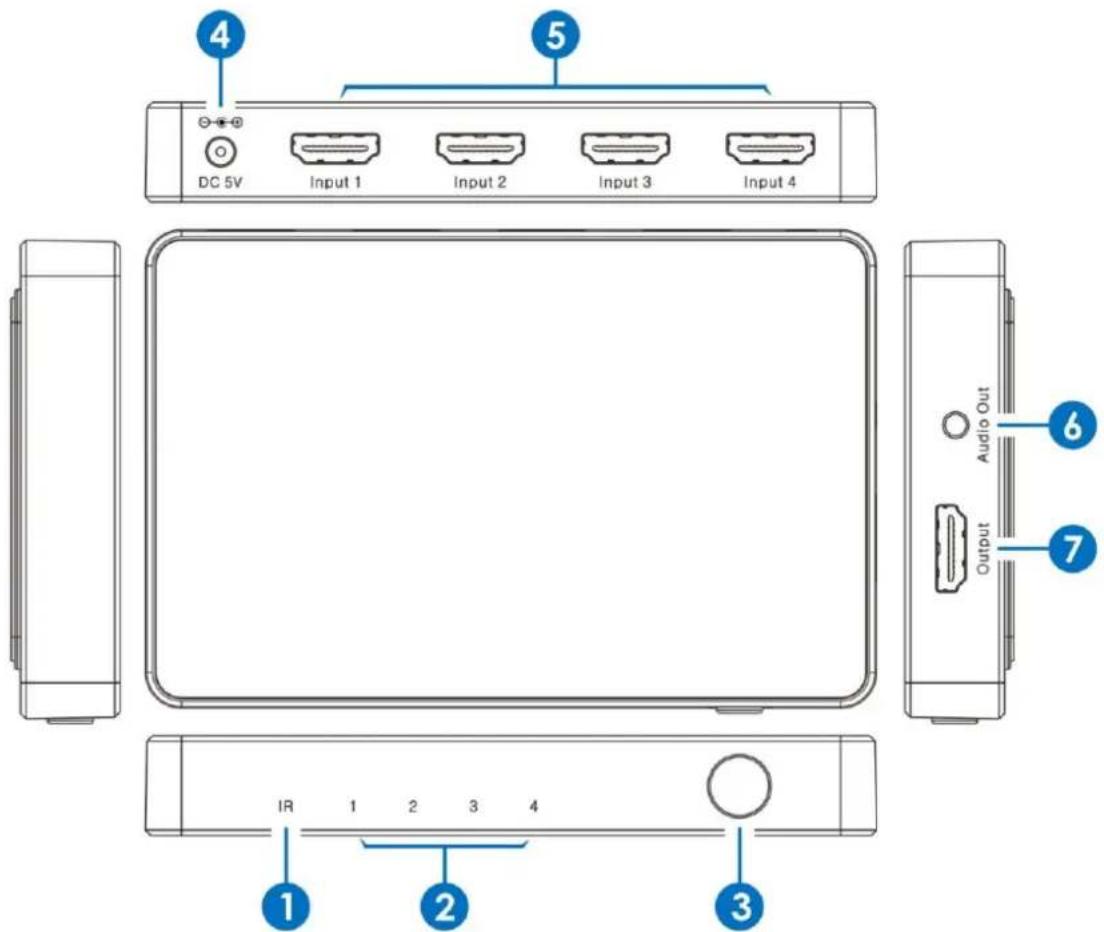
1 IR: IR receiver window.
2 Input LED: The LED will illuminate when corresponding HDMI input be chosen.
3 Select Button: This allows users to select HDMI input ports.
4 DC 5V: Connect 5V/1A adaptor to AC wall outlet for power supply.
5 HDMI Inputs: Connect them to HDMI source devices such as Blu-ray DVD or PS4 player.
6 Audio Out: Connect to audio amplifier or TV L/R audio input port.
7 HDMI Output: Connect to HDMI display device such as TV/Projector.
6. Connection Diagram

flowchart
graph TD
    A["UHDTV"] -->|HDMI| B["Active Speakers"]
    A --> C["Power Supply"]
    B --> D["Output"]
    B --> E["Audio Out"]
    F["DVD or Blu-ray Player"] --> G["Input 1"]
    F --> H["Input 2"]
    F --> I["Input 3"]
    F --> J["Input 4"]
    K["DVD or Blu-ray Player"] --> L["Input 1"]
    K --> M["Input 2"]
    K --> N["Input 3"]
    K --> O["Input 4"]
    P["DVD or Blu-ray Player"] --> Q["Input 1"]
    P --> R["Input 2"]
    P --> S["Input 3"]
    P --> T["Input 4"]
7. Mission Statement
BZB Gear manifests from the competitive nature of the audiovisual industry to innovate while keeping the customer in mind. AV solutions can cost a pretty penny, and new technology only adds to it. We believe everyone deserves to see, hear, and feel the advancements made in today's AV world without having to break the bank. BZB Gear is the solution for small to medium-sized applications requiring the latest professional products in AV.
We live in a DIY era where resources are abundant on the internet. With that in mind, our team offers system design consultation and expert tech support seven days a week for the products in our BZB Gear catalog. You'll notice comparably lower prices with BZB Gear solutions, but the quality of the products is on par with the top brands in the industry. The unparalleled support from our team is our way of showing we care for every one of our customers. Whether you're an integrator, home theater enthusiast, or a do-it-yourselfer, BZB Gear offers the solutions to allow you to focus on your project and not your budget.
8. Warranty Information
BZB Gear | Second Year Assurance
BZB Gear wants to assure you peace of mind. We're so confident in the quality of our products that along with the manufacturer's one-year limited warranty, we are offering free second-year warranty coverage upon registration*!
Taking advantage of this program is simple, just follow the steps below:
-
Register your product within 90 days of purchase by visiting BZBGear.com/warranty.
-
Complete the registration form. Provide all necessary proof of purchase details, including serial number and a copy of your sales receipt.
For questions, please call 1.888.660.2962 or email support@bzbgear.com.
For complete warranty information, please visit BZBGear.com/warranty or scan the QR code below.

*Terms and conditions apply. Registration is required.
Brand : BZBGear
Model : BZB-SW-41A
Category : Router