
HLM-7012WR - Loudspeaker Ikegami - Free user manual and instructions
Find the device manual for free HLM-7012WR Ikegami in PDF.


| Product Type | Dual LCD Monitor |
| Model | HLM-7012WR |
| Brand | Ikegami |
| Display Size | 7 inches diagonal (2 displays) |
| Display Area | 152 (H) x 91 (V) mm |
| Aspect Ratio | 15:9 |
| Resolution | 800 (H) x 480 (V) effective pixels |
| Viewing Angle | 170° (H), 170° (V) |
| Color Reproduction | Approx. 16.77 million colors (RGB 8-bit each) |
| Dimensions (W x H x D) | Approx. 481 x 132.6 x 33 mm (main body); 56 mm including connectors |
| Weight | Approx. 2.1 kg |
| Power Supply | DC 12V (10V - 19V), via XLR 4-pin; also AC adaptor included |
| Power Consumption | 30 W max (AC), 29 W max (DC), 2.4 A max |
| Video Input | 3G/HD/SD SDI (2x BNC) |
| Video Output | SDI active through (1x BNC) |
| Supported Video Formats | 1080p/60, 59.94, 50; 1080i/60, 59.94, 50; 1080PsF/30, 29.97, 25, 24, 23.98; 1080p/30, 29.97, 25, 24, 23.98; 720p/60, 59.94, 50, 30, 29.97, 25, 24, 23.98; 480i/59.94; 575i/50 |
| GPI Input | 1x D-sub 15-pin (female) for tally, marker, aspect, scan, etc. |
| Tally Indicator | Front LED (Green/Red/Yellow/Blue/White), configurable via menu |
| Internal Fan | Always on when powered; fan alarm LED flashes yellow if failure |
| Operating Temperature | 0°C to 40°C (recommended 20°C to 30°C) |
| Operating Humidity | 30% to 85% (non-condensing) |
| Storage Temperature | -20°C to 60°C |
| Storage Humidity | 0% to 90% |
| Accessories Included | Operation manual (CD-ROM), AC adaptor and power cable |
| Warranty | 2 years from purchase (consumables excluded) |
Frequently Asked Questions - HLM-7012WR Ikegami
User questions about HLM-7012WR Ikegami
0 question about this device. Answer the ones you know or ask your own.
Ask a new question about this device
Download the instructions for your Loudspeaker in PDF format for free! Find your manual HLM-7012WR - Ikegami and take your electronic device back in hand. On this page are published all the documents necessary for the use of your device. HLM-7012WR by Ikegami.
USER MANUAL HLM-7012WR Ikegami
3U 7 inches Dual LCD Monitor
3U7型2連LCDモニター
HLM-7012WR
Operating Instructions
Before operating the system, please read this manual thoroughly and keep it for future reference.
オペレーションマニュアル
IKEGAMI TSUSHINKI accepts no liability whatever for incidental damages arising out of the use or inability to use the product, including, but not limited to, corruption or loss of data, lost business revenue or suspension of business operations.
IKEGAMI TSUSHINKI accepts no liability whatever for damages arising from improper use not conforming to the instructions in the instruction manuals.
To ensure proper usage, be sure to read the Safety Precautions thoroughly before using the product. Always keep this manual available for future reference.
Be sure to follow the safety information to prevent injury to the user and other persons, as well as damage to property.
The following describes the meaning of safety symbols and signal words.
Indicates a potentially hazardous operation that could result in death or serious injury to the user.
If something unusual happens; for example, it emits smoke, an unusual odor or sound, turn the power switch off.
If it is dropped or subjected to excessive shock or is damaged, turn the power switch off.
■If water or any other fluid enters it, turn the power switch off.
■If a foreign body enters it, turn the power switch off.
※Failing to do so may cause overheating, fire, electric shock, injury or malfunction.

警告
Indicates a potentially hazardous operation that could result in minor or moderate injury to the user or damage to the property.

注意
■ Do not place any containers of fluids or any metal objects on it.
Doing so may cause overheating, fire, electric shock, injury or malfunction.
■ Do not insert or drop objects into an opening such as vent hole in it.
Doing so may cause overheating, fire, electric shock, injury or malfunction.
■ Do not wet it with fluids such as water, perspiration or seawater.
Doing so may cause overheating, fire, electric shock, injury or malfunction. Take care especially when using in rainy or snowy weather or at the waterside.
■ Do not set up or leave it wherever water or any other fluid is used.
Doing so may cause overheating, fire, electric shock, injury or malfunction.
■Do not disassemble, modify or repair it.
Doing so may cause overheating, fire, electric shock, injury or malfunction.
Adjustments and Settings 調整·設定 10
Names and Functions of Parts 各部名称と働き
HLM-7012WR
HLM-7012WR 各部名称と働き
Front panel
フロントパネル
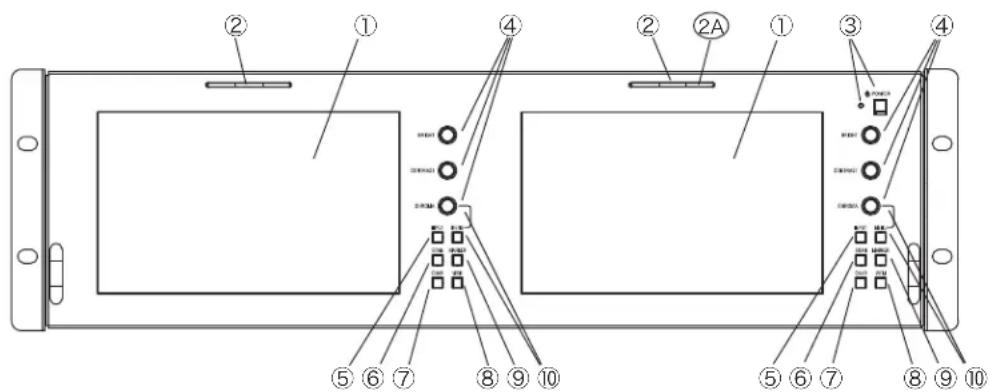
① Screen 画面
7 inches LCD.
7型液晶
Lights up in RED, GREEN, YELLOW, BLUE or WHITE when the tally signal is input to the GPI connector(HD D-sub 15-pin, PIN 1/2/3/4). The color of the light can be changed on the MENU.
Turns the power supply on/off. When the power is ON, the FAN works.

④ BRIGHT/CONTRAST/CHROMA Adjustment Knob
(CHROMA knob is also used as MENU SELECT/ENTER knob.)
By pressing each knob the STANDARD mode and USER setting mode are changed in turn. When USER mode, by rotating the knob each setting can be adjusted. The each setting ranges from 0 to 100.
STANDARD(factory default setting value) : BRIGHT = 50 / CONTRAST = 80 / CHROMA = 50
By pressing the button the input changes SDI 1 and SDI 2 in turn.
The selected input (SDI 1 or SDI 2) and its video format are displayed on the screen by setting in MENU.
By pressing the button the SCAN changes in turn.
NORMAL→OVER→ZOOM→
CHARACTER (alphabet/number/symbol) can be displayed on the screen/CENTER TOP or CENTER BOTTOM. LOCATION, CHARACTER (up to ten letters), SIZE and COLOR of the character are set in MENU/SETUP.
The character "PROGRAM" is displayed on the screen CENTER TOP by default setting when the CHAR is ON,
デフォルトでは、PROGRAM文字が
By pressing the button the WAVEFORM and VECTORSCOPE are displayed on the screen in turn. WAVEFORM → VECTORSCOPE → WAVEFORM and VECTORSCOPE →
SIZE, POSITION and DISP TYPE(OVER LAY/OVER LAP) are set in MENU/WAVEFORM or VECTORSCOPE.
The MARKER display is turned on/off by pressing the button. The contents of the MARKER display is set in MENU.
MENU/MARKER MARKER
CENTER
ASPECT
SAFETY
CROSS HATCH
(CHROMA) ENTER knob : When the MENU is displayed, CHROMA knob functions as ENTER knob. (MENU Selection and Entry Knob/Button)
Rotating ENTER knob selects the setting items. Pressing ENTER knob enters and confirms the selected setting items.
Rotate ENTER knob to select the objective item. The color of the letter of a selected item turns into blue. Press the knob, and the submenu list is displayed. Rotate ENTER knob to select the objective item. The color of the letter of a selected item turns into blue. Press ENTER knob, and the setting(value) is displayed. The background of the letter of the settings of a selected item becomes blue and the color of the letter turns into white. Rotate ENTER knob to select the setting(value) and press the knob, and the selected setting(value) is entered and confirmed. And then the display returns to the submenu. And the next item can be selected.
⑪ SDI 1/SDI 2 SDI Input Connectors (BNC) SDI 入力コネクタ
Connect a SDI signal. (Comptible with 3G/HD/SD SDI)
SDI入力コネクタ。3G SDI対応。
⑫ SDI OUT SDI 1 or SDI 2 Active Through Output Connector (BNC) SDI 出力コネクタ
Outputs the SDI 1 or SDI 2 input signal as is.
Connect an external GPI signal. The assigned functions can be changed on MENU/SETUP/REMOTE.
(HD D-sub 15-pin, female)
pin assignment
| 1 | R TALLY | 6 | NC | 11 | MONO |
| 2 | G TALLY | 7 | NC | 12 | MARKER |
| 3 | Y TALLY | 8 | NC | 13 | ASPECT |
| 4 | INPUT CHANGE | 9 | B ONLY | 14 | SCAN |
| 5 | GND | 10 | NC | 15 | HV DELAY |
⑭ DC IN 12V DC 12V Power Input Connector (XLR 4-pin) DC 12V電源入力コネクタ
Connect a DC 12V power supply. (10V - 19V)
Fan works when the POWER switch is ON.
電源ONのとき動作します。
②A FAN ALARM Indicator (on the front panel): When the fan stops by the trouble, the right LED light of the three LED lights of TALLY indicator of the right display will flash in yellow and show the trouble of fan.
Make sure to turn off the POWER switch of each unit before connecting.
Adjustments and Settings 調整·設定
HLM-7012WR
HLM-7012WR 調整·設定
Adjustments and Settings
調整·設定方法
1 BRIGHT/CONTRAST/CHROMA Adjustment BRIGHT/CONTRAST/CHROMAの調整
STANDARD(default setting value) : BRIGHT = 50 / CONTRAST = 80 / CHROMA = 50
User Setting : (1) By pressing each knob select the USER preset mode.
(2) By rotating the knob adjust each setting. The each setting ranges from 0 to 100.
The user setting value is memorized even if the switch is turned on and off.
2 Function Button Settings
Select the settings by pressing the Function button in sequence.
All 16 channels of the embedded audio can be monitored with the AUDIO LEVEL METER displayed on the screen depending on the settings on the MENU.
OFF/ON → Set to ON to display the AUDIO LEVEL METER.
OFF/ON
* CHROMA knob functions as ENTER knob and MENU button functions as RETURN button while the MENU is displayed.
Pressing MENU button displays the MENU on the screen. The menu returns to the previous list by pressing MENU button while the MENU is displayed.
ENTER knob-button :
Rotating ENTER knob-button selects the menu item or setting while the MENU is displayed. Pressing ENTER button confirms the selected item or value.
RESET of the USER settings
設定値のリセット
USER settings can be reset to the default settings in the MENU.
SAVE USER CONFIG > : USER configuration, settings and values, can be saved by the memory.
LOAD USER CONFIG > : USER configuration, settings and values, saved is loaded.
Even if the RESET is carried out, the USER configuration, settings and values saved by the memory are not reset.
By pressing the MENU button, and by rotating and pressing the ENTER knob set the functions.
Menu Selection and fixing

Submenu Selection and fixing

Setting and fixing
Press MENU button, and the MENU list is displayed on the screen.
CHROMA knob functions as ENTER knob while MENU is displayed.
By rotating ENTER knob select the objective item and press the knob. And then the submenu list is displayed.
By rotating the ENTER knob select the objective item and press the knob. And then the setting items list, is displayed.
By rotating ENTER knob select the objective setting and press the knob. And then the selected item is entered . The display returns to the submenu list and the next item can be selected.
Outside dimension (unit: mm)
Specifications 仕様
HLM-7012WR
HLM-7012WR 仕様
| LCD Panel * | LCD パネル※ | |
| Panel type | LCDパネルタイプ | TFT-LCD |
| Panel size | パネルサイズ | 7 inches diagonal (2 Displays) |
| Size of display area | 画面サイズ | 152(H) x 91(V) mm |
| Panel aspect ratio | アスペクト比 | 15:9 |
| Picture Resolution | 解像度 | 800(H) x 480(V) Effective Pixels |
| Viewing Angle | 視野角 | 170° (H), 170° (V) |
| Color reproduction | 色再現性 | approx. 16,770,000 colors (RGB 8bit each) |
| Input | 入力 | |
| DC IN 12 V | DC 電源入力 | 1x XLR 4-pin (male) DC 12V |
| SDI | SDI 入力 | 3x 2x BNC 3G/HD/SD |
| GPI | GPI 信号入力 | 3x 1x D-sub 15-pin |
| Tally | タリー | |
| Tally Indicator | タリー表示 | 3x 3x Front (Green/Red/Yellow/Blue/White) Colors can be selected by the MENU. |
| Output | 出力 | |
| SDI OUT | SDI 出力 | 3x 1x BNC SDI (Active Through Output) |
| General | 一般 | |
| Weight | 質量 | approx. 2.1 kg |
| Dimensions (WxHxD) | 外形寸法(幅×高さ×奥行き) | approx. 481 x 132.6 x 33 mm (main body) (56 mm including connector protrusions) |
| Power requirement | DC 電源 | DC 12 V (10 V - 19 V) |
| Power consumption | 消費電力 | [AC]30 W max / [DC(12 V)]29 W max, 2.4 A max |
| Operating Temperature | 動作温度(推奨温度) | 0 °C ~ 40 °C (Recommendation: 20 °C ~ 30 °C) |
| Operating Humidity | 動作湿度 | 30 % ~ 85 % (no condensation) |
| Storage Temperature | 保存温度 | -20 °C ~ 60 °C |
| Storage Humidity | 保存湿度 | 0 % ~ 90 % |
| Video Input signal | ビデオ入力信号 | |
| Video Format | ビデオフォーマット | 1080p/60, 59.94, 501080 i/60, 59.94, 50, 1080PsF/30, 29.97, 25, 24, 23.981080p/30, 29.97, 25, 24, 23.98720p/60, 59.94, 50, 30, 29.97, 25, 24, 23.98480 i/59.94575 i/50 |
* The LCD panel is made to precise specifications. Although over 99.99 % of the pixels function normally, less than 0.01 % of the pixels are missing or constantly lit (in red, green or blue). This is normal and not a cause for concern.

Features, design and specifications are subject to change without notice.
WARNING
CAUTION
RISK OF ELECTRIC SHOCK DO NOT OPEN.
CAUTION:
TO REDUCE THE RISK OF ELECTRIC SHOCK, DO NOT REMOVE COVER (OR BACK).
NO USER-SERVICEABLE PARTS INSIDE.
REFER SERVICING TO QUALIFIED SERVICE PERSONNEL.

This symbol is intended to warn the user that parts inside the product are dangerous and may cause electric hazards.
This symbol is intended to inform the user that important operating and servicing instructions are provided with the equipment.
WARNING:
TO REDUCE THE RISK OF FIRE, ELECTRIC SHOCK, OR INJURY TO PERSON, DO NOT EXPOSE THIS EQUIPMENT TO RAIN OR WATER. TO REDUCE THE RISK OF FIRE HAZARD, KEEP THIS EQUIPMENT AWAY FROM ALL LIQUIDS. USE AND STORE ONLY IN LOCATIONS WHICH ARE NOT EXPOSED TO THE RISK OF DRIPPING OR SPLASHING LIQUIDA, AND DO NOT PLACE ANY LIQUID CONTAINERS ON TOP OF THE EQUIOMENT.
FCC NOTICE (USA)
CAUTION :
This equipment has been tested and found to comply with the limits for a Class A digital device, pursuant to Part 15 of the FCC Rules. These limits are designed to provide reasonable protection against harmful interference when the equipment is operated in a commercial environment. This equipment generates, uses and can radiate radio frequency energy and, if not installed and used in accordance with the instruction manual, may cause harmful interference to radio communications. Operation of this equipment in a residential area is likely to cause harmful interference in which case the user will be required to correct the interference at his own expense.
WARNING ;
ANY CHANGES OR MODIFICATIONS NOT EXPRESSLY APPROVED BY THE PART RESPONSIBLE FOR COMPLIANCE COULD VOID THE USERS AUTHORITY TO OPERATE THE EQUIPMENT.
NOTE: There may be precautions that do not fit in this product that you purchased.
WARNING : FOR CONTINUED SAFETY, REPLACE SAFETY CRITICAL COMPONENTS ONLY WITH MANUFACTURE'S RECOMMENDED PARTS (REFER TO SERVICE LITERATURE).
CAUTION :
TO REDUCE THE RISK OF FIRE, USE THE RECOMMENDED ACCESSORIES.
CAUTION :
TO MAINTAIN ADEQUATE VENTILATION, DO NOT INSTALL THIS EQUIPMENT IN THE CONFINED SPACE SUCH AS A BOOKCASE OR BUILT-IN CABINET UNLESS PROPER VENTILATION IS PROVIDED.
CAUTION :
DO NOT BLOCK THE VENT OF THIS EQUIPMENT BY PLACING THIS EQUIPMENT ON A BED, SOFA, RUG, OR OTHER SIMILAR SURFACE. TO PREVENT THE RISK OF FIRE DUE TO OVERHEATING, ENSURE THAT A CURTAIN AND ANY OTHER THING DOES NOT BLOCK THE VENT.
Information on DISPOSAL (EU)
Disposal of used Electric and Electronic Equipment (Applicable in the European Union and other European countries with separate collection systems)
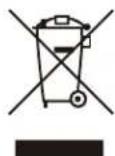
This symbol on the product, or in the related documents in the package, indicates that this product shall not be treated as normal household waste. Instead, it should be taken to a proper applicable collection point or depot for the recycling of electric and electronic equipment.
By ensuring this product is disposed of correctly, you will help prevent possible negative consequences for the environment and human health, which could otherwise be caused by inappropriate waste handling of this product. The recycling of materials will help to conserve natural resources.
For more detailed information about recycling of this product, please contact your local city authorities, your household waste disposal service or the place where you purchased the product.
For business users in the European Union
If yoy wish to discard electrical and electronic equipment, please contact your dealer or supplier for further information.
Information on Disposal in other Countries outside the European Union
This symbol is only valid in the European Union. If you wish to discard this product, please contact your local authorities or dealer and ask for the correct method of disposal.
WARNING
IMPORTANT SAFETY INSTRUCTIONS
1. General
1) Read all instructions provided.
2) Save these instructions for future use.
3) Follow all warnings and instructions marked on the equipment.
4) Never insert objects of any kind into this equipment through cabinet slots as they may come in contact with dangerous voltage points or short out parts, resulting in fire or electric hazards, Never spill liquid of any kind on the television monitor.
5) Do not attempt to service this equipment yourself as operating or removing covers many expose you to dangerous voltage or other hazards, Refer all servicing to qualified service personnel.
6) Do not use attachments not recommended by the equipment manufacturer as they may result in the risk of fire, electric shock, or injury to persons.
7) This television monitor has been preadjusted to meet the respective broadcasting standard signals. So, it cannot be used with the signals of different broadcasting standards.
8) When keeping or transporting the unit for a long time, pack it in the supplied carton or equivalent.
2. Power supply
1) This television equipment should be operated only from the type of power source indicated on the marking label.
2) When connecting and disconnecting the power cable, be sure to hold the plug.
3) Do not allow anything to rest on the power cord.
Do not place this television equipment where the cord will be abused by persons walking on it.
4) For added protection for this television equipment during a lightning storm, or when it is left unattended and unused for long periods of time, unplug it from the wall outlet.
This will prevent damage to the equipment due to lightning and power-line surges.
5) Do not overload wall outlets and extension cords as this can result in fire or electric shock.
3. Usage and location
1) Do not use this equipment near water - for example, near a bath tub, kitchen sink, or laundry tub, in a wet basement, or near a swimming pool, or the like.
2) Do not place this equipment on an unstable cart, stand, or table. The equipment may fall, causing serious injury to children and adults, and serious damage to the equipment. Use only with a cart or stand recommended by the manufacture, or sold with the equipment. Wall or shelf mounting should follow the manufacture's instructions, and should use a mounting kit approved by the manufacture.
The equipment and cart combination should be moved with care. Quick stops, excessive force, and uneven surfaces may cause the equipment and cart combination to overturn.

3) Slots and openings in the cabinet and the back or bottom are provided for vitiation, and to ensure reliable operation of the monitor and to protect it from overheating, these openings should never be blocked or covered. The openings should never be blocked by placing the television equipment on a bed, sofa, rug, or other similar surface. (This television equipment should never be placed near or over a radiator or heat register.) This television equipment monitor should not be placed in a built-in installation such as a bookcase unless proper ventilation is provided.
4) Avoid operating or placing (keeping) in a hot (+40°C or over) or cold (less than 0°C), high vibration, or dusty place. Avoid operating or storing in a place exposed to direct sunlight.
5) If an image of extremely high brightness is displayed on the screen for a long time, the panel may get burned in.
WARNING
4. Cleaning
1) Unplug this television equipment from the wall outlet before cleaning. Do not use liquid cleaners or aerosol cleaners. Use a damp cloth for cleaning.
2) Do not use thinner or benzene for cleaning. Otherwise, the cabinet may deform or the paint may peel away.
5. Repair
1) Unplug this equipment from the wall outlet and refer servicing to qualified service personnel under the following conditions:
a. When the power cord or plug is damaged or frayed.
b. If liquid has been spilled into the television.
c. If the television monitor has been exposed to rain or water.
d. If the equipment does not operate normally by following the operating instructions.
Adjust only those controls that are covered by the operating instructions as improper adjustment of other controls may result in damage and will often require extensive work by a qualified technician to restore the equipment to normal operation.
e. If the equipment has been dropped or the cabinet has been damaged.
f. When the equipment exhibits a distinct change in performance - this indicates a need for service.
2) When replacement parts are required, be sure the service technician has used replacement parts specified by the manufacture that have the same characteristics as the original part.
Unauthorized substitutions may result in fire, electric shock, or injury to persons.
3) Upon completion of any service or repairs to this equipment, ask the service technician to perform routine safety checks to determine that the equipment is in safe operating condition.
4) For repair service, contact Ikegami's authorized sales representative or Ikegami service desk directly.
Cautions for Rack-Mount.
A) Elevated Operating Ambient - If installed in a closed or multi-unit rack assembly, the operating ambient temperature of the rack environment may be greater than room ambient. Therefore, consideration should be given to installing the equipment in an environment compatible with the maximum ambient temperature (Tma) specified by the manufacturer.
B) Reduced Air Flow - Installation of the equipment in a rack should be such that the amount of air flow required for safe operation of the equipment is not compromised.
C) Mechanical Loading - Mounting of the equipment in the rack should be such that a hazardous condition is not achieved due to uneven mechanical loading.
D) Circuit Overloading - Consideration should be given to the connection of the equipment to the supply circuit and the effect that overloading of the circuits might have on overcurrent protection and supply wiring. Appropriate consideration of equipment nameplate ratings should be used when addressing this concern.
E) Reliable Earthing - Reliable earthing of rack-mounted equipment should be maintained. Particular attention should be given to supply connections other than direct connections to the branch circuit (e.g. use of power strips).
NOTE : There may be precautions that do not fit in this product that you purchased.
WARNING
Precautions Upon Use
In order to use the monitor safely, read through this manual and pay attention to the following points in particular.
- Do not use any power supply other than the specified one (AC/DC).
- Do not give a shock to the monitor.
Be very careful to keep the monitor from shocks because glass is used inside the LCD.
- Do not use or store the monitor in the following places.
Place where the ambient temperature is out of spec
When installing the monitor on a monitor shelf, switcher table, rack, etc., make sure in advance that the temperature of the installation location is within the specified range.
In the case of an outdoor setup, even if the ambient temperature is within the specified range, the inside of the monitor may be heated by direct sunlight.
Therefore, keep radiation in mind.
(Avoid direct sunlight.)
Never block the air outlet at the rear of the monitor and the air inlet at the side. Make sure in particular that a blackout curtain or the like does not block the air outlet.
Place exposed to rain, snow or high humidity
Use of the monitor in such a place will cause electric leakage or failure.
- Avoid exposing the LCD screen to direct sunlight.
Exposure of the LCD screen to direct sunlight for a long time will degrade the film. Therefore be careful of direct sunlight when using the monitor outdoors.
- Cautions in handling the front protective panel
Be careful not to touch the LCD panel front surface with bare hands, unless necessary. When wiping the dust off the surface, use soft, dry cloth and take care not to rub the surface strongly.
Do not use thinner or benzene.
- Do not touch liquid crystal leaked from the monitor's display surface.
If the monitor's display surface is accidentally broken and the liquid crystal leaks, be careful never to put the liquid in your mouth, inhale it and allow it on your skin. If the liquid gets into your eye or mouth, immediately rinse it with water and get medical attention.
If the liquid contacts your skin or clothes, immediately wipe it off using alcohol or the like and wash the stained spot with soap and water. Do not leave the liquid intact, because otherwise your skin or clothes may be affected.
- Do not display the same pattern for a long time.
Note that residual image may be generated if the same pattern is displayed for a long time.
- Turn off the power when the monitor is not used.
To avoid residual images, preferably take the following measures.
- Change the screen regularly.
- Display the whole screen in white.
Avoid operation at low temperatures.
Note that the backlight function will be degraded at low temperatures, leading to shorter service life. It is recommended to use the monitor at normal temperatures.
- Cautions in using the battery
In order to prevent the battery from being damaged due to over discharge, avoid leaving the monitor with the battery set in it for a long time.
- Avoid operation or storage in a place exposed to corrosive gas.
Operation or storage in a place where any corrosive gas such as sulfur dioxide, hydrogen sulfide, chlorine or ammonia is generated may lead to a significant reduction in the monitor service life.
It may also cause failure or electric leakage.
Also avoid using the monitor in a loca
- Do not use this monitor for such applications as space appliance, nuclear control system as any medical equipment involving human life.
WARNING
Quality of LCD panel
Note that because the LCD panel mounted on the monitor is manufactured through the use of high-precision technology, 99.99% or more of the pixels are effective, but 0.01% or less of them may be lacking in brightness or lit up constantly.
Internal fan
The fan runs constantly when the power supply is ON. Suppose that the fan does not operate properly or stops. In such case, the "FAN ALARM" indicator LED will flash in yellow and show the trouble of the fan.
If the "FAN ALARM" indicator LED lights, contact your dealer or Ikegami service desk.
Accessories
The monitor comes with the following accessories. Be sure that they are included.
- Operation manual (CD ROM): 1 pc.
- AC adaptor and Power cable: 1 set
* VGA, SVGA, XGA, SXGA, WXGA, UXGA and WUXGA are registered trademarks of International Business Machines Corporation.
* VESA are registered trademarks of Video Electronics Standard Association.
* Specifications and external dimensions are subject to change without prior notice.
NOTE : There may be precautions that do not fit in this product that you purchased.
WARNING
安全上のご注意
安全に正しくお使いいただくために
A term of a guarantee is two years from a day of the purchase. (the consumption parts are excluded)
2. Repair
During a term of a warranty, if the product should fail in spite of the proper use, the manufacturer will repair it free of charge according to the rule of the warranty. In addition, even if it is past the period of the guarantee, if it can be repaired and you want it repaired with payment, the manufacturer will repair it.
NOTE : Even if the product is covered by the warranty, however, the customer will be charged for labor and parts in the following cases.
- Failure and damage caused by the following:
- Improper use
- Repair or modification performed by the customer
- Transportation, transfer, falling, etc. after the purchase of the product
- External factors such as natural disasters and over-voltage
-
Aged deterioration of the liquid crystal panel and backlight (change in brightness, increase in the number of luminescent spots and dark points, etc.)
-
Damage, discoloration and degradation of the cabinet including the LCD front protective panel
-
Replacement of the accessories and fuse
3. Customer Service
If no image comes out in spite of routine adjustment or if the product should seem to fail, contact your dealer or Ikegami service desk.
購入後の保証について
以下に、購入後の保証について示します。
1. 保証期間
HLM-7012WR 2U 7 inches Dual LCD Monitor OPERATING INSTRUCTIONS
1st Edison: April 2015
Published in Ikegami Tsushinki Co.,LTD.
©April 2015 Ikegami Tsushinki Co.,LTD.
All rights reserved. Reproduction or duplication, without permission of Ikegami Tsushinki Co., of editorial or pictorial content in whole or in part, in any manner, is prohibited.
■ Specifications and design are subject to change without prior notice.
Ikegami
池上通信機株式會社


- HLM-7012WR
- Operating Instructions
- オペレーションマニュアル
- 警告
- 注意
- Names and Functions of Parts 各部名称と働き
- Adjustments and Settings 調整·設定
- BRIGHT/CONTRAST/CHROMA Adjustment BRIGHT/CONTRAST/CHROMAの調整
- Function Button Settings
- RESET of the USER settings
- 設定値のリセット
- Menu Selection and fixing
- Submenu Selection and fixing
- Setting and fixing
- Specifications 仕様
- WARNING
- CAUTION
- CAUTION:
- WARNING:
- FCC NOTICE (USA)
- CAUTION :
- WARNING ;
- Information on DISPOSAL (EU)
- For business users in the European Union
- Information on Disposal in other Countries outside the European Union
- IMPORTANT SAFETY INSTRUCTIONS
- General
- Power supply
- Usage and location
- Cleaning
- Repair
- Cautions for Rack-Mount.
- Precautions Upon Use
- Place where the ambient temperature is out of spec
- Place exposed to rain, snow or high humidity
- Quality of LCD panel
- Internal fan
- Accessories
- 安全上のご注意
- 安全に正しくお使いいただくために
- Repair
- Customer Service
- 購入後の保証について
- 保証期間
- HLM-7012WR 2U 7 inches Dual LCD Monitor OPERATING INSTRUCTIONS
- Ikegami
- 池上通信機株式會社
Brand : Ikegami
Model : HLM-7012WR
Category : Loudspeaker