
AHLK-FT - Thermostats JUNG - Free user manual and instructions
Find the device manual for free AHLK-FT JUNG in PDF.


| Product Type | Radio Timer Thermostat Display |
| Brand | JUNG |
| Model | AHLK-FT |
| Display | LCD with weekday, time, symbols for comfort, lowering, anti-freeze |
| Operating Modes | Comfort, Lowering, Anti-freeze, Individual temperature |
| Party Function | Extends comfort temperature by up to 4 hours per activation |
| Economy Button | Brief press: switch to lowering until next switching time; Long press: permanent lowering |
| Individual Temperature | Temporary setpoint offset until next switching time |
| Button Locking | Activate/deactivate by pressing SET and party button for 5 seconds |
| Time Program | Up to 32 switching times; weekly schedule; factory: Mon-Fri 6:00-22:00, Sat-Sun 6:00-23:00 comfort |
| Holiday Program | Set start/end date; select comfort, lowering, or anti-freeze temperature; auto-deletes after end |
| Anti-freeze Function | Adjustable between +5°C and +15°C; can be permanently activated |
| Radio Connection | Teach-in for up to multiple radio motor valve drives or radio controller |
| Clock Backup | Maintains time for at least 4 hours during power failure |
| Cleaning | Use a spray-moistened cloth; no cleaning agents |
| Guarantee | According to legal provisions; return to JUNG service center |
Frequently Asked Questions - AHLK-FT JUNG
User questions about AHLK-FT JUNG
0 question about this device. Answer the ones you know or ask your own.
Ask a new question about this device
Download the instructions for your Thermostats in PDF format for free! Find your manual AHLK-FT - JUNG and take your electronic device back in hand. On this page are published all the documents necessary for the use of your device. AHLK-FT by JUNG.
USER MANUAL AHLK-FT JUNG
Operating Instructions Radio timer thermostat display

Table of contents
- On these instructions .... 2
- How the radio timer thermostat display functions 2
- Normal view in the display 3
3.1. Basic operation of the radio timer thermostat display.... 3
3.2. The individual displays and buttons.... 3
-
Starting up the radio timer thermostat display 4
-
Prolonging the heating phase (party function) 5
5.1. Terminating the party function 5 - Changing over to the lowering temperature (economy button) ... 5
6.1. Switching for brief periods to the lowering temperature ..... 6
6.2. Switching for longer periods to the lowering temperature ..... 6
6.3. Deactivating the lowering temperature 6
- Setting the individual temperature....7
7.1. Deactivating the individual temperature 7
- Locking buttons 8
8.1. Activating button locking function 8
8.2. Deactivating button locking function.... 8
- Settings in the program menu 8
9.1. How to access the menu items in the program menu 8
9.2. Setting the date and time – Uhr (Clock) menu item....9
9.3. Modifying the temperature steps – tEMP menu item.... 10
9.4. Modifying the time program – ProG menu item.... 11
9.4.1. Viewing the switching times.... 11
9.4.2. Modifying the switching time 12
9.4.3. Delete all switching times.... 13
9.4.4. Inserting a new switching time 13
9.4.5. Aborting the settings at the time program....14
9.5. Setting the holiday program – UrLb menu item.... 15
Temperature Management Radio timer thermostat display
Ref.-no.:
9.5.1. Setting the holiday period.... 15
9.5.2. Deleting the holiday period....16
9.6. Activating/deactivating the anti-freeze function – FrSt menu item 16
9.7. Teaching-in radio connection – LErn menu item.... 18
-
Deleting radio connection .... 18
-
Cleaning radio timer thermostat display 18
-
Acceptance of Guarantee.... 19
1. On these instructions
The following symbols and marks are used in these instructions:
- Action instructions are numbered consecutively.
√ Results of actions are identified by this check mark.
- Enumerations are identified by this point.

Note!
Information on the economical use of the radio timer thermostat display is identified by this sign.

Operation with radio controller
Information on altered behaviour of the radio timer thermostat display when operating with the radio controller.
2. How the radio timer thermostat display functions
Your radio timer thermostat display functions similarly to a time delay switch – at specific times which can be set, your heating system is regulated by the radio timer thermostat display to three temperatures which can be set.
- The comfort temperature is usually used for the daytime, put more precisely for the periods when you are present.
- The lowering temperature is usually used for the night. It is also called the economy temperature.
- The anti-freeze temperature is usually used for longer periods of absence (e.g. holidays). The temperature is just high enough to protect the heating system against freezing.
3. Normal view in the display

3.1. Basic operation of the radio timer thermostat display
The + and - buttons are used to set the values such as the time or the temperature.
The SET button is used to confirm the set values.
If you do not press the SET button after carrying out a setting, the display changes automatically back to the normal display 1 minute after a button has been pressed. Changes to the respective values are not accepted in this case.
The PROG button can be used at any time to return to the normal time program.
3.2. The individual displays and buttons
(1) The current weekday is displayed here.
(2) Symbol for the "Time program" operating mode.
(3) Symbol for the "Comfort temperature" operating mode.
(4) Symbol for the "Lowering temperature" operating mode.
(5) Symbol for the "Anti-freeze temperature" operating mode.
(6) The respective current operating mode is indicated here by means of triangles.
(7) The ranges set for the comfort temperature in the time program are displayed here.
(8) ■ or □ button, also called the economy button.
(9) PROG. button
(10) SET . button
(11) + or *button, also called the party button.
(12) The time is displayed here. You can have this display changed by the installer to, for example, the temperature display.
(13) Further information on the settings which you carry out is displayed here: e.g. H if you set the time.
4. Starting up the radio timer thermostat display
When the radio timer thermostat display is switched on for the first time, as well as after long deactivation periods, e.g. after a power failure, the radio timer thermostat display jumps automatically to the time input – the current data must be entered here.
(You can edit these data later --> for details, please refer to „Setting the date and time – Uhr (Clock) menu item" on Page 8).
√ The hour display flashes

- Press the + or - button until the desired hour has been set.
Time format
You can have the time displayed in international 24 hour format (0H...23H) or in the English-speaking a.m. (12AM...11AM) and p.m. format (12PM...11PM). When you set the clock, the display begins with the 24-hour format, followed by the AM/PM format. Depending on the hour format which you confirm with SET, the time is displayed in future in 24-hour format or in AM/PM format.
- Press the SET button.
√ The hour is set and the minute display flashes.

-
You now have to enter all the further data in the same manner:
-
Minutes
- Calendar year
-
Month
Day -
Confirm each entry with the SET button.
√ After the last confirmation with SET, the system returns automatically to the normal display.
5. Prolonging the heating phase (party function)
If necessary, you can extend or activate the comfort temperature – the so-called party function. This extension applies only once. After the extension has expired, the set time program is executed as usual.

Note!
You can extend or activate the heating phase by up to four hours. In addition, you can also repeat this extension as often as desired.
- Press the button.
√ The comfort temperature is extended by 1 hour each time the button is pressed, and counting begins from the time the button is pressed. The period for which the party function is set flashes at the lower edge of the display.
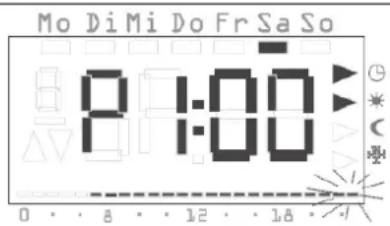
√ The display returns to the normal display when no button is pressed for a few seconds. The period for which the party function is set flashes at the lower display margin.

5.1. Terminating the party function
You can terminate the party function as follows:
- Press the PROG button in order to terminate the party function.
√ The radio timer thermostat display returns to the normal time program.
6. Changing over to the lowering temperature (economy button)
You can change over to the lowering temperature for brief or long-term periods of absence by means of the economy button.
6.1. Switching for brief periods to the lowering temperature
- Press the button for less than 5 seconds.
√ The radio timer thermostat display switches over to the lowering temperature. The Lowering temperature mode is displayed.
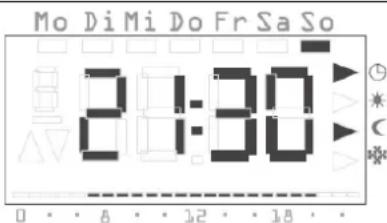
The changeover is retained until the next switching time in the time program.
Tip on lowering temperature
Use this function during ventilation. Change back to the time program again after ventilation by pressing the PROG button.
6.2. Switching for longer periods to the lowering temperature
- Press the button for longer than 5 seconds.
√ The radio timer thermostat display permanently switches over to the lowering temperature.
The Lowering temperature mode is displayed, the time program is no longer displayed.

This switchover is retained until you switch off the lowering temperature again.
6.3. Deactivating the lowering temperature
You can deactivate the lowering temperature at any time:
- Press the PROG button in order to deactivate the lowering temperature.
√ The radio timer thermostat display returns to the normal time program.
7. Setting the individual temperature

Setpoint offset
During operation with the radio controller, a setpoint offset by ±3 K is carried out via this menu item.
You can set an individual temperature if the currently set temperature of the time program does not appear to be suitable.
- Press the SET button.
√ The currently set individual temperature is displayed flashing.

-
Press the + or - button in order to set the individual temperature.
-
Press the SET button in order to confirm the set individual temperature.
√ The radio timer thermostat display returns to the normal display and regulates the set individual temperature until the next switching time in the time program. As long as the individual temperature is used as the setpoint input, no operating mode (Comfort, Lowering, Anti-freeze) is displayed, since none of the temperatures stored there is valid.


Note
If the SET button is not pressed, the display returns to the normal display again after 5 seconds. Any changes to the setpoint temperature are not accepted in this case.
7.1. Deactivating the individual temperature
You can deactivate the individual temperature at any time:
- Press the PROG button in order to deactivate the individual temperature.
√ The radio timer thermostat display returns to the normal time program.
8. Locking buttons
To prevent an accidental or unauthorised operation of the radio timer thermostat display, you can activate the button locking function in the normal view.
8.1. Activating button locking function
- Press the SET and buttons for longer than 5 seconds.
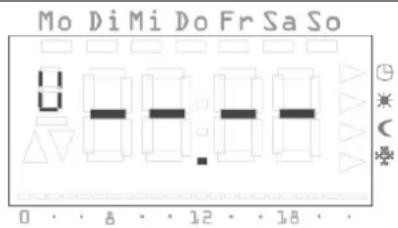
√ When the button locking function is active, "-- --" appears in the display each time a button is pressed to signal that the desired operation has been denied.
8.2. Deactivating button locking function
- Press the SET and buttons for longer than 5 seconds.
√ During unlocking "-- --" appears in the display for 5 seconds. When the button locking function is deactivated, the normal display appears again and the buttons can be released.
9. Settings in the program menu
You can change the following settings in the program menu:
• Date and time (Uhr (Clock) menu item)
• Temperature steps (tEmP menu item)*
• Time program (ProG menu item)*
• Holiday function (UrLb menu item)*
• Anti-freeze function (FrSt menu item)*
- Teaching-in radio connection (LErn menu item)
*Menu item deactivated during operation with the radio controller.
9.1. How to access the menu items in the program menu
Irrespective of the setting you want to change you always access the desired menu item in the program menu as follows:
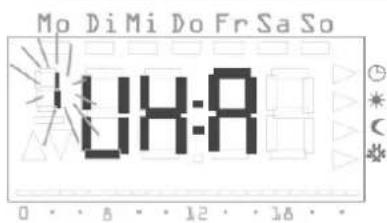
- In normal display press the PROG button at least 5 seconds in order to access the program menu.
- Press the + or - button in order to access the desired menu item. The adjacent example shows the first menu item, the time.
Temperature Management Radio timer thermostat display
Ref.-no.:
- Press the SET button in order to select the desired menu item.
9.2. Setting the date and time – Uhr (Clock) menu item
You can modify the date and time at any time.
Note!
The clock is designed as a week time switch and continues to operate for least a four -hours in the case of a power failure.
The changeover between summer and winter time is carried out automatically.
The integrated calendar automatically takes leap years into account.
To set the date and time:
- Go in the program menu to the Uhr (Clock) menu item (see above).
√ The hour display flashes.

- Press the + or - button until the desired hour has been set.
Time format
You can have the time displayed in international 24 hour format or in the American format (AM/PM). Details are provided on Page 4.
- Press the SET button.
√ The hour is set and the minute display flashes.


Temperature Management Radio timer thermostat display
Ref.-no.:
Use the same method to carry out the further settings. These are:
- Minutes – the time is set after confirmation with the SET button
- Calendar year
- Month
Day

Date does not have to be set!
If the date is already set correctly, you can exit the setting here by pressing the PROG button.
- Confirm each entry with the SET button.
√ After the last confirmation with SET, the system returns automatically to the program menu.
- Press the PROG button in order to return to the normal view.
9.3. Modifying the temperature steps – tEMP menu item

Function deactivated
During operation with the radio controller, this function is deactivated. The setpoint temperature specification is carried out centrally on the radio controller.
You can modify the following temperature steps in the tEMP menu item.
- Comfort temperature (default setting 21.0 °C)
- Lowering temperature (default setting 18.0 °C)
- Anti-freeze temperature (default setting 10.0 °C)

Checking the anti-freeze temperature
The anti-freeze temperature can be checked and set in the "Anti-freeze function" menu item. A change in the anti-freeze temperature in one of the menu items has a direct effect on the respective other menu item. Only one anti-freeze temperature is valid in the radio timer thermostat display.
To change the temperature steps:
- Go in the program menu to the tEMP menu item (see Page 8).
√ The temperature setting of the comfort temperature is displayed flashing. In addition the operating mode is displayed at the righthand display margin.

-
Press the + or - button in order to set the desired temperature.
-
Confirm with the SET button.
√ The display changes automatically to the next temperature step, the lowering temperature.
Temperature Management Radio timer thermostat display
Ref.-no.:
- Use the same procedure to set the lowering and the anti-freeze temperature.
√ After the last confirmation with the system returns automatically to the program menu. - Press the PROG button in order to return to the normal view.
Aborting modifications to the temperature steps
- Press the PROG button in order to abort setting the temperature steps.
√ You return automatically to the program menu. The temperature step which you have opened last for editing is not saved. - Press the PROG button in order to return to the normal view.
9.4. Modifying the time program – ProG menu item

Function deactivated
During operation with the radio controller, this function is deactivated. The time programs are managed centrally by the radio controller.
You can change the switching times of your radio timer thermostat display in the ProG menu item. 32 switching times are available. Each switching time specifies a point within a week at which a change between the comfort and lowering temperature takes place. You can change the switching times in steps of 10 minutes.
The following time program is programmed at the factory.
| Weekdays | Period |
| Monday – Friday 6:00 – 2 | 2:00 comfort temperature |
| Saturday, Sunday 6:00 – | 23:00 comfort temperature |
These settings can be modified or extended as desired.
9.4.1. Viewing the switching times
- Go in the program menu to the ProG menu item (see Page 8).
√ The first switching time is displayed.
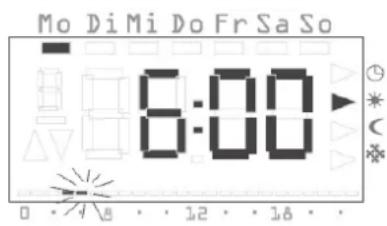
- Press the + or - button in order to view the further switching times.
√ The switching times are displayed chronologically, beginning at Monday 0.00 hours, rising to Sunday 23.50.
√ An empty switching time is offered at the end of the list if at least one switching time is still available.
Temperature Management Radio timer thermostat display
Ref.-no.:

9.4.2. Modifying the switching time
- Go in the program menu to the ProG menu item (see Page 8).
- Press the + or - button in order to access the desired switching time.
- Press the SET button for the switching time to be changed.
√ The switching time is opened for editing, the hour display flashes.

- Press the + or - button in order to modify the hour display.
- Confirm with the SET button.
-
Use the same method to carry out the further settings. These are:
-
Minutes
- Day – here the weekdays are initially displayed from Mo-Su, then the groupings Sa-Su, Mo-Fr, Mo-Sa and Mo-Su.
- Comfort or lowering temperature
Grouping days
If a grouping of days is selected, a separate program point with the specified time and the temperature step is created for each selected day of the group.
Renewed editing of the entire grouping is not possible - only the individual program items can be edited. It may therefore be practical in individual cases to delete all switching times and then enter a new grouping of days.
- Confirm respectively with the SET button.
√ After the last confirmation with SET the modified switching time is saved and the chronologically next switching time is displayed.
Deleting the switching time
- Go in the program menu to the ProG menu item (see Page 8).
- Press the + or - button in order to access the desired switching time.
- Press the + and - buttons for longer than 5 seconds.
√ The switching time is deleted irrevocably and the chronologically next switching time is displayed.

Temperature Management Radio timer thermostat display
Ref.-no.:
9.4.3. Delete all switching times
With this function you can delete all stored switching times. This can, for example, be practical when a complete changeover of the time program is to be carried out and the deleting of individual program points is too time-consuming.
- Go in the program menu to the ProG menu item (see Page 8).
- Select any desired switching time with the + or - button.
- Press the + and - buttons for longer than 10 seconds.
√ All switching times are deleted irreversibly and a blank program point appears with the display "--:--".
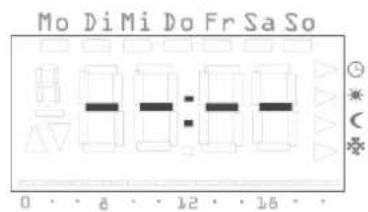

Note
During this procedure the factory-programmed switching times are also deleted. These times can be restored via the Reset function.
9.4.4. Inserting a new switching time
- Go in the program menu to the ProG menu item (see Page 8).
- Press the + or - button in order to access the empty switching time.
- Confirm with the SET button.
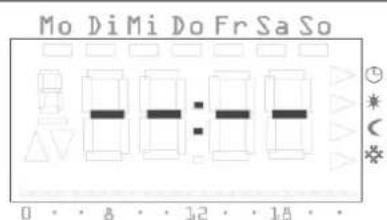
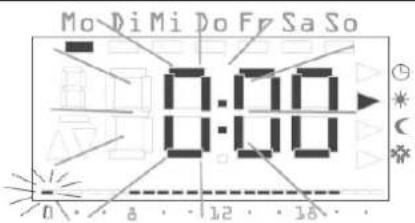
You can now carry out all the settings for a new switching time:
√ The new switching time is opened for editing, the hour display flashes.
Temperature Management Radio timer thermostat display
Ref.-no.:
-
Press the + or - button in order to modify the hour display.
-
Confirm with the SET button.
-
Use the same method to carry out the further settings. These are:
- Minutes
- Day – here the weekdays are initially displayed from Mo-Su, then the groupings Sa-Su, Mo-Fr, Mo-Sa, Mo-Su.
- Comfort or lowering temperature
Grouping days
If you select a grouping of days, a separate switching time with the specified time and the temperature step is created for each selected day of the group.
Renewed editing of the entire grouping is not possible - only the individual switching times can be edited. For this reason, it may be practical in individual cases to delete all switching times and then enter a new grouping of days.
- Confirm respectively with the SET button.
√ After the last confirmation with SET the modified switching time is saved and the chronologically next switching time is displayed.
9.4.5. Aborting the settings at the time program
You can abort the modifications at the time program if no switching time is opened for processing.
- To do so, press the PROG button.
√ You return automatically to the program menu. The currently active switching time which was displayed for setting is not saved.
- Press the PROG button in order to return to the normal view.
Further information on programming switching times
- If all switching times are assigned, no empty switching time will be offered.
- If a group of days is programmed and insufficient switching times are free, FULL is output and the number of free switching times is displayed. You then have to decide whether you want to remove enough switching times or whether you want to implement the desired program by using individual days.
- If a group of days covers an existing switching time, the existing switching time is overwritten without any query.
- If a switching time is placed on the moment of an existing switching time, the existing switching time is overwritten without any query.
- If an existing switching time is modified and placed on a moment which is already occupied by an existing switching time, the existing switching time is overwritten without any query.
- Redundant switching times (switching times in time program which do not cause a change in the temperature step) are not recognized or removed automatically. You must search for switching times of this kind and remove them yourself if further switching times are required.
9.5. Setting the holiday program – UrLb menu item
Function deactivated
During operation with the radio controller, this function is deactivated. The holiday programs are managed centrally by the radio controller.
A holiday program is available in the UrLb menu item. You set the starting date and end date of your absence here. During this period the system regulates to a constant selectable temperature step. After the holiday period has expired the holiday program is deleted automatically so that it is not repeated every year.
9.5.1. Setting the holiday period
- Go in the program menu to the UrLb menu item (see Page 8).
√ When the UrLb menu item is entered, the display "--..." appears if no holiday period has been defined yet.

- Press the SET button in order to set a holiday period.
√ The current date is entered automatically as the holiday beginning.
You can edit this date:
√ The month is displayed flashing.
3. Press the + or - button in order to set the month.
4. Confirm with the SET button.
√ The day begins to flash.
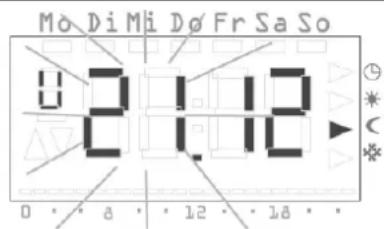
- Press the + or - button in order to set the day.
- Press the SET button again.
√ The display changes to the holiday end.
√ The month is displayed flashing.
7. Use the same procedure to set the holiday end (month and day).
8. Confirm each entry with the SET button.
√ The operating mode is displayed flashing.
Temperature Management Radio timer thermostat display
Ref.-no.:

- Press the + or - button to select the desired temperature step (Comfort, Lowering and Anti-Freeze) to be maintained during the holiday.
- Confirm with the SET button.
√ After the last confirmation with SET, the system returns automatically to the program menu. - Press the PROG button and the radio timer thermostat display returns to the normal view.
√ As soon as the internal date reaches the first holiday day at 0:00 hours, the temperature step is changed. The view in the display changes and displays the holiday end date.


Recommendation for holiday function
At low outside temperatures and longer periods of absence, you should have the holiday function end one day before the planned end of the holiday so that your flat is sufficiently pre-heated.
9.5.2. Deleting the holiday period
- Go to the UrLb menu item.
- Keep the + and - button pressed for more than 3 seconds in order to delete a specified holiday period completely.
√ The radio timer thermostat display changes to the Program menu. - Press the PROG button and the radio timer thermostat display returns to the normal view.
9.6. Activating/deactivating the anti-freeze function – FrSt menu item

Function deactivated
During operation with the radio controller, this function is deactivated. The anti-freeze function is managed centrally by the radio controller.
You can only permanently activate the anti-freeze function here.

Anti-freeze temperature
The anti-freeze function can only be set in operation between +5 °C and +15 °C.
Temperature Management Radio timer thermostat display
Ref.-no.:
- Go in the program menu to the FrSt menu item (see Page 8).
√ The set anti-freeze temperature is displayed flashing. In addition the corresponding operating mode is displayed flashing at the right-hand display margin.

- Press the + or - button in order to select the desired anti-freeze temperature.
- Confirm with the SET button.

Modifying the anti-freeze temperature
A modification of the anti-freeze temperature also acts on the anti-freeze temperature set under "Modifying temperature steps" (refer to Page 10).
√ On or OFF is displayed.
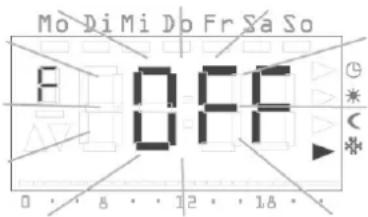
- Press the + button in order to activate the anti-freeze function (On) or the button in order to deactivate the anti-freeze function (OFF).
- Press the SET button.
√ The anti-freeze function is activated or deactivated and the display return to the program menu.
6. Press the PROG button and the radio timer thermostat display returns to the normal view.
√ After the anti-freeze function has been deactivated, the room temperature controller returns to continuous Lowering mode.
Proceed as follows in order to return to the normal time program:
- In normal display press the PROG button at least 5 seconds in order to access the program menu.
- Press the + or - button in order return to the ProG menu item.
- Press the SET button in order to select the ProG menu item.
- Press the PROG button in order to activate the normal time program again.
9.7. Teaching-in radio connection – LErn menu item
To assign radio motor valve drive(s) or a radio controller to the radio timer thermostat display, proceed as follows:
- Go in the program menu to the LErn menu item (see Page 8).
- Start the programming mode on all devices to the taught in.
- Press the SET button on the radio timer thermostat display to start the teach-in process.
√ During the teach-in process the LErn display flashes.
√ After approx. 5 seconds the radio timer thermostat display returns directly to the normal display.
Teaching in several radio motor valve drives
If the radio timer thermostat display is to be assigned several radio motor valve drives, first all valve drives must be switched into the teach mode before that teach-in process is started on the radio timer thermostat display.

10. Deleting radio connection
The radio connection is deleted either
- on the radio motor valve drive (see operating instructions of radio motor valve drive) or
- by teaching in the radio connection again.
11. Cleaning radio timer thermostat display
- Use only a spray-moistened cloth to wipe the housing of the radio timer thermostat display.
- Do not use any cleaning agents, since these may damage the housing.
12. Acceptance of Guarantee
We accept the guarantee in accordance with the corresponding legal provisions.
Please return the unit postage paid to our central service department giving a brief description of the fault:
ALBRECHT JUNG GMBH & CO. KG
Service-Center
Kupferstr. 17-19
D-44532 Lünen
Service-Line: +49 (0) 23 55.80 65 51
Telefax: +49 (0) 23 55 . 80 61 89
CE The CE-Sign is a free trade sign addressed exclusively to the authorities and does not include any warranty of any properties.

- Operating Instructions Radio timer thermostat display
- Table of contents
- Temperature Management Radio timer thermostat display
- Ref.-no.:
- On these instructions
- Note!
- Operation with radio controller
- How the radio timer thermostat display functions
- Normal view in the display
- Basic operation of the radio timer thermostat display
- The individual displays and buttons
- Starting up the radio timer thermostat display
- Time format
- Prolonging the heating phase (party function)
- Terminating the party function
- Changing over to the lowering temperature (economy button)
- Switching for brief periods to the lowering temperature
- Tip on lowering temperature
- Switching for longer periods to the lowering temperature
- Deactivating the lowering temperature
- Setting the individual temperature
- Setpoint offset
- Note
- Deactivating the individual temperature
- Locking buttons
- Activating button locking function
- Deactivating button locking function
- Settings in the program menu
- How to access the menu items in the program menu
- Setting the date and time – Uhr (Clock) menu item
- Date does not have to be set!
- Modifying the temperature steps – tEMP menu item
- Function deactivated
- Checking the anti-freeze temperature
- To change the temperature steps:
- Aborting modifications to the temperature steps
- Modifying the time program – ProG menu item
- Viewing the switching times
- Modifying the switching time
- Grouping days
- Deleting the switching time
- Delete all switching times
- Inserting a new switching time
- Aborting the settings at the time program
- Further information on programming switching times
- Setting the holiday program – UrLb menu item
- Setting the holiday period
- Recommendation for holiday function
- Deleting the holiday period
- Activating/deactivating the anti-freeze function – FrSt menu item
- Anti-freeze temperature
- Modifying the anti-freeze temperature
- Proceed as follows in order to return to the normal time program:
- Teaching-in radio connection – LErn menu item
- Teaching in several radio motor valve drives
- Deleting radio connection
- Cleaning radio timer thermostat display
- Acceptance of Guarantee
- Please return the unit postage paid to our central service department giving a brief description of the fault:
Brand : JUNG
Model : AHLK-FT
Category : Thermostats