
ME5232S - Blind Management JUNG - Free user manual and instructions
Find the device manual for free ME5232S JUNG in PDF.


| Product Type | Centre plate with sensor connection for Venetian blind control |
| Model Number | ME5232S (Art. No. ..5232 S..) |
| Brand | JUNG |
| Category | Blind/Shutter Control |
| Intended Use | Operation of electrically-driven blinds, shutters, and awnings |
| Functions | Venetian blind control, status LED, lock-out protection, individual moving time storage, sun sensor evaluation |
| Status LED | Indicates activation of lock-out protection |
| Lock-out Protection | Prevents automatic downward movement; activated by pressing top for >4s, deactivated by short press |
| Individual Moving Time | Storable from 0.5 s to 2 min |
| Sun Sensor (S version) | Evaluates brightness; adjustable threshold 5000-80000 lx |
| Sun Protection Function | Automatic shading when brightness exceeds threshold for >2 min; retracts when below threshold for >15 min |
| Brightness Threshold Adjuster | On back of cover; range approx. 5000 lx (small sun) to 80000 lx (large sun); factory preset ~15000 lx |
| Mounting | Snap-on onto Venetian blind control unit |
| Ambient Temperature | 0 to +45 °C |
| Storage Temperature | -10 to +60 °C |
| Moving Time Tolerance | ±0.5 s |
| Direction Change Delay | Approx. 1 s |
| Dimensions (Approximate) | Standard 55 mm x 55 mm (frame) |
| Weight (Estimated) | ~50 g |
| Protection Class | IP20 (typical for indoor use) |
| Connection | To Venetian blind control via 4-pin terminal (for sensor) |
| Accessories | Sunlight/dawn sensor (Art. 32 SD), extension flex (Art. 32 K) |
| Warranty | As provided by law; send defective device to central customer service |
| Safety Notes | Installation only by skilled electricians; disconnect power before work; not suitable for disconnection from supply |
Frequently Asked Questions - ME5232S JUNG
User questions about ME5232S JUNG
0 question about this device. Answer the ones you know or ask your own.
Ask a new question about this device
Download the instructions for your Blind Management in PDF format for free! Find your manual ME5232S - JUNG and take your electronic device back in hand. On this page are published all the documents necessary for the use of your device. ME5232S by JUNG.
USER MANUAL ME5232S JUNG
Centre plate with anti lock-out function
Art. No.: ..5232..
Centre plate with anti lock-out function and sensor connection
Art. No.: ..5232 S..
Operating instructions
1 Safety instructions
Electrical equipment may only be installed and fitted by electrically skilled persons.
Serious injuries, fire or property damage possible. Please read and follow manual fully.
Danger of electric shock. Always disconnect before carrying out work on the devise or load. At the same time, take into account all circuit breakers that supply dangerous voltage to the device or load.
Danger of electric shock. Device is not suitable for disconnection from supply voltage.
These instructions are an integral part of the product, and must remain with the end customer.
2 Device components

Figure 1: Device components
(1) Venetian blind control
(2) Frame
(3) Cover
(4) Status LED
3 Function
Intended use
- Operation of electrically-driven blinds, shutters and awnings
- Operation on control of the Venetian blind control system
Product characteristics
- Status LED
- Lock-out protection
- The individual moving time from the upper end position is storable
Additional functions for the cover with sensor connection
- Evaluation of a sun sensor
- Brightness threshold adjustable
- Automatic recognition of an outdoor sensor during the first sensor run
Sun protection function for cover with sensor evaluation
The connection of a sun sensor enables automatic shading when it is very bright outside. The brightness threshold that controls the sun protection can be adjusted on the cover. If the measured brightness exceeds the predefined brightness threshold for more than 2 minutes, the Venetian blind moves downwards. The previously stored individual moving time is executed for an outdoor sensor. The stop position is determined by the sun sensor for an indoor sensor.
The sun protection function is only activated if the Venetian blind has been moved to the upper end position and the control has deactivated automatically after 2 minutes. Each manual operation deactivates the sun protection.
If the brightness threshold is fallen short of for more than 15 minutes, the Venetian blind moves back to the upper end position.
4 Operation
Moving the Venetian blind
■ Press top or bottom of cover for longer than one second.
The Venetian blind moves in the desired direction to the end position or stops when the button is pressed again.
Adjusting the slats
■ Press top or bottom of cover for shorter than one second.
The slat position changes in the desired direction for as long as the button is pressed.
Activating lock-out protection
The lock-out protection prevents the Venetian blind from automatically moving down unintentionally. Shutting down on site via the sensors or extensions is disabled.
■ Press top of cover for longer than 4 seconds.
Status LED is illuminated. Venetian blind moves to the upper end position, the lock-out protection is activated.
Deactivating lock-out protection
■ Press top button briefly.
Status LED goes out.
The lock-out protection is deactivated.
i After a power failure, the lock-out protection is deactivated.
Saving individual moving time
If a Venetian blind should not move to the lower end position "ventilation function" or an outdoor sensor is used, a shorter moving time can be stored. A time between 0.5 seconds and 2 minutes can be stored.
■ Press cover over entire surface for longer than 4 seconds.
The Status LED flashes. The Venetian blind moves automatically to the upper end position.
- Keep the cover pressed in the direction ▼ until the Venetian blind is in the desired position.
■ Release cover.
Venetian blind stops.
■ Press cover over entire surface for at least 1 second to store the moving time.
- Or -
■ Press cover ▼ or ▲ to discard the moving time.
The storage mode is exited automatically and the LED ceases to be illuminated.
The individual moving time remains permanently stored. The old moving time will be replaced if a new moving time is stored.
To execute the individual moving time, the Venetian blind must be moved to the upper end position and switch off there automatically after 2 minutes.
5 Information for electrically skilled persons
5.1 Fitting and electrical connection
Mounting and connecting

DANGER!
Electrical shock when live parts are touched.
Electrical shocks can be fatal.
Before carrying out work on the device or load, disengage all the corresponding circuit breakers. Cover up live parts in the working environment.
The Venetian blind control is mounted and connected properly (see instructions for the relevant Venetian blind control).
■ Install sun sensor for covers with sensor connection and connect to terminal block (see instructions for the sensors and control).
■ Adjust brightness threshold (see following chapter).
Connect the sun sensor with the correct polarity. If a sensor is connected with reversed polarity, this will result in malfunctions. It might not be possible to operate the cover any more.
■ Mount cover (3) with frame (2) onto the Venetian blind control (1) (figure 1).
Adjusting brightness threshold for cover with sensor evaluation
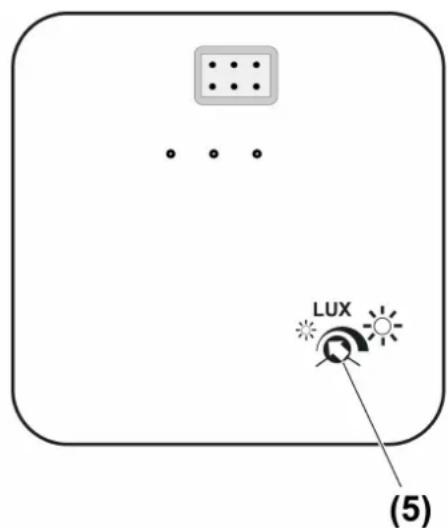
Figure 2: Back of cover: Adjuster for brightness threshold
The brightness threshold can be adjusted within a range of approx. 5,000 Lux "small sun" to approx 80,000 Lux "large sun" using the adjuster (5) on the back of the cover (figure 2). The adjuster is preset to approx. 15,000 Lux at the factory.
■ Adjust the brightness threshold to the required value. Adjust the brightness threshold value after commissioning if necessary.
6 Appendix
6.1 Technical data
Ambient temperature 0 ... +45 °C
Storage/transport temperature -10 ... +60 °C
Switch-over time for direction change approx. 1 s
Moving time 0.5 ... 120 s
Tolerance of the moving time ± 0.5 s
Brightness setting
Art. No. ..5232.. —
Art. No. ..5232 S.. approx. 5000 ... 80000 lx
6.2 Accessories
Sunlight / dawn sensor Art. No. 32 SD
Extension flex Art. No. 32 K
6.3 Warranty
We reserve the right to make technical and formal changes to the product in the interest of technical progress.
We provide a warranty as provided for by law.
Please send the device with a description of the defect to our central customer service office.
ALBRECHT JUNG GMBH & CO. KG
Vollmestraße 1
58579 Schalksmühle
Telefon: +49.23 55.8 06-0
Telefax: +49.23 55.8 06-2 04
kundencenter@jung.de
www.jung.de
Service Center
Kupferstr. 17-19
44532 Lünen
Germany
- Operating instructions
- Safety instructions
- Device components
- Function
- Intended use
- Product characteristics
- Sun protection function for cover with sensor evaluation
- Operation
- Moving the Venetian blind
- Adjusting the slats
- Activating lock-out protection
- Deactivating lock-out protection
- Saving individual moving time
- Information for electrically skilled persons
- Fitting and electrical connection
- Mounting and connecting
- DANGER!
- Adjusting brightness threshold for cover with sensor evaluation
- Appendix
- Technical data
- Accessories
- Warranty
- ALBRECHT JUNG GMBH & CO. KG
- Service Center
Brand : JUNG
Model : ME5232S
Category : Blind Management