
Antari DarkFX Wash 2000 - Effects machine Elation - Free user manual and instructions
Find the device manual for free Antari DarkFX Wash 2000 Elation in PDF.


| Product Type | UV LED Wash Light |
| Brand | Elation / Antari |
| Model | DarkFX Wash 2000 |
| Power Supply | AC 100-240V, 50-60Hz (auto-sensing) |
| Power Consumption | 45W @ 110VAC, 50W @ 220VAC |
| LED Type | 27 x 1.9W High Power UV LED |
| Wavelength | 365 nm (UVA) |
| Output | 20290 mW |
| Beam Angle | 25 degrees |
| Refresh Rate | 500 Hz |
| LED Lifespan | 20,000 hours (L70 at 25°C) |
| DMX Control | DMX 512, 1 or 2 channels |
| DMX Connection | 5-pin XLR (in/out) |
| Power Connection | Neutrik PowerCon (in/through) |
| Control Interface | 2 x 16-digit display with 4 buttons |
| Dimming Curves | Linear, Square, Inverse Square, S-Curve |
| Strobe Rate | 0-20 Hz |
| Housing Material | Metal |
| Protection Rating | IP-20 (indoor use only) |
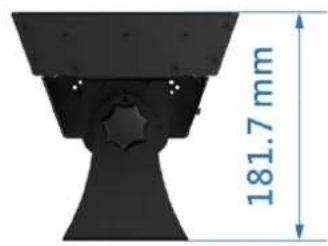
| Dimensions (L x W x H) | 600 x 173.5 x 178.7 mm |
| Dry Weight | 5.8 kg |
| Installation | Surface mount or truss clamp with safety cable |
| Included Accessories | Power cord, user manual |
| Safety | UV radiation warning; avoid eye/skin exposure; use protective lens |
| Cleaning | Unplug, use vacuum/compressed air, soft brush, damp cloth; no alcohol |
Frequently Asked Questions - Antari DarkFX Wash 2000 Elation
User questions about Antari DarkFX Wash 2000 Elation
0 question about this device. Answer the ones you know or ask your own.
Ask a new question about this device
Download the instructions for your Effects machine in PDF format for free! Find your manual Antari DarkFX Wash 2000 - Elation and take your electronic device back in hand. On this page are published all the documents necessary for the use of your device. Antari DarkFX Wash 2000 by Elation.
USER MANUAL Antari DarkFX Wash 2000 Elation
DarkFX Wash 2000 User Manual
English
DarkFX Wash 2000
User Manual · English
Safety Information

Please read the following safety information carefully before operating the fixture. Information includes important safety information about installation, usage, and maintenance. Pay attention to all warning labels and instructions in this manual and printed on the fixture.

CAUTION
HIGH INTENSITY 365nm ULTRAVIOLET LIGHT RISK OF EXPOSURE TO ULTRAVIOLET RADIATION
AVOID DIRECT EYE AND SKIN EXPOSURE
DO NOT OPERATE FIXTURE WITHOUT EXTERNAL COVER AND PROTECTIVE LENS INSTALLED.
DO NOT OPERATE FIXTURE WITH DAMAGED EXTERNAL COVER AND/OR PROTECTIVE LENS.
If you have questions about how to operate the fixture safely, please contact your local Antari dealer for help.
- Keep this device dry. For indoor use only.
- Never look directly into the light source.
• Always connect to a grounded circuit to avoid risk of electrocution.
• Install only in well ventilated area. - Do not connect device to dimmer pack.
- Make sure power cord is never crimped or damaged.
- Disconnect the fixture from AC power before servicing and when not in use.
- Do not attempt to remove or break off the ground prong. The ground prong is provided for your safety.
- Before connecting fixture to power, always check voltage indicate on fixture match to your local AC voltage. Do not use the fixture if AC power voltage does not match.
- No user serviceable and modifiable parts inside. Never try to repair this product, unauthorized repair may lead to fixture damage and or malfunction.
- Protect power cord from being walked on or pinched particularly at plugs.
• Make sure there are no flammable materials close to the machine while operating. - If the fixture fails to work, unplug the fixture and stop operation immediately. Contact your local Antari dealer for advise.
Unpacking and Inspection
Immediately upon receiving the fixture, carefully unpack the carton, check all content to ensure that all parts are present and have been received in good condition. If any parts appear damaged or mishandled from shipping, notify the shipper immediately and retrain the packing material for inspection.
What is included: 1 x DarkFX Wash 2000 UV Light
1 x Power Cord
1 x User Manual
Product Dimension


Product Overview
Adjustable Position LED Strips

natural_image
Technical line drawing of a mechanical assembly with circular holes and internal channels, showing motion arrows (no text or symbols)
ADJUSTMENT KONB

Setting Up
AC Power Connection
This fixture includes an auto sensing power supply ranging from AC100-240V, 50-60Hz. Only connect fixture to AC power within this range.
This fixture can be powered through daisy chaining method. Connecting power output to power input, all fixtures in the chain will draw power via the first fixture. Total current draw of all fixture must not exceed 8 amps maximum.
Data Linking
Serial data links is required when operating the fixture through DMX controller. When planning the data link please consider following:
• Maximum recommended length of data link is 500 meters.
• Maximum recommended number of data linked fixtures is 32 units.
• Fixture must be daisy chanined by linking data output to next data input.
• Data output must be terminated on last fixture of each chian using a termination plug.
- Avoid long parallel run of AC power and data cables as it may cause interference on the data link.
DMX Connector Pin Assignment
The fixture provide 5 pin XLR connector for DMX connection. Diagram below indicate pin assignment information


5 Pin XLR
| Pin | Function |
| 1 | Ground |
| 2 | Data- |
| 3 | Data+ |
DMX Connection
When using standard DMX controller, connect the DMX output of the controller directly with the DMX input of the first fixture in the DMX chain. Connect the DMX output of the first fixture in the chain with DMX input of the next fixture.

natural_image
Line drawings of three different types of industrial equipment or tools, shown in sequence from left to right (no text or symbols present)Physical Installation
Important
• Use supplied mounting bracket or rigging clamp to install fixture.
- Make sure installation location, fastening connecting, and rigging hardware can hold at least 10 times the weight of the fixture.
• Make sure no combustible or flammable material nearby.
- Secure each fixture with an approved safety cable that can hold at least 10 times the weight of fixture.
• Make sure fixture installed in a well ventilated area.
- Consider lamp replacement and routine maintenance access when selecting installation location.
Adjustable Mounting Bracket
Adjust mounting bracket by loosening gear screw, set the fixture to desire angle and tighten the gear screw to finish adjustment. Illustration below demonstrates how to adjust mounting bracket.

Mounting
Use screws for surface mounting or clamps for truss mounting.

natural_image
Technical line drawing of a multi-tiered industrial or structural component with circular holes and mounting base (no text or symbols)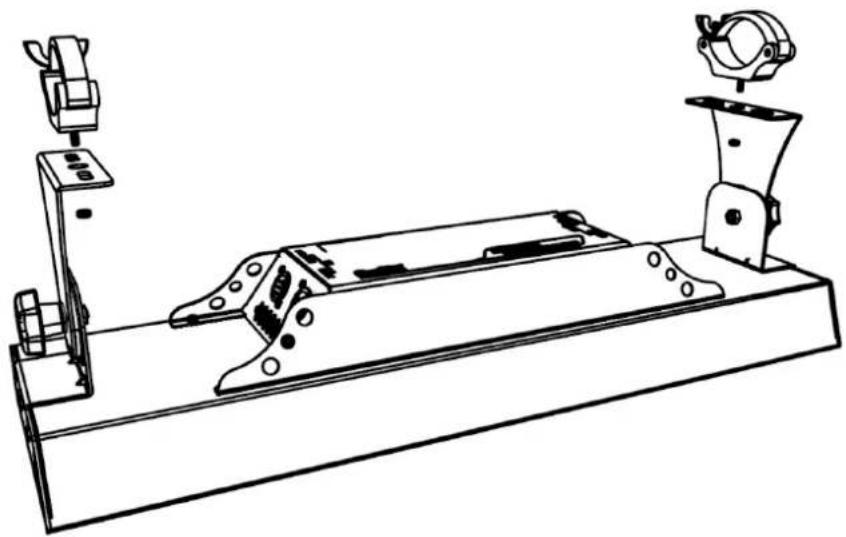
natural_image
Technical line drawing of a mechanical assembly with mounting bracket and clamping device (no text or symbols)Operation
Control Panel Operation
The fixture can be operated with onboard digital control interface
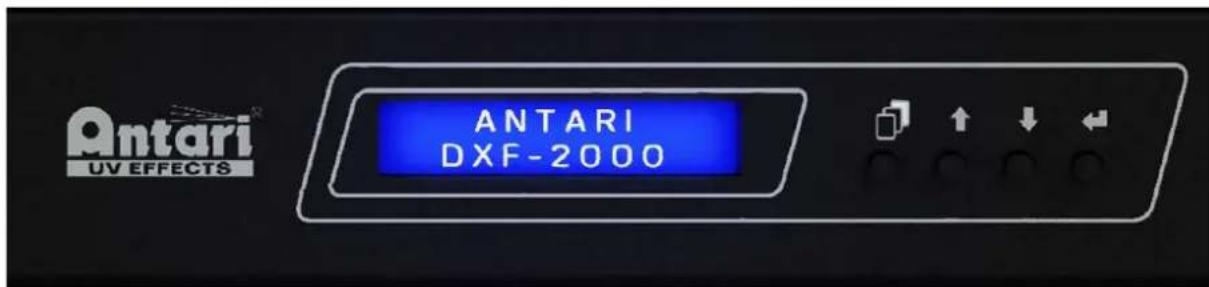
| Button | Function |
| [MENU] | Scroll through setting menu |
| ▲ [UP] | Up |
| ▼ [DOWN] | Down |
| [ENTER] | Deactivate Timer/Volume function |
Control Menu
| Main Menu | Option | |
| DMX Mode | DMX Address | 001-512 |
| DMX Channels | 01/02 | |
| Static Mode | Dimmer | 0-100% |
| Strobe | 0-20Hz | |
| Option | Dimming Curve | Linear/Square/Inverse Square/S-Curve |
| Display | Auto/On | |
| Default Setting | Restore | |
| Info | Serial Number | Show machine serial number |
| Usage Time | Show machine total usage hour | |
| Current Temp | Show current LED temperature | |
| Software Version | Show machine software version | |
DMX Address Setting
Assign DMX address manually when fixture needs to be assign to specific address or use with other fixture.
i. Press "MENU" button to find DMX Mode menu, press "ENTER" to enter submenu.
ii. Use "UP" or "DOWN" button to find DMX Address menu, press "ENTER" to edit
iii. Use "UP" or "DOWN" button to set DMX address from 001 to 512. Press "ENTER" to store setting.
DMX Channels
Set desire DMX control channel mode to gain require control function when control fixture by DMX desk.
i. Press "MENU" button to find DMX Mode menu, press "ENTER" to enter submenu.
ii. Use "UP" or "DOWN" button to find DMX Channels menu, press "ENTER" to edit
iii. Use "UP" or "DOWN" button to set DMX Channel mode 01 or 02. Press "ENTER" to store setting.
DMX Channel Function
| Channel Mode | Channel | Value | Function |
| 1 | 1 Dimmer | 0-255 | Dimmer 0-100% |
| 2 | 1 Dimmer | 0-255 | Dimmer 0-100% |
| 2 Strobe | 0-5 | Off | |
| 6-255 | 1-20Hz |
Service and Maintenance
Important! Smoke fluid residue, dust and any excessive particle residue will degrade product performance, cause overheating and damage fixture. Damages caused by inadequate cleaning or maintenance are not covered by product warranty.
Cleaning
- Unplug fixture from AC power before starting.
- Use vacuum or air compressor and soft brush to remove dust on components and vents.
- Clean fixture with a moist, lint-free cloth.
- Never use alcohol or solvents.
Technical Specifications
Input voltage AC100-240V 50-60Hz
Power 45W @ 110VAC
50W @ 220VAC
LED 27 x 1.9W High Power UV LED
Refresh rate 500 Hz
Optics 25 degrees
Output 20290 mW
Project lamp life 20,000 hrs L70 at 25C
Color range 365nm
Control option DMX 512, Manual
DMX channels 1, 2
Operation 8 bit DMX 512, 2 x 16 digit display with 4 buttons
Power connection Neutrik Powercon in/through
DMX data connection 5-pin XLR
Housing Metal
Protection rating IP-20 Indoor use only
Dimension L 600 x W 173.50 x H 178.70 mm
Dry weight 5.8 kg
DarkFX
Wash 2000
- DarkFX Wash 2000 User Manual
- DarkFX Wash 2000
- User Manual · English
- Safety Information
- Unpacking and Inspection
- Product Dimension
- Product Overview
- Setting Up
- AC Power Connection
- Data Linking
- DMX Connector Pin Assignment
- DMX Connection
- Physical Installation
- Important
- Adjustable Mounting Bracket
- Mounting
- Operation
- Control Panel Operation
- DMX Address Setting
- DMX Channels
- Service and Maintenance
- Cleaning
- Technical Specifications
Brand : Elation
Model : Antari DarkFX Wash 2000
Category : Effects machine