
BG-USB-LR100 - USB Drive BZBGear - Free user manual and instructions
Find the device manual for free BG-USB-LR100 BZBGear in PDF.


| Product Type | USB 2.0 Extender (Transmitter & Receiver) |
| USB Standard | USB 2.0 |
| Transmission Rate | Up to 480 Mbps |
| Maximum Distance | 100 meters (328 feet) via Cat5e/6 cable |
| Input Interface (Transmitter) | 1 x USB-B (female) |
| Output Interface (Receiver) | 2 x USB-A (female) |
| Connection Cable | Cat5e/6 (RJ45) |
| Power over Cable (PoC) | Yes – power either transmitter or receiver, the other is powered via cable |
| Power Supply | DC 12V / 1A (included) |
| Power Consumption | Transmitter: 1.3W, Receiver: 2.3W |
| ESD Protection | Human-body Model: ±8kV (air-gap), ±4kV (contact) |
| Housing Material | Metal enclosure |
| Color | Black |
| Dimensions (each unit) | 82mm (W) x 49mm (D) x 20mm (H) |
| Weight (each unit) | 100 g |
| Operating Temperature | 0°C to 40°C (32°F to 104°F) |
| Storage Temperature | -20°C to 60°C (-4°F to 140°F) |
| Relative Humidity | 20% to 90% RH (non-condensing) |
| Plug and Play | Yes – no driver or software installation required |
| Warranty | 1-year limited (2 years with registration) |
Frequently Asked Questions - BG-USB-LR100 BZBGear
User questions about BG-USB-LR100 BZBGear
0 question about this device. Answer the ones you know or ask your own.
Ask a new question about this device
Download the instructions for your USB Drive in PDF format for free! Find your manual BG-USB-LR100 - BZBGear and take your electronic device back in hand. On this page are published all the documents necessary for the use of your device. BG-USB-LR100 by BZBGear.
USER MANUAL BG-USB-LR100 BZBGear
Thank you for purchasing this product
For optimum performance and safety, please read these instructions carefully before connecting, operating or adjusting this product. Please keep this manual for future reference.
Surge protection device recommended
This product contains sensitive electrical components that may be damaged by electrical spikes, surges, electric shock, lightning strikes, etc. Use of surge protection systems is highly recommended in order to protect and extend the life of your equipment.
Table of Contents
- Introduction ...... 3
- Features .... 3
- Package Contents .... 4
- Specifications .... 4
- Operation Controls and Functions.... 5 5.1 Front Panel.... 5 5.2 Rear Panel....6
- Connection diagram....7
- Warranty Information....8
- Mission Statement....9
1. Introduction
The BG-USB-LR100 USB 2.0 Extender can extend USB signals up to 100 meters / 328ft via Cat 5e/6 cable. With the transmitter, the USB-B port is connected to a PC. With the receiver, you can connect USB devices via the two USB ports such as a U disk or printer, etc. The Transmitter and Receiver support PoC (Power over Cable). The product can be used for long distance signal transmissions between a PC and USB device. Simple plug and play; no drive and setting installation necessary.
2. Features
Supports USB 2.0 protocol, transmission rate up to 480Mbps
Supports extend distance up to 100 meters / 328ft via CAT 5e/6 cable
Supports one USB-B port input in transmitter
Supports two USB 2.0 ports output in receiver
Supports PoC function, it means that either transmitter or receiver is connected powered supply by 12V/1A power adapter, the other doesn't need power supply.
Simple plug and play, no drive and setting installation required
Compact design for easy and flexible installation
3. Package Contents
① 1× USB 2.0 Extender (Transmitter) ② 1× USB 2.0 Extender (Receiver) ③ 1× USB cable (USB-B male head to USB-A male head, one meter) ④ 1× 12V/1A Locking Power Adapter
4. Specifications
| Technical | |
| USB protocol | USB 2.0 |
| Transmission rate | Up to 480Mbps |
| Transmission distance | 100M (328ft) |
| ESD Protection | Human-body Model: ±8kV (Air-gap discharge), ±4kV (Contact discharge) |
| Connections | |
| Transmitter | Input port: 1xUSB [USB-B, female]Output port: 1xCAT [RJ45, female] |
| Receiver | Input port: 1xCAT [RJ45, female]Output port: 2xUSB [USB-A, female] |
| Mechanical | |
| Housing | Metal Enclosure |
| Color | Black |
| Dimensions | Transmitter / Receiver: 82mm (W)x49mm (D)x20mm (H) |
| Weight | Transmitter / Receiver: 100g |
| Power Supply | Input: AC100~240V 50/60Hz, Output: DC 12V/1A |
| Power Consumption | Transmitter: 1.3W, Receiver: 2.3W |
| Operating Temperature | 0°C ~ 40°C / 32°F ~ 104°F |
| Storage Temperature | -20°C ~ 60°C / -4°F ~ 140°F |
| Relative Humidity | 20~90% RH (non-condensing) |
5. Operation Controls and Functions
5.1 Front Panel

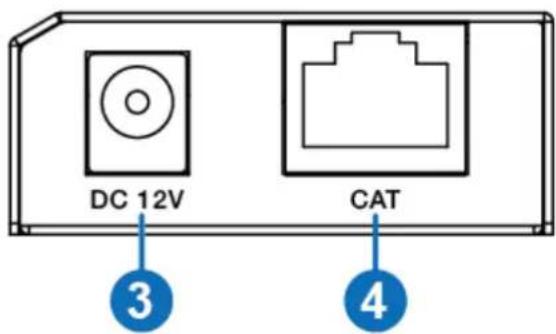
| Number | Name | Function description |
| 1 | USB port | Use USB-B male head to USB-A male head wire to connect USB port of a PC.Note: The PC can control USB ports device of the receiver. |
| 2 | POWER LED | Power LED indicator. The green LED will illuminate when transmitter is provided power supply. |
| 3 | DC 12V | Plug DC 12V/1A power supply into the unit and connect the adapter to an AC outlet. |
| 4 | CAT port | The CAT port is connected receiver's CAT port by CAT 5e/6 cable. |
5.2 Rear Panel
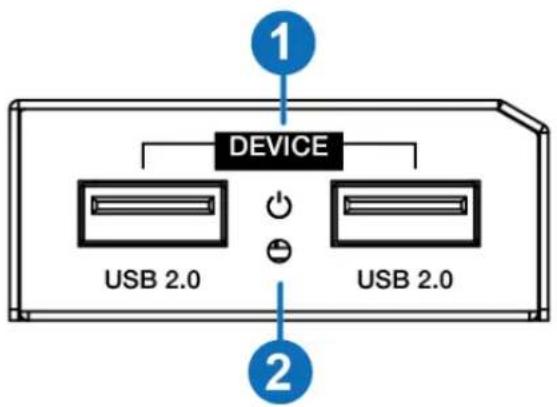
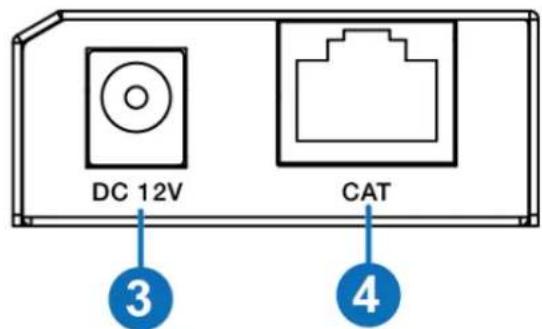
| Number | Name | Function description |
| 1 | USB 2.0 port | Connect to a device with USB port such as printer or U disk, etc. |
| 2 | POWER LED | Power LED indicator. The green LED will illuminate when the receiver is connected power supply. |
| 3 | DC 12V | Plug 12V/1A DC power supply into the unit and connect the adapter to an AC outlet. |
| 4 | CAT port | The CAT port is connected transmitter’s CAT port by CAT 5e/6 cable. |
- Connection diagram

7. Warranty Information
BZBGEAR wants to assure you peace of mind. We're so confident in the quality of our products that along with the manufacturer's one-year limited warranty, we are offering free second-year warranty coverage upon registration*.
Taking advantage of this program is simple, just follow the steps below:
- Register your product within 90 days of purchase by visiting BZBGEAR.com/warranty.
- Complete the registration form. Provide all necessary proof of purchase details, including serial number and a copy of your sales receipt.
For questions, please call 1.888.660.2962 or email support@bzbgear.com.
For complete warranty information, please visit BZBGEAR.com/warranty or scan the QR code below.

*Terms and conditions apply. Registration is required.
8. Mission Statement
BZBGEAR manifests from the competitive nature of the audiovisual industry to innovate while keeping the customer in mind. AV solutions can cost a pretty penny, and new technology only adds to it. We believe everyone deserves to see, hear, and feel the advancements made in today's AV world without having to break the bank. BZBGEAR is the solution for small to medium-sized applications requiring the latest professional products in AV.
We live in a DIY era where resources are abundant on the internet. With that in mind, our team offers system design consultation and expert tech support seven days a week for the products in our BZBGEAR catalog. You’ll notice comparably lower prices with BZBGEAR solutions, but the quality of the products is on par with the top brands in the industry. The unparalleled support from our team is our way of showing we care for every one of our customers. Whether you’re an integrator, home theater enthusiast, or a do-it-yourselfer, BZBGEAR offers the solutions to allow you to focus on your project and not your budget.
Brand : BZBGear
Model : BG-USB-LR100
Category : USB Drive