
UHF8011HH - Loudspeaker Bogen - Free user manual and instructions
Find the device manual for free UHF8011HH Bogen in PDF.


| Product Type | UHF PLL Single Channel Diversity Wireless System |
| Model | UHF8011BP/HH (includes UDR8011 receiver, UHT8011 hand-held transmitter, UBP8011 body pack transmitter) |
| Frequency Range | 470-960 MHz |
| Bandwidth | 36 MHz |
| Number of Channels | 1440 selectable, 6 groups with up to 22 channels each |
| Sync Method | Ultrasonic pairing |
| Receiving Sensitivity | -95 dBm (S/N >80 dB) |
| Signal-to-Noise Ratio | >105 dB(A) |
| Total Harmonic Distortion | <0.6% @ 1kHz |
| Frequency Response | 50 Hz ~ 16 kHz ±2 dB |
| Antenna | 1/2 λ BNC detachable, diversity |
| Audio Outputs (Receiver) | 1x balanced XLR, 1x unbalanced 1/4" TS |
| Power Supply (Receiver) | 12-15 VDC / 300mA, via included AC adapter |
| Transmitter RF Power | 10mW or 50mW (selectable) |
| Transmitter Battery | 2x AA alkaline or NiMH rechargeable |
| Charging | Optional charger (UHFDCD) for rechargeable batteries |
| Receiver Dimensions | 8.35" (W) x 1.5" (H) x 5.6" (L) |
| Hand-Held Transmitter Dimensions | 2" (W) x 10.5" (H) |
| Body Pack Transmitter Dimensions | 2.4" (W) x 3.8" (H) x 0.78" (L) |
| Included Accessories | AC/DC adaptor, AF output cable, antennas, lavalier microphone (BCLM1) with body pack |
| Warranty | 1 year limited |
| Safety and Maintenance | Operate away from heat/humidity; dry hands; remove batteries if not used; clean with dry cloth |
| Reparability | Contact Bogen Factory Service Department for repairs |
Frequently Asked Questions - UHF8011HH Bogen
User questions about UHF8011HH Bogen
0 question about this device. Answer the ones you know or ask your own.
Ask a new question about this device
Download the instructions for your Loudspeaker in PDF format for free! Find your manual UHF8011HH - Bogen and take your electronic device back in hand. On this page are published all the documents necessary for the use of your device. UHF8011HH by Bogen.
USER MANUAL UHF8011HH Bogen
- Notes for System Operation 1
- Features ____ 1
- Model Specifications ____ 2
3-1 UDR8011 UHF PLL Single Channel Diversity Receiver .....2
3-2 UHT8011 UHF PLL Hand Held Transmitter ....3
3-3 UBP8011 UHF PLL Body Pack Transmitter .... 3
3-4 BCLM1 Condenser Lavalier Microphone .... 4
3-4 UHFHSMB Headset Microphone 4
- Description of Parts ____ 5
4-1 UDR8011 Receiver Unit Callouts - Front View 5
4-2 UDR8011 Receiver Unit Callouts - Rear View 6
4-3 UDR8011 Receiver LCD Display Callouts 7
4-4 UHT8011 Hand Held Transmitter Callouts 8
4-5 UBP8011 Body Pack Transmitter Callouts 9
4-6 BCLM1 Condenser Lavalier Microphone Callouts ....10
4-7 UHFHSMB Headset Microphone Callouts .... 10
4-8 Accessories
- Connecting ____ 11
5-1 How to Connect to the UDR8011 Receiver ....11
5-2 1. UHT8011 Hand Held Transmitter Installation .... 12
2. UBP8011 Body Pack Transmitter Installation ..... 12
- Instructions for Use 13
6-1 1. How to Set UDR8011 Receiver Parameters ..... 13-14
2. UDR8011 Receiver Volume Adjustment .... 15
3. UDR8011 Receiver Sync Pairing ..... 15
6-2 How to Set UHT8011/UBP8011 Transmitter Parameters .... 16-17
- Additional Product Instructions 18
- Wireless System Frequency List 19
- Warranty ____ 20
1. Notes for System Operation
- Before connecting the power, check that the power requirement shown on the unit is the same as the power output on the adapter supplied.
- Do not operate the unit where humidity and temperature are high.
- Dry your hands before operating the system.
- Keep the unit away from fire and heat source.
- Turn the volume to minimum on both the mixer and amplifier before setting up and powering on the system.
2. Features
- Six groups are provided as default. Groups can contain up to 22 default channels.
• 1,440 channels to choose from.
• 36MHz Bandwidth - Ultrasonic pairing for synchronized setting of all parameters between receiver and transmitter.
• Channel Scan capable - Adjustable Receiving Sensitivity
• Digital Volume Control
• Automatic Transmitter Power Off
3. Model Specifications
3-1 UDR8011 UHF PLL Single/Dual Channel Diversity Receiver
| MODEL | UDR8011 |
| Frequency Mode | Phase-locked loop (PLL) |
| Frequency Range | 470 ~ 960 MHz |
| Sync Frequency | Ultrasonic |
| Bandwidth | 36 MHz |
| Signal/Noise Ratio | >105 dB(A) |
| Total Harmonic Distortion (Thd) | < 0.6% @ 1kHz |
| Receiving Sensitivity | -95 dBm (S/N >80 dB) |
| Rejection Ratio | >80 dB |
| Frequency Response | 50 Hz ~ 16 kHz ± 2 dB |
| Antenna Type | 1/2 λ BNC detachable, diversity |
| Antenna Power | 12-15 VDC / 100mA |
| Display Type | LCD |
| Controls | Power, Set, ▲/▼, Button Lock, Sync |
| Display Functions | Group, channel, frequency, battery level, antenna A/B, muting level, AF indication, RF indication, channel scanning, output level attenuation, volume indication |
| Audio Frequency Output Level | Ref: ± 22.5 kHz Dev @ 1 kHz Tone |
| 1/4" Jack: -10 dBV (unbalanced) | |
| XLRM Jack: -4 dBV (Line), -24 dBV (MIC) (balanced) | |
| Audio Output Impedance | 600Ω |
| Muting | Noise/Squelch muting |
| Output Port | 1 x balanced XLRM Jack1 x unbalanced 1/4" TS Jack |
| Power Supply | 12-15 VDC / 300mA |
| Dimensions | 8.35" (W) x 1.5" (H) x 5.6" (L) |
3-2 UHT8011 UHF PLL Hand Held Transmitter Microphone
| MODEL | UHT8011 |
| Frequency Mode | Phase-locked loop (PLL) |
| Frequency Range | 470 ~ 960 MHz |
| Sync Frequency | Ultrasonic |
| RF Power Output | 10m W / 50m W (as per local regulations) |
| RF Stability | < ± 10 kHz @ Fc |
| Modulation Frequency | ± 48 kHz |
| Harmonic Radiation | <-50 dBc |
| Display | LCD + LED |
| Controls | Power, Mute, Set, ▲ / ▼ , Button Lock |
| Functions | Mute, auto off, sensitivity adjustment, group, channel, frequency |
| Battery | AA alkaline battery or NiMH rechargeable battery (x 2) |
| Charging | Yes |
| Dimensions | 2” (W) x 10.5” (H) |
3-3 UBP8011 UHF PLL Body Pack Transmitter
| MODEL | UBP8011 |
| Frequency Mode | Phase-locked loop (PLL) |
| Frequency Range | 470 ~ 960 MHz |
| Sync Frequency | Ultrasonic |
| RF Power Output | 10m W /50 m W (as per local regulations) |
| RF Stability | < ± 10 kHz @ Fc |
| Modulation Frequency | ± 48 kHz |
| Harmonic Radiation | < -50 dBc |
| Functions | Mute, auto off, sensitivity adjustment, input level attenuation, group, channel, frequency |
| Display | LCD + LED |
| Input | 4-pin Mini XLR |
| Controls | Power, Mute, Set, ▲/▼ |
| Battery | AA alkaline battery or NiMH rechargeable battery (x 2) |
| Charging | Yes |
| Dimensions | 2.4" (W) x 3.8" (H) x 0.78" (L) |
3-4 BCLM1 Lavalier Microphone
| MODEL | BCLM1 |
| Connector | 4P Mini XLR |
| Frequency Response | 100 ~ 15,000 Hz |
| Polar Pattern | Cardioid |
| Sensitivity (at 1000Hz) | -60 ± 3 dB* |
| Impedance | 2.2k Ω |
| Max. SPL for 1% THD | 130 dB |
| Dimensions | ∅ 0.39" (W) x 1" (H) |
| Net Weight |
*0dB = 10V/pa
3-5 UHFHSMB Headset Microphone
| MODEL | UHFHSMB |
| Connectors | 4P Mini XLR |
| Frequency Response | 100 ~ 18,000 Hz |
| Polar Pattern | |
| Sensitivity (at 1000Hz) | -65 ±3 dB* |
| Impedance | |
| Max. SPL for 1% THD | 20 dB |
| Dimensions | 4.9" (W) x 5.2" (H) x 6.2" (D) |
| Net Weight | ple excluded) |
*0dB = 10V/pa
4. Description of Parts
4-1 UDR8011 Receiver Feature Callouts - Front View
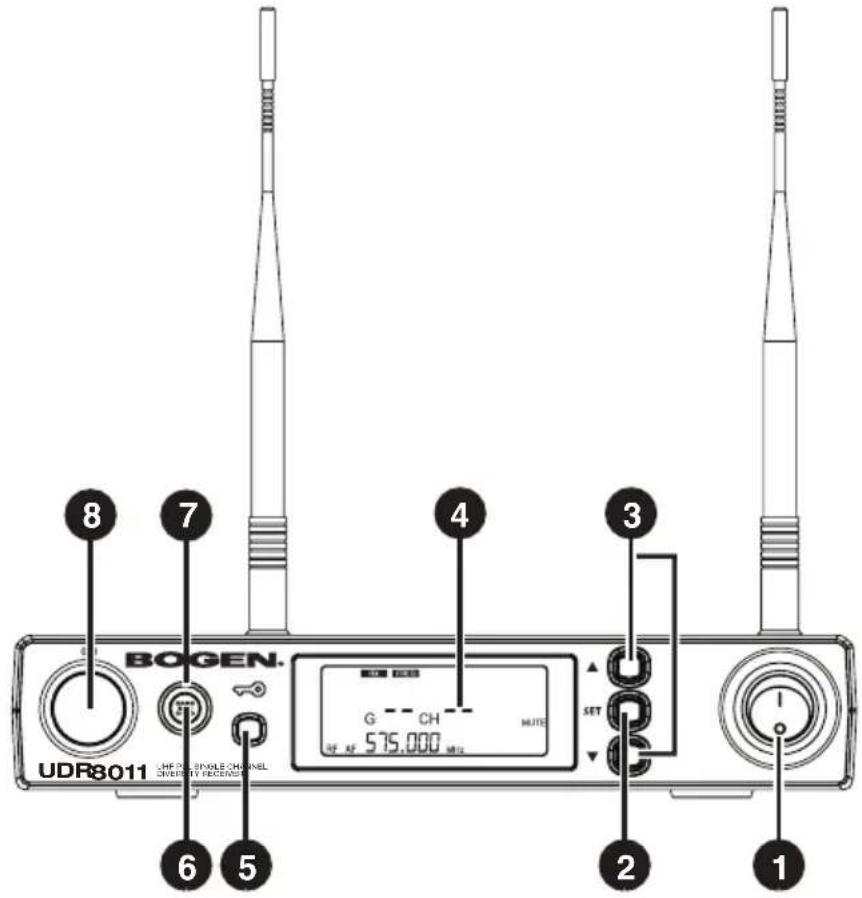
1 POWER: I = ON and O = OFF
2 SET: Push and hold for 2 seconds to enter the Setting Mode. Push SET to advance to the next parameter.
3 ▲/▼: In the Setting Mode, push ▲/▼ to change the parameter value. In the non-Setting Mode: push ▲/▼ to adjust audio output volume.
4 LCD Display: System Information (see page 7 for features).
5 LOCK: Push and hold for 2 seconds to lock the front panel buttons. Repeat to unlock front panel buttons
6 SYNC: This allows you to pair the transmitter after modifying a parameter. Push SYNC to synchronize the settings to the transmitter.
7 SYNC Indicator: This shows the current pairing status. It flashes rapidly when data is being transmitted and the flashing stops when the synchronization is completed. However, the flashing slows down if synchronization fails after a period of time.
8 Ultrasonic Sync Transmission Element: Transmits digital pairing data at ultrasonic frequency. When setting, direct line of sight is required between ultrasonic elements of receiver & transmitter. The effective range is 30^ on both sides off-axis with the maximum distance of 12".
4-2 UDR8011 Receiver Feature Callouts - Rear View

9 RECEIVING ANTENNA: BNC connection for 1/2λ antenna.
10 PHONE JACK (1/4" TS): Unbalanced audio output jack.
11 3P XLR MALE: Balanced audio output jack.
12 STRAIN RELIEF: Securement for DC power cable.
13 DC POWER SOCKET: 12-15 VDC / 300mA power supply.
4-3 UDR8011 Receiver LCD Display
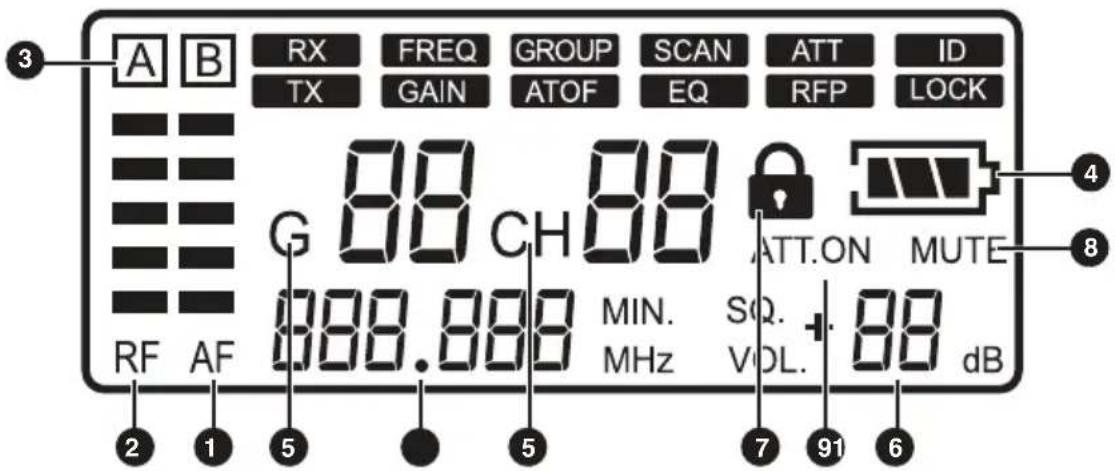
Shown above in the non-Setting Mode
1 AF : Audio Signal strength
2 RF : RF Signal strength
3 A B : Antenna A or B active
4 : Transmitter Battery Level
5 G88 / CH88 : Group/Channel
6 VOL. ^+ 88 dB : Volume Output
7 : Button Lock
8 MUTE : Receiver/Transmitter Mute
9 ATT.ON : Output Attenuation
10 888.888 MHz : Frequency
4-4 UHT8011 Hand Held Transmitter Feature Callouts

1 REMOVABLE HANDLE COVER: Unscrew to access controls and batteries.
2 LCD DISPLAY: Displays the parameter settings in the transmitter.
3 LED INDICATOR: Displays the transmitter's status, including battery level, mute and pairing indication.
4 : Push and hold button for 2 seconds to lock the buttons/controls. Push and hold again for 2 seconds to unlock.
5 POWER: Push to turn the transmitter on. When the transmitter is on, push and hold for 2 seconds to turn it off.
6 MUTE: When transmitter is on, slide switch UP to talk and DOWN to mute. If the transmitter is off, slide switch UP to turn the unit on. The transmitter turns off automatically after 1, 10, or 30 minutes of Mute mode, depending on the parameter setting.
7 SET: Push and hold for 2 seconds to enter the Setting mode. Push SET to advance to the next parameter.
8 ▲/▼: In the Setting mode, push ▲/▼ to change the parameter value.
9 ULTRASONIC RECEIVING ELEMENT: Receives pairing signals from the ultrasonic element at the receiver end.
10 BATTERY HOLDER: Holds AA 1.5V battery or rechargeable NiMH battery (x 2).
11 CHARGING CONTACT: If rechargeable batteries are used, this microphone can be recharged with optional charger (UHFDCD).
4-5 UBP8011 Body Pack Transmitter Feature Callouts
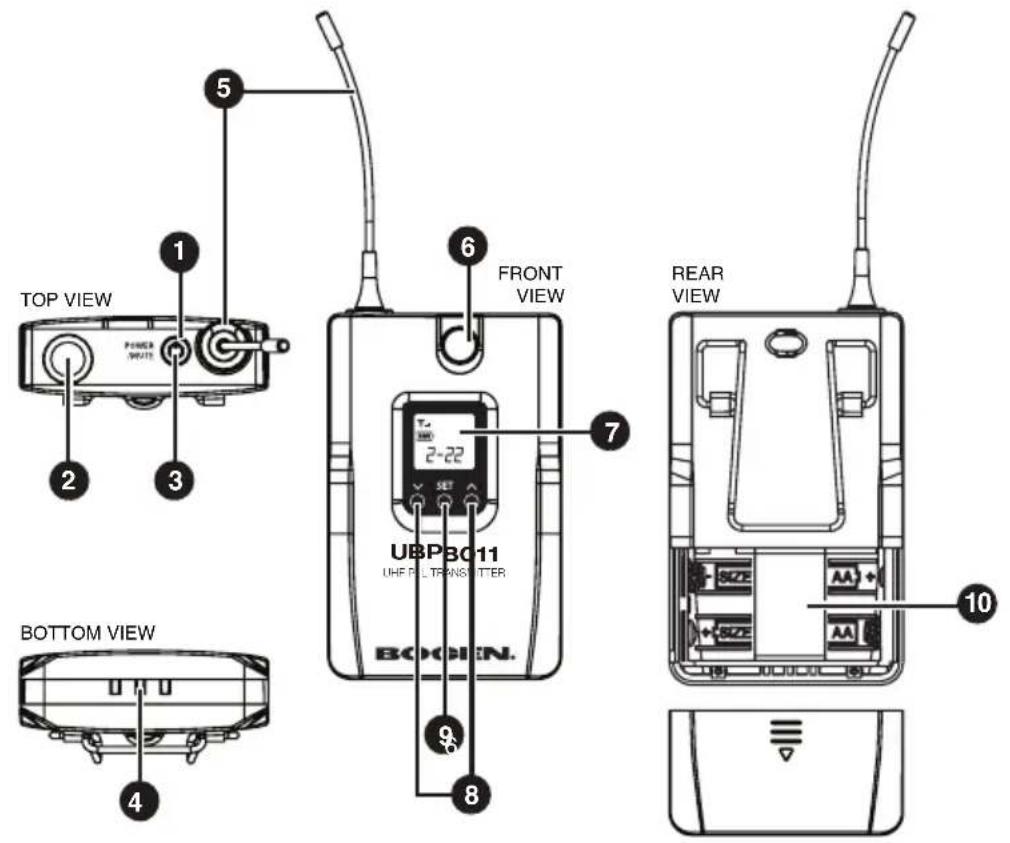
1 LED INDICATOR: Indicates the transmitter's status, including battery level, mute and pairing indication.
2 MICROPHONE INPUT PORT: 4P mini XLR jack
3 MUTE/POWER: Push once to turn the unit on. While the unit is on, push once to mute and push again to unmute. Push and hold for 2 seconds to turn off.
4 CHARGING CONTACT: If rechargeable batteries are used, this transmitter can be recharged with an optional charger (UHFDCD).
5 ANTENNA: The antenna of transmitter
6 ULTRASONIC RECEIVING ELEMENT: It receives the pairing signals from the ultrasonic transmission unit at the receiver end.
7 LCD DISPLAY: Displays the parameter settings in the transmitter.
8 ▲/▼: In the Setting mode, push ▲/▼ to change the parameter value.
9 SET: Push and hold for 2 seconds to enter the Setting mode. Push SET to advance to the next parameter.
10 BATTERY HOLDER: Holds AA 1.5V battery or rechargeable NiMH battery (x 2).
4-6 BCLM1 Condenser Lavalier Microphone (Standard with UBP8011)
1 MIC CLIP
2 MICROPHONE
3 WINDSCREEN
4 4-PIN MINI XLR

4-7 UHFHSMB Headset Microphone (optional for UBP8011)
1 ADJUSTABLE HEADBAND
2 GOOSENECK
3 MICROPHONE
4 WINDSCREEN
5 4-PIN MINI XLR

4-8 Included Accessories

natural_image
Pure electrical circuit lines without any symbols
natural_image
Simple line drawing of a coiled cable with two connectors (no text or symbols)1 AC/DC ADAPTOR (UDR8011-RPS):
AC IN: AC100\~240V, 50/60Hz
DC OUT: DC12V/0.5A
2 AF OUTPUT CABLE: (with 1/4" plug to RCA plug ends)
5. Connecting
5-1 How to Connect the UDR8011 Receiver
1. Connect the audio output of receiver to mixer or amplifier
1.1 UDR8011 Receiver
The XLR balanced output jack or 1/4" unbalanced output jack can be used to connect the audio output to a mixer or an amplifier.
2. Connect the Power
2.1. Connect the AC/DC adapter:
Check that the DC current and voltage ratings of the adapter match the label on the unit. Connect the DC terminal to the DC input port on the unit and the AC end to an AC outlet.
2.2. Set the parameters:
Turn the power on and set the parameters of the receiver according to the instructions (section 6.1).

CAUTION! Secure the power cable on the strain relief fastening hook to prevent the power cable from accidental removal.

flowchart
graph TD
    A["Mixer/Amplifier"] --> B["Step 1"]
    B --> C["UDR8011"]
    C --> D["AC/DC Adapter"]
    D --> E["Wall Outlet"]
    C --> F["AC/DC Adapter Cable"]
    F --> G["Strain Relief: Power cable fastening hook"]
    G --> H["UDR8011 BOTTOM VIEW"]
5-2 Transmitter Installation
1. UHT8011 Hand Held Transmitter
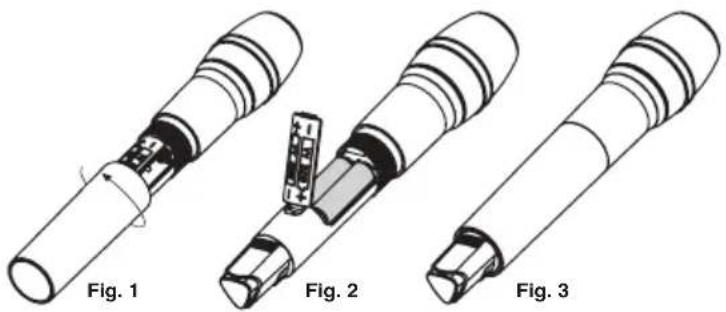
- Unscrew the outer tube of the transmitter (Fig. 1).
- Open panel door and place 2 AA batteries in the battery holder, ensuring they are in the correct polarities (Fig. 2).
-
Screw the outer tube on (Fig. 3).
-
To turn the unit on: a. Push the Power button to turn the unit on (Fig. 4a), or b. Push the Mute switch up to turn the unit on (Fig. 4b).
-
Set the transmitter parameters according to the instructions (section 6-2).
natural_image
Three views of a mechanical component with labeled figures (Fig. 1, Fig. 2, Fig. 3), showing internal structure and assembly details without any text or symbols.
2. UBP8011 Body Pack Transmitter
- Slide the battery holder cover downwards (Fig. 1).
- Place 2 AA batteries in the battery holder ensuring they are in the correct polarities (Fig. 2).
- Slide the battery holder cover upwards to close (Fig. 3)
- Insert the microphone 4-pin mini XLR into the body pack jack (Fig. 4).
- Push the Power button to turn the unit on (Fig. 5).
- Set the transmitter parameters according to the instructions (section 6-2).

6. Instructions for Use
6-1 UDR8011 Receiver
1. Parameter Setting
Push and hold the SET button to enter the Setting mode. Push the ▲/▼ button to select parameter. Push SET again to advance to the next parameter.
When RX receiver is selected:

natural_image
Front view of a UDR8011 wireless audio recording device with two speakers and control knobs (no visible text or symbols on the device body)GROUP: Group / Channel
| G: group | Select default group 1~6 |
| CH: channel | Select default channel, 1~22 (max.) |
Note: When Channel Scan is ON, ▲/▼ will scan for the next available channel.

Select the group when G is flashing; select the channel when CH is flashing.
◎ FREQ: Frequency Setting
 |

Select the number of frequency first in MHz and then in 0.025 MHz.
○ SCAN: Channel Scan
 |

This function is deactivated.
◎ ATT: Audio Output Attenuation (XLR)
 |
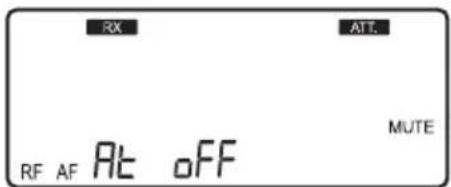
This function is deactivated.
◎ SQ: Squelch Sensitivity
| -5~+10dB | -5 is the maximum sensitivity. |
| +10 is the minimum sensitivity. | |
| The default setting is 0. |

The default setting is 0.
When TX transmitter is selected:
◎ ATT: Microphone Audio Input Attenuation
| At oFF | No attenuation. |
| At on | 20 dB attenuation at audio input). |
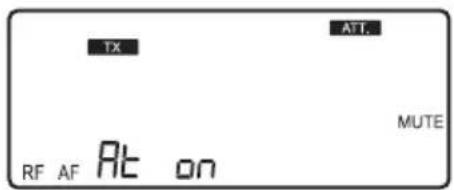
The function is activated with 20 dB of audio input attenuation.
◎ GAIN: Microphone Input Sensitivity
| High Sensitivity | GAIN: +15 dB |
| GAIN: +12 dB | |
| GAIN: +9 dB | |
| GAIN: +6 dB | |
| GAIN: +3 dB | |
| Default | GAIN: 0 dB |
| GAIN: -3 dB | |
| GAIN: -6 dB | |
| GAIN: -9 dB | |
| Low Sensitivity | GAIN: -12 dB |
| GAIN: -15 dB |

Shows the microphone input sensitivity is now at 0 dB (default setting).
© ATOF: Automatic Turn Off Timer
| AO OF | This function is deactivated. |
| AO 1 | 1 minute shutdown. |
| AO 10 | 10 minute shutdown. |
| AO 30 | 30 minute shutdown. |
The default setting is 10 minutes.

This function is deactivated. When active, the transmitter will shutdown only when in MUTE mode.
◎ RFP: RF Transmitter Power
The transmitter comes with 2 stages of RF power output (as per local regulations).
| rF Lo 10mW |
| rF Hi 50mW |

Shows that the RF Output is LO (10mW)
◎ RC: (Resync Configuration)
| rC-FrE | Only frequency setting will be synchronized |
| rC-ALL | All settings will be synchronized |
The default setting is rC-FrE.

Only frequency setting will be synchronized during pairing.
2. Volume Adjustment
In non-Setting Mode, adjust the volume from 0 to -31 dB using the ▲/▼ button.
• The minimum volume is -31 dB.
• The maximum volume is 0 dB.
• The default setting is -10 dB.
Note: This Volume affects the balanced and unbalanced outputs

Minimum volume at -31 db; maximum volume at 0dB
3. Sync Pairing
Once the parameters are set, push the SYNC button and the digital pairing data will be sent to the transmitter via ultrasonic transmission for parameter synchronization. The indicator will flash rapidly while the data is being transmitted. When the synchronization is completed, the indicator will stop flashing. If the signal is not received for a certain period of time, the indicator will flash slowly to inform pairing failure (the slowly flashing indicator can be reset by pushing any button).
Note: The best pairing distance is 12-inches, ±30°. Line of Sight is required.

4. Battery Level
The Transmitter's battery level is also shown on the LCD display. If the battery level is ≤ 2V , the frame around the battery level will flash and the backlight turns Red as a warning.
6-2 UHT8011 Hand Held Transmitter and the UBP8011 Body Pack Transmitter
1. Parameter Setting
Push and hold the SET button to enter the Setting mode. Push the ▲/▼ button to select parameter. Push SET again to advance to the next parameter.

◎ GROUP: Group / Channel
| G: group | Select default group 1~6 |
| CH: channel | Select default channel, 1~22 max. |


Select the number for group and then the number for channel.
◎ FREQ: Frequency Setting
| In 1MHz | Select frequency with ▲/▼ |
| In 0.025MHz | Select frequency with ▲/▼ |
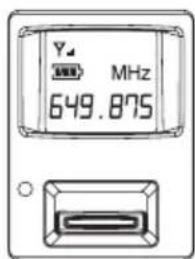

Select the number of frequency first in MHz and then in 0.025 MHz.
◎ GAIN: Microphone Input Sensitivity
| High Sensitivity | GAIN: +15 dB |
| GAIN: +12 dB | |
| GAIN: +9 dB | |
| GAIN: +6 dB | |
| GAIN: +3 dB | |
| Default | GAIN: 0 dB |
| GAIN: -3 dB | |
| GAIN: -6 dB | |
| GAIN: -9 dB | |
| Low Sensitivity | GAIN: -12 dB |
| GAIN: -15 dB |

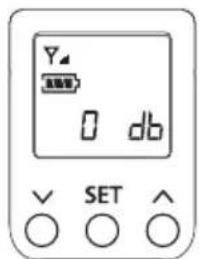
Sensitivity set at GAIN 0 dB (default setting).
UHT8011 UBP8011
◎ ATT: Microphone Audio Input Attenuation
| At oFF | No attenuation. |
| At on | 20 dB attenuation at audio input). |
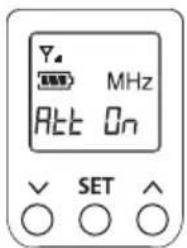
Audio input attenuation at 20 dB.
◎ RFP: RF Transmitter Power
| rFP Lo | 10mW |
| rFP Hi | 50mW |

The RF output is LO.

The RF output is Hi.
◎ ATOF: Automatic Turn Off Timer
| OFF | This function is deactivated. |
| 1 | 1 minute shutdown. |
| 10 | 10 minute shutdown. |
| 30 | 30 minute shutdown. |
(The default setting is 10 minutes)

When active, the transmitter will shutdown only when in MUTE mode.
Key Lock
| Loc on | Lock ON |
| Loc oFF | Lock OFF |
Note: When Lock is ON, push and hold SET button for 2 seconds to enter Lock Disable.


7. Additional Product Instructions
- For the best Sync results, always keep the UHT8011/UBP8011 transmitter within 12-inches of the UDR8011 receiver with Line of Sight.
- The UDR8011 receiver and UHT8011/UBP8011 transmitter must be away from other metal objects, preferably 20-inches or farther.
- It is recommended to hold the UHT8011 transmitter (microphone) at the mid-section for the best signal.
- If the UHT8011/UBP8011 transmitters will not be in use for an extended period of time, the batteries should be removed from the battery holder.
- For the best power performance, it is recommended to change both batteries.
8. Wireless System Frequency List
Frequency Range : 534\~570MHz
| Group1 | |
| 1 | 534.325 |
| 2 | 537.200 |
| 3 | 539.450 |
| 4 | 540.700 |
| 5 | 543.450 |
| 6 | 546.450 |
| 7 | 550.200 |
| 8 | 551.700 |
| 9 | 556.325 |
| 10 | 558.825 |
| 11 | 560.200 |
| 12 | 564.325 |
| 13 | 566.700 |
| 14 | 567.700 |
| Group2 | |
| 1 | 534.000 |
| 2 | 535.000 |
| 3 | 537.375 |
| 4 | 538.875 |
| 5 | 544.750 |
| 6 | 547.250 |
| 7 | 549.375 |
| 8 | 552.875 |
| 9 | 554.750 |
| 10 | 559.000 |
| 11 | 560.750 |
| 12 | 563.000 |
| 13 | 565.750 |
| 14 | 567.750 |
| 15 | 569.375 |
| Group3 | |
| 1 | 534.600 |
| 2 | 536.475 |
| 3 | 537.850 |
| 4 | 539.850 |
| 5 | 541.600 |
| 6 | 544.725 |
| 7 | 545.750 |
| 8 | 548.225 |
| 9 | 550.100 |
| 10 | 551.100 |
| 11 | 552.475 |
| 12 | 555.725 |
| 13 | 558.225 |
| 14 | 559.650 |
| 15 | 562.100 |
| 16 | 562.975 |
| 17 | 564.150 |
| 18 | 564.850 |
| 19 | 567.350 |
| 20 | 568.850 |
| 21 | 569.475 |
| Group4 | |
| 1 | 534.525 |
| 2 | 535.525 |
| 3 | 537.400 |
| 4 | 538.775 |
| 5 | 541.775 |
| 6 | 544.400 |
| 7 | 545.975 |
| 8 | 546.650 |
| 9 | 548.400 |
| 10 | 549.800 |
| 11 | 552.025 |
| 12 | 552.775 |
| 13 | 556.650 |
| 14 | 558.525 |
| 15 | 560.150 |
| 16 | 562.650 |
| 17 | 564.525 |
| 18 | 565.525 |
| 19 | 567.025 |
| 20 | 567.900 |
| 21 | 569.150 |
| 22 | 569.850 |
| Group5 | |
| 1 | 534.825 |
| 2 | 535.575 |
| 3 | 537.325 |
| 4 | 537.950 |
| 5 | 538.825 |
| 6 | 540.025 |
| 7 | 541.700 |
| 8 | 544.825 |
| 9 | 546.950 |
| 10 | 548.325 |
| 11 | 549.950 |
| 12 | 553.325 |
| 13 | 554.575 |
| 14 | 557.275 |
| 15 | 560.325 |
| 16 | 562.375 |
| 17 | 563.950 |
| 18 | 565.825 |
| 19 | 566.825 |
| 20 | 568.200 |
| 21 | 568.950 |
| 22 | 569.950 |
59563-015-01
| Group6 | |
| 1 | 535.300 |
| 2 | 536.425 |
| 3 | 537.925 |
| 4 | 538.925 |
| 5 | 541.175 |
| 6 | 543.800 |
| 7 | 545.050 |
| 8 | 547.800 |
| 9 | 548.425 |
| 10 | 550.800 |
| 11 | 555.300 |
| 12 | 556.175 |
| 13 | 558.300 |
| 14 | 560.675 |
| 15 | 561.800 |
| 16 | 563.300 |
| 17 | 567.050 |
| 18 | 567.800 |
| 19 | 569.175 |
| 20 | 569.925 |
9. Product Warranty
Limited Warranty: Exclusion of Certain Damages
The Bogen UHF Wireless Systems (UHF8011-BP/HH) are warranted to be free from defects in material and workmanship for one (1) year from the date of sale to the original purchaser. Any part of the product covered by this warranty that, with normal installation and use, becomes defective (as confirmed by Bogen upon inspection) during the applicable warranty period will be repaired or replaced by Bogen, at Bogen's option, provided the product is shipped insured and prepaid to: Bogen Factory Service Department, 4570 Shelby Air Drive, Suite 11, Memphis, TN 38118 USA. Repaired or replacement product(s) will be returned to you freight prepaid. This warranty does not extend to any of our products that have been subjected to abuse, misuse, improper storage, neglect, accident, improper installation or have been modified or repaired or altered in any manner whatsoever, or where the serial number or date code has been removed or defaced.
THE FOREGOING LIMITED WARRANTY IS BOGEN'S SOLE AND EXCLUSIVE WARRANTY AND THE PURCHASER'S SOLE AND EXCLUSIVE REMEDY. BOGEN MAKES NO OTHER WARRANTIES OF ANY KIND, EITHER EXPRESS OR IMPLIED, AND ALL IMPLIED WARRANTIES OF MERCHANTABILITY OR FITNESS FOR A PARTICULAR PURPOSE ARE HEREBY DISCLAIMED AND EXCLUDED TO THE MAXIMUM EXTENT ALLOWABLE BY LAW. Bogen's liability arising out of the manufacture, sale or supplying of products or their use or disposition, whether based upon warranty, contract, tort or otherwise, shall be limited to the price of the product. IN NO EVENT SHALL BOGEN BE LIABLE FOR SPECIAL, INCIDENTAL OR CONSEQUENTIAL DAMAGES (INCLUDING, BUT NOT LIMITED TO, LOSS OF PROFITS, LOSS OF DATA OR LOSS OF USE DAMAGES) ARISING OUT OF THE MANUFACTURE, SALE OR SUPPLYING OF PRODUCTS, EVEN IF BOGEN HAS BEEN ADVISED OF THE POSSIBILITY OF SUCH DAMAGES OR LOSSES. Some States do not allow the exclusion or limitation of incidental or consequential damages, so the above limitation or exclusion may not apply to you. This warranty gives you specific legal rights, and you may also have other rights which vary from State to State.
Products that are out of warranty will also be repaired by the Bogen Factory Service Department—same address as above or call 201-934-8500. Returned products which do not qualify for warranty service, may be repaired or replaced at Bogen's option with previously repaired or refurbished items. The parts and labor involved in these repairs are warranted for 90 days when repaired by the Bogen Factory Service Department. All parts and labor charges as well as shipping charges will be at the owner's expense.
All returns require a Return Authorization number. For most efficient warranty or repair service, please include a description of the failure.
10/2018
BOGEN.
UHF8011BP/HH
UHF PLL SINGLE CHANNEL DIVERSITY WIRELESS SYSTEM

- Notes for System Operation
- Features
- Model Specifications
- Description of Parts
- 4-3 UDR8011 Receiver LCD Display
- 4-4 UHT8011 Hand Held Transmitter Feature Callouts
- 4-5 UBP8011 Body Pack Transmitter Feature Callouts
- 4-6 BCLM1 Condenser Lavalier Microphone (Standard with UBP8011)
- 4-7 UHFHSMB Headset Microphone (optional for UBP8011)
- 4-8 Included Accessories
- Connecting
- 5-1 How to Connect the UDR8011 Receiver
- Connect the audio output of receiver to mixer or amplifier
- UDR8011 Receiver
- Connect the Power
- Connect the AC/DC adapter:
- Set the parameters:
- 5-2 Transmitter Installation
- UHT8011 Hand Held Transmitter
- UBP8011 Body Pack Transmitter
- Instructions for Use
- 6-1 UDR8011 Receiver
- Parameter Setting
- When RX receiver is selected:
- GROUP: Group / Channel
- ◎ FREQ: Frequency Setting
- ○ SCAN: Channel Scan
- ◎ ATT: Audio Output Attenuation (XLR)
- ◎ SQ: Squelch Sensitivity
- When TX transmitter is selected:
- ◎ ATT: Microphone Audio Input Attenuation
- ◎ GAIN: Microphone Input Sensitivity
- © ATOF: Automatic Turn Off Timer
- ◎ RFP: RF Transmitter Power
- ◎ RC: (Resync Configuration)
- Volume Adjustment
- Sync Pairing
- Battery Level
- 6-2 UHT8011 Hand Held Transmitter and the UBP8011 Body Pack Transmitter
- UHT8011 UBP8011
- ◎ ATOF: Automatic Turn Off Timer
- Key Lock
- Additional Product Instructions
- Wireless System Frequency List
- Product Warranty
- Limited Warranty: Exclusion of Certain Damages
- BOGEN.
- UHF8011BP/HH
Brand : Bogen
Model : UHF8011HH
Category : Loudspeaker