
VTM-LED170P - Tracking Vitek - Free user manual and instructions
Find the device manual for free VTM-LED170P Vitek in PDF.


| Product Type | 17" LED Color Monitor |
| Model | VTM-LED170P |
| Resolution | 1280 x 1024 (SXGA) |
| Display Type | Active Matrix TFT LED |
| Contrast Ratio | 10,000:1 |
| Response Time | < 5ms |
| Brightness | 300 cd/m² |
| Viewing Angle (H/V) | 170° / 160° |
| Video Inputs | HDMI, VGA, 2 BNC Composite (Looping) |
| Audio Input | Stereo RCA & 1/8" PC |
| Built-in Speakers | 1.5W x 2 |
| PIP/POP | Yes (Analog/Digital) |
| Panel Life | 50,000 Hours |
| Mounting | VESA 75mm x 75mm |
| Power Supply | 12VDC Adapter (AC100-240V, 50/60Hz) |
| Power Consumption | 20W Max |
| Dimensions (W/Stand) | 15.16" x 15.12" x 6.50" (385 x 384 x 165 mm) |
| Weight | 6.98 lbs (3.17 kg) |
| Operating Temperature | 32° to 104°F (0° to 40°C) |
| Stand Tilt | -5° to 15° |
| Package Contents | Monitor, Power Adapter, VGA Cable, User Guide |
| Cleaning Instructions | Soft lint-free cloth; mild detergent; avoid alcohol, ammonia |
| Certifications | UL, FCC-DOC, CE, ROHS |
Frequently Asked Questions - VTM-LED170P Vitek
User questions about VTM-LED170P Vitek
0 question about this device. Answer the ones you know or ask your own.
Ask a new question about this device
Download the instructions for your Tracking in PDF format for free! Find your manual VTM-LED170P - Vitek and take your electronic device back in hand. On this page are published all the documents necessary for the use of your device. VTM-LED170P by Vitek.
USER MANUAL VTM-LED170P Vitek
natural_image
Two black VITEK computer monitors with blank screens, no visible text or symbols on the screens or background.• 17" / 19" LED Display Panel
• HDMI, VGA, and Dual Looping BNC Composite Video Inputs & Stereo Audio Input
• Resolution up to 1280 x 1024 (SXGA)
• Contrast Ratio of 10,000:1
- <5ms Response time
• 170° Horizontal Viewing Angle
• Picture In Picture (PIP) / POP (Picture On Picture) Display Options
- Front Panel Controls
• VESA 75mm Standard Mounting
• 50,000 Hour Panel Life
- Swivel Rack Mountable with optional VT-LCD17SRM / VT-LCD19SRM Rack Kit
1
Introduction and Package Contents
Introduction
Congratulations on your VITEK LED Monitor purchase. You can expect only the sharpest and most brilliant color images from this monitor. Featuring OSD controls and built in speakers, you will find this monitor both easy to use and a pleasure to view.
Please unpack your monitor with care, and verify that all the parts listed below are included. If any parts are missing, please contact your distributor immediately.
Please save the packing box for possible future return for service.
Package Contents
• LED Monitor – VTM-LED170P or VTM-LED190P
• 12 Volt DC Power Adapter / Power cord
• D-Sub 15-pin VGA connector Cable
- User's Guide
Hardware Installation
The following sections in this guide give clear, step-by-step descriptions of the installation process and explain how to use the monitor for optimum results.
Please pay attention to the Regulations and Warnings Section of this user's manual before setting up the display monitor. Failure to do so may inadvertently result in personal injuries or product damage.
Specifications
| VTM-LED170P | VTM-LED190P | |
| Screen Size | 17" | 19" |
| Display Type | LED | |
| Aspect Ratio | 4:3 | |
| Resolution | SXGA (1280x1024) | |
| Response Time | <5ms | |
| Contrast Ratio | 10,000:1 | |
| Display Color | 16.7 Million | |
| Brightness | 300cd/m2 | |
| Pixel Type | Active Matrix TFT | |
| Pixel Pitch | 0.264(H) x 0.264(V) | 0.294(H) x 0.294(V) |
| Viewing Angle (H/V) | 170° / 160° | |
| Video System | NTSC/PAL | |
| Video In/Out | 2 BNC Inputs / 2 BNC Outputs (Looping) | |
| VGA In | 1 (15Pin D-Sub) | |
| HDMI In | 1 | |
| Audio Input | Stereo RCA & 1/8" PC | |
| Built In speaker | Yes (1.5W x 2 ) | |
| PIP / POP | Analog / Digital | |
| Remote | Optional | |
| 3D Comb Filter | YES | |
| 3D De-Interlace | YES | |
| Noise Reduction | YES | |
| Multi-Language | English, Spanish, German, French, Italian, Russia, Turkish, Japanese, Polish | |
| Stand Tilt | -5°~15° | |
| Vesa Mount Size | 75mm x 75mm | |
| Power Adapter | 12VDC (AC100/240 [50/60]) | |
| Power Consumption | 20W Max | 25W Max |
| Certifications | UL, FCC-DOC, CE, ROHS | |
| Operating Temperature | 32° to 104° F (0° to 40° C) | |
| Operating Humidity | 10% to 90% relative, non-condensing | |
| Dimensions (w/Stand) | 15.16" x 15.12" x 6.50" (385 x 384 x 165mm) | 16.69" x 16.34" x 6.50" (424 x 415 x 165mm) |
| Weight | 6.98 lbs (3.17kgs) | 7.09 lbs (3.22kgs) |
VGA Timing
| ITEM | RESOLUTION | H FREQ.(KHZ) | V FREQ.(HZ) |
| 1 | 640x400@70 | 31.460 | 70.080 |
| 2 | 640x480@60 | 31.469 | 59.940 |
| 3 | 640x480@72 | 37.861 | 72.809 |
| 4 | 640x480@75 | 37.500 | 75.000 |
| 5 | 720x400@70 | 31.460 | 70.080 |
| 6 | 800x600@56 | 35.156 | 56.250 |
| 7 | 800x600@60 | 37.879 | 60.317 |
| 8 | 800x600@72 | 48.077 | 72.188 |
| 9 | 800x600@75 | 46.875 | 75.000 |
| 10 | 1024x768@60 | 48.363 | 60.004 |
| 11 | 1024x768@70 | 56.476 | 70.069 |
| 12 | 1024x768@75 | 60.023 | 75.029 |
| 13 | 1280x1024@60 | 63.981 | 60.020 |
| 14 | 1280x1024@75 | 79.976 | 75.025 |
Note:
- Please note, selecting frequencies outside these ranges may result in an abnormal Images.
- The resolution will be showed on the screen while VGA mode be selected.
For example:
2
Monitor and OSD Control
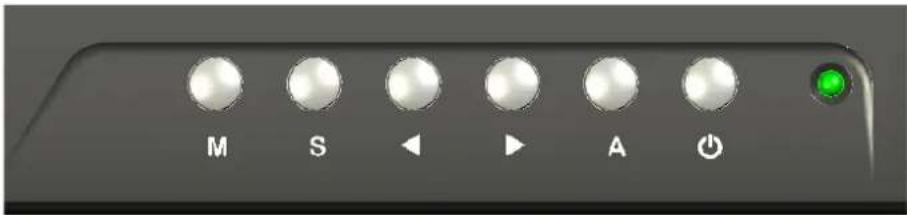
The VITEK VTM-LED170P and VTM-LED190P LED color monitors have a simple control layout for control and OSD (On Screen Display) functions. The table below summarizes the control keys and their related functions.
| Keys | Function Description | |
 | Toggle the display between standby mode and on. (Press “Power” and wait 6 sec., monitor will be activated for display) | |
 | Automatically adjusts H-Position, V-Position, Pixel Clock and Phase for an optimal image in PC mode only. | |
 | Switch function.Increase the value of the chosen item. | |
 | Switch function.Decrease the value of the chosen item. | |
 | Switch mode “PC”, "AV1", "AV2". | |
| M | Enter the main menu of the on-screen display (OSD). | |
LED Status Display
The following table describes the various power states of the LED monitor as represented by different LED colors.
| Power State | LED Color |
| On | Green |
| Standby | Red |
| No power | Blank |
Note: The LED will also be red if AV1, AV2 or HDMI is selected and there is no video signal detected.
OSD Control Function
Picture Mode

| 1. Picture Mode | Press (−) OR (+) to select the picture mode “User, Standard, Movie, Vivid” |
| 2. Contrast | This is used to set the brightness of the screen. Press (−) OR (+) to adjust the parameter. |
| 3. Brightness | This is used to adjust the image contrast. Press (−) OR (+) to adjust the parameter. |
| 4. Tint | This is used to adjust the image Tint. Press (−) OR (+) to adjust the parameter. |
| 5. Saturation | This is used to adjust the image saturation. Press (−) OR (+) to adjust the parameter. |
| 6. Sharpness | Adjust the sharpness. It makes the image become soft. Press (−) OR (+) to adjust the parameter. |
| 7. Color Temp. | Press (−) OR (+) to adjust the color tones. “Cool, Warm, Normal” |
| 8. DNR | Press (−) OR (+) to adjust the noise reduction. “High, Low, Off, Mid” |
| Note: VGA Mode – Contrast, Brightness, Color Temp., Auto Adjust. | |
Sound Mode

| 1. Volume | Press (−) OR (+) to adjust volume level. |
| 2. Mute | Press (−) OR (+) to select sound “ Off, On ”. |
Setting Mode
AV/HDMI Mode

VGA Mode

| 1. Language | Press (−) OR (+) to select language. |
| 2. H. Position | Move the display picture left or right.Press (−) OR (+) to adjust the parameter. |
| 3. H Zoom | Adjust the H-size of the display picturePress (−) OR (+) to adjust the parameter. |
| 4. V Position | Move the display picture up or down.Press (−) OR (+) to adjust the parameter. |
| 5. V Zoom | Adjust the V-size of the display picturePress (−) OR (+) to adjust the parameter. |
| 6. Clock | Press (−) OR (+) to adjust the parameter. |
| 7. Phase | Press (−) OR (+) to adjust the parameter. |
| 8. Scale Mode | Adjust the V-size of the display picturePress (−) OR (+) to adjust “Full, 16:9”. |
| 9. Reset | Recall Default value. |
| Note: “Clock” and “Phase” setting only in VGA Mode | |
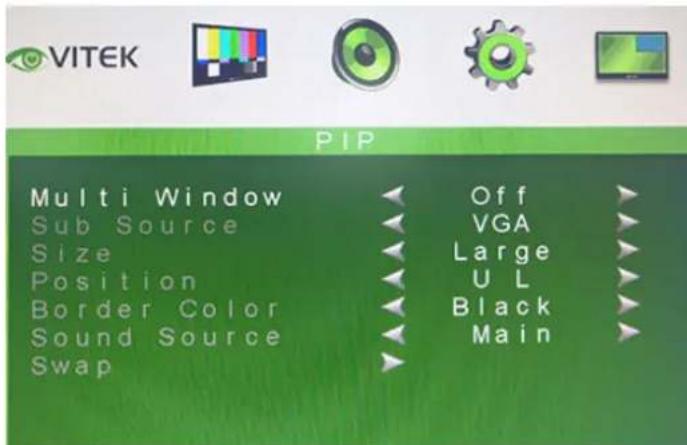
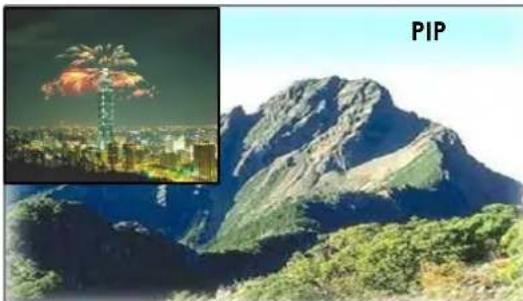
PIP/POP Setup Mode
natural_image
Mountain landscape with a fireworks explosion and inset image of a cityscape (no text or symbols)
natural_image
Split image showing a cityscape at night with a fireworks and a mountain range view labeled 'POP' (no text or symbols on the landscape itself)| 1. Multi Window | Press (−) OR (+) to select “PIP, POP, Off ” mode. |
| 2. Sub Source | Press (−) OR (+) to select “AV, VGA” mode. |
| 3. Size | Adjust the size of Sub Source window.Press (−) OR (+) to select “Large, Small ” |
| 4. Position | Move the position of Sub Source window.Press (−) OR (+) to select “U L, B L, B R, U R” position. |
| 5. Border Color | Choose the border color of Sub Source window.Press (−) OR (+) to select “Black, Blue” color. |
| 6. Sound Source | Press (−) OR (+) to select “Main, Sub” mode. |
| 7. Swap | Press S/Select to Swap the Source of Main and Sub. |
Note:
- AV1 and AV2 cannot be displayed at the same time on the monitor in PIP / POP mode, nor can HDMI and VGA be displayed together in PIP/POP mode. The Source must always be one composite Video and the Sub- source may be either VGA or HDMI.
- If POP mode is selected both images are scaled to fit the screen.
Caring for your LED Monitor
Your VITEK LED color monitor is a sensitive piece of electronic equipment. Proper care can prevent accidentally damaging the LED panel or the monitor itself. By following these guidelines you can ensure many years of trouble free use.
- The LED monitor's plastic casing and LED glass panel can be cleaned with a soft, lint-free cloth. Never use scrub pads or other cleaning materials with abrasive surfaces to clean your LED monitor!
a. For the plastic case, a mild detergent may be used to clean the surface. However, you should ensure not to use too much detergent or water as this could leak into the interior of the casing. - Do NOT use cleaning fluids based on alcohol, methylated spirit, or ammonia. The glass plate has a hard surface coating to prevent scratches. However, the use of strong chemical cleaning agents may damage this coating. Use only a mild soap or detergent and water or specially formulated cleaners made for cleaning glass panels.
- Avoid direct contact with water or other liquids. Never use your LED monitor in or around areas where water may pose a potential hazard to normal operation.
- Only use your LED monitor indoors, and avoid monitor contact with oil, vapor, steam, moisture and dust. Your LED monitor should be used in a clean and low humidity environment.
- Keep your LED monitor away from heaters or other heat sources such as lighting equipment or direct sunlight.
- Do not touch the Screen of your LED monitor with any sharp object such as your fingernail or a pencil etc.
WARNING: Any unauthorized modification to this product could result in the revocation of the authorization to operate the equipment and void the product warranty.
Power button does not respond
- Check the power cord to ensure that it is securely plugged into the monitor base and also into the electrical outlet.
- Ensure there is electrical power coming from the AC outlet. Use another device to check for power.
- Unplug the power cord of the monitor from the AC outlet, wait a few minutes, then to plug the power cord into the AC outlet again. This will reset the monitor and power supply.
No image on the screen
- Ensure that the signal cable is properly connected to the device generating the video signal such as a DVR or Computer.
- If using VGA, check the DB-15 signal cable connector on both ends for bent or pushed-in pins.
- If your signal generating device is a computer, the display card should be properly seated in its card slot.
- Ensure that the computer or image signal generating device's power switch is ON.
- Ensure that the monitor's power switch is ON.
- Unplug the power cord of the monitor from the AC outlet, wait a few minutes, then to plug the power cord into the AC outlet again. This will reset the monitor and power supply.
Power LED is RED (with no image on the screen)
- Check the signal cable to ensure that it is properly attached to the image generating device or graphics display card.
- If using VGA, Check the DB-15 signal cable on both ends for bent or pushed-in pins.
- Make sure the computer (or other device), is not in a power-saving mode (move the mouse or press a key on the keyboard).
No sound coming from the audio speakers
- The audio cable should be connected to the lineout on the audio card and the line-in on the monitor. Ensure that the audio cable is properly connected.
- Inspect the audio cable for any apparent damage. Double check by switching to another audio cable to see if the audio works.
FCC compliance
This device complies with Part 15 of the FCC Rules. Operation is subject to the following two conditions: (1) this device may not cause harmful interference, and (2) this device must accept any interference received, including interference that may cause undesired operation.
NOTE: This equipment has been tested and found to comply with the limits for a Class B digital device, pursuant to Part 15 of the FCC Rules. These limits are designed to provide reasonable protection against harmful interference in a residential installation. This equipment generation, uses and can radiate radio frequency energy and, if not installed and used in accordance with the instructions, may cause harmful interference to radio communications. However, there is no guarantee that interference will not occur in a particular installation. If this equipment does cause harmful interference to radio or television reception, which can be determined by turning the equipment off and on, the user is encouraged to try to correct the interference by one or more of the following measures:
- Reorient or relocate the receiving antenna.
- Increase the separation between the equipment and receiver.
- Connect the equipment to an outlet on a circuit different from that to which the receiver is connected.
- Consult the dealer or an experienced radio/TV technician for help.
Precautions
* Read all of these instructions and save them for later use.
* Follow all warnings and instructions on the product.
* Product
- Do not cover or block the vent holes in the case.
- Do not insert sharp objects or spill liquid into the LED monitor through cabinet slots. They may cause accidental fire, electric shock or failure.
- Disconnect the power plug from the AC outlet if you will not use it for an indefinite period of time.
- Do not attempt to service this product yourself, as opening or removing covers may expose you to dangerous voltage potentials or other risks.
- Do not touch the screen directly with your fingers. You may damage the screen, and oil from your skin is difficult to remove.
- Do not apply pressure to the screen. The LED is very delicate and may crack.
\* Power
- Use the type of power indicated on the rear panel label.
\* Plugs
- Do not remove any of the prongs of the monitor's three-pronged power plug. - Disconnect the power plug from the AC outlet under the following conditions:
◎ If you will not use it for an indefinite period time.
◎ When the power cord or plug is damaged or frayed.
☐ If the product does not operate normally when the operation instructions are followed. Adjust only those controls that are covered by the operating instructions. Improper adjustment of other controls may result in damage and will often require extensive work by a qualified technician to restore the product to normal operation.
© If the product has been dropped or the cabinet has been damaged.
© If the product exhibits a distinct change in performance, indicate a need for service.
\* Power and extension cords
- Do not allow anything to rest on the power cord.
- Do not locate this product where persons will walk on the cord.
- Use the proper power cord with correct attachment plug type. If the power source is 120 V AC, use a power cord that has UL and C-UL approvals. If the power source is a 240 V AC supply, use the tandem (T blade) type attachment plug with ground conductor power cord that meets the respective European country's safety regulations, such as VDE for Germany.
- Do not overload wall outlets or power cords. Ensure that the total of all units plugged into the wall outlet does not exceed 10 amperes.
- Ensure that the total ampere rating of all units plugged into the extension cord is not over the cord's rating.
- If the power supply cord, which came with your monitor, is to be connected to the PC instead of the wall outlet, this equipment is to be used with UL/TUV approved computers with receptacle rated 100\~240V AC, 50/60Hz, 2.0A(minimum).
\* Environment
- Place the monitor on a flat, level surface.
- Place the monitor in a well-ventilated area.
- Keep the monitor away from:
Extremely hot, cold or humid places, direct sunlight, dusty surroundings and/or equipment that may generate strong magnetic fields.
THE IRE SERIES LONG RANGE WEATHER/VANDAL RESISTANT BULLET CAMERAS

natural_image
Three VITEK security cameras with visible lens and head assembly, labeled as dual glass compartments to eliminate glare (no text on devices themselves)VTC-IRE40/3516
Day/Night IR Bullet Camera w/150' Range
VTC-IRE70/650
Day/Night IR Bullet Camera w/300' Range


VITEK Infrared Bullet Cameras are designed to help you achieve any degree of night time surveillance with versatile options to meet any budget. They offer the most advanced features available and simple, worry free installation that have come to be a cornerstone of all VITEK camera designs.
These Ultra Clear, High Resolution cameras realize over 700TV Lines of Resolution and produce crisp color images by use of a Sony Ex-View HAD CCD II and an Effio-E image signal processor. Among their several patented features, are Dual Array Dynamic Intensity LEDs allowing precision images to be delivered in total darkness without "Wash Out" from zero to 150'-IRE40 - and 300' - IRE70 - in distance. Designed with the installer in mind, these state-of-the-art cameras feature an externally adjustable focus and zoom with a clutch to eliminate over-tightening, secondary video output, feed-thru wiring, versatile mounting options and an OSD - On Screen Display for programming. Their IP68 NEMA rating means that these Weather proof cameras will never leak or condensate and cannot be permeated by dust or pests.
FEATURES:
• High Density 1/3" Sony EX-VIEW CCD & Effio-E DSP
• 700TVL High Resolution
• E-WDR by Adaptive Tone Reproduction
- Integrated 840nm Infrared LEDs with up to 300' Range
• 0.003 Lux (F1.2 @ 40IRE) / 0 Lux with IR LEDs On
• Varifocal DC Auto Iris IR Lens
• True Day/Night by ICR - Infrared Cut Removal
• 2DNR Noise Reduction
- Motion Detection, Privacy Masking & Highlight Masking
• Dual Glass Compartments to Eliminate Glare
- OSD (On Screen Display) menu and Camera ID
- Heavy Duty IP68 rated weather/vandal resistant aluminum construction is 100% water and dust proof
• 24VAC/12VDC Dual Voltage
VTC-IRE40/3516
VTC-IRE7
| Image Device | 1/3" High Density Sony EX-VIEW CCD & Effio-E DSP (960H) | 1/3" High Density Sony EX-VIEW CCD & Effio-E DSP (960H) |
| Resolution | 700 TV lines | 700 TV lines |
| Minimum illumination | 0.003Lux / F1.2 (0 Lux with IR LEDs ON) | 0.0035Lux / F1.2 (0 Lux with IR LEDs ON) |
| Infrared LEDs | 40 840nm IR LEDs | 70 840nm IR LEDs |
| IR Distance | Over 150 Feet | Over 300 Feet |
| Day/Night | True Day/Night by ICR | True Day/Night by ICR |
| Built-In Lens | 3.5-16mm DC A/I, Switched IR Cut Filter D/N Lens | 6-50mm DC A/I, Switched IR Cut Filter D/N Lens |
| Light Compensation | HLC (Highlight Compensation) / BLC (Backlight Compensation) | HLC (Highlight Compensation) / BLC (Backlight Compensation) |
| Noise Reduction | 2DNR | 2DNR |
| E-WDR | YES by ATR (Adaptive Tone Reproduction) | YES by ATR (Adaptive Tone Reproduction) |
| Motion Detection | YES (24 x 16 Grid) | YES (24 x 16 Grid) |
| Privacy Mask | Up to 8 Programmable Mask Areas | Up to 8 Programmable Mask Areas |
| Water Resistance | IP68 | IP68 |
| Mounting | Wall/Ceiling | Wall Only w/3 Axis Plate |
| Power Source | 12VDC/24VAC (Dual Voltage) | 12VDC/24VAC (Dual Voltage) |
| Power Consumption (12VDC) | 110mA / 450mA (IR OFF/ON) | 110mA / 800mA (IR OFF/ON) |
| Power Consumption (24VAC) | 120mA / 460mA (IR OFF/ON) | 120mA / 820mA (IR OFF/ON) |
| Operating Conditions | -4°F ~ 122°F (-20°C ~ 50°C) / 85% RH Max | -4°F ~ +122°F (-20°C ~ +50°C) / 85% RH Max |
| Length | Ceiling Mounted: 9.5" (241mm) / Wall Mounted: 11.375" (289mm) | 11.25" (286mm) |
| Width | Camera: 3" (76mm) / Camera w/Sun Shield: 4.375" (111mm) | Camera: 3.6" (91mm) / Camera w/Sun Shield: 4.7" (119mm) |
| Height | Ceiling Mounted: 6" (152mm) | 8.5" (216mm) |
| Weight | 2.65 lbs. (1202g) | 4.4 lbs. (1996g) |
Secondary Video Output & OSD Control Joystick are accessible inside a Gasket sealed removable side panel.

Gasket sealed externally adjustable Focus & Zoom with clutch to eliminate over-tightening.
THE MIGHTY DOME THE ULTRA VERSATILE DOME CAMERA SERIES
The Mighty Series Dome cameras include models produced with the new Pixim-Powered Seawolf Wide Dynamic Range DSP and the Sony Effio Day Night DSP. The Highest resolution Analog camera line up to date offers 700 TV Lines of Resolution, up the coax OSD Control and low light capability up to 0.00008 lux. Created to meet and solve the challenges brought on by varying lighting conditions and display clear, crisp images more accurately than ever before.
A long list of mounting and configuration options are also available for this camera including extreme low
temperature Heater and built in UTP.
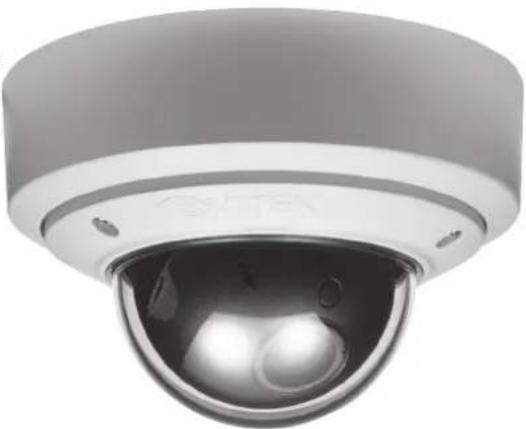
natural_image
Close-up of a security camera with a dome lens and sensor array (no visible text or symbols)
PIXIM®
DIGITAL PIXEL SYSTEM


PIXIM WDR

natural_image
Black-and-white photo of a modern building entrance with glass doors and silhouettes of people walking through (no visible text or symbols)Mighty Domes Conventional Cameras
EFFIO DSP
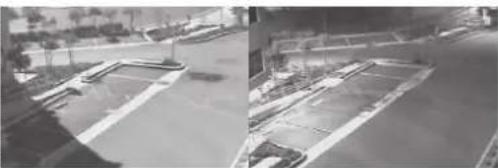
natural_image
Two black-and-white photos showing outdoor parking and street scenes, no visible text or symbolsMighty Domes Conventional Cameras

UTP Interface, Standard Heater/Blower kits available for all weather protection all the way down to -60°F!

OSD Joystick Controls
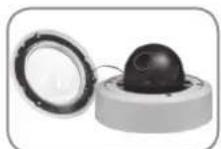
Fully Gasket
Sealed IP68 Rated
Weatherproof Design.
(Outdoor Vandal
Version Only)

Can be Surface Mounted with Included Surface Mount Casing or Semi-Flush Mounted for Sleek, Low Profile Installation.

Secondary Video Output Enables Ease of Adjustment after Installation.
FEATURES:
• High Resolution of 700 TVL incorporating Pixim Seawolf DSP for WDR & Sony Effio for Day/Night.
- Ultra Versatile Design with Infinity Ball Mount for Any Viewing Angle
- OSD (On Screen Display) with Joystick control for Camera Function Setup
• Secondary Video Output (Cable Included)
• True Mechanical Day/Night function available
- Options include 24VAC with Heater/Blower (down to -60°F) & UTP Transmission options.
• Vandal Resistant Version is Fully Gasket Sealed with an IP686 Water tight NEMA Rating
- 1" Conduit Knockout
- Semi-Flush or Surface Mountable
- EXTENSIVE mounting options available
- With Night Watch DSS Low Light Color Technology
- IR Corrected Lens Options Lens options: 2.9-10mm, 9-22mm, and 18-50mm
• 24VAC/12VDC Dual Voltage Operation
• Available in Ivory or Black
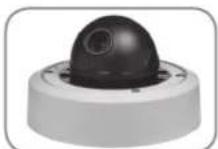
Friction Fit Ball Mount Camera Module Can Achieve Virtually Any Viewing Angle.

The Mighty Dome Vandal base has been designed to manage and protect video and power cables without the need for external adaptors.
VITEK LIMITED PRODUCT WARRANTY
VITEK products carry a three (3) year limited warranty. Digital recording and storage products are also warranted for 3 years except for the hard drives which carry their own independent factory warranty from the hard drive manufacturer. VITEK warrants to the purchaser that products manufactured by VITEK are free of any rightful claim of infringement or the like, and when used in the manner intended, will be free of defects in materials and workmanship for a period of three (3) years, or as otherwise stated above, from the date of purchase by the end user. This warranty is non-transferable and extends only to the original buyer or end user customer of a Vitek Authorized Reseller.
This warranty shall not apply to repairs or replacements necessitated by any cause beyond the control of VITEK, including but not limited to, acts of nature, improper installation, excess moisture, misuse, lack of proper maintenance, accident, voltage fluctuations, or any unauthorized tampering, repairs or modifications. This warranty becomes VOID in the event of alteration, defacement, or removal of serial numbers.
Within the first 6 months of purchase, VITEK will replace or credit any defective product at the request of the customer (subject to availability) with a new product that equals or exceeds the performance of the original product purchased.
Within the first 6 months of purchase, at its sole discretion, VITEK may issue an advance replacement for a defective product; however, all related costs including, but not limited to shipping and/or delivery charges will be the responsibility of the customer. If upon return inspection a product is determined to be in good working order or shows evidence of misuse, the customer will be responsible for full payment of the original product purchased as well as the replacement product.
Beyond the first 6 month period for the remainder of the warranty, VITEK'S responsibility shall be limited to repairing the defective product, including all necessary parts and related labor costs. At its sole discretion, VITEK may choose to either exchange a defective product or issue a merchandise credit towards future product purchases. Any replacement parts furnished in connection with this warranty shall be warranted for a period not to exceed the remaining balance of the original equipment warranty.
A Return Authorization number or "RA" number must be obtained prior to the return of any item for repair, replacement, or credit. VITEK requires that this "RA" number be clearly printed on the outside of the shipping carton to avoid refusal of said shipment. The Return Authorization number expires after 30 days. Products returned after the 30 day period will be subject to refusal. Shipping charges, if any, must be prepaid. A copy of the bill of sale (or invoice of purchase), together with a complete written explanation of the problem must accompany all returns.
Vitek makes no warranty or guarantee whatsoever with respect to products sold or purchased through unauthorized sales channels. Warranty support is available only if product is purchased through a Vitek Authorized Reseller.
- 1
- Introduction and Package Contents
- Introduction
- Package Contents
- Hardware Installation
- Note:
- 2
- Monitor and OSD Control
- LED Status Display
- OSD Control Function
- Setting Mode
- PIP/POP Setup Mode
- Caring for your LED Monitor
- Power button does not respond
- No image on the screen
- Power LED is RED (with no image on the screen)
- No sound coming from the audio speakers
- FCC compliance
- Precautions
- \* Power
- \* Plugs
- \* Power and extension cords
- \* Environment
- THE IRE SERIES LONG RANGE WEATHER/VANDAL RESISTANT BULLET CAMERAS
- VTC-IRE40/3516
- Day/Night IR Bullet Camera w/150' Range
- VTC-IRE70/650
- Day/Night IR Bullet Camera w/300' Range
- FEATURES:
- THE MIGHTY DOME THE ULTRA VERSATILE DOME CAMERA SERIES
- VITEK LIMITED PRODUCT WARRANTY
Brand : Vitek
Model : VTM-LED170P
Category : Tracking