A78006D - Washing machine Defy - Free user manual and instructions
Find the device manual for free A78006D Defy in PDF.


| Product Type | Split Wall Mounted Air Conditioner |
| Model | A78006D |
| Brand | Defy |
| Refrigerant Type | R410A |
| GWP (Global Warming Potential) | 2088 |
| Operating Modes | Auto, Cool, Dry, Heat, Fan |
| Fan Speeds | Low, Mid, High, Auto |
| Turbo Mode | Yes (in Cool or Heat mode) |
| Sleep Mode | Yes (automatic exit after 10 hours) |
| Self-Clean Function | Yes (iCLEAN and Self Clean modes) |
| Timer | ON/OFF timer (0.5-24 hours) |
| Swing | Up/Down and Left/Right (optional) |
| Remote Control | LCD display with backlight, batteries included |
| Temperature Range | 16°C to 32°C (60°F to 90°F) |
| Power Supply | 220-240V ~ 50Hz, dedicated circuit required (no extension cords) |
| Installation Height | Minimum 2.3m above floor |
| Safety Features | Earth leakage breaker, grounding wire, overheat protection |
| Filter Cleaning | Every 2 weeks or as needed; vacuum or wash with mild detergent |
| Warranty | 2 years from date of purchase (excluding consumables) |
| Included Accessories | Indoor unit, outdoor unit, remote control, batteries, drain pipe, connecting pipes, mounting plate, insulation |
| Service Contact | 086 100 3339 (South Africa) or local branches |
Frequently Asked Questions - A78006D Defy
User questions about A78006D Defy
0 question about this device. Answer the ones you know or ask your own.
Ask a new question about this device
Download the instructions for your Washing machine in PDF format for free! Find your manual A78006D - Defy and take your electronic device back in hand. On this page are published all the documents necessary for the use of your device. A78006D by Defy.
USER MANUAL A78006D Defy
SPLIT WALL MOUNTED TYPE AIR CONDITIONERS
Users Manual
Record in the space below the listed information for future reference. The rated current is printed on the serial number label attached to the oven side trim.
SERIAL NUMBER......
DATE OF PURCHASE......
PURCHASED FROM....

The manufacturer strives for continuous improvement. For this reason, the text and illustrations in this manual are subject to change without notice.

Do not attempt to install or maintain the Air Conditioner yourself. Only authorised agents are to carry out installation and repairs. The manufacturer shall not assume responsibility for accidents or injury caused by incorrect installation. The installation instructions are provided in a separate booklet entitled “Installation Instructions”
Read this manual before initial installation and operation of the appliance!
Dear Customer, please read this manual carefully before using your appliance for the first time and then store it within easy reach for future reference. We trust you will enjoy years of trouble free use.
The user manual:
- This manual will provide you with information on how to safely operate and care for your appliance in order that you gain the maximum benefit from it.
- Pay particular attention to safety instructions.
- Read all additional documents supplied with your appliance.
- This manual may be used for several similar but different models. Please check for relevance regarding your particular model.
Explanation of symbols used in this manual

Important safety information. Warning for hazardous situations with regard to life and property.

Caution; Warning for supply voltage.

Caution; Warning for fire hazard.

Useful information. Important information or useful hints about usage.
Unpacking
Remove all packaging. Ensure that packing material is disposed of in a responsible manner and that any plastic bags are cut up to prevent children playing with them and accidentally suffocating. If the appliance is damaged in any way do not use it. Report the damage to your dealer who will take the necessary corrective action.
Since the following are not factory faults they are the owners responsibility
Damage to the exterior finish and breakage of components.
Damage caused through improper use of the appliance.
Damage caused by moving the appliance.
 | This appliance is not intended for use by persons (including children) with reduced physical, sensory or mental capabilities or lack of experience and knowledge, unless they have been given supervision or instruction concerning the use of the appliance by a person responsible for their safety. |
| Children should be supervised to ensure that they do not play with the appliance. | |
 | The manufacturer strives for continuous improvement. Thus technical specifications, text and illustrations in this manual are subject to change without notice. |
| Figures represented in this instruction manual are schematic and may not correspond exactly with your appliance. If the parts are not included in the unit you have purchased, they may be model specific and only valid for some models. | |
| Values stated on the labels or in the documentation accompanying it are obtained in laboratory conditions in accordance with the relevant standards. Depending on operational and environmental conditions of the appliance, these values may vary. |
Contents
1. Important Safety Information 4
Warnings 4
2. Your Air Conditioner 6
Indoor unit 6
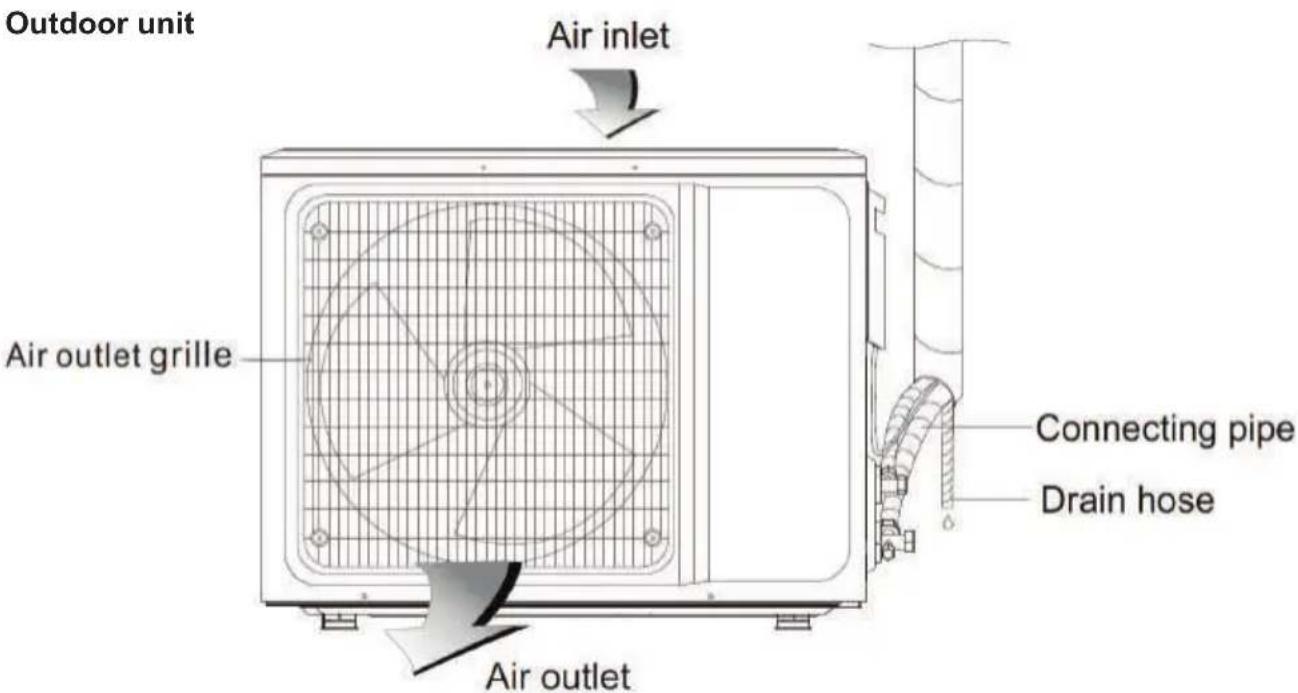
Outdoor unit 6
Specifications 6
3. Using your air conditioner 8
Remote controller 8
Precautions 8
Replacement of batteries 10
4. Maintenance and cleaning 13
5. Trouble Shooting 14
6. Installation 16
Installation of indoor unit 18
Wiring diagram 20
Installation of outdoor unit 21
Wiring diagram 22
Post installation check 24
7. Branches 25
8. Warranty 26
1 Important safety information
Please review and observe the following information. Failure to do so may result in injuries or material damage and will render any warranty and reliability commitments void.

Warnings
- Hand this owners manual over to the new owner should ownership change.
- The appliance must only be used for its intended purpose: Room temperature regulation.
- The appliance is intended to be used in household and similar applications such as in shops, offices and other working environments; farm houses and by clients in hotels, motels and other residential type environments; bed and breakfast type environments; catering and similar non-retail applications.
- Contact the customer care line on 086 100 3339 for all questions and problems relating to the airconditioner. Only authorised agents are to carry out installation and repairs.
 | The appliance must be grounded. Incomplete grounding may result in an electric shock. |
 | Do not pull the power cord during operation. Doing so could cause a fire. To unplug the appliance, switch it off and remove the plug by pulling on the plug and not the cord! |
 | Do not attempt to extend the power cord by joining it to another cord, or by using an extension cord. Do not put any other loads on the power supply socket. Extension cables and multiway plugs must not be used for connection. |
 | Do not damage the power cord. Placing heavy objects on the power cord, having the power cord near objects that operate at high temperatures may cause electric shock and fire. |
 | Pull out the power plug or turn off the power supply when not using the appliance for a long period of time. (Accumulated dirt might cause fire). |
 | An earth leakage breaker with rated capacity must be installed to avoid possible electric shocks. |
 | Do not place burner type appliances where they will be exposed to the airflow of the air conditioner as this may cause incomplete combustion. |
 | Do not use the following for cleaning: Chemical solvents, insecticide or inflammable spraying materials. These will damage the appearance of the appliance. Do not spray or sprinkle water directly onto the indoor unit. |
 | Vapour and vaporized cleaning materials must never be used in cleaning the appliance. The vapour may come into contact with the electrical parts and cause a short circuit or electric shock. |
 | Close doors and windows (preferably use a curtain) while operating the appliance for a long time, if room air is quite turbid, open the door and window for a short period of time to allow for some fresh air circulation. |
 | If anything abnormal such as a burning smell occurs, stop the operation immediately and switch the circuit breaker off. |
 | Do not install the appliance at locations where flammable gas may leak. If there is an electrical leakage from the air conditioner, it may cause a fire or explosion. |
 | Do not use the appliance other than for its intended purpose. Do not use the appliance for cooling medicine or academic research samples which require strict temperature control. |
 | Do not insert a finger, a rod or any other objects into the air outlet/inlet grille. The fan runs at a high speed and it will cause an injury if touched. |
 | Do not dispose of the appliance along with regular household waste. Contact your local authority for disposal information and facilities available. Never dispose of the appliance in a fire. |
 | Do not allow children to hang on the appliance. Never use the parts of the appliance as a means of support or step. |
 | Young children or infirm persons are not to use the appliance without supervision. |
 | Keep ventilation openings clear of obstructions. |
 | Unplug the appliance when cleaning, during routine maintenance or if it will not be used for an extended period. |
 | Should the mains lead of the appliance become damaged or should it need replacing at any time, it must be replaced by a DEFY Authorised Service Agent. |
 | Never connect your appliance to electricity saving systems as they may damage the appliance. Do not pull the batteries apart or throw them into a fire, they will explode. |
 | Do not use explosive substances such as aerosol cans with a flammable propellant near the appliance. Do not use flammable gas, benzene, petrol or volatile substances near the appliance. |
 | In the event of a malfunction, disconnect the appliance from the power supply. Do not operate a damaged appliance. Consult with your nearest DEFY service centre should you have any concerns. |
 | Never place objects on top of the appliance, they may fall down and injure you. |
 | Never plug the appliance into the wall socket during installation. Death or serious injury may result. |
 | The electrical safety of the appliance is only guaranteed if the earth system of your home is compliant with national standards. |
 | Do not expose your body directly to the cool (or hot) air of the appliance for prolonged periods; do not cool (or heat) the room too much. This could effect your physical condition and cause health problems. |
 | To prevent condensed water from dripping from the appliance: Do not open windows and doors while operating the appliance in the COOL/DRY mode for too long a period of time under high humidity conditions. (above 80%). |
 | The appliance is to be installed in accordance with national wiring regulations. The appliance must NOT be installed in the laundry. The appliance must be installed 2.3m above the floor. The appliance must be positioned so that the plug is accessible. For models whose cooling capacity is above 4600W an all-pole disconnection device (which has at least 3mm separation distance in all pole and a residual current device (RCD) and a rating of above 10mA) is to be incorporated in the fixed wiring according to national regulations. |
2 Your Air Conditioner
Indoor unit
Specifications
| Unit AH12H4 / AC12H4 | AH18H4 / AC18H4 AH24 | H4 / AC24H4 | |
| Refrigerant gas type R410A | |||
| Related gas GWP | 2088 | ||
| Quantity R410ARefrigerant gas (Kg) | 0.88 1.34 1.65 | ||
| tCO2 Eq. 1.837 2.798 3.445 | |||
Conditions that will prevent the unit from running normally
Within the temperature range provided in the following table, the air conditioner may stop running and other anomalies may arise.
| Cooling | Outdoor | >48°C |
| Indoor >16°C | ||
| Heating | Outdoor | >30°C |
| <-7°C | ||
| Indoor | >30°C |
- If the temperature is too high, the air conditioner may activate the automatic protection device. If so, the air conditioner may be shut down.
- If the temperature is too low, the heat exchanger of the air conditioner may freeze, leading to water leakage or other malfunctions.
- With long-term cooling or dehumidification, at a relative humidity of above 80% (doors and windows are open), there may be water condensation or dripping near the air outlet.
Notes for heating
- The fan of the indoor unit will not start running immediately after heating is started, this is to avoid the blowing out of cool air.
- When it is cold and wet outside, the outdoor unit will develop frost over the heat exchanger which will compromise the heating capacity. The air conditioner will start to defrost on order to remedy this condition.
- During defrost, the air conditioner will stop heating for about 5-12 minutes.
- Vapour may arise from the outdoor unit during defrosting. This is not a malfunction and is normal during the defrosting process.
- Heating will resume after defrosting has completed.
Emergency operation
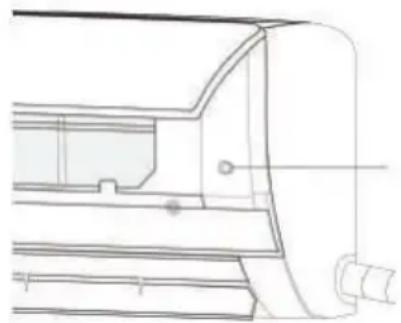
- If the remote controller is lost or broken, use the "force" switch button to operate the air conditioner.
- If this button is pushed with the unit OFF, the air conditioner will operate in Auto mode.
- If this button is pushed with the unit ON, the air conditioner will stop running.
Airflow direction adjustment
- Use the up-down swing and left-right swing buttons on the remote controller to adjust the airflow direction. Refer to the users manual of the remote controller for detail.
- For models without left-right swing function, the fins must be moved manually.
natural_image
Technical line drawing of a mechanical component or bracket (no text or symbols)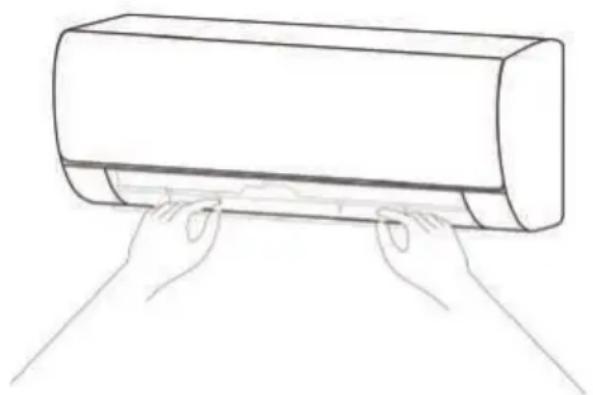
natural_image
Line drawing of two hands pressing down on a cylindrical object (no text or symbols)Remote controller
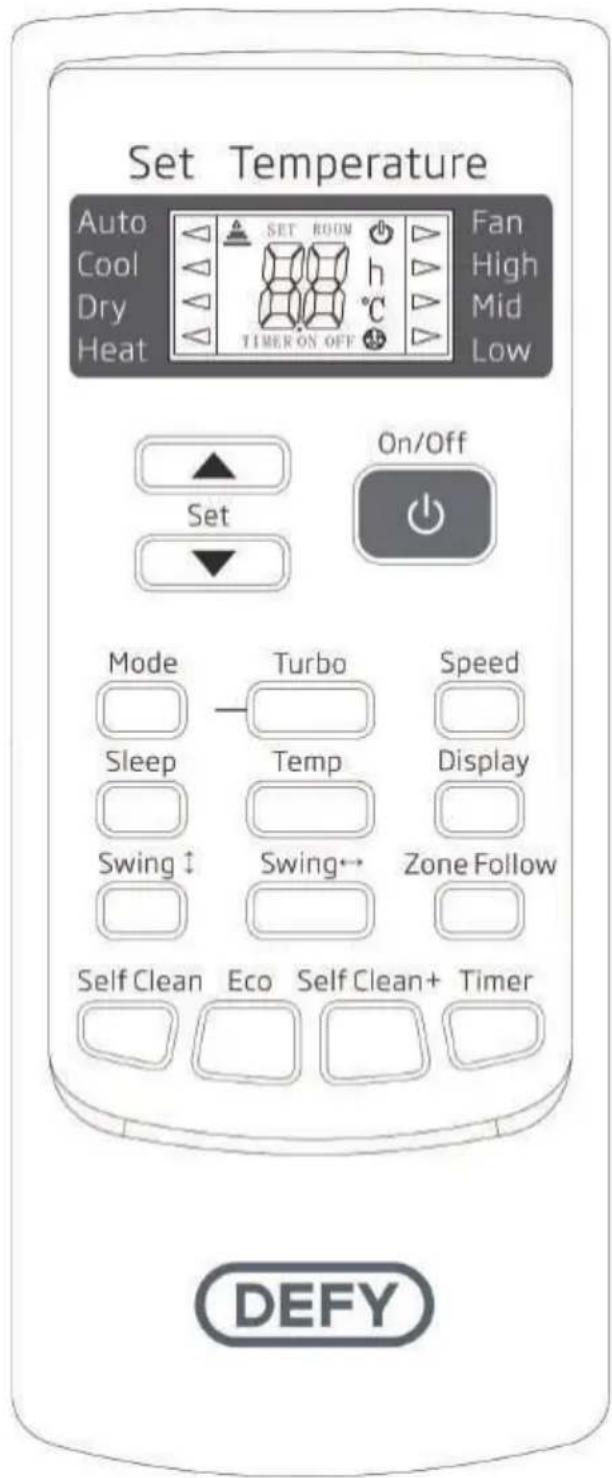
Precautions
- Before first time use of the remote controller, install the batteries and ensure the “+” and “-” poles are correctly positioned.
- Ensure the remote controller is pointed to the signal receiving window, and that there is no obstruction in between and the distance is 8m at the maximum.
- Do not let the remote controller drop or fling it at will. Do not let any liquid in the remote controller. Do not expose the remote controller directly to the sunlight or excessive heat.
- If the remote controller does not function normally, remove the batteries for 30 second before reinstall them. If that doesn't work, replace the batteries.
- When replacing the batteries, do not mix the new batteries with old ones or mix batteries of different types, which could cause failure of the remote controller.
- If the remote controller is not to be used for a long period of time, remove the batteries first, lest the leakage from them may damage the remote controller.
• Properly dispose the discarded batteries.
Note:
This is a universal remote controller and may cover a variety of models. Some of the buttons may not be applicable to the particular model you have purchased. If so, these will not function on your model. (If a specific function is not available on the air conditioner, pressing the corresponding button will have no effect).
Note: The appearance and functions of the remote controllers may vary slightly from model to model. Some indicators and functions on your remote control may not be applicable to the model you have purchased.


Note: The remote controller will display all symbols during power-on and only those corresponding to the current operation will be displayed relating to the particular function for the rest of the time.
1. On/Off
- Press this button to turn on/off the unit.
- This will clear the existing timer and SLEEP settings.
2. Temp
- Press this button to set the temperature display to Fahrenheit, which is displayed by default in Celsius. The “°C” will not be displayed on the LCD.
- Press this button again to restore the temperature display to Celsius.

Note: Temperature display in Fahrenheit is not available for some models. When temperature is displayed in Fahrenheit on the remote controller, it might be in Celsius on the unit, the function and operation of which will not be affected.
3. Speed
- Press this button in order to be able to select the fan speed as follows:
Low - Mid - High - Auto

Note: AUTO air speed is not available in FAN mode
4. Display
- Press this button to turn on/off the display. This is for the convenience of users who are unconformable sleeping with the backlight on.
5. Zone Follow
- Press this button to set the temperature display on the remote controller to ambient temperature and press this button again to set it to pre-set temperature.
6. Timer
- With the unit ON, press this button to set OFF timer or with it OFF to set ON timer.
- Press this button once, "ON(OFF)" will flash. Press "▲" or "▼" to set the number of hours in which the unit will be switched ON/OFF, with an interval of 0.5 h if less than 10 hrs., or 1 hour if longer than 10 hrs., and a range of 0.5-24 hrs.
- Press it again to confirm the setting, the "ON (OFF)" will stop flashing.
- If the timer button is not pressed longer than 10 seconds after the "ON (OFF)" flashes, the timer setting will exit.
- If a timer setting is confirmed, pressing this button again will cancel it.
Note: When a ON timer is set, all function buttons (except SLEEP, DISPLAY and Zone Follow can't be set) are valid and when the ON time set is up, the unit will operate as pre-set.
7. Self Clean +
- Press this button with the unit OFF, the remote controller will display "CL" and the unit will automatically clean dust off the evaporator and dry it, to increase the cooling and heating efficiency.
- The iCLEAN function runs for approximately 30 minutes, during which if the unit is turned on with the remote controller or this button is pressed again, the iCLEAN will be deactivated.
8. ▲ or ▼
- Each time the “▲” is pressed, the temperature setting will increase by 1°C and each time the “▼” is pressed, it will decrease by 1°C.
- The temperature setting ranges from 16°C (60°F)\~32°C (90°F).

Note: The temperature cannot be set in AUTO or FAN mode, thus these two buttons are not functional.
9. Turbo
- Press this button only in COOL or HEAT mode to set TURBO on or off to increase cooling or heating speed.
- When TURBO is on, the air speed is HIGH.
- When TURBO is off, the air speed will default to the previous setting.
10. Mode
- Press this button in order to set the running mode as follows:
Auto - Cool - Dry - Heat - Fan

Note: Heat mode is not available for cool only units
11. Sleep
- Press this button to enter SLEEP mode, which the unit will exit after 10 hours of continuous operation and restore to the previous status.
Note: The sleep function cannot be activated in FAN mode
12. Swing
- Press this button to activate up/down swing and press it again to fix the swing position.
13. Swing ← (Optional)
- Press this button to activate left/right swing and press it again to fix the swing position.
14. Self Clean
- The Self Clean functions when the unit is turned off with the remote controller in COOL, DRY or AUTO mode. It will operate in HEAT mode (FAN mode for cool only units), with the internal fan running with weak flow for 3 minute before stop, to remove the moisture within the evaporator so as to prevent it from giving off bad smell from mould. - This function is not set in the factory. You may set it or cancel it any time you want as follows: With both the unit and the remote controller OFF, point the remote controller at the unit and press “Self Clean” button once, the buzzer will sound 5 times after 5 times, indicating this function is set. Once set, this function will remain valid except when the unit is power off or until it is cancelled.
To cancel Self Clean:
- Power off the unit.
- With both the unit and the remote controller OFF, point the remote controller at the unit and press this button once, the buzzer will sound 3 times after 5 times, indicating this function is cancelled.

Note: With Self Clean activated, it is advised not to turn ON the unit again before it is fully OFF. Self Clean function will be invalid when OFF timer is set.
-
ECO (Not available for this model)
-
If this button is pressed in COOL mode, the unit will enter the ECO mode which has the lowest electricity consumption, and exit it automatically 8 hours after.
- Changing modes or turning off the remote controller will automatically cancel the ECO function.
- Press ECO button in ECO mode to exit this mode.

Note: The ECO mode only works for inverter units
Replacement of batteries
- Replace the batteries when any of the following conditions occur: When the signal from the remote controller is weak and the indoor unit does not receive a proper signal, the indicators on the display screen become blurred.
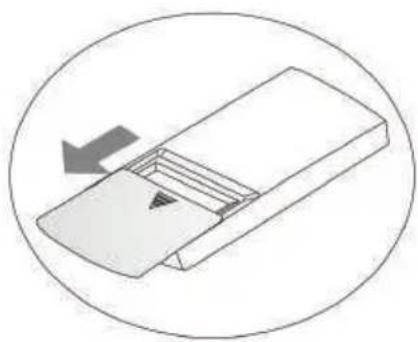
- Slide the back cover of the remote controller off, remove the old batteries and replace with two new batteries.
- The positive and negative poles must match with the batteries poles.
-
New batteries of a matching type must be used.
-
If the remote controller will not be used for an extended period of time then remove the batteries to prevent any leakage of the electrolyte from damaging the remote controller.
- If the remote controller enters an abnormal state, remove and then reinsert the batteries to clear the display.
natural_image
Simple line drawing of a mechanical component with an arrow indicating direction (no text or symbols)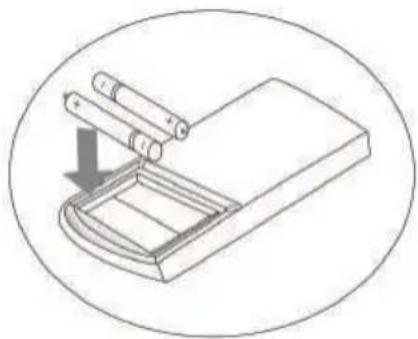
natural_image
Diagram of a mechanical device with a cylindrical component inserted into a tray, showing a downward arrow indicating motion (no text or symbols present)
natural_image
Simple line drawing of a mechanical component with an arrow indicating direction (no text or symbols)Automatic operation mode
- Press the "MODE" button, select the automatic operation mode.
- By pressing the "SPEED" button, you can select the fan speed from LOW, MID, HIGH, AUTO.
- Press the "ON/OFF" button, the air-conditioner starts to operate.
- Press the "ON/OFF" button again, the air-conditioner stops.

Note: In the fan operation mode, the temperature settings is non-effective.
Cooling/Heating operation mode
- Press the "MODE" button, select the Cooling or Heating operation mode.
- By pressing the “▲” or “▼” button, you can set the temperature range from 16°C (60°F)\~32°C(90°F), the display changes as you touch the button.
- By pressing the "SPEED" button, you can select the fan speed from LOW, MID, HIGH, AUTO.
- Press the "ON/OFF" button, the air-conditioner starts to operate.
- Press the "ON/OFF" button again, the air-conditioner stops.

Note: Cold wind types have no heating function.
Warning: Do not break, pull the batteries apart or throw them into a fire. There is a risk of explosion and fire.
Fan operation mode
- Press the "MODE" button, select the fan operation mode.
- By pressing the "SPEED" button, you can select the fan speed from LOW, MID, HIGH.
- Press the "ON/OFF" button, the air-conditioner starts to operate.
- Press the "ON/OFF" button again, the air-conditioner stops.
Note: In the fan operation mode, the temperature settings is non-effective.
Drying operation mode
- Press the "MODE" button, select the drying operation mode.
- By pressing the “▲” or “▼” button, you can set the temperature range from 16°C (60°F)\~32°C (90°F), the display changes as you touch the button.
- By pressing the "SPEED" button, you can select the fan speed from LOW, MID, HIGH, AUTO.
- Press the "ON/OFF" button, the air-conditioner starts to operate.
- Press the "ON/OFF" button again, the air-conditioner stops.
Backlight function (Some models)
The remote controller has a backlight which can be turned on by pressing any button for the convenience of operation in darkness.
The backlight will be automatically turned off if there is no operation within 10 seconds.
4 Maintenance and cleaning

Warning:
- Before cleaning the air conditioner, it must be shut down and the electricity must be switched off for more than 5 minutes to prevent the risk of an electric shock.
- Do not wet the air conditioner. This can cause an electric shock. Never rinse or wet the air conditioner with water under any circumstances.
- Volatile liquids such as thinners or gasoline will damage the air conditioner housing. Only clean the housing of air conditioner with a soft dry cloth and a damp cloth moistened with a neutral detergent.
- Clean the filter regularly to ensure that the unit operates efficiently. If the service environment of the air conditioner is dusty, then increase the frequency of cleaning intervals. After removing the filter, do not touch the fins of the indoor unit with your fingers.
When the panel of the indoor unit is dirty, clean it gently with a slightly damp cloth using tepid water below 45^ C. Do not remove the panel whilst cleaning.

natural_image
Line drawing of a hand using a power tool to clean or brush the sheet of paper (no text or symbols)Cleaning the air filter
Remove the air filter
natural_image
Simple line drawing of a cylindrical object with a flat top and internal slots, no text or symbols present.
natural_image
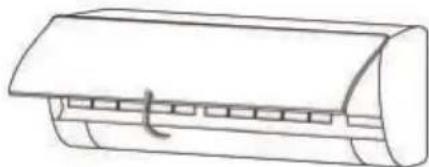
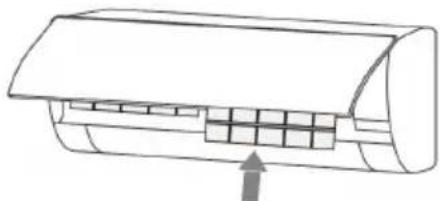
Diagram of a car air conditioner unit with cooling fins and airflow direction arrow (no text or labels)- Use both hands to open the panel from both ends as per the above diagram.
- Release the air filter from the slot and remove it.
Clean the air filter
Use a vacuum cleaner to clean the air filter. The filter may also be rinsed with water to clean the filter. If the filter is very dirty (for example, greasy), clean it with warm water (below 45^ C) and a use mild detergent. Rinse the filter with water and once complete place the filter in the shade to air dry.
Refit the air filter
- Reinstall the dried filter in reverse order of removal, close the cover properly.
natural_image
Diagram of a car air conditioner unit with cooling fins and airflow direction arrow (no text or labels)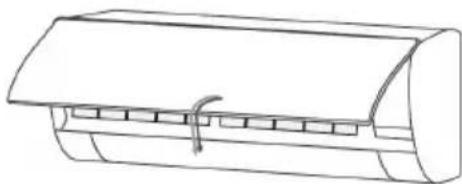
natural_image
Line drawing of a cylindrical air conditioner unit with a curved cover and clamped slots (no text or symbols)
Note: If the air filters and inlets are blocked by dust or dirt, the cooling and heating performance will be affected and the operation noise and power consumption increased. Air filters & inlets should be cleaned regularly.
Check before use
- Check whether all the air inlets and outlets of the units are unblocked.
- Check whether the water outlet of the drain pipe is free from any obstruction. Clean and remove if there are any blockages or obstructions
- Check the ground wire is properly grounded.
- Check whether the remote control batteries are fitted and have sufficient power in them.
- Check whether there is any damage in the mounting bracket of the outdoor unit. if any, contact the customer care line on 086 100 3339.
Maintenance after use
- Switch off the power source of the air conditioner, switch off the circuit breaker and remove the batteries from the remote control.
- Clean the filter and the unit body.
- Remove any dust or debris from the outdoor unit.
- Check whether there is damage in the mounting bracket of the outdoor unit. If any, contact the customer care line on 086 100 3339.
5 Trouble shooting
Please review this list before calling the customer care line. It could save you time and money. This list includes frequent complaints that do not arise from defective workmanship or material usage. Some of the features described here may not apply to your model.
| Symptom Check | |
| The air conditioner does not operate. | Make sure the air conditioner plug is securely plugged in.Are there any obstacles or disturbance supply oscillators in the room that may be disturbing the signal from the remote controller?Is there a power failure?Is the power plug plugged in properly?Check for a blown fuse or tripped circuit breaker.Test the wall socket for power using another appliance.Inspect the electrical cord for damage.Eliminate the use of an extension cord, if any is being used.Does it reach the set time for start up? |
| The remote controller is not operational. | Check whether the batteries of the remote controller are usable.Is the remote controller out of effective distance to the indoor unit?Are there any obstructions between the controller and the signal receptor?Check whether the batteries are positioned correctly. |
| Poor cooling or heating performance. | Is the temperature setting appropriate?Are the air filters clean?Are there any obstacles blocking the inlets and outlets of the indoor and outdoor units? Is sleep mode used during daytime?Are there any heat sources in the room?Is the indoor fan speed set low?Are doors and windows closed? |
| Poor cooling performance. | Is there direct sunlight in the room?Is there a heat source in the room?Are there too many people in the room? |
| Indoor unit does not operate immediately when the air conditioner is restarted. | If the air conditioner is turned on immediately after it is turned off, the protective delay switch will delay the operation for 3 to 5 minutes. |
| There is unusual smell blowing from the outlet after operation is started. | The air conditioner itself does not have undesirable odour.If there is an odour, it may be due to the odour in the environment.Please clean the air filter or activate the cleaning function. |
| There is sound of running water during the running of the air conditioner. | Sometimes the "hissing" sound of running water can be heard. This is the sound of the flow of the refrigerant, not a malfunction. |
| A slight "click" sound is heard at the of start-up or shut-down. | Due to temperature changes, the panel and other parts may expand and contract which will give off the sound. This is normal, and is not a fault. |
| During the cooling operation, the indoor unit outlet sometimes blows out mist. | This is because the indoor air is cooled rapidly. After it runs for some time, the indoor temperature and humidity will be reduced and the mist will disappear. |
| Mist is blown out at COOL operation. | This phenomenon sometimes occurs when the temperature and humidity of the room are very high. This will disappear with the lowering of the temperature and humidity . |
| Moisture may form on the air outlet grilles. | If the unit is operated for a long period of time with high humidity, moisture may form on the air outlet grilles and drip down. |
If one of the following symptoms occurs, please switch the circuit breaker off immediately and call the Defy customer care line on 086 100 3339 for help.
- The power cord or power plug has overheated or is damaged.
- An abnormal sound is heard during operation.
- The circuit breaker, fuse or the earth leakage breaker often cuts off the operation.
- One of the switches or buttons often fails to work normally.
- The air conditioner emits a burning smell during operation.
• Water leaks from the indoor unit. - An unpleasant odour is emitted during operation.
• Water has penetrated the machine or the remote control.
• Air switch or protection switch often breaks.
Please register your product at
www.defy.co.za
DEFY APPLIANCES (PTY) LTD
P.O.BOX 12004
JACOBS
DURBAN
4026
SOUTH AFRICA
Important notice
- Installation is the buyer's responsibility. The manufacturer accepts no liability for this service. Any action that the manufacturer has to take as a result of an erroneous installation will not be covered by the warranty.
- The installation, including electrical connections, must be carried out by qualified personnel in accordance with current and local regulations. An installation by an unqualified person may constitute a hazard and will void the warranty.
- The manufacturer shall not be held responsible for injury to persons or damages arising from procedures carried out by unauthorized persons or due to non compliance with these provisions.
Installation position requirements
- Avoid places where there are inflammable or explosive gas.
- Avoid places subject to strong artificial electric/magnetic fields.
- Avoid places subject to noise and resonance.
- Avoid severe natural conditions (strong wind, direct sunshine or high temperature heat sources).
- Avoid places within the reach of children.
- Keep the distance between indoor and outdoor units to a minimum.
- Select where it is easy to perform service and repairs and where ventilation is good.
- The outdoor unit shall not be installed in an aisle, stairway, exit, fire escape, catwalk or any other public area.
- The outdoor unit shall be installed as far as possible from neighbours doors and windows and from plants.
Raised height requirements
- When carrying out installation at 2m or higher above the base level, safety belts must be worn and ropes of sufficient strength be securely fastened to the outdoor unit. Follow these safeguards to prevent falling that could cause personal injury or death as well as property loss.
Mounting structure requirements
- The mounting rack must meet the relevant national or industrial standards in terms of strength. Welding and connection areas must be rustproofed.
- The mounting rack and its load carry surface shall be able to withstand 4 times or more above the weight of the unit, or 200kg, whichever is heavier.
- The mounting rack of the outdoor unit shall be fastened with expansion bolts.
- Ensure the installation is secure, regardless of what type of wall it is installed on, to prevent potential accidents that could hurt people.
Electrical safety requirements
- Be sure to use the rated voltage and air conditioners dedicated circuit for the power supply. The power cord diameter must meet the national requirements.
- When the maximum current of the air conditioner is ≥ 16A , it must use the air switch or leakage protection switch equipped with protection devices.
- The normal operating range is 90%-110% of the local rated voltage.
- The minimum clearance between the air conditioner and combustibles is 1.5 m.
Grounding requirements
- The air conditioner is a type I electrical appliance and must be properly grounded.
- Do not connect the grounding wire to a gas pipe, water pipe, lightning rod, telephone line, or a circuit poorly grounded to the earth.
- The grounding wire is specially designed and shall not be used for any other purpose. Do not fasten the grounding wire with a common tapping screw.

Note:
The connection method of the air conditioner and the power cord and the interconnection method of each independent element shall be subject to the wiring diagram affixed to the machine.
The model and rating value of the fuse shall be subject to the silkscreen on the corresponding controller or fuse sleeve.
Packing list indoor unit
| No | Name | Quantity | Unit |
| 1 | Indoor unit | 1 | Set |
| 2 | Remote controller | 1 | PC |
| 3 | Batteries | 2 | PC |
| 4 | Instructions 1 Set | ||
| 5 | Drain pipe 1 PC |
Packing list outdoor unit
| No | Name | Quantity | Unit |
| 1 | Outdoor unit | 1 | Set |
| 2 | Connecting pipe | 2 | PC |
| 3 | Plastic strap | 1 | Roll |
| 4 | Pipe protection ring 1 | PC | |
| 5 | Putty 1 | Packet |
Installation of indoor unit

Mounting plate
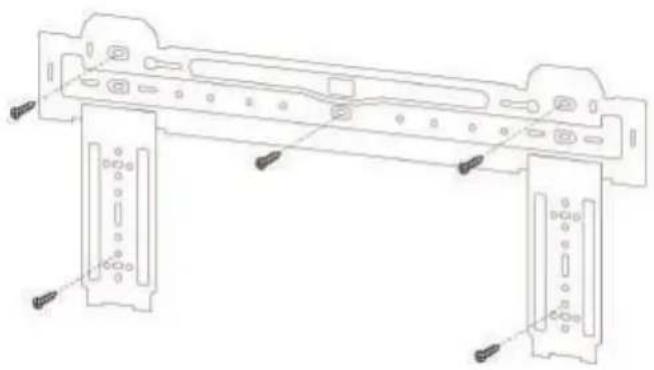
- The wall for installation of the indoor unit shall be hard and firm, so as to prevent vibration.
- Use the "+" type screw to fasten the peg board. Horizontally mount the peg board on the wall and ensure that it is mounted squarely.
- Check the peg board by hand after the installation and check whether it has been securely mounted.
Wall - Through hole
- Make a hole with an electric hammer or a water drill at the predetermined position on the wall for piping. The hole must slant outwardly by between 5°-10°.
- To protect the piping and the cables from being damaged running through the wall, and from the rodent damage, a pipe protecting ring shall be installed and sealed with putty.
Note: The wall hole should be between ∅60mm \~ ∅80mm. Avoid making contact with pre-buried power wire and hard walling when making the hole.
natural_image
Technical line drawing of a mechanical assembly with mounting brackets and fasteners (no text or symbols)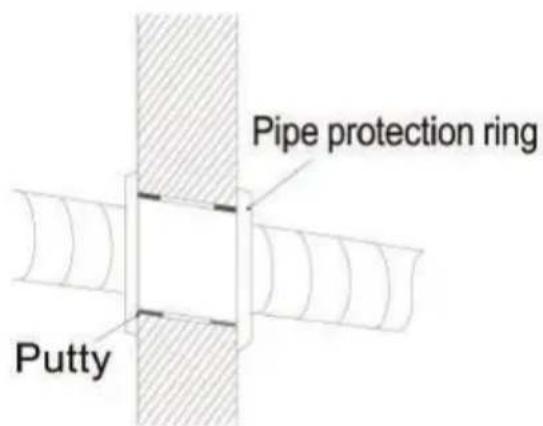
Routing the pipe

- Depending on the position of the unit, the piping may be routed to the side either from the left or to the right (Fig 1), or vertically from the back (Fig 2) (depending on the pipe length of the indoor unit). In the case of side routing, cut off the outlet cutting stock from the correct side.
- The power cord may be routed separately from the piping. Cut off the outlet cutting stock and then run the power cord through the hole, keeping the remaining part as a protector against rodents.
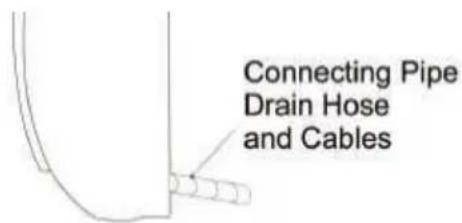
Fig 2
Drain pipe connection
-
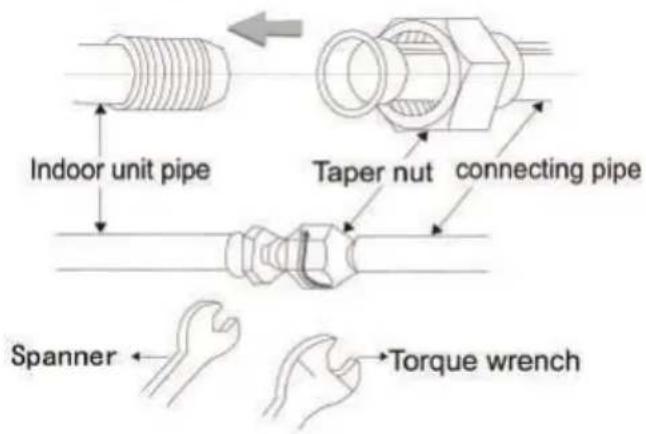
Remove the mountings and pull the indoor unit pipe out of the housing.
-
Connect the connecting pipe to the indoor unit: Aim at the pipe centre, tighten the Taper nut with fingers, and then tighten the Taper nut with a torque wrench, the direction is shown in the diagram on the top right. The torque used is shown in the following table.
| Size of pipe (mm) Torque (N . m) | |
| ∅6 / ∅6.35 15~25 | |
| ∅9.52 35~40 | |
| ∅12 / ∅12.7 45~60 | |
| ∅15.88 73~78 | |
| ∅19.05 75~80 | |
Wrap the piping
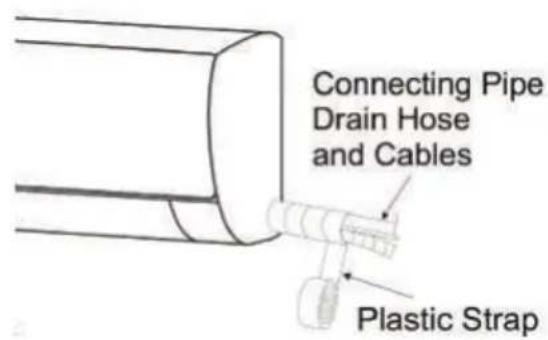
- Use the insulation sleeve to wrap the joint of the indoor unit and the connection pipe. Then use insulating material to pack, seal and insulate the pipe, to prevent generation of water condensation at the joint.
- Connect the water outlet with drain pipes, ensure the connection pipe, cables, and the drain hose are straight.
- Use plastic cable ties to wrap the connecting pipes, cables and drain hose. Run the pipe sloping downward.
Mounting the indoor unit
- Hang the indoor unit on the peg board, and move the unit from left to right to ensure that the hook is properly positioned in the peg board.
- Push toward the lower left side and the upper right side of the unit toward the peg board until the hook is embedded in the slot and makes a "click" sound.

natural_image
Hand holding a sheet of paper with a ruler inserted, showing an arrow indicating direction (no text or symbols)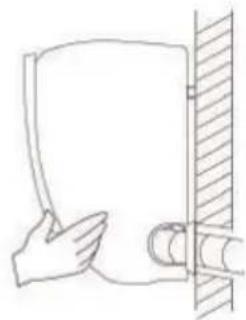
natural_image
Simple line drawing of a hand holding a document next to a vertical wall (no text or symbols)Wiring diagram
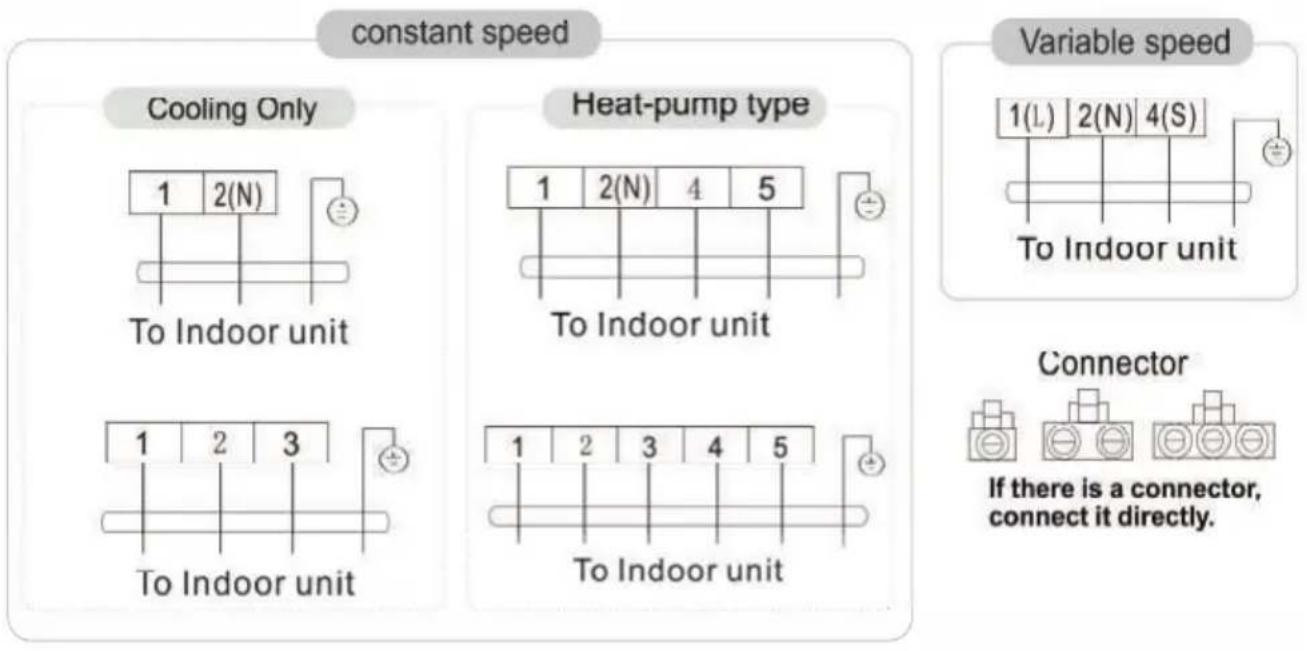
- If your air conditioner is provided with a power cable, the wiring of the indoor unit has been connected in the factory, and there is no need of connection. If the power cable is not provided, connection is needed in accordance with the wiring diagram shown below.

This manual covers a variety of models. Some speciality type wiring diagrams may not be included.
The diagram is for reference only, there may be a slight difference between the wiring diagram and the unit you have purchased,
constant speed
Cooling Only
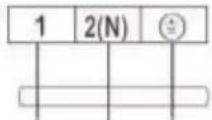
To Outdoor unit

To Outdoor unit
Heat-pump type
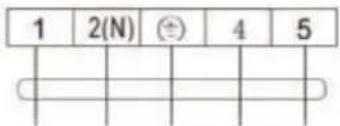
To Outdoor unit
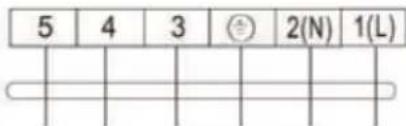
To Outdoor unit
Variable speed

To Outdoor unit
Connector
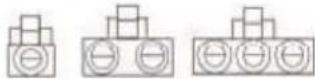
If there is a connector, connect it directly.
Installation of outdoor unit
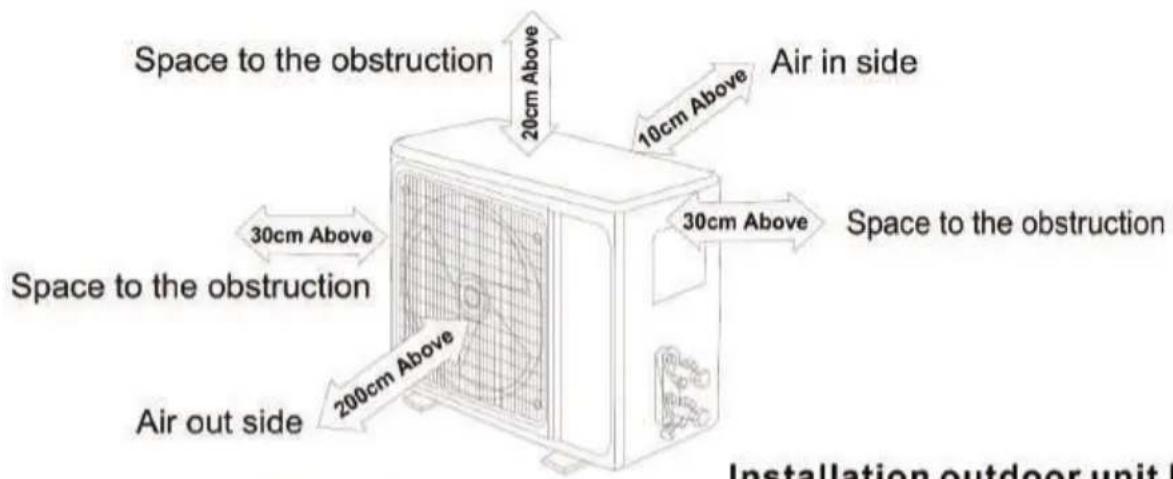


Installation outdoor unit bolt
| Outdoor Unit Size of Shape W1(W2)*H*D) (mm) | A (mm) | B (mm) |
| 665(710)×420×280 | 430 | 280 |
| 600(645)×485×260 | 400 | 290 |
| 660(710)×500×240 | 500 | 260 |
| 700(745)×500×255 | 460 | 260 |
| 730(780)×545×285 | 540 | 280 |
| 760(810)×545×285 | 540 | 280 |
| 790(840)×550×290 | 545 | 300 |
| 800(860)×545×315 | 545 | 315 |
| 800(850)×590(690)×310 | 540 | 325 |
| 825(880)×655×310 | 540 | 335 |
| 900(950)×700×350 | 630 | 350 |
| 900(950)×795×330 | 535 | 350 |
Install the connection pipe
Connect the outdoor unit with the connecting Pipe: Aim the counter-bore of the connecting pipe at the stop valve, and tighten the Taper nut with fingers. Then tighten the Taper nut with a torque wrench.
When extending the piping, an extra amount of refrigerant must be added so that the operation and performance of the air conditioner is not compromised.

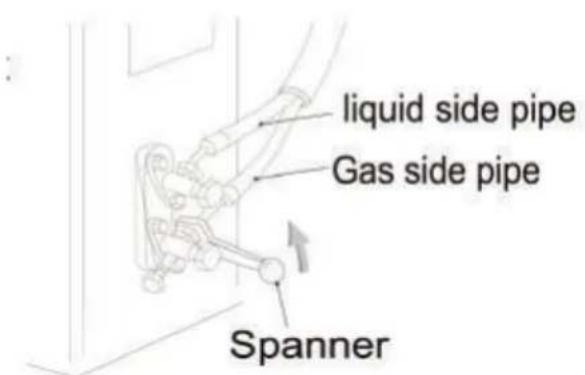
Wiring connection
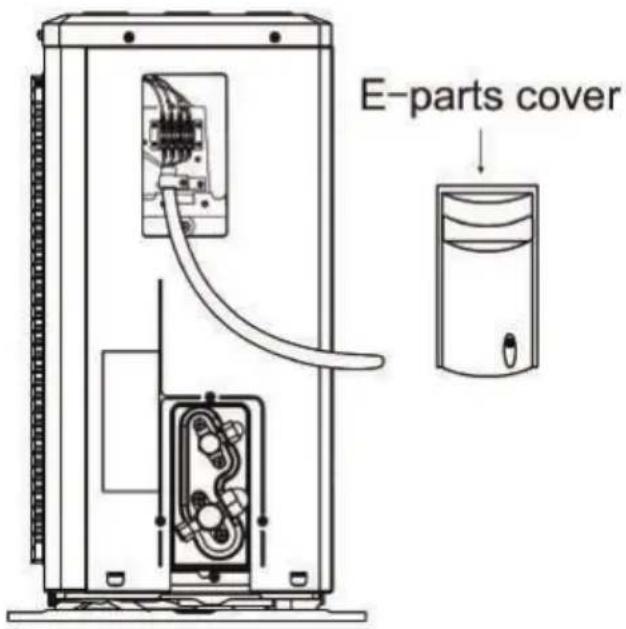
- Loosen the screws and remove E-parts cover from the unit.
- Connect the cables respectively to the corresponding terminals of the terminal board of the outdoor unit (see the wiring diagram), and if there are signals connected to the plug, just conduct butt joint.
- Ground wire: Remove the grounding screw out of the electric bracket, cover the grounding wire end onto the grounding screw and screw it into the grounding hole.
- Fix the cable reliably with fasteners (Pressing board).
- Put the E-parts cover back in its original place and fasten it with screws.
Wiring diagram
Expelling the air
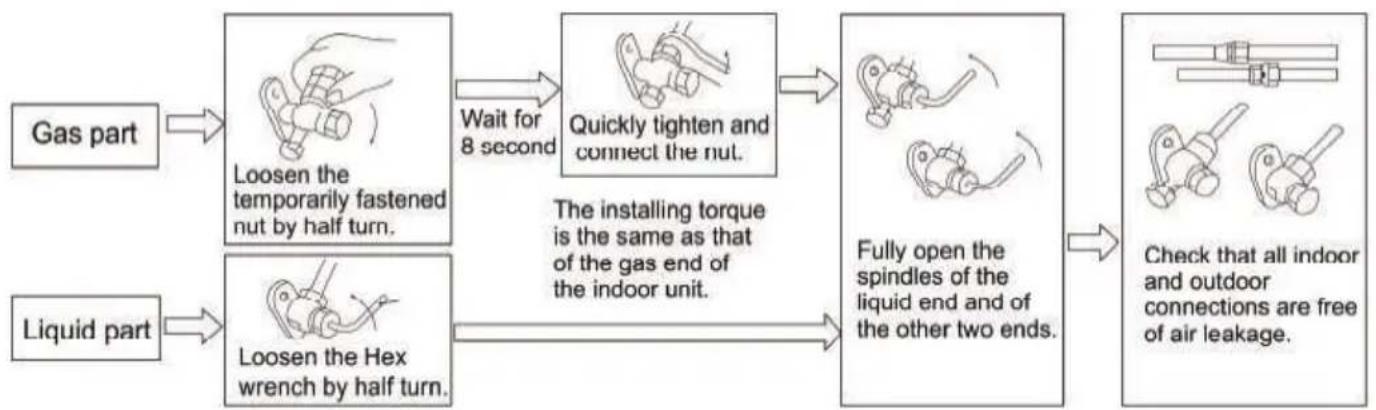
flowchart
graph LR
    A["Gas part"] --> B["Loosen the temporarily fastened nut by half turn."]
    C["Liquid part"] --> D["Loosen the Hex wrench by half turn."]
    B --> E["Wait for 8 second"]
    D --> E
    E --> F["Quickly tighten and connect the nut."]
    F --> G["The installing torque is the same as that of the gas end of the indoor unit."]
    G --> H["Fully open the spindles of the liquid end and of the other two ends."]
    H --> I["Check that all indoor and outdoor connections are free of air leakage."]
Vacuum Pumping Method (R410A)
refrigerant evacuation must use the vacuum pumping method).
Before working on the air conditioner, remove the cover of the stop valve (gas and liquid valves) and be sure to retighten it afterward. (to prevent potential air leakage)
- To prevent air leakage and spilling tighten all connecting nuts of all flare tubes.
- Connect the stop valve, charge hose, manifold valve, and vacuum pump.
- Fully open the handle Lo of the manifold valve and apply vacuum for at least 15 minutes and check that the compound vacuum gauge reads -0.1MPa(-76cmHg).
- After applying vacuum, fully open the stop valve with a hex wrench.
- Check that both indoor and outdoor connections are free of air leakage.
Outdoor condensation drainage (Heat pump type only)
When the unit is heating, the condensing water and defrosting water can be let out reliably through the drain house.
Installation:
Install the outdoor drain elbow in the ∅25 hole on the base plate, and join the drain hose to the elbow so that the waste water formed in the outdoor unit can be drained out safely to a proper place.


Post installation check
Electrical Safety Check
- If the supply voltage is as required.
- If there is any faulty or miss connection in each of the power, signal and grounding wires.
- If the grounding wire of the air conditioner is securely grounded.
Installation Safety Check
- If the installation is secure.
- If the water drain is smooth.
- If the wiring and piping are correctly installed.
- Check that no foreign matter or tools are left inside the unit.
Leak test of the refrigerant
Depending on the installation method, the following methods may be used to check for suspected leaks, on areas such as the four connections of the outdoor unit and the cores of the cut-off valves and t-valves:
- Bubble method: Spray a uniform layer of soap water over the suspected leak spot and observe carefully for bubbles.
- Instrument method: Check for leaks by pointing the probe of the leak detector to the suspected leak according to the instructions.
Test operation
Test Operation preparation
Verify that all piping and connection cables are well connected.
Confirm that the values at the gas side the liquid side are fully open.
Connect the power cord to an independent power socket.
Install batteries in remote control.
Test Operation method
- Turn on the power and push the ON/OFF switch button of the remote controller to start the air conditioner.
- Select COOL, HEAT (not available on cool-only models), SWING and other operation modes with the remote controller and see if the operation is ok.
7 Branches
If you have followed the instructions and still have a problem, contact the customer care line on 086 100 3339. They will be able to advise you on any aspect of the appliance.
South African Branches:
BLOEMFONTEIN
160 Long Street, Hilton, Bloemfontein 9301
Tel: 051 400 3900
Bloemfontein.Service@defy.co.za
CAPE TOWN
5A Marconi Rd. Montague Gardens, 7441
Tel: 021 526 3000
CapeTown.Service@defy.co.za
DURBAN
135 Teakwood Road, Jacobs,
Durban, 4052
Tel: 086 100 3339
Durban.Service@defy.co.za
EAST LONDON
Robbie de Lange Road, Wilsonia,
East London, 5201
Tel 086 100 3339
EastLondon.Service@defy.co.za
JOHANNESBURG
Cnr. Mimetes & Kruger Sts. Denver ext.12
Johannesburg, 2094
Tel: 011 621 0200 or 011 621 0300
Gauteng.Service@defy.co.za
POLOKWANE
87 Nelson Mandela Drive, Superbia 0699
Tel: 0152 92 1166 / 7 / 8 / 9
Polokwane.Service@defy.co.za
PORT ELIZABETH
112 Patterson Road, North End, Port Elizabeth 6001
Tel: 041 401 6400
PortElizabeth.Service@defy.co.za
PRETORIA
Block A1 Old Mutual Industrial Park,
Cnr. D.F.Malan Drive & Moot Str. Hermanstad, 0082
Tel: 012 377 8300
Pretoria.Service@defy.co.za
Sub-Saharan Africa Branches:
ZAMBIA: SOUTHGATE INVESTMENTS LTD
Plot 1606, Sheki Sheki Road
P.O. Box 33681
Lusaka, 10101, Zambia
Tel: +260 0211 242332/3
Fax: +260 0211 242933
sgiservicecentre@microlink.zm
NAMIBIA: ATLANTIC DISTRIBUTORS (PTY) LTD
10 Tienie Louw Street, Northern Industrial Area
P.O. Box 21158, Windhoek, Namibia
Tel: (061) 216162
Fax: (061) 216134
atlantic@mweb.com.na
ZIMBABWE: TRADECOMAFRICA
Trade Com Africa, 183 Loreley Crescent
Msasa, Harare, Zimbabwe
Tel: +263 4 486165/6
Cell: +263 772 469010
Cell: +263 772 469011
BOTSWANA: RAY MORGAN AGENCIES
RMA Service Centre, Plot 48, East Gate
Gaborone International Commerce Park
Kgale View, Gaborone
Botswana
Tel: +267 390 3996 / 390 3912
Fax: +267 318 7376
Cell: +267 7134 6539
service@rma.co.bw; raja@rma.co.bw
SWAZILAND: LYNDS DISTRIBUTORS
P.O Box 716, Mbabane, Swaziland, H100
Tel: (00268) 2515 4310/8
Fax: (00268) 2518 4318
MOZAMBIQUE: COOL WORLD. LDA
This certificate is issued by DEFY APPLIANCES (PTY) LIMITED manufacturers of Defy and Ocean products, hereinafter the Company, to the original purchaser only, of the appliance described on the certificate and shall constitute the only warranty given in respect of this appliance.
The Company warrants to the original purchaser that for a period of TWO YEARS from date of purchase the appliance is free from defect under normal domestic use, both in workmanship and material, subject to the following conditions.
- Repair or replacement of any part of this appliance, found by the Company to be defective, shall be at the election of the Company. The Company reserves the right to effect such service through any of its Service Divisions or Authorised Service Dealers. The cost of such service shall be borne by the Company in full, provided that the appliance is located no further than 50km from a Company Service Centre or an Authorised Service Dealer. Where the appliance is located beyond the 50km radius, the purchaser shall be liable for the standard travelling charges, as determined by the Company.
- Vitreous enamelware, fuses and lamps are specifically excluded from these warranties. It is an express condition of these warranties that the purchaser takes due care and attention in the use and maintenance of the appliance. Abuse, misuse in conflict with operating instructions, connection to incorrect voltages and subjection to commercial use shall release the Company from its obligations.
- This warranty shall become void and cease to operate if the appliance is dismantled by, or any repairs to the appliance are effected by any persons not duly authorised by the Company, or if substitute parts not approved by the Company are used in the appliance, or if the serial number of the appliance is removed.
- The Company shall not be responsible for damages resulting from fire, flood, civil disturbances or any Act of God. The Company shall not, in terms of these warranties be responsible nor held liable for any consequential loss or damage of any kind caused by or due to the failure or malfunction of the appliance.
- The Company shall not be responsible for transportation or other costs other than those incurred within the provisions of Point 1 of this Certificate.
- For warranties in the Republic of South Africa and Sub-Saharan Africa, please contact your nearest Defy office. Please refer to the previous page for respective South African branches and Sub-Saharan Africa branches.
- Where service is requested under warranty and no fault or defect can be found by the Company, all costs incurred will be for the purchaser's account.
- The units are to be serviced every 12 months by an authorised installer/technician, the cost of which is for the purchasers account. Failure to ensure that a unit is serviced according to the prescribed service intervals will result in the warranty becoming void.
- This Certificate as well as your invoice will serve as proof of purchase. For the purpose of warranty, it will be essential to produce this Certificate and invoice. Failure to do so, will render the purchaser liable for service costs.
KEEP THIS CERTIFICATE AND SALES INVOICE AS PROOF OF PURCHASE FOR WARRANTY PURPOSES.

- SPLIT WALL MOUNTED TYPE AIR CONDITIONERS
- Users Manual
- Read this manual before initial installation and operation of the appliance!
- The user manual:
- Explanation of symbols used in this manual
- Unpacking
- Since the following are not factory faults they are the owners responsibility
- Contents
- Important Safety Information 4
- Your Air Conditioner 6
- Using your air conditioner 8
- Maintenance and cleaning 13
- Trouble Shooting 14
- Installation 16
- Branches 25
- Warranty 26
- Important safety information
- Warnings
- Your Air Conditioner
- Conditions that will prevent the unit from running normally
- Notes for heating
- Emergency operation
- Airflow direction adjustment
- Remote controller
- Precautions
- Note:
- On/Off
- Temp
- Speed
- Low - Mid - High - Auto
- Display
- Zone Follow
- Timer
- Self Clean +
- ▲ or ▼
- Turbo
- Mode
- Sleep
- Swing
- Swing ← (Optional)
- Self Clean
- To cancel Self Clean:
- Replacement of batteries
- Automatic operation mode
- Cooling/Heating operation mode
- Fan operation mode
- Drying operation mode
- Backlight function (Some models)
- Maintenance and cleaning
- Warning:
- Cleaning the air filter
- Remove the air filter
- Clean the air filter
- Refit the air filter
- Check before use
- Maintenance after use
- Trouble shooting
- Important notice
- Installation position requirements
- Raised height requirements
- Mounting structure requirements
- Electrical safety requirements
- Grounding requirements
- Installation of indoor unit
- Mounting plate
- Wall - Through hole
- Routing the pipe
- Drain pipe connection
- Wrap the piping
- Mounting the indoor unit
- Wiring diagram
- constant speed
- Install the connection pipe
- Wiring connection
- Expelling the air
- Vacuum Pumping Method (R410A)
- Outdoor condensation drainage (Heat pump type only)
- Installation:
- Post installation check
- Electrical Safety Check
- Installation Safety Check
- Leak test of the refrigerant
- Test operation
- Test Operation preparation
- Test Operation method
- Branches
- South African Branches:
- BLOEMFONTEIN
- CAPE TOWN
- DURBAN
- EAST LONDON
- JOHANNESBURG
- POLOKWANE
- PORT ELIZABETH
- PRETORIA
- Sub-Saharan Africa Branches:
- ZAMBIA: SOUTHGATE INVESTMENTS LTD
- NAMIBIA: ATLANTIC DISTRIBUTORS (PTY) LTD
- ZIMBABWE: TRADECOMAFRICA
- BOTSWANA: RAY MORGAN AGENCIES
- SWAZILAND: LYNDS DISTRIBUTORS
- MOZAMBIQUE: COOL WORLD. LDA
- KEEP THIS CERTIFICATE AND SALES INVOICE AS PROOF OF PURCHASE FOR WARRANTY PURPOSES.
Brand : Defy
Model : A78006D
Category : Washing machine