
MBK100C - Car Radio American International - Free user manual and instructions
Find the device manual for free MBK100C American International in PDF.


| Product Type | Car Radio Installation Kit |
| Brand | American International |
| Model | MBK100C |
| Vehicle Compatibility | Mercedes C-Class 2002-2004 (C230, C240, C320 without factory navigation) |
| Installation Type | Aftermarket radio installation kit |
| Color | Black |
| Material | Plastic and metal brackets |
| Weight | 0.5 kg (approx.) |
| Dimensions | Single DIN/ISO compatible; overall bracket width approx. 178 mm |
| Contents | Main bracket, left and right side brackets, pocket (POC-100C), screws, ISO spacers, ISO trim ring (ITR-100C) and double DIN trim ring (DITR-100C) included |
| Tools Required | Flathead screwdriver, #15 Torx screwdriver, Phillips screwdriver |
| Mounting Options | Single DIN, Single ISO, Double DIN, Double ISO |
| Includes Pocket | Yes (POC-100C) |
| Includes Trim Rings | ITR-100C for ISO, DITR-100C for double DIN |
| Rear Support Bracket | Yes, adjustable |
| Safety Notes | Disconnect battery before installation; avoid airbag interference |
| Maintenance | Clean with damp cloth; avoid harsh chemicals |
| Spare Parts Availability | Contact American International or dealer |
| Warranty | Standard manufacturer warranty |
Frequently Asked Questions - MBK100C American International
User questions about MBK100C American International
0 question about this device. Answer the ones you know or ask your own.
Ask a new question about this device
Download the instructions for your Car Radio in PDF format for free! Find your manual MBK100C - American International and take your electronic device back in hand. On this page are published all the documents necessary for the use of your device. MBK100C by American International.
USER MANUAL MBK100C American International
VEHICLE APPLICATIONS
Mercedes
2002-04 C-230 (w/o Factory Navigation)
2001-04 C-240 (w/o Factory Navigation)
2001-04 C-320 (w/o Factory Navigation)
DASH DISASSEMBLY INSTRUCTIONS
- Depress the Emergency Brake.
- Place Key in the Ignition and turn to the ON position (DO NOT START VEHICLE!!)
- Depress the Brake Pedal and move the gear shift lever to the rear position.
- Open the ashtray door, and remove the ashtray cup.
- Starting from the front edge of the trim around the gear shift lever, carefully pry the front edge upward to release the (2) spring clips, then slide the trim forward to clear the back edge from the console and pull upward (it is not necessary to remove the trim entirely).
- Using a flatblade screwdriver, carefully pry the lower bottom lip of the ashtray assembly upward to release the assembly, pull assembly up and away, detach the light and remove ashtray assembly.
- From below the climate controls, release the individual metal retainer spring clip securing the lower edge of the Radio/Climate Control Trim Bezel.
- From inside each vent assembly located above the Radio/Climate Control Trim Bezel, from inside the outer edges of each vent, there are (2) plastic retainer pins. Use a small flatblade screwdriver and carefully slide the lower retainer pin inward and rotate the vent upward to expose the # 15 Torx screw at the bottom. Unscrew this Torx screw (it is not necessary to remove entirely).
- Rotate the vent back down and slide the upper retainer pin inward and rotate the vent downward to expose the vent assembly plastic retainer clips located on the upper outside edges of the vent assembly. Depress this clip gently and carefully pry vent assembly forward to release.
- Carefully pull dash trim bezel forward, disconnect the harness attached to the rear of the upper section, and carefully lower trim out of the way.
- Remove the (2) # 15 Torx screws securing the factory radio and pocket assembly to the sub-dash.
- Carefully pull radio and pocket forward, pocket slides back and off the radio.
- With the Key in the ON position, remove the factory (burn) security harness located on the back of the factory radio in the middle at the bottom edge.
- Disconnect all wire harnesses and the antenna lead and remove radio.
KIT ASSEMBLY INSTRUCTIONS
Single DIN Mount Applications
- Attach the left and right side brackets to the main bracket. See Figure B opposite page.
- Insert pocket (part # POC-100C) into lower section of the main frame.
- Attach left and right side brackets to the rear of the pocket using screws supplied.
- Insert DIN sleeve from your new radio into the upper section of the installation kit.
- Depress the tabs from inside the sleeves opening upward, outward, and downward to secure sleeve to the installation kit.
- Install radio into sleeve and lock into place.
- Attach a rear support bracket to the rear of the new radio and adjust as necessary to attach to the rear support stud located on the back of the pocket using the small phillips screw supplied with kit.
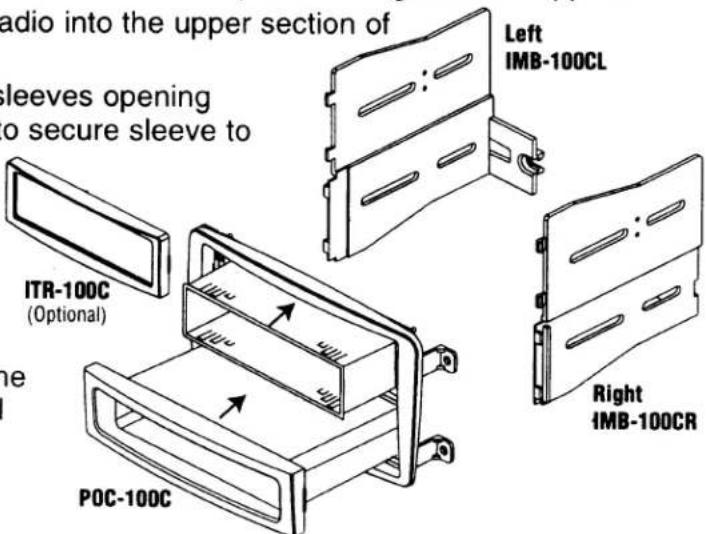
KIT ASSEMBLY INSTRUCTIONS
Single ISO Mount Applications
- Attach the left and right side brackets to the main bracket. See Figure B.
- Insert pocket (part # POC-100C) into lower section of the main frame.
- Attach left and right side brackets to the rear of the pocket using screws supplied.
- Attach (1) ISO Spacer to the inside of upper section on both Left & Right mounting brackets as shown in Fig. A.
-
Insert ISO mountable radio between ISO mount brackets and loosely attach to sides of radio using screws provided with radio when possible or hardware included with kit. NOTE: Use longer screws in kit for upper radio location.
-
Slide radio component forward or backward for desired look and tighten screws.
-
Attach a rear support bracket to the rear of the new radio and adjust as necessary to attach to the rear support stud located on the back of the pocket using the small phillips screw supplied with kit.
NOTE: ISO trim ring (ITR-100C) may be used in place of after-market radio's trim rings.

KIT ASSEMBLY INSTRUCTIONS
Double DIN & Double ISO Mount Applications
- Remove the Shaded tab from the back edge of each left and right mounting bracket (right side not shown).
- Cut and remove center rib from main bracket for double DIN and double ISO applications
- Attach the left and right side brackets to the main bracket. See Figure B.
- Follow steps 4-6 from single ISO instructions on page 3.
NOTE: Use longer screws in kit for upper radio location and shorter screws for lower radio component
- Attach a rear support bracket to the rear of the radio components and adjust as needed to allow rear support bracket to rest in the sub-dash.
NOTE: ISO trim ring (DITR-100C) may be used in place of after-market radio's trim rings. For ISO mount applications, mount after-market radio components to side brackets using screws provided with radio when possible or hardware included with kit.

Brand : American International
Model : MBK100C
Category : Car Radio