
95-7404S - Car Radio Metra - Free user manual and instructions
Find the device manual for free 95-7404S Metra in PDF.


| Product Type | Dash Installation Kit for Aftermarket Radio |
| Application | Nissan Maxima 2004-2006 |
| Color | Painted Silver to Match Factory Dash |
| Head Unit Provision | Double DIN or ISO Stacked (Single DIN with Pocket) |
| Included Components | Double DIN Radio Housing, (4) Panel Retaining Clips |
| Required Tools | Small Flat Blade Screwdriver, Panel Removal Tool, Phillips Screwdriver |
| Wiring Harness (Sold Separately) | Metra 70-7550 Nissan Harness (1995-up) |
| Antenna Adapter (Sold Separately) | Metra 40-NI10 Nissan Antenna Adapter |
| Material | ABS Plastic with Silver Paint Finish |
| Dimensions (Approx.) | 7 in x 4.5 in x 2 in (17.8 cm x 11.4 cm x 5.1 cm) |
| Weight (Approx.) | 0.5 lbs (0.23 kg) |
| Manufacturer | Metra Electronics Corporation |
| Part Number | 95-7404S |
| Compatible Radio Types | Aftermarket Double DIN or Single DIN with Pocket |
| Installation Difficulty | Moderate (Medium Skill Level Required) |
| Safety Note | Disconnect negative battery terminal before installation to prevent short circuit |
| Warranty | Limited Lifetime (Check with Metra for details) |
| Certifications | Meets OEM standards for fit and finish |
Frequently Asked Questions - 95-7404S Metra
User questions about 95-7404S Metra
0 question about this device. Answer the ones you know or ask your own.
Ask a new question about this device
Download the instructions for your Car Radio in PDF format for free! Find your manual 95-7404S - Metra and take your electronic device back in hand. On this page are published all the documents necessary for the use of your device. 95-7404S by Metra.
USER MANUAL 95-7404S Metra
INSTALLATION INSTRUCTIONS FOR PART 95-74045
APPLICATIONS
Nissan Maxima 2004-2006
95-74045
KIT FEATURES
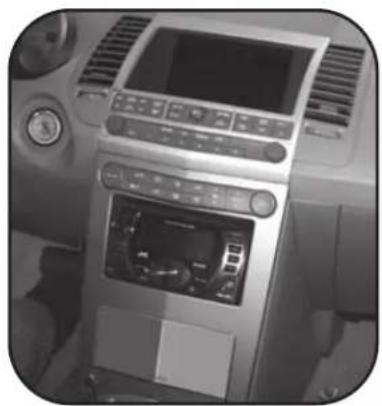
• Double DIN Head Unit Provision
• ISO Stacked Head Unit Provision
- Painted Silver to match factory dash
natural_image
Interior view of a car dashboard with air conditioner and control panel (no visible text or symbols)KIT COMPONENTS
A) Double DIN Radio Housing • B) (4) Panel Retaining Clips

natural_image
Technical line drawing of a mechanical bracket or frame structure with mounting holes (no text or symbols)B

natural_image
Four identical isometric diagrams of mechanical clamping or bracket components (no text or symbols)WIRING AND ANTENNA CONNECTIONS
(Sold Separately)
• 70-7550 Nissan harness - 1995-up
• 40-NI10 -Nissan antenna adapter
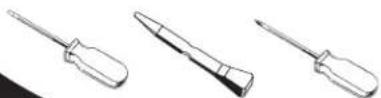
TOOLS REQUIRED:
Small Flat Blade Screwdriver • Panel Removal Tool
• Phillips Screwdriver

1-800-221-0932

www.metraonline.com
© COPYRIGHT 2004-2009 METRA ELECTRONICS CORPORATION
TABLE OF CONTENTS
Dash Disassembly
- Nissan Maxima 2004-2006 ....1,2
Kit Assembly
- Double DIN Head Unit Provision/Stacked ISO Mount Units Provision . . . . 3,4
*Note:
Refer also to the instructions included with the aftermarket radio.

KNOWLEDGE IS POWER
Enhance your installation and fabrication skills by enrolling in the most recognized and respected mobile electronics school in our industry. Log onto www.installerinstitute.com or call 800-354-6782 for more information and take steps toward a better tomorrow.
NISSAN MAXIMA 2004-2006
*Note: Refer also to the instructions included with the aftermarket radio.
1 Disconnect the negative battery-terminal to prevent an accidental short circuit.
2 Twist and slide down the cover at the base of the shift knob.
(Figure A)
3 Remove the retaining clip at base of shift knob and pull up to remove. (Figure B)
4 Unclip and remove panel surrounding shift knob. (Figure C)
5 Remove (2) Phillips screws at the bottom of the radio panel and unclip and remove. (Figure D)
Continued on page 2.
A

natural_image
Technical line drawing of a mechanical lever mechanism with adjustment arrows (no text or symbols)B

natural_image
Diagram of a light bulb with internal components and directional arrows, no text or symbols presentC

natural_image
Technical line drawing of a mechanical assembly with no visible text or symbols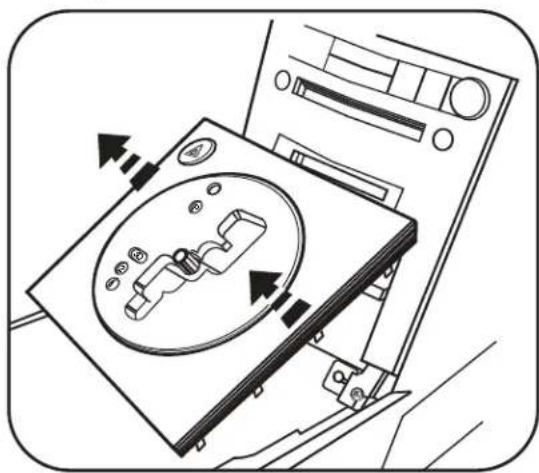
natural_image
Diagram of a CD-ROM drive with arrows indicating motion, no text or symbols presentNISSAN MAXIMA 2004-2006
*Note: Refer also to the instructions included with the aftermarket radio.
6 Remove (2) Phillips screws at the bottom of the display panel and unclip and remove the panel. (Figure E)
7 Remove (4) Phillips screws to remove the audio/climate control/display as one unit. (Figure F)
8 Remove (4) Phillips screws from each side of radio/tuner to remove from audio/climate control/display bracket assembly.
9 Remove the (4) Phillips screws securing the factory climate control button assembly to the radio panel and remove. Note: Retain all hardware to be used in Kit Assembly. (Figure G)
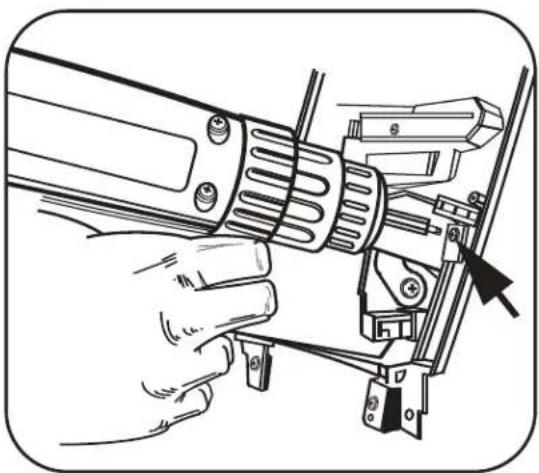
10 Remove (4) Phillips screws securing the factory pocket assembly to the radio panel and remove. Note: Retain all hardware to be used in Kit Assembly. (Figure H)
Continue to kit assembly.
H
natural_image
Line drawing of a hand inserting a mechanical component into a device (no text or symbols)E

natural_image
Line drawing of a hand inserting a component into a vehicle's dashboard (no text or symbols)F

natural_image
Technical line drawing of a vehicle front view showing internal components like seats, monitors, and connectors (no text or labels)G

natural_image
Technical line drawing of a mechanical assembly with mounting brackets and arrows indicating components (no text or symbols)DOUBLE DIN RADIO PROVISION/ ISO STACKED HEAD UNIT PROVISION
*Note: Refer also to the instructions included with the aftermarket radio.
1 Position radio into audio/climate control/display bracket assembly and secure using the (8) Phillips screw positions and the factory hardware. (Figure A)
2 Using the factory hardware secure the factory climate control button assembly into the 95-7404 housing. (Figure B)
Continued on page 4.

natural_image
Technical line drawing of an electronic device housing with mounting brackets and internal components (no text or symbols)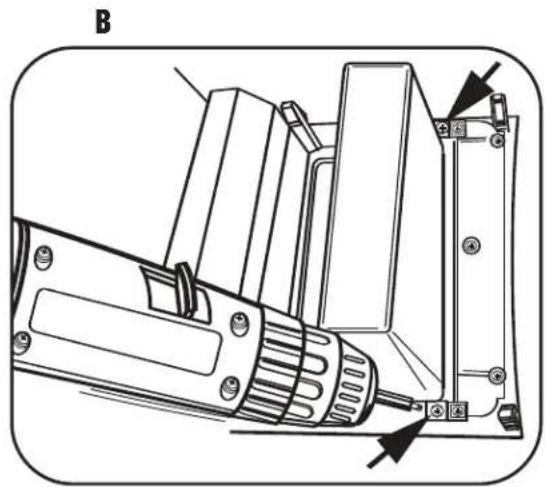
natural_image
Technical line drawing of a mechanical device with labeled components (no text or symbols)DOUBLE DIN RADIO PROVISION/ ISO STACKED HEAD UNIT PROVISION
*Note: Refer also to the instructions included with the aftermarket radio.
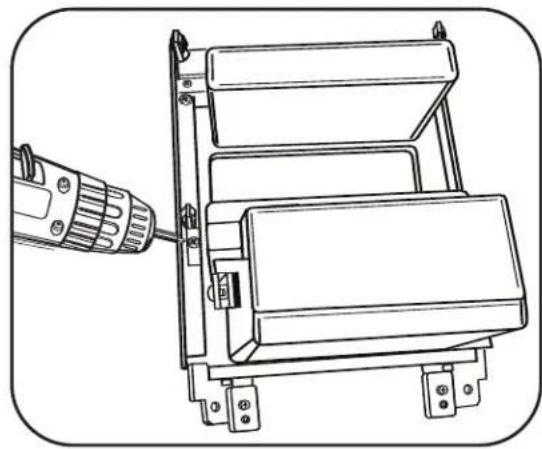
3 Using the factory hardware secure the factory pocket assembly into the 95-7404 housing. (Figure C)
4 Install the (4) supplied retaining clips onto the 95-7404 in the same locations as the factory radio panel. (Figure D)
5 Locate the factory wiring harness in the dash. Metra recommends using the proper mating adapter and making the connections as shown on the front cover. (Isolate and individually tape off the ends of any unused wires to prevent electrical short circuit)
6 Re-connect the negative battery terminal and test the unit for proper operation.
7 Reassemble in reverse order of disassembly using the 95-7404 assembly instead of the factory radio panel.
C
natural_image
Technical line drawing of a mechanical device with a drill bit inserted, showing no text or symbolsD

natural_image
Line drawing of a hand holding a tray with arrows indicating movement or force (no text or symbols)NOTES
95-7404S INSTRUCTIONS
Brand : Metra
Model : 95-7404S
Category : Car Radio