
99-3528 - Car Radio Metra - Free user manual and instructions
Find the device manual for free 99-3528 Metra in PDF.


| Brand | Metra |
| Model | 99-3528 |
| Product Type | Car Radio Installation Kit |
| Compatibility | Pontiac GTO 2004-2006 |
| Radio Provision | DIN radio with pocket (single-DIN) |
| Kit Components | Radio housing, pocket, metal DIN sleeve |
| Required Wiring Harness (sold separately) | Metra 70-1784 |
| Required Antenna Adapter (sold separately) | Metra 40-VW10 |
| Tools Included | No (radio removal keys 86-3528 sold separately) |
| Required Tools | Panel removal tool, Phillips screwdriver |
| Installation Difficulty | Moderate |
| Material | Plastic, metal |
| Color | Black (typical) |
| Weight | 0.5 lb (0.23 kg) |
| Dimensions (approximate) | 7 x 2 x 4 in (17.8 x 5.1 x 10.2 cm) |
| Safety Precautions | Disconnect battery before installation |
| Maintenance | Clean with dry cloth |
| Spare Parts Availability | Contact Metra or authorized dealers |
| Warranty | Limited lifetime (check Metra policy) |
| Technical Support | 1-800-253-TECH |
Frequently Asked Questions - 99-3528 Metra
User questions about 99-3528 Metra
0 question about this device. Answer the ones you know or ask your own.
Ask a new question about this device
Download the instructions for your Car Radio in PDF format for free! Find your manual 99-3528 - Metra and take your electronic device back in hand. On this page are published all the documents necessary for the use of your device. 99-3528 by Metra.
USER MANUAL 99-3528 Metra
Installation instructions for part 99-3528
Pontiac GTO 2004-2006 99-3528
KIT FEATURES
• DIN radio provision with pocket

natural_image
Interior view of a car dashboard with air conditioners and a partially visible battery (no text or symbols)KIT COMPONENTS
• A) Radio Housing

WIRING & ANTENNA CONNECTIONS (sold separately)
Wiring Harness: • 70-1784
Antenna Adapter: • 40-VW10
TOOLS REQUIRED
• 86-3528 Radio Removal Keys • Panel Removal Tool • Phillips Screwdriver
Table of Contents
Dash Disassembly 2
Kit Assembly
- DIN radio provision with pocket 3
CAUTION! Metra recommends disconnecting the negative battery terminal before beginning any installation, unless the vehicle manufacturer recommends against so. Please check with your local Dealership for more information. All accessories, switches, climate controls panels, and especially air bag indicator lights must be connected before reconnecting the battery or cycling the ignition. Also, do not remove the factory radio with the key in the on position, or the vehicle running. It would be best to remove the key from the ignition and then wait a few seconds before removing the factory radio.
METRA. The World's best kits. ^TM
metraonline.com
© COPYRIGHT 2004-2015 METRA ELECTRONICS CORPORATION
99-3528
Dash Disassembly
- Using the radio removal keys, pull the factory radio from the dash and disconnect the wiring. (Figure A)
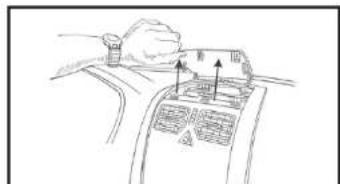
- Unsnap and remove the trim panel at the top center of the dash above the A/C vents and remove (4) Phillips screws. (Figure B)
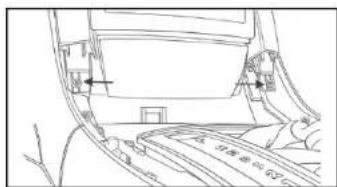
- Remove (1) Phillips screw from inside lower open storage area where center console and dash meet. (Figure C)
- Unsnap and remove center console (open center armrest/ storage compartment and work forward). (Figure D)
natural_image
Line drawing of a hand pressing down on a device panel with arrows indicating movement (no text or symbols)(Figure B) (Figure E)
- Remove (2) Phillips screws exposed at the bottom of the center panel surrounding radio and remove panel. (Figure E)
- Unclip and remove trim panel surrounding radio and A/C controls.
- Remove (3) Phillips screws holding "cage" in radio opening. (Figure F)
- Pull down on the "cage" from the opening inside on the top and remove. (Figure G)
Continue to kit assembly
natural_image
Line drawing of a car interior with no visible text or symbols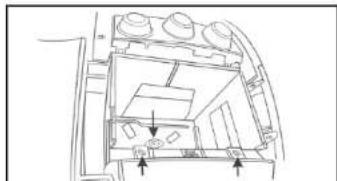
natural_image
Architectural line drawing of a room interior with furniture and fixtures (no text or symbols)
natural_image
Line drawing of hands inserting a device into a control panel (no text or symbols)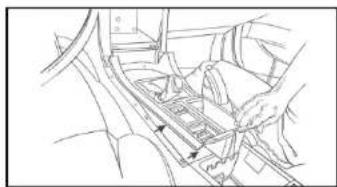
natural_image
Technical line drawing of a mechanical assembly with no visible text or symbols(Figure D) (Figure G)(Figure A)

natural_image
Line drawing of a hand inserting a device into a vehicle compartment (no text or symbols)
99-3528
Kit Assembly
DIN radio provision with pocket
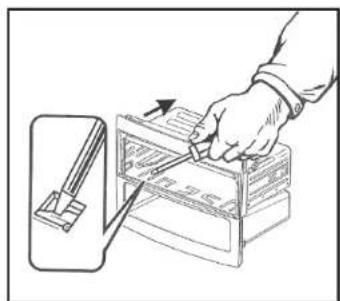
- Remove the metal DIN sleeve from the aftermarket radio.
- Slide the sleeve into the Radio Housing and secure by bending the metal locking tabs down. (Figure A)
- Slide the radio back into the sleeve until it clicks in. (Figure B)
- Reassemble the dash in reverse order of disassembly, leaving the cage removed in disassembly out.
- Locate the factory wiring harness and antenna plug in the dash and make all necessary connections to the radio. Metra recommends using the proper mating adapters from Metra and/or AXXESS. Re-connect the negative battery terminal and test the radio for proper operation.
- Snap the completed assembly into the dash until secure.
natural_image
Line drawing of a hand using a tool to adjust or install a file into a storage cabinet (no text or symbols visible)(Figure A)

natural_image
Line drawing of a computer monitor with an open rear panel and two arrows indicating orientation (no text or symbols)(Figure B)

Installation instructions for part 99-3528
IMPORTANT
If you are having difficulties with the installation of this product, please call our Tech Support line at 1-800-253-TECH. Before doing so, look over the instructions a second time, and make sure the installation was performed exactly as the instructions are stated. Please have the vehicle apart and ready to perform troubleshooting steps before calling.

KNOWLEDGE IS POWER
Enhance your installation and fabrication skills by enrolling in the most recognized and respected
enrolling in the most recognized and respected mobile electronics school in our industry.
Log onto www.installerinstitute.com or call
800-354-6782 for more information and take steps
toward a better tomorrow.

Metra recommends MECP
certified technicians
Brand : Metra
Model : 99-3528
Category : Car Radio