
VTM7012FHD - Surveillance Camera Boyo - Free user manual and instructions
Find the device manual for free VTM7012FHD Boyo in PDF.


| Product Type | 7-inch HD LCD Monitor for Surveillance Cameras |
| Brand | Boyo |
| Model | VTM7012FHD |
| Screen Size | 7 inches |
| Display Technology | HD LCD |
| Resolution | 1024 x 600 |
| Aspect Ratio | 16:9 |
| Video Inputs | 3 (Ch1, Ch2, Ch3) |
| Audio Inputs | 2 (Ch1, Ch2) |
| Display Triggers | 3 (Ch1, Ch2, Ch3) |
| Video Signal Compatibility | 1080P AHD / 720P AHD / CVBS (Auto Switch) |
| Video System | PAL / NTSC (Auto Switch) |
| Built-in Speaker | Yes |
| Mirror Image | Selectable per channel |
| Parking Guidelines | Selectable per channel |
| Trigger Delay | Configurable (Off or 1~10 seconds) |
| Screen Flip | Horizontal / Vertical flip |
| Auto Dimming | Yes (with dimmer sensor) |
| Remote Control | Included |
| Operating Power | 12 ~ 24 VDC |
| Max Current | < 500mA @ 12VDC |
| Menu Languages | English, Japanese, Korean, Russian, Chinese |
| Warranty | 1 Year Limited Warranty |
Frequently Asked Questions - VTM7012FHD Boyo
User questions about VTM7012FHD Boyo
0 question about this device. Answer the ones you know or ask your own.
Ask a new question about this device
Download the instructions for your Surveillance Camera in PDF format for free! Find your manual VTM7012FHD - Boyo and take your electronic device back in hand. On this page are published all the documents necessary for the use of your device. VTM7012FHD by Boyo.
USER MANUAL VTM7012FHD Boyo
natural_image
Two black rectangular monitors displaying outdoor navigation screens with scenic landscape and road views (no text or symbols visible)Please read the instruction manual completely before use and retain it for future reference
Product Features
| Feature | VTM7012FHD | VTM9003FHD |
| Size | 7" HD LCD | 9" HD LCD |
| Resolution | 1024 x 600 | |
| Aspect Ratio | 16:9 wide screen | |
| Video Inputs | 3 (Ch1, Ch2, Ch3) | |
| Audio Inputs | 2 (Ch1, Ch2) | |
| Display Triggers | 3 (Ch1, Ch2, Ch3) | |
| Video Signal | 1080P AHD/720P AHD/CVBS - Auto Switch | |
| Video System | PAL / NTSC - Auto Switch | |
| Speaker | Built-in | |
| Mirror Image | Selectable for each channel | |
| Parking Guidelines | Selectable for each channel | |
| Trigger Delay | Configurable | |
| Screen Flip | Horizontal / Vertical Flip | |
| Auto Dimming | Yes | |
| Remote Control | Included | |
| Max. Current | < 500mA @ 12VDC | |
| Operating Power | 12 ~ 24 VDC | |
Before Installation
- Please check contents.
- Perform bench test. Ensure the product is working before installation by connecting the monitor and the camera to 12VDC.
- Perform pre-install test, before mounting the monitor and the camera. In very rare instances, a running engine causes interference.
- All issues should be resolved. So, when the monitor and the cameras are mounted, wires are run and the power is turned on, and a problem is encounter, it will be easy to troubleshoot the problem.
Contents

Wiring
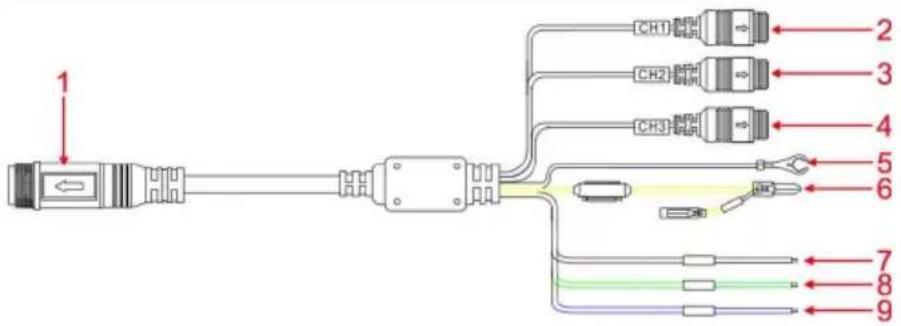
| 1 Black 14-PIN power cable connector | ||||
| 2 | Black | 4-PIN male | AV CH1 Input | AHD 1080P, AHD 720P, or CVBS |
| 3 | Black | 4-PIN male | AV CH2 Input | AHD 1080P, AHD 720P, or CVBS |
| 4 | Black | 4-PIN male | V CH3 Input | AHD 1080P, AHD 720P, or CVBS |
| 5 Black Wire GND | ||||
| 6 Red Wire ACC DC 12-24V positive pole | ||||
| Yellow Wire Battery DC 12-24V positive pole | ||||
| 7 Brown Wire CH1 Trigger DC 12-24V positive pole | ||||
| 8 Green Wire CH2 Trigger DC 12-24V positive pole | ||||
| 9 Blue Wire CH3 Trigger DC 12-24V positive pole | ||||
A trigger wire is normally connected to a backup light, the left turn signal, and the right turn signal. When a trigger wire becomes hot, it will display the video input channel associated with the trigger.
Buttons & Sensors

| Default Menu Mode | ||
| 1 |  | Down: move down in the menu setting |
| 2 |  | Enter OSD Menu Mode Next OSD Menu Item |
| 3 |  | Up: move up in menu setting |
| 4 |  | Power: short press to turn on or off |
| 5 |  | Display Channel 1 Decrease Value |
| 6 |  | Display Channel 2 Increase Value |
| 7 |  | Display Channel 3 |
| 8 | Remote control sensor | |
| 9 | Dimmer sensor | |
| 10 | Bracket knob |
Remote Control

① Power key: short press to turn on or off
② VIDEO key: CH1, CH2, CH3 video channel switching, to move up in menu setting
③ Right key: increase volume, increase analog value in the menu setting
④ MENU key: menu
⑤ Left key: decrease volume, decrease analog value in the menu setting
⑥. MODE key: image mode switching, to move down in menu setting
Operations: Using the Buttons
Default Mode
Press Button
| To turn the display on or off | ||
| To display channel 1 |  | |
| To display channel 2 | ||
| To display channel 3 |
OSD Setting Mode
Press MENU (menu) to enter the OSD setting mode.
Repeated pressing of "MENU" button will cycle through
Image Setting
→ General Setting
System Setting
Volume Setting
To change the values:
- Press (MENU) button to get to the right settings
- Press (down) or (up) button to select the rows
- Press (decrease) or (increase)
to "decrease" or "increase" value
or to turn "on" or "off" - Press (MENU) button to save new settings
Image Setting

1) BRIGHTNESS, CONTRAST, SATURATION
Control display brightness and color
2) RESET
Reset the system to factory default
3) VERSION
The system version number
General Setting

1) GUIDELINES
Turn on or off the parking assist guidelines. Normally used with the backup camera.
2) DELAY
Off or set between 1\~10 seconds. The delay setting determines the number of seconds the video channel will stay on after trigger line goes off. If the system is set off, then the monitor will return to the previous state immediately once the trigger is turned off. If delay is set 2s, then the monitor will return to the previous state 2s later after finished reversing.
System Setting

1) LANGUAGE
English is the default. Japanese, Korean, Russian, and Chinese are available.
2) AUTO DIM
VTM9003FHD feature. When turned on, the screen brightness dims under low ambient light.
3) UPSIDE DOWN
Vertical display flip on or off
4) MIRROR
Horizontal display flip on or off. Used when a normal camera is used as a backup camera. When a 'normal' camera is directed toward rear, an object on the front-right side of the camera will show on the right side of the display screen. Turn the mirror 'ON' to display the object on the left side of the screen, like mirror.
5) VCOMDC
When too much backlight come through the LCD, the black screen with no image will look grey, not black. Decrease the value. It controls amount backlight passes through LCD.
VOLUME Setting

1) VOLUME
Adjust speaker volume
Warranty Information
This one-year limited warranty is given to the end-user or the retail purchaser (referred to this warranty as “Original Purchaser”) that it will be free from defects in material and workmanship for a period of one year from the date of the purchase of the new product (excluding accessory items such as power cords, cradle, memory card, adaptor, and cables).
This limited warranty does not cover any physical damage to, or misuse of, this product, damage caused by improper installation; improper use; misuse; neglect; repair of cracked, scratched, broken or modified cosmetics; or parts that have been altered or removed; damages done by another device used with this product resulting from use of non-BOYO®- brand parts. This warranty is VOID if you purchased this product as used, floor model sample, or refurbished; if the product has been altered or modified in any way (including but not limited to attempted repair without authorization from BOYO®- Vision Tech America, Inc. and/or alteration/removal of the serial number).
For warranty information, visit: https://www.visionechamerica.com/get-warranty
For technical support: Call: (888) 941-3060
Email: info@visiontechamerica.com
Visit: www.VisionTechAmerica.com
1 YEAR LIMITED WARRANTY
This limited warranty is given to the end-user or the retail purchaser (referred to this warranty as "Original Purchaser") that it will be free from defects in material and workmanship for a period of one year from the date of the purchase of the new product (excluding accessory items such as power cords, cradle, memory card, adaptor and cables). A copy of the original proof of purchase and this warranty card with RMA number given by Vision Tech America, Inc. is required to receive warranty service. In the unlikely event that the new product should fail due to defect in material or workmanship, Vision Tech America, Inc. will repair or replace with new or refurbished product, where each party will be responsible for one-way shipping for the lower 48 states customers only. For International and U.S customers residing in Hawaii, Alaska and Puerto Rico, customer is responsible for freight charges incurred both ways.
This limited warranty does not cover any physical damage to this product, damage caused by improper installation; improper use; misuse; neglect; repair of cracked, scratched, broken or modified cosmetics; or parts that have been altered or removed; damages done by another device used with this product resulting from use of non BOYO®- brand parts. This warranty is VOID if you purchased this product as used, floor model sample, or refurbished; if the product has been altered or modified in any way (including but not limited to attempted repair without authorization from BOYO®- Vision Tech America, Inc. and/or alteration/removal of the serial number). This limited warranty does not cover the vehicle of any damages or liabilities in which this product is installed or being installed. This product does not guarantee avoidance of vehicle collision or accident.
If you are having trouble with the product, please contact our technical support at 888-941-3060 or email: info@visiontechamerica.com with your questions or comments. If your product is eligible to receive warranty, request for warranty service online by visiting http://visiontechamerica.com/site/get-warranty/
This warranty is invalid if the factory applied serial number has been altered or removed from the Product.
IMPORTANT: TO SEND DEFECTIVE PRODUCT FOR WARRANTY SERVICE, YOU MUST RECEIVE RMA (RETURN MATERIAL AUTHORIZATION) AND INCLUDE ORIGINAL PROOF OF PURCHASE AND THIS WARRANTY CARD WITH THE SHIPMENT.
VISION TECH AMERICA CUSTOMER SERVICE CENTER 888-941-3060 or visit www.visiontechamerica.com
For an accessory or part not available from your authorized dealer, call For U.S. 888-941-3060 | International 714-446-0543
BOYO®
Product Registration
Vision Tech America, Inc.
Name
Address
City
Phone
Model No.
Purchased Date
City/State of Store
Company
State____ Zip____
Email:
Serial No.
Store Name

BOYO®
Vision Tech America, Inc.
1452 E. Valencia Drive
Fullerton, CA 92831

- Product Features
- Before Installation
- Contents
- Wiring
- Buttons & Sensors
- Remote Control
- Operations: Using the Buttons
- Default Mode
- OSD Setting Mode
- To change the values:
- Image Setting
- General Setting
- System Setting
- 1) LANGUAGE
- 2) AUTO DIM
- 3) UPSIDE DOWN
- 4) MIRROR
- 5) VCOMDC
- VOLUME Setting
- 1) VOLUME
- Warranty Information
- YEAR LIMITED WARRANTY
- BOYO®
- Product Registration
Brand : Boyo
Model : VTM7012FHD
Category : Surveillance Camera