
UH3232 - Computer accessory ATEN - Free user manual and instructions
Find the device manual for free UH3232 ATEN in PDF.


| Product Type | USB-C Multiport Mini Dock |
| Brand | ATEN |
| Model | UH3232 |
| Color | Black |
| Dimensions (L x W x H) | 15.88 x 10.80 x 1.52 cm |
| Weight | 0.07 kg |
| Power Consumption | DC5V, 7.365W |
| Operating Temperature | 0–40°C |
| Storage Temperature | -20–60°C |
| Humidity | 0–80% RH, non-condensing |
| Host Interface | 1 x USB-C male (built-in cable) |
| USB Port | 1 x USB 3.1 Gen 1 Type-A female (blue) |
| Video Output | 1 x HDMI female (black), 1 x VGA female (black) |
| Ethernet Port | 1 x Gigabit Ethernet female (black) |
| Maximum Video Resolution (HDMI) | 3840 x 2160 @ 30 Hz (4K UHD) |
| Maximum Video Resolution (VGA) | 2048 x 1152 @ 60 Hz |
| Data Transfer Rate (USB 3.1 Gen 1) | Up to 5 Gbps |
| Compatible Systems | Windows 10+, macOS 10.12+, iPadOS 12.1+ |
| Video Output Requirement | USB-C port must support DP Alt Mode |
| Housing Material | Plastic |
| Certifications | FCC Class B, CE, RoHS, KCC |
| Warranty | 2 years (varies by region) |
Frequently Asked Questions - UH3232 ATEN
User questions about UH3232 ATEN
0 question about this device. Answer the ones you know or ask your own.
Ask a new question about this device
Download the instructions for your Computer accessory in PDF format for free! Find your manual UH3232 - ATEN and take your electronic device back in hand. On this page are published all the documents necessary for the use of your device. UH3232 by ATEN.
USER MANUAL UH3232 ATEN
Federal Communication Commission Interference Statement: This equipment has been tested and found to comply with the limits for a Class B digital service, pursuant to Part 15 of the FCC rules. These limits are designed to provide reasonable protection against harmful interference in a residential installation.
Any changes or modifications made to this equipment may void the user's authority to operate this equipment. This equipment generates, uses, and can radiate radio frequency energy. If not installed and used in accordance with the instructions, may cause harmful interference to radio communications. However, there is no guarantee that interference will not occur in a particular installation. If this equipment does cause harmful interference to radio or television reception, which can be determined by turning the equipment off and on, the user is encouraged to try to correct the interference by one or more of the following measures:
Reorient or relocate the receiving antenna;
Increase the separation between the equipment and receiver;
Connect the equipment into an outlet on a circuit different from that which the receiver is connected;
Consult the dealer/an experienced radio/television technician for help.
FCC Caution: Any changes or modifications not expressly approved by the party responsible for compliance could void the user's authority to operate this equipment.
This device complies with Part 15 of the FCC Rules. Operation is subject to the following two conditions:
(1) this device may not cause harmful interference, and
(2) this device must accept any interference received, including interference that may cause undesired operation.
KCC Statement
This product is RoHS compliant.
C€FC

© Copyright 2021 ATEN® International Co., Ltd.
Manual Date: 2021-01-06
ATEN and the ATEN logo are registered trademarks of ATEN International Co., Ltd. All rights reserved. All other brand names and trademarks are the registered property of their respective owners. The terms HDMI, HDMI High-Definition Multimedia Interface, and the HDMI Logo are trademarks or registered trademarks of HDMI Licensing Administrator, Inc.
UH3232 User Manual
Online Registration
| International | http://eservice.aten.com |
Telephone Support
For telephone support, call this number:
| International 886-2-8692-6959 | |
| China 86-400-810-0-810 | |
| Japan 81-3-5615-5811 | |
| Korea 82-2-467-6789 | |
| North America 1-888-999-ATEN ext 4988 | |
| 1-949-428-1111 | |
Technical Support
- For international online technical support – including troubleshooting, documentation, and software updates: http://eservice.aten.com
- For North American technical support:
| Email Support support@aten-usa.com | ||
| Online Technical Support | Troubleshooting Documentation Software Updates | http://support.aten.com |
| Telephone Support 1-888-999-ATEN | ext 4998 | |
Package Contents
The UH3232 USB-C Multiport Mini Dock package contains the following items:
◆ 1 UH3232 USB-C Multiport Mini Dock
◆ 1 User Instructions*
Check to make sure that all the components are present and that nothing got damaged in shipping. If you encounter a problem, contact your dealer.
Read this manual thoroughly and follow the installation and operation procedures carefully to prevent any damage to the unit, and/or any of the devices connected to it.
* Features may have been added to the UH3232 since this manual was printed. Please visit our website to download the most up-to-date version of the manual.
Overview
The UH3232 USB-C Multiport Mini Dock connects a computer to an Ethernet, HDMI, VGA and USB Type-A port, through a single built-in USB-C cable. The 4 in 1 adapter instantly links your USB-C or Thunderbolt™ 3 computer to an HDMI or VGA display, USB peripheral and Ethernet cable for quick and easy desktop docking. The 6-layer PCBA design reduces signal distortion and interference for uninterrupted video that is always crisp and sharp, and a Gigabit Ethernet port delivers Internet speeds up to one Gigabit (1000 Mbps).
The UH3232 plugs directly into the USB-C port and does not require any software installation. A built-in billboard feature actively communicates with the connected computer to ensure seamless compatibility with connected devices. This means that when the UH3232 is connected to a computer and a device with an incompatible alternate mode is connected, it alerts you with support details, instead of failing in silence.
The UH3232 USB-C Multiport Mini Dock is ideal for displaying video content on HDMI or VGA monitors at work, school or home. It allows you to add an additional monitor for enhanced multitasking, gaming and viewing of movies or photos in high definition. The lightweight compact design is perfect as a portable companion for your USB-C enabled device to dock anywhere.
Features
- Connects a USB-C or Thunderbolt™ 3 computer to an HDMI / VGA display, Ethernet cable and USB Type-A peripheral
USB 3.1 Gen 1 port with data transfer rates up to 5 Gbps - Superior video resolutions up to 3840 x 2160 @ 30 Hz (HDMI) or 2048 x 1152 @ 60 Hz (VGA)
◆ Supports HDMI @ 4K (UHD) resolutions
♦ Gigabit Ethernet port
System Requirements
Windows USB-C enabled computer:
- Windows® 10 (32-bit / 64-bit) and above
- With Intel 7th-Generation Core Processor (Kaby Lake with HD 6XX series integrated graphics) and above.
Note: For more information about CPU generation, please go to https://www.intel.com/content/www/us/en/processors/processor-numbers.html
- For video output to work through a USB-C port, it must support DP Alt Mode.
Mac USB-C enabled computer:
- MacBook 2015 and later
- MacBook Pro 2016 and later
- Mac OS X 10.12 and above
USB-C enabled iOS Tablet
- iOS 12.1 and above, iPad Pro 3rd generation (2018)
Note: For better HID experience, iPad OS 13 and above is recommended.
Components
UH3232
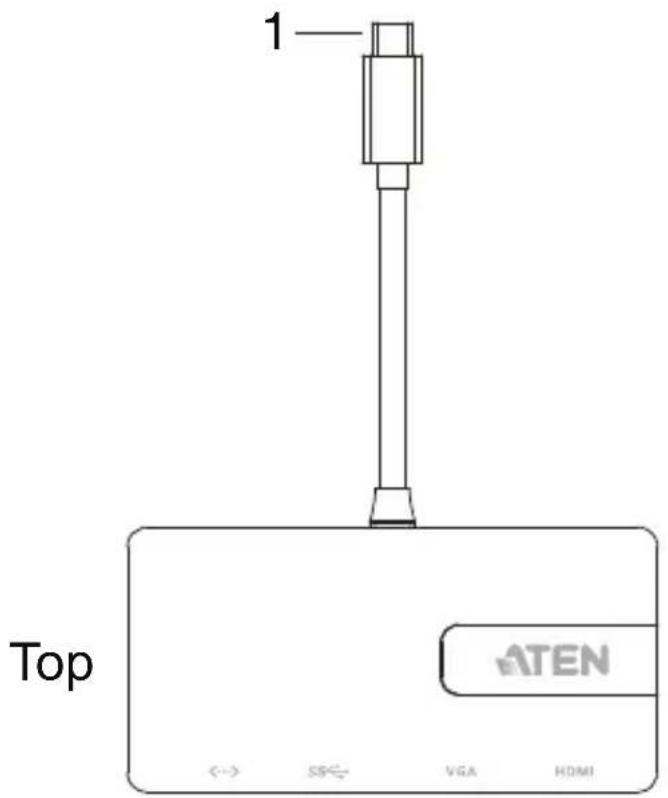
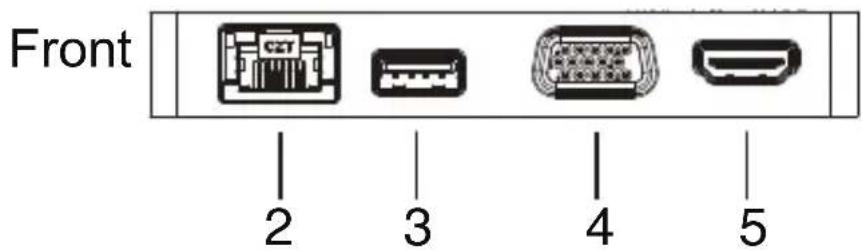
| No. | Component Description |
| 1 | USB-C Cable This cable connects to a USB-C enabled computer. |
| 2 | Gigabit LAN Port Plug an Ethernet cable into this port to provide a network connection. |
| 3 | USB 3.1 Gen 1 Port Plug a USB 3.0/2.0/1.1 peripheral device to this port. |
| 4 | VGA Port The cable from a VGA display plugs into this port. |
| 5 | HDMI Port The cable from an HDMI display plugs into this port. |
Installation

- Make sure that the power to any device that you connect to the installation has been turned off.
- Make sure that all devices you will be installing are properly grounded.
Hardware
To setup the UH3232, use the diagram on the next page (the numbers in the diagram correspond with the numbered instructions below), and do the following:
- Connect the UH3232's USB-C cable to a USB-C enabled computer.
- Plug an Ethernet cable to the Gigabit LAN port.
- Use a USB cable to connect a USB 3.0/2.0/1.1 peripheral device to the USB 3.1 Gen 1 port.
- Connect an HDMI or VGA monitor* to its respective port on the UH3232.
Note: Only connect one monitor at time to the UH3232. If you connect both a VGA and HDMI monitor to the UH3232, the HDMI port will have priority to display video.

Configuration and Settings
Support VGA Resolutions
| Horizontal Vertical Frame Rate | |
| 2048 1152 60 Hz | |
| 1920 1080 60 Hz | |
| 1366 768 60 Hz | |
| 1360 768 60 Hz | |
| 1280 768 60 Hz | |
| 1280 720 60 Hz | |
| 1024 768 60 Hz |
Support HDMI Resolutions
| Horizontal Vertical Frame Rate | |
| 3840 2160 30 Hz | |
| 2560 1440 60 Hz | |
| 2560 1600 60 Hz | |
| 1920 1080 60 Hz |
Specifications
| Function UH3232 | ||
| Computer Connections 1 | ||
| Connectors | ||
| Computer 1 x USB-C Male (Black) | ||
| Device 1 x USB 3.1 Gen 1 Type A | Female (Blue) | |
| Video Output 1 x HDMI Female (B) | ack) | |
| 1 x VGA Female (Black) | ||
| LAN 1 x Gigabit Ethernet Female (Black) | ||
| Video Resolution | ||
| Single View HDMI 38 | 40 x 2160 @ | 30 Hz |
| VGA 204 | 8 x 1536 @ 60 Hz | |
| Power | ||
| Consumption DC5V, 7.365W | ||
| Environmental | ||
| Operating Temperature 0–40°C | ||
| Storage Temperature -20–60°C | ||
| Humidity 0–80% RH, Non-condensing | ||
| Physical Properties | ||
| Housing | Plastic | |
| Weight | 0.07 kg | |
| Dimensions (L x W x H) | 15.88 x 10.80 x 1.52 cm | |
ATEN warrants its hardware in the country of purchase against flaws in materials and workmanship for a Warranty Period of two [2] years (warranty period may vary in certain regions/countries) commencing on the date of original purchase. This warranty period includes the LCD panel of ATEN LCD KVM switches. Select products are warranted for an additional year (see A+ Warranty for further details). Cables and accessories are not covered by the Standard Warranty.
What is covered by the Limited Hardware Warranty
ATEN will provide a repair service, without charge, during the Warranty Period. If a product is detective, ATEN will, at its discretion, have the option to (1) repair said product with new or repaired components, or (2) replace the entire product with an identical product or with a similar product which fulfills the same function as the defective product. Replaced products assume the warranty of the original product for the remaining period or a period of 90 days, whichever is longer. When the products or components are replaced, the replacing articles shall become customer property and the replaced articles shall become the property of ATEN.
To learn more about our warranty policies, please visit our website:
http://www.aten.com/global/en/legal/policies/warranty-policy/


Brand : ATEN
Model : UH3232
Category : Computer accessory