
Mezzo 75 - Mp3 player Chord - Free user manual and instructions
Find the device manual for free Mezzo 75 Chord in PDF.


| Product Type | Power Amplifier |
| Model | Mezzo 75 |
| Brand | Chord Electronics |
| Inputs | Balanced XLR (3-pin Neutric) and Unbalanced RCA (gold-plated with Teflon dielectric) |
| Speaker Outputs | WBT rhodium-plated 4mm binding posts (accepts banana plugs or spades; bare wire not recommended) |
| Phase Switching | Two toggle switches per channel (UP = 180° inverted, DOWN = non-inverted) |
| Protection | Automatic shutdown on overload or short circuit (bounce mode with blue flashing) |
| Ventilation | Minimum 5cm clearance all around; do not place on carpet |
| Mains Connection | IEC connector with supplied lead; for UK/Europe: blue neutral, brown live, yellow/green earth; for US/Canada: white neutral, black live, green earth |
| Earthing | Must be earthed via mains lead; use multi-way block with earth points in Europe |
| Compliance | EN 50081-1, IEC 801/2 |
| Laser Warning (BLU) | Visible and invisible radiation; no user serviceable parts inside BLU |
| Cleaning | Spray clear glass cleaner onto soft lint-free cloth and wipe gently |
| Servicing | No user serviceable parts; return to Chord Electronics Ltd. or approved agents |
| Configuration Modes | Stereo (normal) or bridged mono (using two amplifiers) |
| Bridged Mono Setup | Use balanced Y leads or specific phase switch settings; connect speaker across red terminals only |
| Power Up/Down | Press 'I' for on, 'O' for off |
| Safety Warning | Do not connect grounded test equipment; hazardous voltages inside |
| Warranty | Invalid if tampered or dismantled |
Frequently Asked Questions - Mezzo 75 Chord
User questions about Mezzo 75 Chord
0 question about this device. Answer the ones you know or ask your own.
Ask a new question about this device
Download the instructions for your Mp3 player in PDF format for free! Find your manual Mezzo 75 - Chord and take your electronic device back in hand. On this page are published all the documents necessary for the use of your device. Mezzo 75 by Chord.
USER MANUAL Mezzo 75 Chord
Thank you for buying a Chord Electronics product
Before you start to enjoy using your Chord Electronics product, please take a couple of minutes to read how to connect your audio equipment and loudspeakers to your Chord Choral product and how to maximise your listening experience.
user guide for
power amplifiers
MEZZO
background
We want you to be confident using your new Chord Electronics product.
You are probably an audiophile with extensive knowledge of audio equipment.
However, you may not be!
So in the following section we explain a few basics to help you get started, or get you back up to speed if you are a little rusty.
connecting your equipment
Chord amplifiers are supplied with and designed to be connected using balanced inputs. The interconnecting cables you use will depend on the available input and output sockets on your other equipment. We have installed unbalanced inputs on all Chord equipment, thus enabling you to mix Chord Electronics and other manufacturer's equipment.

Balanced inputs carry twice the strength of signal of unbalanced inputs and are able to be fed down long lengths of cable with less deterioration of signal. They are also less prone to interference than unbalanced inputs. Balanced inputs have three pins and use Neutric XLR style connectors. Pin 1 is earth, pin 2 is positive and pin 3 is negative.

Unbalanced inputs use RCA phono connectors, which are gold plated with teflon high performance dielectric insulators for optimum performance.

flowchart
graph TD
    A[" Speakers"] --> B[" outputs inputs "]
    A --> C[" outputs inputs "]
    B --> D["DAC 64"]
    C --> E["DAC 64"]
    D --> F["BLU"]
    E --> G["BLU"]
    H["MEZZO 50 OR 1 power amplifier"] --> C
    I["PRIMA pre-amplifier"] --> C
    J["SYMPHONIC phono stage"] --> E
    K["AMPLification"] --> A
    L["Switching and level control"] --> A
    M["Data and analogue conversion"] --> N["Source"]
Basic system diagram
when setting up
To ensure that your Chord product works efficiently and safely, please pay particular attention to the following issues.
ventilation
Your Chord product should have at least 5cm of clear space all around it to ensure a free flow of air at all times. We do not recommend that you place your Chord product directly on a carpet as this can damage the equipment through blocked ventilation.
mains lead and plug
All Chord equipment comes supplied with the correct mains lead and plug. This should be used at all times.
if you need to fit a plug for UK/Europe
Connect the blue wire to the neutral terminal
Connect the brown wire to the live terminal
Connect the yellow/green wire to the earth terminal
if you need to fit a plug for US/Canada
Connect the white wire to the neutral terminal
Connect the black wire to the live terminal
Connect the green to the earth terminal
earthing issues in Europe
In some European countries a hum may occur if your processor is connected to mains sockets that do not have an earth. If this is the case please ensure that:
- Your equipment is connected via a multi-way mains block which contains an earth point at each socket outlet. This is to ensure that the chassis metalwork of each item is connected together.
- We recommend that an earthing method for your building is implemented.
- Use the connecting points on your Chord unit and connect to an available earth point.
safety warnings
It is important that your equipment is earthed at all times via its own mains lead. Failure to do this may be hazardous. The power supply components within the units are designed to be operated at lethal voltages and energy levels. Circuit designs that embody these components conform with applicable safety requirements. Precautions must be taken to prevent accidental contact with power-line potentials. Do not connect grounded test equipment.
This unit complies with EN 50081-1 and IEC 801/2
Caution: The BLU employs a laser that emits both visible and invisible radiation. Removal of the top cover or tampering with any of the enclosed electronics may result in exposure to hazardous levels of laser radiation that could cause eye damage. To prevent injury this product should be returned for qualified service to Chord Electronics Ltd.
There are no user serviceable parts within any Chord Electronics Choral product. Unauthorised tampering or dismantling of this product will invalidate the warranty and could cause injury
mains connection
The mains connector of your Choral product is at the back of the unit. Plug the female end (socket) of the mains cable into the power connector of your Choral product, and the male end (plug) of the mains cable into mains wall socket or mains extension socket.

powering up
Press the bottom part of the power switch labelled 'I'.
powering down
Press the top part of the power switch labelled 'O'.
connecting your MEZZO 50 or MEZZO
You need to connect the outputs from your pre-amplifier to your power amplifier and then connect your power amplifier to your loudspeakers. There are two pairs of inputs. You can connect to either the XLR or RCA outputs, but not to both types at the same time. All connections should be made with the power turned off.
connecting to your power amplifier using XLR style inputs
Use XLR style connectors to connect:
◆ the Right output from your pre-amplifier to the Right balanced input
- the Left output from your pre-amplifier to the Left balanced input.
connecting to your power amplifier using unbalanced RCA style inputs
Use RCA style connectors to connect:
- the Right output of your pre-amplifier to the Right input phono socket
- the Left output of your pre-amplifier to the Left input phono socket.
connecting your loudspeakers
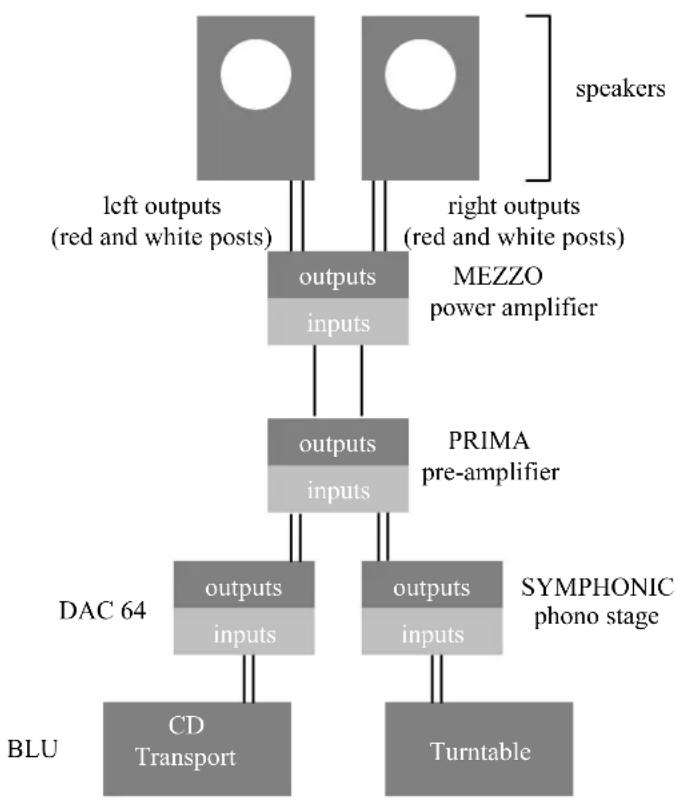
Connect a pair of loudspeakers to the Left and Right outputs on the MEZZO. Each output on the MEZZO has a red and white connection that should be connected to colour matched terminals on your loudspeakers.
Note: The WBT rhodium plated 4mm speaker binding posts will accept 4mm banana plugs (WBT-0645 or WBT-0644) or 6mm spades (WBT-0680). Making connections using bare wire is not recommended.

Connections on the MEZZO
manual bridged mono connections for your MEZZO 50
There are two main ways that your MEZZO can be connected to loudspeakers. One is the normal stereo configuration as assumed on the previous page. See page 32 for a diagram. The other way to connect your MEZZO to loudspeakers is the bridged mono configuration. See page 30 for a diagram.
bridged mono configuration using existing Chord pre-amplifiers other than the PRIMA
The bridged mono configuration allows two separate power amplifiers to be used in a system, each feeding a separate loudspeaker. In this manner, each power amplifier only carries the signal for the left or right channel of audio. This ensures that cross-talk distortion or interference that may normally occur between the left and right channels is completely eliminated. Please note that Chord equipment is designed to the highest possible standards available so if this bridged mono configuration is not adopted and a normal stereo configuration is used, you will still be experiencing audio quality of the highest standard.
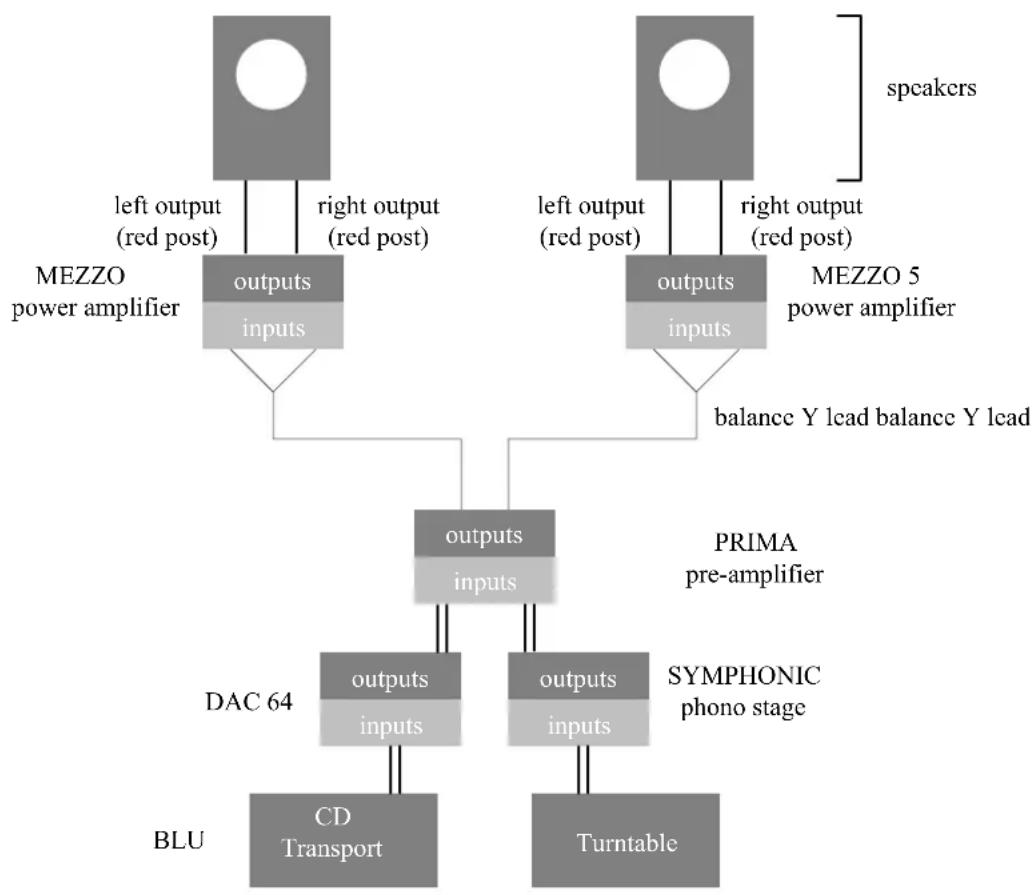
Take two balanced outputs from the pre-amplifier on one channel only I.e. output 1 left channel and output 2 left channel. Plug these into the balanced inputs on the first MEZZO. Switch the right channel phase switch to its up position and the left channel phase switch to its down position. Plug one loudspeaker across the red speaker terminals only (one red post is on the left output and one red post is on the right output). This will now be bridged.
Repeat the process with the second MEZZO for the right channel, making sure all the connections and switch settings are identical as for the left channel. Connect the output 1 right channel and output 2 right channel of the pre-amplifier to the balanced inputs of the second MEZZO. Again, switch the right channel phase switch to its up position and the left channel phase switch to its down position.. As before, connect the second loudspeaker across the red speaker terminals only.
bridging using the PRIMA pre-amplifier
If you are using a PRIMA pre-amplifier in your system, you need to bridge two MEZZO power amplifiers using two balanced Y leads as the Prima has only one balanced output. So you need to feed both channels of one MEZZO amplifier with the same signal i.e. either right or left. You only use the two red terminals when bridged. So Right Red (+) remains as is and Left Red (+) becomes Right return (-) or Black in the case of most speaker cables.

flowchart
graph TD
    A["MEZZO power amplifier"] --> B["outputs inputs"]
    A --> C["outputs inputs"]
    B --> D["output 1"]
    C --> E["output 2"]
    D --> F["DAC 64"]
    E --> G["SYMPHONIC phono stage"]
    F --> H["CD Transport"]
    G --> I["Turntable"]
    J["BLU"] --> F
    K["BEAT"] --> L["DC Transport"]
    M["BEAT"] --> N["Turntable"]
    O["BEAT"] --> P["DC Transport"]
    Q["speakers"] --> R["BEAT"]
    S["BEAT"] --> T["DC Transport"]
    U["BEAT"] --> V["Turntable"]
    W["BEAT"] --> X["DC Transport"]
    Y["BEAT"] --> Z["Turntable"]
Bridged mono connections for the MEZZO
flowchart
graph TD
    A["MEZZO power amplifier"] --> B["outputs inputs"]
    A --> C["outputs inputs"]
    D["MEZZO 5 power amplifier"] --> E["outputs inputs"]
    D --> F["outputs inputs"]
    G["DAC 64"] --> H["CD Transport"]
    I["BLU"] --> J["Turntable"]
    K["BRIDGE"] --> L["DC Transport"]
    M["BRIDGE"] --> N["Turntable"]
    O["BRIDGE"] --> P["DC Transport"]
    Q["BRIDGE"] --> R["Turntable"]
    S["BRIDGE"] --> T["DC Transport"]
    U["BRIDGE"] --> V["Turntable"]
    W["BRIDGE"] --> X["Turntable"]
    Y["BRIDGE"] --> Z["Turntable"]
    AA["BRIDGE"] --> AB["Turntable"]
    AC["BRIDGE"] --> AD["Turntable"]
    AE["BRIDGE"] --> AF["Turntable"]
    AG["BRIDGE"] --> AH["Turntable"]
    AI["BRIDGE"] --> AJ["Turntable"]
    AK["BRIDGE"] --> AL["Turntable"]
    AM["BRIDGE"] --> AN["Turntable"]
    AO["BRIDGE"] --> AP["Turntable"]
    AQ["BRIDGE"] --> AR["Turntable"]
    AS["BRIDGE"] --> AT["Turntable"]
    AU["BRIDGE"] --> AV["Turntable"]
    AW["BRIDGE"] --> AX["Turntable"]
    AY["left output (red post)"] --> B
    AZ["right output (red post)"] --> B
    BA["left output (red post)"] --> B
    BB["right output (red post)"] --> B
    BC["left output (red post)"] --> C
    BD["right output (red post)"] --> C
    BE["Balance Y lead balance Y lead"] --> C
    BF["PRIMA pre-amplifier"] --> C
    BG["SYMPHONIC phono stage"] --> AH
Bridged mono connections for the MEZZO using the PRIMA
flowchart
graph TD
    A[" Speakers"] --> B["MEZZO power amplifier"]
    B --> C["PRIMA pre-amplifier"]
    C --> D["DAC 64"]
    D --> E["SYMPHONIC phono stage"]
    E --> F["Turntable"]
    G["CD Transport"] --> H["BDU"]
    I["left outputs (red and white posts)"] --> J["outputs inputs"]
    K["right outputs (red and white posts)"] --> L["outputs inputs"]
    M["BLU"] --> N["CD Transport"]
Normal stereo connections for the MEZZO
automatic bridged mono mode on the MEZZO 140
To run Mezzo 140 as a bridged mono amplifier, run an interconnect (balanced XLR or RCA phono; XLR recommended) from the preamp output to the right input on the Mezzo. Select phase switch DOWN on the right input, and phase switch UP on the left input. The right speaker + terminal is now the positive and the left speaker + terminal is now the negative.
The bridged amplifier is now phase inverting, in line with other Chord amplifiers. To run the amplifier non-inverting, reverse the phase switches so that right is UP and left is DOWN.
everyday use of the MEZZO
phase switching
you can choose the phase of the signals that are sent to your loudspeakers, to account for varying speaker configurations. There are two phase shift toggle switches on the MEZZO, one for each output. The diagram on the page 28 shows these two switches. When the switches are in their UP position, the signals that are at the outputs are inverted by 180 degrees. When the switches are in their DOWN position, the signals at the outputs are non-inverted, with no phase shift.
automatic shutdown
-
If there is a major overload or short circuit the MEZZO will detect this and shut down automatically and the amplifier will go into 'bounce mode' When in bounce mode, the visible interior of the MEZZO will flash with blue illumination. The MEZZO should then be switched off immediately at the mains.
-
When the fault has been rectified the power amplifier can be switched on and will power up as usual. You should wait at least two minutes before turning the amplifier on again at the mains to allow the power supply protection circuitry to reset itself.
maintenance of the MEZZO
cleaning
To clean finger marks and other blemishes from your amplifier spray clear glass cleaner onto a soft lint free cloth and then use the cloth to gently clean your amplifier.
servicing
There are no user serviceable parts in your Chord amplifier, and it should only be serviced by Chord Electronics Limited or their expressly approved Service Agents.
frequently asked questions about the MEZZO 50 or
the amplifier is on and the switches are on but there is no sound coming out. Have you pressed the correct output from your pre-amplifier?
the sound is vague and ill defined
Check that both loudspeakers are connected correctly (+ve to +ve or red to red, and -ve to -ve or white to white) on both sides.
there is a buzzing sound coming from the loudspeakers
The system may not be properly earthed or the interconnect cables may be running near to mains cables.
I have connected my 3 channel amplifier to my processor and the main left and right out of my AV processor in to my hi-fi, but there is very little sound coming out of the left and right speakers
Have you set the volume on your stereo pre-amplifier to the correct gain to match the other channels in the system?
- user guide for
- background
- connecting your equipment
- when setting up
- ventilation
- mains lead and plug
- if you need to fit a plug for UK/Europe
- if you need to fit a plug for US/Canada
- earthing issues in Europe
- safety warnings
- mains connection
- powering up
- powering down
- connecting your MEZZO 50 or MEZZO
- connecting to your power amplifier using XLR style inputs
- connecting to your power amplifier using unbalanced RCA style inputs
- connecting your loudspeakers
- manual bridged mono connections for your MEZZO 50
- bridged mono configuration using existing Chord pre-amplifiers other than the PRIMA
- bridging using the PRIMA pre-amplifier
- automatic bridged mono mode on the MEZZO 140
- everyday use of the MEZZO
- phase switching
- automatic shutdown
- maintenance of the MEZZO
- frequently asked questions about the MEZZO 50 or
- the sound is vague and ill defined
- there is a buzzing sound coming from the loudspeakers
- I have connected my 3 channel amplifier to my processor and the main left and right out of my AV processor in to my hi-fi, but there is very little sound coming out of the left and right speakers
Brand : Chord
Model : Mezzo 75
Category : Mp3 player